

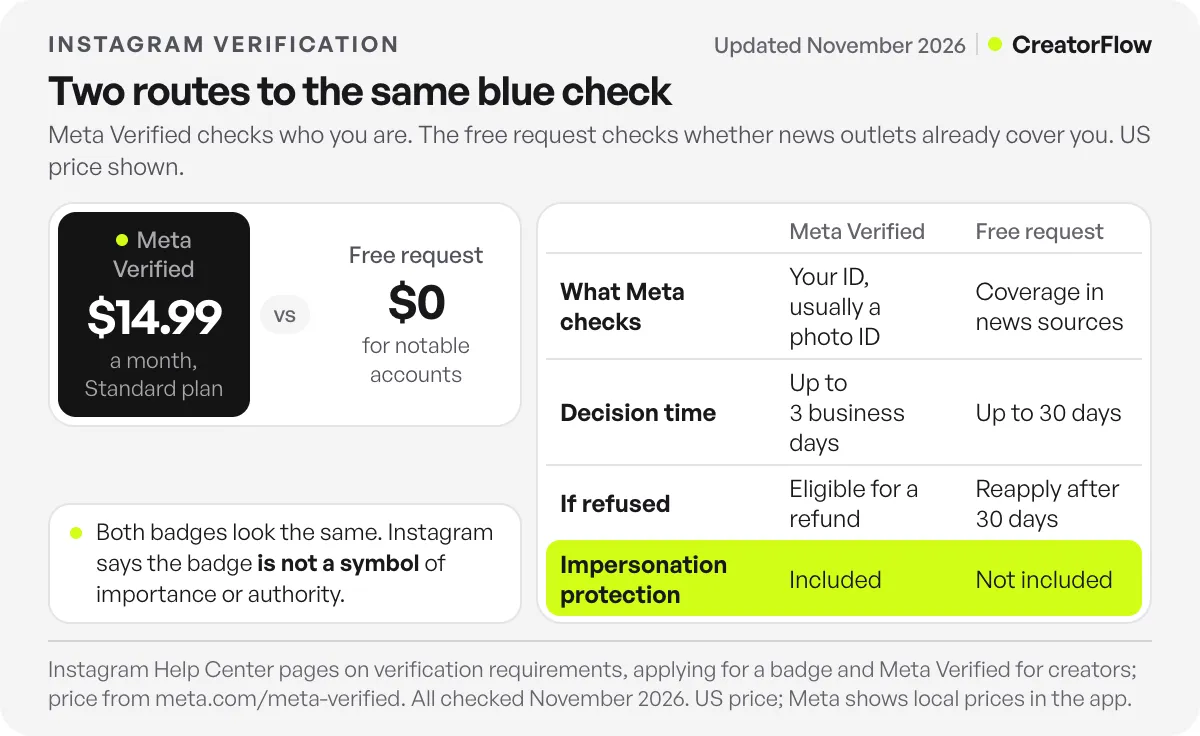
There are two ways to get verified on Instagram. Subscribe to Meta Verified, which confirms your identity, usually with a government photo ID, from $14.99 a month. Or request the free badge in the app if you are a notable public figure, celebrity or brand. Both routes give the same blue check. The paid route checks who you are. The free route checks whether people already search for you.
Many guides still point to a menu that has moved. Instagram’s own help center now puts the free request under Professional dashboard, then Settings. Applying a second time before you get a decision cancels the first request. And a Meta Verified application stalls when your name does not match your ID, such as a one-word stage name.
This guide covers how to get verified on Instagram by both routes, step by step: the requirements for each, the reasons requests fail, how long each takes, and how to keep the badge once you have it. If you are still deciding whether the monthly fee is worth paying, read our breakdown of whether Meta Verified is worth it first. Every rule below comes from Instagram’s help center and Meta’s terms.
Key Takeaways
- Two routes, one badge: Meta Verified checks your identity for a monthly fee. The free request checks your notability. The blue check looks the same either way.
- The free request sits in your dashboard: Menu, then Professional dashboard, then Settings, then Request verification. It works in the Instagram app only.
- Notable means news coverage: Instagram reviews accounts featured in multiple news sources, and paid or sponsored media does not count. Neither route lists a follower minimum.
- Meta Verified has strict name rules: your profile name must match your government ID, and Meta requires a first and last name.
- Timelines differ: a free request gets an answer within 30 days. A Meta Verified review takes up to 3 business days.
- Choose your username first: once Instagram verifies you for notability, you may not change your username.
- The badge proves identity, not importance: Meta says the badge is not a symbol of authority, and its terms make no reach promise.
How do you get verified on Instagram?
You get verified on Instagram either by paying for Meta Verified or by requesting the free badge in the app. Meta Verified is open to most adults with an eligible profile and a government photo ID. The free badge is for public figures, celebrities and brands that news outlets already cover. Meta reviews a paid application in up to 3 business days and a free request in up to 30 days.
| Meta Verified (paid) | Free verified badge | |
|---|---|---|
| Who it is for | Adults with an eligible profile in a country where it is sold | Public figures, celebrities and brands |
| Cost | From $14.99 a month | Free |
| What Meta checks | Your identity: a government photo ID, or your activity across Meta apps | Authentic, unique, complete and notable |
| Where you apply | Instagram or Facebook app (Standard also on the web) | Instagram app only |
| Decision time | Up to 3 business days | Up to 30 days |
| If you are refused | Subscription canceled, eligible for a refund | Apply again after 30 days |
| What else you get | Impersonation protection and enhanced support | The badge |
Sources: Instagram’s help pages on verification requirements, what happens after you apply and Meta Verified for creators; price from meta.com/meta-verified (checked November 2026).
Which verification route fits what you need?
Pick the route by the job the badge has to do. If you need people to trust that your account is the real one, and you want help when something breaks, Meta Verified is the route that includes impersonation protection and support. If news outlets already cover you and you do not want a subscription, the free request costs nothing. Without that coverage, the free request has little to review.
| If you need to… | Pick | Why |
|---|---|---|
| Stop fake accounts from copying you | Meta Verified | It is the only route with impersonation protection |
| Get a human when your account breaks | Meta Verified | Support comes only with a subscription |
| Get the badge with no monthly fee | Free request | It costs nothing, if multiple news sources cover you |
| Verify a one-word or stage name | Free request | Meta Verified asks for a first and last name that match your ID |
| Verify a business account | Meta Verified for businesses, or the free request | Business plans are a separate subscription; notable brands can still apply free |
Visitors cannot tell which route you took, because the two badges look identical. Instagram also says a verified badge “is not a symbol to show importance, authority or subject matter expertise”. The free badge carries no extra status. It saves you the fee if you qualify.
What are the Instagram verification requirements?
The Instagram verification requirements depend on the route. The free badge asks for an account that is authentic, unique, complete and notable. Meta Verified asks for proof of identity: you must be 18 or older, live where it is sold, use an eligible profile and have a government photo ID. Neither list includes a follower count.
Free badge requirements. Instagram’s requirements page lists four, on top of following its Terms of Use and Community Standards:
- Authentic: the account represents a real person, registered business or entity.
- Unique: one account per person or business, with exceptions for language-specific accounts. Instagram does not verify general-interest accounts, and gives @puppymemes as an example.
- Complete: the account is public, has a bio and a profile photo, and is active when you apply.
- Notable: the account represents “a well-known, highly searched for person, brand or entity”. Instagram reviews accounts featured in multiple news sources and does not count paid or sponsored media.
Meta Verified requirements. Meta’s creator eligibility page asks you to:
- Be at least 18, or the age of majority where you live.
- Live in a country where Meta Verified is available.
- Use an Instagram personal or creator profile. Business accounts go through Meta Verified for businesses instead. Not sure which you have? Here is how personal, creator and business accounts differ.
- Have a government-issued photo ID.
- Turn on Advanced Protection, Meta’s security setting for subscribers.
- Meet minimum activity rules, and stay under the limit on recent profile changes, such as your name, photo, username, location or profile type.
How to request the free verified badge
You request the free badge from your Professional dashboard settings in the Instagram app. The request asks for your full name and an ID document, then you submit it and wait up to 30 days for an answer. Do three checks first, because a refused request means waiting 30 days to try again.
Do three things before you apply:
- Choose your final username. Instagram’s requirements page says that once you are verified, “you may not change the username on your account”.
- Complete your profile. Make the account public and add a bio and a profile photo. If your bio needs work, start with these Instagram bio examples.
- Collect your coverage. Notability is judged from news sources. Paid placements and sponsored articles do not count.
Then follow Instagram’s own steps from its request verification page (iPhone and Android):
- Log in to the account you want verified.
- Tap your profile picture in the bottom right to open your profile.
- Tap Menu in the top right.
- Below Your insights and tools, tap Professional dashboard, then tap Settings in the top right.
- Tap Request verification.
- Enter your full name and upload your ID. A person uses a government-issued photo ID. A brand uses official business documents.
- Follow the on-screen instructions, then tap Submit.
You cannot request the free badge on a computer. Submit once and wait. Instagram says that “applying for a verified badge multiple times before receiving a decision will cancel your application.”
How to get verified with Meta Verified
You get verified with Meta Verified by subscribing, confirming your identity and passing a review. You choose a plan, pick the profile, set up a monthly payment and upload photos of your government ID. Meta reviews the application within 3 business days. Meta’s help pages name the profile name, the security setting and an unfinished application as common blockers, so fix those before you pay.
- Turn on Advanced Protection. Meta requires it on the profile you verify, and you cannot turn it off while the subscription is active.
- Fix your profile name and photo first. While your application is in review, you may not be able to change your profile name, username, category, location or date of birth. Your name must match the legal name on your ID.
- Open Meta Verified and choose a plan. Meta’s help center says you manage this in Accounts Center or in Meta Account settings, depending on which one your app shows. Standard is the one plan also sold on the web. Plus, Premium and Max are sold in the mobile app only, according to Meta’s plan page.
- Choose your profiles and payment. You can verify up to two profiles in the same Meta Account, one Instagram and one Facebook, at a bundle discount. Both may need similar names and pictures.
- Confirm your identity. Upload photos of your government ID. Meta says some people can be verified from their activity instead, such as how long they have used their name and how complete their profile is.
- Finish within 3 days. If you do not complete verification in that time, Meta cancels the subscription and you are eligible for a refund. The review itself takes up to 3 business days, according to Meta’s subscription guide.
Two notes on plans. Meta One, the newer subscription that Meta says “builds on Meta Verified”, also includes the option to apply for the verified badge and impersonation protection on its Essential, Advanced, Expert and Max plans, subject to the same eligibility checks, according to the Meta One plans page. Existing Meta Verified subscribers keep their plan for now: Meta says it will notify them when they can switch. Business accounts use Meta Verified for businesses, which has its own plans, ID rules and verification methods.
Why do Instagram verification requests get denied?
Instagram verification requests get denied for different reasons on each route. Free requests fail when the account is not notable enough, not complete, not unique, or when the applicant applies twice. Meta Verified applications fail most often on the name: it must match your government ID, include a first and last name, and avoid symbols, numbers and titles.
Free request: what blocks it.
- Too little independent news coverage, or coverage that is paid or sponsored.
- A private account, or one with no bio, no profile photo or no recent activity.
- A general-interest account, such as a fan page or a meme account.
- A second account for the same person or business.
- A second request sent before the first one got a decision, which cancels the first.
- False or misleading information. Instagram says it removes badges given on false information and may disable the account.
Meta Verified: the name rules. Meta’s profile name page sets out what passes and what does not:
| Accepted | Not accepted |
|---|---|
| Abbreviations, such as Sid for Siddharth | A one-word name, because Meta requires a first and last name |
| Spelling variations, such as Maria and Marya | Symbols, numbers or punctuation |
| First initials, such as LM for Lisa Marie | Unusual capitalization or repeated characters |
| Compound names, such as Mary and Mary-Lou | Characters from more than one language, or certain titles |
Some subscribers can use a name that differs from their ID if it meets Meta’s naming standards, but Meta says this “isn’t available to everyone”. Other reasons a Meta Verified application fails: Advanced Protection is off, the application was not finished within 3 days, the profile had too many recent changes, or the payment failed.
How long does Instagram verification take?
Instagram verification takes up to 30 days for a free request and up to 3 business days for Meta Verified. Free decisions arrive as a notification in Activity, and after a refusal you wait 30 days to apply again. If a Meta Verified review fails after your first payment, Meta cancels the subscription and you are eligible for a refund.
| Step | Time |
|---|---|
| Free request decision | Up to 30 days |
| Wait before a new free request | 30 days |
| Finishing a Meta Verified application | Within 3 days of starting |
| Meta Verified review | Up to 3 business days |
| Review of a verified profile name change | Up to 3 days |
How do you lose a verified badge on Instagram?
You lose a free verified badge if you sell or advertise it, try to verify through a third party, promote rule-breaking services in your profile, switch between public and private too many times, or gave false information. A Meta Verified badge also ends when the subscription is revoked, for example after a failed payment with no backup method or a policy violation.
Ways to lose the free badge. Instagram’s help page on applying says it may remove the badge or disable the account if you:
- Advertise, transfer or sell your verified badge.
- Use your profile picture, bio or name to promote services that break Instagram’s rules.
- Try to get verified through a third party.
- Switch your account between public and private too many times.
That third point settles the question of badge sellers. Anyone offering a blue check for a fee, outside Meta’s own subscription, is selling the thing Instagram removes.
Ways to lose a Meta Verified badge. Meta’s revocation page lists the reasons a subscription ends early: a failed payment with no backup method on file, profile changes that break its policies, policy violations, deleting the account, moving to a country where Meta Verified is not sold, and changing the plan through the Apple App Store or Google Play instead of in the app. Revocation removes every benefit at once, including open support cases. Canceling is gentler: you usually keep the benefits until the end of the billing cycle.
The badge also stays where you earned it. Verification cannot move to a different account, and verifying on Instagram does not verify your Facebook profile. Protect the account itself: our Instagram account health check covers the settings that keep it safe.
What to do after you get verified
After you get verified, protect the account and put the trust to work. Turn on two-factor authentication, which Instagram suggests for accounts verified for notability. Report impersonators as soon as they appear. Then make sure the people who now trust your profile get a fast answer when they comment or message you, because that is where a visit turns into a sale or a booking.
Report impersonators fast. Fake accounts that copy real people are a measured problem. In 2025, nearly 30% of people who reported losing money to a scam said it started on social media, with reported losses of $2.1 billion, according to the FTC’s April 2026 data. In its March 2026 creator update, Meta said it removed more than 20 million accounts impersonating large content creators in 2025.
To report a copy, Instagram’s imposter reporting steps are:
- Open the fake account’s profile.
- Tap Options next to the username.
- Tap Report, then Report Account.
- Tap It’s pretending to be someone else.
- Pick the type of impersonation and follow the instructions.
Instagram also suggests linking to your Instagram account from your website and your other official profiles, so people can check which account is yours.
Answer the people who show up. The badge tells a visitor your account is real. It does not reply to the person who comments “price” under your Reel or asks for your booking link in a DM. CreatorFlow does that part. When someone comments a keyword on a post or Reel, replies to a Story or sends a keyword message, CreatorFlow sends your link by DM within seconds. Every reply goes out from your own account, the one with the badge, so your followers learn that real links come from you.
CreatorFlow is a Meta Tech Provider (since December 2025). It connects through Instagram’s official login, so you never share your password. To see how the replies work, read the guide to setting up Instagram DM automation, or start with CreatorFlow and send your link to every commenter from the account people already trust.
FAQ
How many followers do you need to get verified on Instagram?
You do not need a set number. Neither Instagram’s requirements for the free badge nor Meta Verified’s eligibility rules list a follower minimum. The free badge depends on news coverage of you. Meta Verified depends on your age, your ID, your location and your account activity.
How much does it cost to get verified on Instagram?
The free request costs nothing. Meta Verified Standard costs $14.99 a month for creators, according to Meta’s plan page (checked November 2026). Business plans are priced separately, and Meta shows local prices in the app.
Can a regular person get verified on Instagram?
Yes, through Meta Verified. You need to be 18 or older, live in a country where it is sold, use a personal or creator profile and have a government photo ID that matches your profile name. The free badge is for public figures, celebrities and brands covered by multiple news sources.
Can I get verified on Instagram with a nickname or a one-word name?
It depends on the route. Meta Verified needs a profile name that matches your legal ID, and Meta says a one-word name may be refused because it requires a first and last name. Abbreviations, spelling variations, initials and compound names are accepted. The free request judges notability, so a well-covered stage name can still qualify.
Can I buy a verified badge from a third party?
No. Instagram may remove the badge or disable the account of anyone who tries to verify through a third party, or who advertises, transfers or sells a badge. The only routes are Meta’s own subscription and the free request in the app.
Does a verified badge increase reach on Instagram?
Meta does not promise it. Its Meta Verified terms say all content is treated under “existing guidelines for recommendations”, and that any increased visibility “may vary depending on a number of factors”. Instagram also says the badge is not a symbol of importance or authority.
Can I change my username after getting verified?
Not if Instagram verified you for notability. Its help center says that once verified, “you may not change the username on your account”. Meta Verified subscribers can request username changes, but each change goes through a review of up to 3 days. Choose your final username before you apply.
Sources and checks
Requirements, steps, timelines and removal rules from Instagram’s help center pages on verified badges, verification requirements, requesting a badge, what happens after you apply, Meta Verified eligibility, subscribing, profile names, revoked subscriptions and imposter reports; reach wording from the Meta Verified terms; prices and plans from meta.com/meta-verified and meta.com/meta-one-plans, all checked November 2026. Scam figures from the FTC (April 2026) and impersonation figures from Meta (March 2026). Meta changes menus, plans and prices often, so check your app before you apply.