

You can use Claude AI to create Instagram carousels by turning one idea, blog post, or transcript into a slide-by-slide outline, then drafting the hook slide, body slides, and caption in a single pass. Claude writes and structures the copy. It does not generate the images, so you pair it with a design tool like Canva for the visuals. Claude Pro costs $20/month, with a free tier at $0 (claude.com, May 2026).
You sit down to make a carousel. The idea is solid. Then you spend 40 minutes wording slide one, second-guessing the hook, rewriting the caption, and copying everything into Canva. Three slides in, you lose momentum and the post never ships. The bottleneck is not design. It is the writing.
This guide shows the exact Claude workflow creators use to go from a rough idea to finished slide copy in minutes, plus the prompts, the carousel specs Claude should follow, and how to turn the comments those carousels earn into DMs. For the broader picture on running your whole account with AI, see Claude AI for Instagram creators, brands, and agencies. Give Claude the slide plan first: our guide to what each carousel slide has to do is the brief to hand it.
Key Takeaways
- What Claude does: It writes and structures carousel copy, the hook slide, body slides, and caption, from one idea, a blog post, or a video transcript. It is the writing engine, not the design tool
- What Claude cannot do: It does not generate raster images natively (support.claude.com, May 2026). Pair it with Canva, Figma, or a dedicated image tool for the visuals
- It reads your references: Claude accepts image input (JPEG, PNG, GIF, WebP), so you can paste a competitor carousel or your brand moodboard and ask it to match the structure (platform.claude.com, May 2026)
- Carousel specs matter: Instagram allows up to 20 slides per carousel (rolled out from August 2024), and 1080 x 1350 px (4:5 portrait) is the recommended size
- Pricing: Claude Free is $0; Claude Pro is $20/month billed monthly, or $17/month billed annually (claude.com, May 2026)
- Model choice: carousel copy sits in Sonnet’s range; see which Claude model to use for content creation for the full task-by-task map
- Close the loop: A carousel that ends with “comment a keyword” pairs with Instagram DM automation so every commenter gets your link in a DM automatically

Connect Content to Conversion
Follow us on Instagram: @creatorflow.so
Join the conversation on Threads: @creatorflow.so
Can Claude AI Make Instagram Carousels?
Claude AI makes the text of an Instagram carousel: the hook, the slide-by-slide copy, the on-slide headlines, and the caption. It does not make the picture. Claude has no built-in image generator (support.claude.com, May 2026), so the visual still gets built in Canva, Figma, or a separate AI image tool. Think of Claude as the writer and structurer, not the designer.
That split matters because the writing is where most carousels stall. Once the copy is locked, dropping it into a Canva template takes a few minutes.
What Claude does well for carousels:
- Turns a single sentence into a logical 7 to 10 slide arc, hook, build, payoff, call to action
- Holds your tone across every slide so the post sounds like you, not like a template
- Reads a reference image. Claude supports image input in JPEG, PNG, GIF, and WebP (platform.claude.com, May 2026), so you can paste a carousel you admire and ask it to copy the structure, not the words
- Repurposes long-form content. Feed it a blog post, a Reel script, or a transcript and it returns slide copy
What it does not do: generate the slide graphics, post on a schedule, or send DMs. Those need other tools. Claude handles the part that blocks you, the words.
The Exception: Connecting Claude to an Image Tool
Claude cannot generate an image itself, but it can operate a tool that does. Claude supports the Model Context Protocol, which lets you connect an external service and then ask Claude to use it in the same conversation where you wrote the copy.
DesignerBox publishes an MCP server that exposes 43 tools to Claude, including image generation, product shots, and background removal (designerbox.ai/mcp, August 2026). Once it is connected, the split above closes: you draft the seven slides in Claude, then ask it to generate the visual for each one without opening another tab. The connection steps take a few minutes, and the tool reference lists what Claude can call.
Worth being precise about what this does and does not change. You still lay the slides out somewhere, because the output is images and copy rather than a finished carousel file. And it is only worth setting up if you make visuals often enough that tab-switching is a real cost. For one carousel a month, Canva is faster. Disclosure: DesignerBox is built by the same team as CreatorFlow.
If you are already running AI agents against your Instagram workflow, connecting AI agents to Instagram covers the same pattern on the DM side.
The 5-Step Claude Carousel Workflow
This is the repeatable loop. Once you set it up, each new carousel takes minutes instead of an afternoon.
Step 1: Give Claude context once. Before asking for any carousel, tell Claude who you are. Your niche, your audience, your three content pillars, your tone, and your usual call to action. If you use Claude Pro, save this inside a Project so every chat already knows your brand (claude.com, May 2026). One setup, every future carousel inherits it.
Step 2: Hand over the raw idea. This can be a one-line thought, a blog post you already wrote, or a transcript of a Reel. The more raw material you give, the less generic the output. A blank “make me a carousel about fitness” returns filler. “Turn this 600-word post into a carousel” returns something postable.
Step 3: Ask for the structure first, copy second. Have Claude outline the slides before it writes them. Slide 1 is the hook. Slides 2 to 8 build the argument or steps. The final slide is the call to action. Review the skeleton, fix the order, then ask it to write each slide in full. Approving the outline first stops you from editing finished copy that was built on the wrong frame.
Step 4: Tighten on-slide text. Carousels are read on a phone in seconds. Ask Claude to cut every slide to one idea and keep on-slide headlines under about 10 words. Long paragraphs do not survive a 4:5 frame.
Step 5: Generate the caption and CTA. Once slides are locked, ask for a caption that expands the hook and ends with a clear instruction, often “comment [keyword] and I will send it to you.” That single line is what turns a carousel into leads, covered below.
For the design half of the job once your copy is ready, our Instagram carousel best practices guide covers slide layout, fonts, and the cover that earns the swipe.
Claude Prompts for Carousel Hooks and Slides
These are starting points. Swap in your own niche, audience, and pillars. The first one is the context prompt you run once per session or save in a Project.
I'm a [niche] creator on Instagram for [audience].
My content pillars are: [pillar 1], [pillar 2], [pillar 3].
My tone is [casual / direct / warm / expert].
My usual call to action is: comment a keyword to get a link in DMs.
For everything I ask next, write in this voice and keep it specific to my niche.
Then, for the carousel itself:
Turn the idea below into an Instagram carousel.
First, give me a slide-by-slide outline (7 to 10 slides):
slide 1 = scroll-stopping hook, last slide = call to action.
Wait for my approval, then write the full copy for each slide.
Keep on-slide headlines under 10 words, one idea per slide.

Idea: [paste your idea, blog post, or transcript]
For hooks specifically, when slide 1 is not landing:
Write 10 hook options for slide 1 of a carousel about [topic].
Make them concrete and curiosity-driven, no clickbait, no emojis.
Mix formats: a bold claim, a number, a mistake-to-avoid, and a question.
Avoid pasting these and shipping the first output. Claude gets noticeably better when you reply with “tighter,” “more specific to my audience,” or “the hook is weak, give me five sharper ones.” Treat it as a draft partner, not a vending machine. For a deeper library of reusable prompts across tools, see our AI prompts for Instagram content creation.
Turning One Idea Into a Month of Content
The real time saving is not one carousel. It is using one piece of source material to feed weeks of posts.
Record a single 10-minute talk on a topic you know cold. Upload the transcript to Claude. Then ask it to spin that one recording into several carousels, each covering one sub-point, plus matching captions. Claude holds the full transcript in context easily, the current models run up to a 1,000,000-token context window (platform.claude.com, May 2026), so it can keep an entire month of past captions or a long transcript in view at once.
A practical batch prompt:
Here is a transcript of a talk I gave: [paste].
Pull out 5 distinct carousel topics from it.
For each, give me a one-line hook and a 7-slide outline.
Rank them by which would perform best for [audience] and tell me why.
You review five outlines in one sitting, approve the strongest, and you have a content calendar built from your own expertise instead of recycled tips. Pair this with our Instagram content calendar guide to slot the posts across the month.
Carousel Specs Claude Should Follow
Tell Claude these constraints up front so its copy fits the format. Carousel facts, verified May 2026:
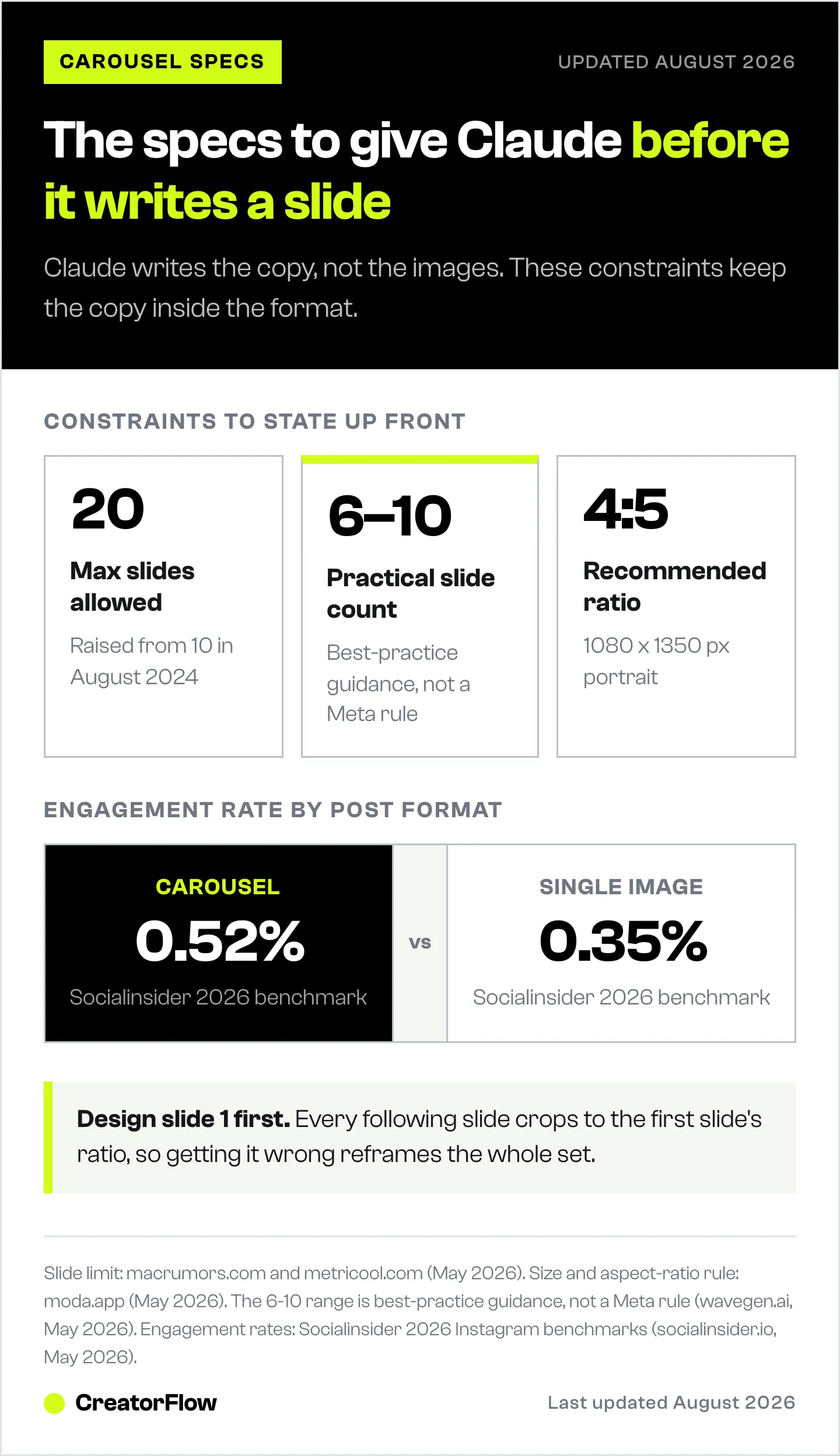
| Spec | Detail | Source |
|---|---|---|
| Max slides | Up to 20 photos or videos per carousel (from August 2024, previously 10) | macrumors.com, metricool.com, May 2026 |
| Recommended size | 1080 x 1350 px, 4:5 portrait | moda.app, May 2026 |
| Aspect ratio rule | All slides crop to the first slide’s ratio, so design slide 1 first | moda.app, May 2026 |
| Practical slide count | About 6 to 10 slides works for most posts (best-practice guidance, not a Meta rule) | wavegen.ai, May 2026 |
On performance, carousels tend to earn strong engagement relative to single images. Socialinsider’s 2026 Instagram benchmarks put carousel engagement at 0.52% versus 0.35% for single-image posts (socialinsider.io, May 2026). Other sources quote far wider gaps with inconsistent methods, so treat the Socialinsider pair as the conservative, reliable number rather than the “10x engagement” claims floating around.
From Carousel to DM: Closing the Loop
A great carousel ends on an instruction: “comment WORD and I will send it to you.” That line moves the conversation out of a public comment and into a one-to-one DM, where you control the link and can gate it behind a follow or an email.
Doing that by hand does not scale. When a carousel takes off and 200 people comment your keyword, you cannot reply to each in time, and slow replies lose the sale. This is where content creation hands off to distribution. Instagram DM automation watches for your keyword and sends the right DM in seconds, every time, around the clock.
That is the division of labor: Claude writes the carousel, Canva builds the slides, and a tool like CreatorFlow turns the comments into DMs automatically. CreatorFlow is Instagram-first and flat-rate at $15/month on Pro, with a free plan at $0. ManyChat covers the same comment-to-DM job across multiple channels, with a separate AI add-on, on its tiered plans starting at Essential $17/month, or $14/month billed annually (manychat.com/pricing, July 2026). Pick the distribution tool that fits your channels and budget, then let Claude handle the words.
Claude vs Other AI Tools for Carousels
No single AI tool wins every content job. Here is the honest split, with the caveat that all of them write text and none of them post or DM for you.
| Tool | Strength for carousels | Note |
|---|---|---|
| Claude | Long context, consistent tone across slides, structured outlines | No native image generation, but connects to one over MCP |
| ChatGPT | Fast creative copy, native image generation for mockups | See ChatGPT for Instagram content |
| Gemini | Image generation, Google Search grounding | Strong for visual-first drafts |
If your bottleneck is words and structure, Claude is the pick. If you also want the tool to draft a rough image, ChatGPT or Gemini add native image generation. Many creators run two tools: one for copy, one for visuals.
Building the slides is the other half of the job; the free Instagram carousel tool helps you lay them out.
FAQ
Can Claude AI create Instagram carousels?
Claude creates the text of a carousel: the hook, the slide-by-slide copy, on-slide headlines, and the caption. It does not generate the images, since it has no native image generator (support.claude.com, May 2026). You build the visuals in Canva or a similar tool and drop Claude’s copy in.
Is Claude free to use for Instagram content?
Yes. Claude has a free plan at $0 that covers chat and content drafting. Claude Pro is $20/month billed monthly, or $17/month billed annually, and adds more usage, unlimited Projects, and the most capable models (claude.com, May 2026).
Can Claude design the carousel graphics too?
No. Claude does not produce raster images. It can write the copy and even describe a layout or produce simple code-based visuals, but the actual slide graphics are made in a design tool. Build slide 1 first, since every other slide crops to its aspect ratio.
How many slides should an Instagram carousel have?
Instagram allows up to 20 slides (macrumors.com, May 2026). For most posts, about 6 to 10 slides works well: one hook slide, a few body slides, and a closing call to action. Ask Claude to fit your idea into that range so no slide carries two ideas.
Can Claude copy a carousel I show it?
Claude reads images you upload in JPEG, PNG, GIF, or WebP (platform.claude.com, May 2026). Paste a carousel you admire and ask Claude to match its structure and pacing, not its words. Use it for the frame, then write original copy for your niche.
How do I turn carousel comments into sales?
End the carousel with a keyword call to action, such as “comment GUIDE.” Then use Instagram DM automation to send your link in a DM the moment someone comments, so you capture every lead without replying by hand.
What is the best size for an Instagram carousel?
1080 x 1350 px, a 4:5 portrait ratio, is the recommended size (moda.app, May 2026). It takes up the most vertical space in the feed. Design the first slide at this ratio, because all following slides crop to match it.
Claude features and pricing verified from claude.com, platform.claude.com, and support.claude.com as of May 2026. Carousel specs verified from macrumors.com, metricool.com, and moda.app, and engagement benchmarks from socialinsider.io, as of May 2026. Individual results vary.


