

Instagram quick replies reduce keystrokes, not workload. At 50 DMs per day, you’re still spending 100+ minutes on manual replies. They can’t respond to comments, can’t capture emails, can’t track link clicks, and they stop working the moment you close the app. DM automation handles all of that for $15/month and runs 24/7.
If you’ve set up your saved replies and still feel buried in messages, the problem isn’t your templates. It’s that quick replies were designed for efficiency, not scale. They make manual work faster. They don’t eliminate it.
This guide covers the five clearest signals that quick replies have hit their ceiling for your account, what DM automation handles that quick replies can’t, and how to transition without disrupting your existing conversations.
Key Takeaways
- Quick replies reduce keystrokes, not workload: You still open every DM, read the context, and manually insert the response. At 50 DMs/day, that’s 100+ minutes of daily manual work.
- Quick replies cannot respond to comments: The single biggest gap. When 30 people comment “LINK” on your Reel, quick replies can’t send a DM to any of them automatically.
- Overnight sales loss: Quick replies require you to be online. DM automation runs 24/7 and captures leads while you sleep across time zones.
- No email capture or link tracking: Quick replies offer zero analytics on link clicks or email collection. Automation tools track both.
- ROI math: At $30/hour and 1 hour/day in DMs, automation at $15/month saves $885/month in recovered time.
- Bottom line: Keep saved replies for personal, nuanced conversations. Add automation for high-volume triggers like comment-to-DM, keyword responses, and story replies.

What Instagram Quick Replies Actually Do
Quick replies (Instagram’s official name is “saved replies”) let you store pre-written messages and insert them into DM conversations with a keyboard shortcut.
How they work:
- Open Settings, then Creator tools and controls (or Business tools and controls)
- Tap Saved replies, then add a new saved reply
- Type a shortcut (like “link1” or “price”) and the full message
- In future conversations, type the shortcut and tap to insert
Menu labels change between app versions, so the path on your phone may differ slightly.
According to Instagram’s Help Center (help.instagram.com, accessed April 2026), saved replies are available for Business and Creator accounts through the professional inbox.
Quick replies are the manual end of Meta’s free stack. Instagram also ships automations that fire on their own, which we break down in Instagram’s built-in automation tools.
What quick replies do well:
- Store unlimited pre-written responses
- Insert full messages with a quick shortcut
- Work in any DM conversation
- Cost nothing (built into Instagram)
What quick replies cannot do:
- Send messages automatically (you open every DM manually)
- Respond to post or Reel comments with a DM
- Trigger based on keywords someone sends you
- Capture email addresses from conversations
- Track which links get clicked
- Work while you’re offline or sleeping
- Handle high volume without your constant attention
Quick replies are a text expansion tool. They reduce keystrokes, not workload.
For a full comparison of saved replies vs automation, see our Instagram Saved Replies vs DM Automation guide.
5 Signs Instagram Quick Replies Are Not Enough
Five signals say you have outgrown saved replies. You spend an hour or more a day inserting them by hand. Comment requests sit unanswered while you film or sleep. Overnight messages from other time zones go cold before you see them. You cannot collect an email address inside a conversation. And you have no click data telling you which Reel earned the sale. Any two of these and automation pays for itself.
Sign 1: You Spend 1+ Hours Daily Responding to Repetitive DMs
You’ve got your saved replies set up. Shortcut “link1” for your affiliate link. “price1” for your coaching rate. “book1” for your Calendly.
But you’re still spending over an hour each day opening DMs one by one, reading the context, inserting the right saved reply, and hitting send. Multiply that by 30-50 conversations per day and your “quick” replies aren’t quick enough.
The math:
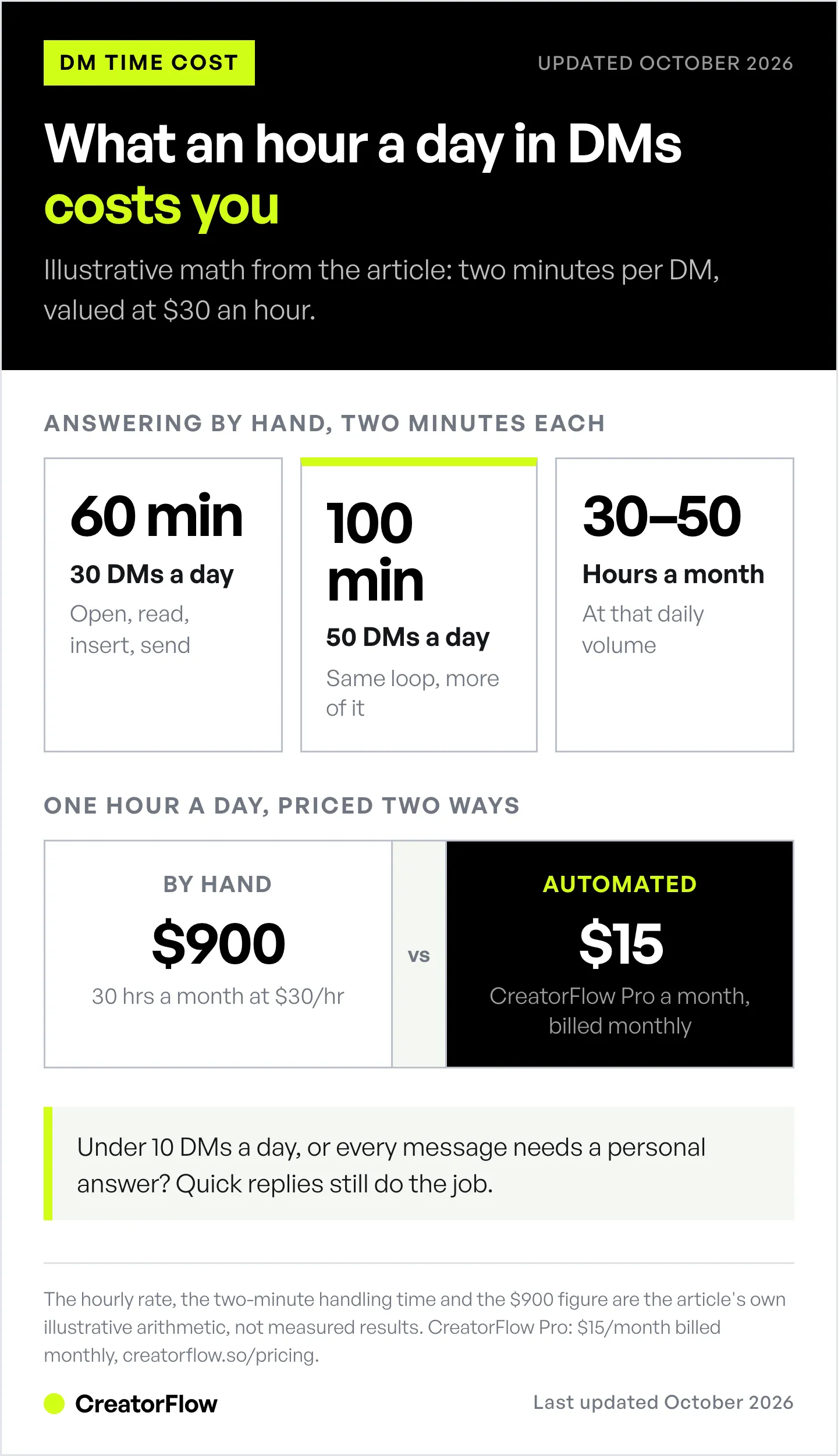
- 30 DMs/day × 2 minutes each (open, read, select reply, send) = 60 minutes
- 50 DMs/day × 2 minutes each = 100 minutes
- That’s 30-50 hours/month spent on messages that could send themselves
Quick replies speed up the typing part. But the typing was never the bottleneck. Opening every conversation, reading the context, and manually triggering the right response is what eats your time.
DM automation eliminates the entire manual loop. Someone comments a keyword, the message sends. No opening. No reading. No selecting. No sending.
Sign 2: “Comment LINK” Requests Go Unanswered for Hours
You post a Reel showing a product. Caption says “Comment LINK for the product link!” Thirty people comment within the first hour while the algorithm pushes your content.
Quick replies can’t help here. They only work inside DM conversations. They cannot respond to comments on posts, Reels, or Stories.
So you’re manually opening each comment notification, navigating to that person’s DM, and pasting your link. One by one. Thirty times.
By the time you respond to everyone, the first commenter waited 2 hours. Speed matters in sales: a 2007 study by James Oldroyd, using InsideSales.com data, found that web-form leads called within 5 minutes were far more likely to be qualified than leads called after 30 minutes. That study measured phone calls, not DMs, and it did not measure sales. A follower asking for your link while watching your Reel is warm. That same follower three hours later has scrolled past 200 more posts.
Comment-to-DM automation solves this entirely. Someone comments your trigger word, they get your link in 2-3 seconds. No manual work. No delays. No lost sales.
Saved replies cannot do this, because they only work inside a DM you open yourself. Meta Business Suite does have free Comment to Message and keyword automations, but Meta documents them as desktop-only. Keywords must match exactly, including capital letters, and keyword replies wait 15 minutes before they send (facebook.com/business/help, July 2026). We compare it with paid tools in Instagram’s built-in automation tools.
For a step-by-step setup, see our Comment-to-DM Automation Guide.
Sign 3: You Wake Up to Missed Sales Overnight
Your followers span multiple time zones. Someone in London discovers your Reel at 2 AM your time. They comment “INFO” and wait. Your saved replies are sitting in your phone, but your phone is on your nightstand.
Eight hours later you respond. They’ve already found an alternative.
This pattern repeats every night. Quick replies require you to be awake, online, and actively checking your inbox. There’s no way around it. Saved replies don’t send themselves.
DM automation runs 24/7 through cloud-based servers. CreatorFlow, ManyChat, and LinkDM all process triggers in real time regardless of whether you’re online, sleeping, or on vacation. According to Meta’s Developer Documentation (developers.facebook.com/docs/instagram-platform, April 2026), the Instagram Graph API supports automated messaging through approved third-party applications at any time of day.
The overnight test: Check your DM requests tomorrow morning. Count how many messages came in while you slept. If it’s more than 5 with repetitive questions, you’re leaving money on the table every night.
Sign 4: You Can’t Capture Emails from DM Conversations
Someone comments “GUIDE” on your post. You want to send them your free PDF. But you also want their email address so you can follow up with your coaching offer next week.
Quick replies can’t do this. There’s no way to ask for an email, validate it, store it, and then send the resource in a conditional flow. Saved replies are static text blocks. They can’t branch, ask questions, or collect data.
DM automation tools handle this with an email gate:
- Follower comments “GUIDE”
- Automation sends: “I’ve got the guide ready! Drop your email below and I’ll send it right over.”
- Follower types their email and sends it
- Automation stores the email and sends the PDF link
- You now have a lead you can nurture through email marketing
Since October 5, 2026, Meta no longer offers an email quick-reply button in Instagram DMs, so the follower types the address (Instagram Platform changelog).
CreatorFlow’s Pro plan ($15/month, or $12/month billed annually) includes the Email Gate and CSV export. ManyChat’s pricing page lists Pro at $39/month, or $29/month billed annually (checked October 2026), and ManyChat offers CRM integrations for the same purpose.
Building an email list from Instagram engagement is one of the highest-ROI activities for creators. Quick replies make it impossible. Automation makes it automatic.
Sign 5: You Have Zero Data on Which Content Drives DM Revenue
You posted three Reels this week. Each one had “Comment LINK for the product” in the caption. You sent links to everyone who asked. But you have no idea which Reel drove the most clicks, which product link converted best, or what your DM-to-sale ratio looks like.
Quick replies offer zero analytics. Instagram doesn’t track which saved reply you used, how many times you used it, or whether anyone clicked the links you sent.
DM automation tools provide:
- Link click tracking: See how many people clicked each link you sent (on CreatorFlow Pro and Growth, also by country and city)
- UTM parameters: Add UTM tags to the links you send and track DM-sourced traffic in Google Analytics
- Per-post numbers: See which Reel or Story sent the most DMs and link clicks
- Response volume data: See how many automated DMs sent per trigger
- Email capture rates: Track what percentage of people share their email
Without this data, you’re guessing. With it, you can double down on the content types that generate revenue and stop wasting time on formats that don’t convert.
What DM Automation Solves That Quick Replies Can’t
Here’s the side-by-side:
| Capability | Quick Replies | DM Automation |
|---|---|---|
| Pre-written message templates | Yes | Yes |
| Manual insertion into DMs | Yes | Yes |
| Auto-reply to post/Reel comments | No | Yes |
| Keyword-triggered DM responses | No | Yes |
| Story reply auto-responses | No | Yes |
| 24/7 automated responses | No | Yes |
| Email capture in DMs | No | Yes (Pro plans) |
| Link click tracking | No | Yes (Pro plans) |
| Ask for a follow before sending a link | No | Yes |
| Analytics dashboard | No | Yes |
| Desktop management | Limited | Full dashboard |
| Cost | Free | Free tiers; paid from $15/month |
| Setup time | 2 minutes | 5-15 minutes |
| Account type required | Business/Creator | Business/Creator |
| API compliance | Native feature | Official Meta Graph API |
The core difference: Quick replies make your manual responses faster. DM automation removes manual responses entirely for predictable, repetitive interactions.
Both tools connect through Instagram’s official systems. Quick replies through the native app. Automation through Meta’s Instagram Graph API (developers.facebook.com/docs/instagram-platform, April 2026). Used properly, neither is likely to put your account at risk.
The Hybrid Strategy: Use Both Together
Switching to DM automation doesn’t mean abandoning saved replies. The strongest creators use both.
Let automation handle:
- Comment-to-DM (instant link delivery after trigger words)
- Story reply auto-responses
- Keyword triggers for common requests (“PRICE”, “LINK”, “GUIDE”)
- Email capture before a link is sent
- After-hours and overnight messages
Keep quick replies for:
- Complex follow-up questions that need personal context
- Objection handling in sales conversations
- Custom quotes or proposals
- Any conversation where the person needs to feel heard, not processed
Example workflow:
- Someone comments “RECIPE” on your Reel → Automation sends the recipe link via DM (instant)
- They reply: “Can I substitute almond flour?” → You open the DM, use saved reply “flour1” with your substitution guide, then add a personal note
- They ask about your meal planning service → You use saved reply “meal1” with pricing, then customize based on their dietary needs
Automation handles the predictable, high-volume top of the funnel. Saved replies help you move faster through the personal conversations that follow.
For more on building this kind of workflow, check our Instagram DM Automation Workflow Guide.
How to Transition from Quick Replies to Automation
If you’re ready to make the switch, here’s the process:
Week 1: Audit your current DM patterns
- Count your daily DM volume (average over 7 days)
- List the top 5 messages you send repeatedly
- Note how many comment-to-DM requests you handle manually
- Calculate time spent in DMs daily
Week 2: Set up automation for your highest-volume trigger
- Pick the one interaction you repeat most (usually comment-to-DM for a link)
- Sign up for a tool: CreatorFlow offers 500 free DMs/month, and ManyChat’s pricing page lists a free plan for up to 25 contacts (checked October 2026)
- Create your first automation with the same message you’ve been sending via saved reply
- Test it on a post and verify it works
Week 3: Add your second and third automations
- Story reply automation
- Keyword trigger for your second most common request
- Enable email capture if your plan supports it
Week 4: Measure and optimize
- Compare DM response time (before vs. after)
- Check DMs sent and, on a paid plan, link clicks in your automation dashboard
- Count hours saved per week
- Decide whether to keep the free tier or upgrade to Pro
Keep your saved replies active throughout this process. They’ll still handle the conversations automation can’t, like personal follow-ups and complex sales discussions.
Cost Reality: Is Automation Worth It?
Quick replies: $0/year. No cost, but costs you time.
DM automation tools (checked October 2026):
| Tool | Monthly Cost (billed monthly) | Annual Cost | Free Tier |
|---|---|---|---|
| CreatorFlow | $15/mo flat (Pro) | $144/year ($12/mo) | 500 DMs/month |
| ManyChat | $17/mo (Essential, 250 contacts, scales up) | $168/year ($14/mo billed annually) | 25 contacts |
| LinkDM | $19/mo (Pro, 3 accounts, 25,000 DMs) | $182/year | 1,000 DMs/month |
| InstantDM | $12/mo (Legend Pro) | $9.99/mo billed annually | 500 automations/month |
Sources: ManyChat pricing, LinkDM pricing and InstantDM pricing, checked October 2026.
The ROI calculation:
If you spend 1 hour/day on repetitive DMs and value your time at $30/hour:
- Monthly time cost: 30 hours × $30 = $900
- Automation cost: $15/month
- Net savings: $885/month in recovered time
Even if you only recover 30 minutes daily, the tool pays for itself within the first week. That’s before counting the additional sales from instant 24/7 responses and the email addresses you capture.
When automation is NOT worth it:
- You get fewer than 10 DMs/day
- Your messages all require unique, personal responses
- You’re available to respond within minutes during all business hours
- You don’t use comment-to-DM CTAs in your content
For most creators posting content with engagement CTAs and receiving 20+ daily messages, the ROI is clear within the first month.
FAQ
Are Instagram quick replies and saved replies the same thing?
Yes. Instagram calls the feature “saved replies,” and many creators and guides still call it “quick replies.” Both terms refer to the same built-in feature: pre-written message templates you manually insert into DM conversations. The feature is available on Business and Creator accounts through Instagram’s professional inbox (help.instagram.com, April 2026).
Will DM automation get my Instagram account banned?
Risk is minimal when you use tools that connect through Meta’s official Instagram API. CreatorFlow is a Meta Tech Provider (since December 2025), and ManyChat and LinkDM also integrate through the official API. Avoid browser-based bots or tools that ask for your Instagram password, as these violate Instagram’s terms of service and risk account suspension (developers.facebook.com/docs/instagram-platform/policy, April 2026).
Can I use quick replies and DM automation at the same time?
Yes. They serve different purposes and work alongside each other. Automation handles the high-volume, predictable interactions (comment-to-DM, keyword triggers, story replies). Quick replies help you respond faster in personal, nuanced conversations that follow. Most creators use both.
How long does it take to set up DM automation?
Most tools take 5-15 minutes for initial setup. CreatorFlow’s onboarding takes under 5 minutes: connect your Instagram account through Instagram’s official login screen, create a trigger (comment keyword or DM keyword), write your message, and activate. No coding or technical knowledge required.
What’s the DM limit for Instagram automation?
Most automation tools pace sends at around 200 DMs per hour as a behavioral safety cap; that number is a tool convention, not a Meta rule. Meta’s rate-limiting documentation lists 100 calls per second for text and links, 10 per second for audio and video, and 750 private replies to comments per hour on the Instagram API with Instagram Login (checked October 2026). Automation tools queue messages to stay well under these limits. For most creators, this is never reached.
Do quick replies work on Instagram desktop?
You create saved replies in the Instagram mobile app, which is where the setup steps live. Desktop support differs between versions and inboxes, so test a shortcut in your own desktop inbox before you rely on it. DM automation tools work on any device through their web-based dashboards.
What happens to my saved replies if I switch to automation?
Nothing. Your saved replies stay exactly where they are. Adding a DM automation tool doesn’t remove or change any existing Instagram features. You continue using saved replies for personal conversations while automation handles the repetitive, trigger-based interactions.
Next Steps
If you’re still on the fence: Track your DM activity for one week. Count the repetitive messages, the overnight requests, and the comment-to-DM interactions you handle manually. If the numbers match any of the five signs above, automation will pay for itself.
If you’re ready to start:
- Try CreatorFlow’s free tier (500 DMs/month) at creatorflow.so
- Set up one comment-to-DM automation on your most engaging content
- Run it for 2 weeks and check how many DMs it sent
- Keep your saved replies active for personal follow-ups
Related guides:
- Instagram Saved Replies vs DM Automation: Full Comparison
- Instagram Auto Reply: Complete Setup Guide
- How to Set Up Instagram Automation: Comments, Stories & DMs
- Instagram DM Automation Complete Guide
Instagram saved replies information verified via Instagram Help Center (help.instagram.com, April 2026). In October 2026 we re-checked DM automation pricing on manychat.com/pricing, linkdm.com/pricing and instantdm.com/pricing, Meta’s Instagram API rate limits, and the October 5, 2026 removal of email quick replies. Meta Business Suite’s Comment to Message details come from facebook.com/business/help (July 2026).


