
An Instagram DM automation workflow is the full sequence: trigger, initial message, follow-up at 18-22 hours, email capture, and conversion tracking. Multi-step workflows convert 2-4x better than single auto-replies by mimicking real conversations. The difference between $500/month and $10K/month from Instagram is the workflow design, not the automation tool you pick.
Creators pulling $10K+/month from Instagram DMs run multi-step workflows. Their automation sends the link, follows up about 20 hours later, captures an email address, and routes warm leads to a booking page. Same tool, completely different results.
The gap isn’t the software. It’s the workflow. This guide walks you through building complete DM automation workflows from trigger to conversion, with copy-paste templates for affiliates, coaches, and e-commerce sellers. You’ll go from “basic auto-reply” to a system that nurtures leads while you create content.
Key Takeaways
- Single reply vs. full workflow: Multi-step workflows convert 2-4X better than single auto-replies by mimicking real conversations with follow-ups and email capture
- 5 building blocks: Every effective workflow includes a trigger, initial message, follow-up sequence, email capture step, and conversion tracking
- The 24-hour rule: Meta’s API only allows messaging users who interacted in the last 24 hours, so follow-ups must encourage replies to reset the window
- Time cost comparison: Manual DMs take 1-3 hours daily at $30/hour ($1,800/month opportunity cost) vs. $15/month for automation running 24/7
- 4 ready-to-copy workflows: Affiliate product recommendation, coaching discovery call, e-commerce product inquiry, and lead magnet delivery with expected performance benchmarks
- Bottom line: Build your first workflow by connecting trigger to goal, write messages that sound like texts from a friend, and schedule follow-ups at 18-22 hours to stay within the messaging window
What Is a DM Automation Workflow?
A DM automation workflow is the full sequence of automated actions that happen after someone triggers your Instagram automation. It’s the difference between a vending machine (insert comment, receive link) and a sales assistant (greet, answer questions, follow up, close).
Single auto-reply (what most creators use):
- Follower comments “LINK”
- They get one DM with your link
- End
Full automation workflow:
- Follower comments “LINK”
- They get a DM with your link + a question (“Which product are you looking for?”)
- Based on their reply keyword, they get a tailored response
- About 20 hours later, they get a follow-up (“Did you find what you needed?”)
- The follow-up includes an email capture prompt
- You track which post drove the conversion
The full workflow converts 2-4X better because it mimics a real conversation. The follower feels helped, not marketed to.
Why Single Auto-Replies Leave Money on the Table
Single auto-replies work. But they only capture the most motivated buyers, the people ready to click your link right now. That’s roughly 15-25% of people who trigger your automation, based on user-reported click-through rates from DM automation tools (as of May 2026).
The other 75-85% needed more. A reminder. A different product suggestion. An answer to “does this work for my situation?” With a single auto-reply, those people are gone forever.
A full workflow catches the stragglers. The person who meant to click but got distracted. The person who wanted to ask a question first. The person who needed social proof before buying.
The 5 Components of Every DM Automation Workflow
Every effective DM workflow has five building blocks. Skip one, and your workflow has a gap where leads leak out.
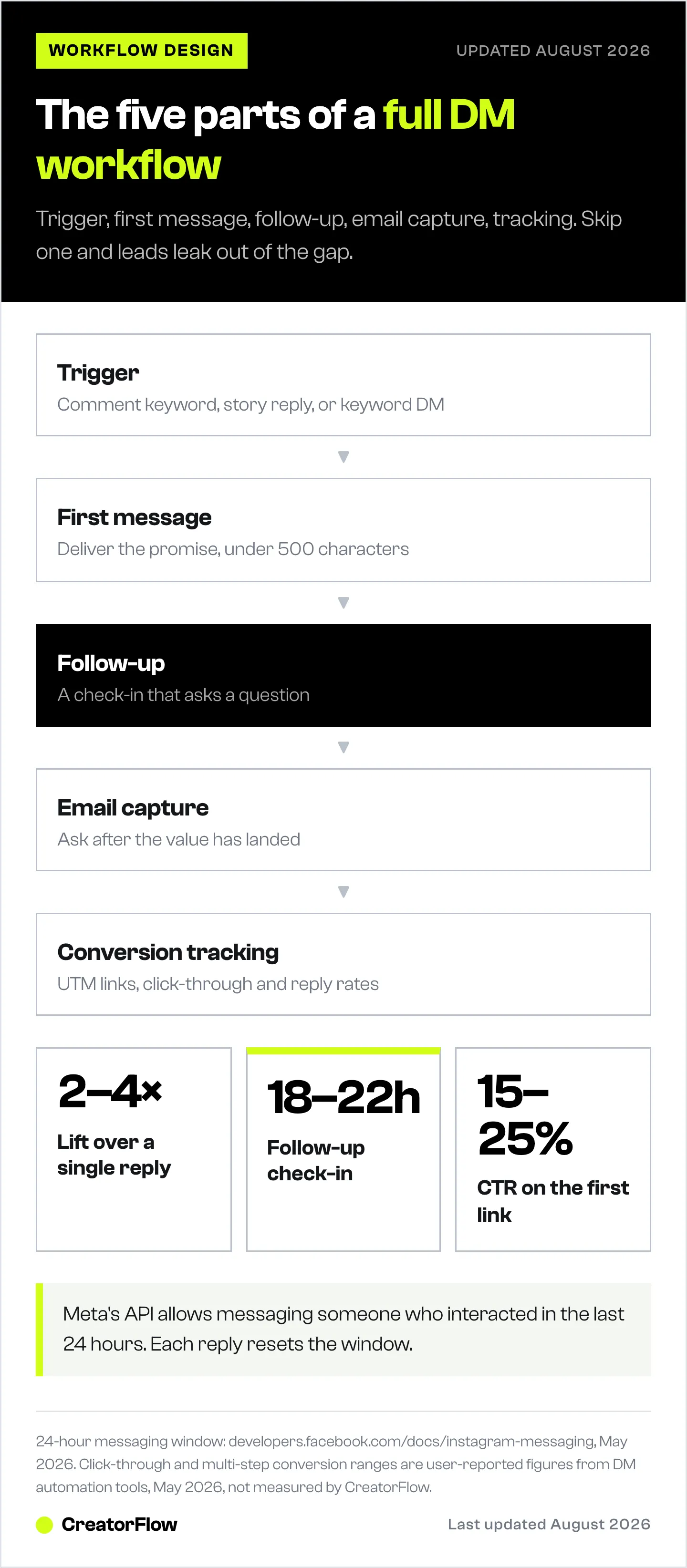
1. Trigger (What Starts the Workflow)
The trigger is the action that kicks off your automation. Instagram’s API supports three trigger types through tools like CreatorFlow, ManyChat, and LinkDM:
Comment triggers activate when someone comments a specific keyword on your post or Reel. This is the most common trigger type and converts best because the person is already engaged with your content.
- Set your trigger word in your automation tool (e.g., “LINK”, “FREE”, “RECIPE”)
- The automation fires within 1-5 seconds of the comment
- Supports multiple trigger words per post
Story reply triggers fire when someone replies to your Instagram Story. Use these for time-sensitive offers, polls, and engagement spikes.
- Works with any story reply or specific keywords
- Great for “DM me [WORD] for the link” story CTAs
Keyword DM triggers activate when someone sends you a DM containing a specific word. Use these for evergreen offers that people discover through your bio, highlights, or older posts.
- Example: Someone DMs you “COACHING” and gets your booking link
- Works 24/7 regardless of when the content was posted
For a full walkthrough on setting up comment triggers specifically, see our Comment-to-DM Automation Setup Guide.
2. Initial Message (The First Response)
Your first DM sets the tone for the entire workflow. It needs to deliver what was promised and open the door for the next step.
Rules for the initial message:
- Deliver the promised value immediately (link, PDF, info)
- Keep it under 500 characters (long messages get skipped on mobile)
- Include one clear next action
- Sound human, not robotic
Template, Affiliate link delivery:
Hey! 👋 Here's the [product name] link you asked about:

[YOUR LINK]

Quick heads up, I've tested 12 [product category] and this one's my go-to because [specific reason].

Curious which [product category] is best for your [specific use case]? Reply "COMPARE" and I'll send you my full breakdown.
Template, Coach/service provider:
Thanks for reaching out! Here's my calendar to book a free 15-min call:

[CALENDLY LINK]

Before we chat, what's your biggest challenge with [topic] right now? That way I can make our call super useful for you.
Template, E-commerce product:
Here's the link to [product name]:

[PRODUCT LINK]

This one's been a top seller because [specific benefit]. If you need help picking the right [size/variant/option], just reply "HELP" and I'll walk you through it.
3. Follow-Up Sequence (The Money Maker)
The follow-up is where most creators give up and where the real conversions happen. Instagram’s API allows you to message someone within 24 hours of their last interaction with your account.
The 24-hour rule: Meta’s Instagram Graph API only permits messaging users who have interacted with your account in the previous 24 hours (developers.facebook.com, as of May 2026). Each time a user replies to your DM, the 24-hour window resets.
This means your follow-up strategy needs to encourage replies, not passive reading. Ask questions. Offer choices. Make it conversational.
Follow-up timing framework:
- Immediate (0-5 seconds): Initial message with value delivery
- Reply-triggered: Tailored response based on keyword in their reply
- Window reminder (18-22 hours): Final check-in before the 24-hour window closes
Follow-up template (18-22 hour check-in):
Hey [name], just checking in! Did you get a chance to check out [product/link]?

If you have any questions about [common objection], happy to help. Just reply here!
This works because it’s genuinely helpful, not pushy. And it resets the 24-hour messaging window if they reply.
4. Email Capture (Own Your Audience)
Instagram can disable your account tomorrow. Your email list can’t be taken away. Every DM workflow should include an email capture step, ideally after delivering initial value so the person has a reason to trust you.
How email capture works in DM automation:
- Your automation asks for their email within the DM conversation
- The user replies with their email address
- Your automation tool captures and stores it (CreatorFlow Pro and ManyChat Pro both support this)
- You export to your email marketing platform (Mailchimp, Kit, Klaviyo)
Email capture template:
Glad you found that helpful! I share stuff like this every week in my email list, [specific benefit like "with links to everything I mention in my Reels"].

Want in? Just reply with your email and I'll add you.
For a full guide on building your email list through DMs, check our Collect Emails Through Instagram DMs guide and the Instagram DM to Email List Integration Guide.
5. Conversion Tracking (Know What’s Working)
Without tracking, you’re guessing which posts, triggers, and messages drive revenue. Every workflow should track three metrics:
Click-through rate (CTR): What percentage of people who receive your DM click your link? Use UTM parameters to track this in Google Analytics.
Reply rate: What percentage reply to your follow-up? Higher reply rates mean your messages sound natural. Low reply rates mean they read like spam.
Conversion rate: What percentage of DM recipients take your target action (purchase, book a call, subscribe)? This is the metric that pays your rent.
How to set up tracking:
- Add UTM parameters to every link: ?utm_source=instagram&utm_medium=dm&utm_campaign=reel-march-2026
- Use your automation tool’s built-in analytics (CreatorFlow Pro includes link click tracking)
- Check weekly, not daily (small sample sizes create noise)
For more on tracking DM performance, see our Instagram DM Link Tracking Guide.
4 Copy-Paste Workflow Templates by Use Case
Here are four complete workflows you can copy and adapt. Each includes the trigger, message sequence, and follow-up.
Workflow 1: Affiliate Product Recommendation
Best for: Amazon Associates, LTK creators, product reviewers
| Step | Timing | Action | Message |
|---|---|---|---|
| 1 | Instant | Comment trigger fires | ”LINK” detected on Reel |
| 2 | 0-5 sec | Initial DM sent | Product link + personal recommendation + “Reply COMPARE for alternatives” |
| 3 | Reply-triggered | Alternative sent | Comparison of top 3 products with affiliate links |
| 4 | 20 hours | Follow-up DM | ”Did [product] work for you? Reply YES or NO” |
| 5 | Reply-triggered | Email capture | ”I share deals like this weekly, reply with your email to get them first” |
Expected performance: 15-25% CTR on initial link, 5-10% reply rate on follow-up, 3-8% email capture rate (based on user-reported data from DM automation tools, as of May 2026).
For affiliate-specific strategies, see our Scale Affiliate Marketing with Instagram DM Automation guide.
Workflow 2: Coaching Discovery Call Booking
Best for: Fitness coaches, business coaches, consultants
| Step | Timing | Action | Message |
|---|---|---|---|
| 1 | Instant | Story reply trigger | User replies to story about coaching results |
| 2 | 0-5 sec | Qualifying question | ”Thanks! Quick Q, what’s your biggest challenge with [topic] right now?“ |
| 3 | Reply-triggered | Calendly link | Personalized response + booking link + “Spots fill fast this week” |
| 4 | 20 hours | Follow-up | ”Did you find a time that works? Happy to answer any questions first” |
| 5 | Reply-triggered | Email capture | Add to nurture email sequence |
Expected performance: 20-35% reply rate on qualifying question, 10-20% booking rate from qualified replies (user-reported, as of May 2026).
See also: Instagram DM Automation for Coaches and Consultants and Instagram Calendly DM Automation.
Workflow 3: E-commerce Product Inquiry
Best for: Shopify sellers, DTC brands, handmade product creators
| Step | Timing | Action | Message |
|---|---|---|---|
| 1 | Instant | Keyword DM trigger | User DMs “PRICE” or “SHOP” |
| 2 | 0-5 sec | Product link + sizing help | Link to product page + “Reply SIZE for our sizing guide” |
| 3 | Reply-triggered | Sizing/variant help | Tailored recommendation based on their reply |
| 4 | 20 hours | Follow-up with offer | ”Still deciding? Here’s 10% off for the next 24 hours: [LINK]“ |
| 5 | Reply-triggered | Email capture | ”Want first access to new drops? Reply with your email” |
Expected performance: 20-30% CTR on product link, 8-15% conversion to purchase with follow-up discount (user-reported, as of May 2026).
Related: Instagram Automation for E-commerce and Shopify.
Workflow 4: Lead Magnet / Free Resource Delivery
Best for: Digital product creators, newsletter builders, course sellers
| Step | Timing | Action | Message |
|---|---|---|---|
| 1 | Instant | Comment trigger | ”FREE” or “PDF” detected on Reel |
| 2 | 0-5 sec | Resource delivery | PDF/guide link + “Reply DONE when you’ve downloaded it” |
| 3 | Reply-triggered | Bonus offer | ”Nice! Here’s a bonus [resource] most people miss: [LINK]“ |
| 4 | 20 hours | Follow-up | ”Did you get a chance to read [resource]? What was your biggest takeaway?“ |
| 5 | Reply-triggered | Email capture + course pitch | Email capture + “If you want the full system, check out [course link]” |
Expected performance: 30-50% download rate, 10-20% reply rate, 5-12% email capture (user-reported, as of May 2026).
See: Instagram Lead Magnet Automation and Create and Launch a Digital Product in 7 Days.
Instagram DM Automation Workflow vs Manual DMs
Here’s the direct comparison between running DM workflows manually and using automation:
| Factor | Manual DMs | Automated Workflow |
|---|---|---|
| Response time | 30 min - 4 hours | 1-5 seconds |
| Daily time required | 1-3 hours | 0 (after setup) |
| Messages per hour | 20-30 | Up to ~200/hour (tool-side pacing) |
| Follow-up consistency | Irregular (you forget) | 100% consistent |
| Email capture | Manual copy-paste | Automatic |
| Link tracking | None | UTM + analytics built in |
| Available hours | When you’re online | 24/7 |
| Cost | Your time | $15-30/month (CreatorFlow, as of May 2026) |
| Scalability | Limited by your hours | Limited by tool-side pacing (about 200 DMs/hour) |
The math is simple. If your time is worth $30/hour and you spend 2 hours/day on DMs, that’s $1,800/month in opportunity cost. A $15/month automation tool pays for itself in the first hour.
For a deeper comparison, see our Manual vs Automated Instagram DMs guide.
How to Build Your First Workflow (Step by Step)
Step 1: Pick Your Trigger and Goal
Before opening any tool, answer two questions:
- What triggers this workflow? (Comment keyword, story reply, or DM keyword)
- What’s the end goal? (Link click, call booked, email captured, product sold)
Your entire workflow connects trigger to goal. Everything in between supports that path.
Step 2: Write Your Message Sequence
Draft all messages before building anything in the tool. Write them in a notes app first. Read them out loud. Do they sound like something you’d say in a real DM conversation?
The test: If your message sounds like it was written by a marketing department, rewrite it. If it sounds like a text from a friend who happens to sell something, ship it.
Step 3: Set Up in Your Automation Tool
Connect your Instagram Business/Creator account to your automation tool via Meta’s OAuth login. No password sharing required. The setup takes 2-3 minutes.
Then build your workflow:
- Create a new automation
- Set your trigger (comment keyword, story reply, or DM keyword)
- Add your initial message
- Add follow-up messages with timing delays
- Add keyword-triggered branches (if your tool supports them)
- Enable email capture (if available on your plan)
- Add UTM tracking to all links
Step 4: Test Before Going Live
Send a test comment from a secondary account (or ask a friend). Walk through the entire workflow. Check:
- Does the initial message arrive within 5 seconds?
- Does the follow-up fire at the right time?
- Do keyword branches route correctly?
- Do all links work and include UTM parameters?
- Does the email capture prompt appear at the right moment?
Step 5: Monitor and Optimize Weekly
After your first week, check these numbers:
- CTR below 10%? Your initial message needs work. Make the value clearer.
- Reply rate below 5%? Your follow-up sounds too salesy. Make it more conversational.
- Email capture below 3%? You’re asking too early. Deliver more value first.
Workflow Tool Comparison (July 2026)
Choosing the right tool for multi-step workflows matters. Here’s how the main options compare for workflow capabilities:
| Feature | CreatorFlow | ManyChat | LinkDM |
|---|---|---|---|
| Price | $15/mo Pro (flat rate) | $17/mo Essential (250 contacts, scales up) | $19/mo Pro |
| Comment-to-DM | Yes | Yes | Yes |
| Story reply triggers | Yes | Yes | Yes |
| Keyword DM triggers | Yes | Yes | Yes |
| Follow-up messages | Yes | Yes (advanced branching) | Yes |
| Email capture | Yes (Pro plan) | Yes (Pro plan) | Yes |
| Link tracking | Yes (Pro plan) | Yes | Limited |
| Multi-platform | Instagram only | Instagram, FB, WhatsApp, SMS | Instagram only |
| Pricing model | Flat rate | Per-contact (scales with audience) | Flat rate |
| Setup time | 5-10 min | 15-30 min (more options) | 5-10 min |
| Best for | Solo creators, simple workflows | Agencies, complex branching | Established creators |
Pricing verified July 2026: CreatorFlow (creatorflow.so/pricing), ManyChat Essential at $17/mo for 250 active contacts, or $14/mo billed annually (manychat.com/pricing), LinkDM (linkdm.com/pricing, $19/mo Pro tier).
Bottom line:
- Choose CreatorFlow if you want flat-rate pricing and fast setup for straightforward workflows
- Choose ManyChat if you need complex conditional branching or multi-platform automation (Instagram + Facebook + WhatsApp)
- Choose LinkDM if you want a proven platform with an established user base
Common Workflow Mistakes (And How to Fix Them)
Mistake 1: Writing Messages That Sound Like a Bot
The problem: “Thank you for your interest! Click the link below to access our exclusive offer. We value your engagement!”
The fix: “Here’s the link! 🔗 I’ve been using this one for 6 months and it’s held up way better than the last three I tried.”
Write like you’d text a friend. Use contractions. Be specific. Skip corporate language.
Mistake 2: Not Respecting the 24-Hour Window
The problem: Scheduling a follow-up 48 hours later, then wondering why it never sends.
The fix: All follow-ups must happen within 24 hours of the user’s last interaction. Schedule your check-in at 18-22 hours to stay safe. If you need more time, your follow-up needs to prompt a reply to reset the window.
Mistake 3: Asking for the Email Too Early
The problem: First message asks for their email before delivering any value. Feels like a bait-and-switch.
The fix: Deliver value first (the link, the PDF, the answer). Ask for the email after they’ve received something useful. The sequence is: give, give, then ask.
Mistake 4: No Tracking on Links
The problem: You know DMs are going out but have no idea which posts or messages drive revenue.
The fix: Add UTM parameters to every single link. ?utm_source=instagram&utm_medium=dm&utm_campaign=[post-identifier]. Review weekly in Google Analytics.
Mistake 5: One Workflow for All Content
The problem: Using the same trigger word and message for fitness content, recipe content, and product reviews. The person who wants your smoothie recipe gets the same message as someone wanting your gym program.
The fix: Create separate workflows per content category. Different trigger words, different messages, different follow-ups. More work upfront, way higher conversion rates.
Instagram Graph API Limits You Need to Know
Building workflows without understanding Instagram’s rules is like building on someone else’s land. Know the boundaries:
| Limit | Rule | Source |
|---|---|---|
| DMs per hour | ~200, a tool-side pacing convention, not a Meta-published cap | Automation tool defaults; Meta’s own published limits are per-second (developers.facebook.com, April 2026) |
| Messaging window | 24 hours from last user interaction | Meta Platform Policy (developers.facebook.com, April 2026) |
| Account type required | Business or Creator (not Personal) | Instagram Graph API requirements |
| Authentication | OAuth only (no password sharing) | Meta Developer documentation |
| Content restrictions | No spam, no unsolicited commercial messages | Instagram Community Guidelines |
All official DM automation tools (CreatorFlow, ManyChat, LinkDM) handle these limits for you. The API itself blocks anything outside its rules, and the tools pace sends well under the ceilings on top of that.
For a full breakdown of rate limits, see our Instagram Graph API Rate Limits Explained and How Many Instagram DMs Can You Send?.
FAQ
What is an Instagram DM automation workflow?
An Instagram DM automation workflow is a multi-step message sequence that triggers automatically when someone comments on your post, replies to your Story, or sends a keyword DM. It goes beyond a single auto-reply to include follow-up messages, conditional responses, email capture, and conversion tracking. Workflows run through Meta’s official Instagram Graph API using tools like CreatorFlow, ManyChat, or LinkDM.
Is Instagram DM automation safe?
Yes, when you use tools that connect through Meta’s official Instagram Graph API. CreatorFlow, ManyChat, and LinkDM all use OAuth authentication (no password sharing) and respect the 200 DMs/hour pacing limit. Using the official API means minimal ban risk from the automation itself. Tools that scrape or use unofficial methods put your account at risk.
How many DMs can I automate per hour?
Automation tools pace sends at about 200 DMs per hour per account. That figure is a tool-side safety convention, not a Meta-published limit — Meta does not publish an hourly DM cap. Its documented limits are per-second (100 calls/sec for text and links on the Instagram API with Instagram Login) plus 750/hour for private replies to comments on posts and reels (developers.facebook.com, July 2026). Legitimate tools pace well under those ceilings automatically. For most creators, 200/hour is far more than enough.
How much does DM automation cost?
Pricing ranges from free to $29+/month depending on the tool and plan (as of May 2026). CreatorFlow Free offers 500 DMs/month at $0. CreatorFlow Pro costs $15/month for 5,000 DMs. ManyChat starts at $17/month (Essential, or $14/month billed annually) for 250 active contacts and scales with audience size. LinkDM Pro is $19/month. All tools offer free tiers or trials.
Can I send follow-up messages automatically?
Yes, but within Instagram’s 24-hour messaging window. You can only message someone who has interacted with your account in the past 24 hours. Each time they reply, the window resets. This means your follow-up strategy should encourage replies to keep the conversation going.
What’s the difference between a DM workflow and a DM funnel?
A DM workflow is the technical automation sequence (trigger → message → follow-up → capture). A DM funnel is the strategic framework that maps the workflow to a business goal (awareness → interest → decision → action). You need both: the funnel tells you what to say, the workflow automates the delivery.
Do I need a business account for DM automation?
Yes. Instagram’s Graph API only works with Business or Creator accounts. Switching from a Personal account takes 30 seconds in Instagram Settings → Account → Switch to Professional Account. You don’t lose followers or content when switching.


