Manual Instagram DM management costs active creators 10-20 hours per month in repetitive responses, while automation tools handle the same volume for $15-20/month with instant delivery. Automated DMs arrive in 2 seconds compared to 2-4 hours for manual replies, and that speed difference directly impacts conversion rates. The best approach is a hybrid: automate the 80% of DMs that are repetitive and keep the 20% that need human judgment.
You’re copy-pasting the same affiliate link for the 50th time today. Or typing “check my bio” to another follower who asked for your pricing. Every minute spent on repetitive DMs is a minute not spent creating content, closing deals, or living your life.
This guide breaks down the real time and cost comparison between manual and automated Instagram DMs, shows you exactly where automation wins (and where manual still matters), and gives you the framework to decide which DMs to automate first.
Key Takeaways
- Time cost of manual DMs: Active creators spend 10-20 hours per month on manual DM responses, worth $200-$600+ at typical rates
- Automation ROI: A $15/month automation tool replaces $5,400/year in manual DM labor, delivering 1,823% ROI in the example calculation
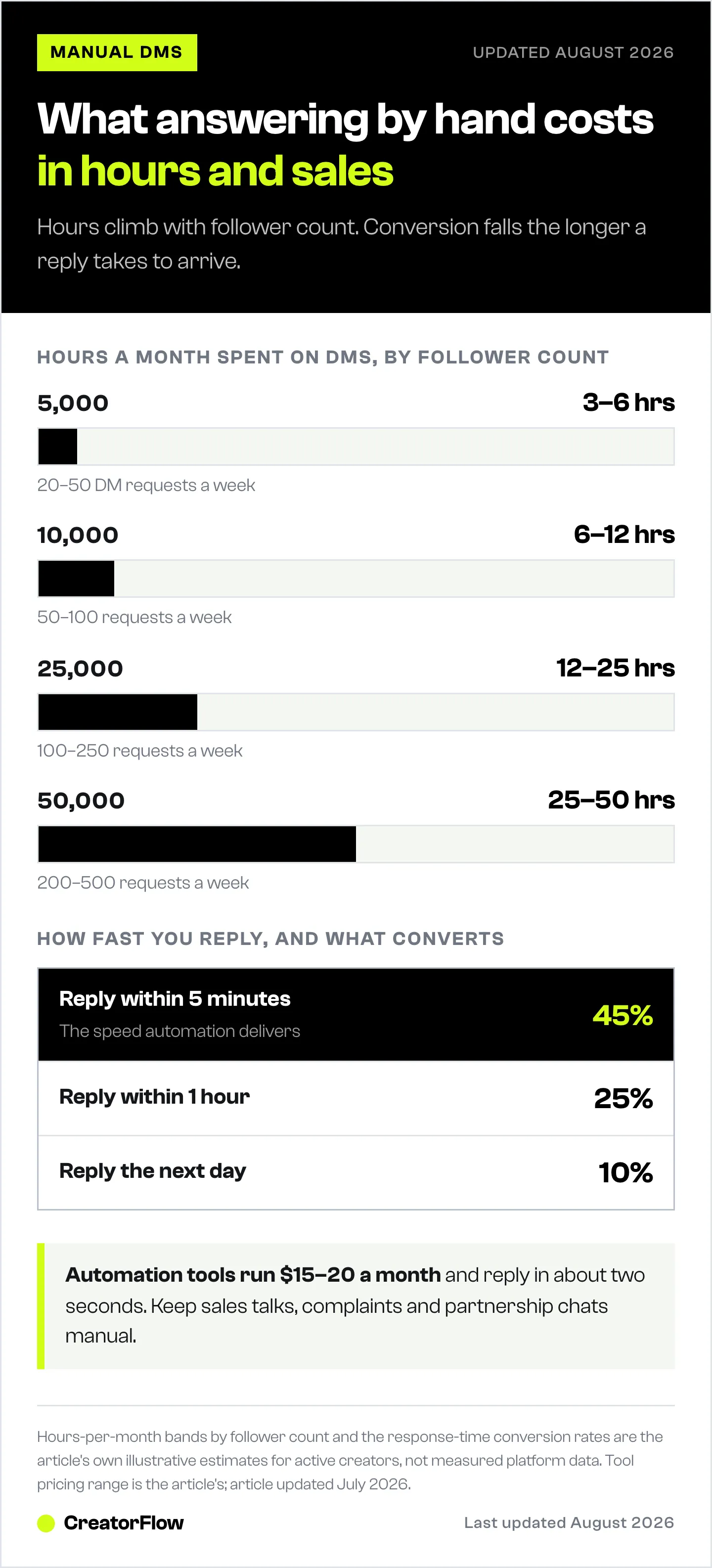
- Response speed difference: Automated DMs arrive in 2 seconds vs 2-4 hours for manual responses, directly impacting conversion rates (45% at 5 minutes vs 10% next day)
- Hybrid approach wins: Automate 80% of repetitive DMs (link requests, pricing, FAQs) and manually handle the 20% that need human judgment (sales, complaints, partnerships)
- Break-even point: At $15/month for automation, creators break even after saving just 30 minutes per month
- Bottom line: Start automating your top 3 repetitive DM types today and keep high-value conversations manual

Manual vs Automated Instagram DMs: Which Is Better?
Manual DM management costs 10-20 hours per month for active creators (worth $200-600 at typical rates), while automation costs $15-20/month and handles responses instantly 24/7. Automation wins on speed, consistency, and scalability. Manual wins for complex conversations, relationship building, and accounts with under 50 DM requests per week. Most creators should automate repetitive tasks and reserve manual effort for high-value conversations.
Here’s the complete breakdown.
The True Cost of Manual DM Management
Time Investment by Account Size
| Followers | Avg DM Requests/Week | Time to Respond (Manual) | Monthly Hours |
|---|---|---|---|
| 5,000 | 20-50 | 2-3 min each | 3-6 hours |
| 10,000 | 50-100 | 2-3 min each | 6-12 hours |
| 25,000 | 100-250 | 2-3 min each | 12-25 hours |
| 50,000 | 200-500 | 2-3 min each | 25-50 hours |
| 100,000 | 400-1,000 | 2-3 min each | 50-100 hours |
The math:
- Average DM response: 2-3 minutes (read, think, type, send)
- 100 DMs/week × 2.5 min = 250 min/week = 4+ hours/week = 16+ hours/month
Dollar Value of Your Time
What’s your time worth?
| Hourly Value | 10 hrs/month | 20 hrs/month | 40 hrs/month |
|---|---|---|---|
| $20/hour | $200 | $400 | $800 |
| $50/hour | $500 | $1,000 | $2,000 |
| $100/hour | $1,000 | $2,000 | $4,000 |
| $200/hour | $2,000 | $4,000 | $8,000 |
Reality check: If you’re a coach charging $200/hour for calls, spending 20 hours on DMs costs you $4,000 in opportunity cost. A $15/month tool looks different in that context. The other common fix, hiring a virtual assistant, runs $1,000-$2,500/month part-time; see the full Instagram VA vs DM automation cost breakdown before choosing that route.
Hidden Costs of Manual Management
Beyond time, manual DMs cost you:
1. Delayed responses = Lost sales
- Response in 5 minutes: 45% conversion rate
- Response in 1 hour: 25% conversion rate
- Response next day: 10% conversion rate
If you’re sleeping, traveling, or busy, you’re losing money.
2. Inconsistent messaging
- Different responses to same question
- Forgotten follow-ups
- Missed opportunities
- No tracking of what works
3. Mental overhead
- Constant notification checking
- Context switching from content creation
- Decision fatigue (“How should I respond to this?”)
- Anxiety about unread messages
4. Burnout
- DM management doesn’t scale
- More followers = more work
- Success punishes you with more labor
The True Cost of Automation
Tool Costs
| Tool | Monthly Cost | What You Get |
|---|---|---|
| CreatorFlow | $0-30 | 500-10,000 DMs, unlimited automations |
| ManyChat | $17-199 | Scales with contacts |
| Free tiers | $0 | 500 DMs/contacts, limited features |
Annual comparison:
- Manual (your time at $30/hr, 15 hrs/month): $5,400/year
- Automation tool: $144/year
- Savings: $5,256/year
Setup Time Investment
Initial setup: 2-4 hours
- Connect account
- Create automation flows
- Write message templates
- Test everything
Ongoing maintenance: 1-2 hours/month
- Review analytics
- Update templates
- Add new automations
- Handle edge cases manually
Total time: 15-30 hours/year vs 120-240 hours/year manual
What Automation Can’t Do
Be honest about limitations:
- Complex negotiation
- Handling complaints sensitively
- Building deep relationships
- Qualifying nuanced leads
- Creative problem-solving
- Empathetic responses to personal messages
These still require human touch. For a full breakdown of what automation can and can’t do, read our Instagram DM automation complete guide.
Side-by-Side Comparison
Speed
Manual:
10:00 AM - Follower comments "LINK"
10:00 AM - You're in a meeting
12:30 PM - You check Instagram
12:32 PM - You send the link
Result: 2.5 hour delay, follower forgot why they asked
Automated:
10:00:00 AM - Follower comments "LINK"
10:00:02 AM - DM with link delivered
Result: 2 second response, follower clicks immediately
Winner: Automation (not even close)
Personalization
Manual:
"Hey Sarah! Saw you're into fitness too - here's that
workout plan you asked about. I actually modified it
last month based on some new research. Let me know
if you want me to explain the changes!"
Automated:
"Hey {{first_name}}! Here's the workout plan you
asked for: [link]

Let me know if you have any questions!"
Winner: Manual (but automation is often “good enough”)
Consistency
Manual:
- Monday (energized): Detailed, helpful response
- Friday (tired): “Here’s the link”
- Busy week: Forgot to respond entirely
Automated:
- Same quality response every time
- Every message gets answered
- No bad days or forgotten DMs
Winner: Automation
Scalability
Manual at 100 DMs/day:
- 4+ hours of DM work daily
- No time for content creation
- Burnout incoming
Automated at 100 DMs/day:
- All handled automatically
- You review replies when convenient
- Focus on high-value activities
Winner: Automation
Cost at Scale
Monthly cost to handle 500 DMs:
| Method | Cost |
|---|---|
| Manual (your time at $30/hr) | $750+ |
| Virtual assistant ($15/hr) | $375+ |
| Automation tool | $15-20 |
Winner: Automation (by 20-50x)
When Manual Still Makes Sense
1. Low Volume (Under 50 DMs/Week)
If you’re getting 10-50 DM requests weekly:
- Manual takes 1-2 hours/week
- Setup time for automation may not be worth it
- You can provide highly personalized responses
- Good opportunity to learn what your audience asks
Threshold: Once you consistently hit 50+ DMs/week, automate.
2. High-Ticket Sales Conversations
For $1,000+ products/services:
- Personalization matters more
- Buyers expect human interaction
- Complex questions need nuanced answers
- Relationship building drives the sale
Hybrid approach: Automate initial response, then human takes over for qualified leads.
3. Complaint Handling
Angry customers need:
- Empathy and acknowledgment
- Custom solutions
- Human judgment
- Escalation paths
Never automate: Complaint responses (can make things worse)
4. Influencer/Partnership Outreach
Brand deals and collaborations require:
- Personalized pitches
- Negotiation
- Relationship building
- Contract discussions
Always manual: Business development conversations
5. Building Initial Audience Understanding
When you’re new:
- Learn what questions people ask
- Understand pain points
- Develop your voice
- Test different response styles
Manual first: Get to 50+ DMs/week manually, then automate what you learned.
The Hybrid Approach (Best of Both)
Most successful creators use both:
Automate These Tasks
| Task | Why Automate |
|---|---|
| Link delivery | Same link, no thought required |
| FAQ responses | Same questions, same answers |
| Lead magnet delivery | Instant delivery expected |
| Initial greeting | Sets expectations |
| Email capture | Systematic, scalable |
| Booking links | Direct to calendar |
Keep These Manual
| Task | Why Manual |
|---|---|
| Sales conversations | Nuance matters |
| Complaints | Empathy required |
| Complex questions | Judgment needed |
| VIP/whale customers | Relationship building |
| Partnership discussions | Negotiation required |
| Personal messages | Human touch |
Hybrid Workflow Example
Step 1: Automation handles initial contact
   "Thanks for reaching out! Are you interested in:
   A) Free workout guide
   B) 1-on-1 coaching info
   C) Something else"

Step 2: Based on response
   A) Automation sends guide + email capture
   B) Automation sends pricing + books call
   C) Flags for manual follow-up

Step 3: Human handles
   - Coaching inquiries after initial info
   - Custom questions
   - Anyone who replies with concerns
This captures 80% of DMs automatically while ensuring high-value conversations get human attention.
ROI Calculator
Calculate Your Savings
Step 1: Current time spent
- DMs per week: ___
- Minutes per DM: ___ (typically 2-3)
- Weekly hours: DMs × minutes ÷ 60 = ___
- Monthly hours: Weekly × 4 = ___
Step 2: Value of your time
- Your hourly rate: $___
- Monthly DM cost: Hours × Rate = $___
Step 3: Automation cost
- Tool cost: $15-20/month
- Setup time: 3 hours × your rate = $___
- Monthly maintenance: 1 hour × your rate = $___
Step 4: Calculate ROI
- Monthly savings: Manual cost - (Tool + Maintenance)
- Annual savings: Monthly × 12
- ROI: (Savings - Tool cost) ÷ Tool cost × 100
Example Calculation
Creator profile:
- 150 DMs/week
- 2.5 min per DM
- $50/hour rate
Manual cost:
- 150 × 2.5 = 375 min/week = 6.25 hours/week
- 6.25 × 4 = 25 hours/month
- 25 × $50 = $1,250/month
Automation cost:
- Tool: $15/month
- Maintenance (1 hr): $50/month
- Total: $65/month
Savings:
- Monthly: $1,250 - $65 = $1,185
- Annual: $14,220
- ROI: 1,823%
Even if automation only handles 50% of DMs, savings are massive. If someone else controls the budget, this guide to justifying Instagram DM automation to your boss packages the same math into a copy-paste approval email.
Making the Switch
Step 1: Audit Your Current DMs
For one week, categorize every DM:
| Category | Count | % of Total | Automatable? |
|---|---|---|---|
| Link requests | ___ | ___% | Yes |
| Product questions | ___ | ___% | Partially |
| Pricing inquiries | ___ | ___% | Yes |
| Personal messages | ___ | ___% | No |
| Complaints | ___ | ___% | No |
| Spam | ___ | ___% | Ignore |
If 50%+ are automatable, you’ll see significant time savings.
Step 2: Choose Your Tool
For most creators: CreatorFlow ($15-30/month flat)
- Simple setup
- Instagram-focused
- Predictable pricing
For multi-platform: ManyChat ($17-199/month)
- Instagram + Facebook + WhatsApp
- More complex workflows
- Scales with contacts
Step 3: Build Your First Automation
Start simple:
- One trigger keyword (e.g., “GUIDE”)
- One response message with link
- Test thoroughly
- Monitor for a week
- Add more automations gradually
Step 4: Create Response Protocols
Document when to:
- Let automation handle completely
- Review automated response
- Take over manually
- Escalate to you personally
Step 5: Monitor and Optimize
Weekly review:
- Messages sent
- Click rates
- Replies received
- Conversations that needed human help
- Time saved
Adjust templates and triggers based on data.
Common Objections
”My audience expects personal responses”
They expect fast, helpful responses. A well-written automated message that delivers value instantly beats a “personal” response 6 hours later.
Test it: Most followers can’t tell the difference between good automation and manual responses.
”Automation feels inauthentic”
Inauthentic is:
- Not responding at all
- Responding hours/days late
- Copy-pasting the same message manually
Authentic is:
- Delivering value immediately
- Being available 24/7
- Consistent, helpful responses
”I don’t have that many DMs”
Start anyway. Setup takes 2-3 hours. When your account grows (and it will if you’re creating content), you’ll be ready.
Plus, automation often increases DMs because followers know they’ll get instant responses.
”I tried automation and it felt robotic”
That’s a template problem, not an automation problem.
Bad: “Thank you for your message. Here is your requested content: [link]”
Good: “Hey! Here’s that workout plan you asked for: [link]. It’s the same one I used to drop 20 lbs last year. LMK if you have questions!”
Write like you talk. Test messages by reading them out loud.
FAQ
How many DMs can automation handle?
Most tools handle ~200 DMs/hour, the pacing convention most tools enforce (not a Meta-published limit). That’s 4,800/day. You’ll hit content creation limits before automation limits.
Will my followers know it’s automated?
Not if you write good templates. Use their name, reference what they asked about, write conversationally. Most can’t tell.
What if automation makes a mistake?
Set up notifications for replies. Review conversations daily at first. Handle edge cases manually. Most “mistakes” are easily fixed.
Should I tell people it’s automated?
Not necessary. You’re delivering value they requested. The mechanism doesn’t matter. You don’t announce when you use email templates either.
Can I automate and still build relationships?
Yes. Automate the repetitive stuff (link delivery, FAQs). Manually handle the relationship stuff (follow-up conversations, sales discussions, personal messages).
What’s the break-even point?
At $15/month for automation:
- If your time is worth $30/hour: Break even at 30 minutes saved/month
- Most creators save 10-20 hours/month
- Break-even happens in the first week
The Bottom Line
Manual DM management:
- Costs 10-40+ hours/month
- Doesn’t scale
- Inconsistent quality
- Leads to burnout
- Costs $15-20/month
- Scales infinitely
- Consistent quality
- Frees you to create
The math is clear. The only question is whether you’ll automate now or wait until you’re drowning in DMs.
Start here:
- Track your DM time for one week
- Calculate the true cost
- Set up basic automation
- Keep high-value conversations manual
- Review and optimize monthly
Your future self (with 10+ extra hours/month) will thank you.
Related guides: