
Creating a digital product means packaging your knowledge into an ebook, template pack, or mini-course that customers download instantly after purchase. A $27 ebook takes 6-10 hours to create in Google Docs and Canva. A template pack takes 4-8 hours. You can go from idea to first sale in 7 days using Gumroad or Stan Store, with Instagram DM automation delivering your product link to every buyer automatically.
Here’s the truth: Your first digital product doesn’t need to be perfect. It needs to exist. A $27 ebook that helps 10 people is better than a $297 course that never launches.
This guide shows you how to create and launch your first digital product in 7 days. From idea to first sale. No perfectionism. No endless planning. Just execution.
Key Takeaways
- 7-day timeline: Day 1 choose format, Day 2 validate, Day 3 outline, Days 4-5 create content, Day 6 design, Day 7 launch and sell
- Pricing ranges by format: Ebooks/PDF guides at $17-47, template packs at $27-67, mini-courses at $47-97
- Validation threshold: 10+ “YES” replies on an Instagram Story poll means your idea is validated, move forward
- Recommended platforms: Gumroad (10% fee or $10/month for 0% fee) for beginners, Stan Store ($30/month) for Instagram-native creators
- Content scope: Keep ebooks to 20-40 pages (3,000-8,000 words) and mini-courses to 5-8 videos of 5-15 minutes each
- Bottom line: Start at $27, get your first 10-20 sales and testimonials, then raise the price, done beats perfect every time
Day 1: Choose Your Product Type
Pick ONE format for your first product:
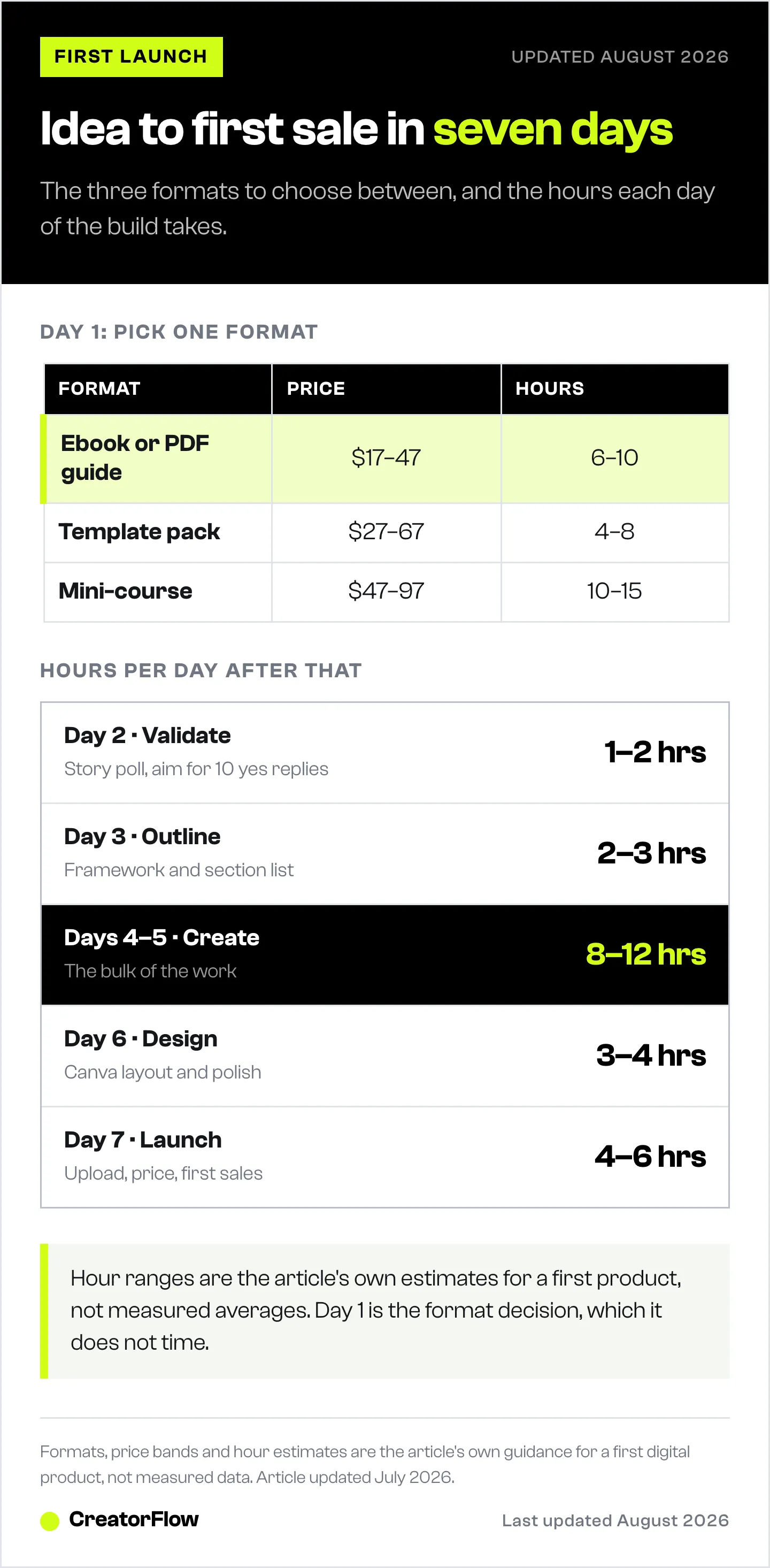
Ebook/PDF Guide ($17-47)
- Time to create: 6-10 hours
- Best for: Step-by-step processes, comprehensive guides
- Tools needed: Google Docs + Canva
Template Pack ($27-67)
- Time to create: 4-8 hours
- Best for: Content templates, business templates, design assets
- Tools needed: Canva, Google Sheets, or Notion
Mini-Course ($47-97)
- Time to create: 10-15 hours
- Best for: Video tutorials, multi-step training
- Tools needed: Loom/phone camera + Google Slides
For beginners: Start with ebook/PDF guide. Fastest to create, easiest to sell.
Action: Pick your format. Move to Day 2.
Day 2: Validate Your Idea (1-2 Hours)
Don’t create something nobody wants. Validate first.
Validation checklist:
- Have at least 5 people asked you about this topic?
- Do you see competitors selling similar products?
- Would you pay $27-47 for this solution?
If yes to all three → validated. Move forward.
Quick validation method: Post on Instagram Stories: “I’m creating [product]. Reply YES if you’d want early access.”
10+ YES replies = validated idea.
Action: Get 10 YES replies or see competitor products. Then Day 3.
Day 3: Create Outline & Framework (2-3 Hours)
Don’t write yet. Structure first.
Ebook outline template:
- Introduction (the problem)
- Chapter 1: [Core concept 1]
- Chapter 2: [Core concept 2]
- Chapter 3: [Core concept 3]
- Chapter 4: [Step-by-step process]
- Chapter 5: [Common mistakes]
- Conclusion (action steps)
Keep it simple: 20-40 pages total. Not 200.
Action: Create detailed outline. Don’t write content yet.

Days 4-5: Create Content (8-12 Hours Total)
Write/record your product. Block 4-6 hours each day.
For ebooks:
- Use Google Docs
- Write like you’re explaining to a friend
- Use bullet points, not paragraphs
- Add examples and screenshots
- Target: 3,000-8,000 words
For templates:
- Create in Canva or Google Sheets
- Include instructions document
- Provide 5-10 template variations
- Make them copy-paste ready
For mini-courses:
- Record 5-8 video lessons
- Each video: 5-15 minutes
- Use Loom or phone camera
- Don’t edit heavily (wastes time)
Action: Finish 80% of content by end of Day 5.
Day 6: Design & Polish (3-4 Hours)
Make it look professional without spending days.
For ebooks:
- Export Google Doc to PDF
- Use Canva to create branded cover
- Add page numbers
- Check formatting consistency
For templates:
- Brand with your colors/fonts
- Add instructions page
- Create preview images
- Export in shareable format
For courses:
- Upload videos to Vimeo or Gumroad
- Create simple welcome PDF
- List all lessons clearly
Don’t over-polish: “Good enough” beats “perfect someday.”
Action: Finalize product. Upload to Gumroad or Stan Store.
Day 7: Launch Your Digital Product and Make First Sales (4-6 Hours)
Go live. Make first sales.
Launch checklist:
1. Set up sales page (1 hour)
- Use Gumroad or Stan Store
- Write 3-paragraph description
- Price: $27-47 for first product
- Add preview/sample if possible
2. Create launch content (2 hours)
- Instagram post announcing launch
- Carousel showing what’s inside
- Stories with a link sticker or “Comment LINK”
- Set up DM automation to send product link
3. Email your list (30 min)
- If you have emails, send launch announcement
- Special discount for first 24 hours
4. Engage & respond (2-3 hours)
- Reply to all comments
- Answer questions in DMs
- Share customer wins in Stories
Goal: Make 1-5 sales on launch day.
Action: Launch and get first sale.

Pricing Your First Product
Ebooks/Guides: $17-47 Templates: $27-67 Mini-courses: $47-97
Pro tip: Start lower ($27) to get first sales and testimonials. Raise price after 10-20 sales.
If you also run a site, a product like this is the highest-earning stream available to you. Bloggers led by digital products average $535.90 per 1,000 pageviews against $33.16 for those led by display ads (productiveblogging.com, August 2026), which we break down in six ways to monetize a blog.
Where to Sell
Gumroad (recommended for beginners)
- Easy setup
- 10% + $0.50 per sale, no monthly fee (gumroad.com, August 2026)
- Merchant of record, so it handles sales tax and VAT for you
- Built-in email collection and simple analytics
Stan Store (good for Instagram creators)
- $29/mo Creator plan, 0% platform fee on sales (stan.store, August 2026)
- Link-in-bio + product sales combined
- Instagram-optimized checkout
For the full fee picture, including the revenue level where a monthly plan starts costing less than a percentage cut, see the digital product platform fee comparison.
Your own website (advanced)
- Need hosting, payment processing
- More complex setup
- Not recommended for first product
Marketing After Launch
Week 1: Post about product 2-3X Weeks 2-4: Mention in relevant posts (1X per week) Month 2+: Evergreen DM automation sends link when triggered
Don’t stop after launch day. Most sales come from consistent promotion, not launch surge. To keep the link flowing on autopilot, set up the 5-minute Instagram sales automation system once and let it deliver your checkout link every time someone comments.
What If Nobody Buys?
If 0 sales after 7 days:
- Lower price to $17-27
- Get 3-5 testimonials from free beta users
- Post more value content showing your expertise
- Set up DM automation to deliver free lead magnet first
Most products need 30-60 days to gain traction. Launch isn’t the end. It’s the beginning.
Frequently Asked Questions
Do I need a big audience to sell digital products?
No. 500-1,000 engaged followers is enough. 2-5% might buy = 10-50 sales.
Should I give away content for free first?
Yes. Free lead magnet builds trust. Paid product is the “next level” version.
How long should my product be?
Long enough to solve the problem. Not longer. 20-40 pages for ebooks. 5-8 videos for courses.
What if my first product flops?
Learn from it. Ask why people didn’t buy. Create version 2.0 or try different product. Every successful creator has flops.
How does the buyer get the file after they pay?
The platform delivers it. You upload the file once when you create the listing, and the buyer gets a download link or account access as soon as the payment clears. You never send files by hand. Keep the master copy in cloud storage so you can upload a corrected version later without building a second product around it.
What stops people from sharing my product for free?
Nothing stops it completely, and chasing it costs more than it saves. Selling platforms tie the download to the buyer’s account or to a single-use link, which handles casual resharing. Price for the people who pay you. Someone who forwards your file to a friend was rarely going to buy, and the hours you spend policing it are hours not spent on the next product.
Conclusion: Done > Perfect
Your first digital product won’t be perfect. It will be done. That’s what matters.
7 days from idea to launch. Your first $27-270 earned. Proof you can create and sell.
Product #2 will be better. Product #5 will be great. But none of that happens until Product #1 exists.
Start Day 1 today.
Ready to automate product delivery via DM? Try CreatorFlow free for 14 days.
Related Articles
More guides for launching and selling products:
- Instagram Lead Magnet Automation: Deliver Free PDFs via DM - Automate lead magnet delivery
- Make Money on Instagram with Small Following - $1K-5K/month with 500-5K followers
- Instagram Sales Funnel Complete Guide - Convert 15-25% instead of 2%
- Collect Emails via Instagram DMs - Build your email list for launches
- Course Creator Instagram Launch Funnel - Scale to $10K/month
Disclaimer: Performance results mentioned in this article are based on aggregated user data and industry research from 2025-2026. Individual results vary based on audience size, content quality, engagement rates, and niche. CreatorFlow uses Instagram's official Graph API as of May 2026. Instagram/Meta may change features, rate limits, or terms at any time. Instagram is a trademark of Meta Platforms, Inc. CreatorFlow is not affiliated with, endorsed by, or sponsored by Meta Platforms, Inc. ManyChat, LinkDM, and InstantDM are trademarks of their respective owners. Users are responsible for complying with Instagram's Terms of Service and Community Guidelines.