

An Instagram sales system automates the process of turning comments into purchases. You pick a high-performing post, set a keyword trigger (like “LINK”), write a short DM template with your product link, connect your Instagram account to an automation tool, and activate. The entire setup takes under 5 minutes using Meta’s official Instagram Graph API. The buyer gets the link in seconds, even while you sleep.
Key Takeaways
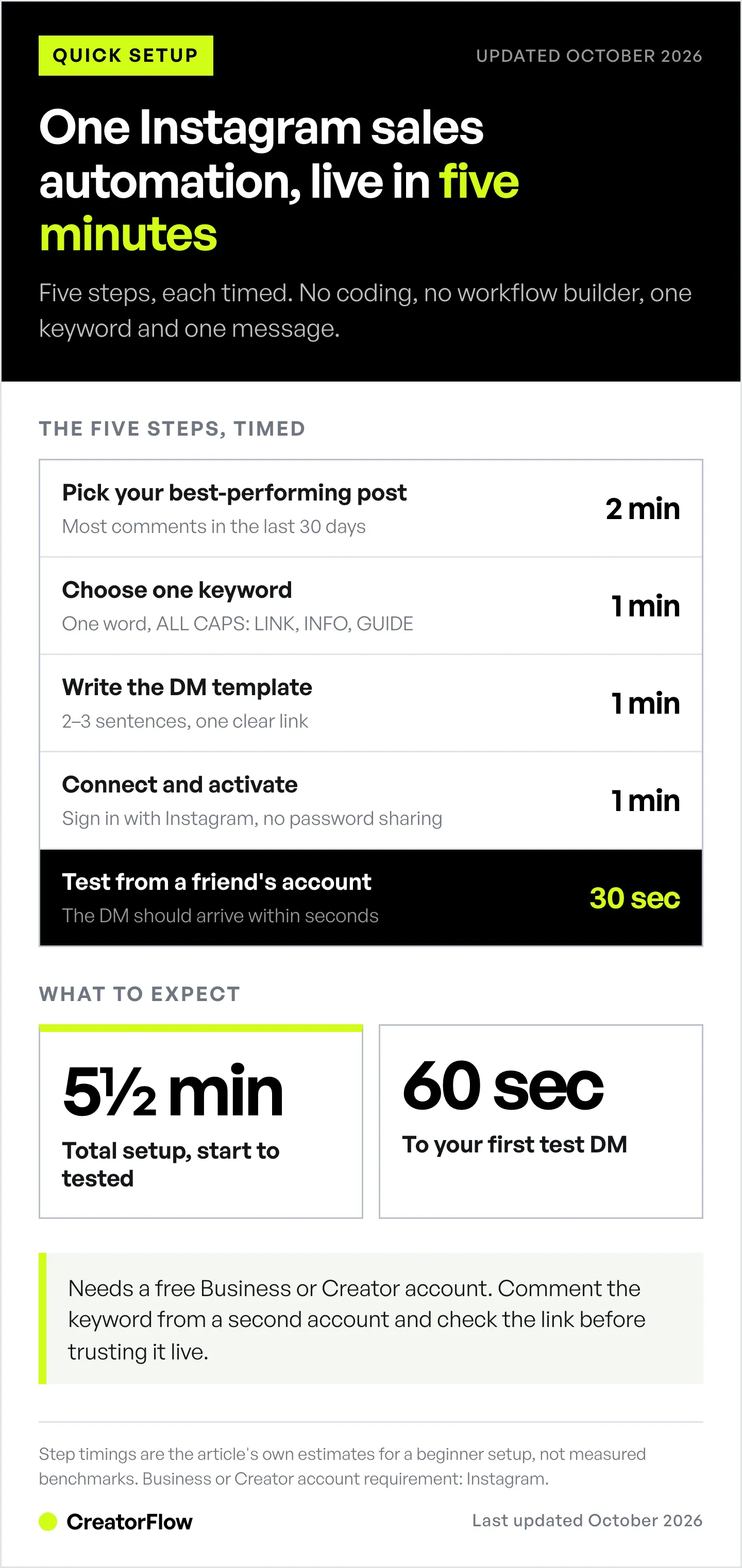
The complete 5-minute system:
- Step 1 (2 min): Pick your best-performing post
- Step 2 (1 min): Choose one keyword (like “LINK” or “INFO”)
- Step 3 (1 min): Write a 2-sentence DM template
- Step 4 (1 min): Connect your Instagram account and activate
- Step 5 (30 sec): Test with a friend’s account
What to expect: Your first automated DM within 60 seconds of testing. Every keyword comment gets a reply in seconds, not hours.
Best tool for non-tech creators: CreatorFlow ($15/month, no per-contact fees, zero coding required)
You’re not “bad with tech.” You just don’t want to spend hours learning complicated software.
Every time someone asks about your product in the comments, you copy-paste the same DM. Every time you miss a comment because you were asleep, you lose a sale. And every time you see “automation,” you think: “That’s for people who understand code.”
Here’s the truth: Instagram sales automation takes 5 minutes to set up. Not 5 hours. Not “5 minutes after you watch 47 tutorials.” Literally 5 minutes from start to finish.
This guide walks you through each step like you’re sitting next to me. No jargon. No assumptions about what you “should already know.” Just a simple system that turns Instagram comments into sales while you sleep.
What Is Instagram Sales Automation?
Instagram sales automation sends a DM the moment someone comments your keyword on a post. You pick one post, pick one trigger word like LINK, write a two-sentence message with your product link, connect your account through Meta’s official Instagram API, and turn it on. Setup runs about five minutes. The buyer gets an answer in seconds instead of whenever you next open the app.
Why Most Creators Think Automation is “Too Complicated”
Let me guess what you’re picturing: dashboards with 47 buttons, “IF/THEN” logic builders, integration APIs, webhook configurations.

That’s a workflow builder built for agencies managing dozens of clients. It’s powerful, but it’s not what a solo creator needs.
Many automation tools added features for every edge case to serve agency teams. The depth fits multi-channel agencies more than solo creators with one Instagram account.
You don’t need 90% of those features. You need one thing: when someone comments “LINK,” send them your product link.
That’s it. That’s the system.
Instagram has 3 billion monthly active users (Meta, September 2025). The people who comment on your post expect a fast answer. Automation gives them one without you living in your DMs.
The 5-Minute Instagram Sales System (Step-by-Step)
Step 1: Choose Your Best-Performing Post (2 Minutes)
Don’t overthink this. You’re not committing to anything permanent.
Open Instagram, go to your profile, check which Reel or carousel got the most comments in the last 30 days.
That’s your test post.
Why start with a high-engagement post? Because you’ll see results faster. A post that already draws comments gets more of them when you add a “comment LINK for details” CTA.
What if I don’t have a high-engagement post? Use your most recent post. The point is to test the system, not achieve perfection.
Time check: 2 minutes. You just picked a post.
Step 2: Pick One Keyword (1 Minute)
Your keyword is what people comment to trigger the automated DM.
Good keywords:
- LINK
- INFO
- GUIDE
- DETAILS
- YES
Bad keywords:
- Long phrases (“send me the full pricing breakdown”)
- Common words (“thanks,” “nice”), you’ll DM everyone
- Emojis (some tools don’t support emoji triggers)
Pro tip: Write the keyword in ALL CAPS in your caption so it stands out. CreatorFlow matches keywords whole-word and case-insensitive, so “link” and “LINK” both trigger the DM.
Write your keyword on a sticky note. You’ll need it in 2 minutes.
Time check: 3 minutes total (1 minute for this step).
Step 3: Write a Simple DM Template (1 Minute)
This is the message that gets sent automatically.
Template format:
Hey [Name]! Here’s what you asked for:
[Your link or information]
[One-sentence next step]
Example for affiliate marketers (more templates in our Amazon influencer automation guide):
Hey there! Here’s the Amazon link to the protein powder I use:
[Amazon affiliate link]
Let me know if you have questions!
Example for coaches:
Hey! Here’s my free consultation booking link:
[Calendly link]
Pick a time that works for you!
Example for digital product creators:
Hey [Name]! Here’s the link to grab the Instagram growth guide:
[Gumroad/Shopify link]
You’ll get instant access!
What NOT to do:
- Write 5 paragraphs (people won’t read it)
- Ask 10 qualifying questions (save that for follow-ups)
- Use “Dear Sir/Madam” (this isn’t 1950)
Keep it to 2-3 sentences. Friendly. Direct. One clear link.
Time check: 4 minutes total (1 minute for this step).
Step 4: Connect and Activate (1 Minute)
Now for the “tech” part (spoiler: it’s 3 clicks).
Using CreatorFlow (recommended for beginners):
- Go to CreatorFlow.so
- Click “Get Started Free”, sign in with Instagram
- Click “New Automation”, select “Comment to DM”
- Paste your keyword from Step 2
- Paste your DM template from Step 3
- Click “Activate”
That’s it. Your automation is live. For a longer walkthrough of the same connection step, the setup guide covers sending your first automated DM in about 3 minutes.
What just happened? CreatorFlow connected to Instagram’s official API (the same one big brands use). When someone comments your keyword, Instagram tells CreatorFlow, and CreatorFlow sends your DM instantly.
No password sharing. Minimal account risk. No coding.
Alternative tools if you want more features:
- ManyChat: $17 to $199/month billed monthly across four paid tiers (Essential $17, Pro $39, Business $99, Advanced $199; $14 to $139/month billed annually). Best for multi-channel flows across Instagram, Facebook Messenger, WhatsApp, TikTok, Telegram, SMS and email (manychat.com/pricing, October 2026)
- LinkDM: Pro $19/month (25,000 DMs, 3 accounts), plus a free plan with 1,000 DMs/month (linkdm.com, October 2026)
- InstantDM: Legend Pro $12/month, or $9.99/month billed annually, plus a free plan with 500 automations/month (instantdm.com/pricing, October 2026)
CreatorFlow costs $15/month flat rate with unlimited automations and 5,000 DMs/month per workspace on Pro. No per-contact fees, no surprise charges.
Time check: 5 minutes total (1 minute for this step).
Step 5: Test From a Friend’s Account (30 Seconds)
Don’t assume it works. Test it.
Ask a friend (or use your personal account):
- Comment your keyword on your test post
- Check if the DM arrives within 2 seconds
- Verify the link works
- Make sure it says their name (not “[Name]”)
If the DM doesn’t arrive:
- Check if your automation is “Active” (not “Draft”)
- Verify the keyword matches exactly (case-sensitive for some tools)
- Make sure your Instagram account is a Business or Creator account (required for automation)
Common first-test mistakes:
- Forgetting to switch Instagram to Business account
- Typing the keyword wrong (“LNIK” instead of “LINK”)
- Testing from the same account that posted (some tools block self-triggers)
Time check: 5 minutes 30 seconds total. Your first automation is live and tested.
What to Expect in the First 24 Hours
Here’s what a first day can look like:
Hour 1: You’ll obsessively refresh your DMs to see if it’s working. (It is. Relax.)
Hour 2-6: The first people comment your keyword. You get your first automated sales DM. It feels magical.
Hour 12: You realize you’ve been manually sending DMs for months when this takes zero effort.
Hour 24: Every keyword comment has a DM waiting for it. Your response time went from “whenever I check my phone” to “instant.”
What drives your first-day numbers:
- How many people see the post and comment the keyword
- How clear the offer in your DM is
- How well the link matches what they asked for
- The price of the product (a low-ticket product under $50 is an easier first sale)
Every keyword comment is also engagement on your post. More comments can bring more reach, and more reach brings more comments and more automated DMs.
It compounds.
Common Beginner Mistakes (And How to Avoid Them)
Mistake #1: Writing a Novel in Your DM Template
Your automated DM should be 2-3 sentences max.
Bad: “Hey! Thanks so much for commenting! I’m so excited to share this with you. I’ve been using this product for 6 months and it completely changed my life. Here’s the link, and if you have any questions at all, feel free to ask! I’m always happy to help. Let me know what you think after you try it!”
Good: “Hey! Here’s the link to the product I mentioned: [link]. Let me know if you have questions!”
People scan DMs on mobile. If they see a wall of text, they swipe away.
Mistake #2: Using a Keyword That’s Too Common
If you use “thanks” or “yes” as your keyword, you’ll DM everyone who comments casually.
- Bad keywords: thanks, cool, nice, yes, wow
- Good keywords: LINK, INFO, GUIDE, DETAILS, SEND
Make it specific enough that only people who WANT your DM will comment it.
Mistake #3: Not Testing on Mobile
Most people read Instagram DMs on a phone. Your DM template might look perfect on desktop but break on iPhone.
Before activating:
- Send yourself a test DM
- Open it on your phone
- Check if the link works
- Verify the formatting isn’t broken
Mistake #4: Forgetting to Add a Call-to-Action
Your automated DM should tell people what to do next.
- Bad: “Here’s the link: [link]”
- Good: “Here’s the link: [link]. Grab it before the sale ends!”
Add urgency, curiosity, or a benefit. Give them a reason to click NOW.
Mistake #5: Setting Up Too Many Automations at Once
Start with ONE automation. Get it working. Then add more.
Beginners often create 5 automations on day 1, get confused, and quit. Don’t do that.
- First week: 1 automation (Comment to DM on your best post)
- Second week: Add a Story reply automation
- Third week: Test keyword triggers
Build confidence before scaling.
What If You’re Still Scared to Press “Activate”?
Let’s address the fear directly.
“What if I look spammy?” You’re responding to people who ASKED for information. That’s not spam. That’s customer service.
“What if I break something?” You can’t. CreatorFlow (and all Meta-approved tools) use Instagram’s official API. The worst thing that happens? The automation doesn’t send. You turn it off and try again.
“What if people get mad?” The DM only goes to people who commented your keyword. They asked for it. People who don’t want it ignore it.
“What if I’m not ready?” You’ll never feel “ready.” The best time to start was 6 months ago. The second-best time is right now.
Instagram’s 3 billion users aren’t waiting for you to feel confident. They’re buying from creators who respond instantly.
Start with one automation. Test it for 7 days. If you hate it, turn it off. But you won’t.
FAQ
Is Instagram automation safe?
Yes, if you use Meta-approved tools that connect via Instagram’s official Graph API.
Tools that use Meta’s official API (October 2026):
- CreatorFlow
- ManyChat
- LinkDM
- InstantDM
Unsafe tools:
- Anything that asks for your password
- Browser extensions that “auto-comment”
- Bots that follow/unfollow automatically
CreatorFlow is a Meta Tech Provider (since December 2025), which means its app passed Meta’s Business Verification and App Review. Minimal ban risk when used correctly.
Do I need a Business account to use automation?
Yes. Instagram requires a Business or Creator account to use automated DMs.
How to switch:
- Go to Settings and activity, then Account type and tools
- Tap “Switch to professional account”
- Choose “Creator” (for influencers/content creators) or “Business” (for brands/e-commerce), see our Creator vs Business account comparison if you’re unsure
Takes 30 seconds. It’s free.
How much does Instagram DM automation cost?
- CreatorFlow: Free plan with 500 DMs/month. Pro is $15/month, or $12/month billed annually, with 5,000 DMs/month, 2 workspaces and unlimited automations
- ManyChat: $17 to $199/month billed monthly across four paid tiers (Essential $17, Pro $39, Business $99, Advanced $199; $14/$29/$69/$139 billed annually), free plan up to 25 contacts (manychat.com/pricing, October 2026)
- LinkDM: Pro $19/month, free plan with 1,000 DMs/month (linkdm.com, October 2026)
- InstantDM: Legend Pro $12/month, or $9.99/month billed annually, free plan with 500 automations/month (instantdm.com/pricing, October 2026)
All four have a free plan. Test before committing.
Can I use automation for affiliate links?
Yes. Amazon affiliates, ClickBank marketers and course creators use automated DMs to send product links.
Make sure:
- You’re complying with Amazon Associates TOS (disclose affiliate relationship)
- Your DM includes a clear next step (“Click here to buy”)
- You’re only DMing people who asked for the link (not spam)
What if someone comments the keyword by accident?
They’ll get your DM. If they didn’t want it, they’ll ignore it.
In practice, most people who comment “LINK” want the link.
If you’re worried, add a line to your DM: “You commented ‘LINK’ on my post. Here’s what you asked for!”
How many DMs can I send per day?
Meta’s published rate limits are per-second (100/sec for text and links, 10/sec for audio/video, and 750/hour for private replies to comments on posts and reels, on the Instagram API with Instagram Login; developers.facebook.com, October 2026). Most automation tools, including CreatorFlow, pace sends at around 200 DMs/hour as a conservative behavioral cap to stay well under those limits and avoid spam triggers (this is a tool-side convention, not a Meta-published hourly limit).
If you’re a beginner, you won’t get close to these limits.
CreatorFlow Pro plan includes 5,000 DMs per month per workspace, which is around 166 per day. Plenty for solo creators.
Can I schedule DMs for later?
Comment-to-DM tools (including CreatorFlow) send the DM the moment the trigger happens (comment, story reply, keyword).
Meta’s rules shape the timing. You get one private reply per comment, within 7 days of the comment. A follow-up is allowed only after the person replies, inside the 24-hour messaging window (developers.facebook.com, October 2026).
That is why instant DMs are the core of this system.
Next Steps: Your First Sale in 7 Days
You’ve set up your first automation. Now what?
- Day 1-2: Let it run. Don’t obsess over metrics yet.
- Day 3-4: Check your numbers. How many DMs were sent? How many people clicked your link? (Link click tracking is on CreatorFlow Pro and Growth.)
- Day 5-6: Add a second automation. Try a story reply trigger or a different keyword on another post.
- Day 7: Evaluate. Did you get sales? Leads? Bookings? If yes, scale it. If no, tweak your DM template.
Give the system 7-14 days before you judge it. The key is consistency. Don’t turn it off after 48 hours because you didn’t see instant results.
Want more advanced strategies? Check out these guides:
- Instagram Comment-to-DM Automation Setup Guide
- Turn Instagram Followers into Customers
- Instagram Sales Funnel: Complete Guide
Conclusion
You made it. You now know exactly how to set up an Instagram sales system in 5 minutes.
No coding. No complicated dashboards. No tech degree required.
The creators who earn well on Instagram aren’t smarter than you. They’re not more technical. They just automated the repetitive stuff (like sending DMs) so they could focus on creating content.
Start with one automation. Test it for 7 days. Then add another.
In 30 days, you’ll wonder why you ever sent DMs manually.


