
The Reels to DM to affiliate funnel converts in 3 steps: a Reel sparks specific product demand, a comment keyword triggers an automated DM, and the DM delivers the affiliate link with a short pitch. Each step is measurable. Done well, you turn 12-30% of commenters into link clicks, compared to the 1-3% bio-link conversion rate most creators settle for.
Picture this. Your Reel hits 50K views overnight. 200 people comment some version of “where did you get this?” You wake up, start typing replies. By the time you DM the first 40 people, the rest have moved on, scrolled past, or bought a similar product from someone else’s Reel. You leave 80% of the demand on the table because you tried to do it manually.
This guide walks through the exact 3-step funnel that fixes that. You’ll see the Reel structure that triggers demand, the comment keyword choice that maximizes opt-in, the DM template that converts, the typical drop-off at each step, and where most creators leak money.
Key Takeaways
- Reels make up over 50% of time spent on Instagram and earn 2x more impressions than other formats (sproutsocial.com, May 2026)
- The 3 steps: specific Reel CTA, comment keyword trigger, automated DM with link
- Comment-to-DM funnels convert 12-30% of comments into link clicks vs 1-3% for bio links
- Use campaign-specific keywords like “OUTFIT” or “RECIPE”, not generic “LINK”
- Manual reply at scale is impossible: a viral Reel with 200+ comments needs automation or you lose 70-80% of intent
- Send the link in the first DM, not after a follow question. Friction kills conversion
- Layer email capture for offers above $50 where nurture matters

How the Instagram Reels Affiliate Funnel Works
Three steps, each one measurable. The Reel shows one specific product and asks for a campaign keyword in both the caption and the voiceover. The comment fires an automated DM within seconds. The DM opens with the affiliate link, names the product from the Reel, and adds a discount code if you have one. A 50K-view Reel typically produces around 500 keyword comments, 100 link clicks and 5-10 sales.
Why This Funnel Beats Bio Links
Bio links carry one URL. Your bio either points to one product, one Linktree page, or one landing page. That works when you sell one thing. It fails when you post 10 different Reels covering 10 different products.
Reels carry one specific intent each. A Reel about a kitchen gadget creates demand for that gadget. A Reel about a workout band creates demand for the band. Bio links force every viewer through the same generic funnel. The Reel-to-DM funnel matches each Reel to its exact product link, delivered in the channel where the demand was created.
Conversion math:
- Bio link click rate: roughly 1-3% of profile visits (industry observation)
- Comment-to-DM click rate: 12-30% depending on offer relevance and keyword choice (practitioner range)
That’s a 4-10x improvement on the same audience, just by matching intent to delivery.
Step 1: The Reel That Triggers Demand
The funnel collapses if the Reel doesn’t generate intent. Three things matter.
Hook in the first 3 seconds. Reels average 0.52% engagement, behind only carousels (socialinsider.io, May 2026). Most viewers swipe within 2 seconds. Lead with the result, the product in use, or the surprising claim. Save the setup for after the hook.
Show the specific product. Don’t post lifestyle Reels and hope viewers ask. Show the product clearly. Use it. Wear it. Demonstrate the result. Vague Reels generate vague comments. Specific Reels generate specific buying intent.
Clear CTA in caption AND voiceover. Both. The voiceover catches scrollers with sound on. The caption catches everyone else. Use the same phrasing in both: “Comment OUTFIT and I’ll DM you the link.”
The CTA is non-negotiable. A Reel without a CTA gets engagement but no funnel entries. For more on hooks that drive comments, see Instagram content hooks templates.
Creators who post Reels with consistent CTAs see audiences grow faster — regular Reels cadence correlates with 25% faster growth (sproutsocial.com, May 2026).
Step 2: The Comment Trigger
This is where most funnels leak. The keyword you ask for determines opt-in rate.
Why “LINK” is the wrong choice. Every creator on Instagram tells viewers to comment “LINK”. It’s generic, easy to forget, and easy to mistype. Worse, viewers who comment “LINK” on multiple Reels get DMs from multiple creators and start ignoring them.
Use campaign-specific keywords. Match the keyword to the Reel content:
- Fashion Reel showing an outfit: comment OUTFIT
- Recipe Reel: comment RECIPE
- Workout Reel with a band: comment BAND
- Travel Reel about a hotel: comment STAY
Specific keywords do three things. They’re easier to remember. They feel less spammy. They let you trigger different DMs for different Reels using the same automation tool.
Set up the trigger. Tools like CreatorFlow connect via Meta’s official Graph API and listen for the keyword on the specific Reel you assign. When someone comments OUTFIT on the fashion Reel, they get the fashion DM. When someone comments RECIPE on the cooking Reel, they get the recipe DM. One creator account, multiple campaigns, no overlap.
For the full setup walkthrough, see comment-to-dm automation setup guide.
API limits to know: most automation tools pace sends at around 200 DMs per hour as a behavioral safety cap, well under Meta’s per-second API rate limits. For most creators that’s plenty. For a viral Reel with 1000+ comments, the queue catches up over 5-6 hours.
Step 3: The DM That Converts
The DM is short. Three lines. Link first.
Template:
Hey! Here’s the link you asked for: [your affiliate URL]
This is the exact [product] from the Reel. Use code [CODE] for [discount] if available.
Let me know if you have any questions about sizing, use, or setup!
Three rules govern this DM:
-
Send the link in the first message. Not after a question. Not after asking them to follow. Not after a quiz. Every step of friction drops conversion 20-40%. The viewer asked for the link. Give it to them.
-
One product per DM. Don’t bundle 5 affiliate links. The viewer wants the specific item from the Reel. Match the DM to the Reel intent.
-
Follow up after 24 hours. A second DM 24 hours later asking “Did you grab it? Happy to answer questions” recovers 5-10% of the people who didn’t click the first time. Set this as part of the automation, not manually.
For the full Reel-to-DM script library, see Instagram Reels that sell: viral DM formula.
Measuring Each Step
The funnel only improves if you measure each step. Typical drop-off looks like this:
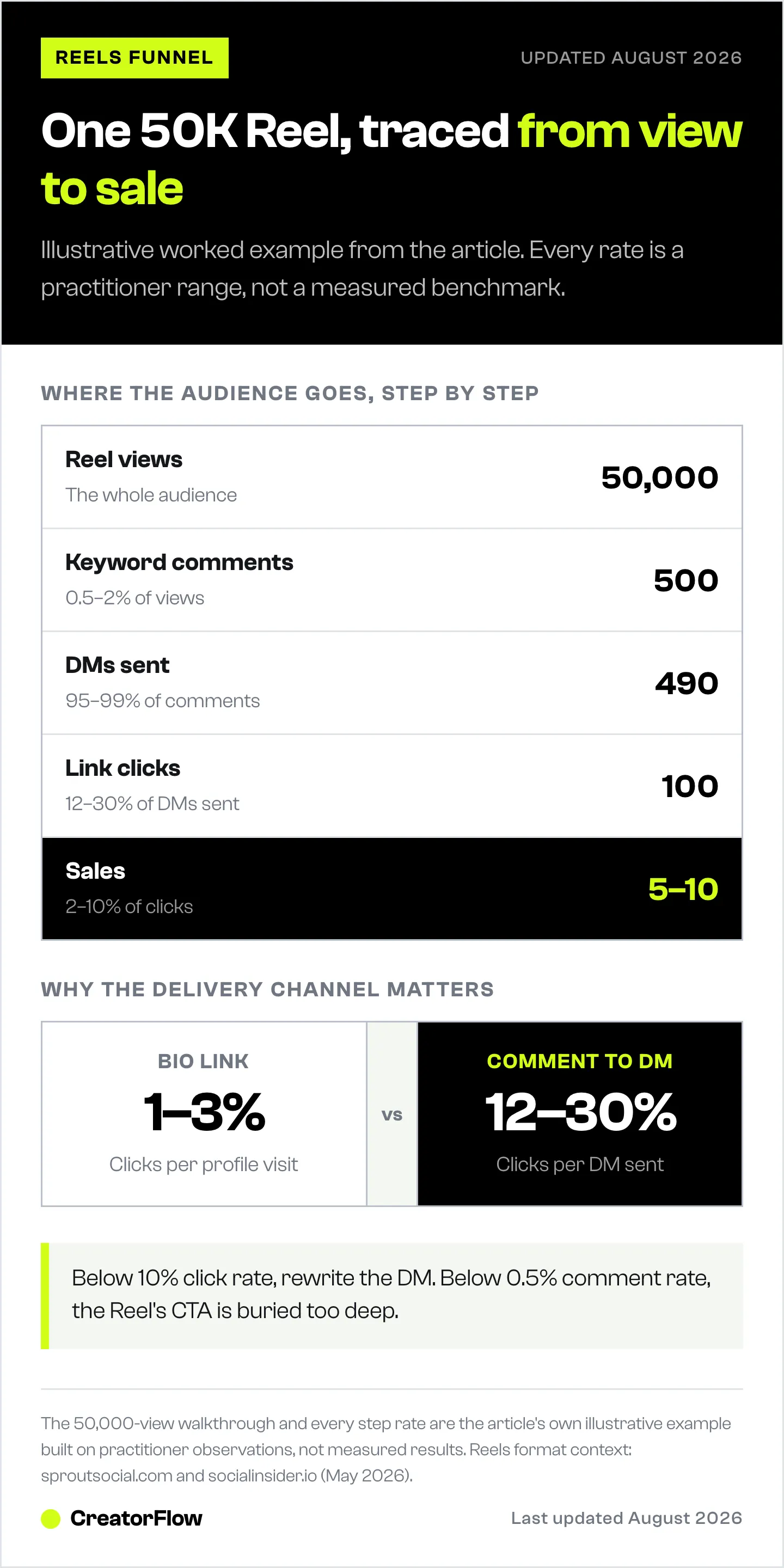
| Step | Typical Conversion | What to Track |
|---|---|---|
| Reel views | — | Total views |
| Comments with keyword | 0.5-2% of views | Comment count |
| DMs successfully sent | 95-99% of comments | DM send rate |
| Link clicks | 12-30% of DMs sent | Click rate |
| Sales/conversions | 2-10% of clicks | Affiliate dashboard |
A Reel with 50K views might generate 500 keyword comments, 490 DMs sent, 100 clicks, and 5-10 sales. The exact numbers vary by niche, audience trust, and product fit.
What good looks like:
- Comment rate above 1% of views: hook and CTA are working
- DM send rate above 95%: automation is firing correctly
- Click rate above 15%: DM copy and link relevance are strong
- Sales rate above 5%: product matches audience intent
If your click rate is below 10%, the DM copy is the problem. Rewrite it. If your comment rate is below 0.5%, the Reel CTA is buried. Move it earlier and repeat it.
Common Reel-to-DM Mistakes
Vague CTA. “DM me for the link” requires the viewer to open your profile, find your handle, send a DM, and wait. 90% of viewers won’t. Use a comment keyword instead.
Generic keyword. “LINK” or “INFO” trains your audience to expect spammy DMs. Specific keywords convert better.
Slow response time. Manual replies take hours. Viewers buy elsewhere. Automation responds in under 60 seconds, which keeps you inside the buying window.
No follow-up. One DM and done leaves 5-10% of conversions on the table. A 24-hour follow-up recovers them.
Sending viewers to your bio. If you DM someone “the link is in my bio”, you’ve added 3 steps of friction. Send the link directly in the DM.
For the full breakdown of where DM funnels leak, see DM funnel complete guide.
Real Funnel Examples by Niche
Fashion creator. Reel: outfit transition, 30 seconds, voiceover “Comment OUTFIT for the exact pieces.” DM delivers 4 affiliate links with sizing notes. Typical click rate: 18-25%.
Recipe creator. Reel: 60-second cooking demo, voiceover “Comment RECIPE for the full ingredient list and the kitchen tool I used.” DM delivers a recipe PDF link plus an Amazon affiliate link to the tool. Typical click rate: 20-30%.
Fitness creator. Reel: 15-second workout using a resistance band, caption “Comment BAND for the link.” DM delivers a single affiliate link with a discount code. Typical click rate: 15-22%.
Travel creator. Reel: 45-second hotel walkthrough, voiceover “Comment STAY for the booking link.” DM delivers a Booking.com or hotel affiliate link with a brief stay tip. Typical click rate: 12-18%.
For scaling these across multiple Reels and accounts, see scale affiliate marketing with Instagram DM automation.
When to Layer Email Capture
For low-ticket affiliate offers (under $50), send the link directly. Friction kills conversion at this price point.
For higher-ticket offers (above $50) or recurring products, layer email capture into the flow:
- Viewer comments keyword
- DM asks “What’s your email? I’ll send you the link plus a quick guide.”
- Email captured, link sent to email
- Email sequence nurtures over 5-7 days
This adds friction but builds an asset you own. For affiliate offers above $200 or course commissions, the email list compounds value over time. CreatorFlow Pro at $15/month flat (creatorflow.so, May 2026) supports email capture inside the DM flow on its paid tier.
The rule: low ticket = direct link, high ticket = email layer. Don’t add the email step for a $20 Amazon product. Don’t skip it for a $300 course commission.
FAQ
How many comments do I need before automation makes sense?
If your Reels regularly hit 30+ keyword comments, manual replies start losing money. At 100+ comments, you’ll lose most of the intent before you finish replying. Automation pays for itself by Reel two.
Will Instagram flag my account for using automation?
Tools that use Meta’s official Instagram API operate inside Instagram’s terms. The 200 DMs/hour pacing is a tool-side behavioral safety cap, not a Meta-published limit. Meta’s actual rate limits are per-second on the Instagram Login path (100/sec for text and links, 10/sec for audio and video). Avoid tools that use unofficial APIs or scraping.
What if my Reel goes viral and exceeds the 200 DMs/hour pacing cap?
The DMs queue and send over the next several hours. A viral Reel with 1000 keyword comments takes about 5 hours to fully process. Most viewers still receive their DM the same day, well inside the buying window.
Can I use the same DM template for every Reel?
You can, but you shouldn’t. Match the DM to the Reel content. A fashion DM about an outfit converts better than a generic “here’s the link” message used across all niches.
Does the comment have to be exact for the trigger to fire?
Most automation tools allow keyword variants (OUTFIT, outfit, Outfit, OUTFIT please) so case and surrounding words don’t matter. Set up 2-3 keyword variants per campaign to catch typos.
What’s the click-through rate I should expect from DMs?
12-30% of DMs sent will click the link, depending on offer relevance, audience trust, and DM copy. Below 10% means the DM needs a rewrite. Above 25% means you’ve matched intent well.
Should I require people to follow me before sending the link?
Only if follower growth is your primary goal. For affiliate revenue, follow-gating drops click rates 30-50%. If you optimize for affiliate income, send the link without the follow requirement.
Sources: sproutsocial.com (May 2026), socialinsider.io (May 2026), spurnow.com (May 2026), creatorflow.so (May 2026). Conversion ranges reflect practitioner observations and vary by niche, audience, and offer.


