

Free tools for content creators cover every job: Edits for Reels, Canva for design, Buffer for scheduling, Kit for email, Payhip for selling and CreatorFlow for comment replies. Each free plan stops somewhere. It caps your subscribers, takes a share of each sale, resets a monthly allowance, marks your files or limits how you can use them. That limit decides when you start paying.
Most “free creator tools” lists stop at the word free. Then the bill arrives at an odd moment. Your first brand deal uses a song your plan does not let you use for money. Your clip tool runs out of minutes in week two. Your email tool changed its free plan, and the old number on a blog is now wrong. MailerLite’s free plan, for example, now covers 250 subscribers.
This guide sorts 20 free plans by the kind of limit each one has, with every limit checked on the tool’s own pricing or help page on November 10, 2026. Use it to build a $0 setup that grows with you and to know which upgrade to buy first. For every option in one place, see our searchable list of 266 content creator tools.
Key Takeaways
- Every free plan has one main limit: a cap on your audience, a fee per sale, an allowance that resets, a mark on your files, or a rule on how you use them.
- Audience caps and fees per sale wait until you earn: Kit is free up to 10,000 subscribers, and Payhip takes 5% of each sale with no monthly price.
- Allowances cost you every month you post: Opus Clip gives 60 credits a month, Suno 50 credits a day, Buffer 10 queued posts per channel.
- Rights limits matter on the first paid post: Suno’s free plan has no commercial rights, and Kittl’s free plan is for personal use only.
- Check the feature, not only the size: Kit’s free plan covers 10,000 subscribers but has no automated email sequences, which is what the paid plan adds.
- Pay first for the limit your audience can see, then for the one that blocks money. Caps and fees can wait.
Free Tools for Content Creators: The Limit in Each Plan
This table lists 20 free plans and the one limit that matters most in each. The limit type tells you when the plan will start to cost you. Paid prices are monthly unless the row says yearly (checked November 10, 2026).
| Tool | Job | Free plan limit | Limit type | First paid plan |
|---|---|---|---|---|
| Edits | Edit Reels | Free, 4K export, no watermark | None found | No paid plan listed |
| CapCut | Edit video | 4K export without a watermark is a Pro feature | Visible mark | Pro $19.99/month |
| Opus Clip | Long video to clips | 60 credits a month, watermark, exports kept 3 days | Allowance | Starter $15/month |
| Canva | Design | 5GB storage; background remover and resize are paid | Allowance | Pro $18/month or $144/year |
| Buffer | Schedule posts | 3 channels, 10 queued posts per channel | Allowance | $5/month per channel, billed yearly |
| Publer | Schedule posts | 3 accounts, 10 queued posts each | Allowance | From $5/month |
| Kit | 10,000 subscribers; no automated sequences | Audience cap | Creator $39/month, or $33 billed yearly | |
| beehiiv | Newsletter | 2,500 subscribers | Audience cap | Lite $59/month, or $49 billed yearly |
| Sender | 2,500 subscribers, 15,000 emails a month | Audience cap | Standard $9/month | |
| MailerLite | 250 subscribers, 2,500 emails a month | Audience cap | From $12/month | |
| Gumroad | Sell products | 10% + $0.50 per sale; 30% on Discover sales | Fee per sale | No subscription |
| Payhip | Sell products | 5% per sale | Fee per sale | Plus $29/month |
| Ko-fi | Tips and shop | 0% on one-off tips if you opt out; 5% on memberships and shop | Fee per sale | Gold $12/month |
| Collabstr | Brand deals | Free to list; 15% of each deal | Fee per sale | Not needed |
| Suno | AI music | 50 credits a day; no commercial rights | Rights | Pro $10/month, or $8 billed yearly |
| Uppbeat | Music | 3 free downloads, your own channels only | Rights | Essentials $6.99/month |
| Leonardo AI | AI images | 150 tokens a day; free images are public | Allowance | See pricing page |
| Remove.bg | Remove backgrounds | Free up to 0.25 megapixels | Visible mark | See pricing page |
| Auphonic | Clean audio | 2 hours a month; a jingle on free files | Visible mark | See pricing page |
| CreatorFlow | Comment and DM replies | 500 DMs a month, 1 Instagram account | Allowance | Pro $15/month |
CapCut says its Pro price varies by region and device. Buffer, Canva, Kit and Suno show yearly prices first. A plan that reads “$5” can mean $60 paid up front, so read the billing period before you compare two numbers.
The Five Kinds of Free Plan Limits
A free plan limits one of five things: how big your audience can get, how much of each sale you keep, how much you can make each month, what your audience sees, or how you can use what you make. Each one starts to cost you at a different time. Caps and fees wait until you grow or sell. Allowances, marks and rights cost you sooner.
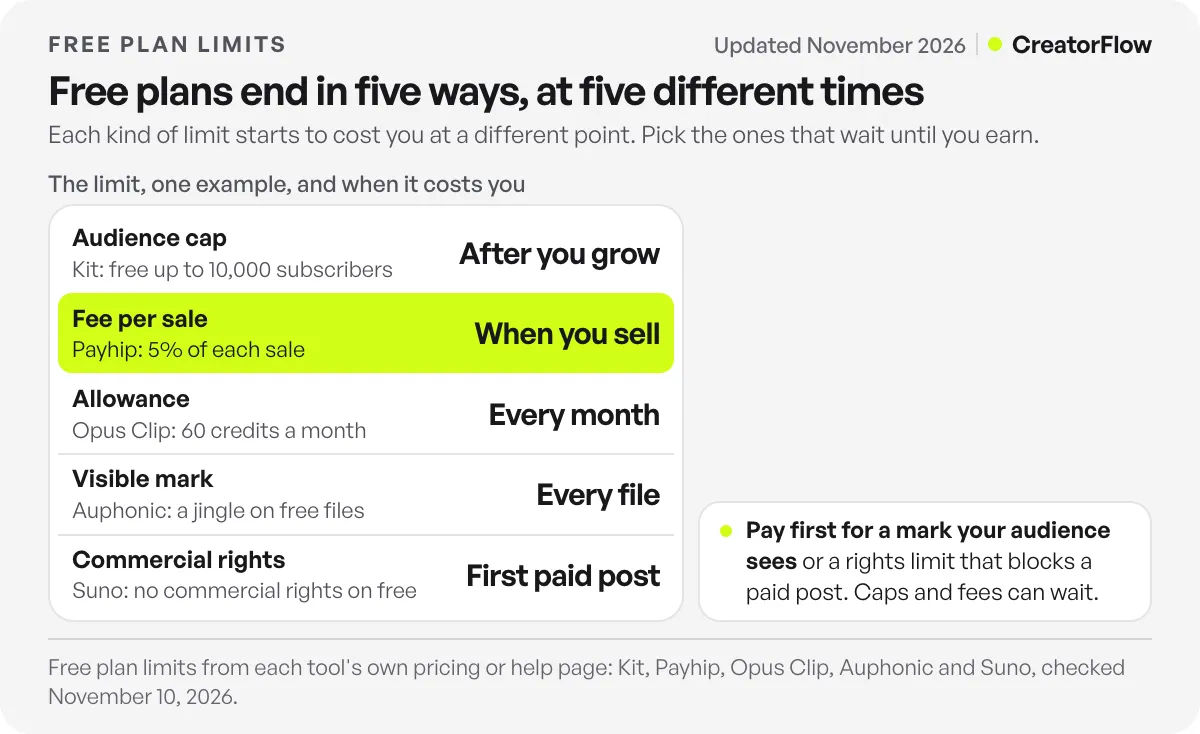
Here is when each kind starts to cost you:
- Audience cap: after you grow past the number. Email tools work this way.
- Fee per sale: only when you sell. You pay nothing in a month with no sales.
- Allowance: every month you post a lot. Minutes, credits and queued posts reset, so a busy week can use them up.
- Visible mark: on every file you publish. A watermark, a jingle or a low-resolution export is what your audience sees.
- Rights limit: on your first paid post. A sponsored video is commercial use, and some free plans do not allow it.
The order matters. The first two limits wait until the tool is already paying for itself. The last three can cost you before you earn anything from the tool.
Email Tools: Free Until Your List Grows
Email tools cap your subscriber count, so the free plan lasts until your list grows. The caps vary a lot. Kit allows 10,000 subscribers for free, Sender and beehiiv allow 2,500, and MailerLite allows 250. Check what the free plan leaves out, too. Kit’s free plan has no automated email sequences, so a welcome series needs a paid plan.
The numbers, from each tool’s pricing page (checked November 10, 2026):
- Kit is free for up to 10,000 subscribers. Its Creator plan costs $39 a month for 1,000 subscribers, or $33 a month billed yearly. It adds automated sequences and the visual automation builder.
- Sender is free for up to 2,500 subscribers and 15,000 emails a month. Standard costs $9 a month.
- beehiiv is free on its Free plan for up to 2,500 subscribers. Lite costs $59 a month, or $49 a month billed yearly.
- MailerLite is free for 250 subscribers and 2,500 emails a month. Paid plans start at $12 a month.
The Kit example shows why you should read the whole plan. On Kit, the reason to upgrade is usually a feature: you want new subscribers to get a welcome email on their own. If you send a weekly newsletter by hand, the free plan can last a long time.
Free plans also change. MailerLite’s free plan allowed 1,000 subscribers until September 2025, and many articles still quote that number. Read the pricing page on the day you sign up.
For how to grow a list from Instagram comments, see our guide to sending new emails from Instagram DMs into Kit, Klaviyo or Mailchimp.
Selling Tools: Free Until You Make a Sale
Selling tools with no monthly price take a share of each sale instead. Gumroad takes 10% plus $0.50 on direct sales and 30% on sales from its Discover marketplace. Payhip’s free plan takes 5%. Ko-fi takes 5% on memberships and shop sales, and 0% on one-off tips if you turn off its full feature set. You pay nothing in a month with no sales.
From each tool’s own page (checked November 10, 2026):
- Gumroad: 10% + $0.50 per sale through your profile or direct links, 30% on Discover sales.
- Payhip: Free Forever plan with a 5% fee. Plus costs $29 a month with a 2% fee. Pro costs $99 a month with no transaction fee.
- Ko-fi: 5% on monthly tips, memberships, commissions and shop sales. One-off tips are 0% if you opt out of “all of Ko-fi”. New accounts start with it on, so tips carry 5% until you switch it off. Gold costs $12 a month, billed monthly.
- Collabstr: free to list your rates. It takes 15% when a brand pays you. Brands pay their own separate fee.
Here is what that means on one $20 product. Gumroad keeps $2.50 of each direct sale. Payhip’s free plan keeps $1.00. Payment processing fees can come on top on some platforms, so check each page.
When does a paid plan make sense? Payhip Plus saves you 3% of each sale for $29 a month. That pays off once you sell about $967 a month ($29 divided by 3%). Below that, the free plan costs less. This is our arithmetic from Payhip’s published fees, not a measured result.
For a full comparison of stores, read where to sell digital products as a creator.
Video, AI and Scheduling Tools: Free Until the Allowance Runs Out
Video, AI and scheduling tools give you an allowance that resets. Opus Clip gives 60 credits a month. Suno gives 50 credits a day and Leonardo AI gives 150 tokens a day. Buffer and Publer each allow 3 accounts with 10 queued posts per account. If you post every day, you reach these limits in a normal week.
From each tool’s own page (checked November 10, 2026):
- Opus Clip: 60 credits a month. Free videos carry a watermark, and exports stay available for 3 days. Starter costs $15 a month for 150 credits.
- Buffer: 3 channels and 10 scheduled posts per channel. Essentials costs $5 a month per channel, billed yearly ($60 a year).
- Publer: 3 social accounts (X excluded) and 10 scheduled posts at a time for each. Paid plans start at $5 a month.
- Leonardo AI: 150 tokens a day, with no rollover. Free images are public. Private mode needs a paid plan.
- CreatorFlow: 500 DMs a month on 1 Instagram account. Pro costs $15 a month for 2 accounts and 5,000 DMs a month per account.
Some tools have no allowance to run out. Edits, Meta’s video app, exports in 4K with no watermark for free, according to its App Store listing. OBS Studio and Audacity are free, open source programs for recording and audio. Compare more editors in our guide to video editing apps for Instagram Reels.
Watermarks and Branding: Limits Your Audience Can See
Some free plans mark what you publish. CapCut lists 4K export without a watermark as a Pro feature. Opus Clip watermarks free videos. Remove.bg is free only for small images up to 0.25 megapixels. Auphonic adds a jingle to free files. Linktree shows its branding on free pages. Your audience sees these marks on every post.
The details (checked November 10, 2026):
- CapCut: the upgrade prompt reads “Upgrade to CapCut Pro to export in 4K without a watermark”. CapCut lists Pro at $19.99 a month or $179.99 a year, and says the price varies by region.
- Remove.bg: free for low-resolution images, up to 0.25 megapixels (about 625×400 pixels).
- Auphonic: 2 hours of processed audio a month for free. Free files come with a jingle.
- Linktree lists branding removal on its Pro plan and above. If you want a free page without it, compare free link-in-bio tools.
A mark is a cost even when the price is $0. If you post product photos for a brand, a small cut-out or a watermark costs you more than a monthly fee.
Commercial Rights: Limits on How You Use What You Make
Some free plans limit how you can use what you make. Suno’s free plan has no commercial rights. Kittl’s free plan is for personal use only. Uppbeat gives 3 free downloads for individual use on your own channels. A sponsored post counts as commercial use, so check the plan before a brand pays you.
From each tool’s own page (checked November 10, 2026):
- Suno: 50 credits a day and “No commercial rights” on the free plan. Pro costs $10 a month, or $8 a month billed yearly.
- Kittl: “For personal use only (no commercial rights)” on the free plan.
- Uppbeat: 3 free downloads for individual use on your own channels. Essentials costs $6.99 a month.
This limit is easy to miss because it costs nothing at first. You make a song or a design for free. Weeks later you put it in a paid post and break the plan’s terms. Upgrade before that post, not after it.
A $0 Setup That Grows With You
Start with the free plans whose limit waits until you earn. Use Edits or CapCut for video, Canva for design, Buffer for scheduling, Kit for email, Payhip or Gumroad for selling, and CreatorFlow for Instagram comments and DMs. Then pay first for the limit your audience sees or the one that blocks a paid post.
Here is the order we suggest for upgrades:
- A mark your audience sees. If a watermark or jingle sits on your posts, pay to remove it, or switch to a free tool without one.
- A rights limit before a paid post. Upgrade your music or design tool before the first sponsored video.
- An allowance you hit every week. If you run out of minutes or queued posts by midweek, that plan is now part of your work.
- A missing feature. Pay when you want a feature the free plan leaves out, such as Kit’s automated welcome sequence.
- A cap or a fee. Upgrade last. When you reach these, the tool is already bringing you subscribers or sales.
One tool fits this setup well on Instagram. People often comment to ask which apps you use. Ask them to comment TOOLS, and CreatorFlow sends your tool list by DM to everyone who comments it, in seconds. It works on every plan, including Free with 500 DMs a month. Read what CreatorFlow’s free plan includes, or see how other creators set it up on the page for content creators.
If you post mostly on Instagram, our list of Instagram tools sorted by job shows which jobs Meta’s own free apps already cover.
FAQ
What are the best free tools for content creators?
Good free starting points are Edits or CapCut for video, Canva for design, Buffer for scheduling, Kit for email, Payhip or Gumroad for selling, and CreatorFlow for Instagram comments and DMs. Each has a free plan with one main limit. Pick the ones whose limit waits until you grow or sell.
Are free creator tools really free?
They cost $0 to start, but each free plan has a limit. It can be a cap on subscribers, a fee on each sale, a monthly allowance, a watermark, or a rule against commercial use. Read the limit before you build your work around a tool.
Which free email tool allows the most subscribers?
Of the email tools we checked, Kit allows the most: up to 10,000 subscribers on its free plan. Sender and beehiiv allow 2,500, and MailerLite allows 250. Kit’s free plan has no automated email sequences, so a welcome series needs its paid plan.
Which free video editor has no watermark?
Edits, Meta’s video app for Instagram, is free and exports in 4K with no watermark, according to its App Store listing. CapCut lists 4K export without a watermark as a Pro feature, and Opus Clip watermarks videos on its free plan.
Can I use free AI music in a sponsored video?
Check the plan first. Suno’s free plan has no commercial rights, and a sponsored video is commercial use. Uppbeat’s free downloads are for individual use on your own channels. Upgrade before the paid post goes live.
What is the cheapest way to sell digital products as a creator?
A tool with no monthly price and a fee per sale. Payhip’s free plan takes 5% of each sale, and Gumroad takes 10% plus $0.50 on direct sales. On a $20 product, that is $1.00 on Payhip and $2.50 on Gumroad, before any payment processing fees.
When should a creator start paying for tools?
Pay first when a free plan puts a mark on what your audience sees, or blocks a paid post. Pay next when you hit a monthly allowance every week. Leave subscriber caps and fees per sale for last, because by then the tool is already bringing you money.
Sources and checks
Free plan limits and prices checked on November 10, 2026 on each tool’s own pricing or help page: Kit, Sender, beehiiv, MailerLite, Gumroad, Payhip, Ko-fi, Collabstr, Opus Clip, Buffer, Publer, Canva, CapCut, Remove.bg, Auphonic, Suno, Kittl, Uppbeat, Leonardo AI and the Edits App Store listing. The Payhip break-even figure is our own arithmetic from its published fees. Free plans change often, so check each page before you sign up.