
Instagram appointment-setting automation responds to prospect comments in seconds with a qualifying question and your Calendly link. Responding within 5 minutes converts leads at 21x the rate of responding after an hour (LeadResponse, April 2026). The average business takes 42 hours to respond. Automation closes that gap to under 10 seconds, turning Instagram engagement into booked calls on autopilot.
This happens every day. The average business takes 42 hours to respond to a lead (GreetNow, April 2026). Responding within 5 minutes converts leads at 21x the rate of responding after an hour (LeadResponse, April 2026).
The fix isn’t hiring a VA to babysit your DMs. It’s building an automated appointment-setting system that qualifies leads and sends booking links in seconds, not hours. If you are weighing that build against paying someone, we ran the numbers on what a human DM setter costs versus an AI setter. For a full overview of how this technology works, start with our Instagram DM automation complete guide.
Key Takeaways
- Response speed matters: Responding within 5 minutes converts leads at 21x the rate of responding after an hour (LeadResponse, April 2026)
- 5-stage system: Trigger (comment/Story/keyword), qualify (one multiple-choice question), book (send Calendly link), confirm, and follow up
- DM performance: Automated Instagram DMs achieve 82-90% open rates and up to 20% conversion on targeted campaigns
- Booking conversion math: 100 comments on a Reel can yield 8 booked calls and 2 new clients when using qualifying automation
- No-show prevention: Discovery call no-show rates run 20-40% without confirmation systems. Automated confirmations and reschedule messages recover lost leads
- Bottom line: Set up a 3-step automated flow (trigger, qualify, book) with CreatorFlow in 5 minutes to convert Instagram comments into booked appointments on autopilot

What Is Instagram Appointment Setter Automation?
Instagram appointment setter automation replaces the manual work of an appointment setter with a DM flow. Someone comments a keyword, replies to your Story, or messages you a word like “pricing.” The automation answers in seconds, asks one qualifying question, then sends your Calendly or Cal.com link based on the answer. You keep the closing call. The software handles the chasing, the sorting, and the booking link.
Why Instagram Is a Goldmine for Service Businesses
Instagram isn’t a social media app for service providers. It’s a lead generation engine.
Your content builds trust. Your Stories show your process. Your Reels demonstrate expertise. By the time someone DMs you, they’re already pre-sold. They don’t need convincing. They need a way to book.
The problem: most service providers treat Instagram like a billboard. Post content, hope someone reaches out, then manually respond hours later. That gap between interest and response is where you lose clients.
Automated Instagram DMs achieve 82-90% open rates and up to 20% conversion rates on targeted campaigns (LeadResponse, April 2026). Compare that to email marketing’s 20-25% open rates. The channel is there. The intent is there. You need the system to capture it.
The 5-Stage Appointment-Setting System
Here’s the complete pipeline from content to booked call. Each stage runs automatically once you set it up.
Stage 1: Trigger
The trigger is what starts the automation. Three options:
Comment triggers work best for Reels and carousel posts. Add a CTA like “Comment BOOK to grab a free strategy call” to your caption. When someone comments the keyword, the automation fires.
Story reply triggers work when you share behind-the-scenes content or client results. Ask “Reply CALL if you want this for your business.” The reply starts the DM sequence.
Keyword DM triggers catch organic interest. When someone DMs “pricing,” “availability,” or “how do I work with you,” the automation responds instantly.
Pro tip: use 2-3 keyword variations. People type “price,” “pricing,” “how much,” and “cost.” Map all of them to the same automation. See our keyword trigger automation guide for advanced keyword strategies.
Stage 2: Qualify
Not every lead is a good fit. Sending your booking link to everyone wastes your time with no-shows and unqualified calls.
Ask one qualifying question before sharing the booking link. Keep it simple:
For consultants:
Thanks for reaching out! Before I send the booking link, quick question:

What's the main challenge you're looking to solve?

A) Revenue growth
B) Operations/systems
C) Team management
D) Something else

Just reply with A, B, C, or D and I'll send you the right calendar link.
For photographers:
Excited to hear from you! Quick question so I can send the right info:

What type of session are you looking for?

A) Portrait/headshot
B) Wedding/event
C) Brand/commercial
D) Other

Reply with the letter and I'll send booking details.
For agencies:
Great to connect! To make sure our intro call is productive:

What's your monthly marketing budget range?

A) Under $2K/mo
B) $2K-5K/mo
C) $5K-10K/mo
D) $10K+/mo

Reply with the letter and I'll send the right next step.
This does three things: filters out tire-kickers, segments leads by service type, and gives you context before the call. You can also collect emails during the DM conversation to follow up beyond Instagram’s 24-hour window.
Stage 3: Book
After they respond to the qualifying question, send the booking link automatically. The message matters.
Based on your answer, here's my calendar for a free 15-minute strategy call:

[Your Calendly/Cal.com link]

Pick any time that works. I'll send a confirmation with a short prep form so we can make the most of our time together.

Talk soon!
Keep the message short. One link. One call to action. No walls of text.
Which booking tool to use:
| Tool | Price | Best For | Key Feature |
|---|---|---|---|
| Calendly Free | $0/mo | Solo providers starting out | 1 event type, unlimited 1-on-1 meetings |
| Calendly Standard | $10/seat/mo (annual) | Established providers | Unlimited event types, HubSpot/Stripe integration |
| Cal.com | $0-12/mo | Open-source preference | Self-hostable, unlimited event types on free tier |
| Acuity (Squarespace) | $16/mo | Providers needing payments | Built-in payment collection, intake forms |
| TidyCal | $29 one-time | Budget-conscious providers | Lifetime deal, basic scheduling |
(Calendly pricing: calendly.com/pricing, April 2026)
Calendly does not integrate natively with Instagram DMs. You need a DM automation tool (CreatorFlow, ManyChat, or LinktoDM) to send the booking link automatically when followers comment or message specific keywords.
Stage 4: Confirm
Booked doesn’t mean showed. No-show rates for discovery calls range from 20-40% without confirmation systems.
Set up a confirmation message that fires after booking:
You're booked! Here's what to expect:

[Date/Time from booking]
[Zoom/Google Meet link]

Before our call, think about:
1. Your biggest challenge right now
2. What success looks like in 90 days
3. Any questions you have for me

See you there!
If your booking tool supports email/SMS reminders, enable them. Calendly Standard sends automated reminders. Cal.com does too on paid plans.
Stage 5: Follow Up
Two follow-up scenarios matter:
No-show follow-up (send 1 hour after missed call):
Hey! I noticed we missed our call today. No worries, life happens.

Here's my calendar if you'd like to reschedule:
[Booking link]

The link stays active for 7 days. Looking forward to connecting.
Post-call follow-up (send within 24 hours):
Great chatting today! As discussed, here's the next step:

[Proposal link / Payment link / Next action]

Let me know if any questions come up. Happy to help.
The 24-hour Instagram messaging window applies here. You can only send automated follow-ups to users who engaged within the last 24 hours. For longer follow-ups, capture their email during the booking process.
Automation Tools Compared for Service Businesses
| Feature | CreatorFlow | ManyChat | LinktoDM |
|---|---|---|---|
| Monthly Price | $15/mo flat | From $17/mo (scales with contacts) | $15/mo flat |
| Comment-to-DM | Yes | Yes | Yes |
| Story Reply Triggers | Yes | Yes | Yes |
| Keyword DM Triggers | Yes | Yes | Yes |
| Platform Coverage | Instagram + WhatsApp + SMS + email | ||
| Qualifying Questions | Yes | Yes (advanced branching) | Yes |
| Booking Link Delivery | Yes | Yes | Yes |
| Email Capture | Yes (Pro) | Yes | Yes |
| Link Click Tracking | Yes (Pro) | Yes | Limited |
| Setup Time | ~5 minutes | 30-60 minutes | ~10 minutes |
| Best For | Solo service providers | Agencies, multi-channel | Creators with existing audience |
(ManyChat pricing: manychat.com/pricing, April 2026. LinktoDM pricing: linktodm.com/pricing, April 2026)
Pick CreatorFlow if you’re a solo consultant, freelancer, or photographer who wants fast setup and flat pricing. No per-contact fees. No complexity you don’t need.
Pick ManyChat if you need multi-platform automation (Instagram + WhatsApp + SMS), advanced conditional logic, or manage multiple client accounts. ManyChat serves over 1 million businesses across 170+ countries (manychat.com, April 2026).
Pick LinktoDM if you want flat pricing with features like Backtrack (automate responses to comments from the past 7 days) and ask-to-follow logic (linktodm.com, April 2026).
Templates by Service Business Type
Pick the template closest to your business. Therapists and wellness practitioners have extra privacy considerations; our guide to DM automation for therapists and wellness coaches covers HIPAA-safe booking flows in detail.
Consultant / Business Coach
Post CTA: “Comment STRATEGY to book a free 20-min growth audit”
Auto-DM sequence:
Message 1 (instant):
"Hey! Thanks for your interest in the growth audit. Quick question before I send the booking link:

What's your current monthly revenue range?
A) Under $5K
B) $5K-$20K
C) $20K-$50K
D) $50K+

Reply with the letter!"

Message 2 (after reply):
"Perfect. Here's my calendar for your free growth audit:
[Calendly link]

Pick any slot this week. I review your business before our call so we can go straight into strategy."
Freelance Designer / Developer
Post CTA: “Need a website that converts? Comment DESIGN for availability”
Auto-DM sequence:
Message 1 (instant):
"Hey! Love that you're thinking about your website. To make sure I'm the right fit:

What type of project are you looking for?
A) New website from scratch
B) Redesign/refresh
C) Landing page
D) Ongoing design work

Reply with the letter!"

Message 2 (after reply):
"Got it! Here's my booking link for a free 15-min project scoping call:
[Booking link]

I'll ask a few questions about your brand and goals so I can give you a rough timeline and estimate on the call."
Photographer
Post CTA: “Comment SHOOT to check availability for your session”
Auto-DM sequence:
Message 1 (instant):
"Thanks for reaching out! I'd love to work together. Quick question:

What type of session are you interested in?
A) Portrait / headshot
B) Wedding / engagement
C) Brand / product
D) Event coverage

Reply with the letter and I'll send you pricing + availability!"

Message 2 (after reply):
"Here's my availability for the next 4 weeks:
[Booking link]

I'll send a prep guide after you book so we can plan your session."
Real Estate Agent
Post CTA: “Thinking about buying or selling? Comment HOME for a free market analysis”
Auto-DM sequence:
Message 1 (instant):
"Hey! Great timing. Quick question:

Are you looking to:
A) Buy a home
B) Sell your home
C) Both (buy and sell)
D) Investment property

Reply with the letter!"

Message 2 (after reply):
"Here's my calendar for a free 15-min market analysis call:
[Booking link]

I'll pull recent comps in your area before our call so we have real numbers to work with."
Salon / Spa / Beauty Professional
Post CTA: “Comment GLOW to book your next appointment”
Auto-DM sequence:
Message 1 (instant):
"Hey! Thanks for your interest. What service are you looking for?

A) Hair (cut, color, styling)
B) Nails
C) Facial / skincare
D) Full glam / special event

Reply with the letter!"

Message 2 (after reply):
"Here's my booking page with real-time availability:
[Booking link]

New clients get a complimentary consultation to discuss exactly what you're looking for."
Metrics That Matter
Track these numbers weekly to optimize your appointment-setting system:
| Metric | What It Measures | Good Benchmark |
|---|---|---|
| Comment-to-DM Rate | % of commenters who trigger the automation | 60-80% |
| Qualification Response Rate | % who answer the qualifying question | 40-60% |
| DM-to-Booking Rate | % who click the booking link and schedule | 15-25% |
| Show-Up Rate | % of booked calls that happen | 70-85% |
| Call-to-Client Rate | % of calls that convert to paying clients | 20-40% |
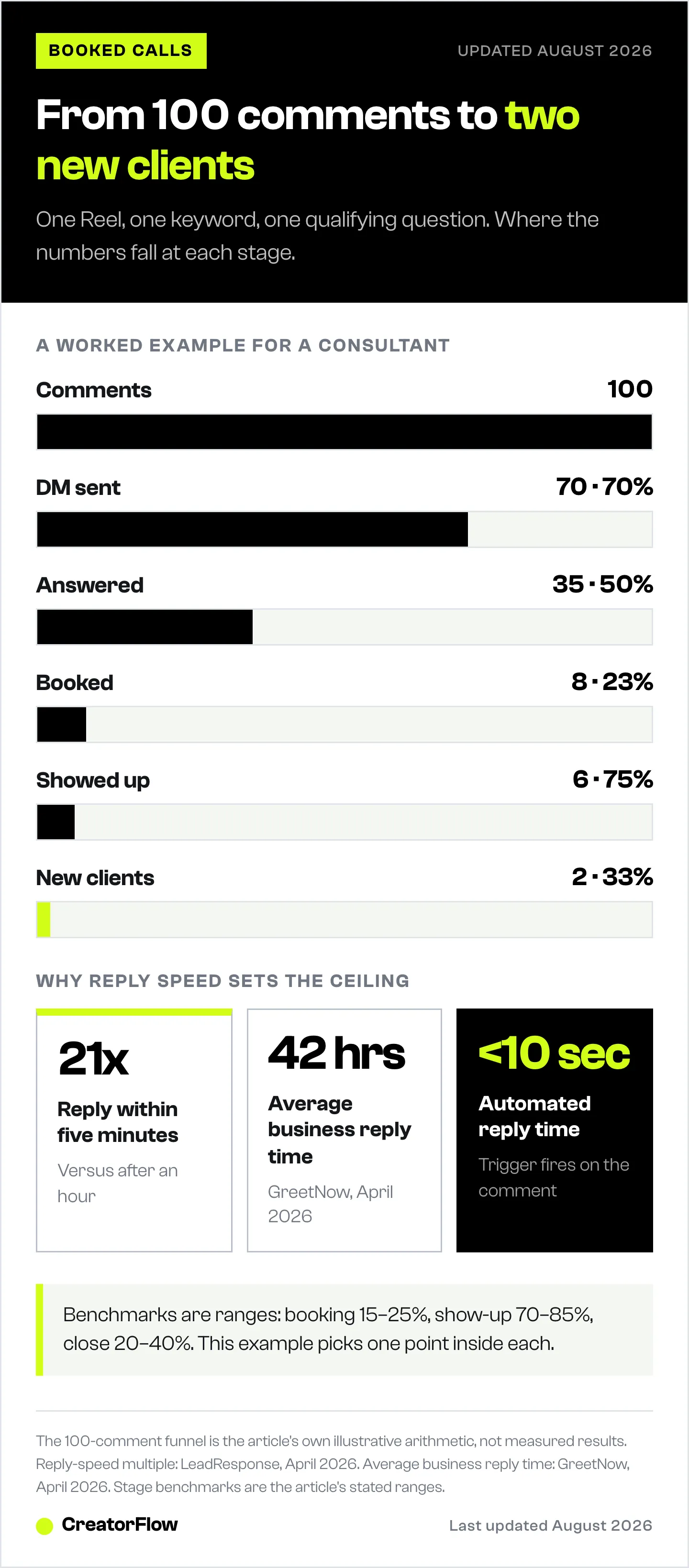
Example math for a consultant:
- 100 comments on a Reel with “Comment STRATEGY”
- 70 trigger the DM (70% comment-to-DM rate)
- 35 answer the qualifying question (50% response rate)
- 8 book a call (23% booking rate)
- 6 show up (75% show rate)
- 2 become clients (33% close rate)
Two new clients from one Reel. If your service costs $2,000, that’s $4,000 from a single post. The automation cost: $15/month.
Common Mistakes to Avoid
Mistake #1: Skipping Qualification
Sending your booking link to everyone who comments sounds efficient. It’s not. You’ll fill your calendar with people who can’t afford you, aren’t ready to buy, or aren’t a good fit. One qualifying question saves hours of wasted calls.
Mistake #2: Writing Robotic Messages
Automated doesn’t mean robotic. Write like you talk. Use contractions. Be warm.
Bad: “Thank you for your inquiry. Please select from the following options to proceed with scheduling.”
Good: “Hey! Love that you’re interested. Quick question before I send the booking link…”
Mistake #3: Too Many Steps Before Booking
Every extra step loses people. The ideal flow: trigger, one qualifying question, booking link. Three steps total. Some businesses add 4-5 qualifying questions and wonder why nobody books. Keep it to one question with multiple-choice answers.
Mistake #4: No Follow-Up for No-Shows
20-40% of booked calls end in no-shows. Without a follow-up message, those leads are gone. Set up an automatic reschedule message. Many of them will rebook. Timing and wording matter here, and the no-show recovery flow for coaches covers what to send and when.
Mistake #5: Ignoring the 24-Hour Window
Instagram’s messaging API enforces a 24-hour window. You can only send automated messages to users who interacted with your account in the last 24 hours. For follow-ups beyond that window, capture their email during booking and follow up via email instead.
How to Set This Up with CreatorFlow (5 Minutes)
-
Connect your Instagram at creatorflow.so. OAuth login, no password sharing required. CreatorFlow uses Meta’s official Instagram Graph API.
-
Create a new automation. Choose “Comment Trigger” and enter your keyword (e.g., BOOK, STRATEGY, CALL).
-
Write your qualifying message. Use the templates above. Add 3-4 multiple choice options.
-
Set the booking response. Paste your Calendly or Cal.com link into the follow-up message.
-
Preview and activate. CreatorFlow shows you exactly what the DM conversation looks like before you go live.
That’s it. Next time someone comments your keyword, they get a DM within seconds. No manual work. No missed leads.
FAQ
Is Instagram DM automation safe for my account?
Yes, when you use tools built on Meta’s official Instagram Graph API. CreatorFlow, ManyChat, and LinktoDM all use the official API. This means no password sharing, no third-party scraping, and minimal ban risk when using Meta’s official API and respecting rate limits. Automation tools pace automated DMs at about 200 messages per hour per account as a tool-side safety convention; Meta’s own published limits are per-second (developers.facebook.com, July 2026).
How many appointments can I book per day with automation?
It depends on your engagement volume. With the 200 DMs/hour pacing limit and a 15-25% DM-to-booking conversion rate, a post with 100 comments could generate 8-15 bookings. Most solo service providers see 5-15 booked calls per week after implementing automation.
Do I need a paid booking tool like Calendly?
No. Calendly’s Free plan supports one event type and unlimited 1-on-1 meetings, which is enough for most service providers starting out (calendly.com/pricing, April 2026). Upgrade to Standard ($10/seat/mo annual) when you need multiple event types or payment collection.
What if someone asks a question my automation can’t handle?
Good automation tools include human handoff. When someone sends a message your automation doesn’t recognize, you get notified and can respond manually. The automation handles the 80% of predictable interactions. You handle the 20% that need a personal touch.
Can I use this for high-ticket services ($5,000+)?
Absolutely. High-ticket services benefit most from qualification automation. The qualifying question filters out leads who can’t afford your service before they book a call. Your close rate goes up because every call is with a pre-qualified prospect.
How long does it take to see results?
Most service providers book their first automated call within 48 hours of setup. The system works as soon as you post content with a keyword CTA. More content with triggers means more bookings.
Related Articles
More guides for service businesses using Instagram automation:
- Instagram Automation for Coaches: Book 3X More Discovery Calls - Coach-specific automation workflows and templates
- Instagram DM Automation + Calendly: Auto-Book Calls - Step-by-step Calendly integration guide
- How to Qualify Instagram Leads Before Booking Discovery Calls - Complete guide to lead qualification frameworks
- Instagram DM Automation for Amazon Influencers - Affiliate-specific automation strategies
- How to Build an Instagram Sales Funnel - Complete funnel architecture guide
- Real Estate Leads on Social Media: The 24-Hour Rule - Capture flow and fair housing rules for agents
Ready to turn your Instagram into an appointment-setting machine? Start automating your booking process today.
Disclaimer: Results vary based on audience size, engagement rates, content quality, and niche. All automation tools mentioned use Meta's official Instagram Graph API. CreatorFlow is a product of CreatorFlow Labs, S.L. Calendly, ManyChat, LinktoDM, Cal.com, Acuity, and TidyCal are trademarks of their respective companies. Pricing verified as of May 2026 and may change. Instagram is a trademark of Meta Platforms, Inc.


