

Instagram DM automation for dentists sends a set reply when someone comments or messages a keyword such as VISIT, PRICES or ALIGNERS. The DM carries your new-patient booking link, a price range, your forms link or your opening hours, and it arrives in seconds, also outside office hours. Keep every message to general information and links. Symptoms, treatment details and patient names stay out of Instagram.
A Reel about clear aligners goes out on Tuesday afternoon. By Wednesday morning the comments hold dozens of “how much?”, “do you take new patients?” and “are you open Saturdays?”. The front desk opens at 8am and starts on the phones. The Instagram questions wait until lunch, and the people who asked at 9pm have already looked at the next practice in their feed.
This guide is for general dentists, orthodontists and cosmetic practices in the US, UK and EU. It covers the six keyword setups most practices need, the line between a safe DM and a privacy problem, how to answer price questions within advertising rules, and what to send when someone writes about tooth pain at midnight. It is general information, not legal advice. Check the rules for your practice with your compliance lead, your state dental board or the General Dental Council.
Key Takeaways
- Six keywords cover most dental DMs: VISIT for the booking link, PRICES, WHITENING and ALIGNERS for price ranges and consultations, FORMS for the new-patient forms link, HOURS for opening times and the emergency line.
- Message one carries everything: Meta allows one private reply per comment, sent within 7 days. The conversation continues only if the person answers, and then within 24 hours.
- Links and general facts only: a DM can send a booking page, a price list and opening hours. It never asks about pain, history or insurance details, and never confirms that someone is a patient.
- Public replies are the bigger risk: HHS settled with or fined three US dental practices, for $10,000, $23,000 and $50,000, after they disclosed patient information in replies to online reviews.
- Price DMs follow your price list: the ADA, several state boards and the GDC all expect fee information that is clear and complete. Send the same range your website shows, and say what it includes.
- The DM never triages: for pain or an emergency it sends your phone number and opening hours, and in the UK it points to NHS 111 out of hours.
- CreatorFlow Free is enough to start: 500 DMs a month and one Instagram account. Pro is $15 a month for Email Gate, link tracking and a second account.
How Instagram DM automation works for dentists
Instagram DM automation watches for a trigger and sends a message you wrote in advance. For a dental practice the three useful triggers are a keyword in a comment on a post or Reel, a keyword in a DM to the practice account, and a reply to a Story. The person gets the booking link or price page in seconds. Your team sees the conversation later in the normal inbox.
Meta’s own rules shape how you write that message. The private replies page in Meta’s Instagram Messaging documentation says a business can send only one message to a person who commented, and it must go within 7 days of the comment. Only when that person replies can the conversation continue, inside the 24-hour messaging window (checked November 2026).
So the first DM has to do the whole job. It needs the link, the one fact the person asked about, and the phone number for anything else. A second “did you book yet?” message will not reach someone who never answered.
CreatorFlow is a Meta Tech Provider and connects through Instagram’s official API, so the practice never shares its Instagram password. It works with Business and Creator accounts.
Six keyword setups for dental practices
Most dental questions on Instagram fall into six jobs. Each job gets its own automation and its own keyword, so each person gets the one link that answers their question. The table below is the starting map. Swap in the treatments your practice offers.
| Keyword | Where people use it | What the DM sends |
|---|---|---|
| VISIT | Comment on a Reel or post | New-patient booking link and the practice phone number |
| PRICES | DM to the practice account | Link to your price page and what a first visit includes |
| WHITENING | Comment on a whitening post | The price range from your price list and a consultation link |
| ALIGNERS | Comment on an aligner Reel | Consultation booking link and what the first appointment involves |
| FORMS | DM after someone books | Link to the new-patient forms in your own forms system |
| HOURS | DM to the practice account | Opening hours, phone number, emergency line and a map link |
| Any Story reply | Reply to a “slot free today” Story | Booking link for today’s open appointments |
Story reply automation answers every reply to that Story, with no keyword needed. That suits a short-notice post such as “Two cancellations this afternoon, reply for the booking link”.
Keyword spelling matters
CreatorFlow matches keywords as whole words and ignores capital letters. A keyword of ALIGNERS will not fire on “aligner”, so add both forms. One automation takes up to 20 keywords, which leaves room for PRICE and PRICES, INVISALIGN, BRACES and common misspellings. The keyword trigger setup guide covers how to choose words people type without thinking.
Three DM templates you can adapt
VISIT (new-patient booking)
Thanks for asking about a first visit at [Practice name]. You can choose a time here: [booking link]. After you book, we send a short new-patient form. For questions about your teeth, please call us on [phone] so a member of the clinical team can help. Please do not send health details by Instagram message.
WHITENING (price question)
Teeth whitening at [Practice name] costs [range from your price list]. The price includes [what is included]. Your dentist checks that whitening suits you at the consultation, and the final price is confirmed then. Book a consultation here: [booking link].
HOURS (opening times and urgent care)
We are open [days and times]. For an urgent problem during opening hours, call [phone]. Outside opening hours, [your out-of-hours instructions]. We read Instagram messages during opening hours only, so please call for anything urgent.
Each template states what happens next and gives one place to go. None of them asks the person to describe a problem.
What can a dentist send in an Instagram DM under HIPAA?
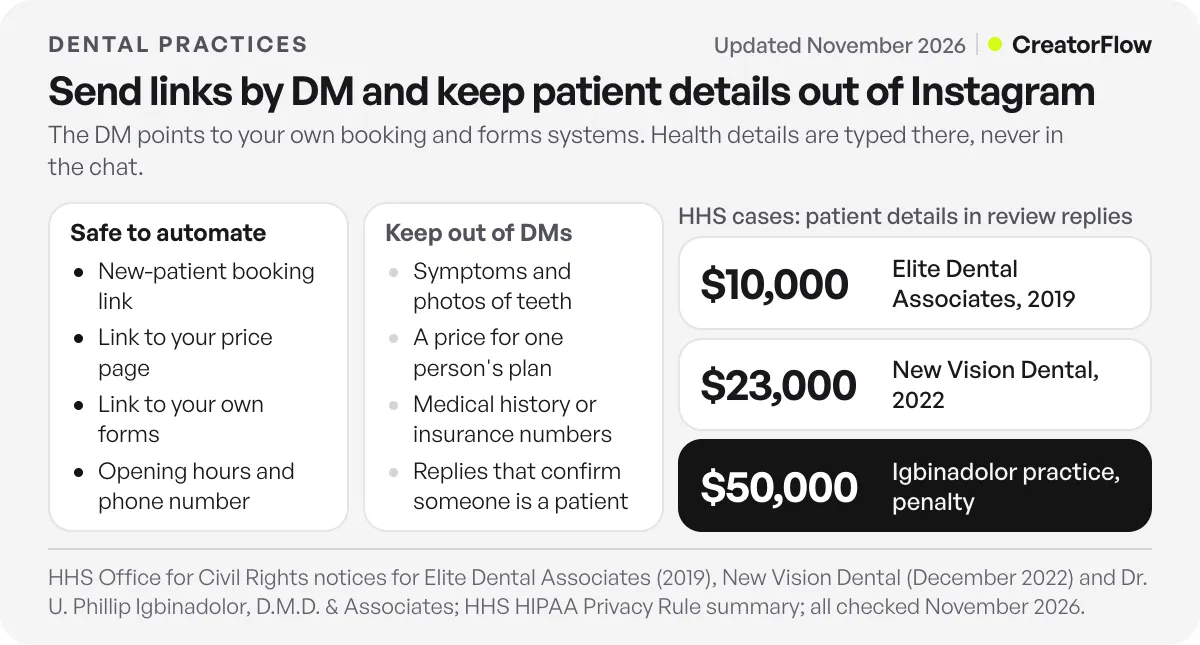
A dental practice can send booking links, price lists, opening hours, directions and links to its own forms in an automated Instagram DM. It should never put symptoms, treatment details, appointment details or anything that confirms someone is a patient into Instagram. Treat Instagram as a channel with no business associate agreement. Collect health details only in your practice’s own HIPAA-ready systems.
What counts as protected health information
The HHS summary of the HIPAA Privacy Rule defines protected health information as individually identifiable health information held or sent by a covered entity or its business associate, in any form or media. That covers information about a person’s health, the care they get or the payment for it, together with anything that identifies them.
In a dental DM that means a name with a treatment, an appointment time for a named person, an insurance detail or a photo of someone’s teeth. “Your crown is ready, Sarah” is PHI. “Book a consultation here” is not.
Instagram and business associate agreements
HHS’s business associates FAQ says a covered entity may disclose PHI to a business associate only after it gets written assurances, usually a business associate agreement, that the vendor will protect it. We found no business associate agreement offered by Meta for Instagram messaging (checked November 2026). Plan as if there is none.
The practical rule follows from that. Keep the automated DM free of PHI, so no patient information passes through Instagram or any tool connected to it. The DM sends a link, and the patient types their details into your booking system or forms platform. The same boundary applies to therapists and wellness practices that use Instagram.
Public replies carry the same risk
The HHS dental cases below are about public replies to reviews, not DMs. HHS’s Office for Civil Rights acted against three dental practices for disclosing patient information in those replies:
- Elite Dental Associates, Dallas: paid $10,000 in 2019 after it disclosed patients’ information in replies on its Yelp review page.
- New Vision Dental, California: paid $23,000 in December 2022 after replies to reviews disclosed patients’ names, treatment and insurance details.
- Dr. U. Phillip Igbinadolor, D.M.D. & Associates, North Carolina: OCR imposed a $50,000 civil money penalty after the practice disclosed a patient’s information in a reply to a negative online review.
An Instagram comment thread is a public reply box. If you turn on a public reply to comments, keep it generic: “Sent you a DM” works. “Glad your implant healed well” confirms a patient relationship in public. Never answer a complaint in the comments with details of the person’s care.
UK and EU practices
The GDC’s guidance on using social media, effective from 27 June 2016, quotes Standard 4.2.3 of the Standards for the Dental Team: “You must not post any information or comments about patients on social networking or blogging sites.” It also tells dental professionals to protect patients’ information by not publishing anything that could identify them on social media without their explicit consent.
Under UK GDPR, the ICO’s guidance on what special category data is lists medical history, diagnosis and clinical treatment as health data. Health data needs extra conditions before you process it. The plain approach is the same as in the US: links in the DM, health details in your own systems. Our GDPR guide to DM automation covers consent and contact data in more depth.
| Safe to automate | Keep out of Instagram DMs |
|---|---|
| New-patient booking link | Symptoms, pain descriptions, photos of teeth |
| Link to your price page or a price range | A price quoted for one person’s treatment plan |
| Link to forms in your own forms system | Medical history or insurance numbers typed into the chat |
| Opening hours, phone number, address | Appointment reminders that name the person or treatment |
| A general guide such as “your child’s first visit” | Any reply that confirms someone is your patient |
How to answer price questions without misleading anyone
Send the same price range your website or price list shows, say what the price includes, and say that the final price is confirmed after an examination. Never give one person a firm number for a treatment plan in a DM. Price DMs count as advertising, so the fee rules for your state or country apply to them.
The ADA’s marketing and advertising page says dentists may not advertise in a way that is false or misleading in any material respect, and notes that social media is part of advertising. It also says many states restrict how dentists advertise fees and discounts. Two examples it gives: California requires fee advertising to be “accurate and precise” and to disclose all services customarily included, and Indiana requires a discount ad to show the full price and the discounted price (checked November 2026).
In the UK, the GDC’s dental costs page says dental professionals “must also give clear information on their prices in the practice literature and on their website”. A DM that sends a link to that price page keeps one source of truth.
Three habits keep price DMs clean:
- Link the price page. The DM points to the list your team keeps up to date, so a price change happens in one place.
- Say what the range covers. For whitening, say whether the price is in-chair, take-home trays or both. For aligners, say whether the consultation and scans are included.
- Separate offers into their own keyword. If you run a new-patient offer, give it its own keyword and DM, with the full price, the offer price and the end date.
What to send for tooth pain and after-hours messages
An automated DM should never assess pain or suggest treatment. When someone writes about pain, swelling or a broken tooth, the DM gives your phone number, your opening hours and your out-of-hours instructions, then stops. A dentist decides what happens next, by phone or in the chair, not an Instagram reply.
Set up a HOURS keyword and add pain words people use, such as PAIN, EMERGENCY, URGENT and TOOTHACHE, so these messages get the urgent-care reply instead of a sales message. Keep the wording calm and short.
UK practices can add the NHS route. The NHS page on finding an emergency or urgent dentist tells people to call their own dentist first and to call NHS 111 to find an out-of-hours dental service (checked November 2026). US practices should send whatever their own after-hours line or on-call arrangement is.
Two rules for this DM:
- No advice about medicines or home care. That is clinical advice to someone the dentist has not examined.
- No promise of a fast human reply unless someone on your team reads Instagram out of hours. Say when messages are read.
How to set up dental DM automation in CreatorFlow
Setup takes under 2 minutes. Start with VISIT and HOURS, then add a treatment keyword each time you post about that treatment.
- Switch to a professional account. Instagram’s messaging API works with Business and Creator accounts.
- Connect the practice account in CreatorFlow. The connection runs through Meta’s login, so nobody types the Instagram password into CreatorFlow.
- Create one automation per job. Choose the trigger: comments on a post or Reel, a keyword DM, or Story replies. Add the keyword and its spelling variants.
- Write the DM and add the link. Use a template above. Check that every link opens on a phone.
- Test from a personal account. Comment the keyword from an account that is not the practice account and check the DM arrives.
- Say the keyword in the post. Put “Comment VISIT for the booking link” in the caption and on screen. People type what they see.
The comment-to-DM setup guide walks through each screen. For a guide such as “your child’s first dental visit”, Email Gate on Pro and Growth asks for an email address before it sends the link. If you only want a booking button on the profile, compare the options in Instagram booking buttons vs DM booking links.
CreatorFlow paces sends at about 200 DMs an hour, a tool-side safety pace, and extra DMs wait for the next hour. A dental Reel that gets a few hundred comments over a day stays well inside that. The CreatorFlow page for dental clinics shows four example flows for a practice.
Which CreatorFlow plan fits a dental practice
Pick the plan by DMs per month and by how many Instagram accounts the practice runs. Each Instagram account is one workspace. A single-location practice testing two or three keywords fits on Free. A group with an account per location needs Growth.
| Plan | Price | DMs per month | Instagram accounts | Fits |
|---|---|---|---|---|
| Free | $0 | 500 | 1 | One practice testing VISIT and HOURS |
| Pro | $15/month, or $12/month billed annually | 5,000 per account | 2 | Practices that want Email Gate, link tracking and clicks by country |
| Growth | $30/month, or $24/month billed annually | 10,000 per account | 5 | Groups with up to five location accounts |
Prices are from CreatorFlow pricing (checked November 2026). Pro and Growth start with a 14-day trial. You add a card to start it, and nothing is charged until the trial ends.
FAQ
Is it HIPAA compliant to answer patients in Instagram DMs?
HIPAA applies to protected health information, so the safe setup keeps PHI out of Instagram entirely. Automated DMs that send a booking link, a price page or opening hours contain no health information about a person. Ask your compliance lead before your team discusses any person’s care in Instagram messages.
Can an automated DM answer “how much is Invisalign?”
Yes, with the range from your published price list, what it includes, and a consultation link. Say that the final price depends on the examination. Check your state board’s fee advertising rules, or the GDC’s price guidance in the UK, before you publish the range.
What should the DM say when someone has tooth pain?
Your phone number, your opening hours and your out-of-hours instructions. UK practices can point to NHS 111, as the NHS advises. The DM should not ask about symptoms or suggest home care, because that is clinical advice from someone who has not examined the person.
Can I send new-patient forms through Instagram?
Send a link to forms that live in your own forms or practice system. The patient fills them in there, not in the chat. Do not ask people to type medical history, insurance numbers or medicines into an Instagram message.
Which keywords work best for a dental practice?
Words people would type anyway: VISIT or BOOK for appointments, PRICES for fees, WHITENING and ALIGNERS for cosmetic treatment, and HOURS for opening times. Add singular and plural forms, because CreatorFlow matches whole words. Say the keyword in the caption and on screen.
How many DMs does a dental practice need per month?
Count the keyword comments and DMs your posts get in a normal week and multiply by four. A practice testing two keywords on a few posts a month may fit inside Free’s 500 DMs. A practice that posts aligner or whitening Reels every week may need Pro’s 5,000.
Does it work for a group with several locations?
Yes, when each location runs its own Instagram account. Each account is a workspace with its own keywords and booking link. Growth covers up to five accounts for $30 a month.
Sources and checks
Sources and checks, November 2026: Meta’s Instagram private replies documentation for the one-message, 7-day and 24-hour rules; HHS’s Summary of the HIPAA Privacy Rule and business associates FAQ; HHS enforcement notices for Elite Dental Associates, New Vision Dental and Dr. U. Phillip Igbinadolor, D.M.D. & Associates; the GDC’s guidance on using social media and dental costs page; the ICO’s special category data guidance; the ADA’s marketing and advertising page; the NHS page on urgent dental care; CreatorFlow plan details from creatorflow.so/pricing. This article is general information, not legal advice.





