
Instagram booking means one of three things: a Book Now button on your profile, a booking link on your profile or in a Story, or a booking link sent by DM when someone asks. All three end at your own booking tool. Most businesses should run a profile link and a DM reply, and add the button if their tool supports it.
Most guides stop at the button, and the button has two gaps. It sits on your profile, so a person watching your Reel at 9pm does not see it. It also depends on a partner connection. Schedulista’s help page says its button has been temporarily unavailable since January 1, 2025, and suggests a profile link in its place.
This guide is for salons, clinics, studios, coaches and local services. It covers each route, what the button needs, which booking tools connect, the reply text for common client questions, and which setup fits your type of business.
Key Takeaways
- Three meanings: Instagram booking can mean the Book Now button, a booking link on your profile or in a Story, or a booking link sent by DM.
- Button: You can show one action button at a time, it needs an account with a partner tool, and it appears in the Instagram app only.
- Profile link: It works with any booking tool, including tools outside Meta’s partner list.
- DM reply: A comment keyword sends the booking link to the person who asked, while they are still looking at your post.
- After the click: Your booking tool handles times, forms, deposits and reminders. Instagram’s job ends at the link.
- Bottom line: Run a profile link and a keyword DM first, and add the button when your booking tool is on the partner list.
What Are the Ways to Take Bookings on Instagram?
There are four ways to take bookings on Instagram: the Book Now button, a link on your profile, a link sticker in a Story, and a link sent by DM. Each one catches a different person at a different moment. The button and profile link catch people already looking at your profile. Stories catch followers. The DM catches anyone who asks.
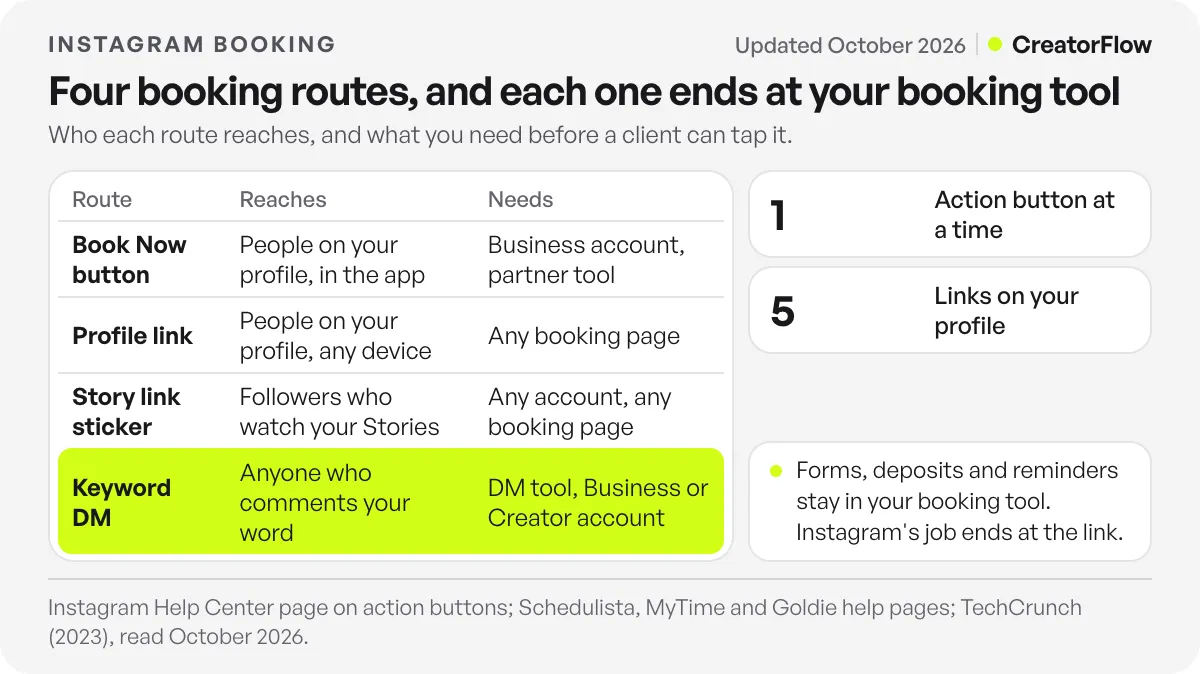
| Route | Who it reaches | What you need | What you can count |
|---|---|---|---|
| Book Now button | People on your profile, in the app | A Business account and a partner booking tool | Bookings in your tool’s source report, where it has one |
| Profile link | People on your profile, on any device | Any booking page, up to 5 links | Clicks in your link tool or booking tool |
| Story link sticker | Followers who watch your Stories | Any account and any booking page | Clicks in your booking tool’s analytics |
| Keyword DM | Anyone who comments or sends your word | A DM tool and a Business or Creator account | Clicks per post, on CreatorFlow Pro and Growth |
Restaurants have a related button. Meta’s action buttons include Reserve for table bookings and Order Food for delivery or takeaway, and you can only show one at a time.
How Do You Add a Book Now Button to Instagram?
To add a Book Now button, you need a Business account and an existing account with a partner booking tool. Go to Edit Profile, open Action buttons or Contact options, choose Book Now, select your tool from the list, sign in, and confirm the connection. The button appears on your profile a few moments later. Menu names vary between app versions.
These steps come from MyTime’s help page and Goldie’s help page. Both are booking tools that connect to the button, and both say a Business account is required.
Four details catch people out:
- One button only. Meta’s action buttons page says you can show one action button at a time.
- Partner account first. Meta’s page says you need an existing account with the partner. You cannot point the button at any URL you choose.
- Meta business assets. Schedulista’s page says the button asks for a Facebook business page, an ad account and a Pixel, and offers to create them if you have none.
- App only. Schedulista’s page also says the button shows in the Instagram mobile app, and not on your profile in a web browser.
The connection can also fail. Goldie’s page notes that some customers see an error at the sign-in step, says it is working with Meta, and gives no date for a fix. Its suggested workaround is a booking link on your profile (checked October 2026). If the button will not connect, use the link and move on.
Which Booking Tools Work With Instagram’s Book Now Button?
Meta keeps a list of partner booking tools, and the list inside your own Instagram app is the current one. Open the Book Now option and look for your tool before you plan around it. Public copies of the list go out of date, and some named tools have paused the connection. If your tool is not listed, use a link.
Meta’s partner page describes a select group of providers. Tailwind’s guide copies a longer list from Instagram’s Help Center. It includes Acuity Scheduling, Appointments by Square, Booksy, Fresha, GlossGenius, MyTime, Setmore, SimplyBook.me, Squire, StyleSeat, Treatwell and Vagaro, and it notes that Timely and Schedulicity were unavailable at the time of writing.
Calendly does not appear on that copy of the list. Coaches and consultants who use it send the link instead, and our Instagram and Calendly guide covers that setup. For restaurants, Meta’s pages name OpenTable, Resy and Tock for the Reserve button.
Do You Still Need a Booking Link on Your Profile?
Yes. A profile link works with any booking tool, on any device, and needs no connection to Meta. Instagram allows up to 5 profile links, so you can add one for booking and one for your price list. Keep it first in the list, and label it with what the person gets, such as “Book a cut” or “Book a free call”.
TechCrunch reported the limit of 5 links when it launched in 2023. Use one direct link to your booking page if booking is the main thing you sell. Each extra tap gives people a reason to stop. If you run several services, send people to a page that lists them, or use separate links. Then add the same link to Stories with a link sticker on the days you have open times.
Native links on posts are a paid option. Meta One’s Advanced plan, at $49.99/month, lists clickable links in 4 posts and 4 Reels a month on its plans page (checked October 2026). That allowance suits a launch or an offer.
How Does Booking by DM Work on Instagram?
Booking by DM means a person comments or sends a keyword, and an automatic DM sends them your booking link. They tap it and pick a time in your own booking tool. The DM’s job is to get the link to the right person at the moment they ask, including evenings when you are closed.
Here are the common questions, with replies that fit one message and one link. Each question runs as its own automation with its own keyword and link. The wording is illustrative, so adjust it for your business.
| Client’s question | Post or trigger | Keyword | Reply text |
|---|---|---|---|
| ”How do I book?” | Reel showing your work | BOOK | ”You can pick a time here: [booking link]" |
| "How much is it?” | Before-and-after post | PRICE | ”Prices are on this page, and you can book there too: [link]" |
| "Any openings this week?” | Story about open times | WEEK | ”Here’s the calendar with this week’s open times: [link]" |
| "Do you do color?” | Post about that service | COLOR | ”Yes. Color appointments are here: [link]" |
| "Is the first call free?” | Reel for coaching or consulting | CALL | ”The first call is free. Choose a time here: [link]” |
CreatorFlow triggers this from a comment on a post or Reel, a Story reply or a keyword DM, with up to 20 keywords per automation. See how it works on our page for sending booking links by Instagram DM. Forms, questions, deposits and reminders all stay in your booking tool. If your tool does not take deposits, this guide on taking a deposit for an Instagram booking covers the options.
Meta’s private reply rule shapes the message: one reply per comment, within 7 days, and a follow-up only if the person replies, within 24 hours of that reply (checked October 2026). So put the link in the first message. Reminders come from your booking tool, which has the client’s email or phone number. For the wider system around this step, read our guide to Instagram appointment setter automation.
If you run a health business, keep the DM general. Send a link to your practice’s own form, and do not ask people for health details in Instagram. HHS explains who the HIPAA rules cover on its covered entities page. Check with your lawyer or compliance team before you write any replies.
Which Instagram Booking Option Fits Your Business?
The right setup depends on how people decide to buy from you. If they choose from your photos and book right away, use the button, a profile link and a keyword. If they need a price or a quote first, the DM and the link matter more. If most clients find you on Google, fix that listing first.
This table is our judgment, so check it against your own booking reports.
| Business | Instagram’s role | Set up first |
|---|---|---|
| Hair, nails, barber, lashes | Often a strong source of new clients | Book Now, profile link, BOOK and PRICE keywords |
| Med spa, aesthetic clinic | Strong for treatment questions | PRICE and CONSULT keywords that link to your own form (setup for med spas) |
| Dentist, general clinic | Second to Google and referrals | Profile link and a general reply with your booking page (dental setup, clinic setup) |
| Coach or consultant | Strong if you post your own expertise | CALL keyword and a calendar link |
| Gym or studio | Strong for trial classes | TRIAL keyword and your class booking page |
| Restaurant | Useful for special nights and table requests | Reserve button and a profile link |
| Plumber, electrician, home services | Second to Google and local search | Profile link to a quote form |
For more detail by trade, see this guide to salon and spa appointments by DM.
How Do You Track Bookings From Instagram?
Track bookings in your booking tool, because it is the only place that knows who booked. Give Instagram its own link or source label, then compare clicks with bookings each week. A post with many clicks and few bookings points to a problem on your booking page or your price. A post with few clicks points to the post itself.
Some tools do this for the button. MyTime says bookings through it appear in the Booking by Source report as “Online Booking - Instagram”. For links, add UTM tags if your booking tool or website analytics can read them, and use a different tag for the profile link, Stories and DMs.
CreatorFlow Pro and Growth include link click tracking and clicks by country and city, so you can see which post sent the most clicks. City data helps a local business check that clicks come from people close enough to visit. Here is an illustrative example with made-up numbers: if your BOOK keyword gets 100 clicks and 12 bookings in a month, that is 12 bookings per 100 clicks. Run the same sum for each keyword, and keep the posts that give you the most.
FAQ
Can customers book directly on Instagram?
They can start from Instagram. The Book Now button opens your partner tool’s booking page, and a link in a DM or on your profile does the same. The time, the form and any deposit are all handled by your booking tool. Instagram sends the person there.
Why can’t I see the Book Now button on Instagram?
Check three things. Your account should be a Business account, your booking tool should be on the partner list in your app, and you should have admin access to any linked Meta business assets. Some tools have paused their connection. If it still does not appear, add a booking link to your profile.
Does the Book Now button cost money?
You need an account with a partner booking tool, so that tool’s price applies. We found no Meta charge for adding the button in the partner pages we read.
How do I add a booking link to my Instagram?
Open Edit Profile, go to Links and add your booking page as an external link. Instagram allows up to 5. You can also add it to a Story with the link sticker, or send it by DM with a keyword. Use a short, direct link that opens the booking page.
Can Instagram send appointment reminders?
Your booking tool sends them. Meta allows one private reply per comment, and a follow-up only if the person replies, within 24 hours of that reply. So a reminder for next week cannot reach someone by automated DM. Turn on email or text reminders in your booking tool.
How much does a keyword booking DM cost?
CreatorFlow’s Free plan costs $0 and includes 500 DMs a month with comment, Story reply and keyword triggers. Pro costs $15/month or $144/year, with 5,000 DMs a month per workspace, Email Gate and link click tracking. New accounts start with a 14-day Pro trial, and a card is required to start it.
Sources and checks
Checked on October 31, 2026. Sources: Instagram’s help page on action buttons and help page on partners, read through search index text because Instagram’s pages did not load for our tools; Schedulista’s, Goldie’s and MyTime’s own help pages; Tailwind’s copy of the partner list, which is undated; Meta’s private replies documentation. The business table is our judgment, and the bookings example is illustrative.





