
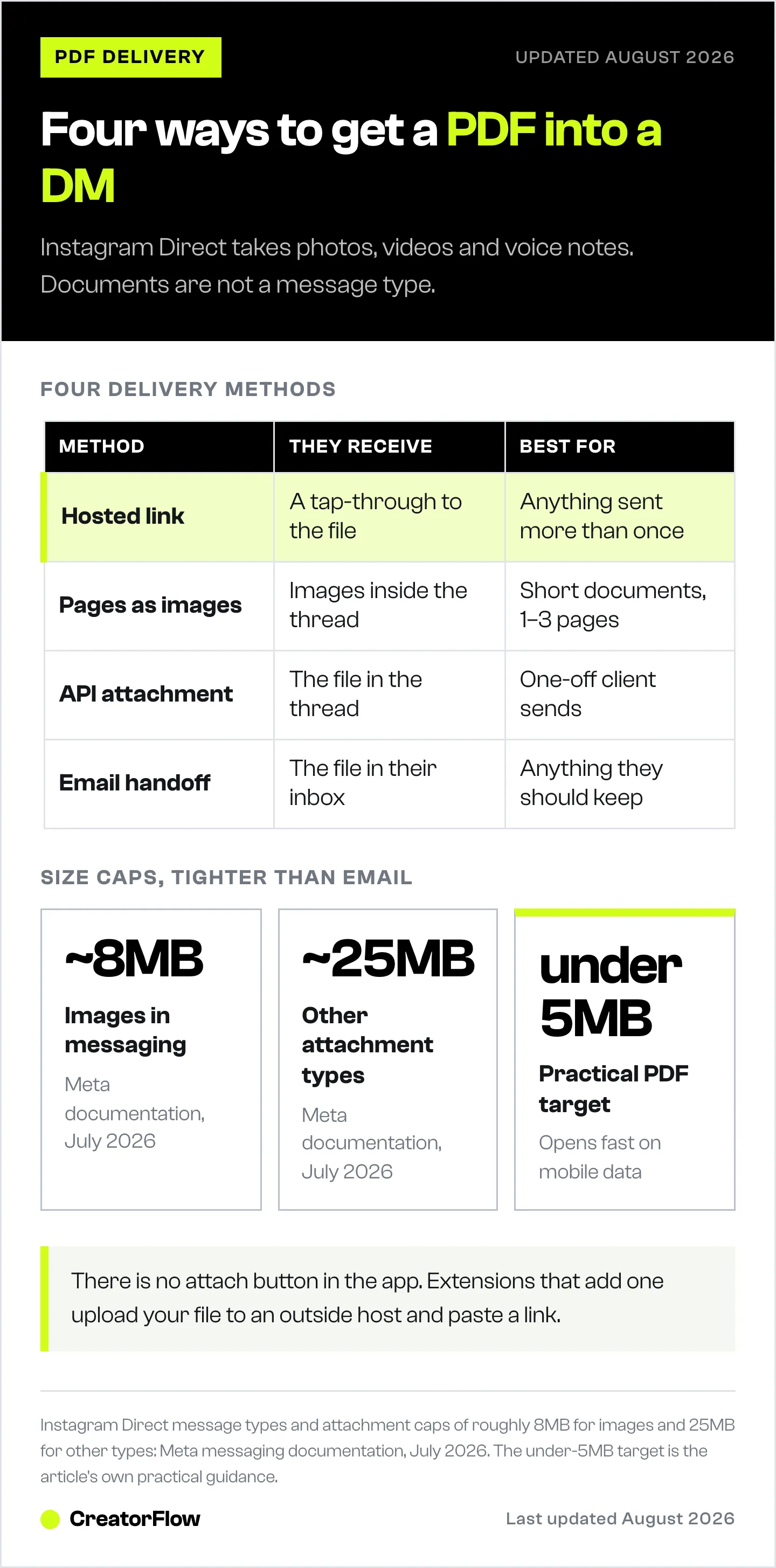
To send a PDF on Instagram DM you need a workaround, because the app has no file attachment option. Direct supports photos, videos and voice notes, not documents. Four approaches work: send a hosted link to the file, convert the pages to images, send it through a business messaging platform built on Meta’s API, or hand the file off to email. For anything you deliver more than once, a tracked link beats a raw file.
Most guides on this topic tell you to open Instagram on desktop and drag the PDF onto the chat window. Try it and nothing happens. There is no paperclip in Instagram Direct, on the app or on the web, and the browser extensions that appear to add one are uploading your file to a third-party host and pasting a link into the message box.
This guide covers which message types Instagram Direct accepts, the four delivery methods that work today, how to send a PDF automatically when someone comments a keyword, and the size and format limits worth knowing before you send anything.
Key Takeaways
- The app has no file attachment option. Instagram Direct handles photos, videos and voice notes. Documents are not a supported message type in the consumer app on iOS, Android or the web.
- Instagram has been testing file attachments since March 2024. A file-attachment option was spotted in the app’s back-end code by researcher Alessandro Paluzzi (socialmediatoday.com, March 2024) and has not shipped broadly since.
- The API path is different from the app path. Meta’s Instagram messaging API supports a file attachment type, which is why some business platforms can place a real PDF in a thread when a person tapping the same app cannot.
- Browser extensions do not add native file support. They upload to an external host and insert a link, so the recipient still taps through to somewhere else.
- Size caps are tighter than email. Instagram messaging limits run around 8MB for images and 25MB for other attachment types, so a print-resolution PDF will fail before it sends.
- A tracked link is the better tool for repeat delivery. A raw file tells you nothing once it leaves. A link tells you who tapped, from where, and lets you capture an email on the way through.
Can You Send a PDF on Instagram DM?
Not from the app. Instagram Direct accepts photos, videos, voice notes, posts, Reels and text. Documents are not on that list, so there is no attach button to look for on iOS, Android or instagram.com.
This trips people up because Messenger and WhatsApp, both Meta products, have handled document attachments for years. Instagram was built as a photo app and its messaging layer inherited that assumption. Meta has been closing the gap slowly rather than all at once.
The workaround everyone reaches for is a link, and that turns out to be the right instinct for most situations.
Why the Instagram App Has No File Attachment Button
Instagram was spotted testing an option to add files to DMs in March 2024, found in the app’s back-end data by app researcher Alessandro Paluzzi and reported at the time as likely to roll out in the following months (socialmediatoday.com, March 2024). As of July 2026 it has not appeared as a general feature.
That gap created a small market of browser extensions promising file sharing in Instagram DMs. They are worth understanding before you install one. These extensions add a paperclip icon to the Instagram web interface, but the file goes to an external file host and the extension pastes the resulting download URL into your message. The recipient gets a link, same as if you had pasted one yourself, with a third party now holding your file.
There is one place a genuine file attachment does appear in an Instagram thread: messages sent through Meta’s Instagram messaging API. The API exposes an attachment type for files, which is why a business platform can deliver a PDF into a conversation that a person on the same account cannot deliver by hand. ManyChat, for example, added PDF attachments to its Instagram automations and documents supported file types in its help center (manychat.com, July 2026).
So the variable is not your device or your account type. It is whether a human or the API is sending the message.
4 Ways to Send a PDF on Instagram DM
| Method | Works on | What they receive | Best for |
|---|---|---|---|
| Hosted link | App, web, automation | A tap-through to the file | Anything sent more than once |
| Pages as images | App, web | Images inside the thread | Short documents, 1-3 pages |
| API file attachment | Automation platforms only | The file in the thread | One-off client and support sends |
| Email handoff | Anywhere | The file in their inbox | Anything you want them to keep |
1. Send a hosted link
Upload the PDF somewhere with a stable public URL, then paste that URL into the DM. Google Drive, Dropbox and your own site all work. Three things to check before you send:
- Set sharing to “anyone with the link”. The most common failure is a Drive file left on restricted access, which shows the recipient a request-access screen instead of your document.
- Use a direct link, not a preview page where you can. Fewer taps between the message and the file means fewer people dropping off.
- Check how the preview renders. Instagram pulls an image and title card from the URL, and a blank or wrong preview costs you taps. This is worth getting right, since your link preview and OG image are the only thing a recipient sees before deciding whether to tap.
2. Convert the pages to images
Export each page as a PNG or JPG and send them as photos. The pages appear inline in the conversation with nothing to tap through to, which is why read rates are high.
The trade-off is that they get pictures of a document, not the document. Text is not selectable, links inside the PDF are dead, and it stops being practical past about three pages. Good for a one-page price list or a short checklist. Poor for a workbook.
3. Send the file through a business messaging platform
If the PDF genuinely has to arrive as a file inside the thread, this is the path. It requires an Instagram Business or Creator account connected to a platform that supports Meta’s file attachment type. The file lands in the conversation and the recipient opens it without leaving Instagram.
Keep the file small. Instagram messaging caps run around 25MB for non-image attachments, and mobile data makes anything near that ceiling a slow open.
4. Hand off to email
Ask for the email address inside the DM, then deliver the PDF to the inbox. This adds a step, and it is the step most worth adding when the document is a lead magnet rather than a one-off favour.
You end up with a contact record instead of a message that scrolls away. Our guide on collecting emails inside Instagram DMs covers the wording that keeps drop-off low at the ask.
How to Auto-Send a PDF When Someone Comments a Keyword
Sending one PDF by hand is a two-minute job. Sending the same PDF to everyone who comments “GUIDE” on a Reel that took off is a different problem, and it is the one worth automating.
The pattern is the same across tools:
- Host the file and get a stable URL. Confirm it opens in a private browser window with no login prompt.
- Pick a trigger keyword. One word, easy to spell, hard to type by accident. GUIDE, PDF, CHECKLIST and the name of the resource all work. Avoid words that show up in normal comments, or you will send the file to people who did not ask for it.
- Connect your Instagram Business or Creator account through the official Meta login. No password sharing.
- Write the reply. Name what they are getting, then the link. Two sentences beats a paragraph.
- Add a gate if the file is worth something. An email gate captures the address before the link is released. A follow gate asks for a follow first.
- Test it from a second account before you post. Comment the keyword, confirm the DM arrives, tap the link, open the file on mobile.
The full walkthrough lives in our comment-to-DM automation setup guide, and the keyword trigger guide covers how to pick words that do not misfire.
This is what CreatorFlow is built for. A comment on a post or Reel triggers a DM with your link, the email gate collects the address before the file is released, and click tracking with country-level analytics shows you which posts drive real downloads. Flat $15/month, no per-contact pricing. You can see the download delivery use case on the main site.
File Attachment vs Tracked Link: Which Should You Use
A file attachment feels like the premium option. For repeat delivery it is the weaker one, and the reason is measurement.
Once a PDF leaves as a file, you know nothing else. You cannot tell whether it was opened, how many people opened it, which post sent the most, or which country they were in. You cannot update it after the fact. You cannot follow up, because you have a DM thread and no contact record.
A tracked link answers all of that. You get the tap, the source, the geography, and if you gate it, the email address. When the same file goes out fifty times a week, that data is the whole point.
Use a file attachment when the recipient specifically needs the document itself, offline, right now: a client contract, an invoice, a brief. Use a tracked link for anything that functions as a lead magnet. For the full funnel version of this, see Instagram lead magnet automation.
Instagram PDF Size and Format Limits
Instagram messaging caps attachments at roughly 8MB for images and 25MB for other file types, tighter than most email providers (per Meta’s messaging documentation, July 2026). Platform limits vary above that, so check your tool’s help pages rather than assuming.
Practical targets, whichever method you pick:
- Keep PDFs under 5MB. Anything larger is slow to open on mobile data, and a slow open is an abandoned open.
- Export for screen, not print. A 300 DPI export of a 20-page workbook clears 40MB easily. Screen resolution cuts that by most of its size with no visible difference on a phone.
- Compress images inside the document before exporting. They are almost always what makes a PDF large.
- Check it on a phone. Small type that reads fine on a laptop is unreadable on a 6-inch screen, and most of your recipients are on one.
Mistakes That Break PDF Delivery in DMs
- Restricted file permissions. The single most common failure. A Drive or Dropbox link set to invite-only shows a request-access screen. Test in a private browser window every time.
- A keyword that appears in ordinary comments. Triggering on “info” or “yes” sends your file to people making conversation.
- Linking to a page instead of the file. Every extra tap loses people. Point at the document.
- Sending a print-resolution export. It either fails the size cap or takes so long to open that people give up.
- No email capture on a lead magnet. You gave away the asset and kept nothing. The email is the reason to build the funnel.
- Never testing on mobile. Desktop is not where this gets read.
FAQ
Can you send a PDF on Instagram DM from the mobile app?
No. Instagram Direct on iOS and Android supports photos, videos, voice notes and shared posts, not document attachments. To get a PDF to someone from your phone, paste a hosted link to the file, or send the pages as images.
Does Instagram have a file attachment button on desktop?
Instagram’s web interface has no native file attachment control as of July 2026. Guides suggesting you drag a PDF onto the chat window describe behaviour the site does not have. Browser extensions that add a paperclip icon upload your file to an outside host and insert a download link.
What is the file size limit for a PDF in Instagram messaging?
Instagram messaging limits sit around 8MB for images and 25MB for other attachment types (Meta messaging documentation, July 2026). Keep PDFs under 5MB regardless, since anything larger opens slowly on mobile data.
How do I send a PDF automatically when someone comments on my post?
Host the file, connect your Instagram Business or Creator account to a DM automation tool through the official Meta login, set a trigger keyword, and write a reply containing the link. When someone comments the keyword, the DM sends within seconds. Test from a second account before posting.
Is it safer to send a PDF file or a download link?
A link is safer for the sender and more useful. You can revoke or update it, you can see whether it was opened, and you can capture an email before releasing it. A file, once sent, is gone with no visibility into what happened next.
Can I send a Word document or spreadsheet on Instagram DM?
The same rules apply to every document type. The Instagram app has no attachment control for DOCX, XLSX or PPTX, so link to the file or export the relevant pages as images.
Why does my PDF link show no preview in the DM?
Instagram pulls the preview card from the destination URL’s metadata. Cloud storage links often expose none, so the message renders as bare text. Hosting the file on a page you control, with a title and preview image set, gives you a card the recipient can read before tapping.
Do I still need a link if the file sends as an attachment?
Usually yes. A link is the fallback when a file fails to send, and it is the only version of the delivery you can measure or update after the fact.
Instagram Direct message types, the March 2024 file-attachment test, Meta messaging attachment size limits, and ManyChat’s Instagram file support verified from Meta developer documentation, Social Media Today and ManyChat’s help center as of July 2026. Individual results vary.


