

Yes, you can automate Instagram DMs from your iPhone. Some tools ship a native App Store app (ReplyRush, ManyChat), while others like CreatorFlow and LinkDM run in your mobile browser. Either way the automation runs on Meta’s official Instagram API servers, not on your phone, so downloading an app is optional. Setup takes about 10 minutes on a Business or Creator account.
You post a Reel from your phone. Within an hour, 30 people comment “price?” and four more reply to your Story asking how to order. You are standing in line for coffee, thumb-typing the same answer for the twelfth time today. That is the exact problem DM automation solves, and you can run the whole thing from the iPhone already in your hand.
This guide covers what you can automate, whether you actually need to download an app, the best Instagram DM automation apps for iPhone in 2026, and a step-by-step setup you can finish before your coffee is ready.
Key Takeaways
- You do not strictly need a native app: the automation executes on Meta’s servers through the official Instagram API, so any tool with a web dashboard can be set up entirely from mobile Safari or Chrome on your iPhone.
- Apps that ship a native iOS app: ReplyRush and ManyChat both have App Store apps (checked October 2026). CreatorFlow and LinkDM are web-based and run in your phone browser.
- It only works on professional accounts: Meta’s Instagram Platform documentation says the API requires an Instagram Business or Creator account, so personal accounts cannot use it (checked October 2026).
- Safety comes from the API, not the app: tools built on Meta’s official Instagram API avoid the ban risk that password-based bots carry.
- Free tiers exist across the board: CreatorFlow (500 DMs), LinkDM (1,000 DMs), and ReplyRush (1,500 DMs) all offer free plans, though what each free plan includes differs.
- Start with comment-to-DM: it turns post engagement into DM conversations and is the automation most creators set up first.
Do You Need an App to Automate Instagram DMs on iPhone?
No. You do not need to download anything from the App Store to automate Instagram DMs on iPhone. The automation runs server-side on Meta’s official Instagram API, triggered by webhooks Meta sends when someone comments or replies. Your phone is just the screen you use to build the rules. A native app is a convenience layer, not a requirement.
This matters because search results make it sound like you must find “the iPhone app.” In reality, tools split into two camps:
- Native app tools put a dedicated icon on your home screen. ReplyRush and ManyChat both publish iOS apps on the App Store (checked October 2026). Handy if you like managing everything from a standalone app with push notifications.
- Web-based tools open in your phone browser. CreatorFlow and LinkDM run as mobile web dashboards. You log in through Safari, connect your account, and build flows there. No download, no App Store updates, no storage taken up on your phone.
Both approaches configure the same underlying automation. When a follower comments your keyword, Meta fires the trigger and the DM sends from its servers, whether you built the rule in a native app or a browser tab. If you want the deeper mechanics, our complete guide to Instagram DM automation breaks down how the API layer works.
What You Can and Can’t Automate on Instagram
Set expectations before you start. Instagram allows a specific category of automation and blocks another, and staying on the right side of that line is what keeps your account safe.
What you can automate on iPhone:
- Comment-to-DM: someone comments a trigger word like “LINK” or “INFO” and gets a DM automatically
- Story reply and Story mention auto-DMs
- Keyword-triggered replies to incoming DMs (“price,” “shipping,” “promo”)
- Follow-up messages after the person replies, inside Meta’s 24-hour messaging window
- Rich media DMs with images, links, and buttons
- Managing multiple accounts from one dashboard
What you cannot automate without risking your account:
- Mass cold DMs to people who never interacted with you
- Automated follows and unfollows
- Fake likes or comments
- Scraping followers from another account and messaging them
The safe zone is response automation. People engage first, then automation handles the reply. Everything CreatorFlow does sits inside that safe zone. If you want the full boundary map, read how to avoid Instagram bans with DM automation before you scale.
Is Instagram DM Automation Safe on iPhone?
Instagram DM automation is safe on iPhone when the tool connects through Meta’s official Instagram API using OAuth login, never your password. The risk everyone remembers comes from old browser bots and password-sharing “growth” tools that Meta detects and bans. API-based tools operate exactly as Meta intended, which is why they carry minimal ban risk. The device you use does not change this.
Two things decide safety, and neither is your iPhone:
1. The tool uses the official API. CreatorFlow connects as a Meta Tech Provider (since December 2025) through the official Instagram API. ManyChat calls itself an “Official Meta Business Partner” on its pricing page, and LinkDM’s homepage says it has been a certified Meta Business Partner since 2021 (checked October 2026). LinkDM’s partner status is listed in Meta’s public directory. ReplyRush describes itself as a Meta Business Partner on its own site and App Store listing. Whichever you pick, confirm it authenticates with Meta OAuth and never asks for your Instagram password.
2. You use a professional account. Meta’s Instagram Platform documentation lists an Instagram Business or Creator account as a requirement (checked October 2026). Personal accounts cannot access it at all, so any tool would fail to connect. If you are still on a personal account, our guide to switching from a personal to a professional account walks through the two-minute change.
Best Instagram DM Automation Apps for iPhone (2026)
Four tools cover most iPhone creators, and they split cleanly by architecture and pricing model. Here is how they compare on the details that matter, checked in October 2026. All figures below are web-dashboard prices; note that in-app purchase prices inside the iOS apps can run higher because of Apple’s fee.
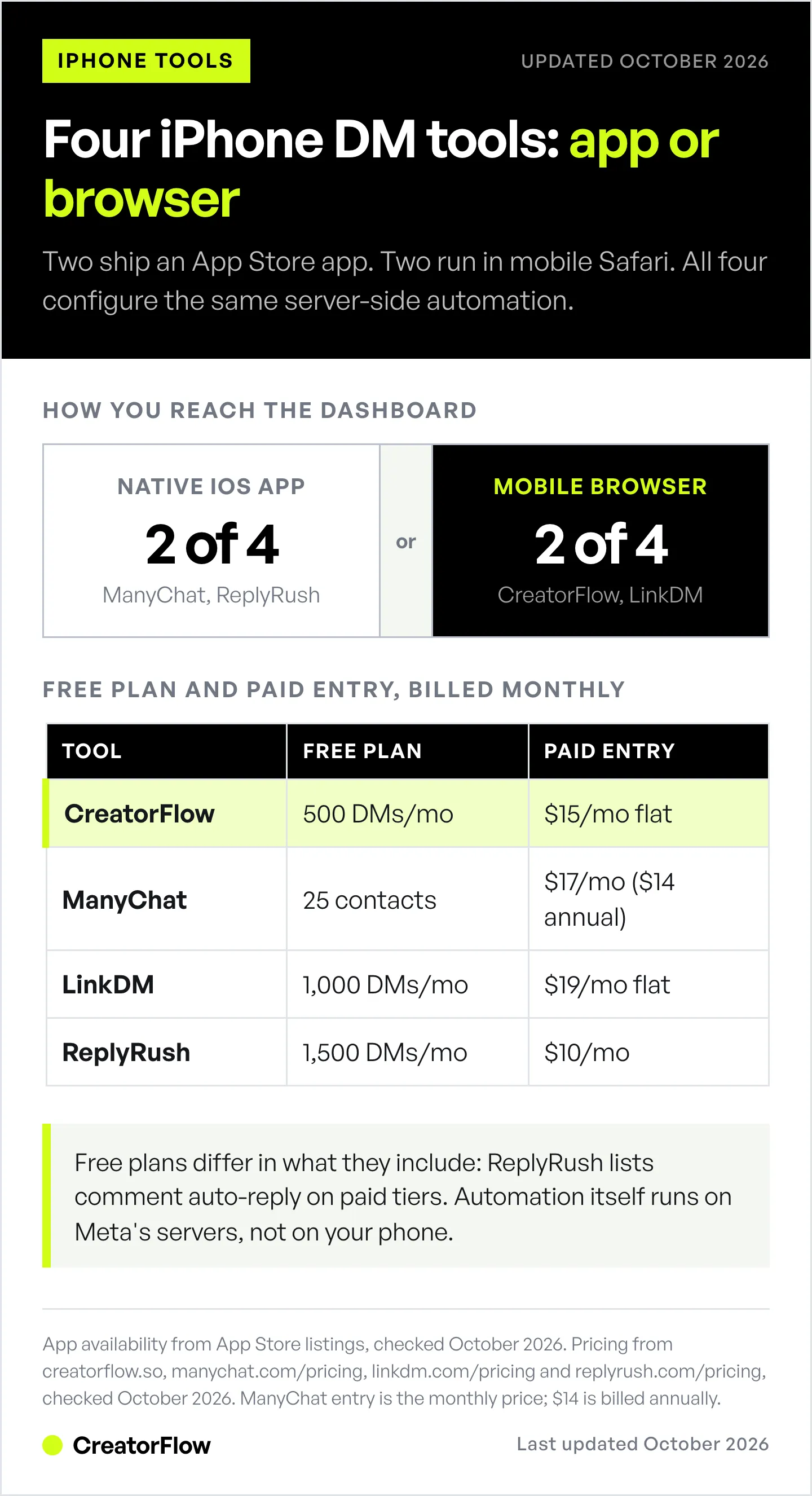
| Tool | Native iPhone app | Free plan | Paid entry | Pricing model | Focus |
|---|---|---|---|---|---|
| CreatorFlow | Web app (runs in Safari) | 500 DMs, comment-to-DM included | $15/mo flat | Flat rate | Instagram, end to end |
| ManyChat | Yes | 25 contacts, 4 automations | $17/mo ($14/mo annual) | Per active contact | IG, FB, WhatsApp, more |
| LinkDM | Web (no iOS app found) | 1,000 DMs | $19/mo flat | Flat rate | Instagram, Facebook |
| ReplyRush | Yes | 1,500 DMs | $10/mo | Flat rate | Instagram, Facebook |
CreatorFlow
CreatorFlow is built for solo creators who want flat pricing and a fast setup, and it runs entirely in your iPhone browser. The free plan includes 500 DMs a month with comment-to-DM, Story replies, and keyword triggers. Pro is $15/month flat for 5,000 DMs a month per account on up to two accounts, with a follow gate, email gate, and geographic analytics. Because it is web-based, there is nothing to download and nothing to update. Every feature is built around how Instagram itself behaves, which is what keeps the setup short.
ManyChat
ManyChat is the multi-platform option. It has a polished native iOS app, rated 4.3 stars on the App Store (checked October 2026), and automates across Instagram, Facebook, WhatsApp, and TikTok. Pricing is per active contact. ManyChat’s pricing page lists Free at 25 contacts and Essential at $17/month for 250 ($14/month billed annually), scaling through Pro ($39), Business ($99), and Advanced ($199) billed monthly (checked October 2026). Best for teams and agencies who need more than one channel and do not mind pricing that grows with your audience.
LinkDM
LinkDM is an established Instagram-and-Facebook tool with a large user base: its homepage reports 60,000+ creators, brands, and agencies (checked October 2026). It is a certified Meta Business Partner listed in Meta’s directory since 2021. Pricing is flat: Free covers 1,000 DMs a month, and Pro is $19/month for up to 25,000 DMs across three Instagram accounts. No native iOS app surfaced in App Store searches, so plan on using it from the browser.
ReplyRush
ReplyRush ships both iOS and Android apps and covers Instagram plus Facebook DMs from one dashboard. Its free plan is generous on volume at 1,500 DMs a month. ReplyRush’s pricing page places comment auto-reply, the core comment-to-DM feature, on the paid tiers rather than the free one (checked October 2026). Paid plans run Lite $10/month (7,500 DMs), Boost $25/month (40,000 DMs, three accounts), and MAX $100/month (400,000 DMs, five accounts). Best for creators who specifically want a standalone app icon and also manage Facebook Pages.
For a wider field with more niche tools, see our roundup of the best Instagram DM automation tools.
How to Set Up Instagram DM Automation on iPhone
Here is the setup using CreatorFlow. The same five steps apply to any API-based tool, native app or browser. Budget about 10 minutes.

Step 1: Confirm you have a Business or Creator account
Open Instagram, go to Settings and activity, then Account type and tools, and tap Switch to professional account if you have not already. This is required for any DM automation to connect. It is free and reversible.
Step 2: Open the tool and connect your account
On your iPhone, open creatorflow.so in Safari (or download your chosen app). Tap connect and log in through Meta’s official OAuth screen, the same secure flow you see when any authorized app asks for Instagram access. You never type your password into the tool itself.
Step 3: Build your first comment-to-DM flow
This is the automation most creators start with because it converts post engagement into real conversations. Create a new automation, choose a comment trigger, pick the post (or apply it to all posts), set your keyword such as “LINK” or “PRICE,” and write the DM followers receive. Our comment-to-DM setup guide has copy templates if you want a head start.
Step 4: Add a Story reply automation
Stories drive some of the highest engagement on Instagram and get under-automated. Create a Story reply trigger, write the auto-DM, and add your call to action, a link or a product name. Now every Story reply gets an instant response.
Step 5: Test, then activate
Have a friend comment your trigger word on the post. Confirm the DM fires and reads naturally on their end. One caution worth knowing: automated links can show as plain text on some Android phones, so read why Android users cannot tap your DM links and format accordingly. Once it works, publish and let it run.
Native App vs Mobile Browser: Which Should You Use?
Pick based on habit, not on capability, because both configure the identical server-side automation.
Choose a native app if you want a dedicated home-screen icon, push notifications when DMs come in, and a single place to manage everything without opening a browser tab. ReplyRush and ManyChat both offer this.
Choose a web-based tool if you would rather not download or update another app, want it to work the same on your iPhone, iPad, and laptop without syncing, and prefer to keep phone storage free. CreatorFlow and LinkDM work this way. You bookmark the dashboard and it behaves like an app without being one.
The honest takeaway: the app-versus-browser question changes your daily convenience, not what the automation can do. A follower who comments your keyword gets the same instant DM either way.
FAQ
Is there an Instagram DM automation app for iPhone?
Yes. ReplyRush and ManyChat both publish native iOS apps on the App Store (checked October 2026). Web-based tools like CreatorFlow and LinkDM run in mobile Safari instead, which works fully on iPhone without a download.
Can I automate Instagram DMs without downloading an app?
Yes. The automation runs on Meta’s servers through the official Instagram API, so any tool with a web dashboard can be set up entirely from your phone browser. Downloading a native app is optional convenience, not a requirement.
Do I need an Instagram Business account to automate DMs on iPhone?
Yes. Meta’s Instagram Platform documentation lists an Instagram Business or Creator account as a requirement for its API (checked October 2026). Personal accounts cannot connect to any DM automation tool. Switching to a professional account is free and takes about two minutes in Instagram settings.
Is Instagram DM automation safe on iOS?
It is safe when the tool uses Meta’s official Instagram API with OAuth login rather than your password. API-based tools like CreatorFlow, ManyChat, and LinkDM carry minimal ban risk. The old danger came from password-based browser bots, which Meta detects and bans. Your device does not affect safety.
Can I automate DMs for multiple Instagram accounts from my iPhone?
Yes. CreatorFlow Pro covers two accounts, ManyChat and LinkDM support multiple, and ReplyRush covers up to five on its higher tiers. You manage them all from one dashboard, whether that is a native app or a browser.
Does Instagram have a built-in DM automation feature?
Partly. Meta Business Suite includes free Inbox Automations, among them Custom Keywords and Comment to Message, but they are set up on desktop, not on your iPhone. Meta documents a 15-minute delay on keyword replies and a cap of five keywords per automation. Tools built on Meta’s official API, like CreatorFlow, send the DM within seconds and can be set up from your phone. Our guide to Instagram’s built-in automation compares the two.
How much does an Instagram DM automation app cost on iPhone?
Free tiers exist across CreatorFlow (500 DMs), LinkDM (1,000 DMs), and ReplyRush (1,500 DMs). Paid plans start around $10 to $19 a month for flat-rate tools, while ManyChat prices per active contact starting at $17/month, or $14/month billed annually (checked October 2026). Note that in-app purchase prices inside iOS apps can run higher than web prices.
Ready to turn every comment into a conversation? CreatorFlow runs right in your iPhone browser, no download required. Connect your account and build your first automation in minutes. Try CreatorFlow free →
Related Articles
- The Complete Guide to Instagram DM Automation - How the API layer and every automation type work
- Comment-to-DM Automation Setup Guide - Templates and step-by-step for automated comment replies
- Best Instagram DM Automation Tools - The wider field compared
In October 2026 we checked competitor pricing on ManyChat’s, LinkDM’s and ReplyRush’s pricing pages, app availability and ratings on the App Store, partner wording on each vendor’s own site, and the account requirement in Meta’s Instagram Platform documentation. Individual results vary. Instagram is a trademark of Meta Platforms, Inc. CreatorFlow is not affiliated with, endorsed by, or sponsored by Meta Platforms, Inc. ManyChat, LinkDM, and ReplyRush are trademarks of their respective owners.


