
An Instagram welcome flow is the automated email or SMS sequence that starts when someone hands over their address inside an Instagram DM. It differs from a standard welcome flow in what it can reference: the post they commented on, the keyword they typed, and the username attached to the profile. The first message should send within minutes and name the post that earned the signup.
Most brands run one welcome flow for every subscriber. The popup on the product page and the “comment LINK” Reel feed the same sequence, so the Instagram subscriber gets an email that opens with a generic brand story and a 10% code. They asked for one specific thing forty seconds earlier. The email never mentions it.
This guide covers why a social signup behaves differently from a popup signup, the two Meta clocks that cap how long the DM can carry the conversation, a 30-day sequence built around what Instagram gives you, and how to measure the cohort separately so you can tell whether any of it works.
Key Takeaways
- Timing beats attention: automated emails and broadcast campaigns open at almost the same rate, 30.21% against 30.41%, yet automations convert at 1.49% versus 0.08% for campaigns (omnisend.com, August 2026)
- Flows carry the revenue: email flows account for 5.3% of sends and roughly 41% of email revenue, with revenue per recipient close to 18 times campaign level, across a study of more than 183,000 Klaviyo accounts (klaviyo.com, August 2026)
- Flows are where new buyers come from: nearly 48% of flow-driven email revenue comes from first-time buyers, against 16% for campaigns (klaviyo.com, August 2026)
- Two Meta clocks apply: you get 7 days to send one private reply to someone who commented on a post or reel, and 24 hours to keep talking once they reply to you (developers.facebook.com, August 2026)
- Three assets a popup subscriber never has: the post that triggered the signup, the exact keyword typed, and a public username you can match to a real person
- One asset they arrive without: a browsing session, so the second email has to do the job a product-page visit normally does
- Bottom line: send inside the first few minutes, name the post in the subject line, and measure the Instagram cohort against your popup cohort rather than your list average
What Is an Instagram Welcome Flow?
An Instagram welcome flow is an automated message sequence triggered when a follower subscribes through an Instagram interaction rather than a website form. The trigger event is a DM reply containing an email address or phone number, usually captured after the person commented a keyword on a post or replied to a story. The flow then runs in email or SMS, outside Instagram, where no platform window limits how long you can keep talking.
The mechanic that fills it is well documented. Someone comments a trigger word, an automation sends them a DM, and the DM asks for an address. If that part is not running yet, the step-by-step setup for collecting emails inside Instagram DMs covers it. This guide starts one step later, at the moment the address lands.
Why an Instagram Signup Behaves Differently
A website popup catches someone mid-session. They arrived from somewhere, looked at something, and the popup interrupted them. By the time your welcome email lands they have a browsing history attached to their profile, and your abandoned-browse flow has something to work with.
An Instagram signup carries none of that. The person never visited your site. There is no product view, no cart, no session. What they have instead is a specific piece of content they engaged with and a specific word they typed to get something.
That trade is worth more than it looks. A popup tells you someone was on a page. A keyword tells you what they wanted, in their own words, before they gave you anything. Meta’s messaging API returns a set of profile fields with no email or phone number among them, which is covered in detail in the breakdown of what Instagram lets a business keep. The keyword is the one piece of intent data that arrives free.
Three assets come with a social signup:
- The post. You know which Reel, carousel or story produced the subscriber, down to the individual piece of content.
- The keyword. They typed it deliberately. “SIZING” and “RESTOCK” are different people with different next steps.
- The username. A public identity, which means their comment history and their follow status are visible to you in a way a popup email address never is.
One asset is missing: the browsing session. Your welcome flow has to manufacture that context in email two instead of reading it from a tracking cookie.
The Two Clocks That Cap the DM
Meta publishes two separate windows, and they decide how much of the relationship can happen inside Instagram at all.
The first is the comment window. When someone comments on a post or reel, you have 7 days to send a single private reply to that comment. The second is the conversation window. Once a person replies to you, standard messaging runs for 24 hours. The human agent tag extends that to 7 days, and Meta scopes it to cases where a person’s issue cannot be resolved inside the standard window, such as a business being closed for the weekend (developers.facebook.com, August 2026).
Both clocks expire. Email does not. That is the entire argument for moving the conversation off-platform quickly, and it is why the address matters more than the reply rate. Until someone types an address, every follow-up you send is borrowed against a countdown.
It also sets the deadline for email one. If the DM conversation closes 24 hours after their last message, your first email should arrive long before that, while the DM thread is still live and the two messages can reinforce each other.
What to Send in the First 30 Days
Each message below uses one of the three assets rather than repeating a generic brand introduction. Timings assume the address was captured in a DM.
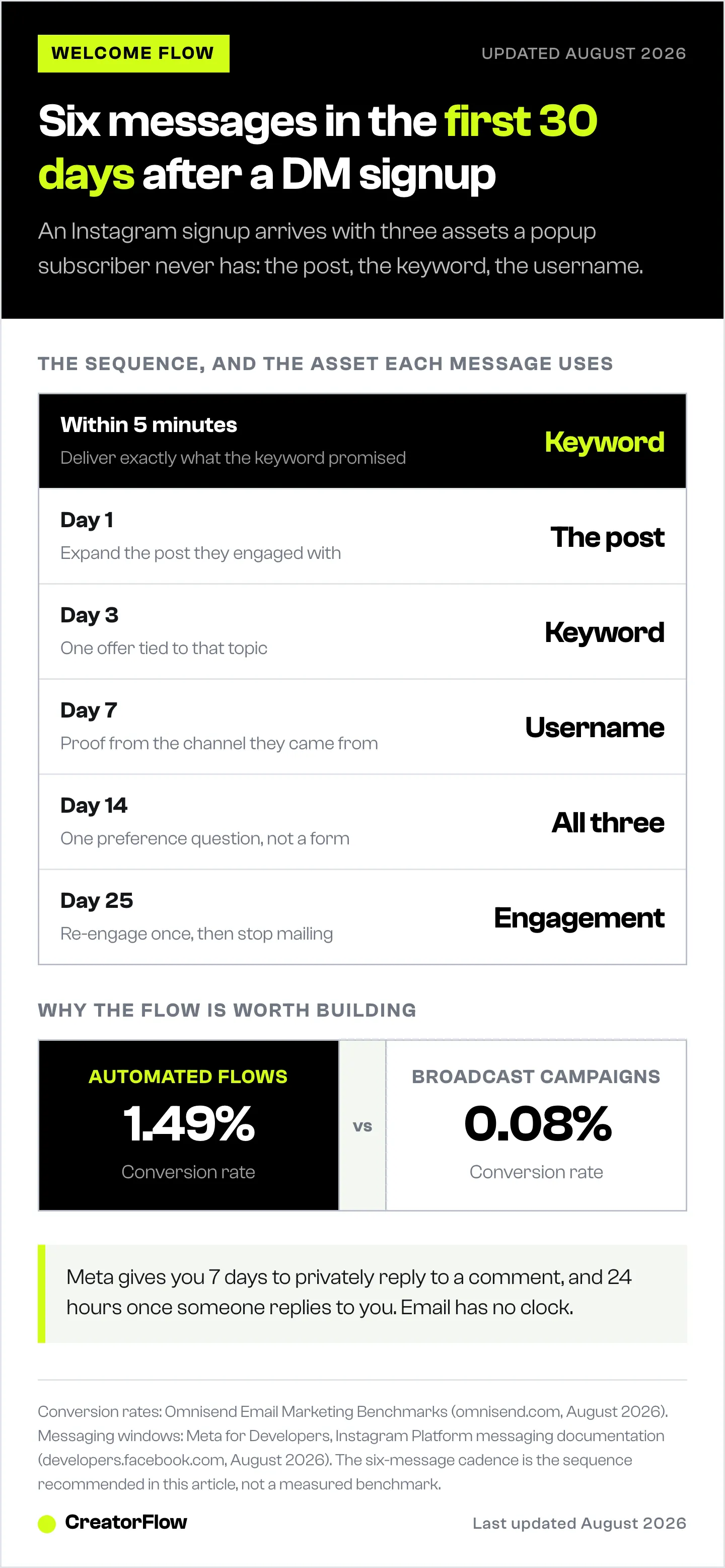
| When | Message | Asset it uses | Job |
|---|---|---|---|
| Within 5 minutes | Deliver exactly what the keyword promised | The keyword | Close the loop before they leave the app |
| Day 1 | The context behind the post they engaged with | The post | Replace the browsing session |
| Day 3 | One offer tied to the post’s topic | The keyword | First purchase attempt |
| Day 7 | Proof from the same channel they came from | The username | Answer the trust question |
| Day 14 | A preference or category question | All three | Segment before you guess |
| Day 25 | Re-engagement, or a quiet sunset | Engagement data | Protect deliverability |
Email one, within five minutes. Deliver the thing. Subject line contains the keyword they typed, because that is the word sitting in their short-term memory. No brand story, no founder letter, no navigation bar full of categories they have not asked about. One link, doing what the Reel said it would do.
Email two, day one. This is the substitute for a browsing session. Take the post they engaged with and expand it. If they commented on a Reel about winter layering, this email covers winter layering and shows three products inside that theme. You are manufacturing the product-view data a popup subscriber would have generated on their own.
Email three, day three. The first real offer, tied to the topic of the post rather than to your bestseller. A subscriber who came from a sizing question and a subscriber who came from a restock alert should not receive the same product here.
Email four, day seven. Proof, sourced from the channel they trust. Someone who found you through Instagram responds to Instagram-shaped evidence: customer photos, reviews with images, content other buyers posted. This is where user-generated content earns its keep.
Email five, day fourteen. Ask one question. Category preference, size, frequency, whichever single field would change what you send next. One question, not a five-field profile update form.
Email six, day twenty-five. If they have not opened anything by now, send a single re-engagement message and then stop mailing them regularly. Unengaged subscribers depress inbox placement for the people who do want your email, and a subscriber acquired from a comment is not worth the deliverability cost of mailing them forever.
Writing the First Email
The single change with the largest effect is naming the post in the subject line.
A popup subscriber cannot be reminded of anything, because they signed up from a page they have already forgotten. A social subscriber remembers a specific piece of content, and the memory is fresh for roughly the length of one scrolling session. Referencing it converts that memory into recognition before they decide whether to open.
Compare the two openings:
- Generic: “Welcome to the family. Here’s 10% off your first order.”
- Specific: “The jacket from Tuesday’s Reel, plus the two we didn’t show.”
The second works because it names something the reader can picture. It also sets up email two, which continues the same thread rather than starting a new one.
Keep the first email to one action. The link they asked for, and nothing competing with it.
Where Instagram Welcome Flows Leak
Four failures account for most of the lost revenue in this sequence.
The flow fires late. If your capture tool exports contacts on a schedule rather than at the moment of capture, email one arrives hours after the DM. The window where naming the post still means something has closed by then.
Every social subscriber enters the same flow. A single welcome sequence for all Instagram signups throws away the keyword, which is the only intent signal you got for free. Split the flow by keyword group before you split it by anything else.
Attribution is not stored on the profile. If the source post is not written onto the contact record at creation, you cannot segment on it later and you cannot report on it at all. The record layer that stores those contacts is where this either happens or does not, and measuring the full path from comment to sale is covered in the guide to connecting comments to revenue.
The cohort is measured against the list average. Instagram subscribers behave differently from popup subscribers on open rate, purchase lag and unsubscribe rate. Averaging them together hides both.
How to Measure It
Compare the Instagram cohort against your popup cohort, on the same four numbers, for the same window.
- Time to first open. Social subscribers who opened within an hour behave differently from ones who opened on day two. This tells you whether email one is arriving fast enough.
- First-purchase rate at 30 days. The number that decides whether the flow is worth running. Flow-driven email revenue skews heavily toward first-time buyers, close to 48% against 16% for broadcast campaigns (klaviyo.com, August 2026), so a welcome flow is where a new subscriber is most likely to buy at all.
- Revenue per recipient. Klaviyo’s 2026 benchmark study puts flow revenue per recipient at roughly 18 times campaign level, with the top decile of flows reaching $7.79 and click rates above 10% (klaviyo.com, August 2026). Use those as a ceiling reference, not a target.
- Unsubscribe rate by keyword. A keyword with a high unsubscribe rate is usually a promise the sequence failed to keep.
The benchmark worth internalising: automated and broadcast emails open at nearly the same rate, 30.21% against 30.41%, while automations convert at 1.49% and campaigns at 0.08%, and generate $3.41 per email sent against $0.155 (omnisend.com, August 2026). Attention is not the variable. Arriving at the moment someone already wants something is.
How to Build One This Week
- Capture the address in the DM. CreatorFlow’s Email Gate collects the address inside the conversation, and Pro exports the contacts as CSV along with click and geographic data for $15/month (creatorflow.so, August 2026).
- Move the contacts into your email platform. The routes for Klaviyo, Kit and Mailchimp are set out in the guide to syncing DM-captured emails into an email platform.
- Tag on entry. Write the source post and the keyword onto the contact record as it is created. Retrofitting attribution later is not possible.
- Split by keyword group. Two or three groups is enough to start. Sizing questions, restock requests and lead-magnet downloads want different second emails.
- Write emails one and two first. They carry most of the result. Add three through six once the first two are sending.
- Report the cohort separately for 30 days before changing anything.
Brands already inside a CRM can run the capture natively. Klaviyo Social Marketing reached general availability on 30 June 2026, built on Gatsby, which Klaviyo acquired on 19 August 2025, and it writes social signups directly onto the same profile as the rest of the customer record (klaviyo.com, August 2026). The sequencing above applies the same way regardless of which tool captures the address.
FAQ
What is an Instagram welcome flow?
It is the automated email or SMS sequence that starts when someone subscribes through an Instagram DM rather than a website form. The trigger is a DM containing an email address or phone number, normally captured after the person commented a keyword on a post or replied to a story.
How soon should the first email send after an Instagram DM signup?
Within about five minutes. The person is still inside the app and still remembers the post they commented on. Meta’s standard messaging window also closes 24 hours after their last message (developers.facebook.com, August 2026), so an email that arrives while the DM thread is live lets the two channels reinforce each other.
Should Instagram subscribers get a different welcome flow from website subscribers?
Yes. A website subscriber arrives with a browsing session attached and no stated intent. An Instagram subscriber arrives with the opposite: a specific post, a specific keyword, and no browsing history. The sequences need to open differently because the available context is different.
What should the first email say?
Deliver exactly what the keyword promised, and name the post in the subject line. One link, one action. Save the brand introduction for email two, where it can be framed around the content they already engaged with.
How many emails should an Instagram welcome flow contain?
Six over 30 days works for most ecommerce accounts: immediate delivery, day one context, day three offer, day seven proof, day fourteen preference question, day twenty-five re-engagement. Start with the first two and add the rest once they are sending reliably.
Do welcome flows outperform regular campaigns?
On conversion, substantially. Automated emails convert at 1.49% against 0.08% for campaigns and produce $3.41 per email sent against $0.155, while opening at almost identical rates, 30.21% against 30.41% (omnisend.com, August 2026). Flows also generate roughly 41% of email revenue from 5.3% of sends (klaviyo.com, August 2026).
How do I know which Instagram post produced a subscriber?
Write the source post and the trigger keyword onto the contact record at the moment the contact is created. If that field is not populated on entry it cannot be reconstructed afterwards, which is the most common reason social attribution reporting comes back empty.
What happens if someone never opens any of the six emails?
Send one re-engagement message around day twenty-five, then move them out of your regular sending. Continuing to mail unengaged contacts lowers inbox placement for the subscribers who do read your email.
Sources
- Omnisend, Email Marketing Benchmarks (omnisend.com, accessed August 2026)
- Klaviyo, 2026 Email Marketing Benchmarks by Industry, based on more than 183,000 Klaviyo accounts (klaviyo.com, accessed August 2026)
- Meta for Developers, Instagram Platform messaging documentation and messaging policy (developers.facebook.com, accessed August 2026)
- Klaviyo newsroom, Gatsby acquisition announcement (klaviyo.com, accessed August 2026)
- CreatorFlow pricing and features (creatorflow.so, accessed August 2026)
Benchmark figures verified from Omnisend and Klaviyo published studies, and messaging windows from Meta’s developer documentation, as of August 2026. Individual results vary.


