
A social media CRM is a system that turns social interactions (comments, DMs, mentions, story replies) into contact records you own and can message outside the platform. It differs from a scheduling or inbox tool because it stores a person, not a thread. Its ceiling is set by the platform: Instagram’s messaging API returns seven profile fields, and an email address is not one of them.
Every vendor page in this category sells the same promise. Capture social engagement, build a customer profile, message that person on a channel you control. The promise is real. What none of those pages tell you is where the data stops. You can buy a $399-per-seat platform and still end up with a contact record that holds a username and a follower count, because that is all the platform released.
This guide covers what these systems store, the difference between the layer that captures a contact and the layer that files it, what the main tools cost and what each one bills against, and the questions that decide which setup fits a business your size.
Key Takeaways
- These systems store people, not conversations. A social inbox closes a thread. A CRM keeps the record after the thread ends, and links it to orders, email activity and support history.
- The platform sets the ceiling, not the software. Meta’s Instagram messaging API returns name, username, profile picture, verification status, follower count and two follow-relationship flags. Email and phone number are absent (developers.facebook.com, August 2026).
- Contact details have to be asked for. Because the API withholds them, every tool in this category collects an email or phone number by prompting for it inside the conversation. The capture step is the product.
- The 24-hour window is the real constraint. Meta gives a business 24 hours to reply after a person interacts, with the Human Agent tag extending manual replies to 7 days (developers.facebook.com, August 2026). Contact details not collected in that window need a new interaction.
- Pricing axes differ more than prices do. Sprout Social and Hootsuite bill per seat, Klaviyo bills per active profile stored, and CreatorFlow charges $15/month flat on Pro. The axis decides what growth costs you.
- Most small operators need two pieces, not one platform. A capture tool on the social side and an email or CRM platform on the record side covers the job at a fraction of a full suite.
What Is a Social Media CRM?
A social media CRM captures interactions from social platforms and writes them to a customer record you control, so a commenter becomes a contact you can email or text. Klaviyo, which launched a product in this category, frames it as making “a comment or a DM the starting point for a real customer relationship” rather than treating engagement as the goal (klaviyo.com, August 2026). The record persists after the conversation closes.
The category name is used two ways, and the difference matters when you are comparing vendors.
The older meaning, sometimes written as social CRM, describes a traditional CRM with a social listening module bolted on. Salesforce sold this as Social Studio and retired the product on 18 November 2024 (help.salesforce.com, August 2026). Most of that functionality moved to specialist vendors.
The newer meaning describes what Klaviyo, Sprout Social and Instagram-first tools now build: social engagement as an acquisition channel that produces owned contacts. This guide uses the second meaning, because it is the one buyers are shopping for.
Social Media CRM vs Social Media Management Tool
These get compared as if they compete. They solve different halves of the problem. A management tool handles publishing and replying. A CRM handles the record that survives the reply.
| Social media management tool | Social media CRM | |
|---|---|---|
| Core object | The post and the thread | The person |
| Lifespan of the data | Until the conversation closes | Ongoing |
| Answers “who commented?” | Yes, by username | Yes, as a contact record |
| Answers “did they buy?” | No | Yes, when order data is linked |
| Can message them off-platform | No | Yes, once an email or phone number is collected |
| Typical billing | Per seat or per social account | Per contact stored, or flat |
A team that posts 40 times a week and answers comments needs the first. A business that wants to email the person who asked “how much?” three weeks later needs the second. Plenty of operations run both, which is why the pricing stacks up fast.
What Instagram Hands Over, and What It Withholds
Meta’s Instagram messaging API returns seven fields about a person who messages a business: name, username, profile picture, verification status, follower count, whether the user follows the business, and whether the business follows the user (developers.facebook.com, August 2026). Email address and phone number are not included. No tool can retrieve them, because Meta does not publish them.
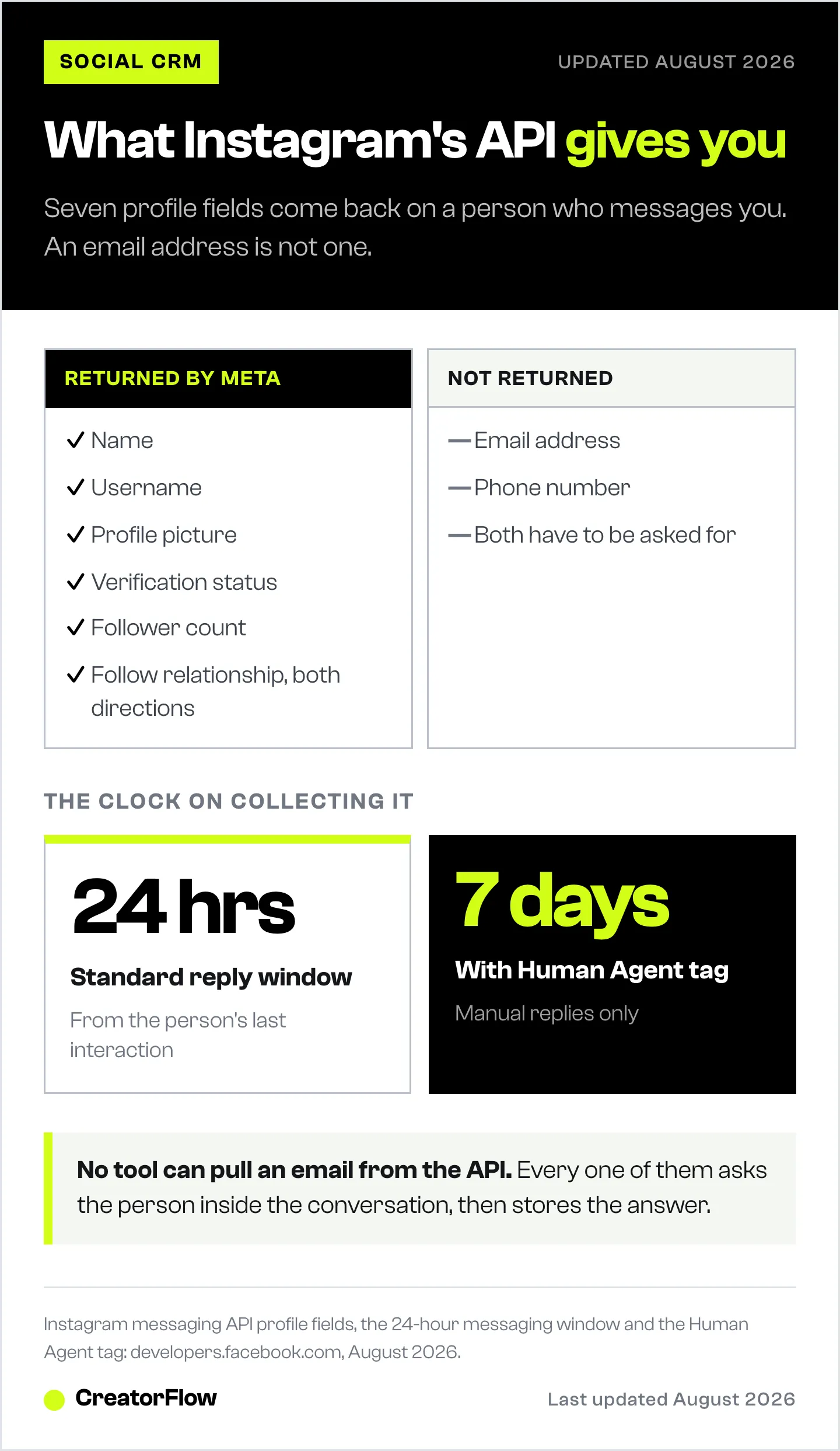
This single fact reorganizes the whole buying decision. The contact record a social media CRM builds is empty of anything you can send a message to until someone types it in. A deeper breakdown of the seven profile fields Instagram returns covers what each one is good for.
| Field | Returned by Meta | Useful for |
|---|---|---|
| Name | Yes | Personalizing the reply |
| Username | Yes | Matching a record on repeat contact |
| Profile picture | Yes | Manual review |
| Verification status | Yes | Prioritizing partnership requests |
| Follower count | Yes | Routing creators and press |
| Follows you / you follow them | Yes | Gating a link behind a follow |
| Email address | No | Has to be collected in conversation |
| Phone number | No | Has to be collected in conversation |
The practical consequence: the vendor demo that shows a rich customer profile is showing you a profile that got rich somewhere else. The social channel contributed a name and a behavior. The identifier came from the person answering a question.
The Capture Layer and the Record Layer
Splitting this category into two layers makes the vendor comparison tractable. The capture layer sits on the platform and gets an identifier out of a conversation. The record layer stores that identifier alongside everything else you know.
The capture layer watches for a trigger (a keyword in a comment, a story reply, a DM) and runs a short exchange that asks for an email address or phone number before delivering whatever the person wanted. The mechanics of collecting email addresses inside Instagram DMs are the same across tools: offer something, ask once, deliver on answer.
The record layer is the CRM or email platform. It stores the contact, deduplicates against existing customers, tracks orders and opens, and runs the follow-up sequences.
Some vendors sell both layers as one product. Klaviyo does, which is what Klaviyo Social Marketing is. Others sell one layer and connect to the other. The trade-off is straightforward: a single platform removes a handoff, and a split stack lets you keep the email platform you already pay for.
CreatorFlow works as the capture layer. It runs comment-to-DM, story reply and keyword automations through Meta’s official API, collects email addresses with the Email Gate on Pro, and exports the collected contacts as CSV for import into whatever email platform or CRM holds your list. Pro is $15/month flat, and includes the Follow Gate, geo analytics and click tracking. The wider question of how to integrate email marketing with social media covers what to do with the list once it lands.
The 24-Hour Window Decides Your Capture Rate
Meta allows a business 24 hours to respond after a person interacts with it, and the Human Agent tag extends manual replies to a 7-day period (developers.facebook.com, August 2026). Automated messages sent inside the standard window may carry promotional content. After it closes, reaching that person again requires a fresh interaction from them.
This is the reason capture speed sits above capture design in importance. A person who comments at 9pm and receives an automated reply at 9pm has a conversation open. The same person contacted the following afternoon by a human working through a backlog is at the edge of the window, and any follow-up after that is gone.
Response latency, in other words, is a data-collection metric before it is a customer-service one. Tools that reply in seconds collect more identifiers than tools that route to a human queue, and the gap compounds across every post.
What Social Media CRM Tools Cost
Prices in this category range from $15/month to $399 per seat per month, and the billing axis varies more than the headline number. Per-seat pricing rises when the team grows. Per-contact pricing rises when the list grows. Flat pricing does neither.
| Tool | Entry price | Billed per | Notes |
|---|---|---|---|
| CreatorFlow | $15/month (Pro) | Flat, per workspace | Free plan at $0 with 500 DMs/month. Instagram-first, Meta Tech Provider since December 2025 |
| Klaviyo | Free tier, then scales | Active profiles stored | Free plan covers 250 active profiles and 500 email sends/month; SMS billed separately (klaviyo.com, August 2026) |
| Sprout Social | $79/month annual, $99 monthly (Essentials) | Seat | Standard $199, Professional $299, Advanced $399 per seat/month. 5 social profiles on Essentials and Standard, unlimited above (sproutsocial.com, August 2026) |
| Hootsuite | $99/month (Standard) | User, annual billing | Professional $199, Advanced $399 per user/month. Standard covers up to 10 social accounts, unlimited above (hootsuite.com, August 2026) |
Sprout Social and Hootsuite are built for teams managing many accounts and both include a consolidated inbox. Their per-seat model suits an organization where several people work the same queue. Klaviyo is built for ecommerce and B2C brands that want social engagement filed next to purchase history in one platform, and its per-profile model tracks the size of the list rather than the size of the team.
For a solo operator or a two-person business, the seat model prices in capacity that is not being used. That is the case where a capture tool plus an email platform lands materially cheaper.
How to Choose a Social Media CRM
Work through five questions in order. The answers narrow the field faster than a feature matrix.
- Which platform produces your conversations? If the answer is Instagram alone, an Instagram-first tool covers it and a multi-network suite prices in networks you do not use. Setting up an Instagram CRM specifically is a narrower job than buying a social suite.
- Do you already pay for an email platform? If yes, you need the capture layer only. Buying a platform that replaces a working ESP is a migration, not a purchase.
- What is your growth axis? Growing headcount favors flat or per-contact pricing. Growing list size favors flat or per-seat pricing. Match the axis you are not growing on.
- Who answers the messages? A single person can work an inbox. Three people need assignment, and that is where seat-based suites earn their price.
- What happens to the contact after capture? Write down the next three messages that person receives. If you cannot name them, the CRM will store records nobody uses.
How to Set One Up in Five Steps
- Connect the account. Use OAuth through the official API. An Instagram Business or Creator account is required for messaging automation. No password sharing is involved.
- Pick one trigger. One keyword on one post beats five automations you cannot measure. Choose a word people already type, and check the comment keywords that convert before guessing.
- Ask for the identifier before you deliver. Offer the link, guide or code, ask for the email address once, then send it. Asking after delivery collects almost nothing.
- Route the contact into your list. Export the collected contacts and import them into your email platform or CRM on a regular schedule so the record layer stays current. What that list should send next is a separate build.
- Measure capture rate, not comment count. The number that matters is identifiers collected divided by conversations opened. Everything else is a vanity metric.
FAQ
What is a social media CRM?
A social media CRM captures comments, DMs, mentions and story replies from social platforms and turns them into contact records you own, so you can message those people by email or text later. It stores a person rather than a conversation thread, and links social behavior to orders and email activity in one profile.
Is social CRM different from a social media management tool?
Yes. A management tool schedules posts and handles replies, and its data ends when the conversation closes. A CRM keeps a contact record that persists, deduplicates against existing customers, and supports follow-up on channels the platform does not control. Many businesses run both.
Can a social media CRM see my followers’ email addresses?
No. Meta’s Instagram messaging API returns seven profile fields and an email address is not among them (developers.facebook.com, August 2026). Every tool that builds an email list from Instagram does it by asking the person for their address inside the conversation, then storing the answer.
Do I need one if I only use Instagram?
Only if you want to reach commenters after the conversation closes. If you answer everyone inside the app and never follow up, an inbox is enough. If you want to email the person who asked about pricing three weeks later, you need a stored contact record.
How much does a social media CRM cost?
Entry pricing runs from $15/month for a flat-rate Instagram-first tool up to $399 per seat per month for enterprise suites such as Sprout Social Advanced and Hootsuite Advanced (sproutsocial.com and hootsuite.com, August 2026). Klaviyo’s free tier covers 250 active profiles and scales with the number of profiles stored (klaviyo.com, August 2026).
Can I connect Instagram DMs to HubSpot or Salesforce?
Contacts collected from Instagram can be imported into any CRM that accepts a contact list. Salesforce retired its own social product, Social Studio, on 18 November 2024 (help.salesforce.com, August 2026), so the common pattern now is a specialist capture tool feeding the CRM you already run.
What happens after the 24-hour messaging window closes?
Meta’s standard window gives a business 24 hours to respond after someone interacts, and the Human Agent tag extends manual replies to 7 days (developers.facebook.com, August 2026). Once it closes, that person has to interact again before you can message them. Contact details collected during the window remain yours.
Which social platforms can feed a CRM?
Instagram, Facebook, WhatsApp, TikTok and LinkedIn all expose messaging or engagement data to approved tools, and coverage varies by vendor. Each platform sets its own field list and its own messaging window, so capabilities do not transfer between them.
Tool pricing, product scope and API behavior verified from klaviyo.com, sproutsocial.com, hootsuite.com, help.salesforce.com and developers.facebook.com as of August 2026. Individual results vary.


