
An Instagram CRM is a customer relationship management tool connected to your Instagram account that captures DMs, comments, and story mentions, organizes them as leads, and helps you reply and follow up in one place. It pulls conversations out of the native app inbox so nothing gets lost, works from the seven profile fields Instagram first-party data actually returns, tracks where each lead sits in your sales process, and automates the repetitive replies.
Your leads are sitting in your Instagram DMs right now, and you are losing them. A comment here, a story reply there, a “how much?” that scrolls off the screen before you answer. The native inbox was built for chatting with friends, not running a business. Once you pass a few dozen conversations a week, you need a system that treats each message as what it is: a potential customer.
This guide explains what an Instagram CRM actually does, the three ways Instagram lets you manage DMs, the difference between native and third-party setups, and how to build a lead-capture system that fits a solo creator or a small team without enterprise overhead.
Key Takeaways
- What it is: An Instagram CRM connects to your account and turns DMs, comments, and mentions into organized, trackable leads instead of a messy inbox.
- Three inbox options: Instagram gives you the app inbox, Meta Business Suite, and the Messaging API. CRMs and automation tools connect through the API.
- The API cannot message first: Businesses cannot start a conversation through the Instagram Messaging API, and they have 24 hours to respond once a user messages them (developers.facebook.com, 2026).
- The 24-hour window has an extension: The Human Agent tag stretches the response window from 24 hours to 7 days (developers.facebook.com, 2026).
- Capture is the hard part: Since you cannot DM first, you need triggers like comment-to-DM, keyword replies, and story mentions to start conversations at scale.
- Match the tool to the job: A full CRM manages pipelines and multiple channels. A creator usually needs a lighter Instagram-native layer that captures leads and feeds them into email or a CRM. The category-level view of how a social media CRM stores contacts covers the same split across every platform.

What Is an Instagram CRM?
An Instagram CRM is software that links to your professional Instagram account and centralizes every customer conversation. Instead of scrolling the app to find who asked what, you get each lead as a record with their message history, contact details, and status in your funnel.
A good Instagram CRM does four things:
- Captures leads from DMs, comments, and story mentions automatically.
- Organizes them into a pipeline so you know who is new, who is interested, and who bought.
- Automates the repetitive replies with keyword triggers and chatbots.
- Measures what is working, so you double down on the posts and messages that convert.
The point is simple: no message goes unanswered, and no lead falls through the cracks.
How Instagram Lets You Manage DMs
Before connecting any tool, it helps to know the three native options Instagram gives a business account.
| Inbox option | Best for | What it does |
|---|---|---|
| Instagram app inbox | Solo creators, micro-businesses | Manage DMs directly in the app, basic flags and folders |
| Meta Business Suite | Small businesses | Manage Instagram and Facebook messages on desktop, with some automation |
| Messaging API | Growing teams and higher volume | Connects external tools and CRMs, enables advanced automation |
The app inbox and Business Suite are free and fine at low volume. Once you are handling real lead flow or want true automation, you connect a tool through the Messaging API, which is what every Instagram CRM and DM automation platform uses under the hood.
The Rules You Have to Work Within
Instagram’s API has two constraints that shape every CRM setup, and most people learn them the hard way.
You cannot send the first message. A business cannot cold-DM someone through the Instagram Messaging API. The user has to message you first, or take an action like commenting on a post (developers.facebook.com, 2026). This is why lead capture on Instagram is about triggers, not outreach.
You have 24 hours to respond. Once someone messages you, the standard window to reply is 24 hours. The Human Agent tag extends that to 7 days for follow-up (developers.facebook.com, 2026). Miss the window and you cannot re-open the conversation freely, which is exactly why automated, instant replies matter so much.
These are not tool limitations. They are Meta’s platform rules, and any legitimate Instagram CRM operates inside them.
Native vs Third-Party Instagram Integration
CRMs connect to Instagram in one of two ways.
A native integration is built into the platform by the company itself, so Instagram connects directly with no middleman. A third-party integration is built by an outside developer to bridge two tools. Native connections tend to be more stable and better supported, since one company owns the whole path. When choosing a tool, check whether its Instagram connection is native or routed through a third party, because that affects reliability.
How to Capture Instagram Leads at Scale
Because you cannot message first, the whole game is getting people to start the conversation. These triggers do that.
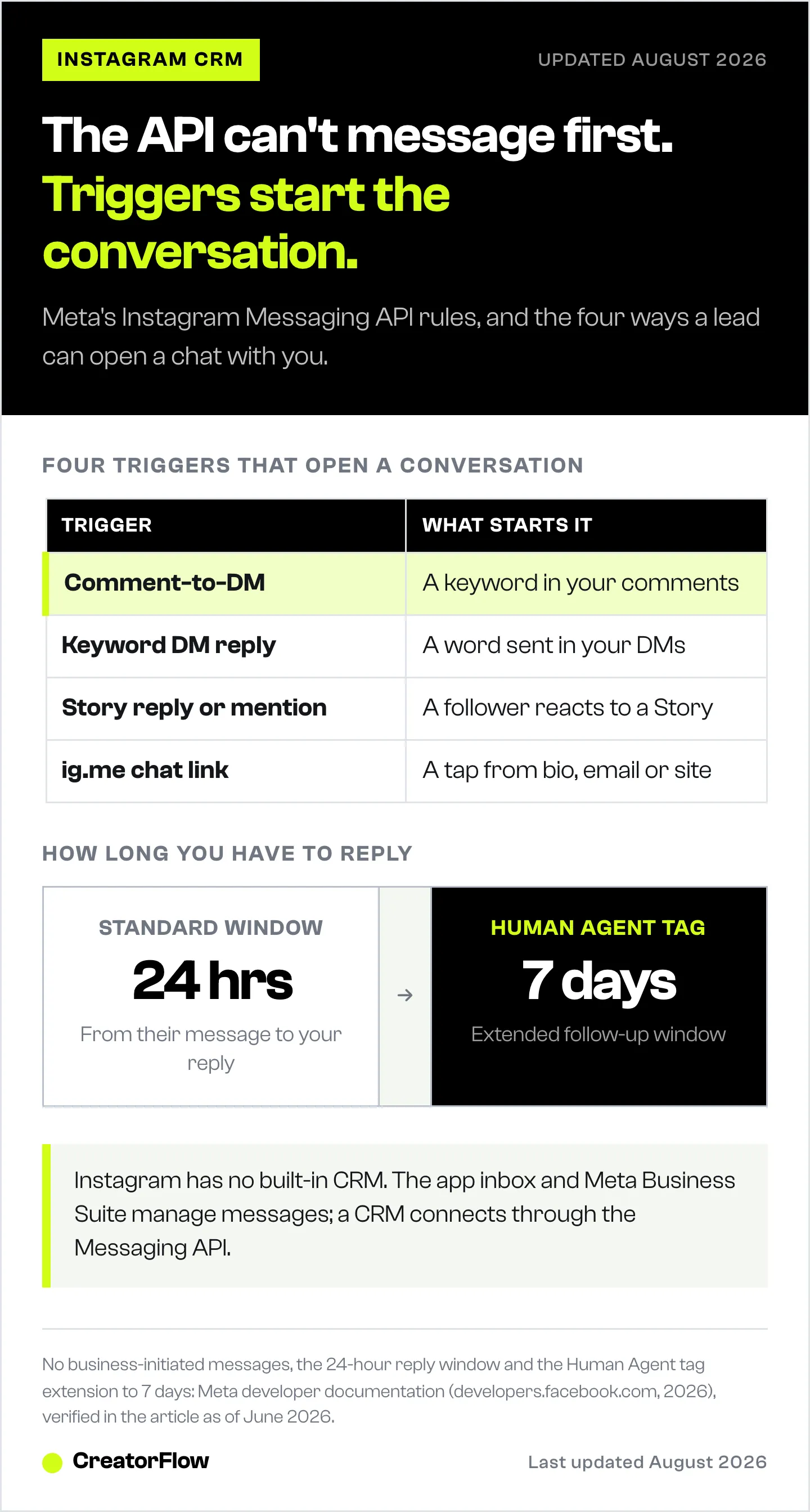
- Comment-to-DM. Someone comments a keyword on your post and instantly receives a DM. This is the highest-volume capture method for creators, because a single Reel can generate hundreds of comments.
- Keyword DM triggers. Someone sends a specific word in your DMs and gets an automated reply with the link, price, or guide they asked for.
- Story replies and mentions. When a follower replies to or mentions you in a story, that becomes a lead you can follow up on.
- ig.me chat links. A direct link that opens a DM with your account, which you can place in your bio, email, or website.
Set these up and your content does the prospecting. Every post becomes a way to open conversations you are allowed to continue. For comment prompts that pull replies, see Instagram content ideas that generate leads.
Some email platforms have started folding this capture step into the CRM itself rather than leaving it to a separate tool. Klaviyo’s Social Marketing feature is the clearest example of that pattern.
Do You Need a Full CRM or a Lighter Layer?
This is where most creators overbuy. A full CRM like the messenger-based platforms or a sales suite manages multi-channel pipelines, invoicing, and team routing. That is the right call if you run a sales team across Instagram, WhatsApp, email, and live chat. If you connect Instagram into a broader pipeline, the GoHighLevel Instagram DM CRM setup walks through that route.
Most solo creators and small businesses do not need all that. They need the Instagram-native capture layer: instant replies, lead capture, and a clean export into whatever email tool or CRM they already use.
That is what CreatorFlow does. It is the Instagram-native capture layer. It connects through Meta’s official Instagram API, fires instant comment-to-DM and keyword replies, can require a follow before sending a link, captures emails inside the DM, and exports contacts to CSV so they flow into your email platform or CRM. Think of it as the front door that catches every Instagram lead, which you then nurture wherever you already work. For the full picture, see what CreatorFlow does and the Instagram DM automation guide.
How to Set Up Your Instagram CRM in 5 Steps
- Switch to a professional account. Creator or Business. Lead tools require it, and it turns on the API connection.
- Connect your Facebook page. Instagram’s API connection runs through a linked Facebook business page, so set that up first.
- Pick your tool. Choose a full CRM if you need multi-channel pipelines, or a lighter Instagram-native tool if you mainly need capture and automation. Compare options in the best Instagram DM automation tools.
- Build your capture triggers. Set comment-to-DM keywords, DM keyword replies, and a welcome flow so conversations start automatically.
- Route leads where you work. Capture emails and export contacts into your email platform or CRM so follow-up happens outside the 24-hour window.
Start simple. One comment-to-DM trigger on your best-performing post is enough to prove the system before you build more.
Customer content belongs on the same record as the customer. For how tagged posts and mentions map onto a profile, and where the Instagram API stops short, see what UGC tracking can and cannot measure.
FAQ
What is an Instagram CRM?
An Instagram CRM is a tool connected to your professional Instagram account that captures DMs, comments, and story mentions, turns them into organized leads, and helps you reply and follow up in one place. It moves your conversations out of the native app inbox into a system built for managing customers rather than chatting with friends.
Does Instagram have a built-in CRM?
No. Instagram gives you the app inbox and Meta Business Suite for managing messages, but neither is a true CRM with lead pipelines and automation. For that, you connect an external CRM or automation tool through the Instagram Messaging API. The native tools work for low volume, but they do not organize leads or automate follow-up.
Is CreatorFlow a CRM?
CreatorFlow is an Instagram-native lead-capture and DM automation tool. It fires instant comment-to-DM and keyword replies, applies a follow gate, captures emails, and exports contacts to CSV. Most creators use it as the capture layer that feeds leads into the email tool or CRM they already use.
Can a CRM send the first DM on Instagram?
No. Meta’s Instagram Messaging API does not allow businesses to initiate conversations. The user must message you first or take an action like commenting on your post (developers.facebook.com, 2026). This is why Instagram lead capture relies on triggers such as comment-to-DM and keyword replies rather than cold outreach.
How do I connect Instagram to a CRM?
Switch to a professional account, link it to a Facebook business page, then connect your chosen tool through Instagram’s Messaging API, usually in the tool’s settings under integrations. Once connected, incoming DMs, comments, and mentions flow into the CRM automatically, where you can reply, tag, and track each lead.
What is the difference between native and third-party Instagram integration?
A native integration is built directly into the platform by the company that makes it, so Instagram connects with no middleman. A third-party integration is built by an outside developer to bridge two separate tools. Native connections are usually more stable and better supported because one company controls the entire connection.
Do I need an Instagram CRM as a small creator?
If your DMs and comments are more than you can answer by hand, yes. You may not need a full CRM, but you do need a capture layer that sends instant replies and saves contacts so leads do not slip past the 24-hour window. Start with one comment-to-DM trigger and grow from there.
Instagram Messaging API rules, the 24-hour window, and the Human Agent tag extension verified from developers.facebook.com, as of June 2026. Instagram platform rules change frequently. Individual results vary.


