
An Instagram quiz funnel turns quiz answers into email subscribers by scoring the quiz inside your content and delivering the result through a DM. The Story quiz sticker cannot do this by itself. A sticker tap is recorded in your Story activity view and never opens a message thread, so no automation tool can reply to it. The funnel needs a comment, a DM, or a Story reply as its trigger.
That single detail is why most Instagram quiz advice fails when people try it. You post the quiz sticker, 400 people tap an answer, and your email list does not move. The taps went into a private tally only you can see. Nobody messaged you, so there was nothing to automate and nobody to send a result to.
This guide covers the two builds that do work, which one fits your account, and the exact setup for each. It is written for coaches, educators, and creators who want the quiz to end in an email address rather than an engagement number.
Key Takeaways
- Quiz stickers are an engagement tool, not a list tool: poll, quiz, and slider taps appear in your Story activity view and do not create a DM thread, so automation cannot respond to them
- Every quiz funnel needs a messaging trigger: a comment keyword, a DM keyword, or a typed Story reply. Those are the three actions that open a conversation an automation can answer
- Two builds exist: score the quiz in your content and send one result DM, or ask the questions inside the DM itself. The first is faster to launch and drops fewer people
- Question count is the main leak: published form benchmarks show completion falling sharply past five fields, and each question in a DM quiz behaves like a field
- Ask for the email after the result, not before it: the answer is the thing people came for, so it is the only reason they have to hand over an address
- Result buckets double as list segments: three outcomes means three tags, and each one tells you what to send that person next
Why Instagram Quiz Stickers Do Not Grow Your Email List
Instagram’s interactive stickers and Instagram’s messaging system are separate systems. When someone taps an answer on a quiz sticker, drags an emoji slider, or votes in a poll, the response is stored against your Story and shown in the activity view attached to that Story. It does not arrive in your inbox, and it does not start a conversation.
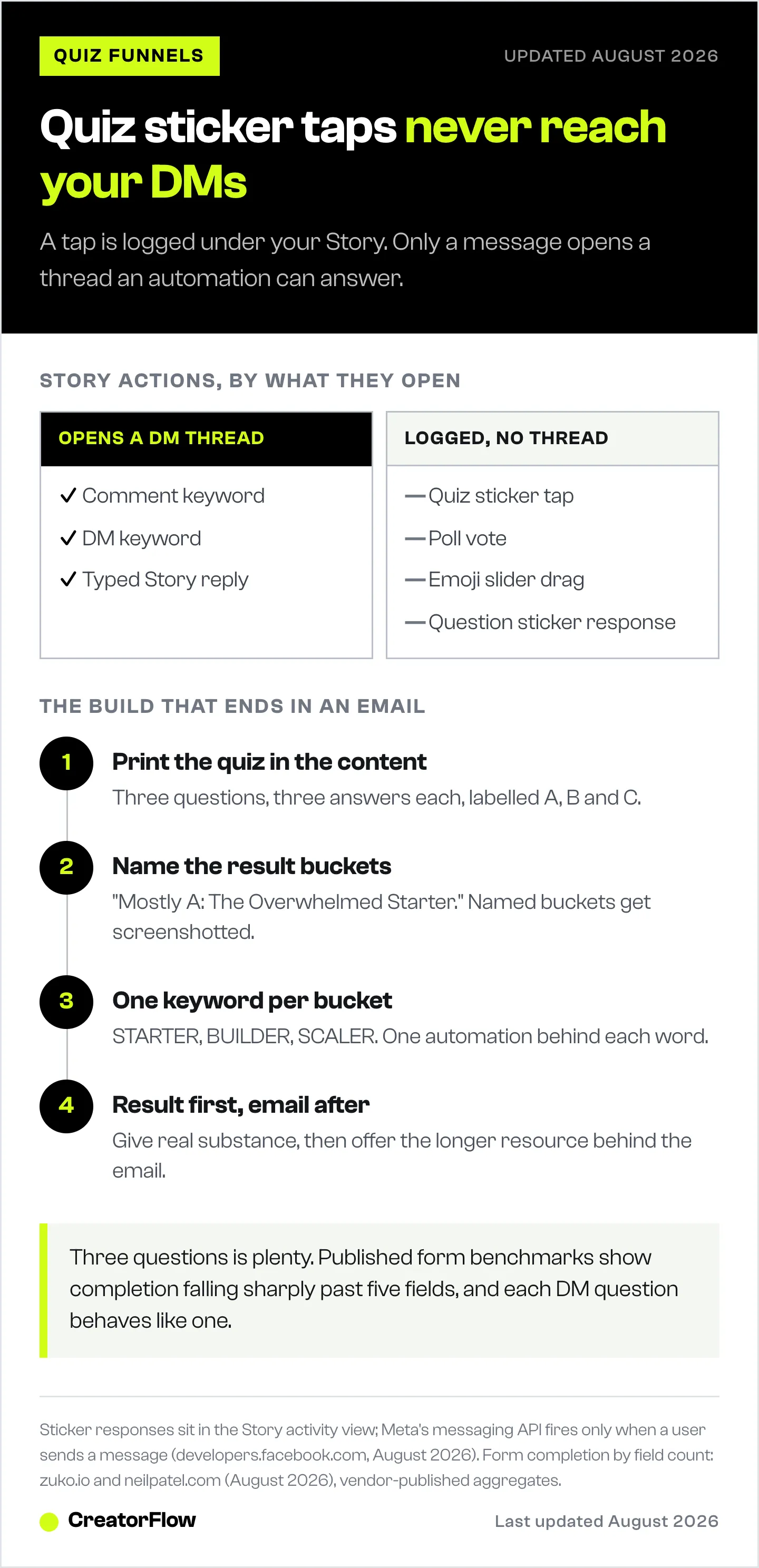
This matters because every Instagram DM automation tool works off Meta’s messaging API, and that API only fires when an Instagram user sends your account a message. Meta’s own documentation describes conversations as beginning when a user messages the account through the feed, posts, Story mentions, and similar channels (developers.facebook.com, August 2026). A sticker tap is not a message, so nothing fires.
The practical result: a quiz sticker can tell you that 62% of your audience picked “beginner,” but it cannot tell you who they are in a way you can act on, and it cannot send them anything.
The question sticker behaves the same way. Responses collect under the Story rather than in your inbox. The one Story action that does open a message thread is a plain typed reply in the reply box, which is why Story reply automation is built around replies rather than stickers.
None of this makes the quiz sticker useless. It is a good warm-up. It cannot be the mechanism that captures the email.
What an Instagram Quiz Funnel Is
An Instagram quiz funnel is a sequence where a follower answers a small set of questions, receives a personalized result by DM, and gives an email address in exchange for the detail behind that result. The quiz supplies the reason to message you. The DM supplies the delivery. The email request sits at the end, after the person has already received something.
The reason this converts better than a plain lead magnet is that the reader has told you something about themselves before you ask for anything. A generic PDF asks for an email from a stranger. A quiz result asks for an email from someone you have already sorted into a group, who now wants the rest of the answer. Quizzes are the best-known method of zero-party data collection, and the same trade logic applies to every other surface you could ask on.
Most published quiz advice assumes the quiz lives on a landing page built in a dedicated quiz tool, with Instagram used only to drive traffic to the link in bio. That works, and it adds two page loads and an app exit between the follower and the result. The builds below keep the whole thing inside Instagram.
The Two Builds, and When Each One Fits
There are exactly two places the quiz logic can live: in your content, or in the DM thread.
| Content-scored quiz | In-DM quiz | |
|---|---|---|
| Where questions live | The Reel, carousel, or Story itself | Inside the DM conversation |
| How answers are captured | Viewer self-scores, then sends one keyword | Tool asks each question and stores the reply |
| Steps for the follower | 1 message | 3 to 6 messages |
| Automations to build | One per result bucket | One branching flow |
| Data you get back | Which bucket, plus the email | Every individual answer, plus the email |
| Tooling needed | Keyword trigger and an email capture step | A tool with multi-question flow logic |
| Best for | Creators, coaches, anyone launching this week | Brands that need per-answer data for segmentation |
Content-scored means the questions are printed in the content. A three-slide carousel poses three questions, the last slide says “mostly A means you are a Starter, comment STARTER and I’ll send your plan,” and the automation replies to whichever keyword arrives. The follower does the scoring. You build one automation per result.
In-DM means the tool asks the questions one at a time in the thread and stores each answer. Klaviyo’s Social Marketing plan supports up to five Custom Questions in an auto-reply flow (help.klaviyo.com, August 2026). ManyChat’s Data Collection block, available on Pro, asks a question, waits for the reply, and saves it to a custom field (help.manychat.com, August 2026). Both give you per-answer data at the cost of extra messages.
Klaviyo’s version is built for ecommerce brands and bills on active profiles in the CRM, which is worth understanding before you commit. Our breakdown of Klaviyo Social Marketing covers who it fits.
For most single-operator accounts, the content-scored build wins on the only metric that decides it: how many people reach the end.
Why Every Extra Question Costs You Subscribers
A question inside a DM behaves like a field on a form. The person can abandon at any point, and a meaningful share of them do.
Published form benchmarks put three-field forms in the low twenties for completion percentage and show the rate falling steeply past five fields, with the drop per field accelerating rather than staying flat (zuko.io and neilpatel.com, August 2026). These are vendor-published aggregates rather than controlled research, so treat them as direction and not gospel. The direction is consistent across every source: more questions, fewer finishers.
You will also see claims that Instagram quizzes convert at 85%. That figure circulates on quiz-tool marketing pages with no sample size, no time period, and no definition of what is being converted. Ignore it and measure your own.
The practical rule that falls out of this: three questions is plenty. Three questions produce enough distinction to sort people into three or four buckets, and three is short enough that the person finishes while still curious.
If you are running the in-DM build, count the email request as one of your steps. A five-question quiz plus an email ask is a six-step conversation.
How to Build a Content-Scored Instagram Quiz
This takes about 30 minutes and needs no quiz software.
1. Pick the sorting question, not the trivia question. The quiz has to sort people into groups you can sell to differently. A skincare account sorts by skin type. A fitness coach sorts by training age. A business coach sorts by revenue stage. If two results would receive the same follow-up, you have two results too many.
2. Write three questions with three answers each. Label the answers A, B, C consistently down all three questions so scoring is trivial. Keep every option to one line, because this has to be readable on a phone at a glance.
3. Define your result buckets and name them well. “Mostly A: The Overwhelmed Starter.” Named buckets get screenshotted and shared. Numbered ones do not.
4. Give each bucket its own keyword. STARTER, BUILDER, SCALER. One word, easy to spell, distinct enough that a typo in one is not a match for another. Avoid keywords that show up in ordinary comments on your posts.
5. Build one automation per keyword. Each one sends that bucket’s result, then asks for the email before the full resource. In CreatorFlow that is a keyword trigger with the Email Gate turned on, so the address is collected inside the DM before the link is released. Three buckets means three automations, each with its own message.
Post the carousel, put the instruction on the final slide, and repeat the instruction in the caption’s first line. The caption is where people look after they finish reading the slides.
Where the Email Ask Goes
Order decides the conversion rate here, and the right order is counterintuitive if you are used to landing pages.
Deliver the result first. Name their bucket, give them two or three sentences of real substance about what it means, and only then offer the longer resource behind the email. The result is what they were promised, so withholding it to force an address turns a curious follower into someone who feels tricked.
What sits behind the email should be specific to the bucket. “The 14-day Starter plan” earns an address. “My newsletter” does not. This is the same principle behind any Instagram lead magnet delivered by DM, with the advantage that the quiz already told you which magnet to offer.
Tag the contact with the bucket name as it comes in. Three buckets means three segments, and a segmented list lets your first email reference what they answered. That reference is the thing that lifts open rates on the follow-up sequence, and it is the whole reason to run a quiz instead of a plain opt-in. Our guide to building an Instagram to email funnel covers what to send those segments afterwards.
Quiz Ideas That Sort by Buying Intent
| Niche | Sorting question | Result buckets | What each bucket buys |
|---|---|---|---|
| Fitness coaching | Training experience | Beginner, Returner, Plateaued | Starter program, comeback plan, advanced block |
| Skincare | Skin behaviour, not skin “type” | Oily-reactive, Dry-sensitive, Combination | Routine matched to the bucket |
| Business coaching | Revenue stage | Pre-first-sale, Under 5K, Scaling | Offer creation, systems, hiring |
| Nutrition | Main obstacle | No time, No plan, No consistency | Meal prep, meal plan, habit tracker |
| Photography | Gear and skill level | Phone, Entry DSLR, Pro body | Presets and course matched to kit |
| Digital products | What they want to sell | Course, Template, Membership | Launch checklist per format |
The pattern in every row: the sorting question predicts the purchase. A quiz that sorts by favourite colour gets shares and sells nothing.
What to Measure
Four numbers tell you whether the funnel works, and they isolate different problems.
- Keyword volume: how many people sent any of your result keywords. Low here means the content or the instruction failed, not the quiz.
- Bucket split: how the keywords divided across results. A 90/5/5 split means your questions are not separating anyone.
- Email capture rate: of the people who received a result, how many gave an address. Low here means the thing behind the email is not worth it.
- Segment open rate: whether bucket-specific first emails beat your list average. If they do not, your buckets are cosmetic.
Run the same quiz twice before changing it. Instagram reach varies enough between two posts that a single run tells you little.
FAQ
Can Instagram quiz sticker answers trigger an automated DM?
No. Quiz, poll, and slider sticker responses are recorded in the activity view attached to your Story and do not create a message thread. Automation tools work off Meta’s messaging API, which fires when a user sends your account a message, so a sticker tap produces nothing to respond to. Use a comment keyword, a DM keyword, or a typed Story reply as your trigger instead.
How many questions should an Instagram quiz have?
Three. Three questions sort people into three or four distinct buckets and keep the whole interaction under a minute. Published form benchmarks show completion rates falling sharply once a form passes five fields, and each question in a DM quiz behaves the same way as a field.
Do I need a quiz tool like Interact or Typeform?
Not for the content-scored build. The questions live in your carousel or Reel, the viewer scores themselves, and a DM automation tool handles the result and the email capture. Dedicated quiz platforms make sense when you need branching logic across more than five questions or want the quiz to live on your own website.
Where should I ask for the email address?
After you deliver the result. Name their bucket and give real substance first, then offer the longer resource behind the email. Asking before the result converts worse and reads as a bait-and-switch to the follower.
Can I run an Instagram quiz funnel on a personal account?
No. Automated DMs require an Instagram Business or Creator account connected through Meta’s official API. Switching account type is free and takes about two minutes in your Instagram settings.
What is the difference between a quiz funnel and a normal lead magnet?
A lead magnet offers the same thing to everyone. A quiz funnel sorts people first, then offers a resource matched to their result, and hands you a segment tag alongside the email address. The sorting is what lets your first follow-up email reference something the subscriber told you.
How do I stop people guessing the keyword without doing the quiz?
You mostly cannot, and it matters less than it sounds. Someone who sends STARTER without reading the questions still self-selected into that bucket, which is the information you wanted. Keep keywords distinct from each other so a wrong guess does not land in the wrong segment.
Sources
- Instagram Story sticker behaviour and activity-view reporting, observed across Instagram Help Center guidance and platform documentation, August 2026
- Meta, Instagram Platform messaging webhooks and conversation initiation (developers.facebook.com, August 2026)
- Klaviyo Help Center, Social Auto-replies and Custom Questions on the paid Social Marketing plan (help.klaviyo.com, August 2026)
- ManyChat Help Center, Data Collection block and Custom User Fields, a Pro feature (help.manychat.com, August 2026)
- Form completion benchmarks by field count (zuko.io, neilpatel.com, August 2026), vendor-published aggregates
Platform behaviour and competitor features verified from the sources above as of August 2026. Individual results vary.


