

To learn Instagram DM automation, read three short guides, build one automation, then read only the guide that fits your goal. The three guides explain what DM automation is, how to set up comment-to-DM and whether it is safe. Together they take about 11 minutes. Then test your first automation from a second account. You learn most of the rest from a weekly look at your numbers.
The CreatorFlow guides page lists 25 guides. Nineteen of them show a read time, and those add up to 62 minutes. Reading all of them before you build anything feels careful. It also delays the one thing that teaches you the most: a real comment that turns into a real DM.
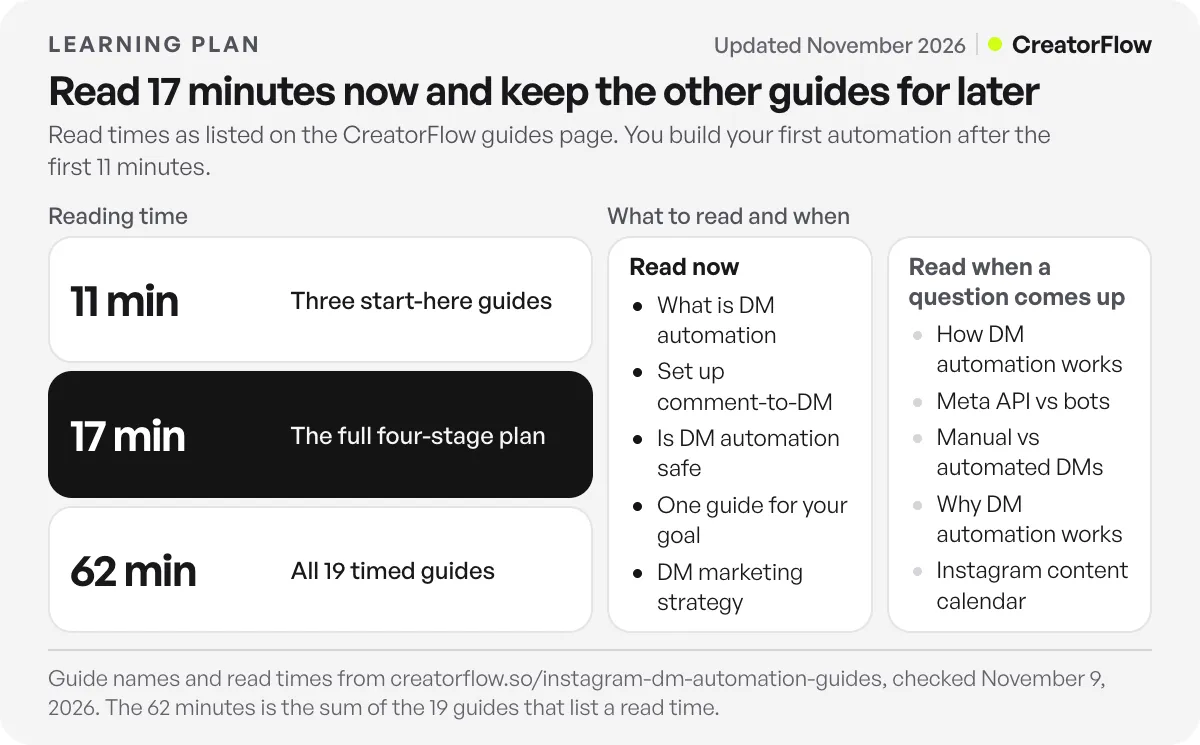
This plan puts the guides in order. You read 17 minutes in total, you build one automation in the middle, and you keep the other guides for the day a question comes up. It is for creators, coaches and small shops with a professional Instagram account and no automation running yet.
Key Takeaways
- Read three guides first. What DM automation is (3 min), how to set up comment-to-DM (5 min) and whether it is safe (3 min).
- Build before you read more. One post, one keyword, one DM. Setup takes about 2 minutes in CreatorFlow.
- Test from a second account. A comment from your own account does not trigger your automation.
- Read one guide for your goal. Sales, emails, links or your niche. Skip the others for now.
- Learn the rest from your numbers. A weekly review shows which post sent the most DMs, and you repeat that shape.
- Know four Instagram rules. One private reply per comment, a 7-day window, a 24-hour window after a reply, and non-followers see your DM in Message Requests.
What Is the Fastest Way to Learn Instagram DM Automation?
The fastest way is to read in the order you will use the knowledge. Read three short guides, then build and test one automation on a real post. After that, read one guide for your goal and review your numbers each week. This path takes about 17 minutes of reading. You learn the rest when a real question comes up.
| Stage | What you do | Reading time |
|---|---|---|
| 1. Basics | Read three start-here guides | 11 minutes |
| 2. Build | Set up one automation and test it | About 2 minutes to set up |
| 3. Goal | Read the one guide that matches your goal | 3 minutes |
| 4. Review | Read the strategy guide, then review weekly | 3 minutes |
Long video tutorials walk through every trigger and every setting before you build anything. No tutorial can show you how your own followers type your keyword.
Stage 1: Read These Three Guides First (11 Minutes)
These three guides answer the questions people have before they connect an account. Read them in this order.
- What is Instagram DM automation? (3 min). What a follower sees, step by step, with a video. You see the post, the keyword comment and the DM with a button.
- How to set up comment-to-DM (5 min). The five setup steps, with a video: start an automation, choose the post, choose the keyword, add an optional step, then write the DM and start it.
- Is Instagram DM automation safe? (3 min). What lowers the risk and what can still go wrong. It also has a short checklist.
Stop here. You now know enough to build. If a word in these guides is new to you, the Instagram DM automation glossary defines 25 terms on one page.
Stage 2: Build One Automation and Test It
You need three things before you start: a professional Instagram account (Business or Creator), a Google account to sign in, and the link you want to send. You can switch a personal account to a professional one for free in Instagram settings.
Build the simplest automation first, the one that sends a link:
- In CreatorFlow, open Templates and choose Send link on keyword.
- Choose one post or Reel. You can also choose Next post, so it starts when you publish.
- Type the keyword, for example LINK. One automation can have up to 20 keywords, and big or small letters both work.
- Skip the optional step for now.
- Write one short message, add a button with your full link (with https://), and press Start Automation.
Now everyone who comments LINK on that post gets your DM, usually within a few seconds. This works on every plan, including Free.
Test it from a second account. Comment the keyword from a friend’s phone or a second profile. A comment from your own account does not trigger your own automation, so a test from it shows nothing. Here is why a test from your own account shows nothing, and what a correct test looks like.
Put the keyword in your caption. Write it in the first line, with what people get: “Comment LINK and I will send you the dress.” People cannot use a keyword they do not see.
Stage 3: Read the Guide That Matches Your Goal
After your first DM arrives, pick one goal. Read only the guide for that goal. Each one takes about 3 minutes.
| Your goal | Read this guide | What you add to your automation |
|---|---|---|
| Sell a product | Turn comments into sales | Buying keywords and a sales DM with a checkout link |
| Grow an email list | Collect emails from Instagram | Email Gate asks for an email in the DM, then sends your link |
| Find more ideas | DM automation use cases | Eight jobs, each with a keyword and a DM to copy |
| Send LTK links | LTK automation guide | Your LTK link by DM when people comment a keyword |
| Grow a recipe blog | Monetize recipes on Instagram | Blog visits, affiliate links and an email list from one DM |
Email Gate comes with Pro, which costs $15 a month or $12 a month billed yearly. Every email goes to Contacts, and you can export them as a CSV file for your email tool. The email list building playbook shows the full path from a free gift to the CSV.
If you want a second and third automation after this, here are the five automations worth building in week one, in the order to build them.
Stage 4: Learn the Rest From a Weekly Review
The last guide to read is DM marketing strategy (3 min). It has four parts: a post with a keyword, one DM, one optional step and a weekly review. The review is where you keep learning.
Once a week, do three things:
- Open your analytics and look at DMs sent for each automation.
- Check link clicks. Link tracking is on Pro and Growth.
- Write your next post in the same shape as the post that sent the most DMs.
After four weekly reviews, you know things no guide can tell you. You know which keyword your followers type, which offer they ask for, and which post format brings comments. For what each number means, see our guide to reading your DM automation analytics.
Which Instagram DM Automation Guides Can Wait?
Most guides on the guides page answer a question you do not have yet. Keep them for the day the question comes up.
| When this happens | Read this guide |
|---|---|
| A DM did not arrive | How DM automation works (4 min). It lists the reasons a DM does not arrive and what to do about each. |
| A tool asks for your Instagram password | Meta API vs bots (3 min). It explains the difference and lists five questions to ask a tool. |
| You are not sure what to automate | Manual vs automated DMs (3 min). It covers what to automate and what to answer yourself. |
| A teammate needs to understand it | Why DM automation works (5 min). It gives four reasons people click. |
| You plan a month of posts | Instagram content calendar (3 min). It gives four pillars and one keyword per post. |
Guides, Free Course or Blog: Which to Use When
CreatorFlow has three places to learn. Each one fits a different moment.
| Format | Size | Best when |
|---|---|---|
| Guides page | 25 guides, most about 3 minutes | You have one question and want one answer |
| Free course | 20 lessons in 6 modules, about 2 hours | You want to go from setup to launches, giveaways and funnels in order |
| Blog | Long articles on one topic | You want a full setup for your niche, or the data behind a choice |
The free course starts with two basics lessons of 6 minutes each. The first connects your account. In the second, you build one post, one keyword and one DM, and you test it from a second account. That is the same order as this plan. Before lesson 1, the course asks you to have a Google account, an Instagram Business or Creator account, and a second Instagram account for tests.
If you prefer one long read to many short ones, Instagram automation for beginners covers the basics on one page.
Four Instagram Rules You Will Meet in Week One
These rules come from Instagram, not from any one tool. Every comment-to-DM tool that uses the official API works inside them. Meta lists them in its private replies documentation (checked November 2026).
- One private reply per comment. Your automation sends one DM to each comment. It can send more messages only after the person replies.
- A 7-day window. The private reply must go out within 7 days of the comment. On Instagram Live, it must go out during the broadcast.
- A 24-hour window after a reply. When the person replies to your DM, you have 24 hours to send follow-up messages.
- Message Requests for non-followers. People who follow you get the DM in their inbox. People who do not follow you find it in their Message Requests folder.
Rule 4 surprises most new users. If someone says the link never came, ask them to check Message Requests before you change anything.
FAQ
How long does it take to learn Instagram DM automation?
About 17 minutes of reading and about 2 minutes of setup for your first automation. Most of what you learn after that comes from weekly reviews. Plan on four weeks before you have a clear picture of which keywords and posts work for your account.
Is there a free Instagram DM automation course?
Yes. The CreatorFlow free course has 20 lessons in 6 modules, about 2 hours in total. It starts with setup and your first automation. Then it covers launches, giveaways, sales, email funnels and playbooks for different kinds of accounts.
Do I need to code to learn Instagram DM automation?
No. You choose a post, type a keyword, write a message and add a link. CreatorFlow connects to Instagram through the official API on Instagram’s own login screen, so you never share your password.
What Instagram account do I need for DM automation?
A professional account, Business or Creator. You can switch from a personal account for free in Instagram settings. For tests, a second Instagram account helps, because a comment from your own account does not trigger your automation.
Can I learn DM automation on a free plan?
Yes. CreatorFlow Free costs $0 and includes 500 DMs a month on one Instagram account. It has comment-to-DM, Story replies, keyword DM replies and templates. Email Gate, Follow Gate and link tracking come with Pro at $15 a month.
Why did my test DM not arrive?
Check three things. First, test from a second account. Second, check the keyword: it must be a whole word, so “linked” does not match LINK. Third, if the test account does not follow you, look in its Message Requests folder.
Sources and checks
Guide names, read times and lesson counts checked on creatorflow.so/instagram-dm-automation-guides and creatorflow.so/learn on November 9, 2026. CreatorFlow prices checked on creatorflow.so/pricing the same day. Instagram reply rules from Meta’s private replies documentation, checked November 2026.





