

CreatorFlow’s free Instagram DM automation course is now live at creatorflow.so/learn. It has 20 short lessons in 6 modules and takes about 2 hours to read. You do not need an account to read it. The two first lessons end with your first automation live and tested. The other 18 cover launches, giveaways, sales, email and booking funnels, and playbooks for your kind of account.
Most people who start with DM automation do not get stuck on the buttons. They get stuck on the questions around them. Which post gets the keyword? What does the caption say? What goes in the DM, and what happens when nobody comments? A tool tutorial does not answer those questions. A course can.
This post explains what is in the course, who each module is for, and which lesson to open first for the job you have this week.
Key Takeaways
- The course is free and open. Every lesson is free to read at creatorflow.so/learn, with no account and no sign-in.
- 20 lessons, 6 modules, about 2 hours. Basics, Campaigns, Funnels, Planning, Tactics and Playbooks. Each lesson takes 6 or 7 minutes.
- Start with 2 lessons. They take 12 minutes and end with one automation that you tested from a second account.
- Most of each lesson is about Instagram. What to post, what to write in the caption, which keyword to ask for and what to send in the DM. The CreatorFlow steps are a short part at the end.
- Every lesson gives you text to copy. Caption lines, DM text and button labels for real cases, such as a waitlist, a giveaway or a PRICE reply.
- Most plays work on the Free plan. Lessons that use Follow Gate, Email Gate, Rewind or link tracking say so. Those features are on Pro and Growth.
What is the free Instagram DM automation course?
The free Instagram DM automation course is a set of 20 lessons on creatorflow.so that teaches you to turn Instagram comments, Story replies and DMs into link clicks, emails and sales. It starts with setup and your first automation. Then it moves to campaigns with an end date, funnels that run every day, a monthly plan, tactics for more comments and clicks, and playbooks for creators, affiliates, coaches, shops and local businesses.
Your progress is saved in your browser, so you can stop after any lesson and come back to the same place.
Why we built a free course
We already have more than 500 articles on this blog, plus help center pages and video guides. That is a lot of answers, but it is not a path. A new user does not know if they should read about keywords, Email Gate or giveaways first.
The course puts the answers in order. Lesson 1 connects your account. Lesson 2 builds one automation and tests it. After that, you choose the module for your goal, and every lesson has the same parts: what you will be able to do, the steps, the text to copy and the mistakes to avoid.
We also wanted the course to be useful if you never use CreatorFlow. The caption lines, keyword rules and DM text work with any Instagram DM tool. That is why the course is free to read with no account.
The 6 modules and 20 lessons
Each module has a clear result. Here is the full list, with the time each one takes.
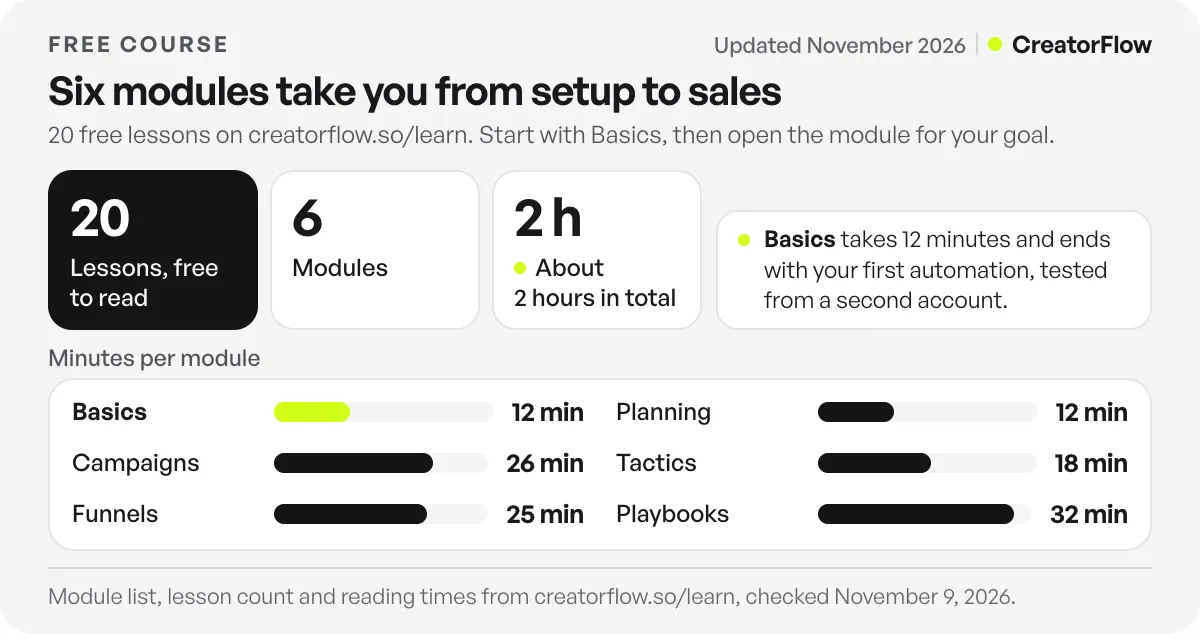
| Module | Lessons | Time | You finish with |
|---|---|---|---|
| 1. Basics | Set up CreatorFlow, Your first automation | 12 min | One automation that you tested |
| 2. Campaigns | Launch, Giveaway, Sale, Event sign-ups | 26 min | A day-by-day plan for a campaign with an end date |
| 3. Funnels | Email list, Follower, DM question, Story | 25 min | Funnels that bring emails, followers and sales every day |
| 4. Planning | 30-day plan, Content and keyword plan | 12 min | A plan for which automation to build each week |
| 5. Tactics | More comments, DMs that get clicks, Measure and improve | 18 min | More comments, more taps on your link, and a weekly check |
| 6. Playbooks | Creators, Affiliates, Coaches, Shops, Local businesses | 32 min | The automations and DMs for your kind of account |
Module 1: Basics
Lesson 1 connects Instagram and shows every screen. Lesson 2 builds one automation: one post, one keyword, one DM with a link button. Then you comment the keyword from a second account to test it. If you only have 12 minutes, do these two.
Module 2: Campaigns
Four campaigns with a start and an end. The launch campaign covers a waitlist, the launch week and the checkout link by DM. The giveaway campaign sends every entrant the rules. The sale lesson sends the code, the link and the end time. The event lesson collects sign-ups for a webinar, a Live or a workshop.
Module 3: Funnels
Funnels run every day, without you in the chat. The email list funnel gives a free guide in exchange for an email. The DM question funnel answers people who send PRICE, BOOK or SIZE. The Story funnel ends a set of Story slides with a DM that holds your link.
Modules 4 to 6: Planning, Tactics and Playbooks
Planning gives you a 30-day plan and a weekly calendar where every post with an ask has its keyword. Tactics covers the first three seconds of a Reel, the DM that gets the tap and the weekly numbers to check. The playbooks are written for one kind of account each: creators, affiliate creators, coaches and course sellers, shops and brands, and local businesses.
Which lesson to open first
You do not need to read the course in order after lesson 2. Pick the job you have this week.
| Your job this week | Open this lesson |
|---|---|
| I have never made an automation | Lesson 1, then lesson 2 |
| I launch a product or course soon | Lesson 3, Launch campaign |
| I want more email subscribers | Lesson 7, Email list funnel |
| People DM me “price?” every day | Lesson 9, DM question funnel |
| My Reels get views but few comments | Lesson 13, More comments |
| People get my DM but do not tap the link | Lesson 14, DMs that get clicks |
| I share affiliate links | Lesson 17, Affiliate creators |
| I sell coaching or calls | Lesson 18, Coaches and course sellers |
What a lesson looks like
Every lesson opens with what you will be able to do at the end. Then it gives a short direct answer, the steps in order and the text to copy. Lesson 2, for example, explains the three triggers (comment, Story reply and DM keyword) in one table. It shows the four steps of the automation builder and lists caption lines you can copy, such as “The lasagna you keep asking for. Comment RECIPE and I will DM you the recipe.”
The lessons also teach the small rules that cause most problems. A keyword must match a whole word, so RECIPE matches “recipe please” but not “recipes”. A word like COURSE also matches “of course”. Lesson 2 says to add plurals and common typos as extra keywords, and to skip words people write in normal comments, such as “love” or “wow”. For more on picking the word, read our guide to comment keywords that convert.
One rule from Meta shapes every DM in the course. Meta’s private replies documentation says you can send one private reply to a person who commented, within 7 days of the comment (checked November 2026). More messages are possible only after the person writes back. So the course teaches you to put everything the person needs in the first DM: the link, the code or the next step.
How the course connects to the app
The course teaches the full path. Inside the CreatorFlow app, CreatorFlow Academy keeps short idea cards with a Use this idea button that opens the matching automation. Use the course to learn the plan, and the app to build it.
To build the automations from the lessons, you need a CreatorFlow account. The Free plan costs $0 and includes 500 DMs a month, with comment-to-DM, Story replies and keyword DM replies. Pro costs $15 a month, or $12 a month billed annually, and adds Email Gate, Follow Gate, link tracking and CSV export. Plans are on the pricing page.
Before lesson 1, have three things ready:
- A Google account. You sign in to CreatorFlow with Google.
- An Instagram Business or Creator account. That is the account the automations run on.
- A second Instagram account for tests. Automations reply to comments from other accounts, so comment from a second account to see the DM arrive.
If your test comment gets no DM, look in Message Requests on the test account first. Our comment-to-DM troubleshooting guide covers the other common causes. If you prefer one long guide over short lessons, the comment-to-DM setup guide covers every screen on one page.
FAQ
Is the Instagram DM automation course really free?
Yes. All 20 lessons are free to read at creatorflow.so/learn, and you do not need an account to read them. To build the automations, you need a CreatorFlow account. The Free plan costs $0 and includes 500 DMs a month.
How long does the free Instagram DM automation course take?
About 2 hours for all 20 lessons. Each lesson takes 6 or 7 minutes. The two basics lessons take 12 minutes and end with your first automation live and tested.
Do I need to do the lessons in order?
Do lessons 1 and 2 first, because they end with a tested automation. After that, open any campaign, funnel, plan or playbook in any order.
Is the course only about CreatorFlow?
No. Most of each lesson is about Instagram: what to post, what to write in the caption, which keyword to ask for and what to send in the DM. The CreatorFlow steps are a short part at the end of each lesson.
Which lessons need a paid plan?
The basics and most plays work on the Free plan. Some steps use Follow Gate, Email Gate, Rewind or link tracking, which are on Pro and Growth. Each lesson that uses one of them says so.
Is the course for beginners?
Yes. Lesson 1 starts with connecting Instagram, and lesson 2 builds your first automation step by step. The later modules, such as funnels and playbooks, also help people who already run automations and want more emails, clicks or sales.
What is the difference between the course and CreatorFlow Academy in the app?
The course at creatorflow.so/learn is a full path of 20 lessons that anyone can read. The Academy inside the app has short idea cards, and each card opens a ready automation with the Use this idea button.
Sources and checks
Course contents, lesson times and requirements checked on creatorflow.so/learn and its lesson pages on November 9, 2026. Plan prices checked on creatorflow.so/pricing on November 9, 2026. Meta’s private reply rule checked on developers.facebook.com in November 2026.





