Run an Instagram giveaway with DM automation
In this lesson you will
- Write a giveaway post with clear rules and its own keyword
- Send every entrant a DM with the rules and the draw date
- Pick the winner fairly, alone or with a brand partner
To run an Instagram giveaway with DM automation, give it its own keyword, such as GLOWWIN, and write the rules in the caption. CreatorFlow sends everyone who comments the keyword a DM with the rules link and the draw date. You check the entries and pick the winner yourself, at random.
The campaign at a glance
A skincare creator gives away her morning set. A candle shop runs one with a florist.
| Part | Your giveaway |
|---|---|
| Goal | New followers and comments from people who like what you make or sell |
| Best for | Creators with a prize, shops, brands that work with a creator |
| Length | 3 to 7 days |
| Posts | 1 giveaway post, 2 or 3 Stories, 1 winner post |
| Keyword | One word only this giveaway uses, such as GLOWWIN |
| What the DM sends | The entry note, the draw date and the rules link |
| CreatorFlow features | Comment-to-DM, Follow Gate, Public Reply, Rewind |
| Plan | Free sends the DM. Follow Gate, Public Reply and Rewind need Pro or Growth |
Day by day
Rules differ by country. Check them where you run the giveaway.
- 1
7 days before: write the rules
Write the prize, who can enter, the end time and how you pick and contact the winner. Put the full rules on one web page. Entry must be free.
- 2
Night before: build it
Build the automation on Next post or reel, with your giveaway word. Add Follow Gate if a follow is in the rules. Post nothing else first.
- 3
Day 1: post in the morning
Put the prize, the keyword and the end time in the first lines. Pin a comment with the keyword. Test from a second account, and leave it out of the draw.
- 4
Days 2 to 5: keep it visible
Post Stories of the prize in use, with a countdown sticker.
- 5
Last day: close on time
Post a Story with the end time. At that time, pause the automation or change the DM.
- 6
Draw day: pick at random
Copy the usernames that commented the keyword. Remove anyone who breaks the rules. Paste the list into the free giveaway picker and record your screen.
- 7
Draw day: tell the winner
Message the winner yourself. Then post the winner and say how you contacted them.
Giveaways with a brand or another creator
- One account hosts. It owns the rules page, the draw and the winner message
- Each account posts the giveaway and runs its own automation, with the same keyword and rules link
- Name every partner in the caption. When a brand gives the prize, start the caption with Ad
- Agree in writing who gets which contacts, and say it in the rules
Instagram giveaway posts and captions to copy
Copy and change
Giveaway DMs to copy
Copy and change
Mistakes
- A keyword people write anyway
WIN, ENTER and GIVEAWAY appear in normal comments. Use a word only this giveaway uses.
- Too many steps to enter
Follow, tag, share and comment loses people. Ask for the keyword and, if you want, a follow.
- Rules only behind a link
Put who can enter, the end time and how you pick the winner in the caption. Link the full rules.
- A giveaway longer than a week
Instagram lets you answer a comment by DM for 7 days after it. A short giveaway also keeps the post busy.
- A private pick
Use a random picker and record the screen. Never pick a favourite.
- Forgetting the DM count
Every entry DM counts toward your month, and Free has 500. Instagram sends 200 DMs an hour. The rest wait.
After the campaign
- Check the keyword comments on the post and Total Followers on Home. Compare them with a normal week
- Expect some new followers to leave after the winner post. Judge the count two weeks later
- Thank everyone who entered with a Story code that works for a few days
- Keep new followers with a free guide behind a keyword on your next post
In CreatorFlow
Set it up in CreatorFlow
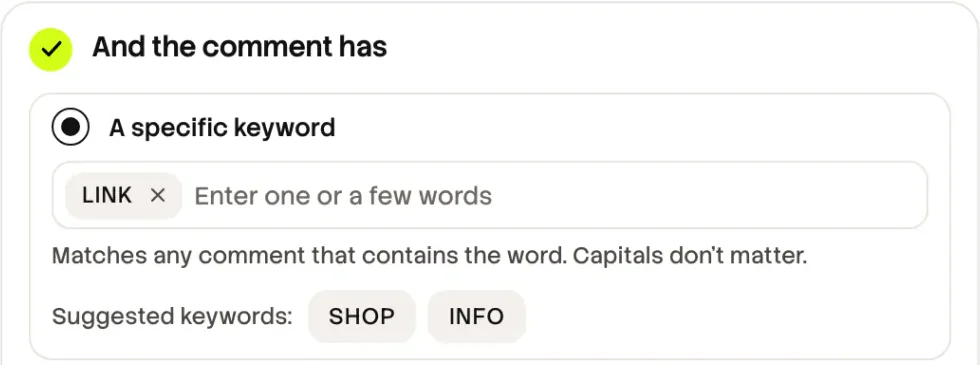
One comment automation runs the whole giveaway.
- 1
Pick the post
Before you post, choose Next post or reel in Step 1. If the post is live, pick it in My Content.
- 2
Type the giveaway word
Use a word only this giveaway uses. On Pro and Growth, turn on the public reply in Step 2.
- 3
Add Follow Gate if the rules ask for a follow
In Step 3, choose a DM asking to follow you before they get the link. It is on Pro and Growth. The follower funnel lesson shows the trade-off.
- 4
Write the DM and the rules button
Write the entry note and the draw date. Press + Add Link, add the rules page and name the button Rules.
- 5
Start, test and pause on time
Press Start Automation. After you post, comment from a second account. At the end time, press Pause on the Automations page.
Practice
Your task
- 1
Write the rules page and the caption summary.
- 2
Build the automation with your giveaway word and test it from a second account.
- 3
Post the giveaway and pin the keyword comment.
You are done when your test account gets the entry DM and the Rules button opens the rules.
Open CreatorFlowKey points
- Use one keyword only the giveaway uses, and keep it to 3 to 7 days.
- Put the main rules in the caption and the full rules on a page.
- CreatorFlow sends the DM. You check the entries and pick the winner at random.
Questions
Does CreatorFlow pick the giveaway winner?
No. It sends the DM to everyone who comments the keyword. On Pro and Growth, you can export Contacts as CSV. The Source column shows which automation each person came from.
Can a follow be part of the giveaway rules?
Yes. Follow Gate, on Pro and Growth, asks people to follow before they get the rules DM. They tap a button to confirm. CreatorFlow does not check the follow, so check the winner yourself.
I posted before I built the automation. What now?
Build it now. On Pro and Growth, Rewind sends the DM to people who commented before the automation started.
Go deeper: Instagram giveaway automation guide, Giveaways with brand partners, Giveaway rules in the UK and the EU, Grow Instagram followers with Follow Gate.
Last updated November 4, 2026