
The seven universal Instagram DM automation templates that work in any niche are: the link drop (trigger word sends your URL), the value-first reply (tip before your link), the email capture (collect addresses in the DM), the story reply (auto-respond to story interactions), the soft pitch (three benefits plus price), the booking request (calendar link plus one qualifier), and the second touch (a separate automation that re-opens a stalled thread). Each takes under 2 minutes to set up in CreatorFlow or any tool built on Meta’s official Instagram API (as of August 2026).
Seven templates. Two minutes each. They work whether you sell fitness plans, affiliate products, online courses, photography prints, or coaching sessions.
Most creators stall at the same point. They sign up for an automation tool, open the message editor, and freeze. What do I write? Will this sound robotic? What if it doesn’t match my niche?
This guide gives you seven universal Instagram DM automation templates that convert in any niche. No customization beyond swapping your link and product name. Copy, paste, activate, done.
If you want niche-specific templates (Amazon affiliates, coaches, e-commerce, real estate), check out our 25 Instagram DM automation templates library. This guide is for creators who want to go live in 2 minutes with something that works right now.
Key Takeaways
7 universal templates that work for any niche:
- Template 1, The Link Drop: Delivers your link instantly when someone comments a trigger word
- Template 2, The Value-First Reply: Adds a tip or insight before your link
- Template 3, The Email Capture: Collects email addresses through DMs before sending your resource
- Template 4, The Story Reply: Auto-responds when followers reply to your stories
- Template 5, The Soft Pitch: Introduces your paid offer after delivering free value
- Template 6, The Booking Request: Sends your calendar link with one qualifying line
- Template 7, The Second Touch: Re-opens a thread that went quiet, using its own keyword
How to use: Copy template, replace [brackets] with your details, paste into CreatorFlow or your automation tool, set your trigger keyword, activate
Setup time: Under 2 minutes per template
Works for: Affiliates, coaches, course creators, e-commerce, service providers, photographers, therapists, tech creators, food bloggers, travel creators, and every other niche on Instagram

How These Instagram DM Templates Work
Each template follows a structure that converts across niches:
- Line 1: Acknowledge what they asked for
- Line 2: Deliver the value (link, resource, answer)
- Line 3: Add context or a bonus
- Line 4: Invite the next step
This structure works because it mirrors how you’d naturally respond in a DM conversation. The person asked for something, you give it to them, you add something helpful, and you leave the door open.
That fourth line does more work than it looks. Meta’s standard Instagram messaging window is 24 hours from the person’s last message (developers.facebook.com, August 2026). A line that invites a reply is what keeps the thread open, and it is the whole basis of Template 7.
Before you start, you’ll need a trigger keyword set up in your automation tool. If you haven’t done that yet, follow our comment-to-DM automation setup guide first. Takes 5 minutes.
Quick Setup Checklist
Before copying any template, have these ready:
- Your link: Product page, affiliate link, Calendly URL, lead magnet, or whatever you’re sending
- Your trigger keyword: The word followers will comment (for example LINK, INFO, FREE, GUIDE)
- Your product/offer name: What you’re promoting or delivering
- Your automation tool: CreatorFlow, ManyChat, or any Instagram DM automation platform
Got those? Pick your template below.
Template 1: The Link Drop
Best for: Any creator who needs to send a link when someone comments
Trigger keywords: LINK, INFO, SEND, YES, WANT
Hey! Here's what you asked for:

[YOUR-LINK]

Let me know if you have any questions, happy to help!
Why This Works
Three lines. Zero friction. The follower asked for something, you deliver it immediately.
This is the simplest template to ship because it does one thing well: get the link into their hands while they are still looking at their phone. The comment and the DM happen in the same minute instead of the same evening.
How to Customize
Replace [YOUR-LINK] with your actual URL. That’s it.
Examples by niche:
| Niche | Link Type | Example URL |
|---|---|---|
| Affiliate | Amazon storefront | amazon.com/shop/yourname |
| Coach | Calendly booking | calendly.com/yourname/discovery |
| Course creator | Free training | yoursite.com/free-training |
| E-commerce | Product page | yourshopify.com/products/item |
| Photographer | Portfolio/pricing | yoursite.com/pricing |
| Service provider | Inquiry form | yoursite.com/contact |
When to Use Template 1 vs Template 2
Use Template 1 when speed matters more than relationship building. Product links, booking pages, and simple resource delivery. If you want the reader to trust the recommendation before they click, use Template 2 instead.
Template 2: The Value-First Reply
Best for: Creators who want to build trust before dropping a link
Trigger keywords: TIPS, HOW, HELP, GUIDE, LEARN
Hey! Great question.

Quick tip: [ONE SENTENCE OF USEFUL ADVICE RELATED TO YOUR CONTENT]

Here's the full [resource/guide/link] I mentioned:
[YOUR-LINK]

If you want more [topic] tips, I post about this every [day/week]!
Why This Works
Leading with value before your link does two things. It positions you as someone who helps, and it gives the follower a reason to trust the recommendation instead of treating it as an ad.
The trade-off is length. This template suits considered purchases such as courses, coaching, and premium products, where the reader wants a reason before a link. For a cheap impulse buy, Template 1 gets out of the way faster.
How to Customize
Replace three things:
- [ONE SENTENCE OF USEFUL ADVICE], share one actionable tip related to the post they commented on
- [YOUR-LINK], your actual URL
- [resource/guide/link] and [topic], match your content type
Examples by niche:
Fitness creator:
Hey! Great question.

Quick tip: Start with 3 sets of 8-12 reps and increase weight when it feels easy for 2 weeks straight.

Here's the full workout plan I mentioned:
yoursite.com/workout-plan

If you want more training tips, I post new routines every Monday!
Tech creator:
Hey! Great question.

Quick tip: Always test your API calls in a sandbox environment before pushing to production.

Here's the full tutorial I mentioned:
yoursite.com/api-guide

If you want more dev tips, I post about this every week!
Food blogger:
Hey! Great question.

Quick tip: Let the pan get screaming hot before adding the protein. That's how you get the sear without overcooking.

Here's the full recipe I mentioned:
yoursite.com/recipe

If you want more cooking tips, I post new recipes every Thursday!
Template 3: The Email Capture
Best for: Any creator building an email list alongside Instagram
Trigger keywords: FREE, DOWNLOAD, PDF, GUIDE, CHECKLIST
Hey! I'd love to send you the [resource name].

Drop your best email below and I'll send it right over.

(I'll also include [bonus item] as a thank you!)
Why This Works
The person is already in a conversation with you and already said they want the thing. Asking for the email inside that thread costs them one reply, with no landing page and no second tab.
It also works in any niche, because every creator has something worth emailing: a PDF guide, a checklist, a recipe book, a workout plan, a discount code, a free lesson, a resource list.
How to Customize
Replace two things:
- [resource name], whatever you’re offering (a free meal plan, Lightroom presets, a startup checklist)
- [bonus item], something small but valuable that sweetens the deal
Examples by niche:
| Niche | Resource Name | Bonus Item |
|---|---|---|
| Fitness | 7-day meal plan | grocery shopping list |
| Photography | 10 Lightroom presets | editing tutorial video |
| Business coach | client acquisition checklist | 15-min strategy call |
| E-commerce | 20% discount code | free shipping on first order |
| Travel | packing checklist | hidden gem destinations PDF |
| Tech | VS Code shortcuts cheatsheet | productivity workflow template |
Confirm the Capture
Once they drop their email, send a short confirmation so the thread doesn’t end on silence:
Got it! Check your inbox in the next few minutes.

(Check spam/promotions if you don't see it right away.)

Thanks for being here!
CreatorFlow’s Email Gate on the Pro plan collects the address before the link is sent, and CSV export moves the list into your email platform. That matters again in Template 7.
Template 4: The Story Reply
Best for: Any creator who gets story replies and mentions
Trigger: Auto-reply to story replies, not keyword-based
Thanks for watching! Means a lot.

Since you're interested in [topic], here's something you'll find useful:
[YOUR-LINK]

Feel free to DM me anytime with questions!
Why This Works
A story reply is an active choice. Someone who taps out a response to your story is warmer than someone who scrolled past, and they are holding their phone right now.
Most creators answer story replies hours later or not at all. Automating this response turns passive viewers into active leads while the story is still on screen.
How to Customize
Replace two things:
- [topic], the general subject of your stories
- [YOUR-LINK], your most relevant resource for story viewers
Pro tip: Your story reply link should match what you typically post about in stories. If you share behind-the-scenes content, link to something that goes deeper on that topic.
Examples by niche:
Real estate agent:
Thanks for watching! Means a lot.

Since you're interested in the local market, here's my latest neighborhood guide:
yoursite.com/neighborhood-guide

Feel free to DM me anytime with questions!
Course creator:
Thanks for watching! Means a lot.

Since you're interested in growing your business, here's a free training I think you'll love:
yoursite.com/free-training

Feel free to DM me anytime with questions!
Template 5: The Soft Pitch
Best for: Creators with a paid offer who want to convert engaged followers
Trigger keywords: PRICE, COST, DETAILS, PROGRAM, ENROLL, BUY
Hey! Glad you're interested.

Here's a quick overview of [product/service name]:

- [Benefit 1]
- [Benefit 2]
- [Benefit 3]

It's [price] and includes [key deliverable].

Full details here: [YOUR-LINK]

Any questions? I'm here to help.
Why This Works
When someone asks about pricing or details, they’re signaling purchase intent. This template gives them enough information to decide without overwhelming them.
The three-bullet format works because a phone screen shows roughly three or four lines at a glance. Keeping benefits scannable means they read them all instead of scrolling past a wall of text.
How to Customize
Replace five things:
- [product/service name], your offer name
- [Benefit 1-3], three specific outcomes, not features
- [price], your actual price
- [key deliverable], what they physically get
- [YOUR-LINK], sales page or checkout
Examples by niche:
Fitness coach:
Hey! Glad you're interested.

Here's a quick overview of the 12-Week Transform Program:

- Custom workout plan based on your goals and equipment
- Weekly check-ins with form corrections
- Private community of 200+ members for accountability

It's $197 and includes 12 weeks of guided training plus lifetime access to the exercise library.

Full details here: yoursite.com/transform

Any questions? I'm here to help.
SaaS/tech creator:
Hey! Glad you're interested.

Here's a quick overview of the API Masterclass:

- Build 3 production-ready projects from scratch
- Access to private Discord with 500+ developers
- Lifetime updates as frameworks evolve

It's $149 and includes 8 hours of video plus all source code.

Full details here: yoursite.com/masterclass

Any questions? I'm here to help.
If your offer sits at a very different price to the examples above, the message length should move with it. Our guide to DM offer templates by price point covers what changes between a $27 product and a $2,000 programme.
Template 6: The Booking Request
Best for: Coaches, consultants, agencies, local services, anyone who sells through a call
Trigger keywords: BOOK, CALL, SLOT, CHAT, DISCOVERY
Hey! Happy to find a time.

Grab any slot that works for you here:
[YOUR-CALENDAR-LINK]

Quick one so I can prep: what are you working on right now?

See you on the call!
Why This Works
A calendar link on its own gets booked and then no-showed. The qualifying question is what changes that, because someone who types an answer has spent effort on the call before it happens.
It also does the work you would otherwise do in the first ten minutes of the call. You open the meeting already knowing what they want.
How to Customize
Replace two things:
- [YOUR-CALENDAR-LINK], your Calendly, Acuity, SavvyCal or Cal.com URL
- The qualifying question, one question only
Ask one question, never three. Each extra question is another reason to close the app and come back later, which nobody does.
Question by niche:
| Niche | The one qualifying question |
|---|---|
| Business coach | What’s the goal for the next 90 days? |
| Fitness coach | What have you already tried? |
| Agency | What does your current setup look like? |
| Photographer | What’s the date and the location? |
| Consultant | What made you reach out today? |
Coaches running this at volume should read our guide to DM automation that books calls, which covers qualifying and no-show reduction in more depth.
Template 7: The Second Touch
Best for: Any creator whose links get opened and then go quiet
Trigger keywords: READY, QUESTIONS, HELP, or your own word
No rush at all.

One thing people usually ask me first: [MOST COMMON OBJECTION, ANSWERED IN ONE LINE].

If that's the bit you're weighing up, reply here and I'll walk you through it.

[YOUR-LINK]
Why This Works
Most people who open your link do not buy on the first visit. They get interrupted. The second touch exists to give them a reason to come back that isn’t a reminder to buy.
Answering the most common objection is the strongest version of that, because you are giving them information rather than asking them for a decision.
How to Set It Up
This is the one template that is not a single automation. It is a second automation on a second trigger, and the first message is what sets it up.
Add one line to whichever template sent the original link:
If you have any questions, reply READY and I'll help you out.Then build a separate automation with READY as its keyword and the Template 7 message as its reply. When they type the word, the second message sends.
This design is deliberate, and it works with how Instagram messaging actually behaves. Meta’s standard messaging window gives you 24 hours from the person’s last message, and the human agent tag extends that to 7 days for a person replying by hand, not for automation (developers.facebook.com, August 2026). A reply keyword is what re-opens the window, which is why the invitation belongs in message one.
The Longer Follow-Up Belongs on Email
For anything past a few days, move the conversation to a channel with no window at all. That is what Template 3 is feeding.
The sequence: Email Gate collects the address before the link goes out, CSV export moves the list into your email platform, and your follow-up runs there on your own schedule. Our guide to DM follow-up sequences covers the timing.
Which Template Should You Start With?
If you’re setting up your first automation ever, start with Template 1 (The Link Drop). It takes 30 seconds to customize and starts working immediately.
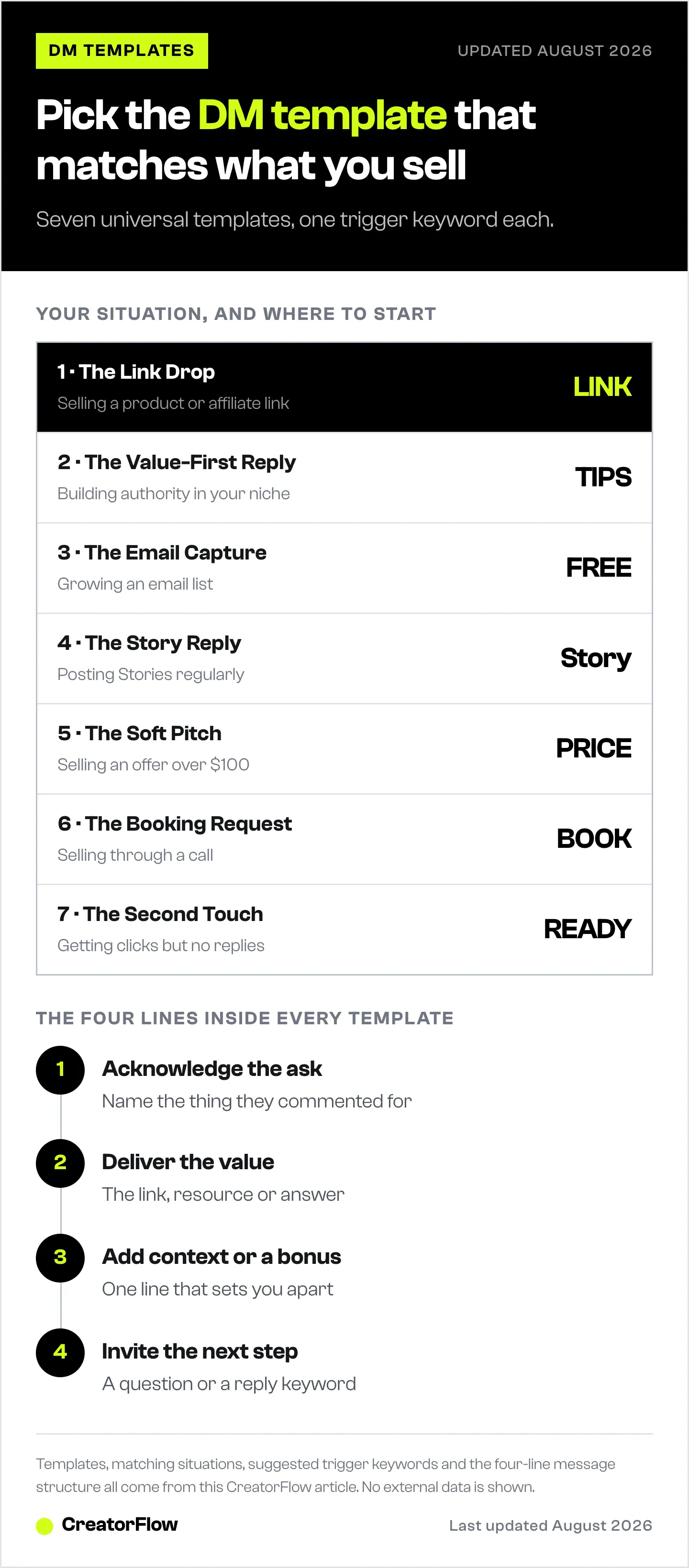
Here’s a decision framework:
| Your Situation | Start With | Why |
|---|---|---|
| Selling a product or affiliate link | Template 1 | Speed matters for impulse purchases |
| Building authority in your niche | Template 2 | Value first earns the click |
| Growing an email list | Template 3 | Captures leads for long-term marketing |
| Posting stories regularly | Template 4 | Reaches your most engaged viewers |
| Selling an offer over $100 | Template 5 | Enough detail for a considered purchase |
| Selling through a call | Template 6 | Qualifies before the calendar |
| Getting clicks but no replies | Template 7 | Re-opens threads that went quiet |
The ideal setup: run all seven with different trigger keywords. Template 1 on LINK, Template 2 on TIPS, Template 3 on FREE, Template 4 on story replies, Template 5 on PRICE, Template 6 on BOOK, Template 7 on READY.
Build them one at a time. Seven automations set up in one sitting means seven untested messages going out at once, and no way to tell which one is doing the work.
Common Mistakes That Kill Conversions
Writing Too Much
Your DM is not a sales page. If your automated message runs longer than five or six lines on a phone screen, it’s too long. People skim DMs. Three to five sentences is the sweet spot.
Using Generic Greetings
“Hello! Thank you for your interest in our services. We appreciate you reaching out.” That’s a corporate email, not an Instagram DM. Write like you’re texting a friend who asked for your recommendation.
Forgetting the Next Step
Every template should end with a link to click, a question to answer, or an action to take. If your DM doesn’t say what to do next, they’ll do nothing.
Never Inviting a Reply
A message that ends in a full stop ends the thread. One question or one reply keyword at the end is what keeps the 24-hour window open and makes Template 7 possible.
Not Testing Before Going Live
Send yourself the automated DM first. Read it on your phone. Does it feel natural? Is the link tappable? Does it fit on one screen without scrolling? If not, cut it down.
Set Up Any Instagram Direct Message Template in 2 Minutes
Step 1: Pick one template from above. Copy it.
Step 2: Replace the [brackets] with your actual details (link, product name, price).
Step 3: Open your automation tool. In CreatorFlow, go to Automations and create a new one.
Step 4: Set your trigger keyword, the word followers will comment to trigger the DM.
Step 5: Paste your customized template into the message field. Preview it. Activate.
That’s it. Your first automated DM is live.
For a detailed walkthrough with screenshots, follow our comment-to-DM setup guide.
When to Graduate to Niche-Specific Templates
These seven universal templates cover most of what a creator account needs. Once you’re seeing consistent engagement, you’ll want templates written for your specific niche.
Signs you’re ready for niche-specific templates:
- You’re sending 100+ automated DMs per month
- You want to test different message styles against each other
- You sell multiple products that need different pitches
- Your clicks on Template 1 have flattened out
When that happens, explore our 25 niche-specific DM automation templates covering Amazon affiliates, fitness coaches, course creators, e-commerce brands, real estate agents, consultants, beauty creators, travel influencers, food bloggers, and service providers. If you write, the same structure adapts to authors selling books with pre-order and launch-list flows.
These templates also carry over to other DM entry points. The same seven messages work on Instagram Live comments and on click-to-DM ads, because the trigger changes but the message doesn’t.
FAQ
Do these templates work with any automation tool?
Yes. These templates are plain text that works with CreatorFlow, ManyChat, LinkDM, or any Instagram DM automation tool that supports keyword triggers. Copy the template, paste it into your tool’s message editor, and set your trigger keyword.
How many templates should I set up at once?
Start with one. Get it working, see results, then add more. Most creators who try to build all seven in one sitting get overwhelmed and finish none. Template 1 takes 30 seconds and covers the most common use case.
Will these sound robotic to my followers?
Not if you customize them. Replace the brackets with your actual words, adjust the tone to match how you normally write, and remove any emojis if you don’t typically use them. The templates are written to sound conversational, not corporate.
What trigger keyword should I use?
The most common trigger keywords are LINK, INFO, FREE, SEND, and YES. Pick something short, easy to type, and related to your content. Tell followers what to comment in your post caption or story, for example “Comment LINK to get the recipe”.
Can I use the same template for different posts?
Yes. That’s the point of universal templates. Template 1 works whether you’re posting about fitness, cooking, photography, or tech. Swap the link for each post, but the message structure stays the same.
How do I follow up with someone who never replied?
Give them a keyword in the first message and build a second automation on that keyword, which is Template 7. Meta’s standard Instagram messaging window runs 24 hours from the person’s last message, and the human agent tag covers a person replying by hand for up to 7 days (developers.facebook.com, August 2026). For anything longer than that, capture the email with Template 3 and follow up by email instead.
Which template books the most calls?
Template 6, and the qualifying question is the part doing the work. A bare calendar link gets booked by people who forget they booked. One question in the DM means they arrive having already told you what they want.
Should I include emojis?
Match your brand. If your feed and captions use emojis, include them in your DMs. If you keep things clean and minimal, skip them. The templates above work with or without emojis.
Sources:
- Instagram messaging window and human agent tag: developers.facebook.com, verified August 2026
- CreatorFlow plans and features: creatorflow.so, verified August 2026
All external data verified as of August 31, 2026.


