
You turn Instagram Story replies into leads by putting a keyword CTA in the Story (“Reply GUIDE”), then letting automation send the resource in a DM and ask for an email in the same thread. Every reply, poll vote, and question sticker answer is a lead signal. DMs get 90% open rates compared to email’s 22% average, and “Reply KEYWORD” Stories hit 5-15% reply rates with 30-40% DM click-through.
Every time someone replies to your Story, votes in your poll, or answers your question sticker, they’re raising their hand. They’re telling you what they want. And unless you respond within minutes, that intent evaporates. They scroll past, watch someone else’s Story, and forget they ever engaged.
DM automation turns those fleeting Story interactions into captured leads, booked calls, and completed sales. Automatically. This guide breaks down the exact Story formats that generate the most leads, the DM templates that convert replies into action, and the metrics you need to track.
Key Takeaways
- Instagram DMs get 90% open rates: Compared to email’s 22% average and bio link’s 1-2% click-through rate, DMs are the highest-converting delivery channel (LeadResponse, April 2026).
- Speed is the conversion multiplier: Responding within 1 minute increases conversions by 391% compared to a 30-minute delay. Automation responds in 1-5 seconds.
- 7 Story formats drive leads: “Reply KEYWORD” Stories, poll stickers, question stickers, before/after transformations, countdown/urgency, this-or-that carousels, and testimonial Stories with CTAs.
- Reply rate benchmarks by format: “Reply KEYWORD” Stories hit 5-15% reply rates with 30-40% DM click-through. Countdown/urgency Stories achieve 35-45% DM click-through rates.
- Email capture from DMs converts at 30-50%: Asking for email directly inside the DM conversation outperforms landing page capture because it stays within the conversation flow.
- Bottom line: Post Stories with specific keyword CTAs, automate DM delivery within seconds, and capture emails in the conversation to build an owned audience from every Story interaction.

Why Instagram Stories Are Your Best Lead Generation Channel
Stories outperform every other Instagram format for lead capture. Not because of reach (Reels win there), but because of what happens after someone engages.
Replies go straight to DMs. When someone responds to your Story, it opens a private conversation. No public commitment. No friction. They’ve already self-selected as interested. Instagram keeps moving more interaction into the inbox too, most recently with Instagram Instants, disappearing real-time photos that live entirely in DMs.
The numbers back it up. According to Meta, over 500 million people use Instagram Stories daily. Interactive Stories featuring polls, quizzes, and question stickers generate 47% more direct responses than static Stories (Meta internal engagement study across 1.2M business accounts, Q4 2025).
DMs crush every other channel on engagement. Instagram DMs achieve approximately 90% open rates compared to email’s 22% average. Reply rates reach up to 60% vs email’s 1-5% click-through rates. Click-through rates on links sent via DM hit 28% compared to email’s 2-3% (LeadResponse, April 2026).
Speed determines conversion. Responding to a lead within 1 minute increases conversions by 391% compared to a 30-minute delay (LeadResponse citing Napolify, April 2026). Manual responses can’t match that speed when you’re sleeping, in meetings, or creating content.
| Channel | Open Rate | Reply/Click Rate | Response Time | Lead Quality |
|---|---|---|---|---|
| Instagram DM (automated) | ~90% | 28% CTR | 1-5 seconds | High (self-selected) |
| Email marketing | ~22% | 2-3% CTR | Hours to days | Medium (list-based) |
| Instagram comment | N/A (public) | Varies | Minutes to hours | Medium |
| Bio link | N/A | 1-2% CTR | User-initiated | Low (passive) |
The gap is clear. Stories create the intent. DMs capture it. Automation makes it instant.
How the Story-to-DM Lead Funnel Works
The funnel is simple: Story creates interest > Follower replies > Automation delivers value > Lead captured.
Here’s the step-by-step:
Step 1: Post a Story with a Clear CTA
Your Story needs to tell people exactly what to do. “Reply GUIDE for my free template” is explicit. “Check out this cool thing” is not.
The CTA determines your lead quality. Specific CTAs attract people who want that specific thing. Vague CTAs attract random replies.
Step 2: Follower Engages (Reply, Poll Vote, Question Answer)
When someone interacts, Instagram’s webhook system notifies your automation tool. The tool receives the interaction type, the user’s reply content, and their account info.
This happens through Meta’s official Instagram Graph API. The messages webhook detects Story replies and delivers them as events with a reply_to.story payload (developers.facebook.com/docs/messenger-platform/instagram/features/webhook/, April 2026).
Step 3: Automation Sends Targeted DM (1-5 Seconds)
Your automation tool matches the reply to a trigger and sends the pre-written response. A keyword reply gets a content delivery message. A poll vote gets a relevant follow-up. A question answer gets a personalized response.
The DM arrives while the person is still on Instagram, still thinking about your Story. That timing is what makes this convert.
Step 4: Lead Captured
The DM includes your lead capture mechanism: a link to download (captures email), a booking calendar (captures appointment), a product page (captures sale), or a direct email ask within the DM conversation.
Every reply also starts a 24-hour messaging window with that user, giving you a follow-up opportunity (ManyChat Help Center, April 2026).
7 Instagram Story Formats That Generate the Most Leads
Not all Stories create equal lead flow. These seven formats consistently generate the highest reply rates and conversion rates when paired with automation.
1. “Reply [KEYWORD] for [VALUE]” Stories
The simplest and most effective format. Tell people exactly what to type and exactly what they get.
Why it works: Zero ambiguity. One action, one reward. People follow clear instructions.
Examples:
- “Reply CHECKLIST for my free Instagram growth checklist”
- “Reply RECIPE for the full recipe with macros”
- “Reply BOOK to grab a free discovery call”
Automation setup: Keyword trigger on the specific word. Send DM with the promised content link.
Conversion benchmark: 5-15% of Story viewers reply when the value proposition is clear (based on Story interaction rates across 1.2M accounts, Meta Q4 2025 study).
2. Poll Sticker Stories (Segment + Qualify)
Polls require one tap. Lowest friction engagement on Instagram. But the real power is segmentation: each answer reveals what someone needs.
Why it works: Polls feel like participation, not commitment. And each answer tells you which DM to send.
Examples:
- “Struggling with Instagram growth? Yes / No”
- “Yes” > DM with growth guide
- “No” > DM asking what’s working for them
- “What’s your biggest challenge? Content / Engagement”
- “Content” > DM with content strategy PDF
- “Engagement” > DM with engagement playbook
Automation setup: Poll-response trigger with different DMs per answer choice. Tools like ManyChat support this natively (manychat.com/features, April 2026). CreatorFlow handles Story Reply triggers that capture these interactions (creatorflow.so, April 2026).
3. Question Sticker Stories (Open-Ended Lead Qualification)
Question stickers let followers type free-form responses. This gives you lead qualification data that polls can’t capture.
Why it works: Open-ended answers reveal pain points, budget signals, and urgency. You can route different answers to different automations.
Examples:
- “What’s your biggest business challenge right now?”
- Answer contains “clients” > DM with lead gen guide
- Answer contains “content” > DM with content strategy
- Answer contains “money” or “revenue” > DM with monetization guide
Automation setup: Keyword-filter triggers on common words in replies. Map each keyword cluster to a different response template.
4. Before/After Transformation Stories
Visual proof creates curiosity. People want to know how you got the result.
Why it works: Transformation content triggers “how did they do that?” thinking. The reply becomes the gateway to the method.
Examples:
- Fitness: Before/after photo > “Reply HOW to get my full workout plan”
- Business: Revenue screenshot > “Reply STRATEGY to learn how I did this”
- Design: Project before/after > “Reply PROCESS to see my workflow”
Automation setup: Keyword trigger on “HOW”, “STRATEGY”, or “PROCESS”. Send DM with detailed guide or booking link.
5. Countdown/Urgency Stories
Stories already have built-in urgency (24-hour expiry). Adding a countdown sticker or limited-offer framing amplifies it.
Why it works: Scarcity drives action. When people know an offer disappears, they reply faster.
Examples:
- “5 spots left for my free coaching call this week. Reply CALL to claim yours”
- “This discount code expires tonight. Reply SAVE for 30% off”
- “Early access closes in 3 hours. Reply EARLY to get in”
Automation setup: Keyword trigger on the CTA word. DM delivers the time-sensitive offer or booking link. If you usually rely on the link sticker for offers like this, the Story link sticker guide explains why its tap-through rates run low and when a reply-triggered DM converts better.
6. “This or That” Carousel Stories
Multi-slide Stories where each slide presents a choice. Builds engagement across multiple frames, improving completion rate and reply volume.
Why it works: Each slide is a micro-engagement. By the final slide with the CTA, they’re invested in the conversation.
Examples:
- Slide 1: “Coffee or matcha?” (engagement builder)
- Slide 2: “Morning workout or evening?” (engagement builder)
- Slide 3: “Want my full morning routine? Reply ROUTINE” (lead capture)
Automation setup: Keyword trigger on final slide’s CTA word.
7. Testimonial/Result Stories with CTA
Share a client result, customer review, or personal win. Then ask if they want the same.
Why it works: Social proof + CTA = high-intent replies. People who reply after seeing results are pre-sold.
Examples:
- Client screenshot: “She booked 12 calls in one week using my system. Reply SYSTEM to learn how”
- Product review: “Sarah says our templates saved her 10 hours/week. Reply TEMPLATES for a free sample”
Automation setup: Keyword trigger. DM with case study link, product page, or booking calendar.
DM Templates That Convert Story Replies into Leads
Your automated DM needs to feel like a real response, deliver the promised value immediately, and move toward the next action.
Template 1: Content Delivery (Lead Magnet)
Hey [Name]! Here's the [resource] I mentioned in my Story:

[LINK]

Quick question: what's the #1 thing you're hoping to fix with this? I read every reply and it helps me create better content for you.
Why it works: Delivers value first (builds trust), then asks a qualifying question (starts conversation). The question also keeps the messaging window open and improves your Meta trust score.
Template 2: Booking CTA (Service Providers)
[Name], thanks for reaching out! Here's my calendar to book a free [discovery call / strategy session]:

[CALENDLY LINK]

I keep these limited to [X] per week so I can give each one proper attention. Grab a time that works.
Why it works: Scarcity framing (“limited per week”) increases booking rates. Direct calendar link removes friction.
Template 3: Product Link (E-commerce)
Here's the [product] from my Story: [LINK]

I'm running [X% off / free shipping] for the next 48 hours. The code is [CODE] if you want to grab it.

Any questions about sizing/features? Happy to help.
Why it works: Includes urgency (48 hours), removes a barrier (discount code), and opens dialogue (questions).
Template 4: Email Capture
[Name]! Glad you want the [resource]. I'll send it right over.

What's the best email to send it to? I'll also add you to my weekly [tips/insights] - you can unsubscribe anytime.
Why it works: Natural email capture within conversation flow. Mentioning unsubscribe reduces resistance. Builds your email list from Instagram engagement.
Template Rules
- Deliver value first. The link or resource should appear within the first two lines.
- Keep it under 500 characters. People skim DMs on mobile.
- End with a question or CTA. Drives replies, which signals engagement to Instagram’s algorithm.
- Use their name. Personalization variables make it feel real.
- One link per message. Multiple links look spammy and reduce click-through rates.
Story Lead Strategy by Business Type
Different businesses need different Story-to-DM strategies. Here’s what works for each:
Coaches and Service Providers
Primary goal: Book discovery calls
Best Story formats: Question stickers (qualify leads), transformation Stories (show results), testimonial Stories (social proof)
Automation flow:
- Story: “Reply CALL to book a free 15-min strategy session”
- DM: Calendly link + qualifying question (“What’s your biggest challenge?”)
- Follow-up: Manual message before the call with prep info
Target metrics: 3-5% Story-to-reply rate, 40-60% reply-to-booking rate
Affiliate Marketers
Primary goal: Send affiliate links, track clicks
Best Story formats: Product showcases, “Reply LINK” Stories, before/after reviews
Automation flow:
- Story: Product review + “Reply LINK for the Amazon link”
- DM: Affiliate link with UTM tracking + brief personal recommendation
- Follow-up: “Did you end up trying it?” message next day
Target metrics: 5-15% Story-to-reply rate, 25-35% DM link click rate
E-commerce Brands
Primary goal: Drive product page visits and sales
Best Story formats: Product demos, customer review Stories, flash sale countdowns
Automation flow:
- Story: Product in action + “Reply SHOP for 20% off”
- DM: Product link + discount code + limited time framing
- Follow-up: “Any questions about the product?” if no purchase within 24 hours
Target metrics: 3-8% Story-to-reply rate, 20-30% DM-to-product-page rate
Content Creators (Lead Magnets)
Primary goal: Build email list, grow audience
Best Story formats: “Reply [WORD]” Stories, poll stickers, educational teasers
Automation flow:
- Story: “I spent 20 hours making this checklist. Reply FREE and it’s yours”
- DM: Download link + email capture ask
- Follow-up: Add to email nurture sequence
Target metrics: 5-15% Story-to-reply rate, 30-50% email capture rate from DM conversations
How to Track Story Lead Performance
Set up tracking from day one. Without data, you’re guessing which Stories generate leads and which waste time.
Metrics to Monitor Weekly
Story reply rate: Total Story replies divided by Story views. Target: 3-15% depending on CTA strength and audience size.
Automation trigger rate: Percentage of replies that match your keyword triggers. If this is below 50%, your CTA instructions aren’t clear enough.
DM link click-through rate: Percentage of automated DMs where the recipient clicks your link. Target: 25-35% for Story-triggered messages (LeadResponse, April 2026).
Email capture rate: For lead magnet campaigns, percentage of DM conversations where you capture an email. Target: 30-50%.
Booking rate: For service providers, percentage of DM conversations that result in a booked call. Target: 40-60% when using qualifying Story CTAs.
Revenue per Story: Total revenue attributed to Story-triggered DM automation divided by number of Stories posted. Track monthly trends.
Performance Benchmarks by Story Type
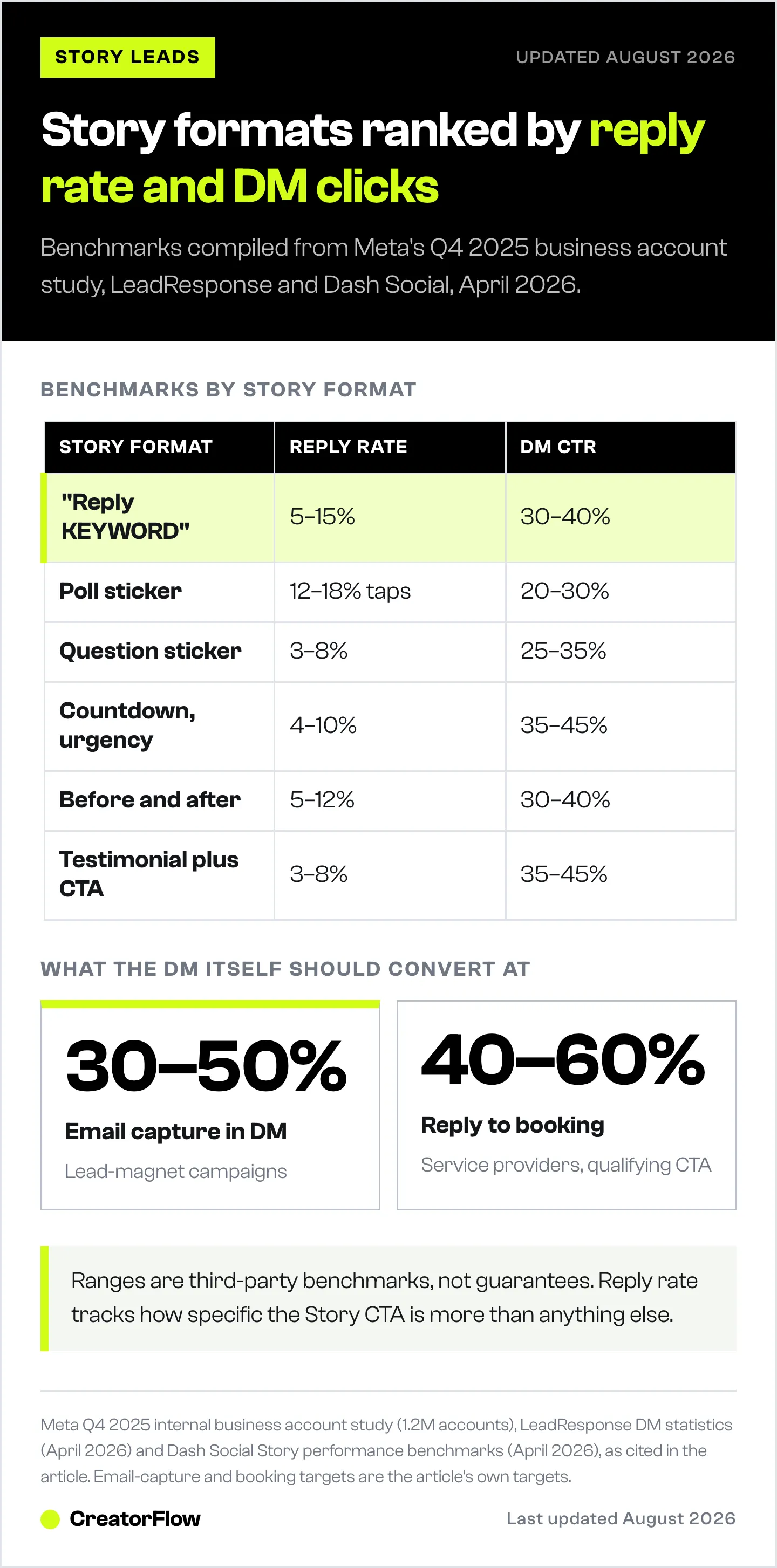
| Story Format | Avg Reply Rate | DM CTR | Best For |
|---|---|---|---|
| ”Reply [KEYWORD]“ | 5-15% | 30-40% | Lead magnets, content delivery |
| Poll sticker | 12-18% interaction | 20-30% | Segmentation, qualification |
| Question sticker | 3-8% | 25-35% | Lead qualification, research |
| Countdown/urgency | 4-10% | 35-45% | Time-sensitive offers, launches |
| Before/after | 5-12% | 30-40% | Coaches, fitness, services |
| Testimonial + CTA | 3-8% | 35-45% | High-ticket services, courses |
Benchmarks compiled from Meta’s Q4 2025 business account study (1.2M accounts), LeadResponse DM statistics (April 2026), and Dash Social Story performance data (April 2026).
Tools for Tracking
CreatorFlow ($15/mo flat rate) includes link click tracking, DM analytics, and automation performance dashboards. Track which Story triggers generate the most clicks and conversions (creatorflow.so, April 2026).
ManyChat ($17-$199/mo based on tier) offers flow analytics showing conversion rates at each step of your automation. Useful for complex multi-step funnels with branching logic (manychat.com/pricing, July 2026).
UTM parameters on all links. Tag every link with utm_source=instagram&utm_medium=dm&utm_campaign=story-[format] to track Story-to-conversion paths in Google Analytics.
Common Mistakes That Kill Story Lead Conversions
Mistake 1: Vague CTAs
“Check this out” or “Thoughts?” generates random replies that don’t convert. Be specific: “Reply GUIDE for the free PDF” tells people exactly what to do and what they get.
Fix: Every Story CTA needs a specific keyword and a specific promised outcome.
Mistake 2: Slow Response After Reply
If your automation takes more than 60 seconds to respond, you lose momentum. The person has already swiped to the next Story. They’re in a different mental state.
Fix: Use automation tools connected to Meta’s official API for 1-5 second response times. Add an intentional 15-30 second delay to feel natural while staying fast. Read more in our story reply automation setup guide.
Mistake 3: Generic Messages for All Reply Types
Someone who replied “GUIDE” to get your PDF and someone who answered your question sticker with “I need more clients” have different intent levels. Sending the same DM to both wastes the qualification signal.
Fix: Create separate automation flows for each trigger type. Match the message to the interaction.
Mistake 4: No Follow-Up Strategy
The first automated DM opens the conversation. If you don’t follow up (manually or with a timed second message), you leave the lead sitting cold.
Fix: Plan a 24-hour follow-up for leads who received your DM but didn’t click or reply. “Hey [Name], did you get a chance to check out the [resource]? Any questions?”
Mistake 5: Posting Stories Without Tracking
If you don’t track which Story formats generate the most replies and which DM templates get the most clicks, you can’t improve. You’re creating content blind.
Fix: Review Story performance weekly. Double down on formats with the highest reply rates. Kill formats that generate views but no replies.
Mistake 6: Ignoring the 24-Hour Messaging Window
Meta opens a 24-hour messaging window when someone interacts with your business account. If your automation fails or is offline when someone replies, you can’t send a delayed DM after the window closes.
Fix: Monitor automation uptime. Test triggers weekly. Have a manual backup process for high-value leads. Learn more about Instagram Graph API rate limits and how they affect your automation.
FAQ
How many leads can I generate from Instagram Stories
This depends on your audience size, Story frequency, and CTA quality. Accounts with 10K-50K followers posting 3-5 Stories per week with keyword CTAs typically generate 50-200 DM leads per month. Larger accounts with daily Story posting can generate 500+ leads monthly. The key variable is your Story reply rate, which ranges from 3-15% depending on CTA clarity and offer value.
Do I need a Business or Creator account for Story DM automation
Yes. Story automation requires Meta’s Instagram Graph API, which only works with Business or Creator accounts connected to a Facebook Page. Personal accounts don’t have API access. Switching is free and takes 30 seconds in Settings > Account > Switch to Professional Account.
What is the best time to post Stories for maximum replies
Post when your audience is most active. Check Instagram Insights for your specific audience data. General benchmarks show weekday lunch hours (11 AM - 1 PM) and evenings (7 PM - 9 PM) in your audience’s timezone generate the highest engagement (Hootsuite, April 2026). Test different times for 2-3 weeks to find your optimal window.
Can I run Story lead automation and comment-to-DM automation at the same time
Yes. Story triggers and comment-to-DM triggers operate independently. They share the same ~200 DMs/hour pacing cap across all automation types combined (a tool-side convention, not a Meta-published limit), but most creators stay well below this threshold.
Will automated Story replies get me banned
Not when using Meta-approved tools like CreatorFlow or ManyChat that connect through the official Instagram Graph API. These tools use OAuth authentication (no password sharing) and respect Meta’s rate limits. The risk comes from unofficial tools that scrape or use unauthorized access methods. Learn more in our guide to avoiding Instagram bans.
How do I capture emails from Story replies
Two methods: (1) Include a lead magnet link in your automated DM that requires email entry to download. This captures the email on your landing page. (2) Ask for the email directly in the DM conversation: “What’s the best email to send this to?” Method 2 has higher capture rates (30-50%) because it stays within the DM conversation. Read our full guide on collecting emails via Instagram DMs.
What is the difference between this and regular Story reply automation
Story reply automation is the technical setup: connecting your account, creating triggers, writing messages. This guide focuses on the strategy layer: which Story formats to use, how to qualify leads through story interactions, which DM templates convert best, and how to track lead generation performance. For the technical setup walkthrough, see our Instagram Story Reply Automation guide.
Can I automate responses to poll votes and question sticker answers
Yes. Tools like ManyChat support poll-based automation where different poll answers trigger different DM messages (manychat.com/features, April 2026). Question sticker responses can be filtered by keywords to trigger relevant automations. CreatorFlow supports Story Reply triggers that capture these interactions (creatorflow.so, April 2026).
Turn Story Views into Revenue
Most creators post Stories for vanity metrics. Views, impressions, completion rates. Those numbers feel good but don’t pay bills.
The creators making money from Stories use them as the top of a lead funnel. Story creates interest. Reply captures intent. Automated DM delivers value. Lead captured.
Without automation: You post a Story, 50 people reply, you respond to 20 before getting distracted, 30 leads gone.
With automation: You post a Story, 50 people reply, all 50 get a DM within seconds, links clicked, emails captured, calls booked.
CreatorFlow handles Story Reply automation with flat-rate pricing at $15/month for up to 5,000 DMs (creatorflow.so, April 2026). No per-contact fees. No scaling costs as your Stories generate more replies.
Start your free trial at creatorflow.so
Sources
- Meta Developer Documentation: Instagram Messaging Webhooks (developers.facebook.com/docs/messenger-platform/instagram/features/webhook/, accessed April 12, 2026)
- Meta: Over 500 million people use Instagram Stories daily (meta.com)
- Meta Internal Engagement Study, Q4 2025: Interactive Stories generate 47% more direct responses across 1.2M business accounts
- LeadResponse: Instagram DM Statistics 2026 (leadresponse.co/blog/instagram-dm-statistics, accessed April 12, 2026)
- Dash Social: Instagram Stories Performance Benchmarks 2026 (dashsocial.com/blog/every-instagram-stories-performance-benchmark-you-need-to-know, accessed April 12, 2026)
- ManyChat: Pricing page (manychat.com/pricing, accessed April 12, 2026)
- ManyChat: Features page (manychat.com/features, accessed April 12, 2026)
- ManyChat Help Center: Messaging Outside 24-Hour Window (help.manychat.com/hc/en-us/articles/14281199732892, accessed April 12, 2026)
- Hootsuite: Instagram Statistics 2026 (blog.hootsuite.com/instagram-statistics/, accessed April 12, 2026)
- CreatorFlow: Product features and pricing (creatorflow.so, accessed April 12, 2026)
Disclaimer: Performance benchmarks cited in this article come from third-party research sources and Meta's internal studies accessed in April 2026. Individual results vary based on audience size, content quality, engagement rates, and niche. CreatorFlow uses Meta's official Instagram API. Instagram/Meta may change features, rate limits, or terms at any time. Instagram is a trademark of Meta Platforms, Inc. CreatorFlow is not affiliated with, endorsed by, or sponsored by Meta Platforms, Inc. ManyChat is a trademark of its respective owners. Users are responsible for complying with Instagram's Terms of Service and Community Guidelines.


