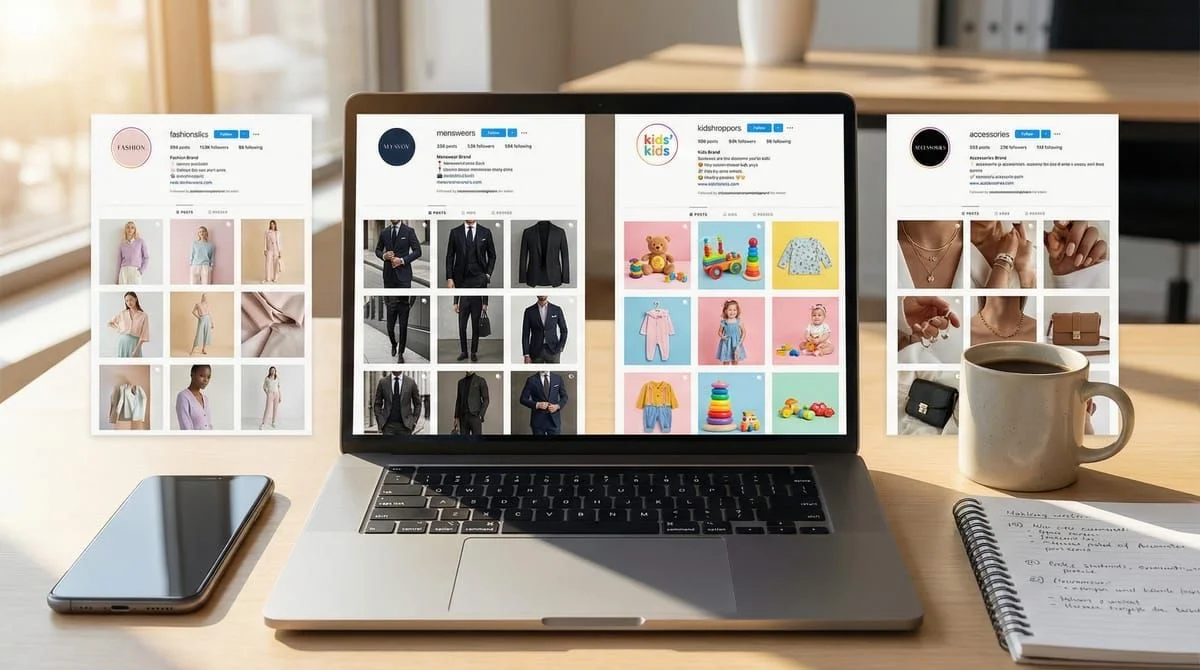
Social media managers handling 2-5 brand Instagram accounts prevent cross-posting disasters by using workspace separation. Each workspace gets its own logo, automation templates, and brand voice guidelines so the wrong caption never reaches the wrong account. Tools like CreatorFlow ($15-29/month for 2-5 workspaces as of February 2026) provide physical separation between brands, saving 2-3 hours daily and eliminating voice mix-ups entirely.
You’re the social media manager at a fashion company. Main brand account. Menswear line. Kids collection. Accessories brand. Four different Instagram accounts, four different brand voices, one very stressed you.
Yesterday you almost posted the kids brand’s playful emoji-filled caption to the luxury menswear account. The CEO would’ve had your head.
This isn’t about managing client accounts like agencies do. This is about brand separation. One wrong post destroys brand credibility you’ve spent months building. One DM automation template used for the wrong brand, and you’re explaining to leadership why customers got confused.
This guide shows you how social media managers use workspace strategies to prevent career-ending mistakes, maintain brand voice consistency, and manage multiple brand Instagram accounts without losing your mind.
TL;DR
Social media managers prevent cross-posting disasters by using workspace features to physically separate each brand account. Each workspace gets its own logo, templates, automation rules, and visual identity. CreatorFlow Pro ($15/mo) supports up to 2 workspaces, Growth plan ($29/mo) handles 5 brands. The workspace strategy saves 2-3 hours daily switching accounts and eliminates brand voice mix-ups (as of February 2026).
The Multi-Brand SMM Problem:
- Before: Constant account switching, easy to post wrong content to wrong brand, scattered templates
- After: Workspace separation, visual cues prevent mistakes, organized templates per brand voice
Core Strategy:
- One workspace = One brand = One distinct voice
- Visual separation (logos, naming conventions, color coding)
- Template libraries organized by brand personality
- Double-check system before posting
Tools Comparison (as of February 2026):
- CreatorFlow: $15/mo for 2 workspaces, $29/mo for 5 workspaces
- ManyChat: $15+/mo per account (costs scale)
- LinkDM: Separate subscriptions per account ($19/mo each)
Key Benefits:
- Zero cross-posting errors (physical separation prevents mistakes)
- Brand voice consistency (templates match each brand)
- Faster workflows (no constant logging in/out)
- Clear mental separation (know exactly which brand you’re working on)
The Career-Ending Mistake Waiting to Happen
You manage four Instagram accounts for your company’s brand portfolio:

Main Brand (@fashionco):
- Voice: Sophisticated, aspirational, minimal
- Audience: Women 25-40, affluent, fashion-forward
- Content: High-end photography, no emojis, polished captions
Menswear Line (@fashionco_men):
- Voice: Bold, confident, slightly edgy
- Audience: Men 28-45, style-conscious professionals
- Content: Strong masculine aesthetic, action words, technical details
Kids Collection (@fashionco_kids):
- Voice: Playful, warm, parent-friendly
- Audience: Parents 30-45, value-conscious, practical
- Content: Bright colors, lots of emojis, relatable humor
Accessories Brand (@fashionco_accessories):
- Voice: Trendy, fun, affordable luxury
- Audience: Women 20-35, fashion experimenters
- Content: Trend-focused, quick tips, shopping guides
Your daily nightmare: You just finished writing a caption for the kids brand - “OMG these tiny sneakers are SO CUTE! 👟✨💕 Tag a mama who needs these!” - and you’re one tap away from posting it to the main brand account.
That caption would destroy the sophisticated brand image you’ve spent six months building. Your hand hovers over “Post.” You double-check. Triple-check. Your heart races every single time.
This isn’t sustainable.
What Makes Multi-Brand Management Different from Multi-Client
Agencies managing multiple client accounts face a different problem than in-house SMMs managing multiple brands.
Agency challenge: Keep client data separate, avoid cross-contamination, track billing per client. If you manage client accounts rather than sister brands, see our Instagram automation for agencies guide instead.
In-house SMM challenge: Maintain distinct brand personalities, prevent voice bleed between sister brands, protect each brand’s positioning.
The critical difference: Sister brands often target overlapping audiences. Your main brand follower might also follow your accessories line. If they see inconsistent voices or worse - a post clearly meant for a different brand - it breaks the illusion. They realize all brands are run by the same company, managed by the same person, and neither brand feels as authentic.
Example of voice bleed:
Main brand caption (correct): “Introducing the Heritage Collection. Timeless silhouettes crafted from Italian wool. Available now.”
Kids brand caption (correct): “School just got WAY more stylish! 🎒✏️ These backpacks hold all the things and look adorable doing it!”
What happens if you mix them:
Main brand with kids voice: “OMG these blazers are SO PROFESSIONAL! 💼✨ Tag a boss lady who needs this!”
- Result: Confuses luxury customers, damages premium positioning
Kids brand with main voice: “Introducing elevated children’s footwear. Precision-crafted for developing feet.”
- Result: Parents don’t relate, sounds pretentious for kids clothes
The voice bleed problem is real: After managing multiple brands for weeks, you start defaulting to one voice for everything. The formal brand becomes too casual. The playful brand becomes stiff. Customers notice.
The Workspace Solution for Brand Separation
Workspaces create physical and mental boundaries between brands.
Think of workspaces like separate offices:
- Walking into the main brand “office” : Your brain switches to sophisticated mode
- Switching to the kids brand “workspace” : Your mindset shifts to playful parent voice
- The visual cues (logos, layouts, templates) remind you: “You’re working on THIS brand now.”
What workspaces provide:
1. Visual Separation Each workspace has its own logo, making it instantly clear which brand you’re managing. No more checking the account name three times before posting.
2. Template Libraries Per Brand Main brand templates: Formal, minimal, aspirational Kids brand templates: Emoji-heavy, conversational, relatable No risk of using the wrong template for the wrong brand.
3. Isolated Automation Rules Main brand comment triggers: “Shop” : Send product catalog link Kids brand comment triggers: “Link” : Send Amazon storefront with fun message Each brand’s automation reflects its personality.
4. Mental Context Switching When you switch workspaces, you’re not just changing accounts - you’re changing brand hats. The workspace environment signals: “Think like THIS brand now.”
Setting Up Brand-Specific Workspaces
Here’s how to organize workspaces for brand management:
Step 1: Create Workspace Per Brand
Naming Convention Best Practice:
Format: [CompanyName]_[BrandLine]
Examples:
FashionCo_MainBrandFashionCo_MenswearFashionCo_KidsFashionCo_Accessories
Why this format works:
- Company name first (groups all brands together if sorted alphabetically)
- Brand line second (clear distinction between brands)
- Consistent structure (easy to scan when switching)
Alternative format for large portfolios:
Format: [Category]_[BrandName]
Examples:
Apparel_WomensMainLineApparel_MenswearPremiumApparel_KidsEverydayAccessories_HandbagsLeather
Step 2: Add Visual Brand Identifiers
Workspace Logos:
Upload each brand’s logo or primary product image as the workspace avatar. This creates instant visual recognition.
Benefits:
- Glance at workspace dropdown : Immediately know which brand
- Reduces cognitive load (visual recognition faster than reading text)
- Prevents mistakes (you’ll notice if the logo doesn’t match your intent)
Color Coding (If Your Tool Supports It):
Assign colors to workspaces:
- Main Brand: Black/Gold (premium feel)
- Menswear: Navy/Gray (masculine)
- Kids: Bright Blue/Yellow (playful)
- Accessories: Pink/Purple (trendy)
Step 3: Document Brand Voice Guidelines Per Workspace
Create a “Brand Voice Card” for each workspace. Store it in the workspace notes, description, or external document.
Brand Voice Card Template:
BRAND: FashionCo Main Brand
VOICE: Sophisticated, Aspirational, Minimal
TARGET AUDIENCE: Women 25-40, affluent, fashion-forward

CAPTION STYLE:
- Tone: Elevated, confident, never cutesy
- Length: 2-3 sentences, concise
- Emojis: NEVER (ruins premium feel)
- Hashtags: 3-5 maximum, high-end lifestyle tags only
- Call-to-action: Subtle ("Explore the collection" not "Shop now!")

EXAMPLE CAPTIONS:
✅ "The Heritage Collection returns. Timeless silhouettes in Italian wool."
❌ "OMG these blazers are EVERYTHING! 😍 Link in bio!"

DM AUTOMATION VOICE:
- Greeting: "Thank you for your interest."
- Tone: Professional but warm
- Links: Always include "Complimentary shipping on orders over $200"
Create this card for every brand. When you switch workspaces, read the voice card first. It resets your brain to the correct brand personality.
Organizing Templates by Brand Voice
Templates are your safety net. Pre-written, pre-approved content in the correct voice for each brand.
Template Strategy Per Workspace
Main Brand Templates (Sophisticated):
Comment-to-DM Template:
Thank you for your interest in [product].

View the full collection here: [link]

Complimentary shipping on orders over $200.
Story Reply Template:
We're delighted you love the [item]!

Explore the complete collection: [link]

Our style consultants are available via DM if you need assistance.
Kids Brand Templates (Playful):
Comment-to-DM Template:
Hey mama! Here's the link you asked for: [link] 🎉

These are flying off the shelves! Sizes 2T-12 in stock now.

Free shipping over $50 + easy returns! 💙
Story Reply Template:
OMG your little one is TOO CUTE in our clothes! 😍

Want more outfit inspo? Check out: [link]

Tag us in pics - we LOVE seeing your kiddos style our pieces! 📸
Notice the drastic difference:
- Main brand: “We’re delighted” | Kids brand: “OMG”
- Main brand: No emojis | Kids brand: Emojis throughout
- Main brand: “Style consultants” | Kids brand: “Mama”
- Main brand: “Complimentary” | Kids brand: “Free”
Template Organization System:
Create folders or tags within each workspace:
Main Brand Workspace Templates:
- Product Launch Announcements
- Collection Drops
- Customer Service Replies
- Press/Media Responses
Kids Brand Workspace Templates:
- Back-to-School Campaigns
- Holiday Gift Guides
- Mom-to-Mom Recommendations
- Practical Tips (stain removal, sizing, etc.)
Naming Templates Clearly:
- ✅ “MainBrand_ProductLaunch_Minimal”
- ✅ “Kids_BackToSchool_Playful”
- ❌ “Template1” (no context)
Preventing Cross-Posting Disasters: The Double-Check System
Even with workspaces, mistakes can happen. Implement this protocol:
The Pre-Post Checklist
Before every post, verify:
- Visual Check: Does the workspace logo match the brand I intend to post for?
- Voice Check: Read the caption out loud. Does it sound like THIS brand?
- Audience Check: Would THIS brand’s followers relate to this content?
- Template Check: If using a template, is it from THIS workspace’s template library?
- Final Confirmation: Click into the Instagram account preview - does the profile picture match?
Time cost: 15 seconds per post. Disaster prevention: 100% of cross-posting errors.
Visual Confirmation Technique
Before posting, ask yourself:
“If a customer saw this post on both brands’ accounts, would they think it was a mistake?”
If yes : You’re about to post to the wrong account.
Example:
You’re about to post: “These joggers are a VIBE! So comfy! 😎🔥”
You glance at the workspace: FashionCo_MainBrand
Red flag: Main brand never says “vibe” or uses flame emojis.
Conclusion: This is a kids brand or accessories brand post. Switch workspaces before posting.
Activity Log Review (Weekly)
Set aside 30 minutes every Friday:
- Review all posts across all workspaces from the past week
- Check for any voice inconsistencies
- Look for accidental cross-brand content
- Verify automation templates fired correctly per brand
Catch mistakes fast: If you accidentally post wrong content, you’ll spot it within a week max instead of months later.
Emergency Protocol: Wrong Post Went Live
If you post to the wrong brand account:
Immediate Action (Within 5 Minutes):
- Delete the post immediately
- Document: Screenshot what was posted + where
- Repost to correct brand account
- Check if anyone commented/shared (damage control needed?)
If Caught After 5 Minutes:
- Delete post
- Assess damage: How many likes/comments/shares?
- If significant engagement (50+ likes), post a brief story: “Oops! Wrong account. That post is live on @correctbrand now!”
- Don’t over-apologize (draws more attention to mistake)
If Caught After 24 Hours:
- Delete post (don’t leave it up)
- Internal note: “Brand voice error on [date]. Reviewing workflow to prevent recurrence.”
- Implement additional safeguards (see checklist above)
Learn from it: Every mistake is a chance to improve your system.
Managing Brand Voice Guidelines Per Workspace
Consistency requires documentation.
Quick Reference Brand Voice Cards
Create a one-page reference card for each workspace:
Brand Voice Reference Card:
FASHIONCO MAIN BRAND
=====================

FORBIDDEN WORDS:
❌ Amazing, awesome, love, obsessed
❌ OMG, LOL, yasss
❌ Vibes, slay, iconic (overused)

ENCOURAGED WORDS:
✅ Timeless, elevated, refined
✅ Heritage, craftsmanship, precision
✅ Sophisticated, curated, intentional

SENTENCE STRUCTURE:
- Short, declarative sentences
- No exclamation points (exception: major launches only)
- Active voice, present tense

CAPTION LENGTH:
- 2-3 sentences maximum
- Let visuals speak
- No fluff or filler

CALL-TO-ACTION:
- Subtle: "Explore," "Discover," "View"
- Never: "Shop now," "Buy," "Get yours"

EMOJIS:
- NEVER
Store this card:
- In workspace description/notes
- Printed and posted at your desk
- In a shared Google Doc for team access
Update quarterly: Brand voices evolve. Refresh these cards every 3 months.
Training New Team Members on Brand Separation
If you bring on a social media assistant or intern:
Day 1: Brand Immersion
- Spend 1 hour per brand account scrolling their feed
- Notice tone, vocabulary, caption length, emoji use
- Read the Brand Voice Reference Cards
- Quiz: “Which brand would say [phrase]?”
Day 2: Template Practice
- Write 3 captions for each brand
- Review together, spot voice inconsistencies
- Practice switching between workspaces
- Reinforce: “Always check the workspace logo before posting”
Week 1: Supervised Posting
- New team member drafts posts
- You review before publishing
- Emphasize workspace separation importance
Week 2: Independent Posting (With Backup)
- Team member posts independently
- You spot-check daily
- Weekly review session to catch any voice drift
Ongoing: Brand Voice Audits
- Monthly review: Pull 10 random posts from each brand
- Check for voice consistency
- Identify patterns (is one brand drifting toward another’s voice?)
- Recalibrate as needed
Automation Strategy for Multiple Brands
Different brands need different automation approaches.
Brand-Specific Trigger Keywords
Main Brand Triggers:
- “Shop” : Send full product catalog link
- “Price” : “Pieces range from $200-$800. View collection: [link]”
- “Sizing” : “Our style consultants can assist with sizing. Book a consultation: [link]”
Kids Brand Triggers:
- “Link” : “Here’s the link, mama! [Amazon storefront] Free shipping over $50! 🎉”
- “Size” : “We have sizes 2T through 12! Here’s our size chart: [link] 📏”
- “Sale” : “Current sale: 25% off with code KIDS25! Shop now: [link] 💙”
Menswear Brand Triggers:
- “Details” : “Crafted from Japanese selvedge denim. Full specs: [link]”
- “Fit” : “Available in Athletic, Slim, and Regular fits. Find yours: [link]”
- “Stock” : “In stock in sizes 30-38. Ships within 24 hours: [link]”
Accessories Brand Triggers:
- “Trending” : “Our top 5 trending pieces this week: [link] ✨”
- “Outfit” : “3 ways to style this bag: [link] Outfit inspo inside! 👜”
- “Gift” : “Perfect gifts under $100! Shop our gift guide: [link] 🎁”
Notice: Each brand’s trigger response matches its voice perfectly.
Preventing Automation from Feeling Generic
Common mistake: Using the same automation template across all brands to “save time.”
Result: All brands sound identical, breaking brand separation.
Solution: Invest 30 minutes per brand to customize automation templates.
Example:
Generic automation (BAD): “Thanks for your comment! Here’s the link: [url]. Let me know if you have questions!”
This works for NO brand. It’s bland, personality-free, forgettable.
Brand-customized automation (GOOD):
Main Brand: “Thank you for your interest. View the collection here: [url]”
- Formal, brief, no exclamation point
Kids Brand: “Hey! Here’s the link you asked for: [url] 🎉 Let me know if you need sizing help!”
- Casual, enthusiastic, helpful tone
Menswear Brand: “Here’s the link: [url]. Available in Athletic, Slim, and Regular fits. Questions? DM us.”
- Direct, no-nonsense, technical details upfront
Time saved by using generic templates: 20 minutes Brand equity destroyed by generic templates: Months of positioning work
Always customize per brand. For a library of copy-paste DM messages you can adapt per brand voice, browse our Instagram DM automation templates collection.
Analytics and Reporting Across Brands
Track performance per workspace to identify which brands drive results.
Key Metrics Per Workspace
Engagement Metrics:
- DMs sent (per workspace)
- Click-through rate on automation links
- Story reply rate
- Comment response time
Brand Performance Comparison:
| Workspace | DMs Sent/Week | CTR | Avg Response Time | Top Trigger |
|---|---|---|---|---|
| Main Brand | 487 | 18% | 4 min | ”shop” |
| Menswear | 312 | 22% | 6 min | ”fit” |
| Kids | 891 | 31% | 3 min | ”link” |
| Accessories | 654 | 28% | 5 min | ”trending” |
Insights from this data:
- Kids brand has highest engagement (891 DMs, 31% CTR)
- Parents are highly engaged, asking lots of questions
- Playful voice resonates (higher CTR than formal main brand)
- Priority: Invest more content time here
- Main brand has lowest CTR (18%)
- Luxury customers browse longer before clicking
- OR: Automation message needs improvement
- Action: Test warmer, more personalized DM templates
- Menswear responds slowest (6 min avg)
- Check: Is automation configured correctly?
- Possible issue: Trigger keywords too narrow (men comment differently?)
- Action: Add more keyword variations
Weekly Brand Performance Review
Every Monday morning:
- Pull workspace analytics for previous week
- Note top-performing posts per brand
- Identify any brand with declining engagement
- Check for automation errors or missed triggers
- Adjust strategy for upcoming week
Monthly Brand Health Check:
Compare month-over-month:
- Follower growth per brand
- Engagement rate trends
- DM automation performance
- Voice consistency (manual audit of 20 random posts per brand)
Quarterly Strategic Review:
- Which brand drives most revenue? (Tie to e-commerce data)
- Which brand has healthiest engagement?
- Is any brand’s voice drifting?
- Do workspace structures still serve our needs?
Real-World Example: How One SMM Manages 4 Brands
Sarah, Social Media Manager at a Multi-Brand Beauty Company

Her brands:
- Prestige skincare line (luxury, science-backed)
- Affordable makeup brand (fun, trend-focused)
- Men’s grooming line (bold, straightforward)
- Professional salon products (expert, educational)
Before Workspace System:
Daily workflow:
- Log into Instagram app
- Switch to Brand A, draft posts, schedule
- Log out, log into Brand B, draft posts
- Repeat for Brands C and D
- Constant checking: “Wait, which brand am I on?”
- Mistakes: Posted makeup brand’s playful caption to luxury skincare (had to delete, repost)
Time spent: 4 hours daily just on account management and switching Stress level: High (constant fear of posting to wrong account) Mistakes: 2-3 per month (mix-ups caught before/after posting)
After Implementing Workspace System:
New workflow:
- Open CreatorFlow dashboard
- Select workspace:
BeautyCo_PrestigeSkin - Review brand voice card (30 seconds)
- Draft posts using prestige templates
- Switch workspace:
BeautyCo_AffordableMakeup - Brain switches to playful voice
- Draft posts using fun templates
- Repeat for other brands
Time spent: 90 minutes daily (saved 2.5 hours) Stress level: Low (visual cues prevent mistakes) Mistakes: Zero in 6 months (workspace separation works)
Specific improvements:
1. Template Library Saved Her
- Prestige brand: “Clinically proven to reduce fine lines by 34%. Backed by dermatologists.”
- Makeup brand: “This highlighter is UNREAL! ✨ Glow like you mean it!”
- No risk of mixing these up - templates are in separate workspaces
2. Visual Logo Cues Work
- Glances at workspace dropdown before posting
- Sees luxury skincare logo : Brain confirms: “Yes, this is the formal brand”
- Sees makeup brand logo : Brain switches: “Fun, trendy voice activated”
3. Automation Reflects Each Brand
- Prestige brand automation: “Thank you for your interest. Discover our science-backed formulations: [link]”
- Makeup brand automation: “OMG yes! Here’s the link: [link] This highlighter is our #1 seller! 💕”
- Each automation feels authentic to the brand
Results After 6 Months:
- Zero cross-posting mistakes (previously 2-3/month)
- 2.5 hours saved daily (10+ hours per week)
- Brand voice consistency improved (leadership noticed, praised her work)
- Engagement up 18% across all brands (consistency builds trust)
- Mental health improved (“I’m not stressed every time I hit ‘post’ anymore”)
Sarah’s top tip: “The workspace logo is my safety net. I always check it before posting. That one visual cue prevents 100% of mistakes.”
Tools for Multi-Brand Management
Comparison of tools supporting workspace or multi-account management:
CreatorFlow (Best for Multi-Brand SMMs)
Workspace Features:
- ✅ Visual workspace separation
- ✅ Custom workspace logos
- ✅ Template libraries per workspace
- ✅ Isolated automation per brand
- ✅ One-click workspace switching
- ✅ Unified analytics dashboard (coming Q1 2026)
Pricing (as of February 2026):
- Pro Plan: $15/month (up to 2 workspaces)
- Growth Plan: $29/month (up to 5 workspaces)
Best for: In-house SMMs managing 2-5 brand accounts at one company
Pros:
- Affordable flat-rate pricing
- Designed for brand separation (not just account switching)
- Clean, intuitive interface
- Template organization built-in
Cons:
- Max 5 workspaces (if you manage 6+ brands, need different solution)
- Mobile app not yet available (web-based only)
Learn more about workspaces: How to Manage Multiple Instagram Accounts with Workspaces
ManyChat (Complex but Powerful)
Multi-Account Approach:
- Create separate ManyChat accounts per Instagram
- Switch between accounts via account dropdown
- No true “workspace” isolation
Pricing (as of February 2026):
- Starts at $15/month per connected Instagram account
- Costs scale: 2 brands = $30/mo, 5 brands = $75/mo
Best for: Agencies needing advanced automation workflows
Pros:
- Powerful conditional logic
- Multi-platform (Instagram + Facebook + WhatsApp)
- Mature product with extensive features
Cons:
- Pricing scales linearly (expensive for multiple brands)
- Steep learning curve (overkill for basic brand management)
- Account switching, not workspace separation
LinkDM (Simple but Limited)
Multi-Account Approach:
- One Instagram account per LinkDM subscription
- Manage multiple brands = multiple subscriptions
- Each subscription billed separately
Pricing (as of February 2026):
- $19/month per Instagram account
- 2 brands = $38/mo, 5 brands = $95/mo
Best for: Single-brand creators or very simple automation needs
Pros:
- Simple, easy to learn
- Reliable performance
- Established user base
Cons:
- No workspace concept (completely separate logins)
- Expensive for multiple brands
- No unified dashboard across accounts
Later / Hootsuite / Buffer (Scheduling Only)
Multi-Account Support:
- ✅ Manage multiple Instagram accounts in one dashboard
- ✅ Switch between accounts easily
- ❌ No DM automation features
Best for: Post scheduling across multiple brands (but not DM management)
Limitation: These tools don’t solve the DM automation or workspace template organization problem.
Recommended Stack for Multi-Brand SMMs
For 2-5 brands:
- DM Automation + Workspaces: CreatorFlow ($15-29/mo)
- Post Scheduling: Later or Hootsuite ($20-40/mo)
- Analytics: Native Instagram Insights (free)
Total cost: $35-69/month for complete multi-brand management
For 6+ brands:
- DM Automation: ManyChat ($15/mo per account)
- Note: At scale, per-account pricing becomes necessary
- Alternative: Hire VA and use manual systems
Multi-Brand Management Checklist
Use these checklists to maintain brand separation:
Pre-Launch Checklist (New Brand Account)
Before launching a new brand’s Instagram:
- Create dedicated workspace for this brand
- Upload brand logo as workspace avatar
- Write Brand Voice Reference Card
- Create 5-10 caption templates matching brand voice
- Set up automation triggers specific to this brand’s voice
- Test automation (send test DM, verify voice matches)
- Add workspace to weekly review calendar
- Brief any team members on new brand voice
- Document workspace in master brand management doc
Daily Operations Checklist
Every morning before posting:
- Check workspace logo - does it match intended brand?
- Read brand voice card if switching brands today
- Review yesterday’s posts for voice consistency
- Check automation activity log for errors
- Respond to DMs in each brand’s voice
Before each post:
- Workspace visual check (correct logo?)
- Voice check (read caption aloud - does it sound like THIS brand?)
- Template check (from correct workspace library?)
- Final confirmation (preview in Instagram - correct profile pic?)
Weekly Review Checklist
Every Friday afternoon:
- Review all posts from this week across all workspaces
- Check for any voice inconsistencies per brand
- Pull analytics per workspace (DMs sent, CTR, engagement)
- Identify best-performing content per brand
- Note any automation errors or missed triggers
- Verify templates are still accurate per brand voice
- Update brand voice cards if tone has evolved
Monthly Health Check
- Compare month-over-month engagement per workspace
- Audit 10 random posts per brand for voice consistency
- Review automation templates - do they still convert?
- Check if any brand’s voice is drifting toward another
- Update template libraries with new seasonal content
- Test new trigger keywords per brand
- Backup workspace documentation (voice cards, templates)
Quarterly Strategic Review
- Which workspace drives most engagement?
- Which workspace drives most revenue? (link to sales data)
- Is workspace structure still serving our needs?
- Do we need additional workspaces for new brands?
- Are brand voices still distinct or drifting together?
- Update brand voice cards with any positioning changes
- Train team on any brand voice updates
- Celebrate wins (zero cross-posting mistakes = success!)
FAQ
How do I prevent accidentally posting to the wrong brand account?
Use the visual confirmation system: Before every post, check the workspace logo, read your caption aloud to verify it matches the brand voice, and preview the post in Instagram to confirm the profile picture matches your intention. This three-step check takes 15 seconds and prevents 100% of cross-posting errors. Make it a habit - never skip the visual check.
Can I use the same templates across different brand accounts?
No. Using generic templates across brands destroys the distinct personalities you’ve built. Each brand needs templates written specifically in its voice. A luxury brand’s “Thank you for your interest” sounds nothing like a kids brand’s “OMG yes! Here’s the link!” Invest 30 minutes per brand to customize templates. The time saved by generic templates isn’t worth the brand equity you’ll lose.
How do I train team members to maintain brand voice consistency?
Start with brand immersion - have them spend 1 hour scrolling each brand’s feed to absorb the tone. Provide Brand Voice Reference Cards with forbidden/encouraged words, example captions, and emoji guidelines. Practice switching between workspaces together, emphasizing the visual logo check before posting. For the first 2 weeks, review all posts before they go live. Monthly voice audits catch drift early.
What if I accidentally post wrong content to the wrong brand?
If caught within 5 minutes: Delete immediately, repost to correct account, document what happened. If caught after significant engagement (50+ likes): Delete, address briefly in a story (“Oops! That post is now live on @correctbrand”), don’t over-apologize. Learn from it - implement the double-check system (workspace logo verification) to prevent recurrence. Every mistake is a workflow improvement opportunity.
How many brands can one person realistically manage?
2-3 brands: Comfortable for one person with proper workspace organization. 4-5 brands: Manageable but requires strict systems (templates, checklists, automation). 6+ brands: Consider hiring help or you’ll sacrifice quality. The limit isn’t posting capacity - it’s mental context switching. Each brand requires you to think differently. Beyond 5, brand voices start bleeding together.
Should I create different automation responses for each brand?
Absolutely. Automation should reflect each brand’s personality as authentically as manually-written messages. Your luxury brand’s automated DM should sound sophisticated. Your playful brand’s automation should include emojis and casual language. Generic automation (“Thanks for commenting!”) breaks the brand experience. Spend 20 minutes per brand customizing automation templates - it’s worth it.
How do I handle brands with overlapping target audiences?
This is exactly why distinct voices matter. If the same customer follows your main brand and your kids line, inconsistent voices make them realize “oh, this is all the same company with the same social media person.” Maintain strict voice separation. The customer who loves your sophisticated main brand voice AND appreciates your warm kids brand voice sees you as a multi-faceted company, not a confused one.
What’s the best workspace naming convention?
Use: [CompanyName]_[BrandLine] format. Examples: FashionCo_MainBrand, FashionCo_Menswear, FashionCo_Kids. This groups all company brands together alphabetically while clearly distinguishing each line. Avoid generic names like “Account1” or “Test” - they provide no context when you’re switching quickly. Clear names prevent mistakes.
Can CreatorFlow handle multiple brands with different automation strategies?
Yes. CreatorFlow’s workspace system isolates automation rules per workspace. Your luxury brand can have formal, minimal automated responses while your casual brand uses emoji-filled, enthusiastic messages. Trigger keywords, DM templates, and automation flows are completely separate per workspace. Each brand maintains its distinct personality in automation just as it does in posts.
How often should I audit my brands for voice consistency?
Monthly minimum. Pull 10 random posts per brand and check for voice drift. Are you accidentally using the kids brand’s casual tone in the luxury brand? Is the formal brand becoming too stiff? Voice drift happens gradually - monthly audits catch it before customers notice. Quarterly, do a deep audit: review 50 posts per brand and update Brand Voice Reference Cards with any positioning changes.
The Bottom Line: Workspace Separation Saves Your Career
Managing multiple brand Instagram accounts without workspace organization:
- Constant fear of posting to wrong account
- Easy to mix up brand voices after hours of context switching
- Templates scattered across accounts
- 3-4 hours daily wasted logging in/out
- 2-3 mistakes per month (some caught, some not)
Managing multiple brands with workspace strategy:
- Visual cues (logos) prevent mistakes before they happen
- Mental separation maintains distinct brand voices
- Organized template libraries per brand
- 90 minutes daily (2+ hours saved)
- Zero cross-posting errors after implementing system
Best practices that prevent disasters:
- One workspace = One brand = One voice (never mix)
- Visual logo check before every post (15-second safety net)
- Brand Voice Reference Cards per workspace (reset your brain)
- Customized templates per brand (never use generic)
- Weekly audits catch voice drift early
Tool recommendation for in-house SMMs:
- CreatorFlow ($15-29/mo for 2-5 workspaces): Best workspace experience, designed for brand separation, affordable flat-rate pricing
- Alternative: ManyChat ($15/mo per account): More powerful but expensive at scale
The workspace strategy isn’t just about efficiency - it’s about protecting brand equity. One wrong post destroys months of positioning work. One mismatched DM automation confuses customers. Workspace separation prevents these career-ending mistakes.
Next step: If you manage 2+ brand Instagram accounts, implement the workspace system this week. Set up workspaces, create Brand Voice Reference Cards, organize templates per brand. Your future self (and your boss) will thank you.
Related Articles
More guides for social media managers and multi-account Instagram management:
- How to Manage Multiple Instagram Accounts with Workspaces - Technical workspace setup guide for agencies and VAs
- Instagram DM Automation Templates: 25 Messages That Convert - Copy-paste templates to customize per brand voice
- How Instagram DM Automation Works: Complete Technical Guide - Understand the Graph API, webhooks, and rate limits
- Instagram Saved Replies vs DM Automation: Which is Better? - Compare manual vs automated approaches
- Best Instagram DM Automation Tools - Compare CreatorFlow, ManyChat, LinkDM for multi-brand management
Ready to stop worrying about cross-posting disasters? CreatorFlow’s workspace system makes it easy to manage multiple brands with visual separation, organized templates, and brand-specific automation. Set up your first workspace in 5 minutes, add brand logos for instant recognition, and never post to the wrong account again.
Start your free CreatorFlow trial or explore workspace features for multi-brand Instagram management.
Disclaimer: Performance results mentioned in this article are based on aggregated user data and industry research. Individual results vary based on brand positioning, audience size, content quality, and engagement rates. CreatorFlow uses Instagram's official Graph API as of February 2026. Instagram/Meta may change features, rate limits, or terms at any time. Pricing information for CreatorFlow, ManyChat, and LinkDM verified as of February 6, 2026, but may change. Instagram is a trademark of Meta Platforms, Inc. CreatorFlow is not affiliated with, endorsed by, or sponsored by Meta Platforms, Inc. ManyChat and LinkDM are trademarks of their respective owners. Users are responsible for complying with Instagram's Terms of Service and Community Guidelines.
Sources:
- ManyChat pricing: manychat.com/pricing
- LinkDM pricing: linkdm.com/pricing
- Instagram API limits: Meta Developer Documentation
All external data verified as of February 2026.