
Slow Instagram DM automation kills conversions. When your automated reply takes 30+ seconds instead of the expected 2-5 seconds, followers lose interest and move on. The most common causes are webhook delays, tool-side pacing at ~200 DMs/hour, over-complicated workflow logic, and server overload during peak posting hours. Most speed issues are fixable in under 10 minutes.
If your automation used to be fast and suddenly slowed down, you’re likely hitting Instagram’s rate limits or your tool’s infrastructure is struggling with scale. This guide diagnoses the exact bottleneck and walks through seven fixes.
Why Is Your Instagram Automation Responding Slowly?
Instagram automation responds slowly due to one of these issues: webhook delays from your automation tool, Instagram Graph API rate limiting, complex workflow logic with too many steps, server overload during peak hours, or poor integration between your tools. Most delays can be fixed in under 10 minutes once you identify the bottleneck. Fast automation should respond in under 5 seconds, if yours takes 30+ seconds, something’s wrong.
This guide walks through each cause and the exact fix.

Key Takeaways
- Target response time: Under 5 seconds for comment-to-DM automation, anything over 15 seconds needs fixing
- Seven common causes: Webhook delays, tool-side pacing at ~200 DMs/hour, complex workflow logic, third-party integration bottlenecks, server overload during peak hours, notification vs delivery confusion, and slow tool architecture
- Fastest fix: Simplify your automation to two steps (detect trigger, send DM) and move logging, CRM updates, and webhooks to background processing
- Rate limit reality: Tools pace sends at around 200 DMs/hour as a behavioral safety cap, viral posts with 500+ comments will hit this and queue remaining messages
- Speed by tool type: Native API tools (CreatorFlow, ManyChat) respond in 1-5 seconds, Zapier-based solutions take 5-15 seconds, white-label platforms take 10-30 seconds
- Bottom line: Start with the diagnostic checklist to identify your bottleneck, most creators fix speed issues within an hour
What’s “Fast” for Instagram Automation?
Before troubleshooting, know what good looks like:
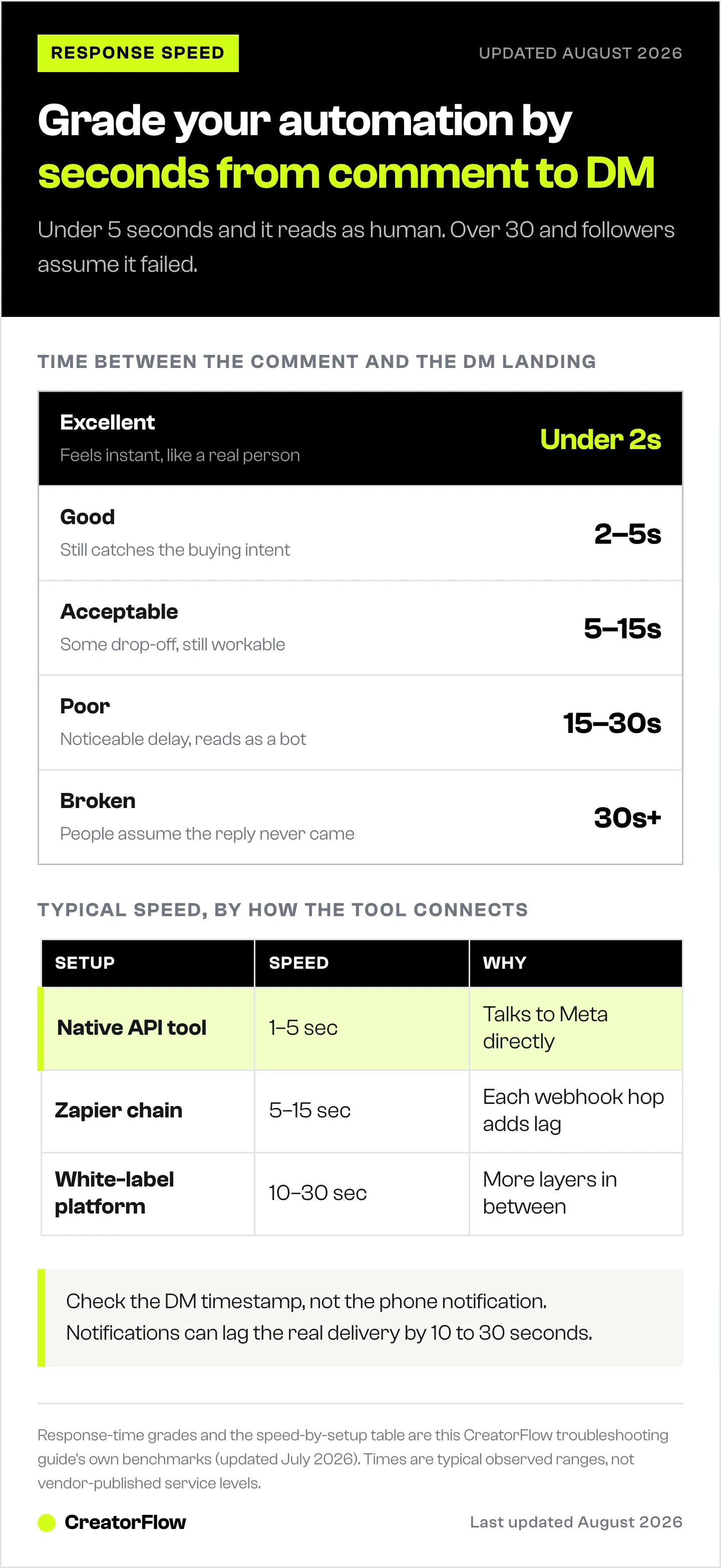
| Response Time | Rating | Impact |
|---|---|---|
| Under 2 seconds | Excellent | Feels instant, like a real human |
| 2-5 seconds | Good | Still captures buying intent |
| 5-15 seconds | Acceptable | Some drop-off, but workable |
| 15-30 seconds | Poor | Noticeable delay, feels automated |
| 30+ seconds | Broken | Defeats the purpose of automation |
| 1+ minute | Critical | Users think it failed, may DM again |
The goal: Respond fast enough that followers don’t notice it’s automated. Under 5 seconds is the target.
Cause 1: Webhook Delays
The Issue
Your automation tool uses webhooks to detect Instagram events (comments, story replies). If webhooks are slow, everything downstream is slow.
How to Identify
Time the gap between:
- When someone comments
- When the DM arrives
If it’s consistently 20-60 seconds, webhook processing is likely the bottleneck.
The Fix
Step 1: Check your tool’s webhook status
Most automation tools have a status page or webhook health indicator. Look for:
- Webhook latency metrics
- Failed webhook deliveries
- Processing queue depth
Step 2: Simplify your trigger conditions
Complex triggers slow down processing:
- ❌ Slow trigger:
IF comment contains "link" OR "info" OR "price" OR "how much" OR "where"
AND user has more than 100 followers
AND user is not already a subscriber
AND post was published within last 7 days
THEN send DM- ✅ Fast trigger:
IF comment contains "link"
THEN send DM
Every condition adds processing time. Use the minimum necessary.
Step 3: Consider your tool’s infrastructure
Some automation platforms run on shared servers that slow down during peak hours (US evenings, weekends). Premium tiers or enterprise plans often have dedicated resources.
Cause 2: Tool-Side Pacing Caps
The Issue
Most automation tools pace sends at around 200 DMs/hour to stay well under Meta’s per-second rate limits. If your automation exceeds this pacing window, responses queue up.
How to Identify
Symptoms of rate limiting:
- Automation works fast initially, then slows dramatically
- DMs arrive in batches instead of individually
- Some DMs never arrive at all
- Delays happen after viral posts with high engagement
The Fix
Step 1: Check your automation volume
Count your hourly DM sends. If you’re hitting 150+ per hour regularly, you’re approaching limits.
Step 2: Enable rate limit handling
Good automation tools automatically:
- Queue messages when approaching limits
- Space out sends to stay under limits
- Prioritize newer requests over older ones
If your tool doesn’t do this, you’ll see random delays.
Step 3: Reduce unnecessary API calls
Every action uses API calls:
- Checking if user follows you = 1 call
- Sending a DM = 1 call
- Adding user data = 1 call
- Checking if user already messaged = 1 call
A 4-step automation uses 4x more API quota than a 1-step automation.
Step 4: Spread automation across time
If you post content at 6 PM and get 500 comments in an hour, you’ll hit limits. Consider:
- Staggering post times
- Using slower, consistent engagement vs viral spikes
- Accepting that viral moments may have some delays
Cause 3: Complex Workflow Logic
The Issue
Your automation has too many steps, conditions, and branches. Each step adds processing time.
How to Identify
Map out your automation flow. If it looks like a flowchart with 10+ steps, it’s too complex.
Common complexity culprits:
- Multiple conditional branches
- User segmentation logic
- Database lookups
- Third-party integrations in the middle of the flow
The Fix
Step 1: Audit your workflow
Draw out every step:
- Trigger detected
- Check condition A
- Check condition B
- Fetch user data
- Decide which message
- Send message
- Log to spreadsheet
- Tag in CRM
Each step = more latency.
Step 2: Simplify to core function
What’s the minimum viable automation?
Most creators only need:
- Detect trigger (comment keyword)
- Send DM with link
That’s it. Everything else is optimization that may not justify the speed cost.
Step 3: Move complexity to follow-ups
Instead of:
IF new user → send welcome + link + email capture + follow-up sequenceDo:
1. Send link immediately (fast)
2. Wait 24 hours
3. Send follow-up with email capture (can be slower)
Speed matters most for the first touch. Follow-ups can be more complex.
Step 4: Remove unused conditions
Old automations accumulate cruft:
- Conditions for campaigns that ended
- User segments that no longer matter
- A/B tests that were never cleaned up
Audit and delete unused logic.
Cause 4: Third-Party Integration Delays
The Issue
Your automation connects to other tools (CRM, email platform, spreadsheet) and waits for responses before continuing.
How to Identify
If your automation:
- Logs to Google Sheets before sending DM
- Checks your CRM before responding
- Waits for Zapier webhook confirmation
…any slow external service delays everything.
The Fix
Step 1: Make integrations asynchronous
Instead of:
1. Comment detected
2. Log to Google Sheets ← Wait for confirmation
3. Send DM
Do:
1. Comment detected
2. Send DM immediately
3. Log to Google Sheets (in background, don't wait)
The DM goes out instantly. Logging happens separately.
Step 2: Use native integrations over Zapier
Zapier adds latency (3-15 seconds per step on free/basic plans). Native integrations are faster.
If your tool offers direct Klaviyo/Mailchimp integration, use that instead of Zapier.
Step 3: Batch external updates
Instead of sending data to your CRM for every DM:
- Collect data in your automation tool
- Sync to CRM once per hour or once per day
Real-time sync sounds nice but rarely justifies the speed cost.
Cause 5: Server Overload (Peak Hours)
The Issue
Your automation tool shares servers with other users. During peak times, everyone’s automations compete for resources.
How to Identify
Track response times across different hours:
- Fast at 2 AM (low usage)
- Slow at 7 PM EST (peak Instagram time)
- Slow on weekends
If there’s a pattern, it’s server capacity.
The Fix
Step 1: Test during off-peak hours
Send test comments at different times. If 3 AM responses are instant but 7 PM responses take 30 seconds, it’s capacity.
Step 2: Upgrade your plan
Many tools offer:
- Free/Basic: Shared servers, slower during peaks
- Pro/Premium: Priority processing
- Enterprise: Dedicated resources
The cost difference may be worth it if speed matters to your conversions.
Step 3: Consider switching tools
Some platforms are simply faster than others due to:
- Better infrastructure
- Fewer users per server
- More efficient code
If your tool is consistently slow even on premium plans, evaluate alternatives.
Cause 6: Mobile App vs API Differences
The Issue
You’re testing automation by watching Instagram on your phone, but Instagram’s app updates aren’t instant.
How to Identify
Test this:
- Have someone comment on your post
- Check your phone for the DM notification
- Compare to when the DM actually arrived (check timestamps)
Sometimes the DM arrives instantly, but your phone notification is delayed.
The Fix
Step 1: Verify actual delivery time
Check the timestamp on the DM itself, not when you saw it. Instagram’s notification system can be 10-30 seconds behind actual message delivery.
Step 2: Test on web
Log into Instagram.com and watch the DM inbox. Web updates faster than mobile app notifications.
Step 3: Don’t over-optimize based on perceived delays
If DMs arrive within 5 seconds but notifications take 20 seconds, your automation is fine. The recipient sees it faster than you do.
Cause 7: Your Automation Tool Is Just Slow
The Issue
Some automation platforms have inherent architectural delays that can’t be fixed with settings changes.
How to Identify
You’ve tried everything above and:
- Response times are consistently 20+ seconds
- Support says it’s “normal”
- Other users report similar issues
- Upgrading plans doesn’t help
The Fix
Step 1: Benchmark against alternatives
Most automation tools offer free trials. Test response times:
- Sign up for trial
- Create simple automation (keyword → DM)
- Time responses with stopwatch
- Compare to your current tool
Step 2: Compare tool architectures
| Tool Type | Typical Speed | Why |
|---|---|---|
| API-first tools | 1-5 seconds | Direct Meta API integration |
| Zapier-dependent | 5-15 seconds | Webhook chains add latency |
| White-label platforms | 10-30 seconds | Multiple abstraction layers |
| Older platforms | Variable | Technical debt, legacy code |
Step 3: Factor speed into tool selection
When evaluating automation tools, test speed as seriously as you test features. The fastest tool with fewer features often outperforms a slow tool with more features.
Quick Diagnostic: Find Your Bottleneck
Run through this checklist:
1. Test baseline speed
- Create simplest possible automation (one keyword, one message)
- Time response with stopwatch
- If simple automation is slow → infrastructure/tool issue
- If simple automation is fast → your complexity is the problem
2. Check during different hours
- Test at 3 AM and 7 PM
- If big difference → server capacity issue
- If consistent → not a capacity issue
3. Review your workflow
- Count total steps in automation
- More than 3 steps before DM sends? → Simplify
- External integrations before DM? → Make async
4. Monitor volume
- Track DMs sent per hour
- Approaching 150+/hour? → Rate limiting likely
- Under 50/hour but still slow? → Not rate limiting
5. Verify actual delivery
- Check DM timestamps, not notifications
- If timestamps show fast delivery → Your perception is wrong
- If timestamps confirm delays → Continue troubleshooting
Speed Benchmarks by Tool Type
What to expect from different automation approaches:
| Approach | Expected Speed | Best For |
|---|---|---|
| Native API tools (CreatorFlow, ManyChat) | 1-5 seconds | Most use cases |
| Zapier automations | 5-15 seconds | Complex integrations |
| Manual + templates | 30-60 seconds | Low volume, high personalization |
| No automation | Minutes to hours | When personal touch matters |
If you need sub-5-second responses, use a native API tool. If you’re okay with 10-15 seconds, Zapier-based solutions work fine.
When Slow Automation Is Acceptable
Not every automation needs to be instant:
Speed matters most for:
- Comment-to-DM (buying intent is highest immediately after comment)
- Story reply automation (ephemeral content, fast-moving)
- Link/product requests (first responder wins)
Speed matters less for:
- Welcome sequences (triggered by follow, not purchase intent)
- Re-engagement campaigns (they’re cold anyway)
- Educational sequences (spaced by design)
Don’t over-optimize:
- 3 seconds vs 5 seconds rarely matters
- 5 seconds vs 60 seconds absolutely matters
- Focus on getting under 15 seconds, then stop obsessing
FAQ
What’s a normal response time for Instagram automation?
Native API tools (ManyChat, CreatorFlow) typically respond in 1-5 seconds. Zapier-based automations take 5-15 seconds. Anything over 30 seconds is problematic and defeats much of the benefit of automation.
Can Instagram throttle my automation speed?
Yes. Most tools pace sends at around 200 DMs/hour to stay well under Meta’s per-second rate limits. If you exceed this pacing cap, your automation will queue messages and send them slower. This is most common after viral posts with hundreds of comments in a short time.
Why is my automation fast sometimes and slow other times?
Variable speed usually indicates either server capacity issues (shared resources during peak hours) or approaching rate limits (fast until quota is hit, then slow). Test during off-peak hours to isolate the cause.
Does upgrading my plan make automation faster?
Often yes. Premium plans typically include priority processing, dedicated resources, and higher rate limits. However, if the platform has fundamental architecture issues, upgrading won’t help much.
Should I switch tools if my automation is slow?
First, simplify your workflow and check for external integration delays. If your simplest possible automation (one keyword → one DM) still takes 20+ seconds consistently, the tool itself may be the bottleneck. Test alternatives with free trials.
How do I test actual response time?
Use a stopwatch. Have someone comment on your post while you time it. Check the DM timestamp (not notification) to see actual delivery time. Test multiple times at different hours to get an average.
The Bottom Line
Slow automation usually comes from one of seven causes:
- Webhook delays (simplify triggers)
- API rate limiting (reduce call volume)
- Complex workflows (simplify to 2-3 steps)
- Third-party integrations (make async)
- Server overload (upgrade plan or switch tools)
- Notification vs delivery confusion (check timestamps)
- Slow tool architecture (evaluate alternatives)
Start with the diagnostic checklist. Most creators fix their speed issues within an hour once they identify the actual bottleneck.
Target: Under 5 seconds for comment-to-DM automation. If you’re consistently over 15 seconds, something needs to change.
Need faster automation? Try CreatorFlow free, built for speed with native Instagram Graph API integration. 500 free DMs/month to test response times yourself.
Related guides: