
The outfit posts that generate the most “link please” comments follow specific formats. Try-on haul Reels produce 3-5x more link requests than static outfit photos because viewers see the clothes in motion, on a real body, from multiple angles. The seven post formats in this guide are ranked by link-request volume based on what top fashion creators consistently use to drive hundreds of comments per post.
You posted a styled flat lay. 47 likes. 3 comments. Zero link requests. Then you filmed a 15-second try-on Reel of the same outfit with the brand name on screen and “Comment LINK for details.” 312 comments. 200+ DM link requests. Same clothes. Different format. The format decides how many followers ask. The CTA decides whether they know to. Both rules below, ranked by request volume.
Key Takeaways
- Try-on haul Reels generate the most link requests. Showing clothes on your body, in motion, with multiple outfits in one video drives 3-5x more comments than static photos
- The CTA is non-negotiable. Posts without “comment LINK” prompts get 70-80% fewer link requests. Followers need explicit direction
- Carousel posts outperform single images by 2-3x for link requests because each slide can feature a separate outfit with its own shoppable items
- Text overlays naming brands and items increase requests. When followers can see “Zara blazer $69” on screen, they’re more likely to comment asking for the link
- Consistency builds the “comment LINK” habit. After 2-3 weeks of using the same trigger word CTA, regular followers start commenting automatically without being prompted
- Automation captures the value. Generating hundreds of link requests means nothing if you can’t respond. DM automation delivers links in seconds while you focus on creating the next post, which is what makes shoppable content for creators actually convert
The Instagram Outfit Post Strategy in Three Parts
Three things decide how many link requests an outfit post earns. Format comes first: try-on haul Reels pull 3-5x more requests than static photos because viewers see fit and movement. The CTA comes second: posts without a “comment LINK” prompt get 70-80% fewer requests. Delivery comes third: 200 requests are worth little if the links land four hours later. Get all three right and the same clothes earn far more. The stills from those posts can earn a second time as Pinterest pins; the Instagram and Pinterest affiliate system shows how one shoot feeds both platforms.
7 Outfit Post Formats Ranked by Link-Request Volume
1. Try-On Haul Reels (Highest Volume)
Why it works: Followers see 3-5 complete outfits in 30-60 seconds. Each outfit is a separate purchase opportunity. The format builds anticipation (“wait for outfit #4”) and the movement shows fit, texture, and drape in a way static photos can’t.
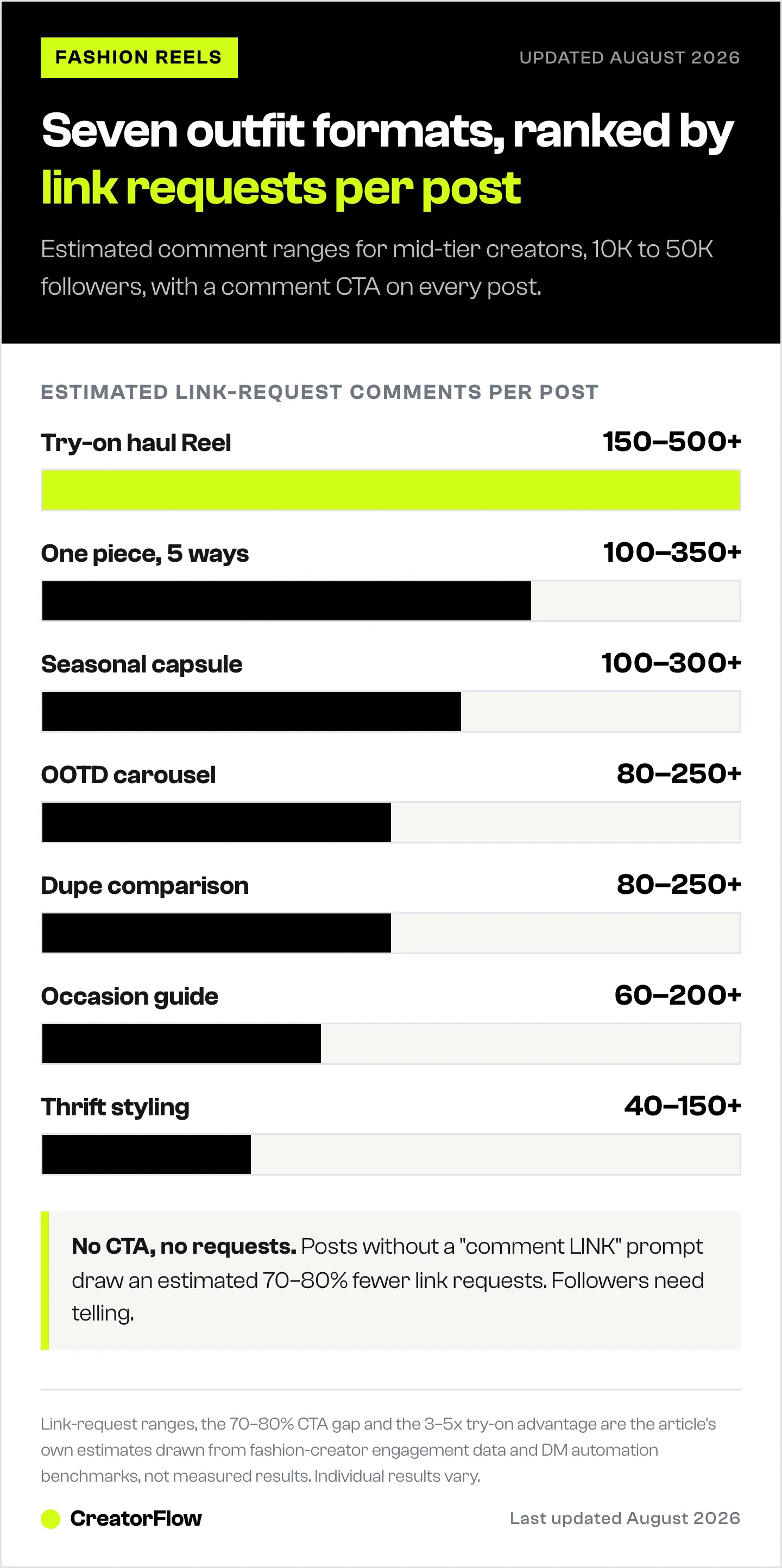
Link-request volume: 150-500+ comments per Reel for mid-tier creators (10K-50K followers)
Format:
- 15-30 second transitions between outfits
- Text overlay on each: item names + brand + price
- Music with clear beat drops for transitions
- End card: “Comment LINK for all outfit details”
- Total length: 30-90 seconds (shorter performs better for algorithm reach)
Caption template: “5 spring outfits I’m obsessed with. All under $150 total. Comment LINK and I’ll DM you every item with direct shopping links. Which one is your favorite? Mine is #3.”
Why this generates the most requests: The multi-outfit format gives followers multiple reasons to want links. Someone might skip outfits 1-3 but love outfit 4. With 5 outfits, you’re casting a wider net of purchase intent.
2. “Style This One Piece 5 Ways” Reels
Why it works: Shows versatility. Followers see one jacket or pair of jeans styled into 5 different looks and realize the cost-per-wear is excellent. The “one piece, many outfits” angle drives link requests because viewers want that specific anchor piece.
Link-request volume: 100-350+ comments per Reel
Format:
- Start with the hero piece (the one item being restyled)
- 5 quick outfit transitions showing it styled differently
- Text overlay: “Look 1: Date Night” / “Look 2: Office” / “Look 3: Casual”
- Closing: “Comment SHOP to get all 5 looks”
Caption template: “This $45 blazer styled 5 different ways. Casual, office, date night, travel, and weekend brunch. Comment SHOP and I’ll send you the link plus all the items I paired it with.”
3. Outfit of the Day Carousel
Why it works: Carousels let you show the full outfit (slide 1), close-ups of specific items (slides 2-4), and a CTA slide (slide 5). Instagram pushes carousels to non-followers more than single images because each slide counts as a separate engagement signal.
Link-request volume: 80-250+ comments per carousel
Format:
- Slide 1: Full outfit shot (head to toe)
- Slide 2: Close-up of top/jacket
- Slide 3: Close-up of shoes/bag
- Slide 4: Detail shot (jewelry, belt, accessories)
- Slide 5: Text graphic listing all items with prices + “Comment LINK”
Caption template: “Today’s outfit breakdown:
- Blazer: [Brand] ($X)
- Top: [Brand] ($X)
- Jeans: [Brand] ($X)
- Boots: [Brand] ($X)
Comment LINK and I’ll DM you everything.”
4. Seasonal Capsule Wardrobe Breakdowns
Why it works: Capsule content targets a specific buying mindset: “I need to refresh my wardrobe for [season].” Followers planning seasonal shopping are high-intent buyers. The comprehensive format (15-20 items that create 30+ outfits) makes them want the full list.
Link-request volume: 100-300+ comments per post
Format (Reel):
- Open with all 15-20 pieces laid out or hanging
- Quick try-on of 5-6 outfit combinations
- Text overlay: “15 pieces, 30+ outfits”
- Close with: “Comment CAPSULE for the full list with links”
Format (Carousel):
- Slide 1: All pieces together (visual impact)
- Slides 2-8: Individual items with brand, price, and size info
- Slide 9: 4-6 outfit combinations
- Slide 10: “Comment CAPSULE for all links”
Caption template: “My spring capsule wardrobe: 15 pieces, 32 outfit combinations. Total cost: $X. Comment CAPSULE and I’ll DM you every item with links. Save this for your next shopping trip.”
5. “Get the Look for Less” Dupe Comparisons
Why it works: The dupe/alternative format taps into price-conscious buying behavior. Showing a $2,000 designer outfit next to a $200 alternative drives massive engagement because followers feel like they’re getting insider knowledge. The price contrast creates urgency.
Link-request volume: 80-250+ comments per Reel
Format:
- Split screen or side-by-side: original vs dupe
- Text overlay: “$2,100” → “$189”
- Multiple comparisons (3-5 per Reel)
- Close with: “Comment DUPE for all the affordable links”
Caption template: “Designer looks for a fraction of the price. The [Brand] coat is $1,800. This one is $95 and looks identical. Comment DUPE and I’ll send you every affordable option.”
6. Occasion-Specific Outfit Guides
Why it works: Targets high-intent moments. Someone searching “wedding guest outfit” or “what to wear to a job interview” has a specific purchase deadline. They need the outfit soon, which means they’re more likely to click and buy immediately.
Link-request volume: 60-200+ comments per post
Format:
- 5-7 outfit options for one occasion
- Text overlay: “Wedding Guest Outfit Ideas” / “First Day of Work” / “Vacation Outfits”
- Each outfit includes complete styling (shoes, bag, jewelry)
- CTA specific to the occasion: “Comment WEDDING for all outfit links”
Best occasions for link-request volume:
- Wedding guest outfits (spring/summer peak)
- Vacation/resort wear (year-round)
- Holiday party outfits (November-December)
- Back-to-school/college (August-September)
- Work/office wear (January, September)
7. Thrift and Vintage Styling Reels
Why it works: The thrift/vintage format adds a storytelling element. Followers watch the transformation from thrift-store find to styled outfit. The element of surprise (“I found this for $8”) drives engagement, though link requests differ because thrifted items are one-of-a-kind.
Link-request volume: 40-150+ comments per Reel (lower than other formats because items aren’t always purchasable, but engagement is high)
How to monetize thrift content:
- Link to similar items from retailers (not the exact thrift find)
- “I found the vintage version, but here’s a similar one new: [link]”
- Feature styled accessories that ARE purchasable alongside the thrifted piece
- Use the “get the look” angle with available alternatives
Caption Templates That Drive Link Comments
The Direct Ask
“Comment LINK and I’ll DM you everything.”
Simple. Clear. Works every time. Don’t overthink it. The direct ask outperforms clever variations by 30-50% because there’s zero ambiguity about what the follower should do. On Stories, the same outfits can run through the link sticker instead, though tap-through rates are lower; the Story link sticker guide covers setup, limits, and when the DM route converts better.
The Curiosity Hook
“The dress is $39 and comes in 12 colors. Comment DRESS and I’ll send you the link before it sells out.”
Adding a specific detail (price, color options, limited stock) creates urgency without feeling pushy.
The Question + CTA
“Which outfit is your favorite? 1, 2, 3, 4, or 5? Comment your number + LINK and I’ll DM you those exact items.”
Combining a question with the CTA drives both engagement (answering the question) and link requests (adding the trigger word).
The Size/Fit Info
“I’m 5’6, size 6, wearing a medium in everything. Comment LINK for items + my full size guide.”
Adding personal fit information increases trust and makes followers feel like they’re getting personalized advice, not a generic link dump.
The Savings Hook
“Total outfit cost: $127. The blazer alone looks like $300. Comment OUTFIT and I’ll send you everything.”
Leading with total cost (especially when it’s lower than expected) drives clicks because followers see value.
Posting Schedule for Maximum Link Requests
When to Post Outfit Content
Fashion content performs best when followers are in shopping mode. Based on engagement data from top fashion creators:
| Day | Best Times | Why |
|---|---|---|
| Monday | 11am-1pm | ”What to wear this week” planning |
| Tuesday | 12pm-2pm | Mid-week browsing during lunch |
| Wednesday | 11am-1pm | Hump day retail therapy |
| Thursday | 6pm-8pm | Weekend outfit planning |
| Friday | 10am-12pm | Payday + weekend anticipation |
| Saturday | 9am-11am | Weekend shopping mode |
| Sunday | 5pm-7pm | ”Planning my week” Sunday scaries |
Times are in your audience’s time zone. Check Instagram Insights to see when your specific followers are most active.
Posting Frequency Targets
| Level | Posts/Week | Expected Link Requests/Week | Monthly Revenue Potential |
|---|---|---|---|
| Starter | 3 | 150-450 | $200-600 |
| Consistent | 5 | 400-1,000 | $500-1,500 |
| Daily | 7 | 700-2,000+ | $1,000-3,500+ |
| Power | 10+ (Reels + carousels) | 1,500-5,000+ | $2,500-8,000+ |
The jump from 3 posts/week to daily posting typically increases link requests by 3-4x, not 2.3x (7/3), because the algorithm rewards consistent posting with increased reach.
How to Handle 200+ Link Requests per Post
This is where most fashion creators hit a wall. You posted a great outfit Reel. 250 people commented “link.” Now what?
Manual approach: Open Instagram, read comment, open DM, copy link, paste, personalize, send. Repeat 249 more times. Time: 2-4 hours. Link delivery: 1-4 hours after comment.
Automated approach: Set up the trigger words and DM template before posting. Every comment with “link” triggers an instant DM. Time: 5 minutes of setup. Link delivery: 3-8 seconds after comment.
The math is clear. At 200+ link requests per post, manual responses are not sustainable. You either automate or you leave money on the table.
CreatorFlow handles this for $15/month flat. Set trigger words, write your message template with all outfit links, and activate. Every commenter gets their links within seconds. The Free plan (500 DMs/month) covers creators just starting out.
DM Template for Multi-Item Outfit Posts
“Hey! Here are all the outfit details:
Top: [affiliate link] Jeans: [affiliate link] Boots: [affiliate link] Bag: [affiliate link] Earrings: [affiliate link]
I’m wearing a size S. The jeans run slightly small, size up one.
Tap any link to shop. Follow for daily outfit ideas!”
Building the “Comment LINK” Habit
The most profitable fashion accounts have trained their audience to comment trigger words automatically. Here’s how to build that habit:
Week 1-2: Use the same CTA on every post. “Comment LINK for details.” Followers who comment once and receive a fast DM learn that the system works.
Week 3-4: Followers start commenting “link” without being prompted. They’ve been conditioned: comment triggers DM with shopping links. The behavior is automatic.
Month 2+: Your regular followers are trained. New followers learn from seeing others comment “link” on your posts. The comments themselves become social proof (“if 200 people are commenting LINK, this must be worth buying”).
Common mistakes that break the habit:
- Changing trigger words frequently (confuses followers)
- Not responding to link requests (followers stop commenting)
- Slow DM responses (followers learn it’s not worth commenting)
- Inconsistent CTAs (some posts have them, some don’t)
FAQ
What’s the best Instagram outfit post format for affiliate sales?
Try-on haul Reels generate the most link requests and affiliate sales. The format shows 3-5 complete outfits in 30-60 seconds, giving viewers multiple purchase opportunities. Pair with a clear CTA (“Comment LINK for all details”) and DM automation for instant link delivery.
How do I get followers to comment “link” on my posts?
Use a direct CTA in every caption: “Comment LINK and I’ll DM you everything.” Respond instantly (via automation) so followers learn the system works. After 2-3 weeks of consistent CTAs, regular followers start commenting automatically.
How many outfit posts should I publish per week?
Daily posting is the target for maximizing affiliate revenue. Each post is a separate revenue event. Creators posting daily earn 3-5x more than those posting 3x/week. If daily feels unsustainable, aim for 5/week and batch-film content on one or two days.
Do flat lay photos or try-on Reels get more link requests?
Try-on Reels get 3-5x more link requests than flat lay photos. Followers want to see how clothes look on a real body, in motion. Static flat lays work for aesthetics but underperform for driving link comments and affiliate clicks.
What trigger words should I use for outfit posts?
“LINK” is the most universal. Other effective trigger words: “OUTFIT,” “SHOP,” “DETAILS,” “DRESS” (item-specific). Keep it simple. One or two trigger words per post. Avoid long phrases (“send me the link please”) as trigger words because followers rarely type them exactly.
How do I handle link requests for sold-out items?
If an item sells out, update your DM template with an alternative: “The original [item] sold out, but here’s a similar option: [new link].” This captures the purchase intent even when the exact product is unavailable. Updating DM templates takes 30 seconds in most automation tools.
Posting strategies and link-request volume estimates based on fashion creator engagement data and DM automation benchmarks. Individual results vary based on niche, audience size, and content quality.


