

To start an Instagram account from scratch, treat your first 7 days as building a system, not chasing followers. Day 1: pick one niche and claim a keyword-rich name. Day 2: optimize your bio for search. Day 3: publish an introduction post. Day 4: batch a week of Reels. Day 5: turn on comment-to-DM capture. Day 6: engage inside your niche. Day 7: read your early data and plan week 2.
Most new accounts stall in week one for a boring reason: the creator posts three times, gets a few likes, and quits before anything compounds. The problem is rarely the content. It is the missing order of operations. Starting from zero feels overwhelming when every guide hands you 40 tasks with no sequence, so you do the easy ones (pick a username) and skip the ones that change results (a searchable profile, a capture system for the attention you earn).
This guide gives you that sequence. It is written for the solo creator, coach, or small brand opening a brand-new Instagram account and wanting a real presence by the end of week one. Each day has a clear focus and a finish line. By Day 7 you will have posted, batched a week ahead, set up a way to capture leads on autopilot, and read enough data to know what to double down on.
Key Takeaways
- Sequence beats effort: A brand-new account needs an order of operations, not a longer to-do list. Set up, post, capture, engage, review, in that order.
- Your Name field is your search field: Instagram weighs the 30-character Name field most heavily for search, and public creator profiles are now indexed by Google (forbes.com, July 2025). Put a keyword there, not just your name.
- Reels are the discovery engine: In Buffer’s analysis of more than 4 million posts, Reels reached 125% more people than single photos (buffer.com, data to October 2024), which makes short video the fastest way to reach strangers on a zero-follower account.
- Consistency over volume: Data across 2 million-plus posts shows 3 to 5 strong posts a week outperform a burnout sprint (buffer.com, July 2026). Batch once, publish all week.
- Install capture on Day 5, not week 5: Set up comment-to-DM before your first post goes viral so a “how?” comment becomes a saved contact and a link click instead of a missed reply.
- Week 1 is the foundation, not the finish: After Day 7, the plan hands off to a longer growth and monetization arc.
Why the First 7 Days Decide Your Next 7 Months
Two accounts start on the same day with the same niche. One posts randomly, replies to comments when it remembers, and checks analytics never. The other follows a sequence, sets up a capture system, and reviews data on Day 7. Three months later they are not in the same place, and the gap opened in week one.
Here is the part almost every launch checklist gets wrong. They optimize for a posting habit and stop there. Posting is necessary, but a post you cannot convert is just reach you rented and gave back. The moment your introduction Reel earns its first “where did you get that?” comment, you either have a system that answers instantly or you have a notification you will reply to four hours later, after the person moved on.
So the thesis of this plan is simple: build the capture layer in your first week, while it is easy, before you need it. A scheduling tool gets your content out. It does not turn a comment into a lead. That is a separate job, and Day 5 is where you set it up.
How to Start an Instagram Account From Scratch: The 7-Day Plan
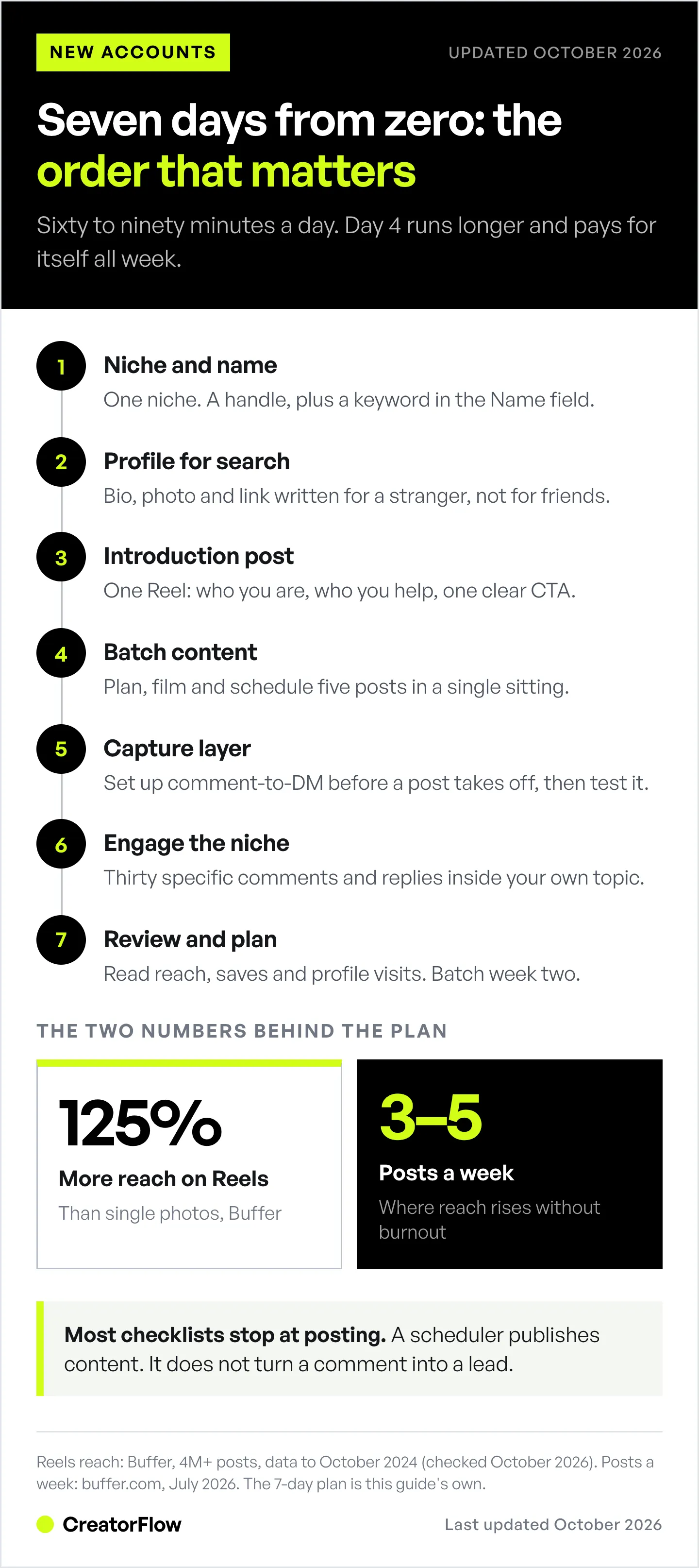
The 7-day plan for a new Instagram account takes roughly 60 to 90 minutes per day. Day 4 (batching) runs longer, closer to two hours, and pays for itself all week.
| Day | Focus | Finish line |
|---|---|---|
| Day 1 | Niche and name | One niche chosen, keyword-rich handle and Name field claimed |
| Day 2 | Profile for search | Bio, photo, and link in bio optimized for discovery |
| Day 3 | Introduction post | First post live with a hook and a clear follow CTA |
| Day 4 | Batch content | Five posts planned, created, and scheduled |
| Day 5 | Capture layer | Comment-to-DM automation set up and tested |
| Day 6 | Engage the niche | 30 genuine comments, follows, and replies inside your topic |
| Day 7 | Review and plan | Early data read, one format chosen, week 2 batched |
Day 1: Pick One Niche and Claim Your Name
Day 1 has one job: decide what your account is about and lock the two fields Instagram searches. Pick a single niche you can post about for 90 days without running dry. Then choose a username that is easy to spell and a Name field that carries a keyword, because the Name field is what Instagram’s search ranks, not your handle alone.
The most common Day 1 mistake is going broad. “Lifestyle” is not a niche, it is a category with a million accounts. “Budget meal prep for shift workers” is a niche, and it tells both humans and the algorithm exactly who should follow you. Narrow wins early because a small, specific audience engages, and early engagement is the signal that gets your next post shown to more strangers.
Lock two things today. Your handle (the @name people type) should be short and memorable. Test your options in the free Instagram handle checker before you commit. Your Name field (the bold text at the top) should read like a person plus a keyword: “Maya | Meal Prep Coach,” not “Maya.” That single change is one of the highest-return moves on a new account, and it costs you nothing.
Day 2: Optimize Your Profile for Search
Day 2 turns your profile into something discoverable. Instagram gives you a 30-character Name field and a 150-character bio, and its search now weighs the Name field most aggressively for keyword relevance (sproutsocial.com, July 2026). Since July 2025, public creator profiles are also eligible to appear in Google, Bing, and DuckDuckGo results (forbes.com, July 2025). Your bio is now an SEO asset, not decoration.
Write the bio for a stranger, not for your friends. State who you help and what they get in the first line, add one or two natural keywords (not a wall of them), and finish with a reason to tap your link. A name like “Maya | Meal Prep Coach” works because it is searchable and human. “Maya | Food Fitness Wellness Meals Health Gym” reads as spam to the person deciding whether to follow. For the full formula and examples, follow our guide on how to write an Instagram bio that gets found.
Round out the profile with a clean, high-contrast profile photo, a link in bio that points somewhere useful, and three or four Story Highlight covers reserved (you will fill them as you post). Switch to a Creator or Business account today too, because a personal account cannot use scheduling, analytics, or DM automation later in the week.
Day 3: Publish Your Introduction Post
Day 3 is when you go live. Publish one introduction post, ideally a Reel, that answers three questions in the first three seconds: who you are, who you help, and what to expect if someone follows. The average Instagram Reel is watched for 8.5 seconds (Metricool, 24.4M posts, June 2026), so lead with a spoken hook, not a slow logo intro.
Do not wait for the “perfect” first post. Your first ten posts are how you learn your own voice, and no stranger is scrolling your grid judging post number one. What matters is that the post has a hook, delivers one useful or interesting idea, and ends with a plain call to action. “Follow for daily meal-prep shortcuts” beats a vague “thanks for stopping by” every time.
Say one clear next step out loud and in the caption. Early on, the best CTA is a follow, because followers are the audience you will convert later. Keep the caption tight, front-load the value, and use a few specific keywords. Since December 2025, Instagram allows up to 5 hashtags per post (help.instagram.com, October 2026), so pick them with care.
Day 4: Batch Your First Week of Content
Day 4 is the day that keeps you consistent. In one sitting, plan, create, and schedule five posts so the rest of week one runs on autopilot. Batching works because context-switching is the real cost of content: filming five Reels in one session takes far less time than filming five on five different days. Aim for 3 to 5 posts a week, the range where reach jumps without pushing you into burnout (buffer.com, July 2026).
Lean into Reels for a new account. Reels reached 125% more people than single photos in Buffer’s analysis of more than 4 million posts (buffer.com, data to October 2024), and reach beyond your followers is exactly what a zero-follower account needs. Keep them between 30 and 60 seconds, where Reel reach rate peaks (Socialinsider, June 2026), with one idea each and the hook in the first line. Mix in a carousel or two for the followers you do earn, since carousels are strong for saves and retention.
Use a scheduler to queue all five with captions and cover frames, then step away. Instagram’s built-in scheduler takes up to 25 posts a day, up to 30 days ahead (help.instagram.com, October 2026). Our comparison of Instagram post scheduler options covers the free in-app route and the paid tools side by side, so a brand-new account can start without paying. If you want your slots to line up with when your specific audience is active, our data breakdown of the best times to post on Instagram by niche shows where to place them instead of guessing.
Day 5: Turn On Comment-to-DM Before You Need It
Day 5 installs the capture layer, and it is the step that separates a presence from a business. Comment-to-DM automation sends a direct message the instant someone comments a trigger word on your post. Someone comments “guide” on your Reel, they get your link in the DMs in seconds, no manual reply, no missed lead. You set it up once while your account is quiet, so it is already running when a post takes off.
This is the piece a scheduling tool cannot do. A scheduler publishes your content; it does not convert the attention that content earns. Setting up capture on a brand-new account takes minutes and connects through Meta’s official Instagram API (developers.facebook.com, July 2026), so there is no password sharing and minimal ban risk. Our comment-to-DM automation setup guide walks the exact steps, and it works on the free tier, which is all a new account needs.
Wire your first automation to your introduction offer: a free checklist, your link in bio, a booking page, whatever “next step” you want. Then write comment CTAs that pull people into the DMs on purpose. Our list of comment CTAs that turn viewers into DMs gives you plug-in prompts so your Day 4 posts actually trigger the system you built today.
Day 6: Engage Your Way Into the Niche
Day 6 is outbound. Spend 30 to 45 minutes leaving genuine comments, follows, and replies inside your niche, on accounts your future followers already watch. New accounts grow faster when the creator is visible in the community, because a thoughtful comment on a bigger account in your topic puts you in front of the exact people who should find you.
Skip the spam. “Great post!” does nothing. A specific reply that adds a point or answers the original poster’s question gets clicks back to your profile, and now that your profile is optimized (Day 2) and live (Day 3), those clicks convert to follows. Prioritize accounts slightly bigger than you and posts published in the last hour, where comments are still visible.
Reply to every comment and DM you receive today, fast. A quick reply shows the first people who found you that a real person runs the account, and it gives them a reason to come back. Once you have a handful, our guide on how to identify your most engaged Instagram followers helps you spot who to nurture.
Day 7: Read Your Early Data and Plan Week 2
Day 7 closes the loop. Open your Insights and read three numbers: which post got the most reach, which got the most saves and shares, and where your profile visits came from. You are not looking for big totals in week one. You are looking for the single format or topic that outperformed, because that is the thread you pull in week two.
Then make three decisions. First, pick one content format to double down on (usually your best Reel style). Second, batch next week’s five posts around it while you still have momentum. Third, set a recurring 15-minute weekly slot to check these same numbers, so review becomes a habit instead of a one-time event. Consistency of review is what compounds a new account past the stall point where most people quit.
Week one builds the foundation: a searchable profile, a content rhythm, and a capture system. What comes next is growth and monetization, and that is a longer arc. When you are ready to extend past day seven, our 30-day creator launch roadmap picks up exactly where this plan ends and carries you to your first income.
Turn Every Post Into a Distribution Channel
You spent week one earning attention. CreatorFlow keeps that attention by automating your Instagram DMs: you connect your new account, set a keyword, and every comment that matches gets your link in the DMs automatically. A Story reply or a DM with your keyword works the same way. A viral Reel becomes a list of leads instead of a pile of replies you never got to. It runs on Meta’s official API, sets up in minutes, and the free plan includes 500 DMs a month.
Start capturing leads from day one: Get started with CreatorFlow free.
FAQ
How long does it take to grow an Instagram account from scratch?
Expect the first meaningful traction in 30 to 90 days of consistent posting, not week one. The 7-day plan builds the foundation (profile, content rhythm, capture system); follower growth compounds after it. Accounts that post 3 to 5 quality posts a week and engage daily reach momentum faster than accounts chasing volume (buffer.com, July 2026).
How many posts should I make in my first week on Instagram?
Aim for 5 posts across your first week, batched in one session so you stay consistent. That lands in the 3-to-5-per-week range where reach jumps without burnout. For a brand-new account, weight those toward Reels, since short video reaches the non-followers you need most.
Should I start with a Creator or Business account?
Choose a Creator or Business (professional) account, not a personal one. Only professional accounts give you Instagram Insights, post scheduling, and DM automation, all of which this plan uses. Creator accounts suit individual creators and coaches; Business accounts suit brands and stores that want contact buttons and shopping features.
Do I need Reels to grow a new Instagram account?
For a zero-follower account, Reels are the fastest path to reach. Buffer found Reels reached 125% more people than single photos across more than 4 million posts (buffer.com, data to October 2024). Static posts and carousels help you keep the audience you earn, but Reels are what put you in front of strangers in the first place.
Can I automate DMs on a brand-new account?
Yes. As soon as you switch to a Creator or Business account, you can connect a tool like CreatorFlow and set up comment-to-DM automation, even with zero followers. Setting it up early means your capture system is already live when your first post gains traction. It runs through Meta’s official Instagram API, so there is no password sharing.
Will my new Instagram account show up in Google?
Since July 2025, public professional and creator accounts are eligible to appear in Google, Bing, and DuckDuckGo search results by default (forbes.com, July 2025). Stories and Highlights are excluded, but your profile, posts, and Reels can be indexed, which is why a keyword-rich Name field and bio matter from Day 1.
Is it too late to start an Instagram account in 2026?
No. Follower count is no longer the main lever for reach. Instagram’s head Adam Mosseri names watch time, likes and sends as the top ranking signals, so a small new account with content people watch and share can reach more people than a large account posting recycled templates. A focused niche and a capture system matter more than a head start.
Instagram posting benchmarks and search-indexing details verified from Buffer, Sprout Social, Forbes, and Meta’s developer documentation as of July 2026. Re-checked in October 2026: Reels reach and length figures (Buffer, Socialinsider, Metricool), the 5-hashtag cap, the in-app scheduler limits and CreatorFlow’s free plan. Platform behavior changes often; re-verify before relying on specifics. Individual results vary.


