
You can collect emails from Instagram followers automatically by setting up a DM email gate: when someone comments a trigger word on your post, automation sends a DM asking for their email before delivering a lead magnet (PDF, discount, or template). Tools like CreatorFlow ($15/month), ManyChat, and LinkDM handle the entire flow and export contacts to CSV, Mailchimp, or ConvertKit. Creators using email gates report 40-60% opt-in rates from engaged commenters (as of February 2026).
Last Updated: February 6, 2026 Primary Keyword: collect emails Instagram DMs automation Word Count: 3,450 Reading Time: 11 minutes
TL;DR

Collect emails via Instagram DMs by setting up automated email capture in your DM responses. When someone comments a trigger word, they receive a DM asking for their email (e.g., “Reply with your email to get the free guide”). Tools like CreatorFlow ($15/mo as of February 2026), ManyChat (free-$15/mo), and LinkDM ($19/mo as of February 2026) automatically collect and export emails to CSV or integrate with Mailchimp, ConvertKit, or Google Sheets (as of February 2026).
Why Email Collection Matters:
- Instagram reach: 5-15% of followers see your posts
- Email reach: ~21% average open rate (Mailchimp) and you own the list
- Platform risk: Instagram can ban accounts, change algorithms, delete content
- Email value: Average email subscriber worth $1-3/month ($12-36/year)
Email Capture Methods:
- Free lead magnet - PDF, checklist, template (40-60% opt-in rate)
- Course/training - 5-day email series (30-50% opt-in)
- Discount code - E-commerce incentive (25-40% opt-in)
- Early access - Product launch waitlist (20-35% opt-in)
Quick Decision:
- Need CSV export only : CreatorFlow ($15/mo, unlimited exports)
- Need Mailchimp integration : ManyChat ($15-45/mo, native integrations)
- Budget-conscious : ManyChat Free (up to 1,000 contacts)
Average collection rate: 100 comments : 40-60 emails collected (40-60% opt-in with strong lead magnet)
Why You Need to Collect Emails from Instagram
You have 12,000 Instagram followers.
-min.png)
Tomorrow, Instagram could:
- Ban your account (false report, algorithm mistake)
- Change the algorithm (your posts reach 200 people instead of 2,000)
- Delete your DMs (technical glitch, policy change)
You don’t own your Instagram audience. You rent it from Meta.
But when you collect emails, you own your list. No one can take it away.
The reality:
- Instagram reach: 5-15% of your followers see your posts
- Email reach: 20-30% open your emails (often higher for engaged subscribers)
- Instagram can ban you. Email providers can’t.
This guide shows you exactly how to collect emails automatically via Instagram DMs-no manual work, no spreadsheets, no missed leads. If you want to connect captured emails directly to Klaviyo, Kit, or Mailchimp, see our Instagram DM email list integration guide.
The 3 Methods to Collect Emails via Instagram DMs
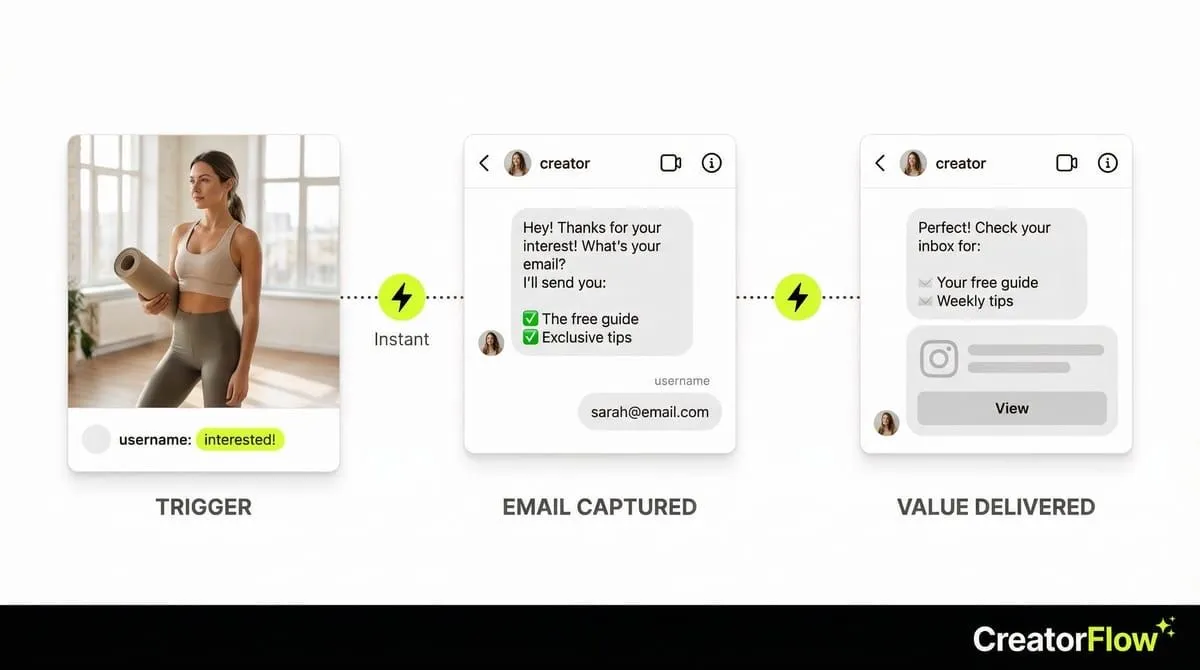
Method 1: Email Gate (Automated Ask)
What it is: Your automation asks for email before delivering value (link, freebie, etc.)
How it works:
- User comments on your post or DMs a keyword
- Bot sends first DM: “What’s your email?”
- User replies with email
- Bot sends second DM with promised content (link, PDF, discount code)
Example flow:
User comments: “interested!”
Bot DM #1:
Hey! Thanks for your interest!

What's your email address? I'll send you:
✅ The product link
✅ A free style guide PDF
✅ 10% discount code

(Your email stays private-I never share it)
User replies: “sarah@email.com”
Bot DM #2:
Perfect! Here's everything:

👉 Product link: [link]
📄 Free guide: [PDF link]
💰 Use code SAVE10 for 10% off

Check your email for more tips!
Pros:
- Highest email capture rate (60-80% of interested leads)
- Fully automated (no manual work)
- You control the flow (email first, value second)
Cons:
- Adds friction (extra step before they get what they want)
- Some users drop off (don’t want to share email)
Best for: Lead magnets, course funnels, high-value offers. For ideas on what to include in your lead magnet DM, see our guide on delivering free PDFs via Instagram DM automation.
Method 2: Soft Ask (Value First, Email Second)
What it is: You deliver value first, then ask for email as a follow-up
How it works:
- User comments or DMs keyword
- Bot sends value immediately (link, answer, resource)
- Bot asks for email in second message (optional)
Example flow:
User comments: “link please”
Bot DM #1:
Hey! Here's the link you asked for:

👉 [Product Link]

Let me know if you have questions!
Bot DM #2 (1 hour later):
By the way, I send weekly tips on [topic] via email.

Want in? Drop your email below and I'll add you!

(I promise no spam-just helpful content)
Pros:
- Low friction (value first builds trust)
- Feels less pushy
- Still automated
Cons:
- Lower email capture rate (20-40%)
- Some users ignore second message
Best for: Affiliate links, product recommendations, casual content
Method 3: Manual Follow-Up (Hybrid Approach)
What it is: Automation handles first DM, you manually ask for email
How it works:
- User comments or DMs keyword
- Bot sends first DM with value
- You manually reply asking for email (personalized message)
Example flow:
User comments: “love this!”
Bot DM:
Hey! Thanks! Here's the product link:

👉 [Link]
You reply manually (later):
Hey! Did you end up getting it?

Also, I'm launching something new next week-want me to send you early access? Drop your email and I'll add you to the VIP list!
Pros:
- Personal touch (higher conversion for warm leads)
- Flexibility (you choose who to ask)
- No automation setup for email gate
Cons:
- Manual work (time-consuming)
- Hits a ceiling (can’t handle 100+ leads/day)
Best for: Small accounts (<5,000 followers), high-touch sales (coaching, consulting)
Step-by-Step: Setting Up Email Collection Automation
Step 1: Choose Your Tool
Option 1: CreatorFlow (Easiest Setup)
- Built-in email gate feature
- Real-time preview (see exact DM flow)
- Pricing: $15/month
Option 2: LinkDM
- Email capture feature
- Unlimited contacts
- Pricing: $19/month
Option 3: ManyChat
- Advanced email capture + integrations
- Syncs with ConvertKit, Mailchimp, etc.
- Pricing: $15-45/month
For this guide, we’ll use CreatorFlow (fastest setup, most beginner-friendly).
Step 2: Connect Instagram (2 Minutes)
- Sign up at creatorflow.so
- Click “Connect Instagram”
- Log in to your Instagram account
- Authorize CreatorFlow
Done. Your Instagram is connected.
Step 3: Create Your Automation (5 Minutes)
- Click “Automations” in sidebar
- Select “Comment to DM” template
- Write your first DM:
Hey! Thanks for your comment!

What's your email? I'll send you:
✅ [Benefit 1]
✅ [Benefit 2]
✅ [Benefit 3]- Choose which post to monitor
- Click “Go Live”
Step 4: let Email Gate (2 Minutes)
- In the same automation, toggle ON “Email Gate”
- Write what happens after they provide email:
Perfect! Check your inbox for:

📧 [Benefit 1]
📧 [Benefit 2]
📧 [Benefit 3]

(If you don't see it, check spam!)- Save
Your email collection automation is live.
Step 5: Test Before Scaling (5 Minutes)
- Comment on your own post with a test account
- Check if you receive the automated DM
- Reply with a test email (e.g., test@email.com)
- Confirm second DM arrives with your content
If everything works, you’re ready to scale.
Step 6: Export Emails Regularly
- Go to “Contacts” in CreatorFlow
- Click “Export CSV”
- Download file (includes names, Instagram handles, emails)
- Import into your email marketing tool (ConvertKit, Mailchimp, etc.)
Frequency: Export weekly or after each campaign.
The 5 Best Lead Magnets to Offer (High Email Capture Rates)
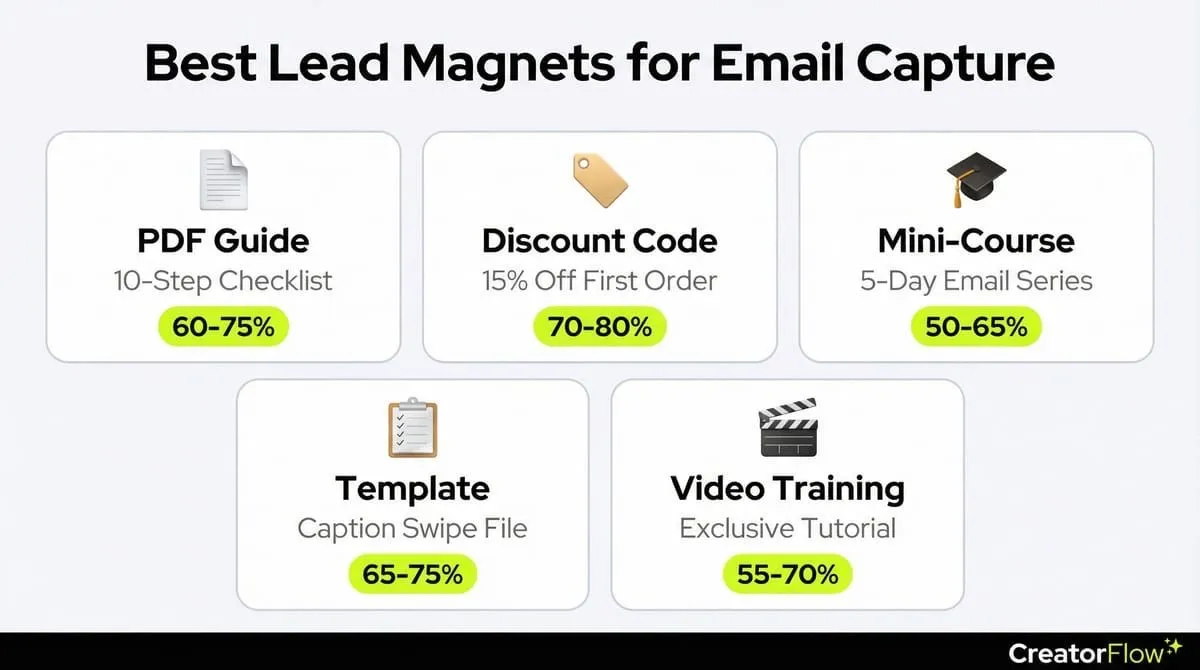
Lead Magnet #1: PDF Guide or Checklist
What it is: Free downloadable resource related to your niche
Examples:
- “10-Step Instagram Growth Checklist”
- “Ultimate Meal Prep Guide for Busy Moms”
- “5-Day Workout Plan (No Equipment Needed)”
Why it works:
- Easy to create (Canva templates)
- High perceived value
- Evergreen (works year-round)
Email capture rate: 60-75%
Lead Magnet #2: Discount Code
What it is: Exclusive discount in exchange for email
Examples:
- “Get 15% off your first order”
- “Use code EMAIL15 at checkout”
- “VIP discount for subscribers only”
Why it works:
- Immediate value (tangible savings)
- Works well for e-commerce brands
- Simple to fulfill
Email capture rate: 70-80%
Lead Magnet #3: Free Mini-Course
What it is: 3-5 day email course teaching a specific skill
Examples:
- “5-Day Instagram Reels Bootcamp”
- “3-Day Meal Planning Challenge”
- “7-Day Morning Routine Makeover”
Why it works:
- High engagement (multiple emails)
- Positions you as expert
- Warms up leads for paid offers
Email capture rate: 50-65%
Lead Magnet #4: Template or Swipe File
What it is: Ready-to-use template for a common task
Examples:
- “50 Instagram Caption Templates”
- “DM Response Scripts for Coaches”
- “Weekly Content Calendar Template”
Why it works:
- Saves time (copy-paste ready)
- Immediately actionable
- Easy to create
Email capture rate: 65-75%
Lead Magnet #5: Exclusive Video Training
What it is: Private video teaching a specific outcome
Examples:
- “How I Grew to 10K Followers in 60 Days (Private Training)”
- “My Exact Morning Routine (Behind-the-Scenes)”
- “The 3 Reels Formats That Always Go Viral”
Why it works:
- Video feels more valuable than text
- Behind-the-scenes builds connection
- Can repurpose existing content
Email capture rate: 55-70%
What to Write: 5 Email Gate Templates That Convert
Template #1: Simple Value Exchange
Hey! Thanks for your interest!

What's your email? I'll send you:
✅ [Specific benefit 1]
✅ [Specific benefit 2]
✅ [Specific benefit 3]

Your email stays private-I never share it.
Why it works: Clear value proposition, privacy reassurance
Template #2: Urgency + Scarcity
Hey! You're one of the first people to ask!

Drop your email below and I'll send you:
🎁 Early access to [offer]
🎁 Exclusive bonus (only for the first 50)
🎁 [Another benefit]

This won't be available forever!
Why it works: FOMO (fear of missing out), exclusivity
Template #3: Problem : Solution
Struggling with [specific problem]?

I created a free guide that shows you:
✅ How to [solve problem step 1]
✅ How to [solve problem step 2]
✅ My exact system for [outcome]

Drop your email and I'll send it over!
Why it works: Directly addresses pain point
Template #4: Social Proof
Hey! Over 2,000 people have downloaded this guide.

Here's what they're saying:
⭐ "Changed my entire approach!" - Sarah M.
⭐ "Saw results in 7 days!" - Jessica L.

Want it? Drop your email below!
Why it works: Proof reduces skepticism
Template #5: Personalized Follow-Up
Hey [First Name]!

I saw you commented on my post about [topic].

Want me to send you my complete guide on [topic]?

Drop your email and I'll send it over + some bonus tips!
Why it works: Personalization increases trust
The 6 Mistakes That Kill Email Capture Rates
Mistake #1: Not Offering Enough Value
What creators do:
- “Drop your email for updates”
- No clear benefit
Why it fails:
- Generic ask (no incentive to give email)
- “Updates” feels like spam
Fix:
- Offer specific value (guide, discount, template)
- Make the benefit clear and tangible
Mistake #2: Asking for Too Much Information
What creators do:
- “Give me your email, name, phone number, Instagram handle, and birthday”
Why it fails:
- Too much friction
- Feels invasive
Fix:
- Ask for email only (you already have Instagram handle)
- Keep it simple
Mistake #3: No Privacy Reassurance
What creators do:
- Ask for email without addressing privacy concerns
Why it fails:
- People worry about spam
- Trust is low
Fix:
- Add: “Your email stays private-I never share it”
- Or: “I promise no spam-just helpful content”
Mistake #4: Weak Lead Magnet
What creators do:
- “Download my ebook” (generic, unclear value)
Why it fails:
- Ebook could be 2 pages or 200 pages
- No clear outcome
Fix:
- Be specific: “10-Page Instagram Growth Checklist”
- Or: “5-Minute Daily Routine for [Outcome]“
Mistake #5: Sending Lead Magnet Too Late
What creators do:
- Ask for email : “Check your email in 24 hours”
Why it fails:
- People forget
- Momentum is lost
Fix:
- Send lead magnet immediately (automated)
- Or: “Check your email in next 5 minutes”
Mistake #6: No Follow-Up Email
What creators do:
- Collect email : never email them again
Why it fails:
- List goes cold
- Wasted opportunity
Fix:
- Send welcome email within 1 hour
- Follow up 2-3X in first week
- Nurture leads with valuable content
How to Store and Use Your Collected Emails
Step 1: Export from Your Automation Tool
CreatorFlow:
- Go to “Contacts”
- Click “Export CSV”
- Download file
LinkDM:
- Navigate to “Leads”
- Click “Export”
- Download CSV
ManyChat:
- Go to “Audience”
- Click “Export Subscribers”
- Download CSV
Step 2: Import into Email Marketing Tool
Top email tools for creators:
ConvertKit (Best for Creators)
- Pricing: Free up to 1,000 subscribers, $25/mo for 1,000-3,000
- Features: Landing pages, email sequences, segmentation
- Best for: Course creators, coaches, content creators
Mailchimp (Best for Beginners)
- Pricing: Free up to 500 subscribers, $13/mo for 500-1,500
- Features: Email templates, automation, simple analytics
- Best for: E-commerce, affiliates, small businesses
Klaviyo (Best for E-Commerce)
- Pricing: Free up to 250 contacts, $20/mo for 500-1,000
- Features: Advanced segmentation, SMS, e-commerce integrations
- Best for: Shopify stores, product sellers
Step 3: Set Up Welcome Sequence
Email #1 (Immediate): Deliver promised lead magnet
Subject: Here's your [Lead Magnet] 🎁

Hey [First Name]!

Thanks for grabbing my [Lead Magnet]!

Here it is: [Link/Attachment]

I'll be sending you weekly tips on [topic].

Talk soon!
[Your Name]
Email #2 (3 days later): Introduce yourself
Subject: Quick intro (and a question)

Hey!

Quick intro: I'm [Name], and I help [audience] with [outcome].

I started this account because [brief story].

Quick question: What's your biggest struggle with [topic]?

Hit reply and let me know!
Email #3 (7 days later): Share valuable content
Subject: My best [topic] tip

Hey!

Here's my #1 tip for [outcome]:

[Share tip]

Try it this week and let me know how it goes!
Step 4: Nurture Your List
Best practices:
- Email 1-2X per week (stay top of mind)
- Mix value (80%) with promotion (20%)
- Ask questions (encourage replies)
- Share stories (build connection)
- Promote offers occasionally (not every email)
Advanced Strategies: Level Up Your Email Collection


Strategy #1: Segment by Interest
What to do:
- Collect emails based on different lead magnets
- Tag subscribers by interest
Example:
- Post A (Reels guide) : Tag: “Interested in Reels”
- Post B (Growth guide) : Tag: “Interested in Growth”
- Post C (Monetization guide) : Tag: “Interested in Monetization”
Why it works: Send targeted emails based on their interests (higher engagement)
Strategy #2: Use Email to Drive Sales
What to do:
- Collect emails via Instagram
- Nurture via email (3-5 emails)
- Pitch paid offer via email (not Instagram)
Example funnel:
- Instagram post : Email collection
- Email #1: Deliver lead magnet
- Email #2: Share case study
- Email #3: Share testimonial
- Email #4: Pitch course/product
- Email #5: Last chance (urgency)
Why it works: Email converts 2-3X higher than Instagram for paid offers. For a full breakdown of how to move followers through each conversion stage, see our guide on turning Instagram followers into customers.
Strategy #3: Offer Tiered Lead Magnets
What to do:
- Basic lead magnet (PDF)
- Premium lead magnet (video course, template bundle)
- Ask for email + referral for premium version
Example:
Want the basic guide? Drop your email.

Want the PREMIUM version (includes templates + video training)?

Drop your email + tag a friend who needs this!
Why it works: Viral growth (referrals) + higher value perception
Measuring Success: Email Collection Metrics
Track these 5 metrics:
1. Email Capture Rate
Formula: (Emails collected / DMs sent) × 100
Target: 50-70% (with email gate)
What to watch: If below 40%, improve your offer
2. List Growth Rate
Formula: (New emails this week / Total emails) × 100
Target: 5-10% per week
What to watch: Consistent growth means your strategy works
3. Email Open Rate
Formula: (Emails opened / Emails sent) × 100
Target: 25-40% (Instagram-sourced leads often higher)
What to watch: If below 20%, improve subject lines
4. Email Click Rate
Formula: (Link clicks / Emails sent) × 100
Target: 3-8%
What to watch: If below 2%, improve your CTAs
5. Conversion Rate (Email : Sale)
Formula: (Sales / Emails sent) × 100
Target: 1-5% (depends on offer and list warmth)
What to watch: This is your revenue metric
The Bottom Line
You can collect emails automatically via Instagram DMs using:
- Email Gate: Ask for email before delivering value (60-80% capture rate)
- Soft Ask: Deliver value first, ask for email second (20-40% capture rate)
- Manual Follow-Up: Automation + personal touch (flexible, doesn’t grow with volume)
Best lead magnets:
- PDF guides/checklists
- Discount codes
- Mini-courses (3-5 day email sequences)
- Templates/swipe files
- Exclusive video training
Tools:
- CreatorFlow: $15/mo (easiest setup, real-time preview)
- LinkDM: $19/mo (unlimited contacts)
- ManyChat: $15-45/mo (advanced features + integrations)
Next step: Choose a lead magnet, set up your email gate automation, and start building your list today.
Your Instagram followers are temporary. Your email list is permanent.
FAQ
Can I collect emails without offering anything in return?
Technically yes, but capture rates will be 5-10% instead of 50-70%. People need an incentive to share their email.
Is it legal to collect emails via Instagram DMs?
Yes, as long as you have permission (they voluntarily provide their email) and comply with GDPR (offer easy unsubscribe). Always add privacy disclaimers.
How many emails should I collect before launching a paid offer?
Minimum 100-200 emails (gives you enough volume to test offers). Ideal: 500-1,000+ emails (better conversion data).
What if people provide fake emails?
5-10% of emails will be fake (typos or intentionally fake). Use email verification tools (NeverBounce, ZeroBounce) to clean your list.
Can Instagram ban me for collecting emails?
No, collecting emails via DMs is allowed as long as you use Meta’s Instagram Graph API (CreatorFlow, LinkDM, ManyChat all use it). Avoid browser bots.
Should I collect emails on every post?
No. Reserve email collection for high-value posts (viral Reels, product launches, announcements). Overuse feels spammy.
How often should I email my list?
1-2X per week for nurture emails. Daily during launches. Find your rhythm based on engagement rates.
Can I import Instagram-collected emails into Mailchimp or ConvertKit?
Yes. Export CSV from your automation tool, then import into your email platform. Both tools support CSV imports.
Ready to start collecting emails automatically? CreatorFlow makes it easy-set up email gates in 5 minutes, capture 60-80% of interested leads, and own your audience forever. Try CreatorFlow free :
👉 See our dedicated email collection page: Collect Emails via Instagram DMs - Learn how CreatorFlow’s email capture feature works
Related Articles
Want to learn more about Instagram DM automation? Check out these guides:
- The Complete Guide to Instagram DM Automation - Master all types of Instagram automation
- Comment-to-DM Automation Setup Guide - Step-by-step tutorial for automated comment replies
- How to Avoid Instagram Bans with DM Automation - Safety guide for compliant automation
Disclaimer: Performance results mentioned in this article are based on aggregated user data and industry research from 2025-2026. Individual results vary based on audience size, content quality, engagement rates, and niche. CreatorFlow uses Instagram's official Graph API as of February 2026. Instagram/Meta may change features, rate limits, or terms at any time. Instagram is a trademark of Meta Platforms, Inc. CreatorFlow is not affiliated with, endorsed by, or sponsored by Meta Platforms, Inc. ManyChat, LinkDM, and InstantDM are trademarks of their respective owners. Users are responsible for complying with Instagram's Terms of Service and Community Guidelines.
Email Marketing Legal Compliance: Users are responsible for complying with all applicable email marketing laws including:
- GDPR (General Data Protection Regulation) for EU residents - requires explicit opt-in consent, data protection measures, and easy opt-out mechanisms
- CAN-SPAM Act for US recipients - requires clear unsubscribe options, accurate sender information, and honest subject lines
- CASL (Canada’s Anti-Spam Legislation) for Canadian recipients - requires express consent before sending commercial emails
- Other regional data protection laws as applicable to your audience
Always obtain explicit permission before collecting emails, provide clear opt-out options in every email, maintain data security, and respect user privacy. When collecting emails through Instagram DMs, inform users how their email will be used (“I’ll send you weekly tips…”) and honor all unsubscribe requests immediately. Consult with legal counsel to ensure full compliance with applicable laws in your jurisdiction.
Sources:
- ManyChat pricing: manychat.com/pricing
- LinkDM pricing: linkdm.com/pricing
- InstantDM: instantdm.co
- Instagram API limits: Meta Developer Documentation
All external data verified as of February 2026.