

The six most common Instagram DM automation mistakes are using one keyword for every offer, asking questions the comment already answered, sending the link with nothing in front of it, collecting emails you never send to, ignoring Meta’s private reply rules, and never reading results per automation. Each one costs clicks or leads. Each fix takes a few minutes inside the automation you already have.
Most advice on fixing a DM funnel adds steps after the comment: a question, a branch, a condition, an AI step that sorts free text into categories. Those tools exist for good reasons. On Instagram, though, the cheapest place to sort people is before they comment, in the caption. The word someone types already tells you what they want.
This guide is for creators, coaches and small brands running comment-to-DM automations who get comments but not the clicks, emails or sales they expected. It walks through each mistake, what it costs, and the fix in CreatorFlow.
Key Takeaways
- The keyword is the segment. Give each offer its own keyword and the person sorts themselves when they comment.
- Never ask what the comment told you. A question after a clear keyword adds a step and loses people.
- Put a step before the link only when it earns its place. An email is worth asking for when you will follow up. An affiliate link usually is not.
- An email list with no emails going out is worth nothing. Collect only what you will use within a month.
- Meta allows one private reply per comment, within 7 days. Anything after that needs the person to reply first (developers.facebook.com, October 2026).
- Judge each automation on its own numbers. One automation with a strong click rate tells you more than an account average.
What Are the Most Common Instagram DM Automation Mistakes?
The common Instagram DM automation mistakes sit in the funnel design. The automation fires, the DM arrives, and nothing happens next. That usually means the funnel asked the wrong thing, at the wrong moment, of the wrong person. The six below cover nearly every case where comments arrive but clicks, emails and sales do not.
Copy problems are a separate issue. If your messages are long, pushy or full of emoji, start with the DM copywriting mistakes that kill conversions. This article is about the shape of the funnel around the copy.
| Mistake | What it costs | The fix |
|---|---|---|
| One keyword for every offer | Everyone gets the same link | One keyword per offer or problem |
| Asking what the comment already said | An extra step, fewer clicks | Let the keyword decide the reply |
| Nothing in front of a valuable link | No way to reach them again | Add an Email Gate when you will follow up |
| Collecting emails you never use | Lost clicks for no return | Gate only lead magnets and your own products |
| Ignoring Meta’s private reply rules | DMs land unseen or cannot continue | Public Reply, and invite a response |
| Never reading results per automation | You repeat what does not work | Compare click rate across automations |
Mistake 1: Using One Keyword for Every Offer
A creator with a free guide, a paid course and a coaching call often runs one keyword, LINK, on every post. Everyone who comments gets the same message, whatever they came for. Someone curious about the free guide receives a sales page, and someone ready to book a call receives a PDF.
Segmenting means sending different people different things. Many funnel builders do it after the comment, by asking a multiple choice question and branching on the answer. On a comment-triggered flow you can do the same job one step earlier.
The fix: one keyword per offer. Name the keyword in the caption so the person picks their path when they type it.
- GUIDE on posts about the free checklist
- COURSE on posts that teach part of the course
- CALL on posts aimed at people ready for one-to-one help
In CreatorFlow each of these is its own automation, with its own message and link. You can set up to 20 keyword variants per automation, so GUIDE, CHECKLIST and FREEBIE can all trigger the same reply. Pick words of six letters or more that nobody types by accident. How keyword matching works explains why short words misfire.
Mistake 2: Asking Questions the Comment Already Answered
Some funnels open with “What are you hoping to get help with?” right after someone comments a specific keyword. The person already said what they want. Asking again turns a one-tap result into a typing task, and every extra step loses people who were only mildly curious.
The same problem shows up when a flow asks for the same details on every post. Someone who gave you their email last week is asked for it again this week. It reads as if nobody was listening.
The fix: let the keyword decide the reply, and keep each automation to one job. If a post sells the course, the course keyword sends the course link. No sorting question is needed, because the sorting happened in the caption. Save the Email Gate for the posts where you need the email, so your regular audience is not asked for it on every post.
When you do want to learn more about a person, ask in a post, not in the DM. A Reel that says “Comment BEGINNER or ADVANCED” gets you the same answer as a quiz inside the DM. It also costs nothing extra, because the comment is the answer.
Mistake 3: Sending the Link With Nothing in Front of It
The original advice behind this mistake is “do not send the link too early”. It is half right. Sending the link straight away is correct when the click is the whole value, such as an affiliate product. It is a mistake when the link leads to something with a follow-up, such as a free guide that should start an email sequence. In that case the person clicks, reads, and you never reach them again.
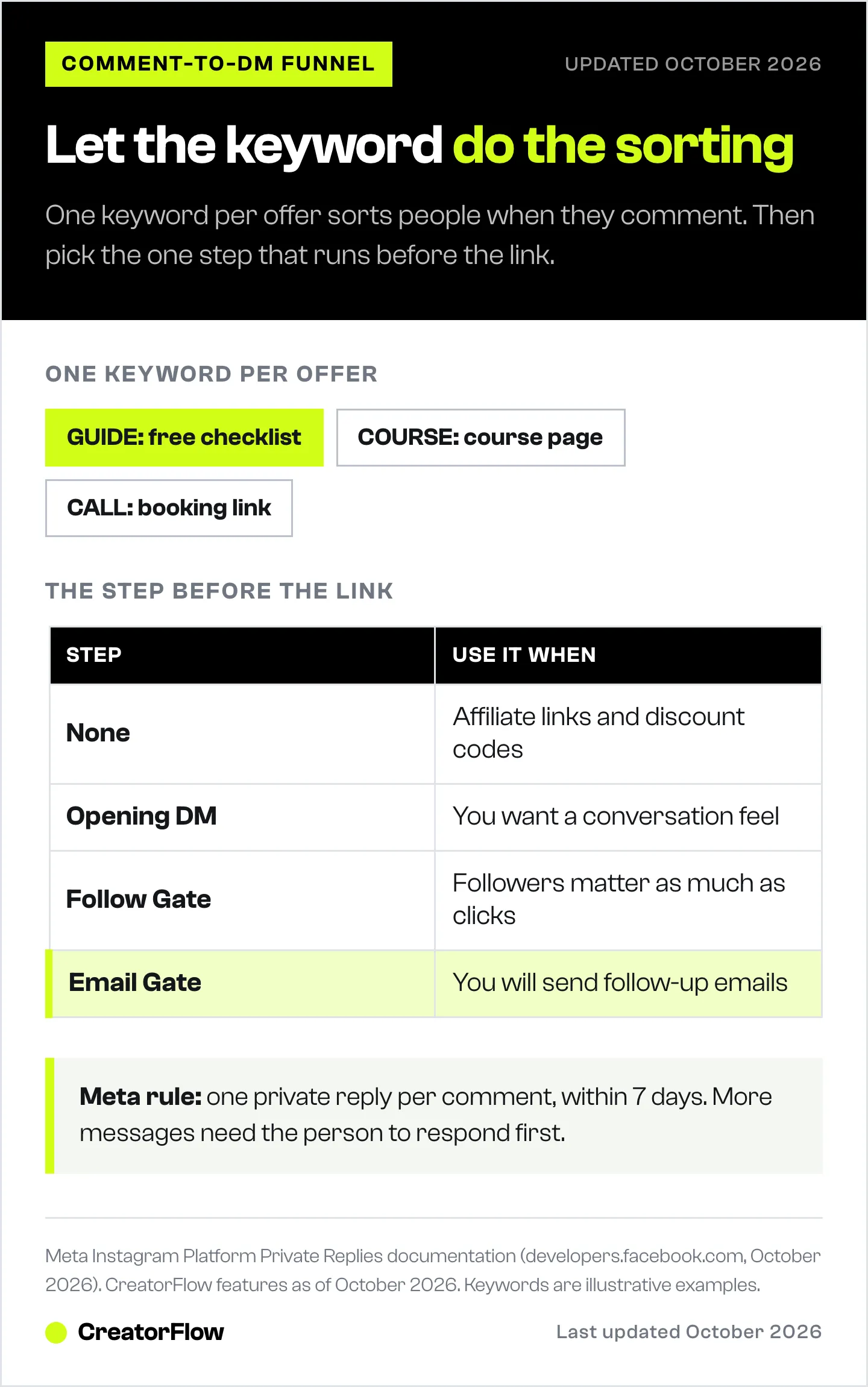
The fix: choose the step before the link on purpose. CreatorFlow has three optional steps that run between the comment and the main DM. You can use one of them per automation, or none.
| Step before the link | What the person does | Use it when |
|---|---|---|
| None | Gets the link right away | Affiliate links, discount codes, anything sold on the first click |
| Opening DM | Reads a short intro, then gets the link | You want the exchange to feel like a conversation |
| Follow Gate | Is asked to follow, then gets the link | Growing followers matters as much as the click |
| Email Gate | Types an email, then gets the link | Lead magnets, courses, coaching, anything with a follow-up |
Email Gate checks the format of the address, saves it to your Contacts, and then sends the link. It is on the Pro plan. When to use a Follow Gate covers the follower side of this choice.
Mistake 4: Collecting Emails You Will Never Send To
The opposite error is putting an Email Gate on everything because “always collect emails” sounds like good advice. Every gate costs some clicks. People who were only browsing, or who do not want more email, would have clicked straight through. With a gate in the way, many of them leave.
An email address is worth one thing: the ability to reach that person again on a day you choose. If no email goes out, the list is worth nothing, and you paid for it in lost clicks.
The fix: gate only where a follow-up exists. Use the Email Gate on lead magnets, your own products and anything with a longer decision, such as coaching or a course. Skip it on affiliate links, where the click is the sale. Then move the collected emails into your email tool with the Contacts export, and send a welcome email within a day.
Does an email gate cost you clicks? works through this decision in detail.
Mistake 5: Ignoring Meta’s Private Reply Rules
A comment-to-DM automation sends what Meta calls a private reply. Meta’s rules for it shape every funnel (developers.facebook.com, October 2026):
- One private reply per comment. Only one message can be sent to the commenter.
- Seven days. The reply must go out within 7 days of the comment.
- Follow-ups need a response. More messages can only be sent if the person responds, and within 24 hours of that response.
- Requests folder for non-followers. If the commenter does not follow you, the DM lands in their Requests folder, not their main inbox.
Two practical problems come from this. First, people who do not follow you may never see the DM. Second, a funnel that needs several messages stalls if the person never replies.
The fix: tell people where to look, and give them a reason to reply. CreatorFlow’s Public Reply posts a visible comment such as “Sent you a DM, check your requests” before the DM goes out, so the person knows to look. Public Reply is on the Pro plan. An Opening DM or an Email Gate also asks the person to do something, and their response opens the 24-hour window for the message that carries your link.
If an automation stopped sending, what Instagram’s 24-hour window error means explains the most common cause.
Mistake 6: Never Reading Results Per Automation
An account-wide click rate hides everything useful. If one automation gets clicks on a third of its DMs and another gets a tenth, the average tells you neither. The difference is usually one sentence of context in the message, or the wrong step in front of the link.
The fix: compare automations against each other. CreatorFlow Insights shows clicks per automation, which markets clicks come from, and when your audience is most active. Geographic analytics are on the Pro plan. Check three things each week:
- Which automation has the highest click rate. Copy its message structure into the weakest one.
- Whether gated automations lose too many people. If an Email Gate automation gets far fewer clicks and the emails are not used, remove the gate.
- Where the clicks come from. If most clicks come from one country, post when that audience is awake.
Change one thing at a time, so you know which change moved the number.
Before You Go Live: A Five-Point Check
Most “my automation is broken” reports have a simple cause. In a month of CreatorFlow support conversations, connection problems and DMs not sending were the two largest groups, and most came down to setup rather than faults (why Instagram automations fail). Run this check before a post goes out:
- Test from a second account. An automation cannot send a DM to the account that owns it.
- Confirm the automation is active, not a draft.
- Use a whole word as the keyword. CreatorFlow matches whole words, so “link” fires on “link please” but not on “linked”.
- Name the keyword in the caption, in capitals. People copy what they see.
- Tap the link in the DM on a phone. Make sure it opens the right page.
For the full setup from a connected account to a working automation, see the comment-to-DM setup guide.
FAQ
What is the biggest Instagram DM automation mistake?
Using one keyword for every offer. Everyone gets the same message whatever they came for, so a person who wanted a free guide receives a sales page. Give each offer its own keyword and the person chooses their path when they comment.
Should I send the link in the first DM?
Yes, when the click is the whole value, such as an affiliate link or a discount code. Add a step first only when the link leads to something with a follow-up, such as a free guide that starts an email sequence. Then an Email Gate lets you reach the person again.
Do I need conditions or branching in my DM funnel?
Not for most creator funnels. Branching sorts people after they comment. Separate keywords sort them before. If each post names one keyword and each keyword sends one matching message, the comment already did the sorting.
Should every automation collect emails?
No. An email gate costs some clicks, so use it only where you will send follow-up emails: lead magnets, your own products, courses and coaching. Skip it on affiliate links, where the click is the sale.
How many messages can an automation send after a comment?
Meta allows one private reply per comment, sent within 7 days of the comment. More messages can only be sent if the person responds, and within 24 hours of their response (developers.facebook.com, October 2026).
Why do people say they never got my DM?
If they do not follow you, Meta delivers the DM to their Requests folder instead of their main inbox. A public reply on the comment, such as “Sent you a DM, check your requests”, tells them where to look.
Can I use AI to sort replies in Instagram DMs?
Some automation builders offer AI steps that read a free-text reply and put it in a category. For comment-triggered funnels, a simpler route is to ask the question in the post and offer one keyword per answer, so no free text needs sorting.
Meta private reply rules verified from developers.facebook.com (Instagram Platform, Private Replies) as of October 2026. CreatorFlow features and plans as of October 2026. Click rates vary by account, offer and audience.

