

Instagram DM automation for musicians sends Spotify links, Apple Music tracks, merch store URLs, and pre-save links automatically when fans engage with your content. It also captures superfan emails for tour announcements and release updates. For musicians, this means converting that short attention window into streams, sales, and lifelong fans without being glued to your phone between sets.
When someone comments “LINK” on your Reel, they want your track now. Not in 2 hours when you check Instagram. DM automation delivers your streaming link in under 3 seconds, capturing intent at its peak.
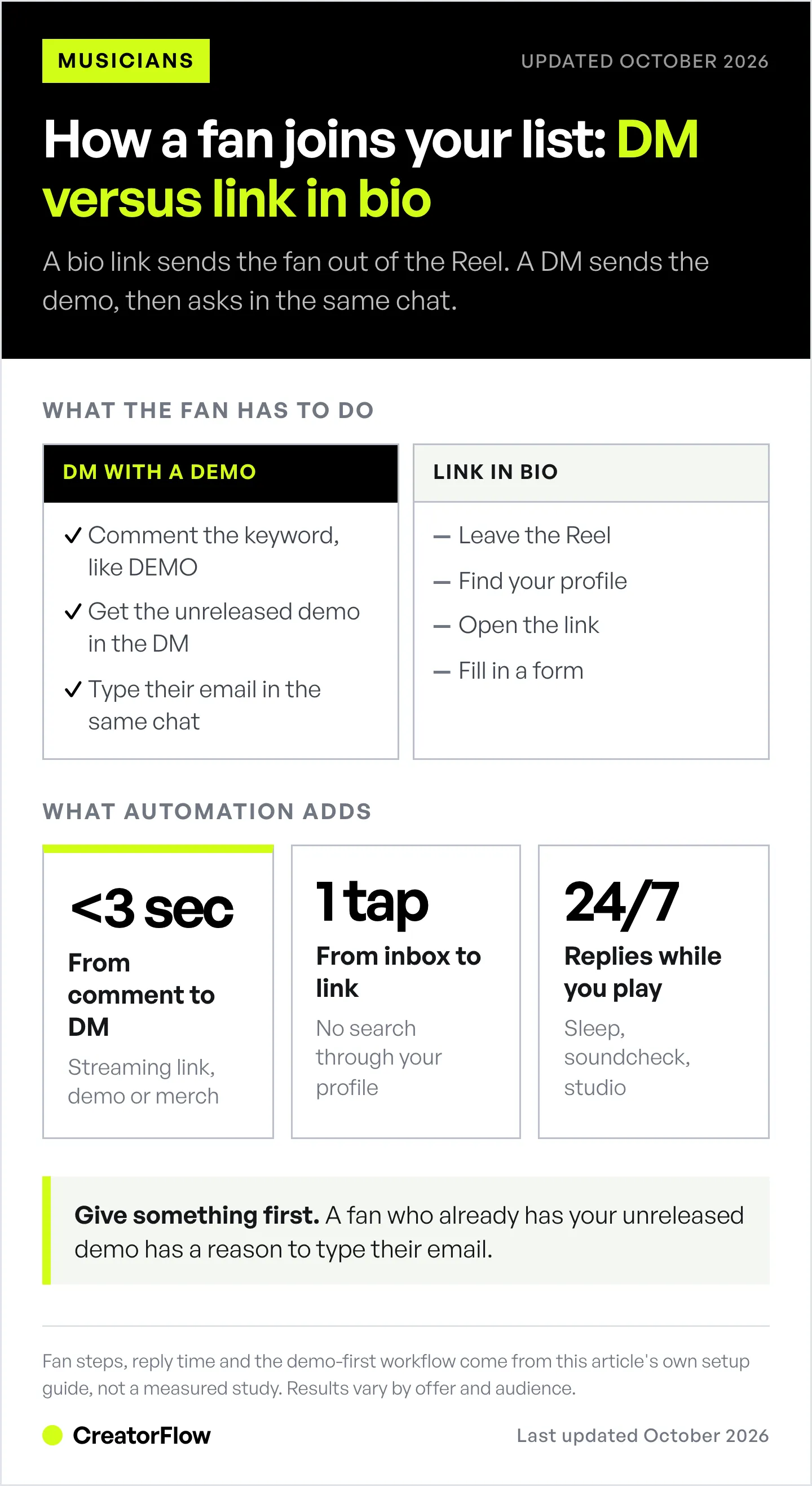
The reason is simple. A DM puts the link one tap away in the fan’s inbox. A link in bio asks the fan to leave the Reel, open your profile, and go looking for it.
Key Takeaways
- DMs beat the bio link on effort: a DM puts your streaming link one tap away, while a link in bio asks fans to leave the Reel and search for it
- One keyword per platform: triggers like “SPOTIFY” or “APPLE” send each fan the link for the app they already use
- The window is short: a fan’s interest peaks right after the snippet ends, so a reply that arrives hours later often arrives too late
- Email list growth: giving something first (an unreleased demo, early access) gives fans a reason to type their email into the DM
- 5 workflows covered: Streaming link delivery, merch sales, show/ticket promotion, superfan email list building, and pre-save campaigns
- Bottom line: Set up keyword triggers like “SPOTIFY” or “MERCH” to deliver links in under 3 seconds while you sleep, perform, or create
Why Musicians Need DM Automation
You post a Reel with a snippet of your new track. It starts getting traction, comments rolling in asking for the full song. But you’re at soundcheck, in the studio, or just living your life.
By the time you respond 4 hours later, those fans have scrolled through 500 more posts. The moment is gone.
This is the reality for every independent musician on Instagram. The platform rewards instant engagement, but making music is a full-time job. You can’t be in your DMs 24/7.
The Window After a Fan Hears Your Track
When a fan hears your music and wants more, you have a short window before they scroll to the next artist. A 2011 Harvard Business Review study of 2,241 US companies found that firms answering web leads within an hour were nearly 7 times as likely to have a meaningful conversation with a decision maker as firms that took longer. That study measured phone calls made in reply to web forms, not DMs, but the lesson carries over: an answer that arrives fast keeps the conversation alive.
DM automation solves this by:
- Responding instantly (under 3 seconds)
- Delivering exactly what fans ask for
- Working 24/7 while you sleep, perform, or create
- Handling many conversations at once
The Email List Problem
You don’t own your Instagram followers. One algorithm change and your reach disappears, we’ve seen this happen repeatedly. An email list gives you direct access to your fans forever.
The problem: “click the link in bio and sign up” asks a fan to leave the post, find your profile, open a link, and fill in a form. A DM that sends an unreleased demo first and then asks for an email removes most of those steps.
The fan already has something from you, and the ask arrives in the same chat.
5 Automation Workflows for Musicians
These workflows work with any DM automation tool that uses Meta’s official Instagram Graph API. Setup takes under 10 minutes each.
Workflow 1: Streaming Link Delivery
The Setup:
- Post Reel with your track (15-30 second hook)
- Caption includes: “Comment SPOTIFY for the full track”
- Automation triggers on keyword “SPOTIFY” (and variations: “spotify”, “Spotify”, “link”, “LINK”)
- DM sends within 3 seconds
Template:
Hey! Here's the full track:

🎵 Spotify: [direct link]
🍎 Apple Music: [direct link]
🔗 All platforms: [smart link]

Save it to your library and let me know what you think!
Pro tip: Use a smart link service (Linkfire, Feature.fm, Hypeddit) alongside direct platform links. Some fans prefer one-tap access to their platform. Set up multiple keyword triggers so fans can comment “APPLE” or “SPOTIFY” to get their preferred platform link.
Why it works: the fan gets the link while the hook is still in their head, without leaving Instagram to search for your track.
Workflow 2: Merch Sales
The Setup:
- Post photo/video wearing or showing your merch
- Caption: “Comment MERCH to get the link”
- Automation sends store link with discount code
Template:
Thanks for checking out the merch!

🛒 Shop here: [store link]
💰 Use code INSTAGRAM for 10% off

Limited stock on the [item name], grab yours before they're gone.
Advanced move: Create exclusive colorways or designs only available through Instagram DMs. This gives fans a reason to engage and makes them feel like VIPs.
Workflow 3: Show/Ticket Promotion
The Setup:
- Announce upcoming show in post or Reel
- Caption: “Comment [CITY NAME] for tickets”
- Automation sends ticket link with presale code
Template:
See you in [City]!

🎫 Tickets: [link]
⚡ Presale code: DMFAM (saves $10)

Bring a friend, tag them below and I might shout you out from stage.
Multi-city automation: Set up different keywords for different cities. “AUSTIN” triggers Austin ticket link, “DENVER” triggers Denver link. One tour announcement post handles all markets.
Workflow 4: Superfan Email List Building
The Setup:
- Offer exclusive content (unreleased demo, acoustic version, behind-the-scenes)
- Caption: “Comment DEMO for an unreleased track”
- Automation sends content AND asks for email
Template:
Here's that unreleased track, you're one of the first to hear it!

🎵 [audio link or preview]

Want early access to everything? Drop your email and I'll add you to the inner circle:
Why it works: a fan who already received the track has a reason to say yes. Count the emails each post collects, so you learn which offer works for your audience.
Workflow 5: New Release Hype (Pre-Save Campaign)
The Setup:
- Post teaser 1-2 weeks before release
- Caption: “Comment PRESAVE to get notified first”
- Automation sends pre-save link
Template:
New track drops [date]!

🔔 Pre-save here to get it the second it's live: [pre-save link]

Everyone who pre-saves gets added to the early access list for future releases.
Why pre-saves matter: High pre-save counts signal to Spotify’s algorithm that your release has momentum. This can mean playlist placement, algorithmic recommendations, and Release Radar features.
Content Ideas for Musicians
The 30-30-30-10 rule keeps your feed engaging without feeling like constant promotion:
- 30% Educational: Songwriting breakdowns, gear tours, production tips
- 30% Entertaining: Day-in-the-life, funny moments, personality content
- 30% Community: Fan covers, Q&As, responding to comments
- 10% Promotional: New releases, merch drops, tour dates
Many musicians flip this and post mostly promotional content, which gives fans little reason to engage.
High-Converting Content Types
Behind-the-scenes studio footage
- Shows your process
- Builds connection
- Natural CTA: “Comment TRACK to hear the finished version”
Fan cover reactions
- Feature fans covering your songs
- Builds community
- Natural CTA: “Comment ORIGINAL to hear my version”
Snippet Reels (15-30 seconds)
- Hook with the catchiest part
- Let it loop
- Natural CTA: “Comment FULL for the whole track”
Live performance clips
- Raw energy converts
- Shows you’re a real performer
- Natural CTA: “Comment TOUR for upcoming dates”
Musician-Specific DM Templates
Booking Inquiry Auto-Response
Trigger keywords: “booking”, “book”, “available”, “gig”, “hire”
Thanks for reaching out about booking!

For inquiries, please include:
📅 Event date
📍 Venue/Location
🎤 Event type (private, festival, club, etc.)
💰 Budget range

📋 My EPK: [link]
🎛️ Tech rider: [link]
📆 Book a call: [Calendly link]

I'll respond personally within 24-48 hours!
Collaboration Request Response
Trigger keywords: “collab”, “feature”, “work together”
Appreciate you reaching out about a collab!

I'm selective about features to keep everything quality. Send me:
🎵 Your best track (streaming link)
📱 Your Instagram handle
💡 What you're thinking for the collab

I check these weekly and respond to anything that catches my ear.
General Fan Engagement
Trigger keywords: “love your music”, “fan”, “amazing”
This made my day, thank you!

Want to stay connected? I share unreleased stuff, tour updates, and behind-the-scenes content with my email list:

📧 Join here: [link]

What's your favorite track? I'm always curious what resonates most.
Merchandise Inquiry
Trigger keywords: “merch”, “shirt”, “hoodie”, “buy”
Thanks for supporting the merch!

🛒 Full store: [link]
📦 Ships worldwide (3-7 days US, 7-14 international)
💰 Code DMFAM = 10% off

What piece caught your eye?
Setting Up Your First Automation
Here’s how to get started in under 10 minutes:
- Choose a tool that uses Meta’s official Instagram Graph API (CreatorFlow at $15/mo, or start with a free tier)
- Connect your account via OAuth (no password sharing required)
- Create your first flow:
- Trigger: Comment contains “SPOTIFY”
- Action: Send DM with streaming links
- Test it by commenting on your own post
- Post content with the keyword CTA
That’s it. You now have 24/7 fan engagement running.
For a complete walkthrough with advanced features, check out our Instagram DM automation complete guide.
Building Your Full Instagram Sales Funnel
DM automation is one piece of a larger strategy. The complete musician funnel looks like:
- Discovery: Reels and content attract new listeners
- Engagement: DM automation captures interest instantly
- Conversion: Streaming links, merch, tickets
- Retention: Email list for direct communication
Each stage feeds the next. Learn how to build the complete system in our Instagram sales funnel guide.
For a version of this tailored to musicians, see CreatorFlow for musicians.
Tools Comparison for Musicians
| Tool | Price | Best For | Key Feature |
|---|---|---|---|
| CreatorFlow | $15/mo | Independent artists | Flat pricing, modern UI, 5-minute setup |
| ManyChat | $17–$199/mo billed monthly | Multi-platform needs | Advanced workflows |
| Inrō | From EUR 12.99/mo | AI conversations | Maintains authentic tone |
| InstantDM | $12/mo, or $9.99/mo billed annually | Budget option | Free plan, up to 800 DMs/hour on Legend Pro |
Important: Only use tools that connect via Meta’s official Instagram Graph API. Browser-based bots that “pretend to be you” get accounts banned. API-based automation is explicitly allowed by Meta.
Most tools offer a free tier, enough to test effectiveness before committing.
FAQ
Is Instagram DM automation safe for musicians?
Yes, when using tools that connect through Meta’s official Instagram Graph API. This is the API Meta provides for business messaging. Browser bots and password-sharing tools put accounts at risk; API-based tools carry minimal ban risk.
How many DMs can I send per hour?
Automation tools pace sends at approximately 200 DMs per hour as a tool-side safety cap, not a limit Meta publishes. Meta’s own rate-limiting documentation caps private replies to comments at 750 per hour on the Instagram API with Instagram Login (checked October 2026). This is plenty for most independent musicians. If you’re hitting these limits regularly, you’re doing something very right.
Will automated DMs feel robotic to fans?
Only if you write them that way. The templates above are conversational and personal. Fans can’t tell the difference between an instant automated response and you being glued to your phone, but they definitely notice when you respond 6 hours later. For more message inspiration, browse our Instagram DM automation templates library.
Can I use automation for pre-save campaigns?
Absolutely. This is one of the highest-impact use cases. Every comment on a teaser post triggers a DM with your pre-save link, so fans who ask get the link while they are still excited about the teaser.
What about Instagram’s terms of service?
DM automation through official API partners is explicitly allowed. Instagram’s terms prohibit third-party apps that simulate human activity (browser bots). API-based tools operate within the rules: CreatorFlow is a Meta Tech Provider (since December 2025), while ManyChat and others are Meta Business Partners.
How do I handle booking inquiries while on tour?
Set up a booking inquiry automation that captures all the info you need (date, venue, budget) and sends your EPK and calendar link automatically. You’ll have qualified leads waiting in your inbox instead of vague “are you available?” messages.
In October 2026 we checked tool prices on ManyChat’s and InstantDM’s pricing pages and on inro.social, and Meta’s private-reply limit in its rate-limiting documentation. Individual results vary.


