
Instagram’s native Reels product tags (launched April 2026) let creators tag up to 30 affiliate products directly in a Reel. DM automation sends affiliate links via direct message when followers comment trigger words. Product tags reach passive viewers who discover your Reel. DM links convert engaged followers who actively request your recommendations. The highest-earning affiliate creators use both: product tags for discovery, DM automation for conversion.
Instagram added native affiliate product tagging to Reels in April 2026. Adam Mosseri announced it directly: creators with 1,000+ followers can now embed product links inside Reels, and Meta takes zero commission (instagram.com/@mosseri, April 2026). The rollout is live in the US, Brazil, India, Indonesia, and Thailand, expanding to 22 markets through 2026 (TechCrunch, March 2026).
So does this replace DM automation? No. And here’s the data explaining why.
Key Takeaways
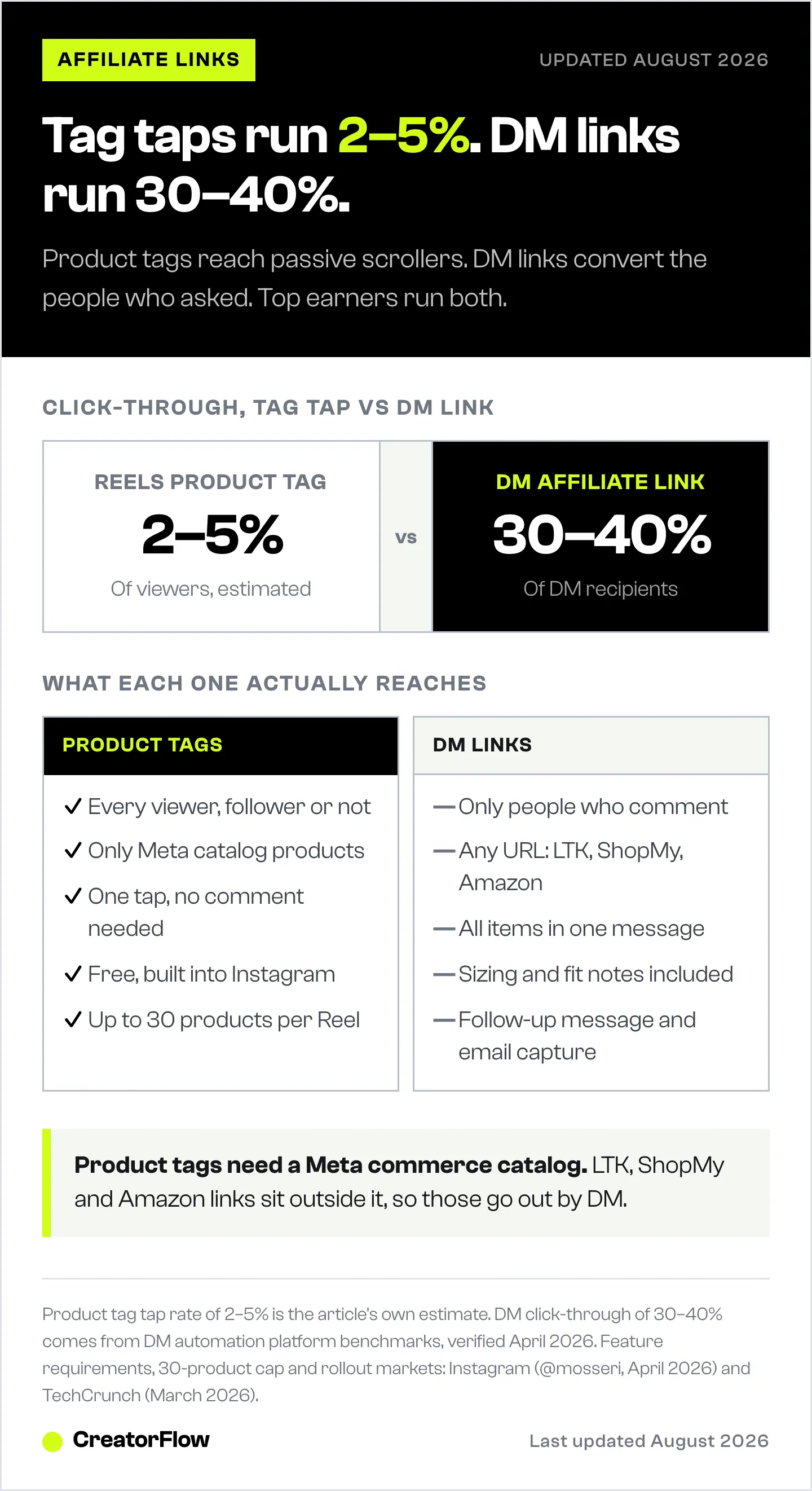
- Product tags capture passive browsers. Viewers tap a floating tag without leaving the Reel. Estimated tap rates: 2-5% of viewers
- DM links convert active requesters. Followers who comment “link” receive a DM with 30%+ click-through rates
- Product tags require Meta commerce catalogs. If a brand hasn’t uploaded their inventory to Meta, you can’t tag their products. This excludes most LTK, ShopMy, and Amazon affiliate links
- DM automation works with any URL. LTK links, ShopMy links, Amazon links, custom URLs, Calendly links. No catalog dependency
- Meta takes 0% commission on Reels product tags. Your full affiliate commission comes from the brand’s program
- Bottom line: Product tags add a new discovery layer. DM automation remains the highest-converting distribution method. Using both covers the full buyer journey

How Each Method Works
Native Reels Product Tags
- Record or upload your Reel
- On the share screen, tap “Add Products”
- Paste your affiliate product URL or search for the brand’s catalog
- Tag up to 30 products per Reel
- Publish. Viewers see floating product labels they can tap
- Tapping goes straight to the product page
Requirements:
- 1,000+ followers
- Age 18+
- Product must be in a verified Meta commerce catalog
- Feature rolling out in phases through 2026
Comment-to-DM Automation
- Create an automation with trigger words (“link,” “shop,” “outfit”)
- Write your DM template with affiliate links
- Post your Reel with a CTA: “Comment LINK for details”
- Followers comment the trigger word
- They receive your DM with all links in 3-8 seconds
Requirements:
- Instagram Business or Creator account
- DM automation tool (CreatorFlow, ManyChat, etc.)
- No product catalog dependency. Works with any URL
Head-to-Head Comparison
| Factor | Product Tags | DM Links |
|---|---|---|
| Click-through rate | 2-5% of viewers (estimated) | 30-40% of DM recipients |
| Reach | All viewers (including non-followers) | Only people who comment |
| Product coverage | Only Meta catalog products | Any URL (LTK, ShopMy, Amazon, custom) |
| Personalization | None (same tag for everyone) | Custom messages, size info, follow-ups |
| Setup per post | Tag products at upload | Set trigger words + template |
| Viewer effort | Tap the tag (low friction) | Comment, then open DM (higher friction) |
| Multi-item delivery | Each item tagged separately | All items in one DM message |
| Follow-up capability | None | Second DM 3-4 hours later |
| Works offline | Yes (tags persist on the Reel) | Yes (automation runs 24/7) |
| Cost | Free (built into Instagram) | $0-15/month (tool dependent) |
| Email capture | No | Yes (ask for email before sending link) |
Where Product Tags Win
1. Passive Discovery
Product tags work on viewers who never intended to buy. Someone scrolling Reels sees your outfit, notices a floating product tag, taps it out of curiosity, and ends up purchasing. This capture of passive interest is something DM links can’t replicate because DMs require the viewer to take an active step (commenting).
2. New Audience Reach
Reels appear on the Explore page and in non-followers’ feeds. Product tags convert these new viewers directly. They don’t need to follow you, comment, or know your trigger words. See it, tap it, buy it. For creators focused on audience growth alongside monetization, product tags add revenue from viewers who might never become followers.
3. Zero Friction
Tapping a product tag inside a Reel is one of the lowest-friction purchase paths on Instagram. No switching to DMs. No waiting for a message. No clicking a bio link. The product page opens instantly. For impulse purchases (beauty products, affordable accessories, trending items), this frictionless path converts well.
4. No Tool Required
Product tags are built into Instagram. No third-party tool, no subscription, no setup beyond tagging products at upload. For creators who want monetization without additional tools or monthly costs, product tags provide a free option.
Where DM Links Win
1. Conversion Rate
The numbers tell the story. DM-delivered links get 30-40% click-through rates. Product tag taps likely range from 2-5% of viewers. The difference: DM recipients actively asked for the link. They’ve already expressed buying intent by commenting. Product tag viewers are passive browsers with lower purchase intent.
2. Product Coverage
This is the deal-breaker for most affiliate creators. Product tags only work for items in a verified Meta commerce catalog. That excludes:
- LTK links (LTK uses its own tracking, not Meta catalogs)
- ShopMy links (ShopMy’s affiliate URLs aren’t in Meta catalogs)
- Amazon Associates links (Amazon runs its own affiliate program)
- Smaller DTC brands that haven’t uploaded to Meta’s catalog system
- Custom URLs (Calendly booking links, digital products, course links)
If you earn commissions through LTK, ShopMy, or Amazon, product tags can’t deliver those links. DM automation can.
3. Multi-Item Outfit Breakdowns
A fashion outfit has 5-8 items. Product tags show each one separately as floating labels on the Reel. DM links deliver all of them in one organized message:
“Here are all the outfit links:
- Dress: [link]
- Boots: [link]
- Bag: [link]
- Earrings: [link]
- Sunglasses: [link]
I’m wearing a size S. The dress runs slightly large.”
The DM format is easier for the buyer to process, includes personalized fit info, and keeps all links in one place they can return to later.
4. Follow-Up Messages
DM automation enables a second message 3-4 hours after the initial link delivery. This follow-up (“Did you find what you were looking for? The dress is almost sold out in size M!”) recovers 15-30% of people who meant to click but got distracted. Product tags offer no follow-up mechanism.
5. Email Capture
Before sending the affiliate link, DM automation can ask for an email address: “What’s your email? I’ll send you the full outfit list plus a discount code.” This builds your email list while delivering the affiliate link. Product tags can’t collect emails.
6. Commission Optimization
With DM links, you choose the highest-paying affiliate URL per item. A dress might pay 22% on ShopMy but only 12% on the brand’s Meta catalog rate. DM automation lets you send the ShopMy link. Product tags lock you into Meta’s catalog commission structure.
The Answer: Use Both
Product tags and DM automation aren’t competing strategies. They target different parts of the buyer journey.
The Full-Funnel Setup
Layer 1: Product tags for passive discovery Tag products in your Reel at upload. Viewers who browse casually can tap and buy without any interaction. This captures impulse purchases from new audiences.
Layer 2: DM automation for active conversion Add “Comment LINK for all outfit details” to your caption. Followers who want the specific links, with sizing info and multiple items organized, comment and receive a personalized DM. This captures high-intent buyers who want your curated recommendation.
Layer 3: Follow-up DM for recovery Send a second DM 3-4 hours later to link requesters who didn’t click. “Hey! Just checking in — the boots from this morning’s outfit are selling fast. Here’s the link again: [link].”
Revenue Impact of Using Both
| Strategy | Estimated Monthly Revenue (25K followers, daily posting) |
|---|---|
| Product tags only | $200-600 |
| DM automation only | $800-2,500 |
| Both combined | $1,200-3,500 |
The combined approach captures buyers at two different intent levels. Product tags add 30-50% incremental revenue on top of DM automation, not instead of it.
Which Products to Tag vs DM
Use Product Tags When:
- The product is in Meta’s commerce catalog
- It’s a well-known brand with high Amazon-like buyer trust
- The item is an impulse purchase (under $50)
- You want to monetize non-follower viewers
- The brand’s catalog commission rate is competitive
Use DM Links When:
- The product is on LTK, ShopMy, or Amazon (not in Meta catalog)
- You want to send a curated multi-item breakdown
- You need to include sizing/fit information
- You want to capture emails before sending links
- A different affiliate platform pays a higher commission
- The product is a considered purchase (over $100)
Use Both When:
- The product IS in Meta’s catalog AND you have a higher-paying affiliate link elsewhere
- Tag it in the Reel for passive viewers. Send the higher-commission link via DM to commenters
This dual-monetization approach means a single product can generate revenue through two channels: tag-taps from browsers and DM-clicks from engaged followers.
Setting Up the Combined Strategy
Step 1: Check Product Catalog Availability
Before posting, check which items are taggable:
- Open the Reel share screen
- Tap “Add Products”
- Search for each brand
- Note which items are available in Meta’s catalog
- Items not found: these go in your DM template only
Step 2: Tag What You Can
For items available in Meta’s catalog, add product tags directly in the Reel. This takes 2-3 minutes during upload.
Step 3: Set Up DM Automation with ALL Items
Create your DM template with links to every item, including those tagged in the Reel. Use your highest-commission links:
- If ShopMy pays more: use ShopMy link in the DM
- If LTK pays more: use LTK link in the DM
- If Amazon is the only option: use Amazon link in the DM
The DM template covers ALL items (tagged and untagged). Product tags cover a subset.
Step 4: Write Your Caption CTA
“All products tagged in the Reel. For the full outfit breakdown with sizes and fit details, comment LINK.”
This tells followers that product tags exist (for casual shoppers) AND gives an option for those who want the full curated experience (via DM).
FAQ
Do Instagram product tags replace DM automation?
No. Product tags capture passive viewers who tap while scrolling. DM automation converts active followers who request links. The conversion rate on DM links (30%+) is 6-15x higher than estimated product tag taps. Most affiliate creators use both to capture different buyer types.
Can I use LTK links in Instagram product tags?
No. Instagram product tags require products to be in a verified Meta commerce catalog. LTK uses its own affiliate tracking system outside of Meta’s catalog. To share LTK links on Instagram, use DM automation, Stories link stickers, or your bio link.
Does Meta take a commission on Reels product tags?
No. Meta takes zero commission on affiliate sales through Reels product tags (Engadget, March 2026). Your full commission comes from the brand’s affiliate program. Meta collects shopping behavior data instead of taking a revenue cut.
How many products can I tag in one Reel?
Up to 30 products per Reel. For fashion outfit content, this means you can tag every item in a multi-outfit try-on haul within a single Reel.
Are product tags available to all creators?
Not yet. The feature is rolling out in phases through 2026. Requirements: 1,000+ followers, age 18+, and the product must be in Meta’s commerce catalog. Available in the US, Brazil, India, Indonesia, and Thailand, expanding to 22 markets (TechCrunch, March 2026). If you don’t see the “Add Products” option, it hasn’t rolled out to your account yet.
What happens if a product isn’t in Meta’s catalog?
You can’t tag it in your Reel. This is the main limitation of product tags. DM automation fills this gap because it sends any URL, regardless of whether it’s in Meta’s catalog.
Product tag feature details from Instagram (@mosseri) announcement, TechCrunch, and Retail Brew coverage of Meta’s Shoptalk 2026 announcements. DM click-through rates based on DM automation platform benchmarks. Verified April 2026.


