

An Instagram shadowban is a drop in reach where Instagram stops recommending your posts to non-followers, often without telling you. To fix a shadowban: open Account Status to see removed content and whether your account is eligible to be recommended, edit or delete flagged posts, request a review if Instagram got it wrong, stop using banned hashtags, and avoid spammy behavior. Most “shadowbans” are ordinary reach drops, not penalties. Account Status is the only official way to know.
You spend 3 hours editing your Reel. Perfect hook, trending audio, killer visuals.
You hit post.
7 views. 2 likes. Both from your mom.
“I’ve been shadowbanned,” you think. And you’re probably wrong.
Most creators who feel shadowbanned aren’t. They’re seeing how Instagram works in 2026: follower count matters less, and content that strangers watch and share matters more.
But if you’re restricted, this guide will help you recover. And if you’re not shadowbanned (which is likely), this guide will help you understand why your reach dropped and how to fix it.
Key Takeaways
Think you’re shadowbanned? Here’s what to do:
- Check Account Status first: it shows removed content, limited features, and whether your account can be recommended to non-followers
- Most aren’t shadowbanned: If Account Status is clear, you’re likely seeing lower reach from more creators competing for attention
- Strikes expire after one year: Meta publishes no fixed restriction length for Instagram, so read the details in Account Status
- Fix strategy: Re-engage existing followers with creative carousels, focus on DM-worthy content, avoid buying engagement
- Prevention: Follow our Instagram DM automation safety guide to stay compliant
Let’s fix this.

What is an Instagram Shadowban?
A shadowban is when Instagram secretly limits your content’s visibility. Your posts appear normal to you, but they’re hidden from feeds, Explore pages, and hashtag searches for everyone else.
The key word? Secret.
But here’s where it gets interesting: Instagram actually isn’t secretive about it anymore. They created a feature that shows you exactly when you’re restricted. More on that in a minute.
Instagram does not use the word “shadowban”. It does stop recommending some accounts and posts to people who don’t follow them, and Account Status tells professional accounts whether that applies to them. Most reach drops that feel like a shadowban come from algorithm changes, more competition, or content that doesn’t hold your audience.
Why Shadowbans Feel So Common (But Aren’t)
Shadowbans feel common because three things lower reach without any penalty on your account:
1. The Algorithm is More Fair (Which Feels Unfair)
Instagram’s ranking leans on how people react to a post, not on how many followers you have.
According to Adam Mosseri, the head of Instagram, the three signals that matter most are (January 2025):
- Watch time: How long people watch your content
- Likes per reach: How many of the people who see a post like it
- Sends per reach: How often people send your post to friends in DMs
Notice what’s missing? Follower count.
This levels the playing field. Someone with 500 followers can get 50,000 views if they make share-worthy content. But someone with 50,000 followers might only get 500 views if their content is boring.
Fair feels like a disadvantage to people who used to get an advantage. If you have 10K+ followers and your Reels used to automatically get 5K views, but now they get 500 views, it feels like Instagram is punishing you. They’re not. They just stopped giving you a head start.
2. Supply and Demand Economics
More creators post every day, while each person still has the same hours to scroll. More posts competing for the same attention means lower average views per post, even when nothing is wrong with your account.
3. The Algorithm Feels Like a Secret
For most creators, the algorithm is confusing. It’s this mysterious black box that decides who goes viral and who doesn’t.
So when your posts flop, the easiest explanation is “Instagram must be hiding my content.” It feels secretive, therefore it must be a shadowban.
But the algorithm isn’t a secret anymore. Instagram has published exactly how it works. Our complete Instagram algorithm guide breaks it down, but here’s the summary:
If your content gets people to watch, save, and share, it gets more views. Period.
Not a shadowban. Just basic supply and demand.
How to Actually Check If You’re Shadowbanned
Stop guessing. Here’s how to know for sure.
Method 1: Instagram’s Account Status Feature
Instagram’s Account Status is the official way to check for a restriction, and the fastest.
How to access it:
- Open Instagram app
- Go to your profile
- Tap the menu icon (☰)
- Type “Account Status” in the search bar
- Tap “Account Status”
What you’ll see:
- Removed content: posts Instagram took down for breaking the Community Guidelines
- Features you can’t use: any temporary limits on your account
- Recommendation eligibility (professional accounts): whether Instagram may recommend your account and content to non-followers in Reels, Feed, Explore, Search and Suggested Accounts
If you’re not eligible, Account Status shows a sample of the posts that caused it. You can edit or delete them, or ask Instagram to review the decision. Eligibility does not guarantee reach; it means Instagram may recommend you (help.instagram.com).
Important caveat: Account Status only shows official violations. It won’t catch subtle algorithmic penalties like “we’re showing your content to 20% fewer people because your engagement rate dropped.” But if Account Status shows no removed content and says you’re eligible for recommendations, you’re not shadowbanned in any meaningful sense.
What to do with each Account Status result:
| Account Status shows | What it means | What to do |
|---|---|---|
| Removed content | A post broke the Community Guidelines | Request a review if Instagram got it wrong. The strike expires after one year |
| Your account can’t be recommended | Some posts break the Recommendation Guidelines | Edit or delete the sample posts it lists, or request a review |
| Features you can’t use | A temporary limit is active | Wait for it to end, and stop the action that caused it |
| Nothing flagged, eligible | No penalty | Work on sends, saves and watch time |
Method 2: The Hashtag Test
Post a photo/Reel with a unique hashtag that nobody else uses. Examples:
- #TestBrock12345
- #ShadowbanCheck2026MyName
- #UniqueHashtagFeb16Test
Post it, then search for that hashtag from a different account (or ask a friend to search). If your post shows up in Recent, you’re not hashtag-banned.
This method is less reliable in 2026 because Instagram’s algorithm now prioritizes content quality over hashtag placement. Instagram also caps posts at 5 hashtags since December 2025, so hashtags carry less of your reach than they used to. But it’s still a decent sanity check.
Method 3: The Engagement Drop Analysis
Compare your last 10 posts to your previous 50 posts.
- Gradual decline over months = Normal. Algorithm changes, more competition, audience fatigue.
- Sudden drop overnight, across every post = Possible restriction. Check Account Status immediately.
- Engagement below your niche benchmark for months = Not a shadowban. Your content isn’t resonating.
Our Instagram organic reach guide shows you how to fix gradual declines with better content strategy.
Understanding Instagram’s Strike System
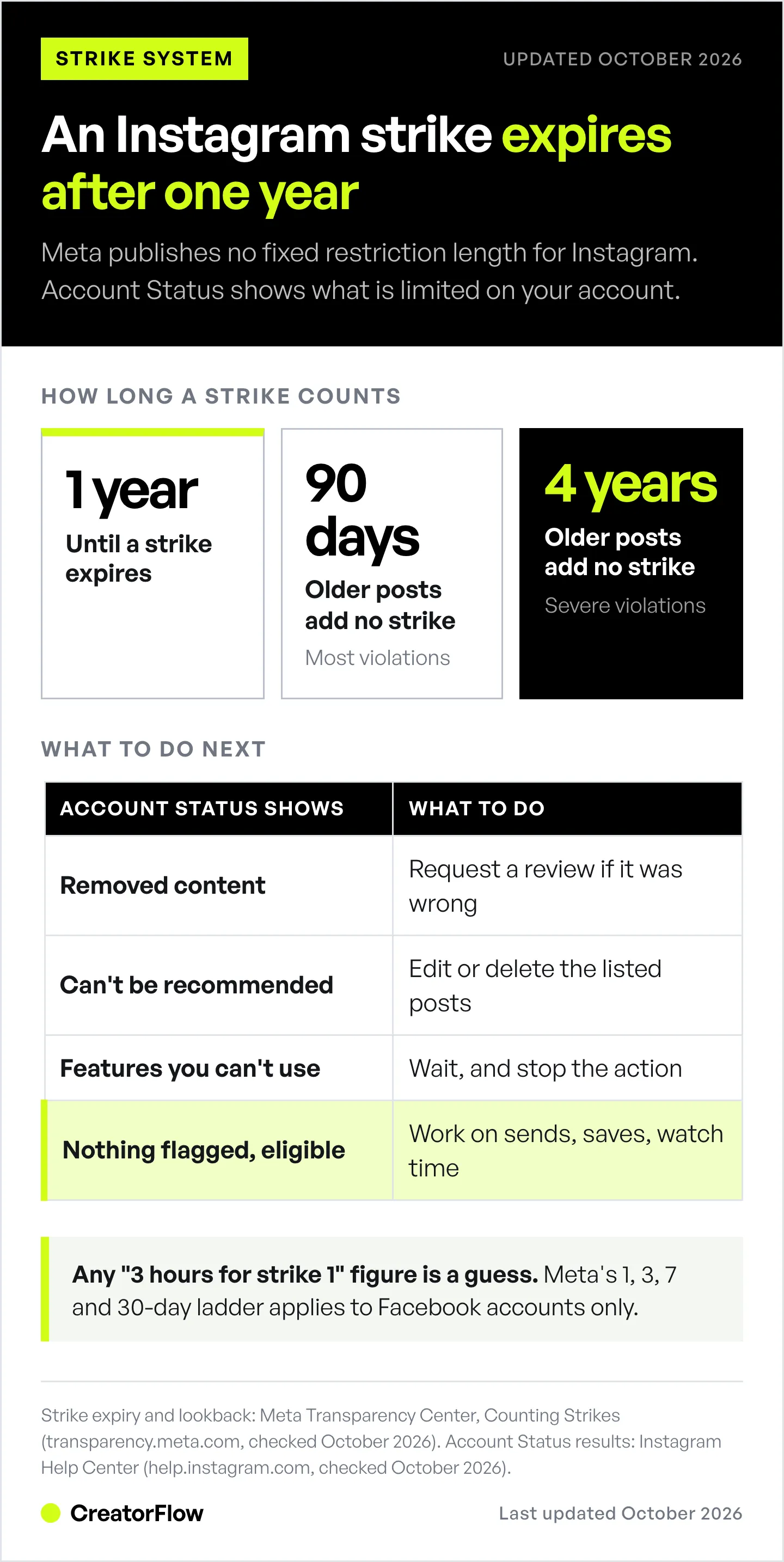
Instagram strikes follow Meta’s rules for counting strikes: break the Community Guidelines and Meta removes the content and may add a strike to your account. If Account Status shows a violation, here is how the system works.
How Strikes Work
Whether you get a strike depends on severity, context, and when you posted it (transparency.meta.com, October 2026).
How long strikes count:
- A strike expires after one year.
- Meta does not count a strike for content posted more than 90 days ago for most violations, or more than 4 years ago for severe ones.
How long a restriction lasts: Meta’s published ladder of 1-, 3-, 7- and 30-day blocks applies to Facebook accounts only. Meta publishes no fixed restriction length for Instagram, so any “3 hours for strike 1” figure you see online is a guess. Account Status shows which features are limited on your account.
What happens during a restriction:
- Your content won’t appear in Explore
- Your content won’t appear in hashtag searches
- Your content won’t be recommended to non-followers
- Your existing followers can still see your posts (usually)
Can You Remove a Strike?
You can ask Instagram to review most removal and recommendation decisions from Account Status (help.instagram.com). A strike you don’t overturn expires after one year (transparency.meta.com, October 2026).
How to appeal:
- Go to Account Status
- Tap the violation
- Tap “Request Review”
- Explain why the content didn’t violate guidelines
- Wait for Instagram’s decision in Account Status
Important: The algorithm makes mistakes. If you posted a photo of your friend wearing a bikini at the beach and it was flagged as “adult content,” appeal it. Many appeals are successful when the content was flagged incorrectly.
Topics Instagram Restricts (Gray Areas)
Even if your content doesn’t violate Community Guidelines, certain topics get reduced distribution.
1. Political Content (2024-2025 Changes)
In February 2024, Instagram stopped recommending political content to non-followers by default (NPR, TechCrunch).
Your political posts would only show to existing followers. No Explore page. No hashtag recommendations. No non-follower reach.
Good news: In January 2025, Instagram reversed this policy. Political content is now eligible for non-follower reach again.
Bad news: Political content can still underperform if your followers don’t want it from you. When people scroll past, hit “not interested,” or unfollow, the algorithm sees those negative signals and shows your post to fewer people.
It’s not a shadowban. It’s your audience voting with their attention.
2. Other Restricted Topics
Instagram’s Recommendation Guidelines list content that can stay on the platform but is not recommended to non-followers. Examples include:
- Sexually suggestive content, even when it is not explicit
- Regulated products, such as tobacco and vaping
- Exaggerated health claims, such as “miracle cures”
- Misleading money offers, such as “risk-free” investments
If your niche sits near these lines, you’re not shadowbanned. Instagram is more conservative about recommending your content to non-followers. Your followers will still see your posts, but you’ll get less Explore traffic.
Solution: Read the Recommendation Guidelines, then edit or delete the posts Account Status flags. Focus on education over promotion. Many creators in these niches still grow with share-worthy content that stays inside the guidelines.
How to Fix a Shadowban: 4-Step Recovery Plan
Fixing a shadowban takes four steps, and they start once you’ve checked Account Status and dealt with any flagged posts.
Step 1: Re-Engage Your Existing Followers
After a restriction lifts, your next posts are what Instagram ranks you on. Give your existing followers a reason to react.
Post a carousel (not a Reel).
Carousels are still the highest-engagement format, averaging 0.50% by followers in Q2 2026 against 0.48% for Reels (socialinsider.io/social-media-benchmarks/instagram, October 2026).
But don’t post a boring carousel. Break your pattern.
If you usually post:
- Educational carousels with text overlays → Post a personal story with photos
- Product photos → Post behind-the-scenes content
- Motivational quotes → Post a vulnerable meme or authentic moment
Entertain, don’t educate. Your followers are tired of tips. Give them something fun, relatable, or emotionally resonant.
Step 2: Focus on Share-Worthy Content
Sends (DM shares) are the signal that matters most for reaching people who don’t follow you, according to Adam Mosseri (January 2025).
Why? Because sending a post to a friend is the ultimate endorsement. It brings that friend back to Instagram. It creates conversation. It’s the highest form of engagement.
How to create share-worthy content:
Use the SHARE acronym:
S = Simple
Your content needs to be understood in 3 seconds. Use fifth-grade vocabulary. Avoid jargon, acronyms, or complex concepts. The “drunk grandma test”: Could a drunk grandma understand this?
H = Hook
80% of your time should be spent on the first 3 seconds, the first sentence, the first frame. Use negative words (“don’t,” “stop,” “avoid,” “never”) because they grab attention faster than positive words.
Examples:
- “Tips for better Instagram growth”
- “Stop doing this if you want Instagram growth”
A = Authentic
The less time between idea and execution, the more authentic it feels. Record a Reel immediately when inspiration hits. Don’t script it. Don’t overthink it. Authenticity beats polish in 2026.
R = Relatable
Specificity creates relatability. Instead of “Me when my post flops,” try “Me when I spend 3 hours editing and get 7 likes.” The more specific, the more people think, “OMG that’s literally me.”
E = Entertainment
Education is boring. Everyone’s tired of “5 tips to…” and “How to in 60 seconds.” Tell stories. Use humor. Make people feel something.
Step 3: Start a Series or Challenge
Daily challenges get crazy engagement because they:
- Give people a reason to follow (don’t want to miss tomorrow’s episode)
- Create anticipation and routine
- Show Instagram you’re consistently posting engaging content
Examples:
- “Reviewing one follower’s Reel every day until I hit 100K”
- “Posting one cake recipe for 30 days straight”
- “Running 1 mile for every 100 followers gained this month”
Make it challenging enough to be interesting, but achievable enough to finish.
Include a call-to-action: “Like this if you want your Reel reviewed next.” This drives engagement and gives you content for tomorrow.
Step 4: Emergency Strategy (Use Sparingly)
If you’re absolutely certain you’re shadowbanned and nothing’s working, try this once per year maximum:
Post a carousel calling out the shadowban.
“Comment HI if you can see this. I think Instagram is hiding my posts.”
This will spike engagement because:
- Existing followers will comment to help you
- It creates FOMO (“Am I seeing all their content?”)
- People love drama and will engage to be part of the story
Warning: This can backfire. Some followers might realize they haven’t seen your content in months and unfollow. Use this only as a last resort.
What NOT to Do When Shadowbanned
These common shadowban “solutions” make reach worse.
Don’t Buy Followers or Engagement
Bought followers don’t engage. When Instagram shows your post to followers who never watch, like or send it, the post earns weak signals, and weak signals mean fewer people see it. Fake engagement also breaks the Community Guidelines.
Buying followers can feel like a shadowban, because it lowers your reach even before Instagram removes the fake accounts.
Don’t Remove Followers in Bulk
Some “experts” recommend removing inactive followers to boost engagement rate. Don’t.
Instagram ranks posts on how the people who see them react, so a smaller follower count does not raise your reach by itself. Removing hundreds of followers in a short time is also the kind of fast, repeated action Instagram limits to fight spam. You take on risk for no documented gain.
Don’t Post 7-Second “Read Caption” Reels
Instagram is a visual platform. When you post a 7-second clip with text that says “Read the caption for the full story,” you’re forcing people to leave the video to read a wall of text.
This tanks your watch time. The algorithm thinks, “People watched 2 seconds and left. Bad content.”
If your content needs more than 60 seconds to explain, make a longer Reel. Instagram supports Reels up to 20 minutes, but Reels over 3 minutes are not recommended to new audiences (help.instagram.com, October 2026). Stay under 3 minutes when you want reach.
Don’t Give Up
The biggest difference between creators who succeed and creators who quit is showing up consistently.
Most posts flop. Most Reels don’t go viral. Most content gets ignored.
But the creators who succeed keep posting, keep improving 1% each day, keep learning from what works and what doesn’t.
Your account will recover. Your reach will come back. Keep going.
Recovery Timeline & Expectations
Reach recovery time depends on whether Account Status shows a violation.
If you had a violation:
Meta publishes no fixed restriction length for Instagram. Check Account Status: it shows which features are limited and whether your account is eligible to be recommended again. Edit or delete flagged posts, request a review where Instagram got it wrong, and remember the strike itself expires after one year.
If you don’t have violations:
This isn’t a shadowban. This is low reach due to:
- Increased competition
- Algorithm changes
- Your content not resonating
- Audience fatigue
There is no fixed recovery time. Reach comes back as new posts outperform your old ones.
Track these metrics against your own last 10 posts:
- Sends per reach: shares to DMs divided by accounts reached
- Saves per reach: saves divided by accounts reached
- Average watch time: from Reel insights
When these improve, your reach will improve. Our Instagram organic reach guide shows exactly how to track and improve these metrics.
How to Prevent Future Shadowbans
Preventing a shadowban comes down to four habits.
1. Follow Instagram’s Community Guidelines
Read them at Instagram’s Help Center. Don’t post:
- Nudity or sexual content
- Hate speech or bullying
- Violence or dangerous content
- Spam or fake engagement
- Copyright violations
2. Use Official Instagram APIs Only
Third-party apps that require your Instagram password can get you banned. They violate Instagram’s Terms of Service.
Safe: tools on Meta’s official API. CreatorFlow is one: an Instagram DM automation tool that replies to comments, story replies and keyword DMs through Meta’s official Instagram API. You sign in with Instagram and never share your password. CreatorFlow is a Meta Tech Provider (since December 2025). Unsafe: Apps that ask for your Instagram password, like sketchy growth services
Our DM automation safety guide explains which tools are safe and which aren’t.
3. Don’t Overdo Automation
Instagram allows automation, but within limits:
- Most tools pace sends at around 200 DMs per hour as a safety cap. That is a tool-side convention, not a Meta rule. Meta’s own limits are 100 calls per second for text and links, and 750 private replies to comments per hour (developers.facebook.com, October 2026)
- Avoid spammy bulk activity (likes, follows, comments) that triggers Instagram’s spam filters
- Use official APIs only (like CreatorFlow’s Meta Tech Provider integration)
If you’re using Instagram DM automation to send links when people comment, make sure you’re using a tool that respects Instagram’s rate limits.
4. Diversify Your Content
Don’t post the same thing over and over. Instagram’s algorithm penalizes repetitive content.
If you’re a fitness coach who posts “5 tips for abs” every single day, Instagram will assume your content is low-value and show it to fewer people.
Mix it up:
- Educational posts
- Behind-the-scenes content
- Personal stories
- Memes and humor
- User-generated content
- Polls and engagement posts
Variety signals to Instagram that you’re creating fresh, interesting content.
FAQ
How long does a shadowban last on Instagram?
Instagram publishes no fixed length for a restriction, so there is no reliable “3 hours” or “2 weeks” answer. Account Status shows which features are limited and whether your account can be recommended again. The strike behind it expires after one year (transparency.meta.com, October 2026). If Account Status shows no violations, you’re likely not shadowbanned; you’re seeing low reach from algorithm changes and more competition.
Can you fix a shadowban?
Yes. If you have a violation, request a review through Account Status. If the review is denied or you broke the guidelines, edit or delete the flagged posts and wait for the limit shown in Account Status to end. Then focus on content that earns sends and saves. Most limits lift automatically.
How do I know if I’m actually shadowbanned?
Open Account Status (profile, menu, then search “Account Status”). It lists removed content, features you can’t use, and, on professional accounts, whether Instagram may recommend you to non-followers. If nothing is removed and you’re eligible for recommendations but reach is still low, you’re not shadowbanned. Your content isn’t performing well enough in the algorithm.
Why did my Instagram reach drop suddenly?
A sudden drop across every post at once can mean a violation or restriction, so check Account Status first. Gradual drops over weeks are normal and come from more competition, algorithm changes, or content fatigue. If you recently posted political content, adult content, or used banned hashtags, that could trigger lower reach even without a formal violation.
Does Instagram shadowban hashtags?
Yes, Instagram can ban specific hashtags that are frequently associated with spam or prohibited content. Using banned hashtags can reduce your reach. Check if a hashtag is banned by searching for it, if it shows “Recent posts hidden” or no posts at all, it’s banned. Avoid using banned hashtags. Since December 2025 you can add up to 5 hashtags per post, so check each of your five before you post.
Will deleting posts fix a shadowban?
No. Deleting a post that already got a strike won’t remove the strike. The strike expires after one year whether or not you delete the post (transparency.meta.com, October 2026). Deleting or editing posts that Account Status flags for recommendations is different: that can make your account eligible to be recommended again.
Can I appeal an Instagram shadowban?
Yes, but only if you have a violation showing in Account Status. Go to Account Status, tap the violation or the recommendation notice, then tap Request Review. If you don’t have any violations showing, there’s nothing to appeal, and you’re not officially restricted.
Does posting too much cause shadowbans?
No. Instagram publishes no posting frequency that triggers a shadowban. Posting several times a day can split your followers’ attention, so each post gets fewer reactions and reaches fewer people. Post as often as you can keep the quality up, and compare sends and saves per post when you change your schedule.
You’re Probably Not Shadowbanned. Here’s What to Do.
If you made it this far, you’re serious about fixing your Instagram reach.
Here’s the truth most creators don’t want to hear: You’re not shadowbanned. Your content just isn’t good enough.
The algorithm isn’t secretly hiding your posts. Your posts just aren’t getting people to watch, save, and share.
And that’s actually good news. Because if Instagram was conspiring against you, you’d be powerless. But if your content isn’t resonating, you can fix that.
Here’s what to do next:
- Check Account Status: Rule out actual violations
- Analyze your last 10 posts: What got the most shares? Do more of that.
- Read our Instagram algorithm guide: Understand exactly how Instagram ranks content
- Focus on DM shares: Create content people want to send to friends
- Use Instagram DM automation: Turn your existing engaged followers into customers while you fix your reach
Your reach will recover. Keep showing up. Keep creating. Keep improving.
The creators who win aren’t the ones who never get shadowbanned. They’re the ones who keep posting even when it feels like no one’s watching.
Sources:
- Meta Transparency Center: Counting Strikes and Restricting Accounts (transparency.meta.com, checked October 2026)
- Instagram Help Center: Account Status and recommendation eligibility (help.instagram.com, checked October 2026)
- Instagram Recommendation Guidelines
- Adam Mosseri on Instagram’s ranking signals (January 2025)
- Socialinsider 2026 Instagram Organic Benchmarks (socialinsider.io, checked October 2026)
- Instagram Help Center: Reel length and recommendations (help.instagram.com, October 2026)
- Meta Developer Documentation: Instagram Platform rate limits (developers.facebook.com, October 2026)
- Meta Limits Political Content, NPR
- Meta Reverses Political Content Policy, TechCrunch
- Instagram Community Guidelines


