
White-label Instagram DM automation for agencies means delivering DM automation to clients under your agency’s brand instead of the underlying tool’s. In 2026, true white-label (custom domain, full custom branding) is rare at SMB pricing. The practical agency stack is multi-workspace tools with branded reporting, an official Meta API integration, and dedicated agency tiers like CreatorFlow Agency or Respond.io Enterprise. Tooling typically runs $30 to $280 per month before agency margin.
Your client wants automation under your agency’s brand. They don’t want to log into “ManyChat” or “CreatorFlow.” They want to see your logo, your dashboard, your reports. The problem: search “white-label Instagram DM automation” and the top results are affiliate pages dressed as reviews. The actual market has maybe two enterprise tools that quietly offer custom branding, plus a handful of vendors with semi-private agency plans you only learn about by asking sales. Most “white-label” claims you’ll see online are misleading.
This guide is for marketing agencies, social media managers, and freelance consultants running Instagram automation for 3 or more clients. It covers what white-label realistically means in this category, the multi-workspace tools that come closest, the Meta Business Partner badge that does more for client trust than a custom domain ever will, the agency-tier offerings hiding inside CreatorFlow and Respond.io, the operations playbook to package and price the service, and the compliance setup that keeps client accounts un-banned.
Key Takeaways
- The white-label myth (mostly): True dashboard white-label (custom domain, fully hidden vendor) basically doesn’t exist for SMB-priced Instagram DM tools. The closest legitimate option is LinkDM Pro, which offers white-label DM branding (“Powered by Your Brand” instead of LinkDM’s branding on outgoing messages) at $19/month (linkdm.com, July 2026).
- Agency programs exist but are not self-serve: CreatorFlow runs an application-based agency program at creatorflow.so/agency-program. No pricing, workspace count or DM allowance is published; you apply by email. Dedicated onboarding (creatorflow.so/pricing, May 2026). Respond.io’s Enterprise tier is custom-quoted (respond.io/pricing, May 2026). ManyChat has a Business plan (7,500 contacts, unlimited channels) targeted at agencies above the standard Pro tier.
- Meta Business Partner Messaging specialty is the right badge: Agencies running Instagram DM automation should target the “Messaging” specialty within the Meta Business Partner program. LinkDM, InstantDM, and ReplyRush already hold this certification (facebook.com/business/marketing-partners, May 2026).
- Branded reporting is where most agencies “white-label”: Build PDF or Notion reports under your agency brand using exported data. Clients see your logo, not the tool’s.
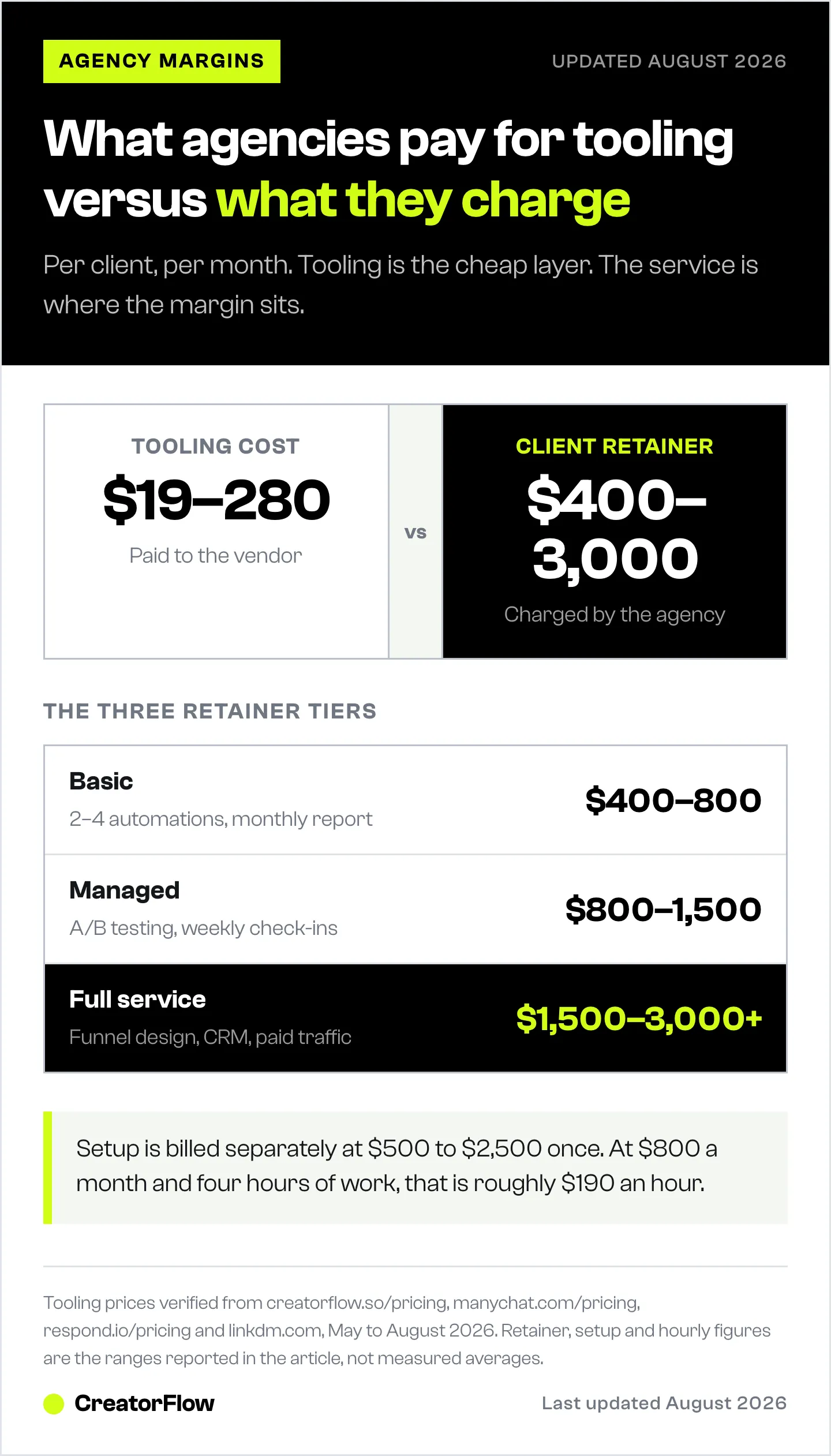
- Pricing reality: Tooling cost is $19 to $280 per client per month. Agencies typically charge $400 to $3,000 per client per month for the full service.
- Compliance non-negotiables: Add the agency as a Partner via the client’s Meta Business Manager (never share Instagram passwords), get a signed scope of work granting messaging permission, document data handling for GDPR.

What “White-Label” Actually Means in Instagram DM Automation
White-label in software is a spectrum, not a switch. Most agencies hear “white-label” and picture a fully custom-branded app on their own domain. In Instagram DM automation, that’s the rarest tier. Here is how the four tiers actually break down:
Tier 1: Full white-label. Custom domain (yourdomain.app), custom logo on every screen, no third-party branding visible to the client anywhere. Rare in this category. Where it exists, it’s enterprise-only, custom-quoted, and starts well above $200 per month per client. Vendors that offer this typically require 12-month contracts and minimum client volume.
Tier 2: Co-branded or agency portal. The platform shows your logo alongside theirs, or hides their logo behind a custom subdomain. Some Enterprise plans on Respond.io and similar multi-channel tools offer this. CreatorFlow’s Agency plan includes “team permissions” and “dedicated onboarding,” which sales conversations suggest can include some co-branding for higher-volume agencies.
Tier 3: Multi-workspace (most common). You manage every client account from one login, but the platform brand stays visible to anyone who logs into the underlying tool. The client typically never logs in. This is what CreatorFlow Growth, ManyChat, LinkDM, and most SMB tools actually offer to agencies.
Tier 4: Branded reporting only. The platform itself isn’t white-labeled, but your agency builds PDF, Notion, or Looker reports with your brand on top of the exported data. This is what most successful agencies actually deliver to clients regardless of which tier they pay for.
Tier 5: White-labeled outgoing messages. LinkDM Pro ($19/month) includes a White Label feature that removes LinkDM branding from outgoing DMs and lets partners use “Powered by Your Brand” instead (linkdm.com, July 2026). This is partial white-label: the messages your client’s end users receive carry your brand instead of LinkDM’s, but the dashboard your client logs into still shows LinkDM. For affiliate platforms and partner programs where the end-user message branding matters more than the dashboard branding, this is the cheapest legit white-label option in the category.
If a vendor claims “white-label” but won’t show you a custom domain demo, they mean Tier 2, 3, or 5. That’s fine, just know what you’re buying. The rule of thumb: ask “can my client log into a URL that says yourdomain.app and see only my brand?” If the answer is anything other than a clean yes, it’s not full dashboard white-label — though end-user message white-label (Tier 5) may still be available.
Why True White-Label Doesn’t Exist (Yet) for Most Instagram DM Tools
Three structural reasons:
1. Meta’s API access is per-app, not per-reseller. Each Instagram DM automation tool registers a Meta App ID, gets reviewed by Meta, and connects client accounts through that single app. Reselling the underlying app under your own domain would require either (a) becoming a Meta Tech Provider yourself, which is a months-long process with custom legal review, or (b) the vendor running multi-tenant infrastructure with per-customer custom domains, which most haven’t built. Most SMB tools chose option (c): skip true white-label and offer multi-workspace instead.
2. Margins are thin at SMB pricing. A platform charging $15 to $30 per month per workspace can’t economically build and maintain a custom-branded reseller tier with dedicated infrastructure. The economics only work above $200 per month per client, which is where Respond.io Enterprise, Sprinklr, and similar enterprise tools live.
3. Agency demand is fragmented. Most agencies running 3 to 10 clients can deliver enough perceived value through branded reports and a Meta Business Partner badge that they don’t push vendors hard for true white-label. The vendors that did try (early Customers.ai/MobileMonkey, some smaller tools) pivoted away from agency white-label as the volume never materialized.
The honest read: spending energy hunting for a true white-label SMB tool is wasted time. Build the pseudo white-label stack instead.
The Pseudo White-Label Stack Agencies Actually Use
Three layers, in order of impact on client perception:
Layer 1: Meta Business Partner badge. This is the single biggest credibility lever. Clients trust the Meta logo more than they trust any custom domain. We cover the qualification path below in detail.
Layer 2: Branded monthly reports. Export raw data from your DM automation tool (CSV, API, or screenshots), then build a PDF or Notion dashboard with your agency’s logo, colors, and commentary. Clients receive “YourAgency Q2 Report,” not “ManyChat Analytics Export.”
Layer 3: Multi-workspace tooling that you don’t surface to the client. You log into the underlying tool. The client never does. They see results in your branded report and a shared Loom or Slack update. The tool stays invisible to anyone who isn’t on your team.
Optional Layer 4: Agency program. If you grow past 10 clients, apply to CreatorFlow’s agency program at creatorflow.so/agency-program, or talk to Respond.io about Enterprise. Both will custom-quote. Both offer dedicated onboarding and (depending on volume) some degree of co-branding.
This stack covers 90% of what an agency actually needs and avoids paying for enterprise tiers you don’t use.
Tool Comparison: Best Multi-Workspace Platforms for Agencies
Pricing verified from each vendor’s pricing page in May 2026.
| Platform | Agency Tier | Price | Workspaces | White-Label Option | Best For |
|---|---|---|---|---|---|
| CreatorFlow Growth | Growth | $30/mo flat | 5 (10K DMs each) | No (multi-workspace + branded reports) | Boutique agencies, 3-5 clients |
| CreatorFlow Agency | Agency | Custom-quoted | Multiple, adjustable | Partial (depends on volume) | 5-15 client agencies |
| ManyChat Pro | Pro | $39/mo monthly or $29/mo annual, 2,500 contacts | One per subscription | No | Solo creators, small accounts |
| ManyChat Business | Business | Higher tier, custom pricing, 7,500 contacts | Multi-channel | No | Multi-platform agencies (IG + WhatsApp + FB + SMS) |
| Respond.io Growth | Growth | $159/mo | Multi-workspace, $20 per extra seat | No | Mid-market agencies, 10+ clients |
| Respond.io Enterprise | Enterprise | Custom-quoted | Custom | Possible (custom branding available) | Agencies with $50K+ tooling budget |
| LinkDM Pro | Pro | $19/mo (3 accounts, 25K DMs) | 3 IG accounts | Yes (white-label DM branding on outgoing messages) | Affiliate platforms, partner programs |
| LinkDM Platinum | Platinum | Higher tier (10 accounts, 300K DMs) | 10 IG accounts | Yes (same white-label feature) | High-volume affiliate platforms |
Sources: creatorflow.so/pricing, manychat.com/pricing, respond.io/pricing, linkdm.com, all accessed May 2026.
The honest pick by agency size:
- 1 to 5 clients: CreatorFlow Growth at $30/month. 5 client workspaces with 10,000 DMs each. That’s $6 per client in tooling cost. You can’t beat that economically.
- 5 to 15 clients: apply to CreatorFlow’s agency program, or stack two Growth subscriptions if your DM volume per client stays under 10K/month. Ask CreatorFlow sales for the Agency plan if you need adjustable per-workspace DM limits or co-branding.
- 15+ clients with multi-channel needs: Respond.io Growth or Enterprise, or ManyChat Business. Contact-based pricing rises with contact count but supports Instagram + WhatsApp + Messenger + SMS in one platform.
- Affiliate platforms or partner programs: LinkDM Pro at $19/month if you need white-labeled outgoing message branding. This is the only tool in the category that offers true white-label on the messages end users receive without an enterprise contract.
For deeper feature comparison see our best Instagram DM automation tools breakdown and CreatorFlow alternatives guide.
CreatorFlow’s Agency Program: How It Works
CreatorFlow’s public pricing page lists three self-serve plans: Free, Pro ($15/mo) and Growth ($30/mo). Agencies that need more than Growth’s 5 workspaces go through a separate agency program at creatorflow.so/agency-program, which is application-based rather than self-serve.
Terms are set per agency rather than published as a fixed tier. You apply by email, describing the Instagram accounts you manage and how you plan to use CreatorFlow, and CreatorFlow replies within a few business days (creatorflow.so/agency-program, August 2026).
Because the terms are scoped to your roster, treat the first reply as a scoping call. Worth raising on it:
- Custom co-branding on the surfaces your clients actually see
- Client onboarding under your agency’s brand
- Support response times you can put in a client contract
- Volume pricing once your DM load passes what stacked Growth seats cover
If you are running 5 to 15 active clients, that conversation is worth having before you stack multiple Growth subscriptions, because the per-workspace maths changes once the roster grows.
Sources: creatorflow.so/pricing and creatorflow.so/agency-program, accessed August 2026.
Get the Meta Business Partner Badge (Trust Signal)
The Meta Business Partner program is structured into two tiers as of 2026 (facebook.com/business/marketing-partners, May 2026):
Member Level (entry tier):
- Approximate minimum: $5,000 in ad spend managed across client accounts
- Required: registered legal entity, business email domain
- Required: at least one team member with a Meta Blueprint certification
- Listed in the directory but no badge to display publicly
Badged Partner (the visible badge clients recognize):
- Significantly higher ad spend track record (third-party reporting suggests several hundred thousand dollars over the last year, though Meta does not publish exact thresholds)
- Demonstrated technical proficiency
- Proven track record fostering business expansion for clients
- Specialty alignment with one of Meta’s nine partner specialties (Adtech, Agency, Commerce, Conversion data, Creative platform, Feed management, Measurement, Messaging, Platform)
For Instagram DM automation agencies specifically, the relevant specialty is “Messaging” — companies that specialize in managing conversations at scale. This is the badge that signals to clients you’re vetted by Meta for exactly the kind of work you’re selling them. As of May 2026, certified Messaging-specialty Meta Business Partners in Instagram DM automation include LinkDM, InstantDM, and ReplyRush (linkdm.com, July 2026; instantdm.com, May 2026). Your agency can earn the same Messaging specialty if you meet the eligibility bar.
There’s no traditional application form. Meta auto-evaluates eligibility through a dashboard inside Business Manager. Once approved, you get a badge to display on your website, proposals, and pitch decks, and you’re listed in the public Meta Business Directory where prospects search for vetted agencies.
If you’re not yet at the spend threshold, list your CreatorFlow, ManyChat, or LinkDM partnership on your site as proof you’re using Meta-approved tools. It’s a smaller signal but still meaningful to clients doing diligence.
Branded Client Reporting: What to Send Each Month
This is where the actual “white-label” experience happens for the client. A monthly report packaged under your agency’s brand makes the underlying tool invisible.
Recommended sections, in order:
- Executive summary — 3 bullets on what changed this month (DMs sent, conversions, key wins). One paragraph max. Most clients only read this section.
- Comment-to-DM performance — top 5 posts by trigger volume, click-through rate per automation, total DMs sent.
- Story reply automation performance — if running, open rates and CTR by Story type.
- Keyword trigger performance — inbound DMs handled automatically, common keywords, response volume.
- Email capture results — new emails added to client list, opt-in rate (typically 30 to 50% of automation triggers).
- Geographic breakdown — where engaged users live (helps with ad targeting decisions, especially for ecommerce clients).
- Notable patterns — which content types drove the most automation engagement, what to double down on.
- Recommendations — 2 to 3 changes you’re proposing for next month, with expected impact.
- Hours saved — estimated DMs the client would have sent manually, multiplied by 30 seconds per reply, expressed as hours of human time freed up. This is the line clients quote when justifying your retainer.
Build it once as a Notion template or Google Slides master. Duplicate per client per month. Total time after the template is built: 20 to 40 minutes per client per month.
For the underlying metrics framework, see our Instagram analytics for creators guide which covers most of the engagement KPIs that translate to DM automation reports. For the underlying engagement KPIs that translate to retainer-worthy results, see 10 ways to increase Instagram engagement.
Pricing Your Agency Service on Top of Tooling
Tooling is the cheap part. Service is where the margin lives. Before you can price the service, you have to sell it; this guide on pitching Instagram DM automation to agency clients includes email templates, call scripts, and objection handling.
Cost stack per client per month:
- Tool subscription share: $6 to $30 (depending on platform and workspace count)
- Account manager time: 2 to 5 hours at your blended rate
- Reporting time: 30 to 45 minutes (with template built)
- Client communication: 1 to 2 hours
- Tool optimization, A/B test setup, copy refresh: 1 to 3 hours
Pricing tiers most agencies use in 2026:
Setup fee (one-time): $500 to $2,500. Covers initial automation buildout, Meta App access setup via Business Manager, asset creation (DM templates, lead magnets), client onboarding workshop. Charge this even on small accounts. It filters out clients who aren’t serious.
Monthly retainer Tier 1 (basic): $400 to $800 per client. Covers 2 to 4 active automations, monthly branded report, email support, one optimization round per month. Best for solopreneurs and small ecommerce clients.
Monthly retainer Tier 2 (managed): $800 to $1,500 per client. Adds A/B testing on DM copy, weekly check-ins, copy refreshes every two weeks, monthly strategy call. Best for established creators and growing brands.
Monthly retainer Tier 3 (full-service): $1,500 to $3,000+ per client. Adds funnel design (DM to email to sales), integration with email and CRM platforms, paid traffic coordination (driving traffic from Meta ads into DM automation), bi-weekly strategy calls, dedicated Slack channel. Best for serious DTC brands and high-ticket coaches.
Performance bonuses (optional): Some agencies layer performance fees on top of retainers — 5 to 10% of attributed revenue, or a flat bonus per email captured above a threshold. Risky but lucrative if your tracking is clean.
Margin math: at $800 per month per client with $30 tool cost and 4 hours of work per month, you’re at roughly $190 per hour blended. That holds up across 5 to 10 clients before you need to hire. At Tier 3 ($2,000+/mo), margins improve significantly because the marginal time cost doesn’t scale linearly with the price.
For more on operational scaling beyond automation, see our multi-account Instagram management guide.
Client Onboarding Workflow (Step-by-Step)
Standardize this once. Run every new client through it. Total time: 60 to 90 minutes per client across the full first week.
Day 0: Discovery call (30 min). Learn the client’s audience, offers, and primary conversion goal (link clicks, calls booked, emails captured). Document in a shared Notion page so the client can see it. Establish the metric you’ll be measured against.
Day 0: Account audit (15 min). Check Instagram account type (must be Business or Creator), follower base, recent post engagement rates, DM volume, current bio link tool. Flag any compliance red flags (suspended accounts, recent shadowbans, banned content).
Day 1: Asset collection. Get the links, lead magnets, calendar URLs, brand voice samples, and any existing DM templates the client has. Use a single intake form (Tally or Typeform) and require all fields before moving on. Half of agency delays are clients dragging on assets.
Day 2: Tool connection. Add their Instagram account to your multi-workspace tool. Use Facebook Login for Business so the client can revoke access if the relationship ends. Never ask for their Instagram password. Verify the connection is using their own Business Manager, not yours, so they retain ownership of the integration.
Day 3-4: Build the first 2 automations. One comment-to-DM for their best-performing post type, one keyword trigger for inbound DM FAQs. Use templates. Don’t over-engineer the first build. Get something live fast.
Day 5: Test loop. You comment the trigger word from a test account, verify the DM lands, click the link, screenshot the flow. Send the screenshots to the client. They love seeing the work concretely.
Day 6: Client walkthrough (30 min). Show them the live automation, the report template, and what the first 30 days will look like. Set expectations: results compound. Month 1 numbers will be smaller than month 3.
Day 30: First check-in. Review CTR, capture rate, and propose 2 to 3 optimizations. This call is where the upsell to Tier 2 or Tier 3 happens naturally.
For the API safety practices that keep client accounts un-banned, see our avoid Instagram bans guide and Instagram API rate limits explained.
Specific Automations to Build for Each Client Type
Different client types need different starting automations. Here are the highest-ROI builds by client type, based on what most agencies see drive the fastest measurable wins.
Affiliate creators (Amazon, LTK, Mavely):
- Comment-to-DM for product links (trigger word “LINK” or “SHOP”)
- Email capture before delivering the link
- Follow-up DM at 24 hours if the user didn’t click
Coaches and course creators:
- Comment-to-DM for course information
- Keyword triggers for “PRICE,” “TESTIMONIALS,” “BOOK A CALL”
- Story reply automation tied to value-based polls (“Want my free guide? Reply YES”)
Ecommerce brands:
- Comment-to-DM for product page links
- Keyword triggers for “SIZE,” “SHIPPING,” “RETURN”
- Abandoned engagement re-targeting (DM users who liked product posts but didn’t comment)
Local services (realtors, photographers, restaurants):
- Comment-to-DM with booking calendar
- Keyword triggers for “MENU,” “AVAILABILITY,” “PRICE”
- Story reply automation tied to event posts
SaaS and B2B brands:
- Comment-to-DM with demo link
- Keyword triggers for “DEMO,” “PRICING,” “INTEGRATIONS”
- Email capture as the primary CTA, not direct conversion
For each client, pick 2 to 3 of the recommended automations to ship in week one. Don’t build all five. Ship fast, measure, layer in more in month 2.
Common Mistakes Agencies Make (And How to Avoid Them)
Mistake 1: Asking the client for their Instagram password. This violates Instagram’s Terms of Service and can get the client’s account banned. Use Facebook Login for Business through Meta-approved tools only.
Mistake 2: Mixing workspaces. Sending one client’s automation message to another client’s audience is the agency equivalent of sending the wrong email to the wrong list. Multi-workspace tools fix this if you actually use them. Don’t shortcut by managing multiple clients in one workspace just because the tool allows it.
Mistake 3: Promising true white-label and delivering Tier 3. The client logs into the tool one time, sees the vendor’s logo, and feels lied to. Set expectations correctly upfront. Position your service as “managed automation under our brand” not “our white-labeled platform.”
Mistake 4: Not having an exit clause in the contract. When the relationship ends, who owns the data? Who deletes it? When? Spell this out before the client asks. Standard practice: 30-day data export window, then deletion.
Mistake 5: Charging too low. Tooling is $6 to $30 per client. Agencies who charge $200/month barely break even after 3 hours of work. The market supports $400+ for basic, $800+ for managed. If a prospect can’t afford that, they’re not your client.
Mistake 6: Building too much in week one. Five automations per client looks impressive but takes weeks to optimize. Two automations live and measured beat five half-configured. Iterate.
Mistake 7: Skipping the Meta Business Partner badge once eligible. Even if you’re at the Member tier (around $5K ad spend minimum), it’s a free credibility upgrade you should claim immediately. Many agencies qualify and don’t bother.
Compliance and Legal Setup for Agencies
A few non-negotiables most agency guides skip:
Add your agency as a Partner via the client’s Meta Business Manager. The client opens Business Manager, goes to Settings -> Partners, adds your agency by Business ID, and grants permissions on the relevant Facebook Page (Editor access) and Instagram account (Editor or Admin) (developers.facebook.com, May 2026). This is the official Meta-sanctioned workflow. The client retains ownership of the API integration. When the relationship ends, they revoke your Business’s access in one click without losing their automation history. Never ask for the client’s Instagram password — that violates Meta’s Terms of Service for commercial use and can get the account banned.
Get a signed scope-of-work explicitly granting your agency permission to send messages on the client’s behalf. This protects you under Meta’s Platform Terms. The SOW should name the specific Instagram account, the types of automation you’ll run, the message templates the client has approved, and the duration of the engagement.
Document data handling in your client contract. If you’re collecting emails through DM automation and exporting them, you’re a data processor under GDPR (and equivalents in California, Brazil, and other jurisdictions). The contract should spell out:
- What data you’re collecting (emails, Instagram usernames, message content)
- How long you’re retaining it (typically 30 days post-contract)
- The client’s right to a full export at any time
- Your security practices (encrypted storage, access controls)
- Sub-processors you use (the underlying DM automation tool, your CRM, your reporting tool)
Have an exit clause. When the contract ends, you disconnect the workspace, export final reports, and delete data within an agreed window (30 days is standard). Document this in writing. The most contentious agency-client disputes on Reddit threads come from unclear data handoff at the end of a relationship.
Honor opt-outs immediately. If an end user replies “STOP” or “UNSUBSCRIBE” to a client’s automation, your tool should auto-add them to a block list across that workspace. Most tools do this; verify the setting is on. Failure to honor opt-outs creates legal liability for the client (and reputational risk for you).
These five elements in the contract prevent 80% of the agency-client disputes that show up on industry forums.
Tool Migration Playbook (When Switching Vendors)
Eventually you’ll move clients between tools. Maybe CreatorFlow’s agency program beats your Respond.io setup. Maybe a client demands ManyChat for cross-platform support. Migrations are painful but manageable if you plan them.
Working with agency owners? We keep a dedicated setup page for exactly that: CreatorFlow for agency owners.
Step 1: Audit existing automations. Document every active automation in the old tool: trigger words, message content, delays, link destinations, A/B variants. Screenshot everything.
Step 2: Export historical data. Most tools support CSV export of contact lists, message logs, and conversion data. Pull everything before disconnecting.
Step 3: Set up the new tool in parallel. Don’t disconnect the old tool until the new one is fully configured and tested. Run both for a 24-hour overlap to verify the new tool is sending DMs correctly.
Step 4: Schedule the cutover for low-traffic. Late evening client-time is best. Disconnect the old app from the client’s Business Manager, then immediately reauthorize the new app. The gap should be under 5 minutes.
Step 5: Test on a single live automation. Have someone comment the trigger word, verify the new tool sends the DM correctly, click the link, screenshot the flow. Send to the client.
Step 6: Migrate remaining automations. Rebuild each automation in the new tool over the next 2 to 4 hours. Test each one before activating.
Step 7: Rebuild the report template. Different tools surface different metrics. Update your branded report template to reference the new tool’s analytics structure.
Step 8: Deactivate the old tool. Cancel the subscription. Save final exports somewhere safe (Notion, Drive, S3) for at least 12 months.
Total migration time: 4 to 8 hours per client. Charge the client a migration fee ($200 to $500) or eat it as goodwill. Either way, communicate before, during, and after.
FAQ
Can I truly white-label Instagram DM automation under my own domain?
In most cases no, not at SMB pricing. True white-label (custom domain, custom branding, no vendor logos visible to the client) is enterprise-only and usually requires custom contracts at $200+ per month minimum. For agencies running 3 to 10 clients, the practical alternative is multi-workspace tooling combined with branded monthly reports under your agency’s logo. Agencies running 15+ clients can ask CreatorFlow about the Agency plan or Respond.io about Enterprise, both of which are custom-quoted and may include limited co-branding.
Does ManyChat have a white-label or agency program?
ManyChat runs an affiliate-style Partner Program (recurring commission on referred customers) but does not offer true white-label. The standard Pro plan is $39/month (monthly) or $29/month (annual) for 2,500 active contacts, with overage at $0.05 per additional contact (manychat.com/pricing, May 2026). For agencies and larger brands ManyChat offers a Business plan with 7,500 contacts, unlimited channels, priority support, and team collaboration tools. Neither tier is white-labeled but the Business plan is the practical agency choice on ManyChat.
Is Respond.io white-label for agencies?
Respond.io supports multi-workspace setups across its Growth ($159/month) and Advanced ($279/month) plans, but a fully custom-branded experience requires the Enterprise tier, which is custom-quoted (respond.io/pricing, May 2026). For agencies with 15+ clients running multi-channel automation (Instagram + WhatsApp + Messenger), Enterprise is often worth the spend. Below that volume, Growth is the practical pick.
Does CreatorFlow have an agency offering?
Yes, though not as a self-serve tier. The public pricing page lists Free, Pro ($15/month) and Growth ($30/month). Agencies apply to a separate agency program at creatorflow.so/agency-program, which publishes no pricing and is scoped per agency (creatorflow.so/agency-program, August 2026).
How do I become a Meta Business Partner?
There’s no traditional application form. Meta auto-evaluates eligibility inside Business Manager. The two tiers are Member (entry, around $5,000 ad spend minimum across managed client accounts) and Badged Partner (significantly higher track record, several hundred thousand dollars in managed spend over the last year per third-party reporting). You also need a registered legal entity, a business email domain, and at least one team member with Meta Blueprint certification. Approval typically takes 2 to 4 weeks once eligibility is met. Source: facebook.com/business/marketing-partners, May 2026.
Can I manage client Instagram accounts legally through the API?
Yes. The official workflow: the client adds your agency as a Partner inside their Meta Business Manager (Settings -> Partners), grants Editor access on their Facebook Page and Instagram account, and the connection routes through Meta-approved tools like CreatorFlow, ManyChat, Respond.io, or LinkDM. Agencies don’t need their own Meta App if they use an existing approved platform. Never ask clients for their Instagram password. Sharing credentials violates Meta’s Terms of Service for commercial use and can get the client’s account banned (developers.facebook.com, May 2026).
How many clients can I manage on a single CreatorFlow account?
CreatorFlow’s Growth plan ($30/month) supports 5 workspaces, with 10,000 DMs per workspace per month and 5 team seats per workspace. That’s enough for most boutique agencies running up to 5 active clients. Beyond 5, the Agency plan (custom-priced) supports multiple workspaces with adjustable DM limits, or you can stack a second Growth subscription if your DM volume per client stays low. Verify current limits at creatorflow.so/pricing.
What should be in a monthly client report for DM automation?
Nine sections: executive summary, comment-to-DM performance, Story reply performance, keyword trigger performance, email capture results, geographic breakdown, notable patterns, recommendations for next month, and hours saved versus manual replies. Build the template once in Notion or Google Slides, then duplicate per client per month. Total time after template build: 20 to 40 minutes per client.
How much should I charge for Instagram DM automation as a service?
Most agencies in 2026 charge a $500 to $2,500 setup fee plus a monthly retainer. Basic retainers run $400 to $800 per client per month, managed tier $800 to $1,500, full-service $1,500 to $3,000+. With tool cost at $6 to $30 per client and 3 to 6 hours of work, blended hourly rates land around $150 to $250.
Will switching tools mid-contract break my client’s automation?
Yes, briefly. When you disconnect one tool’s app from the client’s Business Manager and reconnect through a new tool, automations stop until reauthorized. Plan migrations during the client’s lowest-traffic window (typically late evening), test on a single automation first, and budget 4 to 8 hours for the full switch including report rebuilds. Charge a migration fee or eat it as goodwill.
What happens to client data when our agency contract ends?
Standard practice: a 30-day handoff window during which you export all data (contact lists, message logs, performance reports), provide it to the client in CSV or PDF format, then delete it from your systems. Spell this out in your contract before the engagement starts. The cleanest approach is to store everything in the client’s own Business Manager from day one so there’s nothing to “hand off” — they simply revoke your app’s access.
Does LinkDM have a white-label or partner program for agencies?
Yes. LinkDM Pro ($19/month, 3 Instagram accounts, 25,000 DMs/month) includes a White Label feature that removes LinkDM branding from outgoing messages and lets partners use “Powered by Your Brand” instead. LinkDM also runs a Partner Program for brands and affiliate platforms with complimentary Pro access for end users, no API or tech setup required, and flexible partner pricing (linkdm.com, July 2026). This is the cheapest legit white-label option in the Instagram DM category, but the dashboard your client logs into still shows LinkDM — only the outgoing message branding is white-labeled.
Should I get a Meta App approved for my own agency, or just use existing tools?
For most agencies, use existing Meta-approved tools (CreatorFlow, ManyChat, Respond.io, LinkDM). Building and getting your own Meta App approved takes months, requires custom legal review by Meta, and only makes sense if you’re at 50+ clients with very specific custom requirements that no existing tool meets. Below that scale, the time and cost don’t pay back.
White-label tiers, vendor pricing, Meta partner program details, and tool features verified via direct URL fetches and web searches against creatorflow.so/pricing, respond.io/pricing, linkdm.com, manychat.com (search-based — direct fetch blocked by Cloudflare), developers.facebook.com, and facebook.com/business/marketing-partners as of May 2026. ManyChat Pro pricing ($39/mo monthly, $29/mo annual, 2,500 contacts) sourced from May 2026 third-party verification. Tool features, pricing, and Meta program thresholds change without notice. Individual agency results vary based on client mix, service depth, and operational discipline.


