

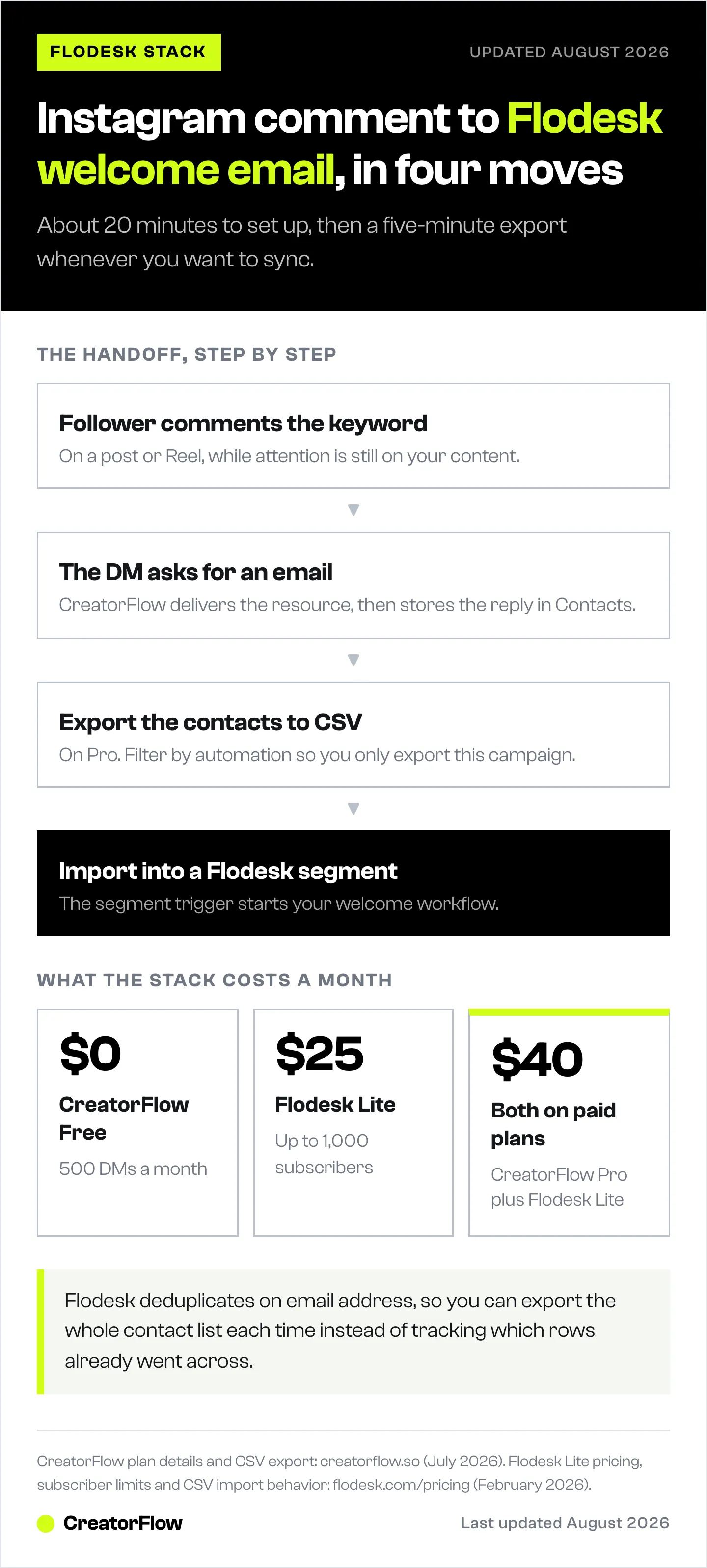
Connect Instagram DMs to Flodesk by pairing a DM automation tool like CreatorFlow with Flodesk’s own import. When a follower comments a trigger word on your post or Reel, CreatorFlow sends them a DM asking for their email and stores the address in Contacts. You then export those contacts to CSV and import them into a Flodesk segment, which triggers your welcome workflow. CreatorFlow’s CSV export on Pro is the supported route for moving that data across (creatorflow.so, July 2026).
This guide walks through each step, from CreatorFlow automation setup to Flodesk segment configuration and welcome sequence design, plus the automatic-sync option if you would rather use a tool that publishes a Zapier connection.
Key Takeaways
- The stack: CreatorFlow ($15/mo) + Flodesk (from $25/mo for 1K subscribers). No Zapier needed; CreatorFlow’s CSV export moves the contacts across
- The flow: Comment keyword on post, CreatorFlow DM captures the email into Contacts, you export to CSV and import into a Flodesk segment, welcome workflow fires
- Setup time: About 20 minutes end to end, plus a recurring 5-minute export whenever you want to sync new contacts
- Why CreatorFlow for this: Flat-rate pricing, 5-minute setup, focused on Instagram DM automation
- Want hands-off syncing instead? Flodesk’s Zapier integration supports Create/Update Subscriber, Add to Segment, Add to Workflow and 4 more, so a DM tool that publishes a Zapier connection (such as ManyChat) can push contacts automatically

How Do You Connect Instagram DMs to Flodesk?
Connect Instagram DMs to Flodesk by pairing a DM automation tool like CreatorFlow with Flodesk’s own import. When a follower comments a trigger word on your post or Reel, CreatorFlow sends them a DM asking for their email and stores the address in Contacts. You then export those contacts to CSV and import them into a Flodesk segment, which triggers your welcome workflow. CreatorFlow’s CSV export on Pro is the supported route for moving that data across (creatorflow.so, July 2026).
Why Flodesk Users Need Instagram DM Automation
Flodesk handles the email side well: beautiful templates, simple workflows, flat-rate pricing that doesn’t penalize you for growing your list. But it doesn’t have a native way to capture subscribers from Instagram.
Most Flodesk users default to “link in bio” forms. The problem: only 1-3% of your followers click that link. DM automation captures emails inside the conversation, where engagement is already happening.
If you’re using Flodesk for email marketing, adding Instagram DM automation closes the gap between your Instagram audience and your email list. No platform switch required.
What You Need Before Starting
Required accounts:
- Instagram Business or Creator account connected to a Facebook Page
- CreatorFlow account (free plan includes 500 DMs/month; CSV export is a Pro feature)
- Flodesk account on a paid plan (Lite starts at $25/month for up to 1,000 subscribers; flodesk.com/pricing, February 2026)
- Optional: a Zapier account, only if you use a DM tool that publishes a Zapier connection
Time needed: 15-20 minutes for the full setup.
Step 1: Set Up Email Capture in CreatorFlow
Create the DM automation that asks followers for their email address.
Create a new automation
- Log in to CreatorFlow and click New Automation
- Choose your trigger type: Comment Keyword or Story Reply
- Set your trigger keyword (e.g., “GUIDE,” “FREEBIE,” or “EMAIL”)
Build the DM conversation flow
Your automation should follow this sequence:
Message 1: Deliver the value they asked for.
“Here’s the link to the free Instagram growth checklist: [link]. Want me to send you weekly tips too?”
Message 2: Ask for their email.
“Drop your email below and I’ll add you to the list. One tip per week, nothing spammy.”
Message 3: Confirm receipt.
“You’re in! Check your inbox for a welcome email from me.”
CreatorFlow captures the email response and stores it in Contacts. You move it into Flodesk in the next step.
For a full walkthrough on comment triggers, see the comment-to-DM setup guide.
Step 2: Export Your Captured Contacts
Every email the DM flow collects lands in CreatorFlow’s Contacts, alongside the Instagram handle, the automation that captured them, and the last interaction date.
In CreatorFlow:
- Open Contacts from the main navigation
- Filter by the automation you built in Step 1 so you only export this campaign’s leads
- Click Export to CSV (available on Pro and Growth)
- Save the file; it contains the email address and Instagram username for each contact
This export is CreatorFlow’s supported way to move contacts out (creatorflow.so, July 2026). Run it on a schedule that matches your launch cadence: weekly is enough for an evergreen lead magnet, daily during an active launch.
Step 3: Import the CSV into a Flodesk Segment
Flodesk imports CSV files directly and can drop every row into a segment on the way in, which is what fires your welcome workflow.
Create the segment first
- In Flodesk, open Audience and click Segments
- Create a segment named for the source, for example “Instagram DM Leads”
Import the file
- Go to Audience, then Add Subscribers, and choose Import a CSV file
- Upload the file you exported from CreatorFlow
- Map the columns: the email column to Email, and the Instagram username to a custom field if you want to keep it
- Select the “Instagram DM Leads” segment as the destination
- Confirm the import
Flodesk deduplicates on email address, so re-importing an overlapping export will update existing subscribers rather than create duplicates. That means you can export the full contact list each time instead of tracking which rows you already sent.
If you would rather automate the sync
Flodesk’s Zapier integration supports 7 actions including Create/Update Subscriber, Add Existing Subscriber to Segment, Add to Workflow, and Find Subscriber (zapier.com/apps/flodesk/integrations, February 2026). Any DM automation tool that publishes a Zapier trigger, such as ManyChat, can push each new email into Flodesk the moment it is captured. That is the trade-off to weigh: ManyChat prices per active contact and adds a Zapier subscription once you pass the free task tier, while CreatorFlow is flat-rate and moves contacts across with the CSV export above.
Step 4: Build a Welcome Workflow in Flodesk
With emails flowing into Flodesk, set up a welcome sequence to engage new subscribers immediately.
Create a segment-triggered workflow
- In Flodesk, go to Workflows and click New Workflow
- Set the trigger to Added to Segment: “Instagram DM Leads”
Build your email sequence
Email 1 (Immediate): Welcome + deliver the promised resource.
- Subject: “Here’s your [resource name]”
- Body: Deliver the download link and set expectations for future emails
Email 2 (Day 2): Introduce yourself.
- Share your story, what you create, and why they should stay subscribed
Email 3 (Day 4): Your best content or offer.
- Link to your most popular content, product, or service
Email 4 (Day 7): Soft ask.
- Invite them to reply, join a community, or check out a paid offering
Segment strategy for Flodesk
Create separate segments for different DM automations to send targeted welcome sequences:
| Segment Name | Trigger Source | Welcome Sequence |
|---|---|---|
| Instagram DM Leads | General keyword (e.g., “EMAIL”) | Standard welcome |
| Freebie Downloaders | Lead magnet keyword (e.g., “GUIDE”) | Resource delivery + nurture |
| Product Interest | Product keyword (e.g., “PRICE”) | Product-focused follow-up |
Someone who asked about pricing gets different emails than someone who downloaded a free checklist. For more on segmentation strategies, see how to build an email funnel from Instagram automatically.
Step 5: Test Your Full Funnel
Before going live, run through the complete flow end to end.
Test checklist
- Comment the trigger keyword on your own post from a test account
- Verify the DM arrives within a few seconds
- Reply with a test email address in the DM conversation
- Confirm the address appears in CreatorFlow Contacts
- Run the CSV export and import it into Flodesk
- Check Flodesk to verify the subscriber appeared in the correct segment
- Wait for the welcome email to confirm the workflow triggered
Common issues and fixes
Email doesn’t appear in Flodesk:
- Confirm the contact is in CreatorFlow Contacts first; if it is missing, the DM flow never captured it
- Check that the CSV column you mapped to Email is the address column, not the username column
- Re-run the import and watch for rows Flodesk skips as invalid
Subscriber lands in wrong segment:
- Re-check the destination segment you picked during the import step
- Flodesk segment names are case-sensitive
Welcome email doesn’t send:
- Verify your Flodesk workflow is set to Active (not Draft)
- Check that the workflow trigger matches your segment name
- Review Flodesk’s workflow logs for delivery errors
How Much Does This Stack Cost?
Here’s what the CreatorFlow + Flodesk stack costs at different scales.
CreatorFlow + Flodesk stack
| Tool | Plan | Monthly Cost |
|---|---|---|
| CreatorFlow | Free | $0 (500 DMs/month) |
| CreatorFlow | Pro | $15/month (5,000 DMs/month, includes CSV export) |
| Flodesk | Lite (1K subs) | $25/month |
| Total (free start) | $25/month | |
| Total (Pro) | $40/month |
Flodesk Lite supports up to 1,000 subscribers with unlimited email sends. As your list grows, Flodesk Pro starts at $28/month for 1,000 subscribers with unlimited workflows and no branding (flodesk.com/pricing, February 2026).
How ManyChat compares
ManyChat Essential starts at $17/month for 250 contacts and scales across 5 tiers post-March 2026: Pro $39/mo (2,500 contacts), Business $99/mo (7,500), Advanced $199/mo (25,000), or $14/$29/$69/$139 per month billed annually (manychat.com/pricing, July 2026). ManyChat includes built-in email sending on its Pro plan and higher, so you could potentially handle both DM automation and email marketing in one tool.
ManyChat’s email builder is functional and works well for transactional follow-ups. If you specifically chose Flodesk for its design-first email experience and visual templates, the CreatorFlow + Flodesk combination lets you keep using the email tool you prefer while adding Instagram automation on top.
ManyChat also supports Facebook Messenger, WhatsApp, SMS, and TikTok alongside Instagram. If you need multi-platform automation, ManyChat offers more coverage. CreatorFlow is focused on Instagram and designed for creators who want a fast, simple setup for one platform.
Tips for Higher Email Capture Rates
1. Offer something specific
Generic “join my newsletter” asks convert at 5-10%. Specific offers convert much higher.
Instead of: “Drop your email for updates.”
Try: “Drop your email and I’ll send you the exact Instagram caption templates I use every week.”
2. Use keyword triggers on Reels
Reels reach non-followers at scale. Add a CTA like “Comment TEMPLATE to get the free caption pack” at the end of your Reels. This turns reach into list growth.
For more on using Reels as a DM trigger, see the Reels-to-DM automation strategy.
3. Keep the DM conversation short
Two to three messages maximum before asking for the email. Every extra message increases drop-off. Deliver value first, ask second.
4. Deliver the lead magnet via email, not DM
Tell them: “I’ll send it to your inbox.” This gives them a reason to share their real email address. It also trains them to open your emails from day one.
For lead magnet delivery ideas, check out how to deliver free PDFs via Instagram DM automation.
5. Tag by interest in Flodesk
Use different trigger keywords for different topics. “RECIPE” goes to a cooking segment, “WORKOUT” goes to a fitness segment. Flodesk’s segment-based workflows make this straightforward to configure.
FAQ
Is Flodesk compatible with Instagram DM automation tools?
Flodesk doesn’t have a native Instagram integration, so a DM automation tool sits in between. With CreatorFlow you capture the email and move it across with a CSV export and Flodesk’s own import. With a tool that publishes a Zapier trigger, such as ManyChat, the sync can run automatically: Flodesk’s Zapier integration includes 7 actions (Create/Update Subscriber, Add to Segment, Remove from Segment, Add to Workflow, Remove from Workflow, Unsubscribe, and Find Subscriber) (zapier.com/apps/flodesk/integrations, February 2026).
Can I use CreatorFlow’s free plan for this?
Yes. CreatorFlow’s free plan includes 500 DMs per month, which is enough to test and validate this funnel. Once you’re consistently capturing 100+ emails per month, upgrading to Pro ($15/month) gives you 5,000 DMs per month and features like email collection tracking and link click analytics.
Does Flodesk have a direct API I can use instead of the CSV import?
Flodesk offers a REST API at developers.flodesk.com with endpoints for subscriber management, segments, and workflows (developers.flodesk.com, February 2026). API access is available on all paid plans. It is useful if you are already writing code, and it covers the Flodesk side of the handoff. On the CreatorFlow side, the CSV export is how the captured contacts move across.
What if someone gives a fake email in the DM?
This happens occasionally. Flodesk will still create the subscriber, but the welcome email will bounce. Monitor your Flodesk bounce rate and clean your list monthly by removing hard bounces. If it becomes a pattern, run the exported CSV through a validation service such as NeverBounce or ZeroBounce before you import it.
How does this compare to using a link-in-bio form?
Link-in-bio forms require followers to visit your profile, click the link, find the form, and fill it out. That’s 4 steps with drop-off at each one. DM automation captures emails mid-conversation in 2 steps: comment trigger + email reply. Most creators see significantly higher conversion rates with DM-based capture compared to link-in-bio forms.
For a detailed comparison between these approaches, see bio link vs DM automation for driving clicks.
How many subscribers can Flodesk handle?
Flodesk’s Lite plan supports up to 25,000 subscribers. The Pro plan and Everything plan go up to 255,000 subscribers. Accounts exceeding 255,000 get custom billing. Flodesk sends unlimited emails on all paid plans, so you’re only gated by subscriber count, not email volume (flodesk.com/pricing, February 2026).


