

Choose a link in bio if most of your visitors arrive from Instagram, TikTok or YouTube, and a website if they arrive from Google. A link-in-bio page is free or cheap, takes minutes to set up and fits a phone screen. A website costs more and takes longer, but it can rank in search and hold long content. Many creators run both, on a domain they own.
Most advice on this question compares features: templates, checkouts, design control. Features matter less than one fact you can check today in your analytics. If 90% of your visits come from a social app, a five-page website is a lot of work for people who will never scroll past the first screen. If people find you by typing a question into Google, a bio page will not rank for it.
This guide compares both options on cost, setup, search and selling, with plan prices checked on each company’s own pages in October 2026. It gives you a decision rule based on traffic source, explains why the domain matters more than the tool, and covers the step both options share: the tap from your profile to the link.
Key Takeaways
- Pick by traffic source: social traffic fits a link-in-bio page, search traffic needs a website. Check your analytics before you choose a tool
- Entry costs range from $19 to $300 a year: Carrd Pro Standard is $19 a year, Linktree Starter is $8 a month, Wix Light is $17.77 a month billed yearly and Stan Creator is $300 a year (checked October 2026)
- Only a website can rank for topics: a bio page is one short page, so it has little text for Google to match against a question
- Own the domain from day one: if your bio link points at yourname.com, you can switch tools later and every old link still works
- Both options share one weak step: a visitor must leave the post, open your profile and tap the bio link. Sending the link by DM when someone comments removes that step
- Running both is common: the website holds content and search traffic, and the bio page or DM sends social visitors straight to one action
Link in Bio vs Website: The Short Answer
A link-in-bio page is one mobile page with a list of buttons, hosted by a tool such as Linktree, Stan, Beacons or Carrd. A website is a multi-page site on your own domain, built on Squarespace, Wix, WordPress or similar. The bio page is a menu for people who already know you. The website is a place strangers can find through search.
| Link-in-bio page | Website | |
|---|---|---|
| Best for | Visitors from social apps | Visitors from Google and other search |
| Setup time | Minutes | Days to weeks |
| Cost to start | Free plans exist | Wix has a free plan; Squarespace has a 14-day trial only |
| Pages | One | As many as you need |
| Ranks in Google for topics | Rarely | Yes, with content |
| Selling | Built-in checkout on Stan, Beacons, Linktree | Built-in store on most paid builder plans |
| Upkeep | Update a button | Update pages, plugins, design |
What a Link-in-Bio Page Does Well
A bio page is built for the moment someone taps your profile link on a phone. It loads fast, fits one screen and shows five to ten choices. That matches how social visitors behave: they came from a post, they want one thing, and they will leave if they have to search for it.
Instagram allows up to five links in a bio since April 2023, and the bio itself holds 150 characters. Five plain links with no labels or images are hard to scan, which is why many creators still put one link-in-bio page in the first slot. For page layouts and wording, see these Instagram bio ideas.
The other strength is cost. Most link-in-bio tools have a free plan, and the paid tiers start low. Our comparison of free link-in-bio tools covers 11 of them, including the fee each one takes from sales.
What a Website Does That a Bio Page Cannot
A website gives search engines something to read. Each page can answer one question in full: a recipe, a review, a guide, a portfolio case. That text is what Google matches against a search, and a one-page list of buttons has almost none of it.
Instagram content can appear in Google too. Since July 10, 2025, public posts from professional accounts can show in search results, as PPC Land reported at the time. Posts are short, though, and you do not control how Google shows them. If you want to try it, here is how to get Instagram Reels into Google search.
A website also gives you room. You can publish long sales pages, an archive, a media kit or a portfolio. You choose the design and the URL structure. You do not depend on one social app’s rules for your whole presence.
Link in Bio vs Website: Cost, Setup and SEO Compared
Prices below come from each company’s own pricing page, checked October 2026. Read the billing column: some tools quote monthly prices, others quote yearly.
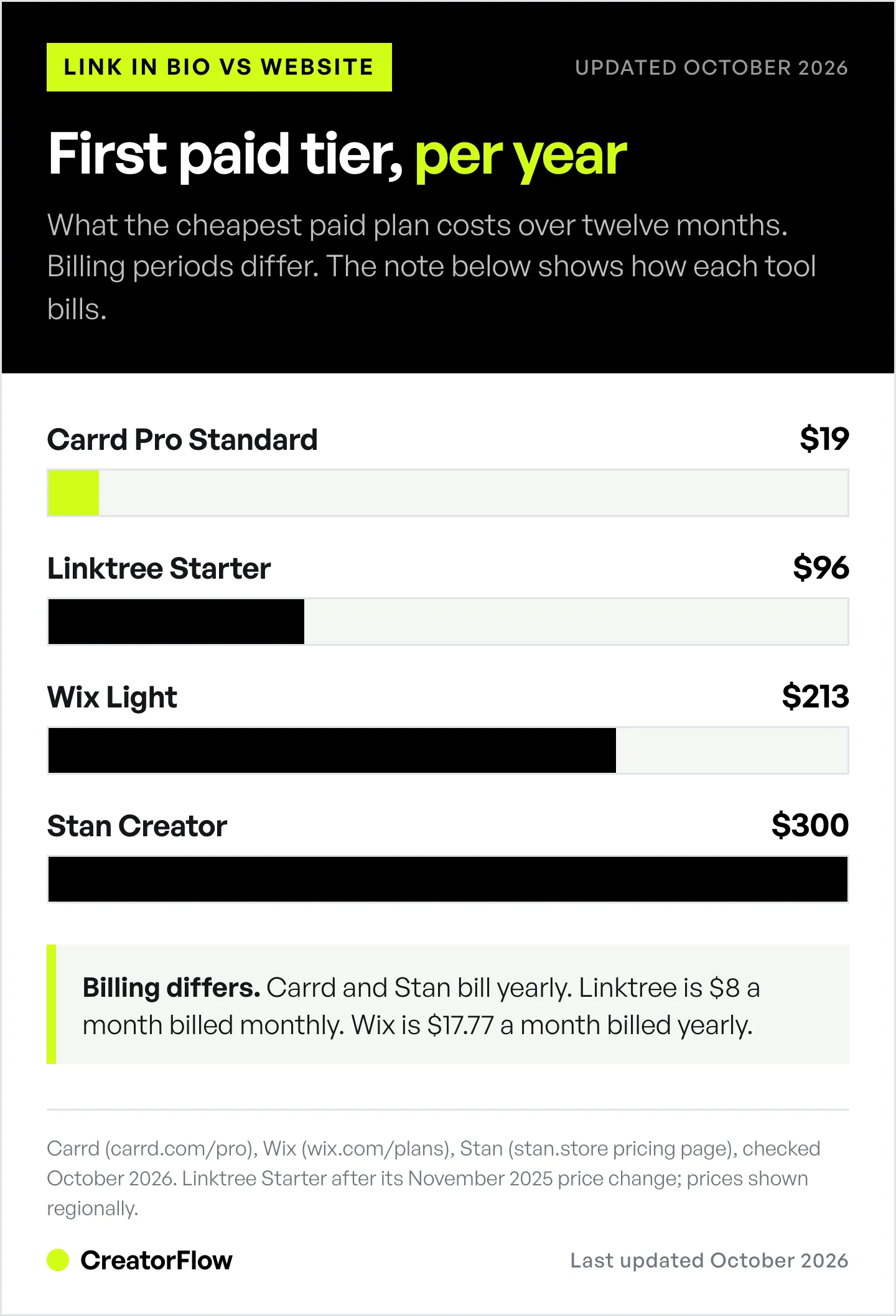
| Tool | Type | Free plan | First paid tier | Per year at that tier |
|---|---|---|---|---|
| Carrd | Simple site or bio page | Yes | Pro Standard, $19/year (first tier with custom domains and forms) | $19 |
| Linktree | Link in bio | Yes | Starter, $8/month billed monthly | $96 |
| Wix | Website | Yes, with Wix branding and no custom domain | Light, $17.77/month billed yearly | $213 |
| Stan | Link-in-bio store | No, 14-day trial | Creator, $29/month or $300/year | $300 |
| Squarespace | Website | No, 14-day trial | Basic | See pricing page |
Sources: Carrd Pro, Wix plans, Stan pricing, Squarespace pricing (all checked October 2026). Linktree’s Starter price follows its November 2025 price change; Linktree shows prices by region, so check the price in your own account.
Two fees change the picture once you sell. Linktree takes 12% of sales on its free plan, 9% on Starter and Pro, and 0% on Premium at $35 a month. Stan says it charges no transaction fee on either plan; Stripe or PayPal processing still applies. Carrd has no checkout of its own, so you link to a store elsewhere.
Setup time follows the same order. A bio page takes minutes because there is nothing to design beyond buttons. A website takes days because each page needs writing, and the site needs a navigation, a domain and basic SEO settings.
Where Do Your Visitors Come From?
This is the question that decides it. Open the analytics in your current link tool, or in Google Search Console if you have a site, and look at the referrer list for the last 90 days.
- Over 80% from social apps: a link-in-bio page is enough. Spend the time on content and on what happens after the tap.
- A real share from search: build a website, even a small one. Write one page for each question people type to find you.
- No data yet: start with a bio page on a domain you own. Add the website when search traffic or long content gives you a reason.
Your business model points the same way. A creator who sells one product to an existing audience needs one clear button. A coach who wins clients from “how to” searches, or a photographer whose portfolio is the pitch, needs pages.
Why You Should Own the Domain Either Way
The most expensive mistake in this decision is a URL you do not control. If your bio, your old posts, your podcast notes and your printed cards all say linktr.ee/yourname or stan.store/yourname, switching tools later means changing every one of those links.
A domain you own fixes that. Point yourname.com/links at whatever bio tool you use today. If you move to a different tool or build a full website next year, you change one setting and every old link still works. Carrd allows custom domains from its $19 a year Pro Standard tier, and website builders include them on paid plans. Check whether your chosen bio tool supports a custom domain on the tier you can afford.
The Step Both Options Share: The Bio Tap
A link in bio and a website have the same entry point on Instagram: the profile. A visitor sees your post, opens your profile, taps the link and then picks a button. Every step in that path loses people, and the best page design cannot recover a visitor who never reached it.
You can skip the path for your most important link. With a comment-to-DM automation, a follower comments a keyword such as “LINK” on a post and gets the link in their DMs within seconds. The link arrives where they already are, attached to the post that made them want it. This is the idea behind the comment LINK strategy.
CreatorFlow runs this on Meta’s official Instagram API as a Meta Tech Provider. The Free plan includes comment-to-DM, story reply and keyword triggers with 500 DMs a month. Pro costs $15 a month and adds a Follow Gate, an Email Gate, link click tracking and geographic analytics. The DM can point at your bio page, a product on your website or a checkout.
For the numbers behind each route, compare bio link and DM automation for affiliate clicks, or see how the two perform for email capture on Instagram.
When to Run Both
Most established creators end up with three layers, each doing one job:
- Website: holds long content, ranks in search and gives you a home you control
- Bio page: serves profile visitors with a short menu, on yourname.com/links
- DM automation: sends the one link a post is about to the person who asked for it
You do not need all three on day one. Start with the layer that matches where your visitors come from today, put it on your own domain, and add the next one when your traffic or your products give you a reason.
FAQ
Do I need a website if I have a link in bio?
Not if almost all of your visitors come from social apps and you sell one or two things. A link-in-bio page handles that well. Build a website when people start finding you through Google, or when you need long pages such as a portfolio, a blog or detailed sales pages.
Is a link in bio good for SEO?
Only in a small way. A bio page is one short page with little text, so it rarely ranks for topic searches. It can rank for your own name. If search traffic matters to you, a website with one page per question is the better tool.
Is Linktree a website?
Linktree hosts a single page on its own domain, linktr.ee/yourname. It works like a one-page website, but you do not control the domain, the page structure or the SEO settings in the way a website builder allows.
Can I use my own domain for a link-in-bio page?
Yes, on many tools. Carrd supports custom domains from its Pro Standard plan at $19 a year (checked October 2026). Other tools offer it on paid tiers. Check the tier you plan to buy before you print or post the URL.
How much does a creator website cost compared to a link in bio?
At the first paid tier, Carrd is $19 a year, Linktree Starter is $96 a year on monthly billing, Wix Light is about $213 a year and Stan Creator is $300 a year (checked October 2026). Free plans exist for Carrd, Linktree and Wix, with limits on branding and domains.
Can I send people my link without a bio link?
Yes. Instagram allows up to five links in your bio, and a comment-to-DM automation sends a link in a direct message when someone comments a keyword on your post. That skips the profile visit entirely, which is useful for the one link a post is about.
Prices verified on Carrd, Wix, Stan and Squarespace in October 2026. Linktree’s price ladder and selling fees follow its November 2025 price change and are shown regionally. Instagram’s five-link bio limit dates from April 2023, and Google indexing of professional accounts’ public posts from July 10, 2025. CreatorFlow plans per creatorflow.so, October 2026.


