

You can sell digital products without a website by using a hosted checkout that someone else runs. The six routes are a payment link (Stripe or PayPal), a link-in-bio store, a hosted product page (Gumroad, Payhip, Lemon Squeezy), a marketplace like Etsy, your email platform’s checkout, and Instagram DMs that send the buy link. Each one replaces a different part of what a website does.
Most guides stop at “use a link-in-bio store”. That answers one question, where the buy button lives, and skips three others. Who sends the file after payment? Who keeps the buyer’s email so you can sell to them again? Who files VAT when someone in Germany buys your $20 template? A website answered all four. Without one, you pick a tool for each job.
This guide compares the six routes on those four jobs, with fees from each platform’s own pricing page and the cost of a $20 sale worked out on each. It is written for creators selling ebooks, templates, presets, guides and courses, mostly to an Instagram audience. If you are still choosing what to make, start with how to make digital products worth buying.
Key Takeaways
- A website does four jobs: it takes payment, delivers the file, keeps the buyer’s contact, and handles sales tax. Every no-website route covers some of these and leaves the rest to you
- The cheapest checkout is a Stripe Payment Link: 2.9% + $0.30 on a US card, or $0.88 on a $20 sale, with no monthly fee. You set up file delivery and tax yourself
- Fees on a $20 sale range from $0.88 to $6.00 across the routes compared here. Gumroad’s Discover marketplace takes 30% because it also finds the buyer for you
- Two platforms state they are merchant of record: Gumroad (since January 1, 2025) and Lemon Squeezy. They handle sales tax and EU VAT. Payhip says it collects and pays EU and UK VAT for you
- Instagram Shops cannot list digital products: Meta’s Commerce Policies prohibit downloadable digital content. You sell on Instagram through links, in your bio or in DMs
- The buy link reaches more people in a DM than in a bio: a comment-to-DM automation sends the checkout link to each person who asks, seconds after they ask
Can You Sell Digital Products Without a Website?
Yes. A hosted checkout, such as a Stripe Payment Link, a Gumroad product page or a Stan Store, gives you a page that takes payment and a link to share. You post the link in your Instagram bio, a DM, an email or a YouTube description. The platform hosts the page and processes the card. Some platforms also deliver the file and handle tax; others leave that to you.
The question that matters more is which of a website’s jobs you still need covered. Here is how the six routes split them.
| Route | Takes payment | Delivers the file | Keeps buyer email | Handles VAT |
|---|---|---|---|---|
| Payment link (Stripe, PayPal) | Yes | You set it up | Yes, in Stripe or PayPal | No, Stripe Tax is an add-on |
| Link-in-bio store (Stan, Beacons) | Yes | Yes | Yes | No |
| Hosted product page (Gumroad, Payhip, Lemon Squeezy) | Yes | Yes | Yes | Gumroad and Lemon Squeezy: yes. Payhip: EU and UK VAT |
| Marketplace (Etsy, Gumroad Discover) | Yes | Yes | Limited, the buyer belongs to the marketplace | Varies by marketplace |
| Email platform checkout (Kit) | Yes | Yes | Yes, added to your list | Not stated on the pricing page |
| Instagram DM delivery | No, it sends the checkout link | Yes for free files, by link | Yes, with an email gate | Not applicable |
The 6 Ways to Sell Digital Products Without a Website
1. A Payment Link From Stripe or PayPal
A payment link is a checkout page with no store around it. Stripe’s Payment Links documentation describes them as links you share on social media, in emails or on a website, with no code needed. Stripe hosts the page.
Cost: Stripe’s US pricing is 2.9% + $0.30 per domestic card payment, plus 1.5% for international cards and 1% when currency conversion applies (checked October 2026). PayPal’s US business fees page lists 3.49% + $0.49 for PayPal Checkout payments (checked October 2026).
Delivery: in Stripe, set the link’s after-payment option to a confirmation page that contains the download link, or redirect the buyer to the file. Anyone with that link can open it, so host the file somewhere you can replace the link if it spreads.
Best for: one product, low price, and a creator who wants to keep fees at the minimum.
2. A Link-in-Bio Store
A link-in-bio store puts a small shop on the page your bio link opens. Each product gets a checkout, and the platform emails the file after payment.
Stan Store has no free plan. Creator is $29/month or $300/year and Creator Pro is $99/month or $948/year, with a 14-day free trial, according to Stan’s own pricing post (checked October 2026). Stan states it charges 0% transaction fees; Stripe or PayPal processing applies.
Beacons has a free plan with a 9% fee on sales. Creator is $10/month (still 9%), and Creator Plus at $30/month and Creator Max at $90/month take 0%, per the Beacons help center (checked October 2026).
Best for: creators with several products who want one page for all of them. Our list of Linktree alternatives compares the bio-page tools that can sell.
3. A Hosted Product Page: Gumroad, Payhip or Lemon Squeezy
These platforms give each product its own page with checkout, file delivery and a customer list. You share the product link anywhere.
- Gumroad takes 10% + $0.50 on sales through your profile or direct links, according to its pricing page (checked October 2026). The same page says that since January 1, 2025, Gumroad handles all your tax obligations
- Payhip is free with a 5% fee, $29/month with 2%, or $99/month with 0%, per its pricing page (checked October 2026). Stripe or PayPal fees apply on top. Payhip states it collects and pays EU and UK VAT on your behalf
- Lemon Squeezy charges 5% + $0.50 per transaction and states it is your merchant of record on its pricing page (checked October 2026)
Best for: creators selling to buyers in many countries who do not want to file VAT themselves. Our digital product platform fee comparison shows the monthly revenue at which each of these gets cheapest.
4. A Marketplace: Etsy or Gumroad Discover
A marketplace brings its own shoppers. That is what you pay for. Etsy’s US seller fees are $0.20 per listing, a 6.5% transaction fee and 3% + $0.25 for payment processing (checked October 2026). Gumroad charges 30% on sales that come through its Discover marketplace (gumroad.com/pricing, October 2026).
The trade-off is the customer relationship. A marketplace buyer is the marketplace’s customer first, and your ability to email them later is limited. Use a marketplace to be found, and a direct link to sell to people who already follow you.
Best for: printables, planners and templates that people search for by name.
5. Your Email Platform’s Checkout
Some email platforms sell products too, so every buyer joins your list at the moment they pay. Kit’s free plan covers up to 10,000 subscribers and includes selling digital products and subscriptions, with a 3.5% + $0.30 fee per sale, according to Kit’s pricing page (checked October 2026).
Best for: creators whose main channel is a newsletter, or who sell follow-up products to existing buyers.
6. Instagram DMs That Send the Checkout Link
This route does not replace the checkout. It replaces the part a website was always weakest at: getting the link in front of the person at the moment they want it.
Instagram has allowed up to five links in a bio since April 2023, as TechCrunch reported at launch, but a bio link waits for a profile visit and a tap. A comment-to-DM automation works from the post itself. You write “Comment GUIDE to get the link”, and each commenter receives a DM with your Stripe link, Gumroad page or Stan product, seconds after they comment.
Instagram’s own shop is not an option here. Meta’s Commerce Policies list downloadable digital content and digital subscriptions among the items commerce listings may not sell (checked October 2026). The DM carries a link to a checkout outside Instagram instead.
CreatorFlow is an Instagram DM automation tool built for this. It sends the link when someone comments a keyword, replies to your Story or sends you a DM, through Meta’s official Instagram API. The free plan covers 500 DMs per month. Pro at $15/month adds an Email Gate, which collects the person’s email before the link is sent, plus link click tracking. The comment-to-DM setup guide walks through a first automation.
Best for: creators who sell from Reels and posts, where the buying moment is the comment.
What a $20 Sale Costs on Each Route
These figures apply each platform’s published rate to one $20 sale with a US card. They are illustrative arithmetic from the pricing pages cited above, not measured results, and they exclude monthly plan prices.
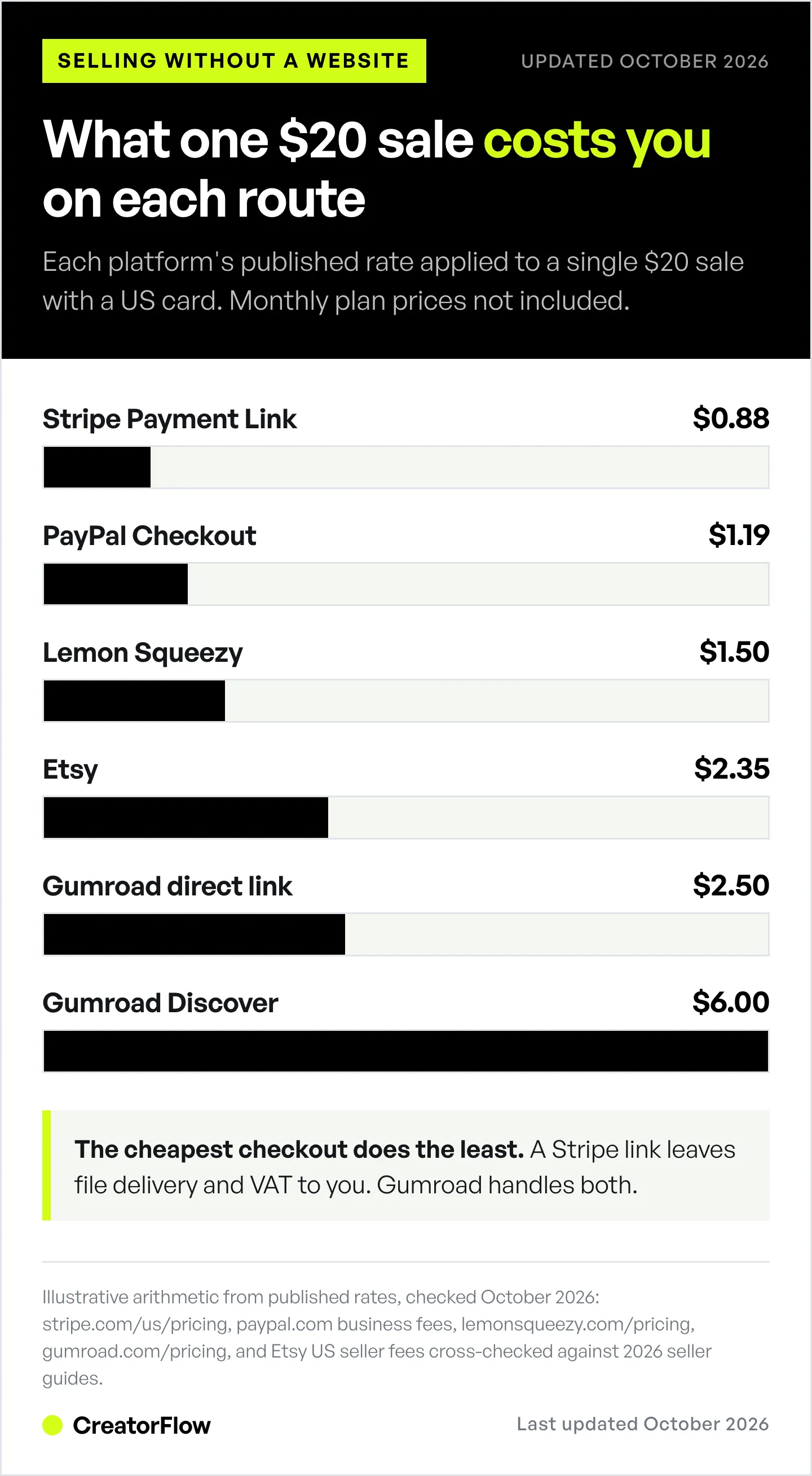
| Route | Published rate | Fee on a $20 sale | Card processing |
|---|---|---|---|
| Stripe Payment Link | 2.9% + $0.30 | $0.88 | Included |
| Kit | 3.5% + $0.30 | $1.00 | Not stated separately on the pricing page |
| PayPal Checkout | 3.49% + $0.49 | $1.19 | Included |
| Payhip (free plan) | 5% | $1.00 | Charged on top |
| Lemon Squeezy | 5% + $0.50 | $1.50 | Not stated separately on the pricing page |
| Beacons (free plan) | 9% | $1.80 | Charged on top |
| Etsy | $0.20 + 6.5% + 3% + $0.25 | $2.35 | Included |
| Gumroad (direct link) | 10% + $0.50 | $2.50 | Not stated on the pricing page |
| Gumroad (Discover) | 30% | $6.00 | Not stated on the pricing page |
Two things change the math. Monthly plans: Stan Store’s $29/month is $1.45 per sale at 20 sales a month, and $0.29 at 100. And international buyers: Stripe adds 1.5% for non-US cards, so a $20 sale to a buyer in London costs $1.18 instead of $0.88.
The cheapest route is rarely the right one on its own. A Stripe link at $0.88 leaves delivery and VAT to you; Gumroad at $2.50 handles both.
Do You Need to Charge VAT Without a Website?
Having no website does not change your tax position. In the EU, digital products sold to consumers are taxed in the country where the buyer lives. The European Commission’s One-Stop Shop page explains that sellers based outside the EU declare that VAT through the non-Union OSS scheme, and sellers inside the EU can use their home-country rules only below EUR 10,000 a year in cross-border sales (checked October 2026).
You have two ways to deal with it:
- Use a merchant of record. Gumroad and Lemon Squeezy sell the product on your behalf and handle the tax. Payhip collects and pays EU and UK VAT for you
- Handle it yourself. With Stripe, PayPal, Stan or Beacons, you are the seller. Stripe Tax can calculate it, but registering and filing stay with you
This is general information, not tax advice. If most of your buyers are outside your country, ask an accountant before you pick a route.
How to Set Up a No-Website Sale in One Afternoon
- Package the file. Export a PDF, a template link or a zip. Name it clearly
- Pick your checkout from the table above. One product and US buyers: a Stripe Payment Link. Buyers in many countries: Gumroad, Payhip or Lemon Squeezy. Several products: a link-in-bio store
- Set up delivery. On a hosted platform, upload the file. On a Stripe link, add the download link to the confirmation page
- Write the product page. Say what the buyer gets, who it is for and what they can do after using it, in that order
- Test it. Buy your own product once and check the email and the file arrive
- Put the link where people ask for it: in your bio, in a pinned post, and in a comment-to-DM automation on every post that mentions the product
For the delivery step on free products, our guide to sending free PDFs by DM shows the full flow.
How Do You Get Buyers Without a Website?
Without a website you lose search traffic to a product page, so your audience does the work. Three habits cover most of it:
- Name the keyword in every post about the product. “Comment TEMPLATE” turns a Reel into a checkout path
- Collect emails from free products. A free checklist sent by DM, behind an email gate, builds the list you will sell the paid product to. See how to collect emails through Instagram DMs
- Use a marketplace for discovery. One listing on Etsy or Gumroad Discover can find buyers who have never seen your account
FAQ
Can I sell digital products without a website?
Yes. Use a hosted checkout such as a Stripe Payment Link, a Gumroad or Payhip product page, a link-in-bio store like Stan or Beacons, or a marketplace like Etsy. The platform hosts the page and takes payment, and you share the link in your bio, DMs, emails or video descriptions.
What is the cheapest way to sell digital products without a website?
A Stripe Payment Link costs 2.9% + $0.30 per US card payment with no monthly fee, which is $0.88 on a $20 sale (stripe.com/us/pricing, October 2026). Payhip and Beacons have free plans with 5% and 9% fees, plus processing.
Can I sell digital products on Instagram without a website?
Yes, through links. Instagram Shops cannot list downloadable digital products under Meta’s Commerce Policies, so you sell through a checkout link in your bio or in DMs. A comment-to-DM automation sends that link to everyone who comments your keyword.
How do I deliver a digital product without a website?
Hosted platforms like Gumroad, Payhip, Stan and Beacons email the file to the buyer after payment. With a Stripe Payment Link, put the download link on the after-payment confirmation page or redirect the buyer to the file.
Do I need an LLC to sell digital products?
Not to start, in most US states. Payment platforms accept individual sellers. An LLC is a legal and tax decision about liability, so check your state’s rules and ask an accountant once sales grow.
Which platforms handle EU VAT for digital products?
Gumroad and Lemon Squeezy state they are merchant of record and handle sales tax. Payhip states it collects and pays EU and UK VAT for you. With Stripe, PayPal, Stan or Beacons, VAT stays your responsibility.
Fees, plans and policies checked on official pages in October 2026: Stripe pricing and Payment Links docs, PayPal business fees, Gumroad, Payhip, Lemon Squeezy, Stan Store pricing post, Beacons help center, Kit, Meta Commerce Policies and the EU One-Stop Shop. Etsy’s fees were cross-checked against several 2026 seller guides because Etsy’s fee page blocks automated access. Prices change; confirm on each platform before you choose. Not tax advice.


