

The six Skool alternatives worth comparing are Circle, Mighty Networks, Kajabi, Podia, Stan and Whop. Circle and Mighty Networks are the closest match for a community-first business. Kajabi and Podia fit creators who sell courses and products around the group. Stan and Whop cost the least at low revenue. On Skool’s $99 Pro plan, fees alone are rarely a reason to switch.
Most “Skool alternatives” lists compare fee percentages in isolation. A 2% fee sounds cheaper than 2.9%, until you add the monthly plan and the card processing that Skool already includes. The order changes depending on how much you sell.
This guide prices each platform at three revenue levels, shows where Skool’s two plans cross over, and names the plan limit that tends to bite first on each tool. It is written for coaches and community owners deciding where to host a paid group, and what to do about filling it.
Key Takeaways
- The Skool breakeven: Skool Hobby ($9 plus 10%) costs more than Skool Pro ($99 plus 2.9%) once you sell more than about $1,268 a month
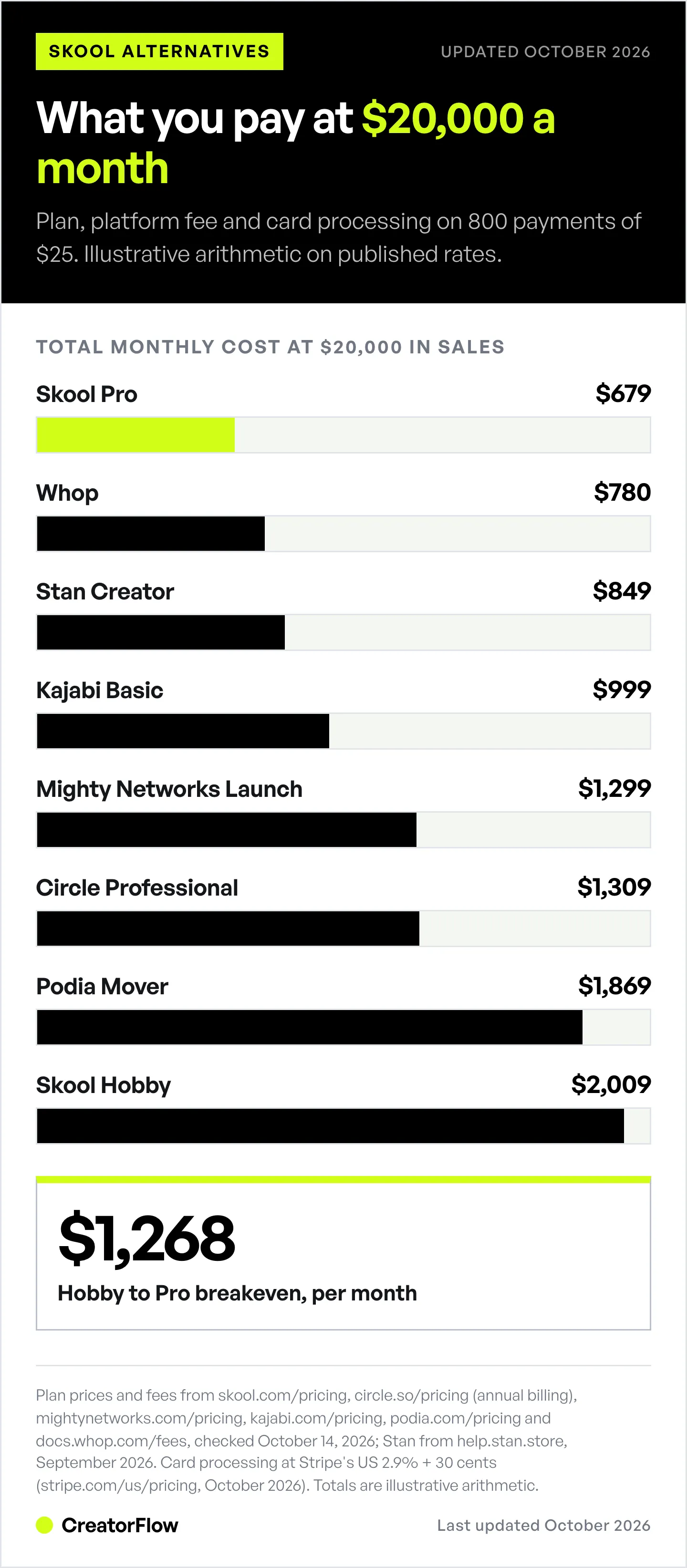
- Fees are rarely the reason to leave Pro: at $20,000 a month, Skool Pro’s published fees come to about $679, less than every alternative here except Whop
- Cheapest at low revenue: Stan ($29/month, 0% platform fee) and Whop (no monthly fee) cost the least under $5,000 a month
- Closest community match: Circle and Mighty Networks offer spaces, courses, events and live streaming, with platform fees that fall on higher plans
- Best for selling more than access: Kajabi bundles email, funnels and landing pages; Podia bundles a storefront, email and community
- The real gap is members, not software: none of these platforms brings you buyers, so plan where new members come from before you pick a host
What Skool Costs in 2026
Skool has two plans. Hobby costs $9 a month with a 10% transaction fee. Pro costs $99 a month with a 2.9% transaction fee. Both include unlimited members, courses, videos and live calls, according to Skool’s pricing page (checked October 2026). A yearly toggle offers two months free.
Skool’s pricing page lists only those percentages. Several payment guides report an extra 30 cents per payment, and 3.9% on single payments above $900. The totals in this article use the published percentages, so read the Skool rows as the lowest you would pay.
When Hobby stops being the cheap plan
Hobby is cheaper at small revenue because the monthly fee is $90 lower. The 10% fee closes that gap fast. The two plans cost the same at about $1,268 a month in sales ($90 divided by the 7.1-point fee difference). Above that number, Pro is cheaper, and the gap widens with every sale.
That makes the common reason for leaving Skool, “the fees got expensive,” mostly a Hobby problem. If you are on Hobby and selling more than $1,268 a month, the first move is upgrading to Pro, not migrating.
Why Creators Look for a Skool Alternative
Skool does one job: a community feed with courses, a calendar and gamification (points, levels and leaderboards). People leave for reasons other than price:
- You sell more than access. Downloads, 1:1 coaching, templates and physical products need a storefront or checkout.
- You want your own brand. Some platforms let you build custom spaces or a branded mobile app.
- You need email and funnels built in. Skool focuses on the community itself.
- Your members live elsewhere. Some audiences already gather in Discord or Telegram, where Whop gates access.
Knowing which of these applies to you decides the shortlist faster than any feature table.
Skool Alternatives Compared by Real Cost
Each row shows what a platform costs per month at three revenue levels. It assumes a $25 monthly membership, so $1,000 means 40 payments and $20,000 means 800.
| Platform | Plan used | $1,000/mo | $5,000/mo | $20,000/mo |
|---|---|---|---|---|
| Skool | Hobby, $9 + 10% | $109 | $509 | $2,009 |
| Skool | Pro, $99 + 2.9% | $128 | $244 | $679 |
| Circle | Professional, $89 + 2% | $150 | $394 | $1,309 |
| Mighty Networks | Launch, $79 + 2% | $140 | $384 | $1,299 |
| Kajabi | Basic, $179 | $220 | $384 | $999 |
| Podia | Mover, $49 + 5% | $140 | $504 | $1,869 |
| Stan | Creator, $29 + 0% | $70 | $234 | $849 |
| Whop | No monthly fee | $39 | $195 | $780 |
How the numbers were built. Each total is the monthly plan, plus the platform’s own fee, plus card processing. Processing is Stripe’s standard US rate of 2.9% + 30 cents per payment from Stripe’s pricing page, except for Kajabi (Kajabi Payments, same rate on Basic), Whop (its own 2.7% + 30 cents) and Skool (processing included in its fee). Circle uses its annual-billing price, because its page shows no month-to-month figure. This is illustrative arithmetic on published rates, checked October 2026, not a measured bill. International cards, taxes and add-ons raise every row.
What the table shows
At $1,000 a month, the subscription is most of the bill, so Stan and Whop win. At $5,000, Whop, Stan and Skool Pro are close. At $20,000, the percentage fee dominates, and Skool Pro’s all-in 2.9% beats every option except Whop.
Two plans change the high end. Circle Business ($199, 1% fee) comes to about $1,219 at $20,000. Mighty Networks Scale ($179, 1% fee) comes to about $1,199. Podia Shaker drops the 5% fee entirely, so it comes to about $919 at $20,000.
1. Circle
Circle is the closest match for creators who want a community with more structure than one feed. It organizes members into separate spaces and includes courses, events and live streams.
Circle’s pricing page lists Professional at $89 a month, Business at $199 and Scale at $419, all billed annually (checked October 2026). The transaction fee is 2% on Professional, 1% on Business and Scale, and 0.5% on Circle Plus, which is custom-priced. Members are unlimited on every plan.
Plan limit to know first: Professional includes 3 admins, Business includes 5 and Scale includes 10.
Best for: community owners who want spaces, events and courses in one branded hub.
2. Mighty Networks
Mighty Networks combines community, courses, events and live streaming. It sells branded mobile apps on its top tier.
Mighty Networks’ pricing page lists Launch at $79 a month, Scale at $179 and Growth at $354, billed monthly, with two months free on annual billing (checked October 2026). The transaction fee is 2% on Launch, 1% on Scale and 0.5% on Growth and Mighty Pro.
Plan limit to know first: live streaming is capped by plan, at 20 hours a month and 100 viewers per stream on Launch. Custom branded apps are listed only on Mighty Pro, which is custom-priced.
Best for: creators who run frequent live sessions and may want their own app later.
3. Kajabi
Kajabi is a full online business platform. Community is one part of it, next to courses, email, funnels and landing pages.
Kajabi’s pricing page lists Basic at $179 a month, Growth at $249 and Pro at $499 when billed monthly, or $143, $199 and $399 a month billed annually (checked October 2026). Kajabi Payments charges 2.9% + 30 cents on Basic in the US. If you use an outside payment provider, Kajabi adds 2% on Basic, 1% on Growth and 0.5% on Pro.
Plan limit to know first: Basic includes 5 products, 2,500 contacts and 1 community. Pro raises that to 3 communities.
Best for: coaches who want email, funnels and courses in the same login as the community.
4. Podia
Podia is a storefront for courses, downloads, coaching and webinars, with a community included on every plan.
Podia’s pricing page lists Mover at $42 a month, Shaker at $84 and Earthquaker at $150, billed annually (checked October 2026). Month to month, the plans were $49, $99 and $179 when we checked in September 2026. Mover charges a 5% transaction fee; Shaker and Earthquaker charge none. Stripe or PayPal processing applies on every plan.
Plan limit to know first: Podia ties email to a subscriber count, with paid contact tiers above the included amount.
Best for: creators whose community supports a product catalog rather than the other way round.
5. Stan
Stan is a creator storefront built for the link in your bio. A community is one product type, next to courses, downloads, coaching calls and memberships.
Stan’s Creator plan costs $29 a month and Creator Pro costs $99, or $300 and $948 a year, with a 0% platform fee, according to Stan’s help center (checked September 2026). Members can use the free Stan Community app on iOS.
Plan limit to know first: email marketing and upsells sit on Creator Pro.
Best for: creators who sell several product types and want the community as one item in the store.
(We compare Stan with comment-to-DM tools for affiliate creators in Stan Store vs CreatorFlow.)
6. Whop
Whop sells access to digital products, communities and groups that live on Discord, Telegram and its own app. It has no monthly subscription.
Whop’s fee page lists 2.7% + 30 cents per successful domestic card payment, plus 1.5% for international cards and 1% when currency conversion is needed (checked October 2026). Optional add-ons for billing, orchestration, and tax collection each charge an extra percentage only when you turn them on.
Plan limit to know first: there is no plan limit, so the cost depends on your card mix. A mostly international audience adds 1.5 to 2.5 points to every sale.
Best for: creators whose members already gather in Discord or Telegram. Our Whop setup guide covers selling that access from Instagram.
How to Choose the Right Skool Alternative
Pick by the job, then check the cost row at your revenue.
| If you need | Look at | Why |
|---|---|---|
| A community with spaces and events | Circle, Mighty Networks | Built around the member experience |
| Courses, email and funnels in one tool | Kajabi | Marketing tools included on every plan |
| A product catalog with a community | Podia, Stan | Storefront first, community included |
| Access to Discord or Telegram | Whop | Gates groups that already exist |
| The lowest fees above $5,000 a month | Skool Pro, Whop | Low all-in percentage |
If you are on Skool Hobby and the fee is the problem, upgrade to Pro before you move. Migrating members costs you more than the fee difference: every member has to create a new login, and some will not.
Where New Members Come From
Every platform above hosts a community. None of them fills it. Skool has a discovery page, but most creators still bring members in from their own audience, and for coaches that is usually Instagram.
The usual leak is the step between interest and the join page. A follower comments on a Reel, then has to find the link in your bio. Comment-to-DM automation removes that step. Someone comments a keyword, and they get the join link, a free lesson or the waitlist page in their DMs within seconds.
This works with any of the six hosts, because the DM carries a plain link. CreatorFlow sends it from comments, Story replies and DM keywords, tracks clicks, and can collect an email before the link goes out. It costs $15 a month on Pro, flat, whatever your audience size. The full funnel is in our guide to filling a Skool community with Instagram DM automation, and the same setup works for the membership communities hosted elsewhere.
If your community sits next to courses, our comparison of the best platforms to sell courses and coaching prices the course side of the decision.
FAQ
What is the best Skool alternative?
It depends on what you sell besides access. Circle and Mighty Networks are the closest match for a community-first business. Kajabi suits coaches who want email and funnels in the same tool. Stan and Whop cost the least at low revenue. Check the cost table at your own monthly sales before deciding.
Is there a cheaper alternative to Skool?
Below about $5,000 a month in sales, yes. Whop has no monthly fee, and Stan costs $29 a month with no platform fee, so both cost less than either Skool plan at $1,000 a month. Above $5,000, Skool Pro’s 2.9% all-in fee is hard to beat.
How much does Skool take from each sale?
Skool’s pricing page lists a 10% transaction fee on the $9 Hobby plan and 2.9% on the $99 Pro plan (checked October 2026). Payment guides also report 30 cents per payment and 3.9% on payments above $900 on Pro.
When should I switch from Skool Hobby to Skool Pro?
Once you sell more than about $1,268 a month. At that point the 10% Hobby fee costs more than Pro’s $90 higher monthly price. Above it, Pro saves money on every sale.
Is Circle better than Skool?
Circle gives you more structure: separate spaces, events and more control over the look. Skool gives you one simple feed with built-in gamification. On cost, Skool Pro is cheaper at every revenue level in our table, because Circle’s 2% fee comes on top of card processing.
Can I use Instagram to grow a community on any of these platforms?
Yes. Each platform gives you a join or checkout link. Comment-to-DM automation sends that link in a DM when someone comments a keyword on your post or Reel. It works the same for Skool, Circle, Kajabi or Whop.
Pricing and fees verified on the vendors’ own pages: Skool, Circle, Mighty Networks, Kajabi, Podia, Whop and Stripe, checked October 14, 2026. Stan pricing from its help center, checked September 2026. Cost totals are illustrative arithmetic on published rates. Your bill varies with card mix, taxes and plan.


