

Instagram Threads is Meta’s text-based social platform tied directly to your Instagram account, with an estimated 400+ million monthly active users as of early 2026 (DemandSage, April 2026). Threads surpassed X (formerly Twitter) in mobile daily active users in January 2026, hitting 141.5 million mobile DAU versus X’s estimated 125 million (Similarweb, January 2026). For creators already using Instagram DM automation, Threads adds a public conversation layer that feeds attention back into your Instagram profile, where your automations convert that attention into leads, sales, and email subscribers.
You’re already posting Reels and sending automated DMs when someone comments “LINK.” That system works. But Threads gives you a new front door: a place where short-form text posts reach people outside your current follower base, spark conversations, and drive profile visits to your Instagram. The catch? Threads has no DM automation API. No chatbot. No keyword triggers. So the play is using Threads for reach and Instagram DM automation for conversion.
This guide covers how Threads works for creators in 2026, what content performs best on the platform, how to build a Threads-to-Instagram pipeline, and how to pair your Threads strategy with DM automation tools like CreatorFlow to turn text posts into revenue.
Key Takeaways
- Threads is growing fast: An estimated 400+ million MAU with 73.6% higher median engagement than X, making it the fastest-growing text platform for creators (Buffer, 2026)
- No DM automation on Threads: The Threads API supports publishing and scheduling only, not direct messages. All DM automation stays on Instagram through Meta’s Graph API
- Cross-posting is one tap: Share Threads posts directly to Instagram Stories without leaving the app (launched February 2026), funneling Threads audience to your Instagram
- Short text wins: Posts between 100-280 characters perform best. Conversational, authentic content outperforms polished promotional copy
- The real strategy: Use Threads for reach and conversation, then funnel interested followers to Instagram where your DM automations capture leads, send links, and collect emails
- Bottom line: Threads is a free top-of-funnel channel. Instagram DM automation is your conversion engine. Together, they create a content-to-revenue pipeline

What Is Instagram Threads (And Why Should Creators Care)?
Threads is Meta’s text-first social platform, launched in July 2023 and built directly into Instagram. Your Threads account is your Instagram account. Same username, same profile photo, same verified badge. When someone discovers you on Threads, your Instagram is one tap away.
The numbers that matter for creators:
| Metric | Threads | X (Twitter) |
|---|---|---|
| Estimated MAU | 400-450M | 550-600M |
| Mobile DAU (Jan 2026) | 141.5M | 125M |
| Median engagement rate | 6.25% | 3.6% |
| Post character limit | 500 | 280 (free) / 25K (Premium) |
| Video length | Up to 5 min | Up to 4 hours (Premium) |
| Ads | Live globally | Mature platform |
| Creator monetization | None (as of May 2026) | Revenue sharing available |
Sources: DemandSage Threads Statistics 2026, Buffer Threads vs Twitter analysis, The Social Shepherd Threads Statistics (all accessed April 2026).
Why the engagement gap matters: A median engagement rate of 6.25% on Threads versus 3.6% on X means your posts get more replies, more profile visits, and more followers per impression. For creators using Instagram DM automation, every new follower who hits your Instagram profile is a potential automation trigger.
How Threads Connects to Instagram
Threads isn’t a separate island. It’s an extension of your Instagram identity:
- Shared account: Your Threads username IS your Instagram username. No separate signup
- Profile link: Every Threads profile links directly to your Instagram
- Cross-platform discovery: Meta surfaces popular Threads posts on Instagram and Facebook as carousels
- Story sharing: Since February 2026, you can share Threads posts directly to your Instagram Story without leaving the app (TechCrunch, February 2026)
- Follower overlap: According to Meta, 51% of Threads users are active on Instagram. Your Threads audience is likely already in your Instagram orbit
This tight integration is the strategic advantage. Unlike building on a disconnected platform, every Threads impression has a direct path back to your Instagram profile, where your automations are waiting.
How the Threads Algorithm Works
Threads runs two feeds, and understanding both changes how you create content.
The “For You” Feed (Algorithmic)
This is where discovery happens. The algorithm ranks content based on:
- Engagement velocity: 50 likes in 30 minutes outranks 100 likes over 24 hours. Early momentum matters
- Reply depth: Back-and-forth conversations (not just single replies) carry heavy weight. The algorithm rewards posts that spark actual discussion
- Higher-effort interactions: Comments, profile visits, and shares count more than passive likes
- Time spent on post: If people stop scrolling to read your full post, that’s a signal
The “Following” Feed (Chronological)
Reverse-chronological. No algorithmic ranking. Your followers see everything you post, in order. This feed rewards consistency. Post regularly and your core audience stays engaged.
The “Dear Algo” Feature
Launched February 2026, this lets users tell the Threads algorithm what to show more or less of. It resets after about 3 days. For creators, this means your content needs to earn engagement organically. You can’t rely on algorithmic boosts alone.
The takeaway for creators: Post content that starts conversations, not broadcasts. A question that gets 30 replies will outperform a polished statement that gets 200 likes. The algorithm is optimized for dialogue.
What Content Works on Threads (And What Doesn’t)
Based on data from Buffer, Metricool, and SociaVault analysis of top-performing Threads content (April 2026):
Content That Performs
Conversational posts (highest engagement):
- Hot takes on your niche (“Unpopular opinion: you don’t need 10K followers to monetize”)
- Questions that invite debate (“What’s the one tool you’d keep if you could only use one?”)
- Behind-the-scenes honesty (“My Reel got 500K views and generated $47 in affiliate revenue. Here’s why.”)
Short-form insights:
- 100-280 characters is the sweet spot
- Line breaks and scannable formatting outperform walls of text
- One clear idea per post
Community engagement:
- Replying to other creators’ posts (the algorithm tracks this)
- Threads of related thoughts (numbered lists work well)
- Polls and prompts that invite participation
Content That Fails
- Posts with links: 30-50% less engagement according to multiple practitioner reports. The algorithm suppresses link-heavy content
- Overt selling: “Buy my course!” style posts get buried. Threads rewards conversation, not promotion
- Recycled tweets: Content copied from X without adaptation underperforms. Threads has its own culture
- Generic motivational quotes: Low engagement. The platform rewards specificity and personality
Posting Frequency
1-3 posts per day, spaced across peak engagement windows. More than 5 posts per day leads to diminishing returns. Quality conversation starters beat volume.
The Threads + DM Automation Strategy
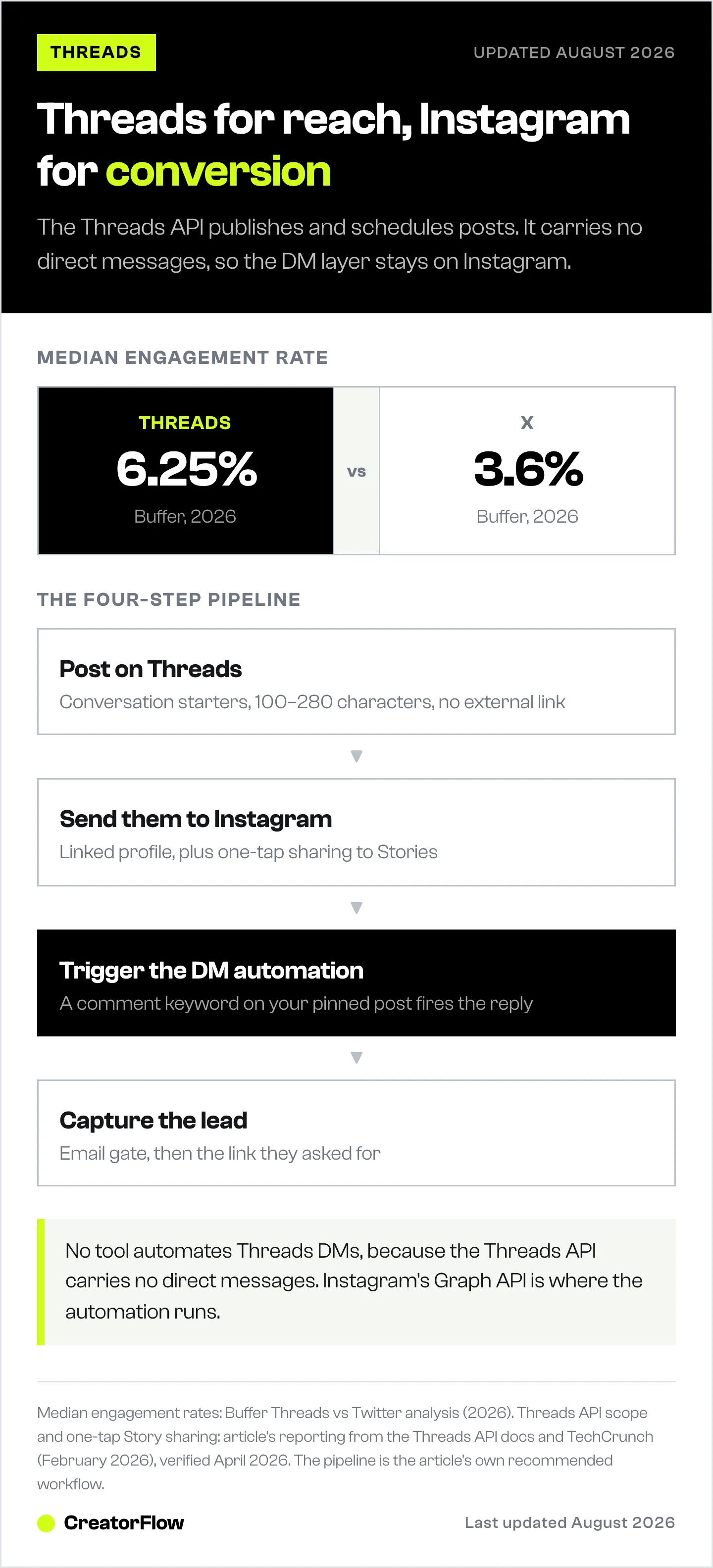
Here’s the core framework: Threads is your reach channel. Instagram is your conversion channel. DM automation is the bridge.
Why This Works
Threads gives you what Instagram’s algorithm makes difficult: organic reach to new audiences through text-based discovery. But Threads has no DM automation, no keyword triggers, no email capture tools. Instagram has all of those through Meta’s Graph API.
The play:
- Post on Threads to start conversations and attract new followers
- Drive them to Instagram through your linked profile and cross-posted Stories
- Trigger DM automations when they engage with your Instagram content
- Capture leads through email gates, link delivery, and booking automation
Step 1: Create Threads Content That Drives Instagram Visits
Your Threads posts should make people curious enough to visit your Instagram profile.
The “resource tease” format:
“I tracked my Instagram DM automation results for 90 days. 4,200 DMs sent automatically. 890 email captures. $12,400 in affiliate revenue. I broke down the exact setup on my Instagram. Link in bio or comment SYSTEM on my latest post.”
This post works on Threads (conversational, specific, no external link) and drives traffic to Instagram (where your automation captures the lead). If you want real numbers to build your own version on, read these Instagram DM automation results from live creator accounts.
The “conversation-to-CTA” format:
“What’s the #1 thing killing your Instagram engagement? Reply below and I’ll tell you what I’d fix first.”
Engage in replies for 30-60 minutes. Then follow up with: “If you want the full breakdown, I put together a free guide. Head to my Instagram and comment GUIDE on my pinned post.”
For more CTA strategies that drive comments and trigger automations, see our Instagram call-to-action examples.
Step 2: Cross-Post to Instagram Stories
Since February 2026, sharing a Threads post to your Instagram Story takes one tap. Use this for:
- High-performing Threads posts: If a post gets traction on Threads, share it to Stories. Your Instagram followers see it, engage with it, and it drives Threads growth simultaneously
- Conversation highlights: Screenshot interesting Threads replies and post to Stories with a “Join the conversation” CTA
- Teasers: Post a Threads hot take to Stories with “Full thread on Threads, link in bio”
This two-way traffic loop strengthens both platforms. For more on using Stories strategically, check our Instagram Story leads and DM automation guide.
Step 3: Set Up Instagram DM Automations for Threads Traffic
When Threads followers land on your Instagram, they need a reason to engage. Set up these automations:
Comment-to-DM on your pinned post: Reference your pinned post in Threads content. “Comment GUIDE on my latest Instagram post for the free download.” When they comment, your automation tool (CreatorFlow, ManyChat, LinkDM) sends the resource instantly.
Keyword triggers in DMs: Threads followers who visit your Instagram may DM you directly. Set up keyword automations for common requests: “PRICE,” “LINK,” “COACHING,” “GUIDE.” Instant responses convert curious visitors into leads.
Email capture gates: Before sending the promised resource, ask for their email. This moves them from a platform you don’t own (Threads) to a channel you do own (email). For a full walkthrough, see our DM-to-email list building guide.
Step 4: Track What’s Working
Monitor these metrics to optimize your Threads-to-Instagram pipeline:
- Threads post engagement rate: Which topics spark the most conversation?
- Instagram profile visits from Threads: Check Instagram Insights for traffic sources
- DM automation trigger rate: How many Threads-driven visitors actually comment trigger words?
- Email capture rate: What percentage of Threads-sourced visitors give you their email?
Use Instagram analytics to track the full funnel from Threads impression to DM conversion.
Threads API: What’s Possible (And What Isn’t)
The Threads API is publicly available and supports:
- Publishing: Post text, images, and video programmatically
- Scheduling: Schedule posts in advance (also available natively in-app since early 2026)
- Content management: Read, edit, and delete your posts
- Third-party tool support: Buffer, Hootsuite, Later, Sprinklr, and others integrate via the API
What the API does NOT support:
- Direct messages (no DM automation on Threads)
- Comment automation
- Follower management
- Analytics/insights retrieval (limited)
For CreatorFlow users: Your DM automations stay on Instagram. Threads is a content distribution channel only. No Threads DM automation exists from any tool because the API doesn’t support it. If this changes, it would be a significant development. For now, the workflow is: content on Threads, conversions on Instagram.
Third-party scheduling tools with Threads support: Buffer, Hootsuite, Later, Sprinklr, ShortSync, Brandghost, PostEverywhere (all verified April 2026). PostNext, built by the same team as CreatorFlow, also publishes to Threads alongside Instagram from one calendar (postnext.io, September 2026).
Threads Monetization: Where the Money Is (And Isn’t)
Direct monetization on Threads: $0.
As of April 2026, Threads offers no creator fund, no ad revenue sharing, no tipping, no subscriptions, and no branded content tools. Ads are live for advertisers globally (since January 2025), but creators don’t earn from ad placements.
Projected trajectory: Threads is expected to generate roughly $11.3 billion in ad revenue for Meta in 2026 (Blacktwist estimate, April 2026). The pattern mirrors Instagram’s evolution: build audience first, add creator monetization later. No timeline has been announced.
How creators monetize Threads today:
- Funnel to Instagram: Use Threads reach to grow your Instagram, where DM automation converts followers into customers
- Build authority: Position yourself as a thought leader in your niche. Brand deals and sponsorships follow audience and engagement
- Drive traffic to owned channels: Use Threads to grow your email list (via Instagram DM automation email gates), then monetize through email marketing
- Affiliate content: Share product opinions and recommendations on Threads, then direct followers to your Instagram for the affiliate link (via comment-to-DM automation)
The bottom line: Threads is a free distribution channel that feeds your Instagram conversion engine. For more on building a complete sales funnel from social content, see our Instagram sales funnel guide.
5 Threads Mistakes Creators Make
1. Treating Threads like Instagram Threads rewards conversation. Instagram rewards visual content. Posting your Reel captions as Threads posts doesn’t work. Write for the platform.
2. Dropping links in every post Posts with links get 30-50% less engagement. Share your insights on Threads, then direct people to your Instagram (where your DM automations handle the link delivery) when they ask for more.
3. Ignoring replies The algorithm tracks whether you engage with responses. Accounts that post and disappear get suppressed. Spend 15-30 minutes replying after each post.
4. Posting too infrequently Threads rewards consistency. Posting once a week won’t build momentum. Aim for 1-3 posts daily. Use native scheduling or a third-party tool to stay consistent.
5. Not connecting Threads activity to Instagram If you’re posting on Threads but never referencing your Instagram content, you’re leaving conversions on the table. Every Threads post should have a path back to your Instagram profile.
Threads vs Instagram Broadcast Channels: Which to Use?
Both are Meta-owned creator communication tools, but they serve different purposes:
| Feature | Threads | Instagram Broadcast Channels |
|---|---|---|
| Audience | Public (anyone can see) | Private (followers opt in) |
| Communication | Two-way (anyone can reply) | One-way (only you send messages) |
| Discovery | Algorithmic (reaches non-followers) | No discovery (existing followers only) |
| Message type | Text posts, images, video | Text, polls, voice notes, links |
| Best for | Reach and conversation | Announcements and exclusive content |
| DM automation pairing | Indirect (funnel to Instagram) | Direct (announce CTA, trigger DM automation) |
Use both: Threads for public discovery and conversation. Broadcast channels for direct communication with your most engaged followers. DM automation for conversion on both paths.
FAQ
Can you automate DMs on Threads?
No. The Threads API (as of May 2026) supports publishing and scheduling posts only. There is no DM functionality in the Threads API. All DM automation operates through Instagram’s Graph API using tools like CreatorFlow, ManyChat, or LinkDM. If you want automated direct messages, that happens on Instagram, not Threads.
How many users does Threads have in 2026?
Third-party estimates place Threads at 400-450 million monthly active users as of early 2026 (DemandSage, Backlinko, April 2026). The last official number from Meta was 350 million MAU, announced during the Q1 2025 earnings call in May 2025. Mobile daily active users hit 141.5 million in January 2026, surpassing X’s estimated 125 million mobile DAU (Similarweb, January 2026).
Is Threads better than X (Twitter) for creators?
For Instagram creators, yes. Threads has a 6.25% median engagement rate versus X’s 3.6% (Buffer, 2026). Threads is directly connected to your Instagram account, so every Threads follower can find your Instagram content in one tap and trigger your DM automations. X requires a separate audience-building effort with no Instagram integration.
How do you make money on Threads?
Threads has no direct creator monetization as of May 2026. No creator fund, no ad revenue sharing, no tips or subscriptions. Creators monetize indirectly by using Threads to grow their Instagram audience and then converting through DM automation (affiliate links, course sales, coaching bookings, email capture). The platform is free distribution that feeds your conversion channels.
What should creators post on Threads?
Short conversational posts between 100-280 characters perform best. Questions, hot takes, behind-the-scenes honesty, and niche-specific insights drive the highest engagement. Avoid posts with external links (30-50% less engagement), overt promotional content, and recycled content from other platforms. Post 1-3 times daily and reply to comments for 15-30 minutes after posting.
Can you cross-post from Threads to Instagram?
Yes. Since February 2026, you can share Threads posts directly to your Instagram Story without leaving the Threads app (TechCrunch, February 2026). Meta also surfaces popular Threads content on Instagram and Facebook as carousels. This cross-posting capability is what makes the Threads + Instagram DM automation strategy effective.
Does CreatorFlow work with Threads?
CreatorFlow is an Instagram DM automation tool that operates through Meta’s Instagram Graph API. It does not integrate with Threads directly because the Threads API does not support DM functionality. The strategy is to use Threads for content distribution and audience growth, then use CreatorFlow on Instagram for automated DM responses, email capture, and link delivery when those Threads followers engage with your Instagram content.
Your Threads + DM Automation Action Plan
This week:
- Post your first Threads post. Ask a question about your niche. Reply to every response for 30 minutes
- Share your best-performing Threads post to your Instagram Story
- Set up a comment-to-DM automation on your latest Instagram post with a trigger word you can reference in Threads content
This month: 4. Establish a posting cadence: 1-2 Threads posts daily, cross-posted to Stories when they perform well 5. Track Instagram profile visits from Threads in your Instagram Insights 6. Set up email capture gates on your DM automations to convert Threads-sourced followers into email subscribers
This quarter: 7. Build a content system: Threads for conversation and discovery, Instagram for visual content and DM automation, email for long-term nurturing 8. Analyze which Threads topics drive the most Instagram DM automation triggers 9. Scale what works. Drop what doesn’t
Threads is free reach. Instagram DM automation is your conversion engine. The creators who connect these two platforms now will have a significant advantage as Threads continues to grow past 500 million users.
Ready to set up the Instagram side of this strategy? CreatorFlow automates your DMs, captures emails, and sends links, so when Threads sends you new followers, your Instagram converts them automatically. 500 free DMs/month.


