
Instagram DM automation for real estate agents sends instant replies with property details, availability, and your booking link within seconds of a comment or DM. It connects through Meta’s official Instagram Graph API (as of July 2026), qualifies leads automatically by asking budget, timeline, and location preferences, and books showings via Calendly integration. Tools like CreatorFlow ($15/month), ManyChat ($17/month for 250 active contacts), and LinkDM ($19/month) handle lead qualification on autopilot while you’re at closings.
You post a listing Reel. Get 40 comments asking “Is this still available?” You’re mid-showing with another client. By the time you check your phone 3 hours later, those leads already called the agent who responded in 30 seconds. In a market where 5-7 agents compete for the same buyer, the first to respond wins the showing. That’s not an opinion. That’s how buyers pick agents.
This guide covers why response speed determines your commission check, how to set up lead qualification automations that filter serious buyers from browsers, 5 copy-paste automation templates built for real estate, content strategies that trigger your automations, and how to calculate the ROI at $15-20/month versus the $24K+ in potential monthly revenue from faster responses.
Key Takeaways
- Response speed wins deals: Leads contacted within 5 minutes are 21X more likely to qualify than those contacted after 30 minutes (MIT Lead Response Management Study, 2.24M leads analyzed). In real estate where buyers contact 5-7 agents on Instagram, the first to respond wins the showing
- Time savings: Automation handles 70-80% of initial DM responses, saving agents an estimated 40-60 hours/month of manual messaging
- Lead qualification on autopilot: Automation asks budget, timeline, and neighborhood preferences before you ever pick up the phone, filtering serious buyers from casual browsers
- Safe and compliant: All recommended tools use Meta’s official Instagram Graph API with OAuth authentication, no password sharing, and minimal ban risk when using the official API
- Setup takes 15 minutes: Connect your Instagram Business account, set trigger keywords (TOUR, AVAILABLE, PRICE), write your DM templates, and activate
- Bottom line: Set up a “TOUR” keyword trigger with your Calendly link and start booking showings while you’re at closings, open houses, and client meetings

Why Real Estate Agents Can’t Ignore Instagram DMs
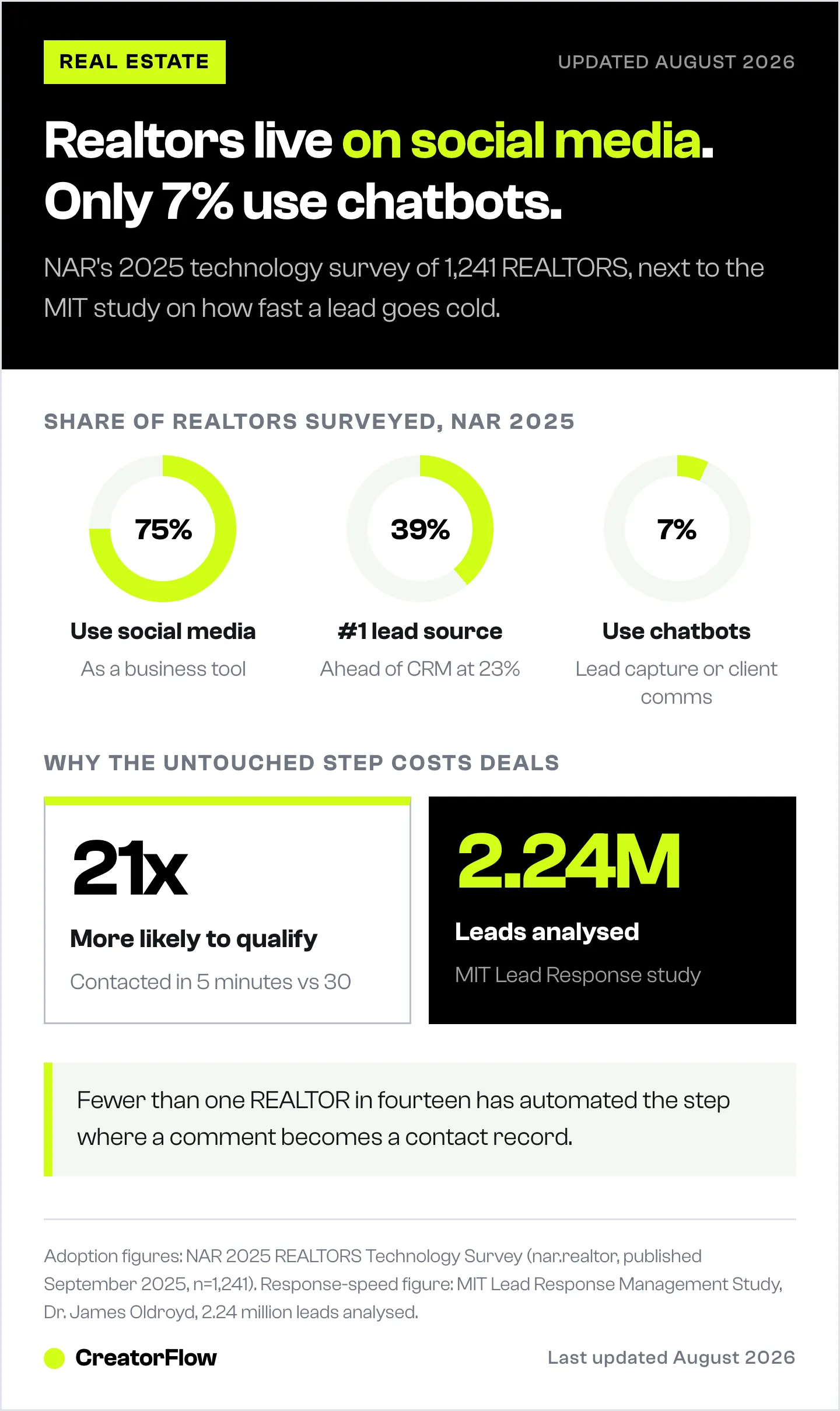
Instagram is where your next buyer is scrolling right now. According to NAR’s 2025 REALTORS Technology Survey (nar.realtor, published September 2025, n=1,241), 75% of REALTORS use social media as a business tool, making it the second-most-used technology after eSignature (79%). Social media is also the #1 lead-generating technology for agents at 39%, ahead of CRM (23%) and local MLS (17%). Buyers browse listings on Instagram before they ever open Zillow.
The problem isn’t getting attention. The problem is what happens after someone comments “Is this available?” on your listing post.
The Response Speed Gap
An MIT Lead Response Management Study (Dr. James Oldroyd) analyzing 2.24 million leads found that contacting leads within 5 minutes makes them 21X more likely to qualify than waiting 30 minutes. For real estate agents, the math is unforgiving:
- Your reality: You’re in showings 4-6 hours/day. DMs pile up. Average response time: 2-6 hours
- Buyer’s reality: They messaged 3-5 agents about the same listing. First to respond wins
- The gap: While you’re at a closing, another agent’s automation already sent your lead a Calendly link
The gap between “interested buyer” and “lost lead” is measured in minutes, not hours.
Almost nobody has automated the handoff yet. In the same NAR survey, only 7% of REALTORS reported using chatbots for lead capture or client communication (nar.realtor, September 2025). Three quarters of agents are on social media, 39% call it their best lead source, and fewer than one in fourteen has automated the step where a comment becomes a contact record. More on that gap in our guide to real estate leads on social media.
What DM Automation Actually Does for Agents
Instagram DM automation monitors your comments and DMs for trigger words. When someone comments “AVAILABLE” on your listing post, they get an instant DM with property details, pricing, and your booking link. No manual work. No delays.
Here’s what it handles:
- Listing inquiries: Instant property details + showing booking link
- Open house RSVPs: Automatic confirmation + calendar reminder
- Lead qualification: Ask budget, timeline, and neighborhood preferences before you respond
- Document delivery: Send buyer guides, market reports, and pre-approval checklists via DM
- Follow-up sequences: Re-engage leads who showed interest but didn’t book
All of this runs through Meta’s official Instagram Graph API, the same system that powers ManyChat, CreatorFlow, and LinkDM. You’re not violating any rules. Instagram approves these tools. For a deeper understanding, read our guide on how Instagram DM automation works. The same instant-booking flow works for any appointment-driven business, including salons and spas booking appointments.
5 Instagram Automations Every Real Estate Agent Needs
Automation 1: Instant Listing Availability Check
Trigger: Someone comments “AVAILABLE” or “STILL AVAILABLE” on your listing post
Auto-response:
Hi! Yes, this property is still available. Here’s what you need to know:
Address: 123 Main St, Austin TX
Price: $450,000
Beds: 3 | Baths: 2.5 | Sq Ft: 2,100
Want to see it in person? Book your private showing here: [Calendly link]
Have other questions? Reply with:
“DETAILS” for full listing info
“PRICE” for financing options
“TOUR” to schedule showing
— [Your Name], [Brokerage]
Why it works: Confirms availability instantly (the #1 question on listing posts), provides key specs, and gives a clear next step. The multi-keyword menu keeps them engaged in the conversation instead of bouncing to another agent.
Automation 2: Open House RSVP and Reminder
Trigger: Someone comments “OPEN HOUSE” or “RSVP” on your open house announcement
Auto-response:
You’re on the list! Here are the details:
Date: This Saturday, June 15
Time: 2pm - 5pm
Address: 123 Main St, Austin TX
Get directions + add to your calendar: [Google Calendar link]
Bringing someone? Reply “GUEST” and I’ll add them too.
See you Saturday!
— [Your Name]
Why it works: Confirms attendance, sends a calendar reminder (reduces no-shows), and the “GUEST” reply keeps engagement going. Open house posts with DM automation get 2-3X more RSVPs because commenting feels low-commitment compared to filling out a form.
Automation 3: Lead Qualification (Budget + Timeline)
This is the automation that separates browsers from buyers. Instead of sending everyone the same generic response, this flow asks qualifying questions before you invest any personal time.
Trigger: Someone comments “BUYING” or “FIRST HOME” on an educational post
Auto-response sequence:
Message 1 (instant):
Congrats on starting your home search! I put together a free guide: “7 Steps to Get Pre-Approved in 48 Hours.” I’ll send it to you.
Quick question first: What’s your target budget range?
Reply with a number like “$350K-$450K”
Message 2 (after budget reply):
Got it! And what neighborhoods or areas are you interested in?
Message 3 (after location reply):
Last one: Are you looking to buy in the next 1-3 months, 3-6 months, or exploring?
[After answers collected, send the guide + your Calendly link]
Here’s your guide: [PDF link]
Based on what you told me, I have [X] listings that match. Want to see them? Book a 15-min call and I’ll walk you through options: [Calendly link]
Why it works: You now know budget, location preference, and timeline before you ever pick up the phone. A lead who says “$400K-$500K in [your area] within 3 months” gets priority. A lead who says “exploring” gets nurtured with market reports. You spend zero time on unqualified leads.
For more on lead qualification flows, see our guide on how to qualify Instagram leads before discovery calls, and for the wider channel picture, how real estate agents get leads on social media.
Automation 4: Seller Lead Generation
Most agents focus on buyer automation. Seller leads are higher value and less competitive on Instagram.
Trigger: Someone comments “VALUE” or “WORTH” on a market update post
Auto-response:
Want to know what your home is worth in the current market? I’ll pull a free comp analysis for your property.
Reply with your property address and I’ll send you a custom valuation within 24 hours.
(Or if you prefer, book a 15-min call and I’ll walk you through it live: [Calendly link])
— [Your Name], specializing in [Area] since [Year]
Why it works: “Free home valuation” is the #1 seller lead magnet in real estate. Delivering it through Instagram DMs feels personal and immediate versus a generic website form. You collect the address (qualifying info) before investing any time.
Automation 5: Follow-Up Sequence for No-Shows and Cold Leads
Someone booked a showing but didn’t show up. Or they downloaded your buyer guide but went silent. This sequence re-engages them without you manually remembering to follow up.
Day 1 (missed appointment):
Hey! I was at [property address] today but didn’t see you. Everything okay? Reply “RESCHEDULE” if you’d like a new time. No pressure.
Day 2 (if no response):
Still interested in [property address]? I’m seeing strong interest on this one. Let me know if you want to see it before offers come in.
Reply “YES” to book a new showing, or “OTHER” to see similar properties.
Day 3 (final follow-up):
If [property address] isn’t the right fit, I have 12 other listings in [neighborhood] you might like. Reply “SEND” and I’ll share them.
Why it works: Persistent but helpful. Offers alternatives instead of pressuring on the original property. Three touches over three days captures leads who got busy (not leads who aren’t interested). For more follow-up strategies, see our Instagram DM campaign playbooks.
How to Set Up Instagram DM Automation for Real Estate (Step-by-Step)
Step 1: Choose Your Automation Tool (5 minutes)
Recommended for real estate agents:
| Tool | Price | Best For | Key Feature |
|---|---|---|---|
| CreatorFlow | $15/mo flat | Solo agents, small teams | Real estate templates, Calendly integration, flat pricing |
| ManyChat | $17–$199/mo (contact-based) | Teams, agencies, multi-platform | Advanced workflows, CRM, Facebook + Instagram + WhatsApp |
| LinkDM | $19/mo flat | Agents wanting proven reliability | 51K+ users, Meta Business Partner, simple interface |
What real estate agents specifically need:
- Comment-to-DM automation (trigger on listing keywords)
- Email/phone collection (capture contact info before sending details)
- Calendly/scheduling integration (auto-book showings)
- Template library (pre-built listing, open house, and buyer flows)
For a detailed tool comparison, read our complete DM automation tool comparison.
Step 2: Connect Your Instagram Business Account (2 minutes)
Requirements:
- Instagram Business or Creator account (not personal). See our guide on creator vs business accounts if unsure which to pick
- Facebook Page linked to your Instagram account
- Admin access to both
How to connect:
- Sign up for your chosen automation tool
- Click “Connect Instagram”
- Log in with Facebook (Instagram uses Facebook’s Graph API for authentication)
- Grant permissions for messaging and comments
- Select your Instagram account
This uses OAuth authentication. You never share your Instagram password. The tool gets permission to send messages on your behalf through Meta’s official system.
Step 3: Create Your First Automation (10 minutes)
Start with the highest-impact automation: showing booking.
Trigger keywords: TOUR, SHOWING, SEE IT, VISIT
Message flow:
- Instant reply: “I’d love to show you this property!”
- Capture info: “What’s your email? (I’ll send showing confirmation)”
- Share link: “Book your showing here: [Calendly link]”
- Confirmation: “See you at [property]! I’ll send a reminder 1 day before.”
In CreatorFlow: Select the comment-to-DM template, customize with your Calendly link, set your trigger keywords, and save. Takes under 5 minutes. For a step-by-step walkthrough, see our comment-to-DM setup guide.
In ManyChat: Build a flow with text nodes, conditional logic, and Calendly integration. More powerful but expect 15-20 minutes for setup.
Step 4: Set Up Lead Capture (10 minutes)
Get contact info BEFORE sending valuable information. This is non-negotiable for real estate agents. Instagram DMs are temporary (24-hour messaging window). Emails and phone numbers are forever.
Method 1: Email collection (recommended)
- Automation asks: “What’s your email so I can send you full listing details?”
- User replies with email
- Tool validates format and saves to your contact list
- Tool sends listing PDF + your contact info
Method 2: Phone collection
- Automation asks: “What’s your phone number? I’ll text you the address and directions.”
- User replies with phone number
- You can now follow up via text + Instagram
Method 3: Both (for high-value leads)
- Ask for email first (lower friction)
- Then ask for phone after delivering value
- Now you have two channels to nurture the lead
For a complete email capture strategy, read how to collect emails via Instagram DMs.
Step 5: Build Your Template Library (20 minutes)
Create 10-15 templates covering all common real estate scenarios:
For active listings:
- Availability check response
- Full listing details (beds, baths, price, features, photos)
- Showing booking flow
- Open house RSVP
- Virtual tour link delivery
For buyer leads:
- First-time buyer guide delivery
- Pre-approval checklist
- Neighborhood guide by area
- Mortgage calculator link
- Monthly market report
For seller leads:
- Home valuation request flow
- Seller consultation booking
- Listing presentation request
- Comp analysis delivery
Store these as templates in your tool. When you create a new automation, you pick from your library instead of writing from scratch. For message writing tips, see our Instagram DM scripts that convert.
Step 6: Test Before Going Live (15 minutes)
Before activating any automation:
- Test comment triggers: Have a friend comment your keywords on a test post
- Test DM triggers: Send yourself DMs with trigger keywords from another account
- Test lead capture: Verify emails and phone numbers are saved correctly
- Test all links: Click every Calendly, PDF, and calendar link
- Check mobile preview: See how DMs look on iPhone and Android (CreatorFlow has real-time preview)
Common mistakes to catch:
- Broken Calendly links (book a fake appointment to test)
- Wrong property address in templates (double-check before saving)
- Typos in automated messages (one typo kills credibility for a $500K purchase)
- Missing or expired links in older templates
Content Strategy: Posts That Trigger Your Automations
Your automations are useless without posts that drive comments. Here’s a content calendar built around triggering DM automation.
Post Type 1: New Listings with Clear CTA
Post: Photo/video walkthrough of property (exterior, best room, unique feature)
Caption: “NEW LISTING: 3bd/2.5ba in [Neighborhood]. $450K. Comment AVAILABLE for full details + booking link!”
What happens: Automation sends instant DM with property specs, photos, and Calendly link.
Frequency: Every new listing (2-4 per week for active agents)
Post Type 2: Open House Announcements
Post: Video tour or carousel of the property
Caption: “OPEN HOUSE this Saturday! 123 Main St, 2-5pm. Comment RSVP and I’ll send you directions + a reminder!”
What happens: Automation confirms attendance, sends calendar invite, sends reminder day before.
Frequency: 1-2 per week during active open house season
Post Type 3: Educational Content (Lead Magnets)
Post: Carousel: “5 Mistakes First-Time Buyers Make in [Your City]”
Caption: “I put together a free First-Time Buyer Checklist that covers everything. Comment CHECKLIST to get it!”
What happens: Automation sends PDF, captures email, adds to buyer lead list.
Frequency: 2-3 per week (builds authority and captures leads who aren’t ready to buy yet)
Post Type 4: Market Updates
Post: Infographic showing local market data (median price, days on market, inventory)
Caption: “[Your City] Real Estate Market Report - April 2026. Want the full report with neighborhood breakdowns? Comment REPORT!”
What happens: Automation sends detailed PDF, positions you as the local market expert.
Frequency: Monthly (ties to fresh MLS data)
Post Type 5: Just Sold / Success Stories
Post: Photo at closing table or sold sign
Caption: “JUST SOLD! Helped [Client first name] find their dream home in 18 days. Want results like this? Comment READY!”
What happens: Automation sends consultation booking link.
Frequency: After every closing (social proof is your strongest sales tool)
Recommended mix: Listings (40%), Educational (25%), Market updates (15%), Just sold (10%), Behind-the-scenes/personal (10%)
For more content ideas that drive engagement and DMs, read our guide on Instagram content ideas that generate leads.
Lead Nurturing Sequences for Real Estate
A lead who downloads your buyer guide but doesn’t book a showing isn’t lost. They’re in research mode. Nurture sequences keep you top-of-mind until they’re ready.
Sequence 1: First-Time Buyer Nurture (3 days)
Day 1: Send buyer guide (triggered by “GUIDE” comment)
Day 1 + 4 hours: “Did you get the guide? Here’s the section I’d focus on first: getting pre-approved. Reply PRE-APPROVED if you want my lender recommendations for [your area].”
Day 2: “Here are 3 starter homes under $350K in [neighborhood] that match what first-time buyers look for: [links]. Want to see any of these? Reply TOUR.”
Day 3: “Ready to start looking? I have openings this week for buyer consultations. Book 15 minutes here: [Calendly link]. No pressure, no commitment.”
Sequence 2: Open House Follow-Up (2 days)
Day 1 (after open house): “Thanks for visiting [property address] today! What did you think? Reply LOVE IT or PASS.”
If “LOVE IT”: “I’m glad you liked it! Want to discuss making an offer? Reply OFFER and I’ll walk you through next steps.”
If “PASS”: “No worries! I have 8 similar properties in [area]. Reply SIMILAR and I’ll send them over.”
Day 2 (if no response): “Just following up from the open house at [address]. If you’re still thinking it over, I’m happy to answer any questions. Reply QUESTION or book a call: [Calendly link]“
Sequence 3: Seller Lead Nurture (3 days)
Day 1: Send home valuation estimate (triggered by “VALUE” comment)
Day 2: “Did you see your home valuation? Properties in [neighborhood] are selling for [X]% above list price right now. Reply SELL if you want to discuss timing.”
Day 3: “I put together a custom marketing plan for homes in [neighborhood]. It covers staging tips, optimal listing timing, and pricing strategy. Book 15 minutes and I’ll walk you through it: [Calendly link]”
Platform note: CreatorFlow and ManyChat both support multi-day sequences with configurable delays. All sequences respect Instagram’s 24-hour messaging window, so sequences rely on the lead continuing to reply (each reply resets the 24-hour clock). For leads who go silent, capture their email first and continue nurturing via email.
Tool Comparison: Which Automation Tool Is Best for Agents?
All three recommended tools use Meta’s official Instagram Graph API. The differences come down to pricing model, complexity, and features.
CreatorFlow ($15/month flat rate)
Best for: Solo agents and small teams who want simple setup
Real estate strengths:
- Template-first approach (pick a template, customize, launch in 5 minutes)
- Real-time phone preview (see exactly how your DM looks before activating)
- Flat-rate pricing ($15/mo regardless of contact count)
- Email gate and follow gate (collect emails before sending listing details)
- Multi-brand workspaces (manage up to 2 accounts on Pro, 5 on Growth)
- Link tracking and geographic analytics
Scope notes:
- Instagram end to end, with every feature shaped to how Instagram behaves
- 20,000+ creators and brands on the platform
- Template-first rather than a general-purpose flow builder, so a listing automation goes live in about five minutes
Pricing: Free plan (500 DMs/month), Pro $15/month (5,000 DMs), Growth $30/month (10,000 DMs). 14-day free trial on paid plans.
ManyChat ($17–$199/month, contact-based)
Best for: Teams, agencies, and agents who need multi-platform automation
Real estate strengths:
- Multi-platform: Instagram + Facebook Messenger + WhatsApp + SMS + TikTok
- Advanced workflow builder with conditional logic and branching
- CRM-level segmentation and tagging (track lead status, budget, timeline)
- Hundreds of integrations (Zapier, Google Sheets, Shopify, CRMs)
- Largest user base = most tutorials and community support
Scope notes:
- Priced per active contact rather than per message, so the monthly cost tracks audience size
- The flow builder covers conditional logic and branching, which is more surface area than a template-first tool
- Built for multi-channel marketing teams; real estate flows are assembled from general-purpose blocks rather than niche templates
Pricing: Free plan up to 25 active contacts. Essential $17/month (250 contacts), Pro $39/month (2,500), Business $99/month (7,500), Advanced $199/month (25,000). Billed annually those become $14/$29/$69/$139 per month. This plan structure applies to accounts created on or after March 2, 2026 (manychat.com/pricing and help.manychat.com, July 2026).
LinkDM ($19/month flat rate)
Best for: Agents who want proven reliability without complexity
Real estate strengths:
- 50,000+ users (proven track record, as reported on linkdm.com, July 2026)
- Meta Business Partner certified
- Flat-rate pricing ($19/mo, doesn’t scale with contacts)
- Quick setup (10-15 minutes)
- Simple, reliable interface
Scope notes:
- Instagram-first, so Facebook Messenger, WhatsApp, and SMS are outside its scope
- Pro covers up to 3 Instagram accounts (linkdm.com, July 2026)
- Positions on reliability and simplicity rather than a deep workflow builder
Pricing: Free plan (1,000 DMs/month), Pro $19/month (25,000 DMs, up to 3 Instagram accounts), Platinum+ $99/month (300,000 DMs) (linkdm.com, July 2026).
Quick Decision Guide for Agents
| Your Situation | Best Tool | Why |
|---|---|---|
| Solo agent, want simple setup | CreatorFlow ($15/mo) | Template-first, 5-minute setup, cheapest flat rate |
| Team or agency, need CRM | ManyChat ($17–$199/mo) | Advanced workflows, multi-platform, integrations |
| Want proven track record | LinkDM ($19/mo) | 51K+ users, Meta Partner, reliable |
| Managing 3+ agent accounts | CreatorFlow Growth ($30/mo) | Multi-brand workspaces (up to 5 accounts) |
| Need Facebook + Instagram + SMS | ManyChat ($39–$99/mo) | Only multi-platform option at this level |
For a deeper comparison, read our CreatorFlow vs ManyChat breakdown or the full automation tool comparison.
ROI Calculation: What This Is Worth to Your Business
Time Savings
Before automation (estimated):
- Responding to Instagram DMs: 1.5-2 hours/day
- Scheduling showings via DM: 30-60 minutes/day
- Following up on cold leads: 30-60 minutes/day
- Total: 3-4 hours/day = 60-80 hours/month
After automation (estimated):
- Automation handles: ~70-80% of initial responses
- You handle: 20-30% requiring human judgment (complex questions, negotiations, price discussions)
- Estimated time saved: 40-60 hours/month
Value of time saved: At $50-75/hour (typical agent effective hourly rate), that’s $2,000-$4,500/month in recovered time. Time you can spend on showings, closings, and client relationships.
Tool cost: $15-20/month
Revenue Impact (Scenario)
More showings from faster responses:
- Before: 12 showings/month (2-6 hour average response time)
- After: 25-35 showings/month (instant response time)
- Increase: +13-23 showings/month
More closings from more showings:
- Average showing-to-closing rate: 10-15%
- Additional closings: 1-3 per month
- Average commission: $6,000-$12,000 (varies by market and price point)
Conservative estimate: Even 1 additional closing per month at a $6,000 commission = $72,000/year in additional revenue from a $180/year tool investment.
These are illustrative scenarios. Results vary based on market, price point, audience size, content quality, and engagement. The core principle holds: faster responses capture more leads.
Instagram API Limits for Real Estate Agents
Every legitimate automation tool respects Meta’s rate limits. Here’s what you need to know:
~200 automated DMs per hour: This is the tool-side pacing cap most automation tools enforce across all your automations combined. If you exceed it, messages queue and send in the next hour. For most agents, you’ll never hit this unless a listing post goes viral.
24-hour messaging window: You can only send automated messages to people who interacted with your account in the last 24 hours. After 24 hours, automation stops (you can still message manually). This is why capturing email addresses early is critical.
What this means for real estate: If you get 50 comments on a listing post over 3 hours, automation handles all of them easily (well under the ~200/hour tool pacing cap). If a Reel goes viral with 500+ comments in an hour, some leads get their DM 1-2 hours later. Still faster than your manual 4-hour response time.
For the full technical breakdown, read our guide on Instagram API rate limits explained.
Compliance and Safety for Real Estate Agents
Instagram API Compliance
All recommended tools (CreatorFlow, ManyChat, LinkDM) use Meta’s official Instagram Graph API:
- OAuth authentication (no password sharing)
- Meta-approved messaging permissions
- Automatic rate limit enforcement
- GDPR-compliant data handling
Using official API tools carries minimal ban risk when you respect Instagram’s rate limits and messaging rules. No API guarantees absolute account safety, but the official path removes the main causes of enforcement: password sharing, unofficial access, and unpaced sending.
Real Estate-Specific Compliance
Include in every automated message:
- Your full name
- Your brokerage name
- Your state license number (if required by your state)
- Fair Housing disclaimer (if applicable to property-related messages)
Don’t do:
- Make guarantees about property values in automated messages
- Share MLS data that violates your board’s rules
- Discriminate in any automated messaging (Fair Housing Act applies)
- Claim to be available 24/7 if you’re not (automation responds, but set expectations for complex questions)
Template footer example:
— [Your Name], [Brokerage Name]. [License #]. All information deemed reliable but not guaranteed.
Frequently Asked Questions
Is Instagram DM automation safe for real estate agents?
Yes, when you use tools built on Meta’s official Instagram API. CreatorFlow, ManyChat, and LinkDM all connect through it via OAuth, with no password sharing. Ban risk stays low compared with unofficial bots that operate outside Meta’s Terms of Service, though no API guarantees absolute account safety. Follow the rate limits and the 24-hour messaging window and enforcement is unlikely.
Can automation replace me as an agent?
No. Automation handles repetitive tasks: availability checks, booking showings, sending documents, collecting contact info, and initial lead qualification. You still close deals, negotiate offers, show properties, build relationships, and provide expertise. Automation gets qualified leads to you faster so you spend more time on high-value work.
How much does Instagram DM automation cost for real estate?
$15-20/month for most agents. CreatorFlow costs $15/month (flat rate, priced by DM volume rather than contacts). LinkDM costs $19/month (flat rate). ManyChat starts at $17/month for 250 active contacts and scales to $199/month at 25,000, or $14 to $139 per month billed annually (July 2026). All three offer free plans to test before committing.
What if a lead asks a question my automation can’t answer?
Set a fallback response: “Great question! Let me personally get back to you on that. I’ll reply within 2 hours.” You get notified, handle it manually. Automation handles 70-80% of common questions (availability, pricing, booking). You handle the 20-30% that need human judgment (negotiations, custom requests, complex financing questions).
Which tool is best for real estate agents specifically?
CreatorFlow ($15/mo) for solo agents who want simple setup and flat pricing. ManyChat ($17–$199/mo) for teams needing CRM-level features and multi-platform reach. LinkDM ($19/mo) for agents who want proven reliability. All three use Meta’s official API and support comment-to-DM, email capture, and Calendly integration.
Can I use this for both buyer and seller leads?
Yes. Buyer automations: listing availability, showing booking, first-time buyer guides, neighborhood info. Seller automations: home valuation requests, seller consultation booking, market reports. Create separate keyword triggers for each (TOUR for buyers, VALUE for sellers) and you capture both sides of the transaction.
Do I need a Business account or will a Creator account work?
Both work. Instagram Business and Creator accounts both connect to Meta’s Graph API. If you’re a licensed agent, a Business account is typically better because it offers contact buttons, category labels (Real Estate Agent), and better analytics. See our guide on creator vs business accounts.
How do I track which posts generate the most leads?
CreatorFlow and ManyChat both track which automations generate the most DMs, clicks, and email captures. You can see which listing posts drive showings, which educational content captures buyer leads, and which CTAs convert best. Use this data to double down on what works. For tracking setup, read our link tracking guide.
The Bottom Line
The math is simple: leads contacted within 5 minutes are 21X more likely to convert. Your competition responds in 4-6 hours. Automation responds in seconds.
At $15-20/month, you need one additional showing booking per month to make the investment worthwhile. Most agents see far more than that once instant responses are running.
Next step: Start with CreatorFlow’s free plan (500 DMs/month). Set up a “TOUR” keyword trigger on your next listing post. See how many showings book themselves while you’re at closings.
Related Articles
- Real Estate Leads on Social Media: The 24-Hour Rule
- Instagram DM Automation: How to Set Up in 5 Min
- Turn Instagram Into an Appointment-Setting Machine
- How to Qualify Instagram Leads Before Discovery Calls
- Instagram + Calendly: Auto-Book Calls via DM
- Slow Instagram DM Responses Kill Sales: How to Fix
Disclaimer: Performance results and scenarios mentioned in this article are illustrative estimates based on general automation and lead response research. Individual results vary based on market conditions, property prices, audience size, content quality, and engagement rates. The 21X lead conversion statistic is from the MIT Lead Response Management Study by Dr. James Oldroyd (analyzing 2.24 million leads). REALTOR technology and lead-source figures are from the National Association of REALTORS 2025 REALTORS Technology Survey (September 2025, n=1,241, margin of error plus or minus 2.78%). CreatorFlow uses Instagram's official Graph API as of July 2026. Instagram/Meta may change features, rate limits, or terms at any time. Instagram is a trademark of Meta Platforms, Inc. CreatorFlow is not affiliated with, endorsed by, or sponsored by Meta Platforms, Inc. ManyChat and LinkDM are trademarks of their respective owners. Users are responsible for complying with Instagram's Terms of Service, Community Guidelines, and all applicable real estate regulations including Fair Housing Act requirements.