Instagram webinar registration automation sends your signup link via DM the instant someone comments a keyword like “WEBINAR” on your post. DM automation delivers 12-18% registration rates compared to 2-3% from bio links. Instagram DMs hit 90%+ open rates versus email’s 20-25%, and the link arrives in 8 seconds while the person is still engaged. If 200 people comment, expect 24-36 registrations versus 4-6 from bio links.
You announce a webinar. 200 people comment “interested.” You spend 3 hours copy-pasting registration links. Meanwhile, someone else sends their link in 8 seconds and fills 500 seats.
This guide covers the exact DM sequence, keyword triggers, and 7-day promotion strategy that coaches and course creators use to fill webinar seats. New to DM automation? Start with our Instagram DM automation complete guide.
Key Takeaways
- DM automation delivers 12-18% registration rate: Compared to 2-3% from bio links. If 200 people comment your keyword, expect 24-36 registrations vs 4-6 from bio links.
- Instagram DMs hit 90%+ open rates: Compared to email’s 20-25%. The registration link arrives in 8 seconds while the person is still engaged on Instagram.
- 3-message sequence within 24 hours: Instant registration link, 4-12 hour follow-up if no click, and a final reminder before Instagram’s messaging window closes.
- 7-day content runway fills seats: Teaser Reel (7 days before), announcement (5 days), value post with keyword CTA (3 days), urgency Story (1 day), and day-of last chance reminders.
- Email capture alongside registration converts 40-60%: Ask for email in the DM confirmation to enable reminder sequences, replay links, and future webinar invitations beyond Instagram’s 24-hour window.
- Bottom line: Set up a keyword trigger like “WEBINAR,” write a 3-message DM sequence, promote across Stories and Reels, and capture emails to follow up beyond Instagram’s messaging limits.
How Instagram Webinar Registration Automation Works
You post about the webinar and tell people to comment a keyword like WEBINAR. The comment fires a trigger, and your registration link lands in their DM about 8 seconds later while they are still on the post. Two timed follow-ups chase anyone who has not clicked, all inside Instagram’s 24-hour messaging window. Comment-to-DM registration runs at 12-18% against 2-3% for a bio link.
Why Instagram for Webinar Promotion?
Your webinar registration page converts at 30% on average. Top performers hit 59%. But none of that matters if nobody clicks through to see it.
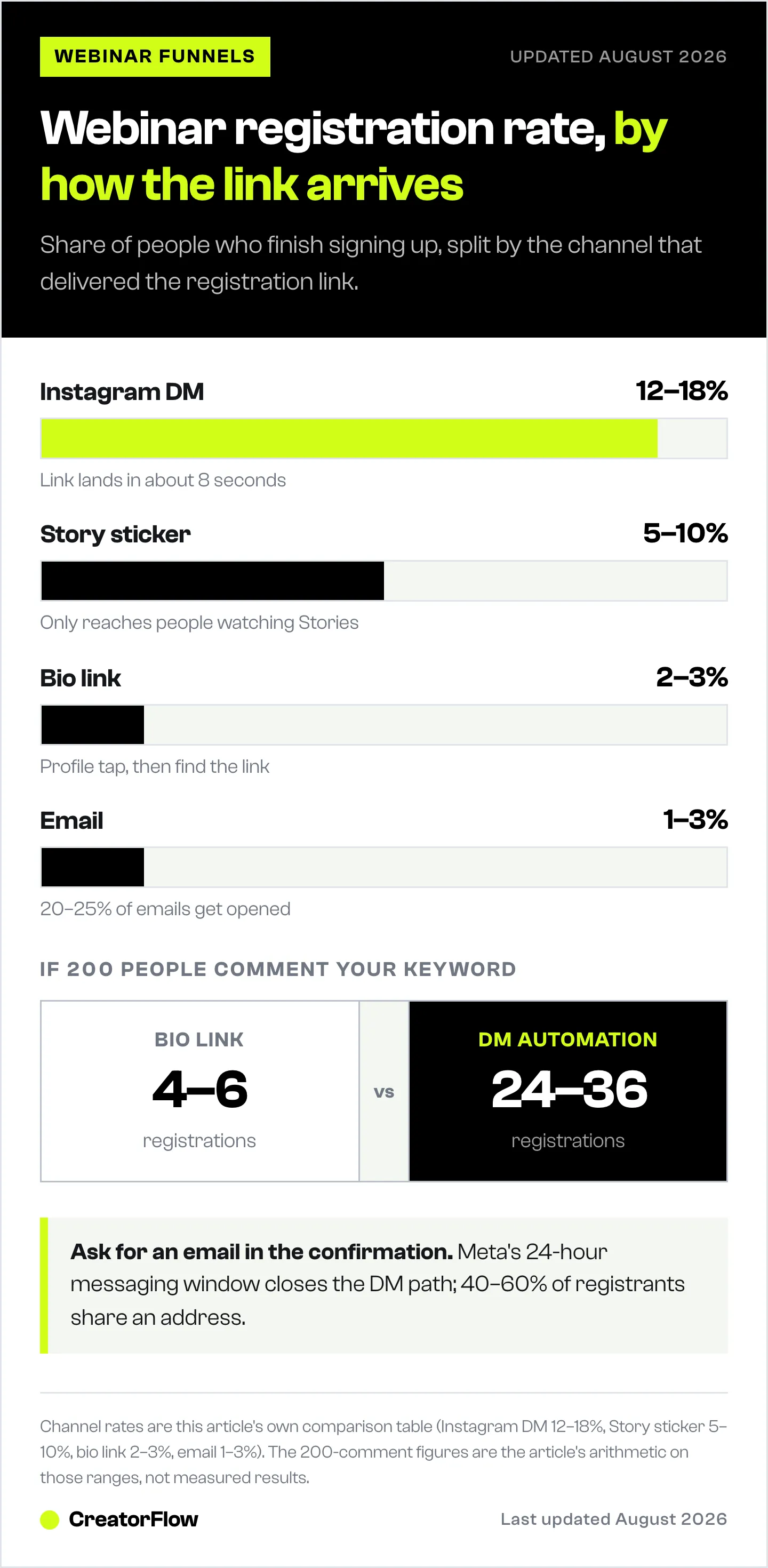
Here’s the problem: Your Instagram bio link gets 2-3% click-through. That means 97% of interested followers never see your registration page.
DM automation solves this:
| Channel | Open/View Rate | Click Rate | Registration Rate |
|---|---|---|---|
| Instagram DM | 90%+ | 15-25% | 12-18% |
| 20-25% | 2-5% | 1-3% | |
| Bio Link | N/A | 2-3% | 2-3% |
| Story Link Sticker | 40-60% | 8-15% | 5-10% |
Why DMs win:
1. Immediacy. When someone comments “WEBINAR,” they’re interested right now. A DM arrives in 8 seconds while they’re still engaged. An email arrives 4 hours later when they’ve moved on.
2. Personal delivery. DMs land in their primary inbox (if they follow you) or requests (if they don’t). Either way, they see a notification. Bio links require them to navigate to your profile, find the link, and click. That’s 3+ friction points.
3. Conversation opportunity. If they have questions, they’re already in a DM thread. They can reply immediately. With a landing page, they’d have to find your contact info separately. The full landing page vs DM automation comparison breaks down the conversion data behind when each approach wins.
Real results: Brian (ManyChat case study) generated 1,800+ webinar registrations in one week using comment-to-DM automation. That’s the difference between a half-empty webinar and a waitlist.
The Webinar DM Automation Flow
Here’s the exact sequence that fills seats:
[User comments "WEBINAR" or DMs keyword]
         ↓
[Instant DM #1: Registration link + key benefits]
         ↓
[4-12 hours later, if no click: Follow-up #1]
         ↓
[12-24 hours later, if still no click: Final reminder]
         ↓
[After registration: Confirmation + calendar reminder]
This sequence works within Instagram’s 24-hour messaging window. After 24 hours without user interaction, you can’t send more messages. That’s why timing matters.
Step 1: Create Your Keyword Triggers
Keywords are the words that trigger your automated DM. When someone comments or sends a message containing your keyword, the automation fires.
Best keywords for webinars:
- WEBINAR
- REGISTER
- SIGNUP (and SIGN UP)
- SPOT
- SAVE
- JOIN
- LIVE
Pro tip: Add common typos as alternative keywords. “WEBNAR,” “REGSTER,” and “SINGUP” catch 5-10% more leads.
Keyword setup in CreatorFlow:
- Go to Automations → New Automation
- Select “Comment Trigger” or “DM Keyword Trigger”
- Enter your keyword(s)
- Build your DM sequence
Step 2: Design Your DM Sequence
Message #1 (Immediate - within 10 seconds):
Hey [First Name]! You're in.

Here's your spot for [Webinar Topic]:
[REGISTRATION LINK]

On [Date] at [Time], you'll learn:
- [Key takeaway 1]
- [Key takeaway 2]
- [Key takeaway 3]

Got questions? Just reply here!
Keep it short. This first message should be scannable in 5 seconds. Lead with the link. They commented because they want it.
Message #2 (4-12 hours later, if no registration):
Hey [First Name], quick check-in!

Did you grab your spot for [Webinar Topic]?

We're at [X] registered and I don't want you to miss [specific benefit they'll get].

Here's the link again: [REGISTRATION LINK]
Message #3 (12-24 hours later, final):
Last reminder for [Webinar Topic]!

After this, I'll leave you alone.

If [specific pain point] is something you're dealing with, this training is for you.

Final link: [REGISTRATION LINK]

See you there (or not - no pressure!)
Why 3 messages max: More than 3 follow-ups feels spammy. Instagram’s 24-hour window naturally limits this, but even within that window, respect matters. Your goal is registrations, not annoyance.
Step 3: Set Up Confirmation Flow
After they register (tracked via UTM parameters or webhook), send a confirmation DM:
You're confirmed for [Webinar Topic]!

Date: [Date]
Time: [Time] [Timezone]

I'll send you a reminder 1 hour before we go live.

What's your #1 question about [topic]? I'll try to cover it!
This does two things:
- Confirms their registration (reduces no-shows)
- Collects pre-webinar questions (improves content)
Step 4: Promote Your Keywords
Automation only works if people trigger it. Here’s how to drive keyword comments and DMs:
Instagram Stories (40-60% open rate):
Free training: How to [achieve result]

DM me "WEBINAR" for instant access

[Countdown sticker to webinar date]
Instagram Reels caption:
The strategy that [achieved result].

Full breakdown in my free training.

Comment "WEBINAR" and I'll send you the link.
Instagram Live:
"If you want the registration link, drop 'WEBINAR' in the comments and you'll get it in your DMs automatically."Lives deserve their own setup since comments move fast and viewers leave when the stream ends. The Instagram Live DM automation guide covers the full viewers-to-leads workflow.
Feed posts:
Free training: [Webinar title]

Here's what you'll learn:
- [Point 1]
- [Point 2]
- [Point 3]

Comment "WEBINAR" below and I'll DM you the link.
Content Strategy for Webinar Promotion
Your webinar doesn’t sell itself. You need a content runway. Here’s the timeline:
7 days before: Teaser Reel
- 30-second video on the problem your webinar solves
- Don’t mention the webinar yet
- Build curiosity
5 days before: Announcement Story + Feed
- Reveal the webinar topic
- Add countdown sticker
- “DM WEBINAR for the link”
3 days before: Value post + keyword CTA
- Teach one small piece from the webinar
- “Want the full framework? Comment REGISTER below”
1 day before: Urgency Story
- “Starting tomorrow at [time]”
- Show registration count (“500+ signed up”)
- Final keyword CTA
Day of: Last chance
- Morning Story reminder
- 1 hour before: “Going live soon, last chance to register”
- DM follow-up to non-registrants who engaged
After webinar: Replay offer
- New keyword for replay access (“REPLAY”)
- Captures people who missed the live
Email Capture in the DM Flow
Webinar registrations are great. Email addresses are better. Here’s why:
Instagram’s 24-hour messaging window limits your follow-up. If someone registers but doesn’t attend, you can only DM them if they’ve messaged you in the last 24 hours.
Email has no such limit. You can send reminder sequences, replay links, and future webinar invitations indefinitely.
How to capture emails in DMs:
Add this to your confirmation message:
One more thing - reply with your best email and I'll send you:
- Calendar invite
- Pre-webinar prep guide
- Replay link (in case you miss it)
Or use your automation tool’s email capture feature. CreatorFlow and ManyChat both support asking for and storing email addresses within the DM flow.
Email capture rates: With a strong incentive (bonus content, replay guarantee), expect 40-60% of DM registrants to share their email.
For more on email collection, see our complete guide: Collect Emails via Instagram DMs: Complete Guide.
Tracking and Optimization
You can’t improve what you don’t measure. Track these metrics:
Flow metrics:
- Trigger rate: How many people comment/DM your keyword
- Open rate: How many open Message #1 (usually 90%+)
- Click rate: How many click your registration link
- Registration rate: How many complete registration
- Drop-off points: Where people stop engaging
UTM tracking:
Add UTM parameters to your registration links:
https://yourwebinar.com/register?utm_source=instagram&utm_medium=dm&utm_campaign=webinar_jan2026This tells you exactly how many registrations came from DM automation vs Stories vs bio link.
A/B testing:
- Test different keywords (WEBINAR vs REGISTER vs JOIN)
- Test message length (short vs detailed)
- Test benefit framing (outcome vs pain point)
- Test timing of follow-ups (4 hours vs 8 hours vs 12 hours)
Benchmarks to aim for:
- Trigger rate: 5-15% of post reach
- Message open rate: 90%+
- Registration rate from DM: 12-18%
- Email capture rate: 40-60%
Tool Comparison for Webinar Automation
| Tool | Price | Best For | Webinar Features |
|---|---|---|---|
| CreatorFlow | $15/mo flat | Solo coaches, educators | Comment-to-DM, keyword triggers, email capture, flat pricing |
| ManyChat | $17-199/mo (scales) | Agencies, multi-platform | Flow builder, CTA buttons, Zoom integration |
| LinkDM | $19/mo | Established creators | 50,000+ users, simple setup |
Choose CreatorFlow if: You’re a solo coach or educator, you want flat pricing (no per-contact fees), and you only need Instagram.
Choose ManyChat if: You need multi-platform (Instagram + Facebook + WhatsApp), advanced flow logic, or native webinar platform integrations.
Choose LinkDM if: You want a proven tool with a large user base and simple interface.
For a detailed comparison of all options, see: Coach Instagram Automation: Book 3X More Calls.
FAQ
Is Instagram webinar automation safe?
Yes, when using tools that connect via Meta’s official Instagram Graph API (CreatorFlow, ManyChat, LinkDM). These tools are Meta-approved and operate within Instagram’s terms of service. Automation tools pace sends at about 200 DMs/hour as a behavioral convention; Meta’s own published limits are per-second, not hourly. Instagram does not publish official daily DM caps; daily limits are enforced algorithmically based on account age, engagement, and behavior. Using unofficial automation (bots, browser extensions, scrapers) risks account suspension (as of May 2026).
How many webinar signups can I expect from DM automation?
Expect 12-18% of people who trigger your keyword to register (vs 2-3% from bio links). So if 200 people comment “WEBINAR,” you’ll likely get 24-36 registrations. With proper content promotion, some creators report 1,000+ registrations per webinar using this method.
Can I send messages to people who didn’t comment first?
No. Instagram’s API only allows messaging users who initiated contact (commented on your post, replied to your Story, or DMed you first). This is by design to prevent spam. You cannot cold-message followers who haven’t engaged.
What’s the best time to promote webinar keywords?
Promote during your highest engagement times (check Instagram Insights). Generally, 7-9am, 12-2pm, and 7-9pm in your audience’s timezone work well. Stories perform best in morning/evening; Reels can go anytime since they have extended shelf life.
How do I handle different time zones for webinars?
Include timezone in all DM messages. Consider running the same webinar at multiple times (e.g., 10am EST and 7pm EST) and using different keywords for each (“WEBINAR1” and “WEBINAR2”). Your automation can send the appropriate link based on which keyword they used.
Can I use this for paid webinars?
Yes. The flow is identical. Just link to your paid registration page instead of a free one. For paid webinars, consider adding a “questions before you join?” option in your DM sequence to handle objections before purchase.
Get Started Today
Instagram webinar registration automation transforms how coaches and educators fill seats. Instead of spending hours in DMs, you set it up once and let it run.
Quick action plan:
- Choose your tool (CreatorFlow for flat pricing, ManyChat for multi-platform)
- Create keyword trigger (“WEBINAR”)
- Write your 3-message sequence
- Post content with keyword CTA
- Watch registrations roll in
Ready to automate your webinar registrations? Get started with CreatorFlow and set up your first automation in under 10 minutes.