
Social media marketing automation is software that handles three jobs without you: publishing posts on a schedule, responding to comments and DMs the moment they arrive, and compiling performance reports. Most tools do one layer well. Scheduling tools price per channel or per seat, response tools price per contact or a flat rate, and buying the wrong layer is the common mistake.
You bought a scheduler. Your calendar is full, your posting is consistent, your reports look tidy. And your revenue did not move. That happens because scheduling automates the half of social media where nobody is talking to you. The half where people raise their hand, comment “price?”, reply to a Story, or DM asking for the link, is still being handled by a human refreshing an inbox.
This guide breaks the category into its three layers, prices each one with verified August 2026 numbers, and shows which layer to buy first depending on what you sell.
Key Takeaways
- Three layers, not one category: publishing automation, response automation, and measurement automation are sold under the same name and do completely different jobs.
- The pricing unit tells you the layer: publishing tools bill per channel, per brand, or per seat. Response tools bill per contact or at a flat rate. If a tool prices per seat, it is not built to answer your DMs.
- Response is the layer tied to revenue: publishing creates the comment. Responding converts it. Harvard Business Review’s analysis of 2.24 million leads found firms that made contact within an hour were roughly seven times more likely to qualify a lead than those that waited 60 minutes longer.
- The cost gap is wide: publishing runs $6 per channel (Buffer) to $99 per seat (Hootsuite, Sprout Social). Response runs $0 to $199 per month depending on whether you are billed per contact or flat.
- Meta publishes real ceilings: 750 private replies per hour per account for comments on posts and reels, and a 24-hour messaging window (developers.facebook.com, August 2026).
- Buy the layer that matches your bottleneck: if you cannot post consistently, buy publishing. If comments go unanswered, buy response. Buying both before you know which is broken is how the budget disappears.
What is social media marketing automation?
Social media marketing automation is the use of software to run repeatable social media tasks without a person doing them each time. It covers three distinct jobs: putting content out on a schedule, reacting to engagement as it happens, and turning platform data into reports. A scheduling tool posts at 9am whether or not anyone is listening. A response tool acts only when someone does something. A measurement tool tells you which of the two worked.
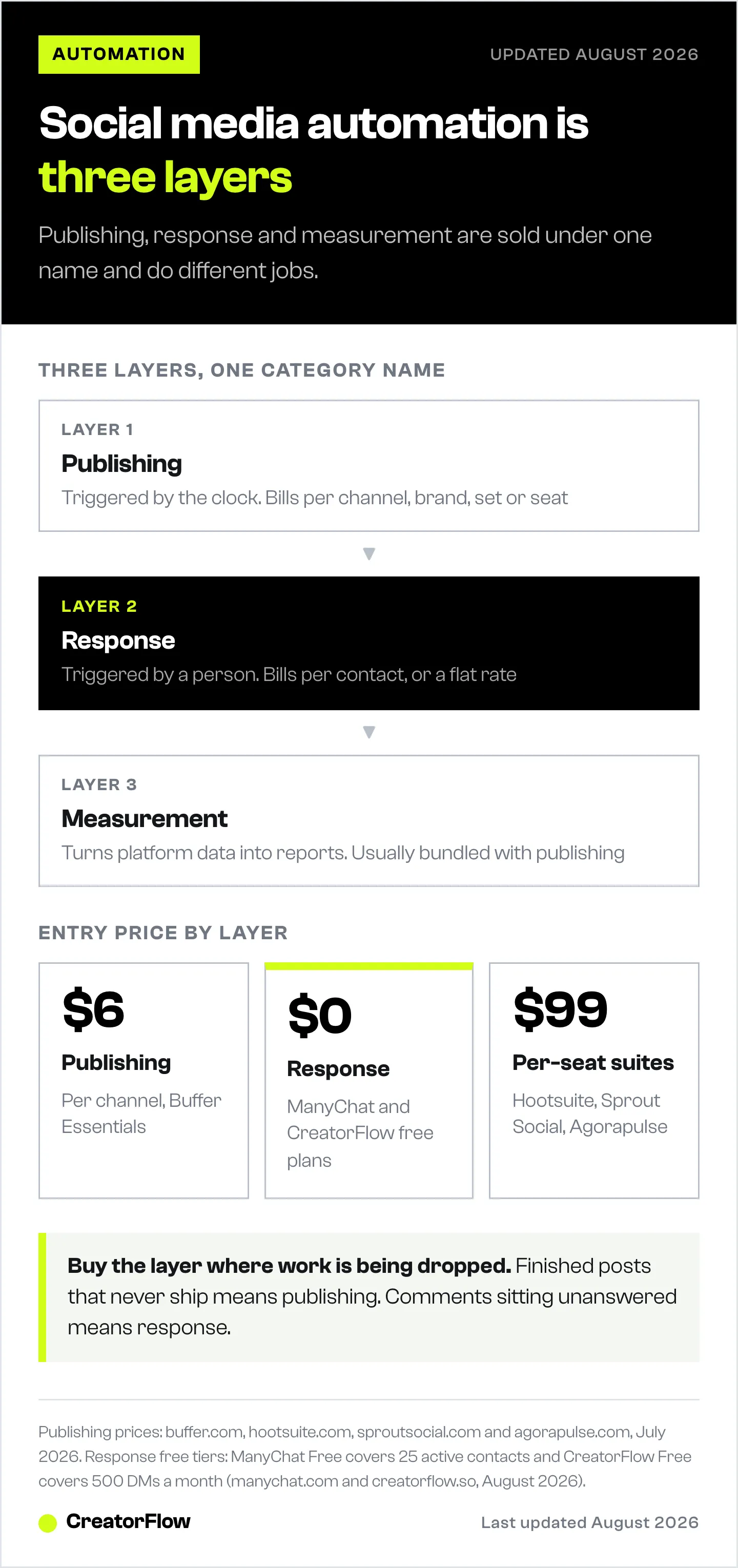
The word “automation” hides that split, and it is the reason buyers end up with a tool that cannot do the thing they wanted. Most software sold as social media marketing automation automates publishing only. For the wider discipline these tools sit inside, see what social media marketing covers.
The three layers
Publishing automation queues and posts content across networks from one calendar. Buffer, Later, Metricool, Hootsuite, SocialBee, Agorapulse, and Sprout Social all sit here. This layer scales your output.
Response automation watches for a trigger and sends a message. Someone comments a keyword on a Reel, replies to a Story, or sends a DM, and the tool replies in seconds with a link, a lead magnet, or a question. ManyChat, CreatorFlow, and Klaviyo Social Marketing sit here. This layer scales your conversations.
Measurement automation pulls reach, engagement, click, and conversion data into a recurring report. This layer usually ships bundled inside a publishing tool rather than sold on its own, which is why standalone reporting rarely appears in tool comparisons. Our guide to building a social media report that proves ROI covers what belongs in one.
Publishing automation versus response automation
Publishing and response automation are frequently compared as alternatives. They are not substitutes. Publishing produces the engagement that response converts, and a tool that does one usually does not do the other.
The difference shows up clearly in what triggers the software. A publishing tool is triggered by the clock. A response tool is triggered by a person. That distinction changes everything downstream: what the tool needs access to, how it is priced, and what happens when you go viral.
| Publishing automation | Response automation | |
|---|---|---|
| Trigger | Time of day | A follower’s action |
| Scales with | Number of posts and channels | Number of people who engage |
| Typical pricing unit | Per channel, per brand, or per seat | Per contact or flat rate |
| Direct revenue link | Indirect | Direct |
| Fails by | Posting into an empty feed | Missing the window while intent is high |
The revenue argument for the response layer rests on how fast intent decays. Harvard Business Review’s study of 2.24 million sales leads found that firms attempting contact within an hour were close to seven times more likely to qualify a lead than firms that waited an hour longer, and 60 times more likely than those that waited a day. Social media compresses that curve further, because a commenter is mid-scroll and will not return to check whether you replied.
What social media marketing automation costs
Prices in this category are not comparable across layers, because each layer counts a different thing. The number that matters is the unit, not the sticker.
Publishing tools bill on five different units. Buffer charges per connected channel, from $6 per channel per month on Essentials with a free plan covering 3 channels. Metricool charges per brand, from $25 per month for 5 brands. Later charges per social set, from $25 per month. SocialBee sells fixed profile bundles from $29. Agorapulse, Hootsuite, and Sprout Social all charge per seat, starting at $99 per user per month (buffer.com, metricool.com, later.com, socialbee.com, agorapulse.com, hootsuite.com, and sproutsocial.com, July 2026). A full breakdown of how those units change your bill is in our comparison of social media management tools priced by real account setup.
Response tools bill per contact or flat. ManyChat prices on active contacts across five tiers: Free covers 25 active contacts, then Essential $17 per month for 250 contacts, Pro $39 for 2,500, Business $99 for 7,500, and Advanced $199 for 25,000. Billed annually those become $14, $29, $69, and $139 per month (manychat.com and help.manychat.com, August 2026). CreatorFlow prices flat: Free is $0 with 500 DMs a month, Pro is $15 per month ($12 billed annually) with 5,000 DMs per workspace, and Growth is $30 per month ($24 annually) with 10,000 DMs across 5 workspaces (creatorflow.so, August 2026). Klaviyo Social Marketing runs inside Klaviyo, which prices on active profiles, from a free tier of 250 active profiles and 500 email sends up to paid email plans starting around $20 per month (klaviyo.com, August 2026).
The two models diverge as you grow. Per-contact pricing rises with the size of your audience. Flat pricing rises only when you change tier. Neither is automatically cheaper, and which one wins depends on whether your engaged audience or your message volume grows faster. Every one of these lines belongs on the cost side of what the whole channel returns against what it costs.
| Layer | What it counts | Entry price | Where cost climbs |
|---|---|---|---|
| Publishing | Channels, brands, sets, or seats | $6 per channel (Buffer) | Adding people or networks |
| Response | Active contacts, or flat by DM volume | $0 (ManyChat Free, CreatorFlow Free) | Audience growth, on per-contact plans |
| Measurement | Usually bundled with publishing | Included | Reporting depth and history |
Which layer should you automate first?
Automate the layer where work is currently being dropped. That is the whole rule, and it is worth more than any feature comparison.
Automate publishing first if your posting is inconsistent, you manage more than three accounts, or you are the bottleneck between an idea and it going live. Signs: a content folder full of finished posts that never shipped.
Automate response first if your posts get comments and DMs you answer late or not at all. Signs: comments asking for a link, a price, or a size that sit for hours. This is the layer that turns attention into contacts you own, and it is where comment-to-DM automation does the work.
Automate measurement first if you report to someone who decides your budget. Signs: you spend the first Monday of every month in spreadsheets.
Ecommerce brands and coaches almost always have the response gap, because their posts generate questions with money attached. Media accounts and personal brands more often have the publishing gap, because their value is volume and consistency. The move that pays for both is capturing engagement into email or SMS, which is covered in our guide to integrating email marketing with social media.
Meta’s rules for automated Instagram messages
Response automation on Instagram runs on Meta’s official API, and Meta publishes hard ceilings that every compliant tool works inside.
For private replies to comments on posts and reels, an app can make 750 calls per hour per Instagram professional account. For private replies to comments on Instagram Live, the ceiling is 100 calls per second. Messages containing text and links are capped at 100 calls per second on the Instagram Login path, and audio or video messages at 10 calls per second (developers.facebook.com/docs/graph-api/overview/rate-limiting, August 2026).
Separately, Meta enforces a 24-hour messaging window: after someone engages with you, there is a 24-hour period in which you can message them. Tools also pace sends at roughly 200 DMs per hour as their own safety margin. That figure is a tool-side convention and does not appear anywhere in Meta’s documentation, so treat any vendor presenting it as an official Meta limit with caution.
These ceilings are generous for almost everyone. Seven hundred and fifty private replies an hour is a viral Reel, not a normal Tuesday.
How to set up response automation in 5 steps
- Connect your Instagram professional account. Response tools use OAuth through Meta’s API, so you authorize access rather than hand over a password. A Business or Creator account is required.
- Pick one trigger keyword. Choose a word people would type anyway. “Link”, “price”, and “guide” outperform branded words nobody thinks of. Our breakdown of Instagram comment keywords that convert covers what to test.
- Write the DM. One message, one ask, one link. A second call to action splits attention between the two.
- Add the capture step. Ask for the email or send to a form before the link. This is what turns a comment into a contact you can reach next month, when the algorithm has moved on.
- Test it from a second account. Comment the keyword yourself and confirm the message arrives and the link works on mobile before you put it on a post.
Setup takes under 10 minutes on most tools. The part that takes longer is deciding what the message should say, which is a copywriting problem rather than a software one.
FAQ
What is the difference between social media automation and social media marketing automation?
They are used interchangeably in practice. “Social media automation” more often refers to scheduling and publishing alone, while “social media marketing automation” tends to include the response and measurement layers, and often implies a connection to email or SMS. Check which layer a tool covers rather than relying on the label.
Is social media marketing automation allowed on Instagram?
Yes, when it runs through Meta’s official API. Meta publishes rate limits for automated messaging and provides the Private Replies and Send APIs specifically for this purpose (developers.facebook.com, August 2026). What is not allowed is automation that logs into your account with your password or scrapes the platform. Those methods put the account at risk regardless of how the tool markets itself.
What is the cheapest social media marketing automation tool?
For publishing, Buffer’s free plan covers 3 channels with 10 scheduled posts each, and Metricool’s free plan covers 1 brand (buffer.com and metricool.com, July 2026). For response, ManyChat’s free plan covers 25 active contacts and CreatorFlow’s free plan covers 500 DMs a month (manychat.com and creatorflow.so, August 2026). Free tiers in this category are genuinely usable for a single account.
Can you automate Instagram DMs?
Yes. Comment-triggered replies, Story-reply responses, and keyword-triggered DMs are all supported through Meta’s API and are the core of the response layer. Messages send within seconds of the trigger and operate inside Meta’s 24-hour messaging window.
Does social media automation hurt your reach?
Scheduling through an official API partner does not reduce reach; the notion that natively posted content outperforms scheduled content has not held up in platform statements. What does affect reach is engagement quality, and response automation tends to help there, since replying quickly to comments and DMs is a positive engagement signal.
What should you never automate on social media?
Complaints, refunds, and anything involving a customer’s specific situation. Automation works when the question is predictable and the answer is the same every time. Route anything else to a person. A DM tool that sends a link when someone asks for a link is useful. A DM tool that answers a billing dispute is a problem.
Do you need both a scheduler and a DM tool?
Most businesses running social seriously end up with one of each, because no single tool leads both layers. Start with the one covering your current gap, run it for a month, and add the second only when the first has stopped being the bottleneck.
Pricing and platform limits verified from manychat.com, help.manychat.com, creatorflow.so, klaviyo.com, buffer.com, metricool.com and Meta’s developer documentation as of August 2026. Publishing-tool pricing verified July 2026. Individual results vary.


