

Instagram works for ecommerce in 2026, but not as a store. Meta finished removing in-app checkout in August 2025, so every purchase now completes on your own website. Instagram is a discovery and handoff layer: Reels and product tags create demand, and three clickable surfaces (bio link, Story link sticker, and DMs) carry buyers to your checkout.
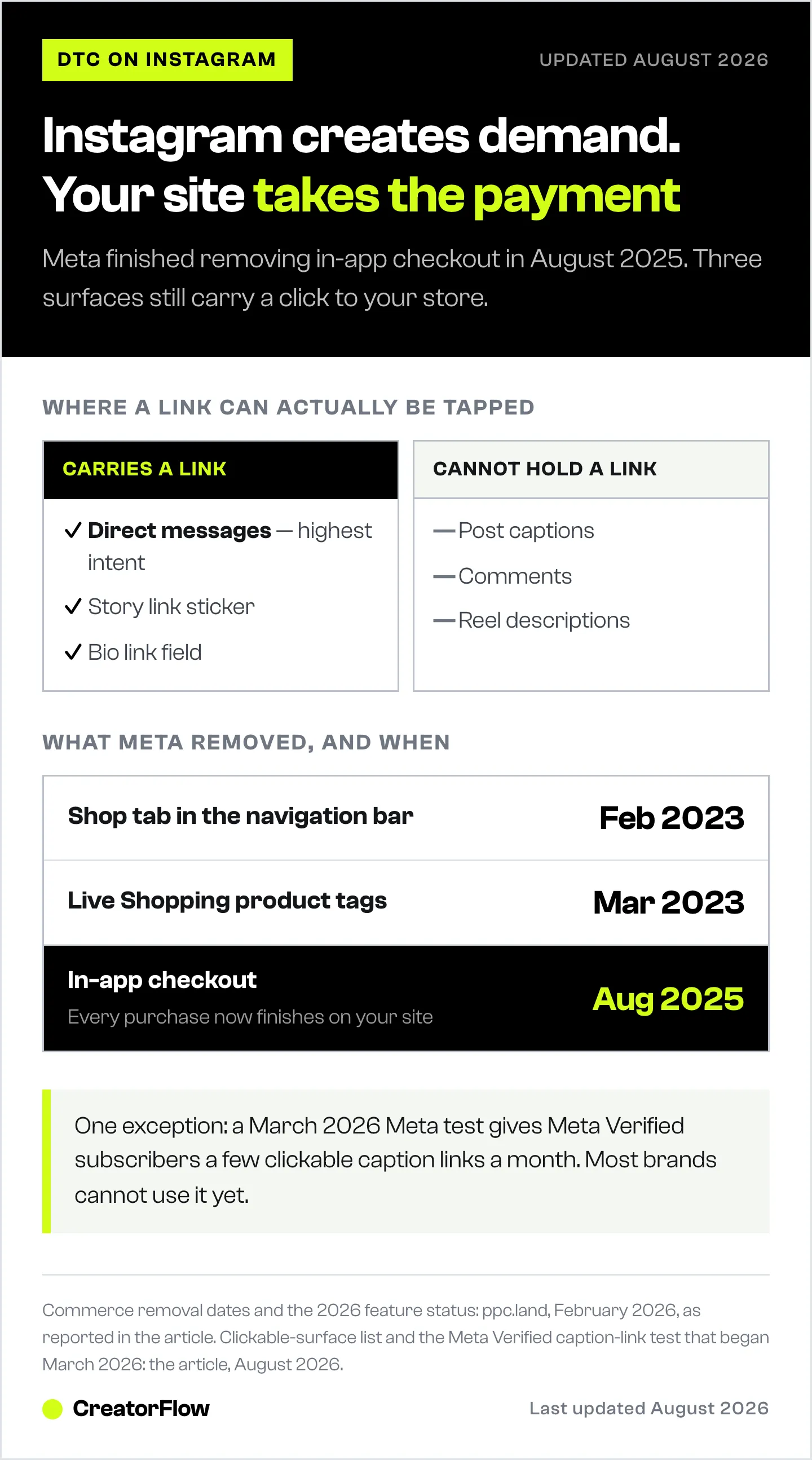
Most Instagram ecommerce advice still tells you to keep shoppers inside the app. That advice was written when you could. Meta spent three years pulling its commerce features back out: the Shop tab left the navigation bar in February 2023, product tagging left Live broadcasts a month later, and native checkout finished phasing out in August 2025.
What is left is still worth a lot. But it is a different machine, and it rewards a different strategy. This guide covers what Instagram still does for ecommerce brands, what it stopped doing, and how to engineer the handoff from a Reel to a completed order on your own site.
Key Takeaways
- Instagram is a discovery engine, not a checkout. Every purchase path now ends on your website (ppc.land, February 2026).
- Three surfaces carry a click: your bio link, the Story link sticker, and DMs. Captions, Reels, and comments do not.
- Reels remain the acquisition channel, because most Reels reach goes to people who do not follow you yet.
- Product tags still work in feed posts, Stories, and Reels. The tap opens your product page instead of an in-app cart.
- Comment-to-DM covers the gap Meta opened, moving a buyer from an unclickable Reel to a clickable link in seconds.
- Acquisition costs keep climbing. Ecommerce CAC is up roughly 40% since 2023, at $68 to $84 per customer (ringly.io, August 2026).
Is Instagram Good for Ecommerce in 2026?
Yes, for demand generation and for reaching buyers who have never heard of you. Roughly 44% of Instagram users shop on the platform in an average week, and 81% use it to research products or brands (capitaloneshopping.com, August 2026). US social commerce sales are forecast to reach $109.4 billion in 2026, up 27.8% year over year (sellerscommerce.com, August 2026). The demand is real. The checkout is not.
That distinction decides your whole strategy. If you plan around a store that Instagram no longer operates, you will spend your effort on catalog polish and lose the sale at the handoff. If you plan around discovery plus a fast route to your own checkout, the same content earns more.
What Meta Removed From Instagram Commerce
Meta’s retreat from running commerce infrastructure happened in stages. Only about 8% of global sellers used native checkout regularly, and Meta redirected those resources toward ad delivery and creator partnerships (ppc.land, February 2026).
| Feature | Status in 2026 | What ecommerce brands do instead |
|---|---|---|
| In-app checkout | Removed, August 2025 | Buyer completes payment on your site |
| Shop tab in the navigation bar | Removed, February 2023 | Your Shop lives on your profile only |
| Live Shopping product tags | Removed, March 2023 | Comment-to-DM during the broadcast |
| Product tags in feed, Stories, Reels | Active | Tap opens your product page |
| Reels affiliate product tags | Added, March 2026 | Creators tag products, buyer checks out on the retailer site |
| Bio link, Story link sticker, DM links | Active | The only clickable routes to your checkout |
The pattern is consistent. Meta kept everything that creates demand and removed everything that processes payment. Our breakdown of Instagram checkout and cart abandonment covers what that shift did to conversion rates in detail.
The Three Clickable Surfaces
Instagram allows a tappable link in exactly three places: the link field in your bio, the link sticker in Stories, and inside a direct message. Captions cannot hold a live link. Comments cannot. Reel descriptions cannot. The one exception is paid: Meta began testing clickable caption links for Meta Verified subscribers in March 2026, and since September 2026 it lists post links only in its Meta One plans from $49.99 a month. Every ecommerce strategy on Instagram is a plan for moving someone from content they cannot click into one of those three surfaces.
Brands lose most of their revenue at this seam. A Reel earns 80,000 views, the comments fill with sizing and price questions, and the answer to every one of them is a link the poster cannot place where the question was asked. Manual replies clear maybe the first thirty before the day takes over.
Ranked by how much traffic they carry for a working ecommerce account:
- DMs. Highest intent, because the buyer asked. Also the only surface that scales without you retyping the link.
- Story link sticker. Good for launches and restocks, gone in 24 hours unless you save it to a Highlight.
- Bio link. Always available, lowest intent, and it makes the buyer hunt for the product they already saw.
How to Set Up Instagram Shopping for Ecommerce
An Instagram Shop still earns its setup time. Product tags give your posts a price and a product page, and tagged content gets surfaced to shopping-intent surfaces inside the app. Setup runs through Meta Commerce Manager and takes an afternoon.
- Switch to a Business account under Settings, then Account type.
- Connect your product catalog through Commerce Manager, Shopify, BigCommerce, or WooCommerce.
- Submit your account for commerce review and wait for approval.
- Build collections that match how people shop, such as best sellers, gift guides, and new arrivals.
- Tag products in feed posts, Stories, and Reels.
The tap behaviour is the part to plan for. A tagged product opens a product detail page inside Instagram, and the buy button sends the shopper to your website. Your mobile product page is now the conversion surface, so its load time and its mobile checkout matter more than anything you do inside the app. The full walkthrough lives in our guide to setting up an Instagram Shop.
Reels Are the Discovery Engine
Reels are where ecommerce brands meet buyers who do not follow them. Instagram ranks Reels by interest rather than by follower graph, which is why a 2,000-follower brand can outsell a 200,000-follower brand on a given week. Follower count stopped being the constraint. Creative is.
What performs for product sales:
- Product demonstrations that show the thing working in the first two seconds
- Before and after sequences, where the result is visible without narration
- Manufacturing and sourcing footage, which answers quality objections
- Customer footage, which answers trust objections
- Short tutorials that make the product feel easy to own
Tag products in the Reel, keep captions readable with sound off, and treat saves and watch time as your signal rather than likes. In March 2026 Meta added native affiliate product tags to Reels, letting creators tag products and earn commission, with purchase completing on the brand or retail partner site (netinfluencer.com, August 2026). For brands, that widens the pool of creators who can sell your catalog without a formal contract. We compare the two routes in product tags against DM links.
Comment-to-DM Closes the Gap Meta Opened
Comment-to-DM automation watches a post for a keyword and sends the commenter a direct message containing your product link. It converts the one surface that cannot hold a link into the one surface with the highest intent, in about two seconds, at any volume.
The mechanic is simple to run. Pick a keyword, say it out loud in the Reel and again in the caption, and let the automation deliver the link when someone types it.
Where it earns the most for ecommerce brands:
- Product launches. The Reel announcing a drop collects hundreds of comments in the first hour, when intent is highest and manual replies are slowest.
- Recurring questions. Sizing charts, shipping timelines, ingredient lists, and material details all resolve with a link rather than a typed answer.
- Live broadcasts. Since product tagging left Live in March 2023, a keyword in the comments is how viewers get the link while you stay on camera. Our guide to selling during Instagram Lives covers the full broadcast workflow.
- Restocks and waitlists. Collect emails inside the DM so the next launch does not depend on the algorithm.
The questions themselves differ by what you sell. We have category playbooks for clothing and apparel brands, jewelry and accessory brands, beauty and skincare brands, and home, candle, and food brands.
One constraint shapes every DM plan: Meta’s 24-hour messaging window. You can reply to someone who contacted you within the last 24 hours, and outside that window the conversation closes. A DM tool answers people who raised their hand. It is not a broadcast channel, and any workflow that promises unprompted follow-ups weeks after purchase is describing something the platform does not permit.
Tools that run this through Meta’s official API include CreatorFlow at $15 per month flat, with 5,000 DMs per workspace, a follow gate, an email gate, and clicks broken out by country and city (creatorflow.so, August 2026). ManyChat covers Instagram alongside Facebook, WhatsApp, SMS, TikTok, and email, priced per active contact at $17, $39, $99, and $199 per month, or $14, $29, $69, and $139 billed annually (manychat.com/pricing, August 2026). Multi-channel brands tend to want the broader coverage; Instagram-only brands tend to want the flat rate. Our Instagram automation tools comparison breaks the plans down side by side.
Creators and Customer Content
Creator partnerships and customer content do the same job from two directions: they put your product in front of people who trust the messenger more than they trust your brand account.
Micro-creators in the 10,000 to 100,000 follower range are the usual starting point for ecommerce brands, because rates sit low enough to test several in a quarter and their audiences are narrow enough to match a catalog. Give each one a tracked link or a unique discount code so you can tell which partnership paid.
Customer content is cheaper and converts well in ads, where footage of a real person using the product usually beats studio work. Two rules keep it safe: ask before you repost, and get paid-ad rights in writing separately, because permission to share something organically does not cover running it as an ad. Our guide to collecting user-generated content covers the rights request and how to log it.
What Ecommerce Brands Should Measure
Instagram Insights stops being useful at the handoff, because the sale happens on your site. Tracked links are what connect the two halves.
Demand signals, measured in Instagram: Reels views from non-followers, profile visits, saves and shares, and product page taps.
Handoff signals, measured in your link tracking: clicks per post, click-through rate from DM sends, and which keyword or Reel produced them.
Revenue signals, measured in your store: sessions from Instagram, add-to-cart rate, conversion rate, average order value, and repeat purchase rate.
The one number most brands never see is the gap between product page taps in Instagram and sessions in their store analytics. That gap is your handoff loss, and it is usually the cheapest thing on this list to fix. Our Instagram sales funnel guide maps each metric to its funnel stage.
Common Mistakes Ecommerce Brands Make on Instagram

Planning around a checkout that no longer exists. Guides published before August 2025 tell you to keep buyers in the app. Following that advice today means optimising a step Meta deleted.
Answering link requests by hand. The comments under a launch Reel are the highest-intent moment your brand gets all month, and manual replies clear a fraction of them before the intent cools.
Sending every click to the homepage. A buyer who asked about one product should land on that product, not on a storefront where they have to search for it again.
Treating the mobile product page as someone else’s problem. Instagram traffic converts on your site now. A slow mobile page is the whole strategy failing at the last step.
Posting only static images. Reels are how non-followers find you, and a feed of product shots reaches the audience you already have.
Expecting DMs to work like email. The 24-hour window means DM automation answers requests. Nurture sequences belong in email, which is why capturing an address inside the DM matters.
FAQ
Is Instagram still good for ecommerce in 2026?
Yes, as a discovery channel. Around 44% of Instagram users shop on the platform weekly and 81% research products there (capitaloneshopping.com, August 2026). What changed is where the sale completes. Since August 2025 every purchase finishes on your own website, so Instagram generates demand and your site converts it.
Can customers buy directly on Instagram?
No. Meta finished phasing out native in-app checkout for Facebook and Instagram Shops in August 2025 (ppc.land, February 2026). Product tags still exist, but tapping one opens a product page and then sends the shopper to your site to pay. Plan your mobile checkout accordingly.
Do I still need an Instagram Shop if checkout is gone?
An Instagram Shop is still worth setting up. It gives your posts taggable products with prices, adds a storefront to your profile, and makes your content eligible for shopping surfaces inside the app. It is free, and it shortens the path from a Reel to the right product page.
How do ecommerce brands get links to buyers on Instagram?
Through the three surfaces that accept a link: your bio, the Story link sticker, and direct messages. Captions, comments, and Reel descriptions cannot hold a clickable link. Comment-to-DM automation is the common route, sending the product link by DM when someone comments a keyword.
Why did Instagram remove Live Shopping?
Meta pulled product tagging from Live broadcasts in March 2023 as part of a broader retreat from running commerce infrastructure (marketingdive.com, August 2026). You can still sell during a broadcast by asking viewers to comment a keyword and having automation send the product link while you stay on camera.
Do I need a large following to sell on Instagram?
No. Reels are ranked by interest rather than by who follows you, so most of a Reel’s reach goes to non-followers. Brands with a few thousand followers sell well by posting Reels consistently, tagging products, and answering link requests quickly. Engagement rate and click-through matter more than follower count.
How often should ecommerce brands post on Instagram?
Three to five Reels a week is the usual working cadence, with Stories most days and two or three feed posts. Consistency beats volume. One Reel that demonstrates a product clearly will outperform a week of product shots that reach only existing followers.
Instagram commerce feature status verified from ppc.land, marketingdive.com, and netinfluencer.com as of August 2026. Shopping and social commerce statistics from capitaloneshopping.com and sellerscommerce.com, August 2026. CAC benchmarks from ringly.io, August 2026. Pricing verified at creatorflow.so and manychat.com/pricing, August 2026. Individual results vary.


