
Mavely Instagram comments stop converting because of four friction points between the comment and the commission: manual replies that arrive hours after buyer intent peaks, a MyShop storefront holding 50+ products instead of a curated collection, links spread across Mavely, Amazon, LTK and ShopMy, and no follow-up for the people who never clicked. Fix those four and the same content earns more.
You posted a Target haul Reel. 350 comments flooded in. “Link!” “Need this!” “Where from?” Those are 350 people telling you they want to buy through your Mavely SmartLink right now. Your Mavely commission dashboard at the end of the week shows 8 sales. That is a 2.3% conversion rate on shoppers who actively asked for your links.
The content worked. 350 people engaged and stated intent. The audience is not the problem. Mavely’s commission rates are not the problem either, since Mavely pays up to 30% on 1,400+ brand partners (company.joinmavely.com, April 2026).
Four specific friction points between the comment and the commission are quietly bleeding your revenue. Most Mavely creators never identify them because they assume “more content” is always the answer. It is not. The fix is closing the gap between stated intent and actual purchase.
This guide walks through a full conversion audit, pinpoints exactly where sales are leaking, and gives you copy-paste fixes for each friction point.
Key Takeaways
- Response speed is your largest lever: Every hour of delayed reply drops buyer intent. Instant SmartLink delivery captures shoppers while they are still on your post.
- Cluttered MyShop pages cause decision paralysis: Storefronts with 50+ products see click-through rates fall below 1%. Curated collections of 5-8 items convert 4-5x better.
- Multi-platform link juggling steals time: Most Mavely creators also use Amazon Associates, LTK, and ShopMy. LinkDM’s free Mavely plan only sends Mavely links, forcing manual copy-paste for everything else.
- Account deactivation anxiety limits experimentation: Trustpilot reports of Mavely account closures make creators hesitant to connect third-party tools. Meta-approved automation is safe because it uses the official API.
- Cookie windows vary by brand on Mavely: Attribution runs 7-30 days depending on the retailer (joinmavely.com, April 2026), which makes instant responses matter because purchase intent fades within hours regardless of cookie length.
- A single follow-up DM recovers 15-30% of missed clicks: People get distracted, not disinterested. One reminder brings them back.
- Email capture through SmartLink requests builds an owned audience: Instagram can restrict your reach tomorrow. An email list cannot be taken away.

The Mavely Commission Funnel: Where Your Money Disappears
Your Mavely commission funnel has six stages. Every stage has drop-off. Most creators only pay attention to stage one (content) and stage six (commission check). The stages in between are where the money goes missing.
Stage 1: You post content. A Target haul, a skincare routine, a home refresh. This part is working because your engagement is high.
Stage 2: Followers comment. They type “link,” “need this,” or “where is that from?” This is the highest-intent moment in the entire funnel. A single viral Reel can generate 100-400 link requests.
Stage 3: You respond with a SmartLink. First major leak. Manual responses typically take 1-4 hours. By then, 40-60% of commenters have moved on.
Stage 4: They click the SmartLink. Second leak. If you sent your full MyShop storefront instead of a curated collection, they land on a page with 50-200 products and have to hunt for the item they asked about.
Stage 5: They navigate Mavely and reach the retailer. Third leak. Multi-platform creators often lose attribution here because they pasted the wrong link type (LTK instead of Mavely, or vice versa) during manual responses.
Stage 6: They purchase and you earn commission. The survivors. Out of 350 comments, maybe 8 people made it through all five friction stages.
Fix stages 3, 4, and 5 and you can triple conversions from 8 sales to 24-30 on the same post. Same content. Same audience. Three times the revenue.
Friction Point 1: Response Delay Is Your Most Expensive Problem
Picture a follower scrolling Instagram. They see your Target Reel. The cropped sweater catches their eye. They already imagine wearing it this weekend. They comment “link please!” and keep scrolling, fully expecting to buy within the next 10 minutes.
Three hours later, you respond with the SmartLink. By now they are making dinner. They have seen four other sweater Reels from other creators. They might still click. But the spark is gone. Buying intent has a short half-life on social media.
LTK has published data on this and the same principle applies to Mavely: creators using instant DM responses earn up to 60% more in commissions compared to those who respond manually (LTK via BusinessWire, August 2024). That is not a marginal improvement. That is the difference between a $2,000 month and a $3,200 month.
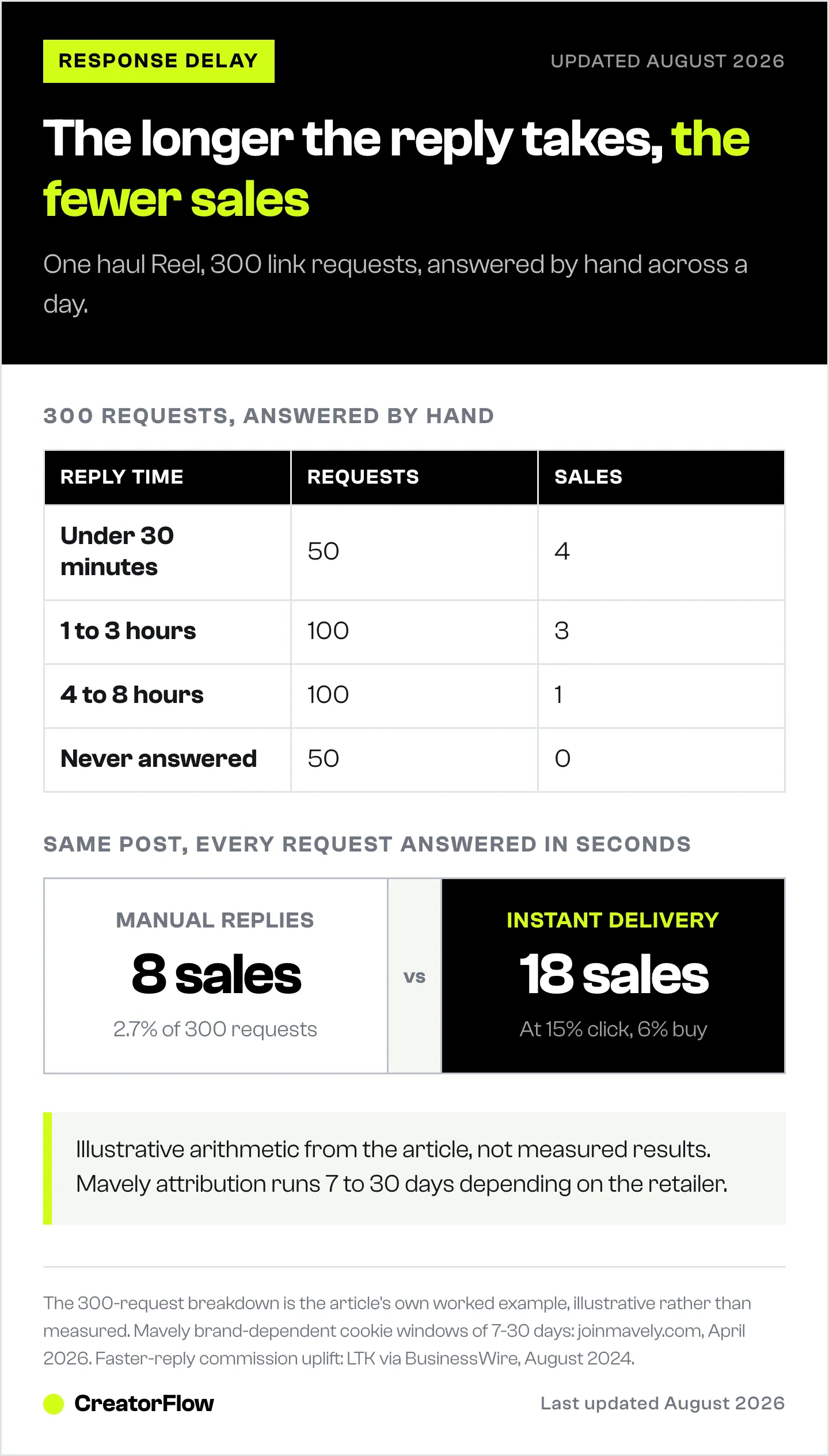
Response time math on a real Mavely post:
Say you get 300 SmartLink requests on a haul Reel. Here is how manual response time typically breaks down:
First 50 requests: You respond within 30 minutes while still online right after posting. These people get SmartLinks while they are browsing. Maybe 18% click and 7% buy. That is roughly 4 sales.
Next 100 requests: You respond 1-3 hours later. Intent has dropped. Maybe 8% click and 3% buy. That is 3 sales.
Next 100 requests: You respond 4-8 hours later because you went to bed or filmed more content. Intent is cold. Maybe 3% click and 1% buy. That is 1 sale.
Last 50 requests: You never respond. Forgot, or the DMs got buried. Zero sales.
Total: 8 sales from 300 requests. A 2.7% conversion rate.
Now imagine every single one of those 300 people received a SmartLink within 5 seconds of commenting. Intent stays high for all 300. If 15% click and 6% buy, that is 18 sales. More than double the revenue from the exact same post.
Why “I will respond faster” is not a strategy.
You cannot outwork the math. Even disciplined creators sleep, film content, eat meals, and have lives. There will always be 4-8 hour gaps in your response time, and those gaps cost real money every single day.
Automation tools solve this by responding in seconds, 24 hours a day. Mavely partners officially with LinkDM, which offers creators a free Mavely Pro plan (200,000 DMs per month) that covers the core use case (linkdm.com, July 2026). CreatorFlow charges $15 per month flat for any URL type (creatorflow.so, April 2026). ManyChat starts at $17 per month for 250 contacts ($14 billed annually) and scales up to $199 per month with audience size (manychat.com/pricing, July 2026).
For a deeper side-by-side of these options, check the Mavely LinkDM vs alternatives comparison.
The investment pays for itself on a single post. If automation helps you capture 6 more sales at an average $7 commission, that is $42 from one Reel, well above the monthly cost.
Friction Point 2: Your MyShop Page Has Too Many Products
Someone comments “love the blazer!” on your cozy office outfit Reel. You send them your MyShop storefront link. They tap it, excited to buy a $68 blazer they already decided they wanted.
They land on your MyShop page. It has 180+ products. Summer sandals from June. Sunscreen from a beach trip. Random Amazon finds from three months ago. The blazer they wanted is somewhere in there, buried between a yoga mat and a pair of earrings.
They scroll. They do not find it immediately. They scroll more. After 15 seconds of searching, they close the tab and go back to Instagram. You lost a sale that was already yours.
This is decision fatigue in action. Research on product page performance shows focused pages with 5-8 items see click-through rates around 12-18%, while cluttered pages with dozens of products drop below 5% (Pop.Store, 2025). That gap represents thousands of dollars in lost commissions over a year.
The MyShop trap.
Many Mavely creators default to sending their main MyShop link for every request because it seems efficient. One link covers everything. But it creates a terrible shopping experience.
When someone asks “where is the blazer from?” they want one specific blazer, not a catalog of everything you have worn since January. Think of it like a clothing store. If someone says “I want that blue dress in the window,” you do not hand them a map of the entire mall. You walk them to the dress.
The fix is curated SmartLink collections, not product dumps. Build small, focused Mavely collections of 5-8 items organized by category. Your office outfit post links to your “Workwear” collection. Your skincare Reel links to your “Morning Skincare” collection. This matches buyer intent with the right product page.
For a full comparison of how curated DM delivery beats generic bio links, read the bio link vs DM automation analysis.
Friction Point 3: Multi-Platform Link Juggling Steals Your Time
Most Mavely creators do not use only Mavely. Survey data and creator communities consistently show that active affiliate creators run 2-3 platforms simultaneously. Mavely for everyday products (1,400+ brands). LTK for high-end fashion partnerships. Amazon Associates for long-tail catalog items.
This multi-platform approach makes commercial sense because it maximizes earning potential. But it creates a hidden friction for Instagram DM responses.
Mavely’s official partnership with LinkDM gives creators a free LinkDM Pro plan with 200,000 DMs per month. This is genuinely excellent. But the free plan only sends Mavely SmartLinks (linkdm.com/solutions/mavely-creators, April 2026). Sending an Amazon link or an LTK link through the free plan requires purchasing additional LinkDM credits or upgrading.
What this looks like in practice.
You post a morning routine Reel featuring 5 products. Three are Mavely SmartLinks (the face wash, the moisturizer, the blush). One is an Amazon-only find (the hair tool). One is an LTK exclusive brand (the perfume).
120 people comment asking for the products. Your LinkDM free plan handles the three Mavely items automatically. Perfect. But the Amazon and LTK link requests go unanswered unless you manually reply. That means 120 DMs split into two categories:
- Automatic responses for 60% of requests (Mavely items)
- Manual copy-paste for 40% of requests (Amazon and LTK items)
You are back to 45-60 minutes of manual DM work per post. The automation solved half the problem and left the other half untouched.
The fix: use a tool that sends any URL.
CreatorFlow charges $15 per month flat and sends any link type (Mavely SmartLinks, Amazon affiliate URLs, LTK collection links, Shopify product pages, Calendly booking links). Multi-keyword routing lets you set “blush” to send the Mavely link, “perfume” to send the LTK link, and “hair tool” to send the Amazon link, all from one dashboard.
You can run CreatorFlow alongside LinkDM’s free Mavely plan. LinkDM handles Mavely requests for free. CreatorFlow handles the multi-platform overflow. Running both in parallel costs $15 per month and fully covers your audience.
For a detailed comparison of automation tools for Mavely creators, including the exact trade-offs between running one tool vs. two, see the Mavely LinkDM vs alternatives guide.
Friction Point 4: Account Deactivation Anxiety Stops Experimentation
This one is subtle but real. Scroll Trustpilot reviews of Mavely and you will find documented reports from creators whose accounts were deactivated right around payout time, with vague policy-violation explanations and no clear appeal process (trustpilot.com/review/joinmavely.com, April 2026).
The majority of Mavely creators never experience this. 180,000+ creators use the platform without issues. But the public reports create anxiety that quietly shapes creator behavior. Some creators hesitate to connect third-party automation tools because they worry it will flag their account. Others avoid testing new workflows because they do not want to risk their payout pipeline.
This anxiety costs money. The creators who experiment with automation, templates, and link routing earn significantly more than those who stick to manual responses out of fear.
The fix: use only Meta-approved tools.
Meta publishes a list of certified Tech Providers who have been approved to access the Instagram Graph API. Tools on this list, including CreatorFlow, ManyChat, and LinkDM, cannot get your Mavely account deactivated because they do not interact with Mavely’s platform at all. They operate entirely through Instagram’s official API with explicit Meta approval (developers.facebook.com, April 2026).
What can get your Mavely account flagged: violating Mavely’s terms of service, using spam-like tactics, fraudulent click generation, or operating in restricted regions. Those risks exist whether or not you use automation tools.
Automation tools that use unofficial Instagram methods (browser bots, screen scrapers) can get your Instagram account banned, which is different from a Mavely account issue. The rule is simple: only use Meta-approved API tools.
Build independent assets.
Anxiety about losing your Mavely account also points to a deeper truth: platform dependency is a real risk. The answer is building revenue streams you own. Your email list is the primary one, covered in detail later in this guide.
The 5-Step Mavely Conversion Audit (Run This Today)
Stop guessing where you are losing money. Run this audit on your account right now. It takes 15 minutes and shows you which friction points are hurting you most.
Step 1: Check your average response time.
Open your Instagram DMs. Look at your last 20 SmartLink requests. Note the time between the comment and your response. Calculate the average. If it is over 30 minutes, response delay is your biggest leak. If it is over 2 hours, you are leaving significant commissions on the table.
Step 2: Count products on your MyShop page.
Open your MyShop page on your phone (not desktop, because your followers shop on mobile). Count visible products. If it is over 30, your storefront is too cluttered. If it is over 100, it is actively hurting your conversions.
Step 3: Click your own SmartLink from a mobile browser.
Send yourself a DM with a SmartLink. Tap it. Count how many taps, scrolls, and page loads it takes to reach the actual product on the retailer’s site. If it is more than 3 taps, you have too much friction.
Step 4: Count unanswered link requests from the last 7 days.
Scroll your recent posts. Count comments asking for links that you never responded to. Each one is a lost sale. If you find more than 20, manual response is not sustainable.
Step 5: Cross-reference engagement with commissions.
Compare your most-engaged posts (highest comment counts) with your Mavely commission dashboard. If your most popular posts are not generating the most commissions, the bottleneck is between the comment and the purchase, not the content itself.
Fix 1: Instant SmartLink Delivery via Automation
The single biggest upgrade you can make is instant automated responses. Tools in this category:
LinkDM Mavely Pro is free for Mavely creators, 200,000 DMs per month, but only sends Mavely SmartLinks. Best for creators who only use Mavely (linkdm.com, July 2026).
CreatorFlow is $15 per month flat, sends any URL (Mavely, Amazon, LTK, Shopify, Calendly), includes multi-keyword routing, Follow Gate, and Email Gate. Best for multi-platform creators (creatorflow.so, April 2026).
ManyChat starts at $17 per month for 250 contacts ($14 billed annually) and scales to $199 per month on Advanced (25,000 contacts), with multi-step flows and AI conversations. Best for complex branching logic (manychat.com/pricing, July 2026).
Setup takes 5-10 minutes. Pays for itself on a single viral post. For a detailed comparison including which tool fits which creator profile, see the Mavely LinkDM vs alternatives comparison.
For a step-by-step walkthrough on configuring your first comment-to-DM automation, check the comment-to-DM setup guide.
Fix 2: Curate Mavely Collections That Actually Convert
Your MyShop page should not be a dumping ground for every product you have ever linked. It should be a curated shopping experience organized by category, season, and price range.
Collection structure by niche.
Fashion creators need about 5 core collections: current season outfits (6-8 looks, update monthly), workwear (5-8 outfits), weekend casual (5-8), date night (5-6), accessories under $50 (6-8 items).
Beauty creators need about 5 collections: morning skincare in application order (5-7 products), evening skincare (5-7), everyday makeup (6-8), haircare essentials (4-6), dupes under $25 (6-8).
Home decor creators need about 4 collections: living room (6-8 items), bedroom (5-7), kitchen and dining (5-7), home finds under $50 (6-8).
Why 5-8 items per collection.
Fewer than 5 feels sparse. More than 10 creates decision fatigue, and anything above 20-30 products drops click-through rates dramatically. Think of each collection as a curated recommendation, not a comprehensive catalog.
Update weekly.
Stale collections hurt conversions. If someone clicks your “Fall Outfits” collection and sees sold-out items from last season, they lose trust immediately. Remove anything that is sold out or discontinued. Add new products featured in recent content. The 15 minutes per week you spend curating generates more commission revenue than an extra hour of content creation.
For more on affiliate link strategy, read the guide on how to add affiliate links on Instagram.
Fix 3: Maximize Mavely Boosts with Dedicated Automations
Mavely Boosts, launched in August 2025, give creators up to 3x commission on select brand partnerships during time-limited windows (prnewswire.com, August 2025). Boosts apply automatically and require no follower minimums or approvals.
The opportunity: Boost products generate the highest revenue per click during their active windows. The catch: those windows are temporary. Manual responses during a Boost period mean you are responding late to the highest-earning products in your portfolio.
How to capitalize on Boosts.
Check your Mavely dashboard daily for active Boosts. Create dedicated trigger-word automations for any Boost product you have featured in recent content. Example: if “Ulta” is running a Boost and you posted a Sephora vs Ulta haul last week, set up a “ulta” keyword automation that instantly sends the Boosted Ulta SmartLink.
When the Boost expires, remove the dedicated automation (or redirect the keyword to a standard SmartLink). This takes about 3 minutes per Boost setup and can dramatically increase your earnings on boosted products.
Creators using LinkDM Mavely Pro can do this within LinkDM. Creators using CreatorFlow can do it there. The principle is the same: dedicated automations for time-sensitive revenue opportunities.
Fix 4: Build Your Email List Through SmartLink Requests
Every follower who comments asking for a SmartLink is a warm lead. They have seen your content, liked your style, and want to buy what you recommend. Right now that relationship lives entirely on Instagram. If Instagram changes its algorithm or your account gets restricted, that revenue stream vanishes.
An email list is an owned asset. No algorithm can take it away.
Two approaches to email capture in DMs.
Approach A: email before link. Your automation asks for their email before sending the SmartLink. “Drop your email and I will send the link plus early access to my next haul.” Higher capture rate but adds friction. Some people will bounce rather than share an email.
Approach B: link first, email second. Your automation sends the SmartLink immediately, then follows up. “Here is the link you asked for. If you want my weekly picks and exclusive deals, reply with your email and I will add you.” Zero friction on the buying experience but lower capture rate.
Recommendation: Approach B for most Mavely creators.
Your primary goal is commissions. Anything that slows down the link hurts conversion. Send the SmartLink first, always. Capture emails second.
Even a 10-15% email capture rate builds a meaningful list. If you send 1,000 DMs per month and 12% share their email, that is 120 new subscribers monthly. After six months, a 700+ person email list of people who actively shop your recommendations.
For more on scaling affiliate revenue through DM workflows, read the guide on scaling affiliate marketing with DM automation.
Mavely DM Templates for Every Category
These eight templates cover the most common Mavely SmartLink request scenarios. Customize with your voice and product details. Always include FTC disclosure since you are sharing affiliate links.
Template 1: Fashion Haul Breakdown
Hey! Here is everything from the haul:
The blazer (Aritzia, I wear size S, TTS): [MAVELY SMARTLINK] The jeans (Agolde, sized down one): [MAVELY SMARTLINK] The bag (Polene Numero Neuf, Chalk): [MAVELY SMARTLINK]
I earn a small commission when you shop through these at no extra cost to you. The blazer runs long in the sleeves, so grab your normal size unless you have long arms. Happy shopping!
Template 2: Beauty and Skincare Routine
Here is my morning routine in order of application:
- CeraVe Hydrating Cleanser: [MAVELY SMARTLINK]
- The Ordinary Niacinamide 10%: [MAVELY SMARTLINK]
- Supergoop Unseen Sunscreen SPF 40: [MAVELY SMARTLINK]
- Rare Beauty Soft Pinch Blush in Joy: [MAVELY SMARTLINK]
I earn a small commission on shops through these links. The niacinamide and sunscreen are the non-negotiables for me.
Template 3: Home Decor Room Tour
Thanks for asking! Here is everything from the living room refresh:
The sofa (Article Sven, Charme Tan): [MAVELY SMARTLINK] The coffee table (West Elm Avery): [MAVELY SMARTLINK] The rug (Loloi Chris Loves Julia, 8x10): [MAVELY SMARTLINK]
Commission disclosure: I earn a small amount when you shop through these. The rug pulls the whole room together, worth every penny.
Template 4: Amazon Crossover (for Multi-Platform Creators)
Here is the breakdown:
The blender (Amazon link): [AMAZON AFFILIATE LINK] The countertop containers (Mavely): [MAVELY SMARTLINK] The coffee maker (Mavely): [MAVELY SMARTLINK]
I earn a small commission across both platforms. The blender is Amazon-only, the rest are on Mavely. Let me know if you grab anything!
Template 5: Sale or Boost Alert with Urgency
Heads up! That jacket is running a Mavely Boost right now (higher commission means I love promoting these more):
Currently $118 (originally $189, 37% off): [MAVELY SMARTLINK]
Sizes are going fast. I grabbed mine in XS and it fits perfectly over a tee or sweater. Commission disclosure: I earn more than usual on Boost products but your price is the same.
Template 6: Sizing and Fit Question
Great question about fit! I am 5’7”, 130 lbs and wear a size S in this brand. Their stuff runs slightly oversized, so if you prefer fitted, size down.
Here is the link: [MAVELY SMARTLINK]
For reference, I usually wear S in Zara and M in Free People, and this brand is closer to Zara’s fit. I earn a small commission on purchases through this link.
Template 7: Story Reply (Personal Tone)
Ahh thank you! That sweater is my favorite thing I bought this month. I have worn it four times already and it is SO soft.
Here you go: [MAVELY SMARTLINK]
Comes in 6 colors, the oatmeal one is the best in person. I earn a small commission when you shop through this link.
Template 8: Follow-Up Reminder
Hey! I sent the link to the [product] earlier. Wanted to make sure it did not get buried in your DMs!
Here it is again: [MAVELY SMARTLINK]
A few sizes started selling out, so did not want you to miss it. Commission disclosure: I earn a small amount when you shop through this link.
For niche-specific template variations and advanced customization tips, check the Instagram DM automation templates library. Fashion creators can also explore templates designed specifically for outfit link delivery.
Weekly 15-Minute Tracking Framework
Tracking separates creators who earn consistent Mavely commissions from those who post and hope. Block 15 minutes every Sunday or Monday. Open two tabs: your DM automation analytics and your Mavely commission dashboard.
Source 1: DM automation analytics.
Look at three numbers: total DMs sent, click-through rate per template, and click-through rate per trigger word. These tell you which messages resonate and which products get the most interest. If your fashion template gets a 22% CTR and your beauty template only gets 8%, lean into more fashion content.
Source 2: Mavely commission dashboard.
Look at three numbers: total commissions earned, commissions per brand or category, and average order value. These tell you which products actually convert to purchases (not just clicks) and which retailers pay the highest commissions.
Cross-reference to find winners.
Your best content is the intersection of high DM engagement and high commission revenue. A post that generates 200 link requests AND strong commissions is your template for future content. A post that generates 200 link requests but low commissions means people click but do not buy, usually pointing to a product-link mismatch.
Key metric: revenue per DM sent.
Total Mavely commissions divided by total DMs sent. If you sent 500 DMs and earned $400, your revenue per DM is $0.80. Track this weekly. Improving templates, curated collections, and response speed should push this number higher each month.
For detailed setup on link tracking and analytics, read the Instagram DM link tracking guide. For CreatorFlow’s built-in analytics dashboard, see the CreatorFlow Insights guide.
Try CreatorFlow free with 500 DMs per month and see your click-through rates within the first week. Plans start at $15 per month flat if you need higher volume (creatorflow.so, April 2026).
Working with Mavely creators? We keep a dedicated setup page for exactly that: CreatorFlow for Mavely creators.
FAQ
Why are my Mavely link clicks high but commissions low?
High clicks with low commissions usually means one of three things. First, you might be sending people to high-traffic, low-commission brands. Mavely commission rates vary significantly by retailer. Second, your followers might click but not complete purchases because the product page is confusing or the item is out of stock. Third, attribution might be failing because the cookie window on that specific brand expired before they purchased. Check your Mavely dashboard for conversion rates by retailer and focus your content on higher-commission partners.
How fast should I respond to Instagram comments asking for Mavely links?
As close to instant as possible. Industry data from LTK shows creators using instant DM responses earn up to 60% more in commissions (LTK via BusinessWire, August 2024), and the principle applies to Mavely. Every hour of delay reduces buying intent. If you are responding manually and averaging over 30 minutes, you are losing substantial revenue. Automation tools deliver SmartLinks in 3-8 seconds, capturing the buyer while still engaged with your content.
What is Mavely’s attribution window?
Mavely cookie duration varies by brand partner, typically ranging from 7 to 30 days (joinmavely.com, April 2026). Each retailer on Mavely sets its own window. Ulta Beauty uses a 30-day cookie, for example. The variation means you should check cookie length per brand in your Mavely dashboard. Regardless of cookie duration, response speed still matters because purchase intent fades within hours whether the cookie lasts 7 days or 30.
Should I send my full MyShop page or individual SmartLinks?
Individual SmartLinks almost always outperform the full MyShop page. When someone asks “where is that jacket from?” they want one specific jacket, not a catalog of 200 products. Send them to a curated collection of 5-8 items related to the post they commented on. Focused pages see click-through rates around 12-18% compared to under 5% for cluttered pages (Pop.Store, 2025). Start by creating 4-5 category collections and routing trigger words to the right one.
How many products should be on my MyShop collection pages?
Keep it to 5-8 products per collection. Fewer than 5 feels sparse. More than 10 starts creating decision fatigue. Above 20-30 products drops click-through rates dramatically. Think of each collection as a curated recommendation, not a comprehensive catalog. Update weekly to remove sold-out items.
Can I use DM automation and still sound personal?
Yes, if you write templates the way you actually talk. The biggest mistake is switching to a formal tone in automated messages. Read your template out loud. If it does not sound like something you would text a friend, rewrite it. Include specific product details, personal sizing notes, and honest opinions. Your followers know automation exists and do not mind automated messages as long as the content is helpful and sounds like you.
What happens if my Mavely account gets deactivated?
Some Trustpilot reviews document account closures at payout time with vague policy explanations (trustpilot.com/review/joinmavely.com, April 2026). The majority of Mavely’s 180,000+ creators never experience this. Building an email list through your SmartLink requests is the best insurance. If your Mavely account is ever restricted, you still have a direct relationship with your warm buyers and can switch to another affiliate platform without losing your audience.
How do I know which DM template works best for Mavely?
Track click-through rates per template over 2-4 weeks. Most automation tools show how many people opened each message. Run two versions of the same template (one with sizing info, one without) and compare CTR after 100+ sends. The higher click rate wins. Common patterns: templates with specific product names outperform generic ones. Templates with personal notes (your size, how it fits) outperform plain product links. Templates with urgency (sale ending, selling out) outperform standard messages.
Should I use link-in-bio or DM automation for Mavely SmartLinks?
DM automation outperforms link-in-bio for Mavely conversions by a significant margin. Link-in-bio requires your follower to leave the post, navigate to your profile, find the link, tap it, and search for the specific product. That is 4-5 friction steps. DM automation sends the SmartLink directly to their inbox in seconds with one specific item. Use link-in-bio as backup for general browsing, and DM automation for any post recommending specific products. For a full analysis, read the bio link vs DM automation comparison.
How do I recover commissions from unanswered link requests?
Audit your last 7 days of posts. Go through comments and identify every link request you never responded to. Respond now, even days later, with a personalized message: “So sorry for the delay! Here is the [product] link you asked about: [SMARTLINK]. Let me know if you need sizing help.” Some of those people will still buy. Going forward, set up DM automation to ensure zero requests go unanswered. Add a follow-up DM sequence that sends a gentle reminder 3-4 hours after the initial link delivery. A single follow-up recovers 15-30% of missed clicks.
Related Articles
- Mavely Creator Instagram Automation: Setup Guide - Full setup guide for automating Mavely SmartLink delivery with keyword triggers and templates.
- Mavely LinkDM vs CreatorFlow vs ManyChat Comparison - Side-by-side comparison of DM automation tools for Mavely creators, including LinkDM free plan restrictions.
- Why Your LTK Instagram Comments Aren’t Converting - Parallel conversion analysis for LTK creators with overlapping strategies.
- Instagram DM Automation for Amazon Influencers - Apply multi-keyword routing to Amazon affiliate links on Instagram.
- Bio Link vs DM Automation for Affiliate Clicks - Data-backed comparison of link-in-bio vs direct DM delivery for affiliate revenue.
- Comment-to-DM Automation Setup Guide - Step-by-step instructions for configuring keyword triggers and custom responses.
- Instagram DM Automation Templates - 50+ customizable templates for every niche and product category.
- Scale Affiliate Marketing with DM Automation - Strategies for growing affiliate income without proportional time investment.
- Instagram DM Link Tracking - How to track click-through rates, conversion data, and revenue attribution.
- How to Add Affiliate Links on Instagram - Complete guide to affiliate link placement across posts, stories, DMs, and bio.
Disclaimer: Performance results mentioned are based on aggregated user data and industry research from 2025-2026. Individual results vary based on audience size, content quality, engagement rates, and niche. Mavely commission rates vary by brand partner as of May 2026. Cookie/attribution windows are brand-specific (typically 7-30 days) and subject to change. Mavely Boosts commission multipliers ("up to 3x") are ceilings, not guarantees. FTC requires disclosure of affiliate relationships in all promotional content including DMs. Instagram is a trademark of Meta Platforms, Inc. CreatorFlow, Mavely, LinkDM, ManyChat, and other product names are trademarks of their respective owners. Users are responsible for complying with Instagram's Terms of Service, FTC disclosure guidelines, and all applicable laws.


