
Mavely’s official partnership with LinkDM gives creators 200,000 free DMs per month (linkdm.com/solutions/mavely-creators, April 2026). That sounds like Instagram DM automation is solved for every Mavely creator on earth. The catch is that the free plan sends Mavely SmartLinks only, on up to 3 Instagram accounts. Creators who also run Amazon Associates or LTK links need an unrestricted tool: CreatorFlow at $15/month, LinkDM Pro at $19/month, ManyChat from $17/month, or Chatfuel.
Until you try to send an Amazon link. Or an LTK link. Or your own course page. Or a Calendly booking link through the free plan. You hit a wall. LinkDM’s free Mavely Pro tier only sends Mavely SmartLinks. Everything else requires purchasing additional credits or upgrading to a paid LinkDM plan.
For creators who use only Mavely, that restriction does not matter and the free plan is excellent. For creators who run Mavely plus Amazon Associates plus LTK (which is most Mavely creators), the free plan solves half the problem and leaves the other half for manual copy-paste.
This guide compares LinkDM’s free Mavely plan against four alternatives: CreatorFlow, LinkDM’s paid tier, ManyChat, and Chatfuel. Feature-by-feature, pricing, and which one generates the most Mavely commissions based on your specific setup.
Key Takeaways
- LinkDM Mavely Pro is genuinely free but restricted to Mavely SmartLinks, 3 Instagram accounts max, and requires a prior Mavely payout to activate (linkdm.com, July 2026).
- Non-Mavely links in LinkDM free tier require purchasing credits or upgrading to the $19/month paid plan.
- Multi-platform creators lose the most with link-restricted tools because they still manually copy-paste Amazon, LTK, and own-product links.
- CreatorFlow sends any URL at $15/month flat rate (any affiliate platform, any booking link, any landing page).
- All listed tools operate through Instagram’s official API, which is the approved path for sending automated DMs and keeps you clear of the browser bots and scrapers that bans are associated with.
- Pricing ranges from free (LinkDM Mavely-only) to $69/month (Chatfuel’s AI conversation engine).
- The right choice depends on your platform mix, not just price. Mavely-only creators should use LinkDM free. Multi-platform creators need an unrestricted tool.

LinkDM Alternatives for Mavely Creators
If you promote only Mavely, LinkDM’s free Mavely Pro plan covers you: 200,000 DMs a month across up to 3 Instagram accounts, Mavely SmartLinks only. It activates only after a prior Mavely payout (linkdm.com, July 2026). If you also send Amazon, LTK, or your own checkout links, pick a tool with no link-type restriction. CreatorFlow is $15/month flat, LinkDM Pro is $19/month flat, ManyChat starts at $17/month for 250 contacts, and Chatfuel runs $20-69/month.
What Mavely’s Free LinkDM Plan Actually Includes (And What It Doesn’t)
Mavely announced its LinkDM partnership in October 2024 and rolled out the free Mavely Pro plan to all eligible creators (prnewswire.com, October 2024). The deal is genuinely generous compared to LinkDM’s standard free tier.
What the free Mavely Pro plan includes:
- 200,000 DMs per month (vs. LinkDM’s standard free plan of 1,000 per month)
- Access to all current and future LinkDM Pro features
- Comment auto-reply on up to 3 Instagram accounts
- Story reply and Reel comment automation
- The “Unlock” feature, which enables auto-reply on your last 200 posts (valued at $76 alone per LinkDM)
- LinkDM reports 92% open rates and 74% CTR on automated DMs sent through the platform
On paper this looks like a complete solution. For many creators it is.
What the free plan does not include:
The critical restriction is link type. The free Mavely Pro plan only sends Mavely SmartLinks. Sending any non-Mavely URL (Amazon affiliate link, LTK shop link, Shopify product page, Calendly booking link, your own course checkout) requires either purchasing additional LinkDM credits or upgrading to LinkDM’s paid Pro plan at $19/month.
Additional restrictions:
- Limited to 3 Instagram accounts
- Requires a prior Mavely payout before you can claim the plan
- Requires a Facebook Page (personal Facebook account does not work)
- No email capture workflows (Email Gate feature)
- Limited advanced analytics compared to paid tools
When the free plan is enough.
You should stick with LinkDM’s free Mavely plan if:
- You only promote Mavely products on Instagram (no Amazon, LTK, or own products)
- You run 3 or fewer Instagram accounts
- You have received at least one Mavely payout
- You do not need email list building inside DMs
- Basic click analytics are sufficient
That profile fits a meaningful slice of Mavely creators, especially those earlier in their affiliate journey or those whose niche maps cleanly to Mavely’s 1,400+ brand partners.
When you have outgrown the free plan.
You need an unrestricted tool if:
- You promote products from multiple affiliate platforms (Mavely + Amazon + LTK + ShopMy)
- You sell your own products, courses, or coaching through Instagram
- You book calls or consults via Calendly or similar
- You want to capture emails through DM workflows
- You run more than 3 Instagram accounts
- You need granular link click analytics
For setup help on the LinkDM free plan itself, our Mavely creator guide covers earnings and workflow, and Mavely Creator Instagram DM Automation covers the initial setup flow.
Why Link Restrictions Cost Multi-Platform Creators Money
Most successful Mavely creators do not only use Mavely. Creator communities and platform research consistently show 2-3 affiliate platforms is the norm among active creators.
The economic logic is simple:
- Mavely covers 1,400+ everyday brands (Target, Nike, Anthropologie, Sephora, Samsung)
- LTK covers 5,000+ retailers with strong fashion partnerships (ltk.com, April 2026)
- Amazon Associates has the largest catalog but lower commission rates (1-10%)
- ShopMy specializes in indie and DTC brands with high per-sale payouts
Each platform captures a different slice of your audience’s shopping intent. Using all three maximizes potential earnings.
The multi-platform DM math.
Assume your typical Reel generates 200 link requests split across product types. For a fashion-beauty creator, that split might be:
- 60% Mavely SmartLinks (120 requests)
- 25% Amazon affiliate links (50 requests)
- 15% LTK links (30 requests)
If you use the free LinkDM Mavely plan exclusively, 120 of the 200 requests get instant automated responses. The other 80 sit in your inbox waiting for manual copy-paste replies. That is 40-60 minutes of manual DM work per post, which is exactly the problem automation was supposed to solve.
If 40% of your typical link requests go unanswered (or delayed by 2+ hours), you are losing revenue at the worst possible moment: peak buying intent immediately after a post goes live.
The fix: unrestricted URL routing.
Tools like CreatorFlow, ManyChat, and Chatfuel send any URL regardless of source. One keyword sends a Mavely SmartLink. Another sends an Amazon link. A third sends your own course checkout page. The dashboard manages all of them from one place.
The monthly cost typically sits at $15-30 for full multi-platform coverage. Compared to the revenue recovered from answering the 40% of requests you currently miss, it pays for itself within a single post.
Head-to-Head Comparison Table
Here is the full comparison across every feature that matters for Mavely creators.
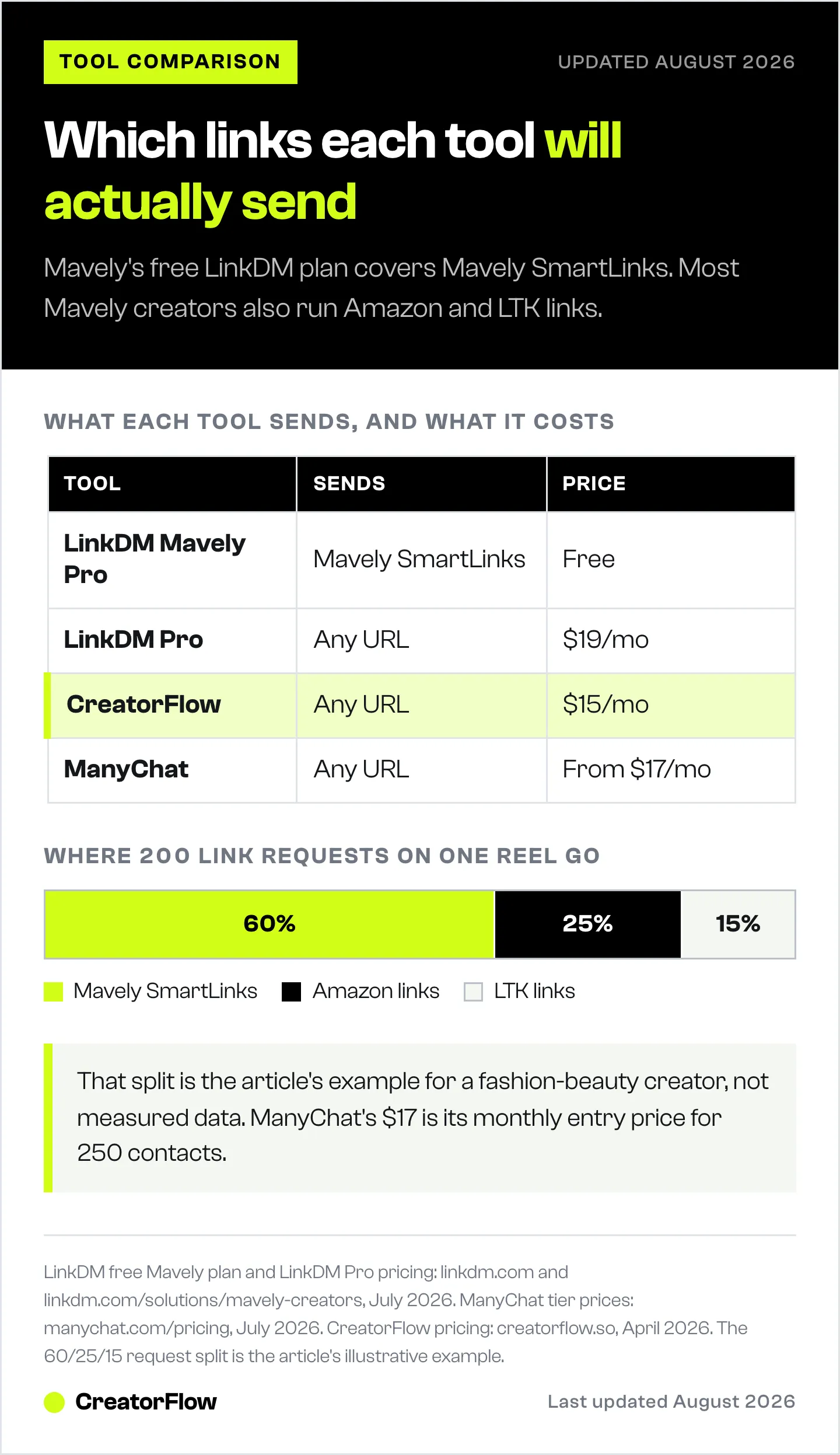
| Feature | LinkDM Mavely Pro (Free) | LinkDM Pro (Paid) | CreatorFlow | ManyChat | Chatfuel |
|---|---|---|---|---|---|
| Price | Free | $19/mo flat | $15/mo flat | $17-199/mo | $20-69/mo |
| Link type restriction | Mavely SmartLinks only | Any URL | Any URL | Any URL | Any URL |
| DMs per month | 200,000 | 25,000 | 5,000 Pro | Up to 50,000 | Unlimited |
| Instagram accounts | 3 | 3 | 2-5 | 1 | 1 |
| Keyword triggers | Unlimited | Unlimited | Unlimited | Unlimited | Unlimited |
| Story reply automation | Yes | Yes | Yes | Yes | Yes |
| Reel comment automation | Yes | Yes | Yes | Yes | Yes |
| Email capture (Email Gate) | No | Limited | Yes | Yes | Yes |
| Follow Gate | Limited | Yes | Yes | Yes | Yes |
| Click analytics | Basic | Full | Full | Full | Full |
| Official Meta partner program | Yes | Yes | Yes (Meta Tech Provider) | Yes | Yes |
| Setup time | 10-15 min | 10 min | 5 min | 30+ min | 15 min |
Pricing spread: free (LinkDM Mavely-only) to $69/month (Chatfuel’s AI tier). The sweet spot for multi-platform Mavely creators sits at $15-19/month with either CreatorFlow, LinkDM Pro, or ManyChat’s entry plan.
All five options run through Instagram’s official Graph API under Meta’s partner programs, with CreatorFlow listed as a Meta Tech Provider, which keeps ban risk minimal for your Instagram account.
LinkDM Mavely Pro Plan (Free Tier): Detailed Look
LinkDM’s Mavely-only free plan is the right starting point for most creators on Mavely. It is literally free, the DM volume is generous, and it integrates cleanly with Mavely’s dashboard.
What it does well:
- Instant reply to comments with a DM containing your Mavely SmartLink
- Auto-reply on up to 200 previous posts via the Unlock feature
- Story AutoDM and Reel auto-reply across all your eligible content
- Multiple Instagram accounts (up to 3) from one dashboard
- No cost at all for creators who qualify
Where it hits limits:
The Mavely-only link restriction is the biggest. Every non-Mavely link request you receive has to be handled manually. For a creator who promotes a skincare Mavely product plus an Amazon hair tool plus a coaching call via Calendly, the free plan covers one out of three response flows.
Setup has additional hoops:
- You must have received at least one Mavely payout to activate the plan
- You need a Facebook Page (personal Facebook does not work)
- Existing LinkDM users need to submit a switch request, which LinkDM processes within 1 business day
The 200,000 DMs-per-month allowance is very generous. Most Mavely creators will not hit this cap. It is effectively unlimited for typical creator volume.
Best for: Mavely-only creators who have received a payout, run 1-3 Instagram accounts, and want free automation without complexity.
Not ideal for: Multi-platform creators, new Mavely creators pre-payout, creators who also sell their own products, or those who want email capture workflows.
CreatorFlow for Mavely Creators
CreatorFlow is built for creators who run multiple revenue streams and want modern tooling without a learning curve (creatorflow.so, April 2026).
For Mavely creators, the value is multi-platform link routing at a flat rate. Set “blush” to send your Mavely SmartLink. Set “perfume” to send your LTK link. Set “coaching” to send your Calendly. Set “course” to send your own checkout page. Each keyword maps to a different URL, all from one dashboard.
Pricing: Free plan includes 500 DMs per month with 1 workspace. Pro costs $15/month flat (or $12/month billed annually) with 5,000 DMs and 2 workspaces. Growth costs $30/month flat with 10,000 DMs and 5 workspaces (creatorflow.so, April 2026).
No per-contact pricing. No scaling costs as your audience grows. A Mavely creator with 10,000 followers pays the same $15/month as one with 500,000 followers.
Mavely-specific features that matter:
Real-time phone preview lets you see exactly what your follower will receive before you activate the automation. The message tone, link formatting, and FTC disclosure all need to look natural.
Link click tracking through CreatorFlow Insights shows which SmartLinks get clicked and which get ignored. Cross-reference this with your Mavely commission dashboard to see which content categories drive the most revenue.
Follow Gate asks for a follow before sending the link. Email Gate captures an email address before (or after) sending the link, building your list while you earn commissions.
Best for: Multi-platform Mavely creators, creators who also sell own products or courses, anyone who books calls via Calendly, those who want email capture built in, anyone who prefers flat pricing.
Scope: Instagram, end to end. Every feature follows how Instagram behaves: the 7-day comment window on posts and Reels, the 24-hour window on story replies, the Follow Gate, and the Email Gate. One trigger sends one message, which keeps each automation predictable, and longer journeys run as separate automations on separate triggers. 20,000+ creators and brands use it, across 2 Instagram accounts on Pro and 5 on Growth.
LinkDM Pro (Paid Plan) for Mavely Creators
If you already use LinkDM Mavely Pro for Mavely links and you want to send non-Mavely links, upgrading to LinkDM Pro ($19/month) is a straightforward path.
Pricing: $19/month flat ($182/year, approximately $15/month if billed annually). 25,000 DMs per month per Instagram account. 3 accounts supported (linkdm.com/pricing, July 2026).
Features beyond the free Mavely plan:
- Send any URL (removes the Mavely-only restriction)
- Comment auto-reply on unlimited posts (no 200-post cap)
- Lead generation workflows with email capture
- DM planner for scheduling automated campaigns
- Priority support
- Remove LinkDM branding from your DMs
Best for: Existing LinkDM users who want to stay within the same dashboard and add non-Mavely link sending. Creators comfortable with LinkDM’s interface and workflow who value continuity.
Trade-off vs CreatorFlow: LinkDM Pro is $19/month for 25,000 DMs/account with 3 accounts (75,000 total DMs across all accounts). CreatorFlow Pro is $15/month for 5,000 DMs across 2 accounts, or Growth at $30/month for 10,000 DMs across 5 accounts. LinkDM wins on raw DM volume at that price point. CreatorFlow wins on setup simplicity, Follow Gate, and Email Gate.
ManyChat for Mavely Creators
ManyChat is the most powerful option on this list and the most complex. For Mavely creators needing multi-step conversation flows, AI conversations, or multi-platform reach (Instagram + Facebook + WhatsApp + SMS), ManyChat is the right tool (manychat.com/pricing, April 2026).
For straightforward Mavely SmartLink delivery, it is more than you need.
Pricing: ManyChat restructured to five contact-based tiers in March 2026. Free covers 25 active contacts. Billed monthly, Essential is $17 (250 contacts), Pro $39 (2,500), Business $99 (7,500), and Advanced $199 (25,000); billed annually those work out to $14/$29/$69/$139 per month. ManyChat AI is a separate add-on (manychat.com/pricing, July 2026).
That per-contact model is the main difference to weigh. Your monthly cost moves with your active contact count: a Mavely creator holding 10,000 active contacts sits in the Advanced band at $199/month billed monthly ($139 billed annually). CreatorFlow charges $15/month flat regardless of audience size, so the comparison turns on whether you value multi-platform reach or predictable cost.
Where ManyChat shines for Mavely:
- Multi-step flows that qualify product interest before sending a SmartLink
- AI-powered responses to open-ended product questions
- Multi-platform sends (Instagram + Facebook Messenger + WhatsApp + SMS)
- Large template library with Mavely-compatible structures
- 1M+ businesses on the platform with proven track record
Best for: Mavely creators running complex multi-step qualification flows, agencies managing multiple creator accounts, creators who also sell on Facebook or WhatsApp, anyone needing AI-powered conversations.
Not ideal for: Solo Mavely creators with straightforward keyword-to-link use cases, creators on a strict budget as their audience scales, anyone who wants fast simple setup.
Chatfuel for Mavely Creators
Chatfuel sits at the higher end with premium AI conversation features (chatfuel.com/pricing, April 2026).
Pricing: Business plans start around $20/month for Facebook Messenger and Instagram coverage, scaling to $49/month for WhatsApp. Newer AI-focused tiers run $39-69/month. Enterprise plans from $300/month for larger teams.
Chatfuel’s AI engine can handle open-ended conversations rather than just keyword triggers. A follower could message “hey, that sunscreen you mentioned last Tuesday, do you have a link?” and Chatfuel can parse the request and respond with the right SmartLink.
For most Mavely creators this is more than you need. If 90% of your link requests come from simple keyword comments (“link,” “shop,” “outfit”), you do not need an AI conversation engine at $20-69/month. A $15/month tool handles the core use case.
Best for: Service-based businesses with complex customer conversations, creators who get highly specific product questions that cannot be mapped to keywords, high-revenue Mavely creators where the higher cost is negligible compared to commission income.
Not needed: Most Mavely creators whose followers comment simple trigger words.
Product-Specific Mavely DM Templates
These templates are ready to paste into your automation tool. Replace the bracketed placeholders with your actual SmartLinks. Each template is designed for a specific scenario to maximize click-through rates. All include FTC disclosure.
Template 1: Fashion Haul Breakdown
Hey! Here is everything from the haul:
The blazer (Aritzia, size S, TTS): [MAVELY SMARTLINK] The jeans (Agolde, sized down one): [MAVELY SMARTLINK] The bag (Polene Numero Neuf, Chalk): [MAVELY SMARTLINK]
Commission disclosure: I earn a small amount when you shop through these links. The blazer runs long in the sleeves, grab your normal size unless you have long arms.
Template 2: Beauty and Skincare Routine
Here is my full morning routine in order of application:
- CeraVe Hydrating Cleanser: [MAVELY SMARTLINK]
- The Ordinary Niacinamide 10%: [MAVELY SMARTLINK]
- Supergoop Unseen Sunscreen SPF 40: [MAVELY SMARTLINK]
- Rare Beauty Soft Pinch Blush in Joy: [MAVELY SMARTLINK]
I earn a small commission when you shop these. The niacinamide and sunscreen are the non-negotiables.
Template 3: Home Finds Bundle
Thanks for asking! Here is everything from the room refresh:
The sofa (Article Sven, Charme Tan): [MAVELY SMARTLINK] The coffee table (West Elm Avery): [MAVELY SMARTLINK] The throw pillows (H&M Home, under $20 each): [MAVELY SMARTLINK]
Commission disclosure: I earn a small amount on purchases through these. Pillows are the easiest win if you want to start small.
Template 4: Amazon Crossover (for Multi-Platform Creators)
Here is the breakdown:
The blender (Amazon only): [AMAZON AFFILIATE LINK] The containers (Mavely): [MAVELY SMARTLINK] The coffee maker (Mavely): [MAVELY SMARTLINK]
I earn a small commission across both platforms. The blender is Amazon-only, the rest are on Mavely.
Template 5: LTK Crossover (for Multi-Platform Creators)
Here are the links organized by platform:
The dress (LTK): [LTK LINK] The shoes (Mavely): [MAVELY SMARTLINK] The bag (Mavely): [MAVELY SMARTLINK]
Commission disclosure: I earn on all platforms. LTK has the dress exclusive, Mavely has the rest.
Template 6: Mavely Boost Product
Heads up! This jacket is running a Mavely Boost right now:
Grab it here: [MAVELY SMARTLINK]
Boosts give me up to 3x commission so I can promote these more aggressively, but your price is exactly the same. Sizes are selling fast.
Template 7: Story Reply
Ahh thank you! That sweater is my favorite thing I bought this month. I have worn it four times already and it is SO soft.
Here you go: [MAVELY SMARTLINK]
Comes in 6 colors, the oatmeal is the best in person. I earn a small commission when you shop through this link.
Template 8: Follow-Up Reminder
Hey! I sent the link to the [product] earlier. Wanted to make sure it did not get buried in your DMs!
Here it is again: [MAVELY SMARTLINK]
A few sizes are selling out. Commission disclosure: I earn a small amount when you shop through this link.
For niche-specific template variations, check the Instagram DM automation templates library. Fashion creators can also explore templates designed specifically for outfit link delivery.
Setting Up Multi-Platform Link Routing
This is where unrestricted tools pull ahead of LinkDM’s free Mavely plan. Instead of one keyword category (Mavely links only), you build a routing table that maps specific trigger words to specific URLs across every platform you use.
Here is a sample routing table for a multi-platform Mavely creator:
| Trigger Words | Link Sent | Platform |
|---|---|---|
| ”dress” / “outfit” | Fall Dresses collection | Mavely |
| ”jeans” / “bottoms” | Denim Favorites | Mavely |
| ”blush” / “makeup” | Everyday Glam | Mavely |
| ”serum” / “skincare” | Morning Routine | Mavely |
| ”hair tool” / “curling iron” | Direct Amazon link | Amazon |
| ”perfume” / “fragrance” | LTK Beauty Exclusives | LTK |
| ”course” / “coaching” | My course checkout | Own product |
| ”book call” / “consult” | Calendly booking | Own service |
| ”link” / “shop” | Main MyShop page (catch-all) | Mavely |
The catch-all row at the bottom handles generic requests. Everyone who asks about a specific product gets the right curated link for that category.
Setting up one automation takes 2-3 minutes:
Open your automation tool. Create a new Comment-to-DM automation. Select the post (or set as default for all future posts). Enter trigger words for that category, separated by commas. Paste your DM template with the specific URL. Preview the message. Activate.
Repeat for each category. Most multi-platform Mavely creators need 6-10 keyword groups to cover their content areas. For a full walkthrough, check the comment-to-DM automation setup guide.
Mavely Boosts: Why Time-Sensitive Commissions Need Instant DMs
Mavely Boosts, launched in August 2025, give creators up to 3x commission on select brand partnerships during time-limited windows (prnewswire.com, August 2025). The multiplier is a ceiling, not guaranteed, and varies by Boost opportunity.
Boosts are typically temporary (days to weeks, depending on the brand). If you post content featuring a Boosted brand, every manual delay on DM responses during the Boost window costs meaningfully more than a regular product because the commission multiplier is higher.
How to structure automation around Boosts.
Check your Mavely dashboard daily or weekly for active Boosts. When you spot a Boost on a brand you have featured recently, create a dedicated trigger-word automation for that product. Example: Ulta Beauty Boost is active, you posted a Sephora vs Ulta haul last week, set up “ulta” as a trigger sending the Boosted Ulta SmartLink.
When the Boost expires, remove or redirect the automation. This takes about 3 minutes per setup.
Creators on LinkDM Mavely Pro can do this within LinkDM. Creators on CreatorFlow, ManyChat, or Chatfuel can do it there. The principle is the same: dedicated automations for time-sensitive revenue opportunities.
For a broader conversion analysis including how Boost timing fits into your overall Mavely strategy, read Why Your Mavely Instagram Comments Aren’t Converting.
Migration Guide: Adding a Third-Party Tool Alongside LinkDM
Already using LinkDM Mavely Pro? Good news: you do not have to turn it off. The smartest approach for multi-platform creators is running LinkDM free plus an unrestricted tool in parallel.
Step 1: Keep LinkDM Mavely Pro running.
Leave your LinkDM automations active for all your Mavely SmartLink triggers. It is free. It already works. It handles the majority of your link requests at zero cost.
Step 2: Add a second tool for non-Mavely links.
Pick CreatorFlow ($15/month) or ManyChat (Essential from $17/month, or $14/month billed annually). Connect your Instagram account through the official Meta OAuth process. Setup takes 5 minutes in CreatorFlow, 15-30 minutes in ManyChat.
Step 3: Build automations only for non-Mavely triggers.
Set up keyword triggers in the second tool for your Amazon links (“hair tool,” “amazon”), LTK exclusives (“perfume,” “designer”), and your own products (“course,” “book call”). Do not duplicate Mavely triggers in the second tool, since LinkDM already handles those.
Step 4: Run both tools for 2 weeks.
LinkDM handles Mavely. Your second tool handles everything else. They do not conflict because they trigger on different words. Track performance of both during the test.
Step 5: Compare results.
After 2 weeks, check how many more DMs got instant automated responses (instead of sitting manually unanswered). The revenue lift from capturing the 30-40% of non-Mavely requests that used to slip through is almost always higher than the $15/month tool cost.
The risk of this parallel approach is zero. You are not turning off anything that works. You are adding capability on top of free.
There is a page built specifically for Mavely creators that walks through the setup end to end: CreatorFlow for Mavely creators.
FAQ
Can I use LinkDM’s free Mavely plan and CreatorFlow at the same time?
Yes. They operate through Instagram’s official Graph API independently and do not conflict. LinkDM handles Mavely SmartLink triggers. CreatorFlow handles Amazon, LTK, and own-product triggers. Both connect to the same Instagram account through Meta OAuth. Most multi-platform Mavely creators who run both see significant revenue lift because they stop manually responding to non-Mavely requests.
Will Instagram ban me for using third-party DM automation?
No. CreatorFlow is a Meta Tech Provider, and ManyChat, LinkDM, and Chatfuel operate through Instagram’s official Graph API with Meta approval (developers.facebook.com, April 2026). Accounts get banned for using unofficial browser bots or screen scrapers that fake human activity, not for using approved API tools.
Does CreatorFlow work with Mavely SmartLinks specifically?
Yes. CreatorFlow sends any URL, including Mavely SmartLinks, with tracking parameters preserved. There is no platform restriction. You paste your Mavely SmartLink into the DM template and the tool sends it exactly as you wrote it, with UTM parameters intact for Mavely attribution.
How do I get the free LinkDM Mavely Pro plan?
You must have a Mavely account, have received at least one Mavely payout, and have a Facebook Page (not personal Facebook account). Go to your Mavely app, navigate to the Integrations tab, and connect LinkDM. Existing LinkDM users submit a switch request which LinkDM processes within 1 business day (joinmavely.com/blog/mavely-linkdm-integration, April 2026).
Can I send Amazon and LTK links through LinkDM’s free Mavely plan?
Not directly. The free plan only supports Mavely SmartLinks. Sending Amazon, LTK, or other non-Mavely URLs requires purchasing additional LinkDM credits or upgrading to LinkDM’s paid Pro plan at $19/month. Alternatively, run LinkDM for Mavely links and a separate tool (CreatorFlow at $15/month) for non-Mavely links.
What is the cheapest option that supports any affiliate link?
CreatorFlow at $15/month flat rate or ManyChat Essential at $17/month for 250 active contacts ($14/month billed annually). Both support unlimited keywords, any URL type, and full DM automation. The difference: CreatorFlow stays at $15/month regardless of audience size, while ManyChat’s price scales with contact count.
How many keyword triggers can I set up per post?
With most third-party tools, there is no hard limit. You can create as many triggers as your content needs. A single haul post might have 8-10 keywords (one per product) plus a generic “link” catch-all. Across all your posts, hundreds of active keyword automations can run simultaneously.
Can I automate Instagram Story replies with Mavely SmartLinks?
Yes, with all tools listed. CreatorFlow, ManyChat, LinkDM, and Chatfuel all support automated Instagram Story replies. When a follower replies to your Story with a keyword, the tool sends a DM with the matching SmartLink. Since Stories drive significant engagement, this is meaningful.
Do third-party tools track Mavely commission data?
Not directly. No third-party DM tool integrates with Mavely’s commission dashboard. The tools track link clicks (how many people clicked the SmartLink in your DM). You cross-reference clicks with your Mavely dashboard to see which clicks converted to purchases and commissions. Weekly review takes about 15 minutes.
How do I connect multiple Instagram accounts for Mavely automation?
LinkDM Mavely Pro supports 3 accounts on the free plan. CreatorFlow supports 2 on Pro ($15/month) and 5 on Growth ($30/month). LinkDM Pro paid supports 3 accounts. ManyChat includes 1 account per plan tier. Each connects through Meta’s OAuth, which takes 2 minutes per account.
Related Articles
- Mavely Creator Instagram Automation: Setup Guide - Full setup guide for automating Mavely SmartLink delivery with trigger words and templates.
- Why Your Mavely Instagram Comments Aren’t Converting - Diagnose the 4 friction points silently killing Mavely commissions.
- Instagram DM Automation for Amazon Influencers - Apply multi-keyword routing strategies to Amazon affiliate links.
- LTK Creator DM Automation: Stop Copy-Pasting Links - Parallel setup guide for LTK creators with transferable workflows.
- LTK DM vs Third-Party Tools Comparison - Parallel comparison article for LTK creators.
- Bio Link vs DM Automation for Affiliate Clicks - Why DM automation outperforms MyShop link-in-bio for affiliate revenue.
- Comment-to-DM Automation Setup Guide - Step-by-step walkthrough for configuring your first keyword-triggered automation.
- Instagram DM Link Tracking - Track which SmartLinks get clicked and which messages convert.
- CreatorFlow Insights Link Tracking Guide - Detailed analytics dashboard walkthrough.
- Instagram DM Automation Templates - 50+ copy-and-paste templates organized by use case.
- How to Add Affiliate Links on Instagram - Complete guide to affiliate link placement across posts, stories, DMs, and bio.
Disclaimer: Pricing and features for all tools mentioned (LinkDM, CreatorFlow, ManyChat, Chatfuel) are cited as of May 2026 based on publicly available pricing pages and may change. Mavely commission rates vary by brand partner. Cookie/attribution windows are brand-specific on Mavely (typically 7-30 days). Mavely Boosts commission multipliers ("up to 3x") are ceilings, not guarantees, and vary by Boost opportunity. FTC requires disclosure of affiliate relationships in all promotional content including DMs. Instagram is a trademark of Meta Platforms, Inc. All product names are trademarks of their respective owners. Users are responsible for complying with Instagram's Terms of Service, FTC disclosure guidelines, platform terms of service for Mavely/LTK/Amazon/other affiliate networks, and all applicable laws.


