
Mavely is an affiliate platform (acquired by Later in 2024) that connects creators with 1,500+ brand partners and offers a unique 25% monthly bonus program on qualifying commissions. Creators earn commissions by sharing product links from partner brands on Instagram, and Mavely distributes up to $200K per month in bonus payouts across its creator network. The platform is free for creators, includes a browser extension for instant link generation, and provides a MyShop storefront for curating product collections.
You spent 45 minutes filming a “spring essentials” Reel featuring products from 5 different brands. The post gets 180 comments asking for links. You open each brand’s affiliate dashboard, copy each link, switch to Instagram, paste into DMs one by one. By the time you’re done, you’ve spent another 90 minutes on link distribution and missed half the comments because followers moved on.
Mavely solves the link creation side: one platform, one dashboard, one browser extension that generates affiliate links instantly across 1,500+ brands. What it doesn’t solve is link distribution on Instagram. This guide covers how to maximize Mavely earnings and pair it with DM automation to deliver those links when followers actually want them. Weighing Mavely against other options? See the best affiliate programs for micro-influencers.
Key Takeaways
- 1,500+ brand partners: Fashion, beauty, home, wellness, and lifestyle brands all in one platform
- 25% monthly bonus: Mavely distributes bonus payouts on qualifying commissions. This is on top of base commission rates
- Browser extension: Generate Mavely affiliate links from any partner retailer’s website with one click
- MyShop storefront: Curate product collections that followers can browse
- 10% referral commission: Earn on other creators you recruit to Mavely
- No built-in Instagram DM automation: Mavely generates links but doesn’t deliver them to followers via DM. You need a separate tool
- Free for creators: No fees, no monthly charges

How the Mavely Affiliate Program Works for Instagram Creators
Mavely gives Instagram creators one dashboard for 1,500+ brand partners and a browser extension that builds an affiliate link from any partner product page. You share those links in Stories, in your bio, and in DMs, and earn a base commission of roughly 5-20% depending on the brand. Mavely then adds a monthly bonus of up to 25% on qualifying commissions, drawn from a pool of up to $200K. It is free for creators.
The Basics
Mavely connects creators with brand affiliate programs through a single platform. Instead of joining Amazon Associates, individual brand programs, and multiple affiliate networks separately, Mavely aggregates partnerships into one dashboard.
When you share a Mavely link and someone clicks through and purchases, you earn a commission from the brand. Mavely takes a platform fee (built into the commission rate) and pays you the difference.
The 25% Monthly Bonus Program
This is Mavely’s most distinctive feature. Each month, Mavely distributes a bonus pool to qualifying creators based on their performance. The bonus adds up to 25% on top of your base commissions.
How it works:
- Earn base commissions from brand sales (varies by brand, typically 5-20%)
- At month end, Mavely calculates bonus payouts based on your contribution to total platform sales
- Bonus is paid on top of base commissions
- Total pool: up to $200K distributed monthly across all qualifying creators
The bonus structure rewards consistent, high-volume creators. Posting daily with product links and driving regular sales puts you in a stronger position for monthly bonus payouts.
Mavely vs LTK vs ShopMy
| Feature | Mavely | LTK | ShopMy |
|---|---|---|---|
| Minimum followers | Application-based | 5,000 | 1,000 |
| Brand partners | 1,500+ | 7,000+ | 1,500+ |
| Monthly bonus | Yes (25%) | No | No |
| Browser extension | Yes | Yes | Yes |
| Creator storefront | MyShop | LTK App | ShopMy Storefront |
| Payout frequency | Monthly | Monthly | Weekly (Fridays) |
| Built-in DM feature | No | LTK DM (limited) | No |
| Referral program | Yes (10%) | No | No |
| Cost | Free | Free | Free |
For a detailed platform comparison, see ShopMy vs LTK: Which Affiliate Platform Pays Fashion Creators More?
Setting Up Your Mavely Account
Application
- Visit joinmavely.com and apply as a creator
- Connect your Instagram account
- Complete your profile with niche information and content examples
- Wait for review (typically 5-10 business days)
- Once approved, set up your payment method and start generating links
Installing the Browser Extension
The Mavely browser extension is essential for efficient link creation:
- Download the Mavely Chrome extension from the Chrome Web Store
- Pin it to your browser toolbar
- Browse any partner retailer’s website
- Click the Mavely extension icon on any product page
- Copy the generated affiliate link
This workflow means you can browse Nordstrom, find a dress, click one button, and have a commission-ready link in your clipboard. No logging into dashboards. No searching for products within the Mavely app. Browse like a normal shopper and monetize as you go.
Building Your MyShop Storefront
MyShop is Mavely’s creator storefront. It’s a curated page where followers can browse your recommended products, organized by categories you create.
Setting up collections:
- “Spring Wardrobe Essentials”
- “Under $50 Finds”
- “My Skincare Routine”
- “Home Office Favorites”
Link your MyShop URL in your Instagram bio. Followers who visit your profile can browse and shop without needing to DM you for specific links. MyShop provides passive, always-on monetization alongside your active post-by-post link sharing.
How to Promote Mavely Links on Instagram
Method 1: Bio Link (Passive, Low Conversion)
Add your MyShop URL to your Instagram bio. Conversion rate: 0.5-2% of profile visitors. This is the simplest approach but generates the least revenue because it requires followers to visit your profile, find the link, and browse your storefront.
Method 2: Story Link Stickers (Active, Moderate Conversion)
Share products in Stories with a link sticker pointing to your Mavely URL. Works well for:
- Flash sales or limited-stock alerts
- “Today’s outfit” daily features
- Product reviews and first impressions
- Behind-the-scenes shopping hauls
Every Instagram account can use link stickers (no follower minimum).
Method 3: Comment-to-DM Automation (Active, Highest Conversion)
Post an outfit Reel with “Comment LINK for outfit details.” When followers comment, DM automation sends your Mavely links within seconds.
This is the highest-converting method because:
- The follower already expressed buying intent by commenting
- Links arrive while the product is still on their mind
- The DM format lets you include all items in one organized message
- Click-through rates on DM-delivered links: 30%+ vs 0.5-2% for bio links
Mavely doesn’t include built-in DM automation. You need a separate tool.
CreatorFlow connects to Instagram’s official API and sends your Mavely links automatically when followers comment trigger words. $15/month flat rate for 5,000 DMs. Free plan available with 500 DMs/month. The full architecture, message templates, and revenue math behind this setup are in the Mavely comment-to-DM funnel guide.
Method 4: Native Reels Product Tags (If Available)
Instagram’s native affiliate product tagging (April 2026) works alongside Mavely. If a brand’s products are in Meta’s commerce catalog, you can tag them directly in your Reel. Use this for products in Meta’s catalog and DM automation for Mavely-specific links and products not in the catalog.
For more on combining these methods, see Instagram Product Tags vs DM Links.
Setting Up DM Automation for Mavely Links
Step-by-Step Setup
Step 1: Generate your Mavely links
Open the Mavely browser extension. Browse each item in your outfit on the retailer’s website. Click the extension to generate affiliate links. Copy each link.
Step 2: Create your DM template
In your automation tool, write a message with all Mavely links:
“Hey! Here are all the outfit details:
Blazer: [Mavely link] Top: [Mavely link] Jeans: [Mavely link] Boots: [Mavely link] Bag: [Mavely link]
I’m 5’6 wearing a size M. The blazer runs true to size. The jeans run slightly large, size down one.
Tap any link to shop!”
Step 3: Set trigger words
Common triggers: “link,” “outfit,” “shop,” “details,” “where”
Step 4: Apply to your post and activate
Select the Instagram post to monitor. Turn on the automation. Every comment with a trigger word triggers an instant DM.
Step 5: Monitor and optimize
Check Mavely’s dashboard for clicks and conversions. Check your automation tool for DM delivery rates. Adjust trigger words and DM copy based on what converts.
Maximizing the 25% Monthly Bonus
Post Consistently
The bonus is based on your contribution to platform-wide sales. Daily posting with Mavely links increases your total sales volume, which increases your share of the monthly bonus pool. Creators who post 5-7 times per week consistently earn larger bonus payouts than sporadic posters.
Focus on High-Converting Content
Not all content drives equal sales. Try-on haul Reels generate more purchases than static photos. Posts with clear CTAs (“Comment LINK”) generate more link requests than vague captions. Prioritize content formats that drive clicks and conversions, not engagement metrics.
Use the Referral Program
Mavely offers 10% commission on sales from creators you refer. If you recruit 5 active creators who each generate $1,000/month in sales, you earn an additional $500/month from referrals. Share your referral link with creator friends and in creator communities.
Stack with Other Platforms
Mavely doesn’t require exclusivity. Use Mavely for brands where it pays the best commission. Use LTK for retailers with exclusive LTK rates. Use Amazon Associates for Amazon-specific products. Use ShopMy for brands with higher ShopMy commissions. In each DM template, mix links from whichever platform pays the most per item.
Mavely Earnings Potential
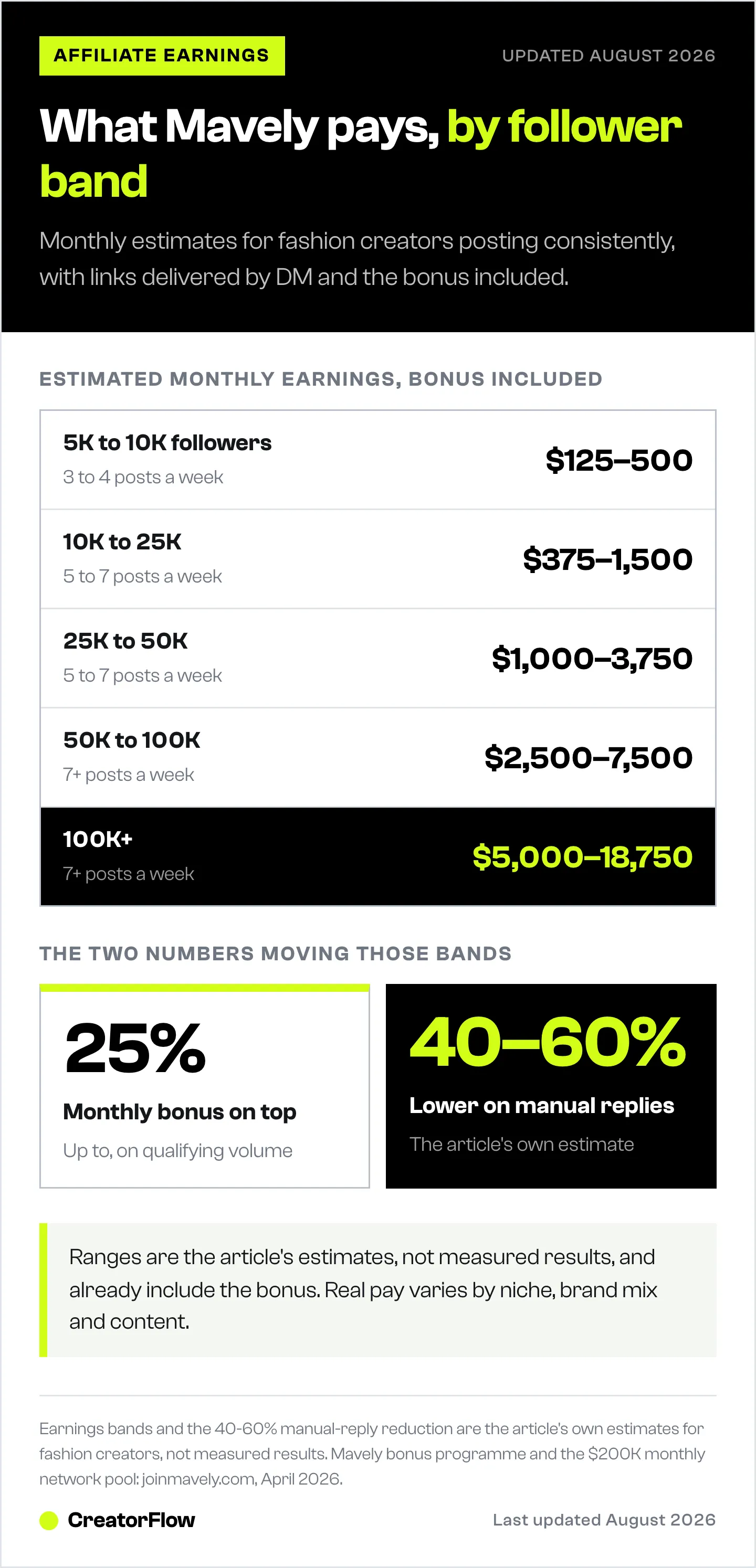
Estimated monthly earnings for fashion creators using Mavely with DM automation:
| Follower Count | Posts/Week | Base Commissions | With 25% Bonus | Total Estimated |
|---|---|---|---|---|
| 5K-10K | 3-4 | $100-400 | $125-500 | $125-500 |
| 10K-25K | 5-7 | $300-1,200 | $375-1,500 | $375-1,500 |
| 25K-50K | 5-7 | $800-3,000 | $1,000-3,750 | $1,000-3,750 |
| 50K-100K | 7+ | $2,000-6,000 | $2,500-7,500 | $2,500-7,500 |
| 100K+ | 7+ | $4,000-15,000 | $5,000-18,750 | $5,000-18,750 |
These estimates assume consistent posting with DM automation for link delivery. Manual DM responses typically reduce these numbers by 40-60%.
Working with Mavely creators? We keep a dedicated setup page for exactly that: CreatorFlow for Mavely creators.
Curious what your account is worth today? The Instagram money calculator works it out from your followers and engagement rate.
FAQ
Is Mavely free for creators?
Yes. No fees, no monthly charges, no commission deductions beyond the standard platform rate (which is built into the brand commission you see). You earn what the dashboard shows.
How does the Mavely 25% bonus work?
Each month, Mavely distributes a bonus pool (up to $200K total across all creators) based on creator performance. The bonus adds up to 25% on top of your base commissions. Consistent high-volume creators receive larger shares.
Can I use Mavely and LTK at the same time?
Yes. No exclusivity requirement. Use Mavely for brands where it pays better, LTK for brands with exclusive LTK rates. Mix links from both platforms in the same DM automation template.
Does Mavely have Instagram DM automation?
No. Mavely generates affiliate links but doesn’t handle Instagram DM delivery. You need a separate tool like CreatorFlow to automatically send Mavely links when followers comment on your posts.
What niches work best on Mavely?
Fashion, beauty, and home decor creators generate the most revenue on Mavely because these niches have high comment-to-purchase conversion rates. Food, wellness, and lifestyle creators also perform well with product-focused content.
How does Mavely compare to Amazon Associates?
Mavely offers higher commission rates (5-20% base + 25% bonus) than Amazon Associates (1-10%) for most product categories. Amazon has a wider product catalog. Mavely has the bonus program and browser extension. Most creators use both for maximum coverage.
Mavely features and commission data based on joinmavely.com documentation and Mavely creator resources. Verified April 2026. Commission rates and bonus structures subject to change.


