

When a brand hands you a tracking link for a sponsored post, put that exact link inside your DM automation without shortening, cloaking, or rewriting it, and add your own tracking on top rather than in place of it. The brand’s link must stay intact or their attribution breaks and your campaign shows zero conversions. Set the automation up before the post publishes, because you cannot add a keyword trigger to a Reel that is already live and already collecting comments.
Brands stopped buying reach. A screenshot of 240,000 views is no longer what gets a contract renewed, because every brand now knows views are not the same thing as people who did something. The brand-side view of the same deal, with 2026 rates by tier and what belongs in the brief, is in our Instagram influencer marketing guide.
That shift is visible in how the automation platforms are repositioning. ManyChat launched a brands product in 2026 built entirely around this question, promising to show which creators drive intent rather than impressions and what happens between a post and a purchase (manychat.com/brands, July 2026). The brands you work with are being sold that framing right now.
Which is good news, if you can answer it. The creator who hands over click-through data, geography, and captured intent from a sponsored post is a different vendor from the one who sends a screenshot of Insights. This guide covers the technical part most creators get wrong: running someone else’s tracking link through your automation without breaking it, and keeping your own data at the same time.
Key Takeaways
- Set it up before you publish. A comment trigger has to exist before the comments do, and a Reel that goes up without automation cannot be retrofitted for the people who already commented
- Never modify the brand’s link. No shorteners, no cloakers, no stripped parameters. Their attribution runs on those parameters and a rewritten link reads as zero conversions
- Add your tracking alongside, not instead. Your tool’s click tracking sits on top of their URL, so both sides get data from the same click
- DM automation gives you numbers Insights cannot. Instagram shows views and reach; your automation shows how many people asked, how many clicked, and where they were
- Geography is the number brands react to. Clicks by country tell a brand whether your audience matches their market, which is what decides the next campaign
- Disclose inside the automated DM too. The DM is part of the ad, so the disclosure belongs in the message, not only in the caption
How Sponsored Post Tracking Works on Instagram
Track a sponsored post by pairing the brand’s link with your own click data. Paste their tracking URL into your DM automation exactly as supplied, then let your tool count the click before passing the visitor to the destination. That gives you numbers Instagram Insights does not carry: how many people asked for the link by name, how many received it, how many clicked, and which countries and cities they clicked from.
Set Up Before the Post Goes Live
The mistake that costs the most is the most boring one: publishing first and automating second.
A comment-to-DM automation triggers on comments that arrive after it is active. The first two hours of a Reel are usually its best two hours. If the automation goes live at hour three, everyone who commented in the window that mattered got nothing, and those are the people the brand paid for.
Build in this order:
- Get the tracking link from the brand in writing, in the contract or the brief, before the shoot
- Create the automation and set the keyword
- Paste the brand’s link exactly as supplied
- Send yourself a test comment and click through to confirm the destination loads and the parameters survive
- Publish the post with the keyword in the caption and, if it is a Reel, spoken out loud
- Watch the first hour, because a keyword that people misspell is fixable in the first hour and not afterwards
Point six is worth taking seriously. If the brand insists on a branded keyword like GLOWSERUM, add the obvious misspellings and the shorter form as additional triggers. People type what they remember.
Handling the Brand’s Tracking Link
Most sponsored posts come with a link that carries the brand’s attribution: UTM parameters, an affiliate network ID, a partner subdomain, or all three. It looks something like a long URL ending in a string of utm_source, utm_campaign, and a creator ID.
That string is the campaign. Break it and the brand’s dashboard reports that you sent nobody.
Paste it exactly. Copy from the brief, not from a browser address bar after you clicked through, because some destinations strip or rewrite parameters on landing and what you copy back is not what you were given.
Do not run it through a link shortener. Bitly and similar tools are the most common way creators break a campaign. Shorteners can drop parameters depending on configuration, they add a redirect hop that some attribution setups do not follow, and several affiliate programs prohibit obscuring the destination outright. If you want a short link, ask the brand to generate one on their side so the tracking is built in.
Do not cloak it. Affiliate and partner agreements commonly ban disguising the destination URL. See Instagram affiliate disclosure and FTC rules for where that intersects with disclosure obligations.
Add your tracking as a layer, not a replacement. Tools that count clicks do it by registering the click before passing the visitor through to the destination. Your click counter and their attribution parameters both survive, because you are measuring the same click at two points rather than replacing their URL with yours. In CreatorFlow, link tracking runs automatically on whatever URL you put in the message, so this needs no special setup.
Test the whole path once. Click your own DM link on a phone, on cellular rather than wifi, and confirm you land on the right page with the parameters still in the address bar. Two minutes here prevents the conversation where a brand tells you their dashboard shows nothing.
What You Can Prove That Instagram Cannot
Instagram Insights reports on the post. Your automation reports on the people.
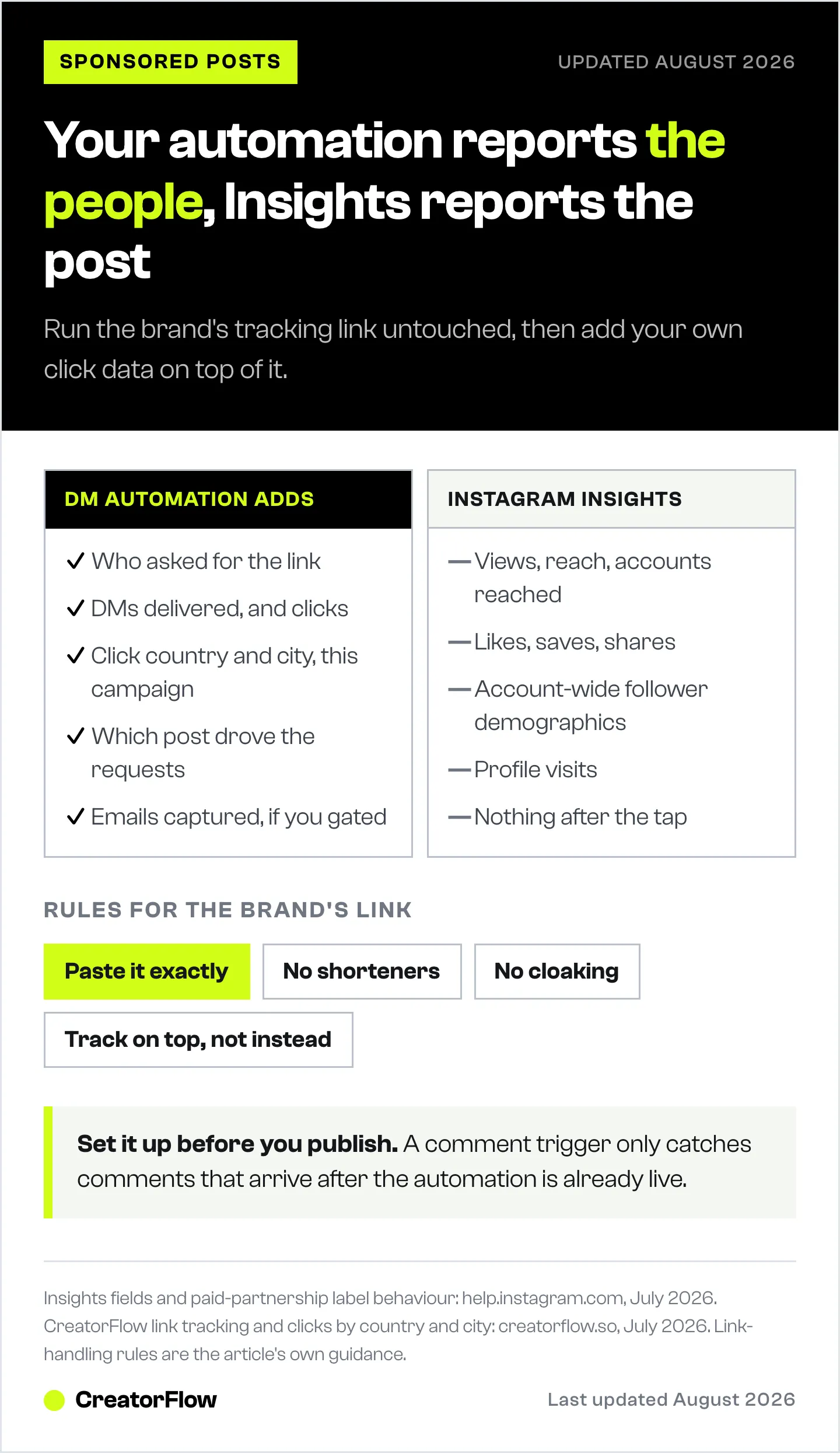
| What Insights shows | What DM automation adds |
|---|---|
| Views, reach, accounts reached | How many people asked for the link by name |
| Likes, saves, shares | How many received it and how many clicked |
| Follower demographics for your whole account | Country and city of the people who clicked this campaign |
| Profile visits | Which of your posts drove the requests |
| Nothing after the tap | Emails captured, if the campaign used an Email Gate |
The middle row is the one that changes conversations. Follower demographics describe your audience in general. Click geography describes the people who acted on this specific campaign, which is what tells a brand whether their money reached their market.
A beauty brand launching in Germany does not care that 240,000 people saw the Reel. They care that 61% of the clicks came from Germany. That is a number almost no creator supplies, and it is sitting in your dashboard.
CreatorFlow’s Insights shows click-through rate per automation and clicks by country and city on Pro. The mechanics of reading it are in the CreatorFlow Insights guide.
Put the Disclosure Inside the DM
The automated DM is part of the advertisement. It carries a paid link to a person who received it because of a paid post, which means the disclosure belongs there as well as in the caption.
Practically: open the DM with the disclosure rather than burying it under the link. “Here’s the link I mentioned, from my paid partnership with [brand]” costs you one line and removes the argument. The FTC’s position is that disclosure has to be hard to miss, and a line after a call-to-action button is easy to miss.
Instagram’s paid partnership label on the post does not cover the DM, because the DM is a separate message in a separate surface.
The One-Page Recap
Keep the deliverable short. A brand marketer reading it has fifteen other campaigns.
Six numbers, one page, sent within 72 hours while the campaign is still current:
- Reach and views on the post
- Keyword requests, meaning how many people asked
- DMs delivered
- Link clicks and click-through rate on delivered DMs
- Top five countries or cities by clicks
- Emails captured, if you gated
Then two sentences of interpretation, which is the part that gets you rebooked: what the request-to-click ratio suggests about how well the offer matched the audience, and one specific recommendation for the next campaign.
Do not send raw screenshots without interpretation, and do not pad it. For a full reporting structure with a copy-paste template, see how to create a social media report that proves ROI. If you manage this for clients rather than yourself, Instagram automation reporting for agencies covers the retainer-level version.
Common Failures
Automating a post that is already live. You lose the first-hour commenters permanently.
Shortening the brand’s link. The single most common cause of a campaign reporting zero.
Using a generic keyword. LINK collides with every other automation you run. Use something specific to the campaign, and read Instagram keyword systems for multiple offers if you run several at once.
Reporting reach only. It tells the brand nothing they cannot see themselves, and it puts you in the same bucket as every other creator.
Waiting two weeks to report. Send it inside 72 hours. Budget decisions for the next cycle get made while your campaign is still the recent one.
FAQ
Can I use a brand’s affiliate link in an automated Instagram DM?
Yes, if you paste it unmodified. The link carries the brand’s attribution parameters and those must survive to the destination. Do not shorten, cloak, or strip anything from it. Check the specific partner agreement as well, since some affiliate programs restrict where links may be placed.
Will link tracking break the brand’s attribution?
No, provided your tool counts the click and then passes the visitor to the original URL with its parameters intact. Your tracking measures the click, theirs measures what happens after. Test the full path once on a phone before publishing and confirm the parameters are still in the address bar when you land.
What if the brand does not give me a tracking link?
Ask for one, because without it they cannot attribute any conversion to you and your next negotiation has no evidence behind it. If they genuinely have nothing, use your own tracked link to their product page and report clicks and geography instead. Say clearly in the recap that conversion data was not available on their side.
Should the disclosure go in the caption or the DM?
Both. The caption disclosure and Instagram’s paid partnership label cover the post. The DM is a separate message carrying the paid link, so it needs its own disclosure, placed before the link rather than after it.
How quickly should I send campaign results to a brand?
Within 72 hours of the post going live. Most of the click activity happens in the first 48 hours, and next-cycle budget conversations happen while the campaign is still recent. A fast, short recap beats a thorough one that arrives three weeks later.
What is a good click-through rate on a sponsored DM?
Compare against your own baseline rather than a published benchmark, because rates vary enormously by niche, offer, and how specific the keyword was. Run the same measurement on your non-sponsored automations for a month first, then you have a number that means something when you present it.
Sources
- ManyChat brands positioning and campaign measurement claims (manychat.com/brands, accessed July 2026)
- CreatorFlow link tracking, geographic analytics, and plan availability (creatorflow.so, July 2026)
- FTC endorsement disclosure guidance for social media (ftc.gov, July 2026)
- Instagram paid partnership label behaviour (help.instagram.com, July 2026)


