

A link in bio for musicians should hold five things, in this order: your newest release as a music link, your next show, an email sign-up, your merch and your social profiles. The order changes with your release cycle. A pre-save sits on top before release day, the new song on release day, and tour dates once you announce a tour. Old dates and expired pre-saves leave the page.
A fan hears 15 seconds of your chorus in a Reel, opens your profile and taps your bio link. If the top block still shows last spring’s single, or a pre-save for a song that came out a month ago, that fan leaves without hearing the new one. The page did its job last month, and nobody has changed it since.
Release day raises the stakes. Meta lets you send one private reply to a person who comments, within 7 days of the comment. A follow-up is allowed only if they reply, and only within 24 hours of that reply, per its private replies documentation (checked November 2026). So a fan who commented PRESAVE last week got one DM. When the song comes out, your bio page, a Spotify notification or your email list is how they find it.
This guide is for independent musicians and bands with a release, shows and merch to point fans at. It covers what goes on the page, how the order changes across a release, which pre-save tools are free, and how to keep the page current.
Key Takeaways
- One job at the top. The top block is the one thing you want fans to do this week: pre-save, stream, buy a ticket or join your list
- The order follows the release cycle. Announce, pre-save, release week, tour and the quiet months each get a different top block, and each phase removes something that has expired
- Match the post, the comment word and the page. In release week, the Reel, the word fans comment and the top block all lead to the same song
- Pre-saves can be free. Linktree’s and Feature.fm’s Free plans each include a pre-save on one service, and DistroKid builds a HyperFollow page for each upload (checked November 2026)
- The page carries release day. Meta allows one private reply to each commenter unless they reply, so fans who commented PRESAVE come back through your bio, Spotify or email
- Use blocks that change themselves. A pre-save that turns into a music link on release day, and tour dates read from Bandsintown or Seated, save manual edits
- A free page with music blocks: More.You’s free page, from our team, holds pre-saves, events and podcast episodes next to your links
What Should a Link in Bio for Musicians Include?
A musician’s bio page needs six blocks at most: the newest release, a pre-save before release day, upcoming shows, an email sign-up, merch and social profiles. Put the one thing you want fans to do this week at the top. Everything else sits below it, in the order fans need it.
| Block | What the fan gets | What to use |
|---|---|---|
| Newest release | The song in the streaming app they already use | A music link, also called a smart link |
| Pre-save, before release day | The song added to their library on release day | A pre-save link |
| Upcoming shows | Dates near them, with ticket links | A tour block fed by Bandsintown or Seated |
| Email sign-up | News of the next release in their inbox | An email form |
| Merch | Shirts, vinyl or bundles | A store link or shop block |
| Social profiles | A way to follow you on TikTok, YouTube and Spotify | Social icons |
Keep the list short. Linktree’s own best-practice guide for musicians says three to seven links works best. Each extra block is one more choice for a fan who came for one song.
Instagram itself lets you add up to five links to your profile, as TechCrunch reported when the feature launched in April 2023. That can be enough for a new artist with one song and no shows. A bio page adds what plain links cannot: a song preview, dates that update themselves and an order you set.
How Should Your Bio Page Change Across a Release Cycle?
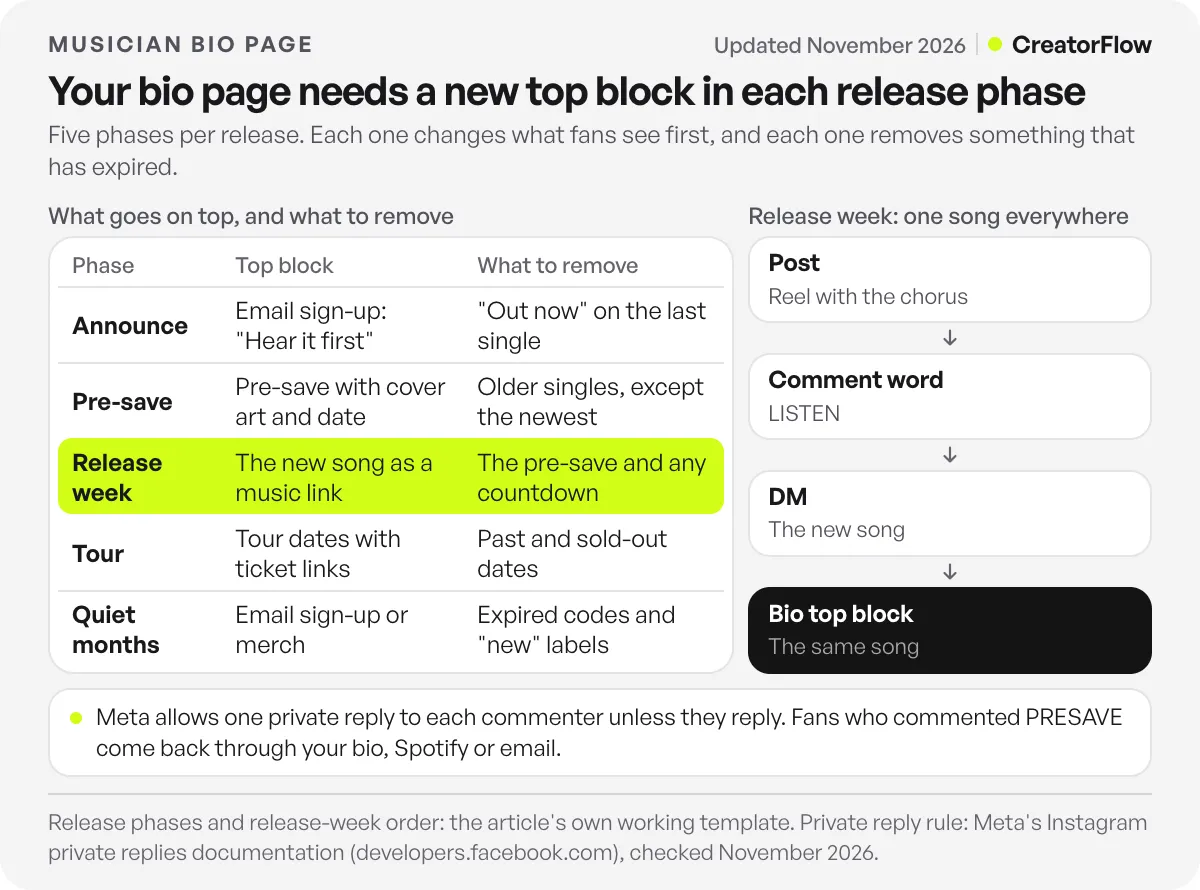
Change the top block when the phase changes. You do not need to change it for every post. A release cycle has five phases: announce, pre-save, release week, tour and the quiet months between. Each phase has a different main action, so each one gets its own top block. Each phase also removes something that has expired.
| Phase | Starts when | Top block | Second block | What to remove |
|---|---|---|---|---|
| Announce | You share the title or date | Email sign-up: “Hear it first” | Your current song | ”Out now” on the last single |
| Pre-save | Your pre-save link is live | Pre-save with cover art and date | Email sign-up | Older singles, except the newest |
| Release week | Release day, for 7 days | The new song as a music link | Music video or lyric video | The pre-save and any countdown |
| Tour | You announce dates | Tour dates with ticket links | The new song | Past and sold-out dates |
| Quiet months | No release or show in the next month | Email sign-up or merch | Your newest song | Expired codes and “new” labels |
The email sign-up leads twice, in the announce phase and in the quiet months. Those are the weeks with no new song to send people to. A fan who joins your list in March hears about the June single with no algorithm in between.
Some tools make two of these switches for you: a pre-save that turns into a music link on release day, and a tour block that reads your dates from Bandsintown or Seated. The Linktree section below covers both.
What Should Your Bio Page Show in Release Week?
In release week, the top of your bio page shows the new song as a music link that opens in every streaming app. Every post that week points at the same song. The word fans comment and the top block lead to one place, so a fan reaches the song by DM or by tapping your profile. Change all three on the same day.
| When | What you post | Comment word | Top of your bio page |
|---|---|---|---|
| Last days before release | Reel with the release date on screen | PRESAVE | Pre-save with cover art and the date |
| Release day | Reel with the chorus, plus a Story shared from Spotify | LISTEN | The new song as a music link, labelled “Out now” |
| Days 2 to 4 | Studio clip or lyric carousel | LISTEN | The new song, with the music video second |
| Days 5 to 7 | Show or merch Reel | TICKETS or MERCH | The new song, with tour dates or merch second |
If a Reel says “comment LISTEN” and the bio still shows the pre-save, a fan who taps your profile lands on a page that asks them to wait for a song that is already out.
Fans who commented PRESAVE do not get a second DM on release day unless they replied to the first one. That is why the top block switches to the song on the morning it goes live. For the posts themselves, from two weeks before release to the week after, see our 14-day release plan for Instagram.
Which Pre-Save and Music Link Tools Can Musicians Use?
Musicians can use three kinds of tool. General bio pages such as Linktree now include music links and pre-saves. Music link tools such as Feature.fm and Linkfire build release and pre-save pages with more music detail. Your distributor and Spotify also offer pre-save pages. Most free options cover one streaming service for pre-saves, often Spotify.
| Tool | What it covers | Free option | Paid plans |
|---|---|---|---|
| Linktree | Music links, Music Pre-save, tour dates from Bandsintown or Seated | Yes, pre-save on 1 automated service | Starter $9, Pro $17 a month, billed monthly |
| Feature.fm | Artist bio link, pre-save, release and tour links | Yes, 1 pre-save service | $8, $19 or $39 a month, billed monthly |
| Linkfire | Bio, pre-release, release and ticket links | Free trial | Pro $27 a month, or $21 billed yearly |
| DistroKid HyperFollow | A page with a Spotify pre-save for each upload | Included with DistroKid | No extra cost |
| Spotify Countdown Pages | Pre-save inside Spotify, with an alert on release | Spotify feature | Needs 3,000 monthly active listeners |
Feature.fm builds an artist bio link, pre-save links, release links and tour links. Its pricing page lists Free with 1 pre-save service and 7 days of insights. Basic Artist costs $8 a month with 3 pre-save services, and Artist at $19 and Pro Artist at $39 a month cover every supported service (checked November 2026). The Free plan collects fan emails, and access to them starts on Basic Artist, at 50 emails per link.
Linkfire gives every plan the full feature set, including bio, pre-release, release and ticket links, plus retargeting pixels for ads. Its pricing page lists Pro at $27 a month, or $21 a month billed yearly, before VAT, with a free trial (checked November 2026).
DistroKid HyperFollow is a page DistroKid creates for every upload, with a Spotify pre-save. DistroKid’s support article calls it free for all DistroKid artists (checked November 2026). If you use another distributor, ask whether it offers a pre-save page before you pay for a separate tool.
Spotify Countdown Pages let fans pre-save inside Spotify, and Spotify sends every pre-saver a push notification when the music goes live. Its help page limits them to new albums and EPs from artists with at least 3,000 monthly active listeners. Spotify also says nearly 60% of people who pre-save an album stream it in the first week (checked November 2026). A single needs one of the other tools.
Is Linktree Good for Musicians?
Linktree covers the main music jobs on its Free plan. Free includes music links that find your song across streaming services and a Music Pre-save link with one automated service. Its tour block, fed by Bandsintown or Seated, is not on Linktree’s list of paid features. Paid plans add more pre-save services, clicks by streaming platform and more design control.
Music links. Paste one link to your song, and Linktree finds it on other services, 73+ in total, according to its music link guide. With a Spotify, SoundCloud or Audiomack link, you can turn on a 30-second audio preview. Both work on every plan, including Free. Clicks split by streaming platform start on Starter (checked November 2026).
Pre-saves. The Music Pre-save link adds your release to a fan’s library on release day through Spotify, Apple Music or TIDAL. At the release time you set, it turns into a regular music link. The Free plan shows one of those three services, and showing more needs Pro or Premium (checked November 2026).
Tour dates. The Tours and Events link lists your shows from your Bandsintown or Seated profile and updates when your dates change there. It does not appear on Linktree’s list of paid features (checked November 2026).
Price. In US dollars, Starter is $9, Pro $17 and Premium $35 a month billed monthly, or $7, $14 and $30 a month billed annually, per Linktree’s pricing page (checked November 2026). Pro removes the Linktree branding and adds custom designs.
If you are thinking about another tool, name the reason first: more pre-save services on a free plan, retargeting pixels for ads, or a different look. Our guide to Linktree alternatives sorts ten options by the reason you are leaving, and our comparison of free link-in-bio tools lists each free plan’s limits.
How Do You Keep a Musician’s Bio Page Current?
Tie each edit to a date you already know: the announcement, the day the pre-save goes live, release day, the tour announcement and the last show. Use blocks that change themselves where you can. Check the page on your phone after each edit and once a month.
- Put the five dates in your calendar when you plan the release. Each date is one page edit
- Remove before you add. Delete the expired item first: the pre-save, past dates or an old discount code. Then add the new top block
- Let tools make the release-day switch. A pre-save that turns into a music link, and a tour block fed by Bandsintown or Seated, change without you
- Write labels as what the fan gets. “Hear the new single” and “Tour dates and tickets” tell a fan more than “New music” or “Tour”
- Test every link on your phone after each edit. Open the page from Instagram, the way fans do
- Read the clicks once a month. A block that gets few taps moves down or leaves the page
From Our Team: A Free Bio Page With Music Blocks
More.You is a link-in-bio page builder built by the same team as CreatorFlow. We include it because its Free plan covers the blocks this guide asks for. A free More.You page has music pre-save, events and podcast-episode blocks next to your links and social icons. The Free plan is free forever. It includes every block type, the full theme gallery, QR codes and basic analytics of views and clicks, with 30 days of history (checked November 2026). A QR code works on a gig poster or at the merch table.
If your page lives on Linktree today, More.You’s importer reads it from its URL. It proposes your header, avatar, socials and links as blocks, and nothing changes until you confirm. For a side-by-side view, see how More.You compares with Linktree.
How Do Fans Who Comment Get the Pre-Save Link?
Fans who comment get the pre-save link by DM. Your teaser Reel says “Comment PRESAVE for the link”, and a DM automation tool sends your pre-save page to everyone who comments PRESAVE, within seconds. The fan stays on the Reel. Your bio page then serves the fans who tap your profile instead of commenting.
CreatorFlow sends these DMs through Meta’s official Instagram API, as a Meta Tech Provider. Setup takes under 2 minutes, comment-to-DM works on every plan including Free, and Pro is a flat $15 a month. Our page on DM automation for musicians shows the PRESAVE setup, and these five fan workflows for musicians cover the streaming, merch, ticket and email keywords.
Keep the DM and the page in step. On release day, point the DM link and the top block at the new song in the same sitting.
FAQ
What should a musician put in their link in bio?
Your newest release as a music link, a pre-save before release day, upcoming shows, an email sign-up, merch and social profiles. Put the one action you want this week at the top, and remove anything that has expired.
Is Linktree free for musicians?
Yes. Linktree’s Free plan includes music links with 30-second previews for Spotify, SoundCloud and Audiomack links, and a Music Pre-save link with one automated service (checked November 2026). Its tour block is not on the list of paid features either. Showing more pre-save services needs Pro, at $17 a month billed monthly or $14 a month billed annually.
What is the best link in bio for musicians?
The best one is the tool that does your next job. For a general page with music links and a free pre-save, Linktree fits. For release campaigns with more pre-save services and ad tracking, Feature.fm or Linkfire fit. For a free page with music pre-save and event blocks, More.You, built by the same team as CreatorFlow, is another option.
How do I add a pre-save link to my Instagram bio?
Create the pre-save on a tool such as Linktree, Feature.fm, your distributor’s page or Spotify Countdown Pages. Linktree asks for the release’s Spotify URI, ISRC or UPC, which your distributor can give you. Put the pre-save at the top of your bio page with the cover art and the date, or add it as one of your five Instagram profile links.
Should my bio link go straight to Spotify?
Only if nearly all your fans use Spotify. A music link shows every service your song is on, so an Apple Music or YouTube Music listener reaches it in one tap. A direct Spotify link sends everyone else to an app they may not use.
How often should I update my link in bio page?
At each phase change, which is about five edits per release: the announcement, the pre-save, release day, the tour announcement and the last show. Check every link once a month in between.
Sources and checks
Checked in November 2026: Linktree’s music link guide, Music Pre-save help article, Tours and Events guide, best-practice guide for musicians, paid features list and pricing page. The pricing page shows local currency by region; we read it in US dollars and matched the figures against Elev8or’s Linktree pricing tracker (November 2026). Also checked: the Feature.fm and Linkfire pricing pages, with Feature.fm’s monthly billing matched against Unhurd’s music promotion guide; DistroKid’s HyperFollow support article; Spotify’s Countdown Pages help page; Meta’s private replies documentation; TechCrunch’s April 2023 report on five profile links; and More.You’s blocks, import and Linktree comparison pages. The release-phase and release-week tables are our own working template. Prices change; confirm on each vendor’s page before you pay.





