

More.You is a free link in bio page built by the same team as CreatorFlow. One page at more.you/yourname holds your links, products, events, music, podcast episodes, bookings, opening hours and FAQs as blocks. You can start by pasting your current page URL or by describing what you do in one sentence. Every page is also readable by AI assistants like ChatGPT.
Your bio link is the one link you put everywhere. People tap it from Instagram, TikTok and YouTube. More and more, AI assistants read it too, when someone asks them who you are, what you sell or how to book you.
We built More.You for both kinds of visitors. This post explains what goes on a page, the three ways to start one, what AI assistants read, and how More.You works next to CreatorFlow.
Key Takeaways
- One page, many block types: links, social icons, products, events, music pre-saves, podcast episodes, bookings, opening hours and FAQs, in the order you choose
- Three ways to start: paste your current link in bio URL, point it at your website, or describe what you do in one sentence. Nothing is saved until you approve it
- Readable by AI: every page publishes an llms.txt file, an agent manifest and structured data built from your blocks
- Edit by chat: connect ChatGPT, Claude or Gemini over MCP and ask it to add a link or retitle a block
- Free forever: the Free plan includes one page with every block type, themes, templates, QR codes and views and clicks analytics
- Works with CreatorFlow: CreatorFlow sends your link by DM to everyone who comments a word. More.You is the page people find when they tap your profile
What Is More.You?
More.You is a link in bio page builder. You get one page at more.you/yourname, built from blocks instead of a plain list of buttons. Each block has a shape that fits what it holds: a product has a photo and a price, an event has a date, a booking has a button. People read the page on their phone, and AI assistants read a version made for them.
More.You calls itself “the AI-native link in bio platform” on its homepage. It is built by the same team as CreatorFlow, so read this post as an introduction to our own product.
What Goes on a More.You Page?
A More.You page holds nine block types. You add the ones that fit your work, drag them into order, and pin the most important link to the top. A musician might use music pre-saves and events. A local business might use opening hours, bookings and an FAQ.
| Block | What it shows | Good for |
|---|---|---|
| Links | A button to any web address | Your newest post, a guide, a website |
| Social icons | A row of your profiles | Instagram, TikTok, YouTube, X |
| Products | A photo, a name and a price | Makers, shops, digital products |
| Events | A date and a place | Workshops, shows, studio sales |
| Music pre-saves | A cover and a release date | Musicians before a release |
| Podcast episodes | The latest episodes | Podcasters |
| Bookings | A button to book a time | Coaches, salons, photographers |
| Opening hours | Your hours and an open-now state | Cafes, shops, studios |
| FAQ | Questions and short answers | Anyone who gets the same questions |
The block list comes from More.You’s page blocks page (checked November 2026). For a block order that fits your type of work, see our link in bio examples for 10 creator types.
Three Ways to Start Your Page
You do not start from a blank page. More.You can read your current link in bio page, your website or a short description, and then propose a page for you to approve. You can also start from a template. Each path ends the same way: you check the proposal, keep what you want, and publish.
1. Paste your current link in bio URL. The import tool reads a page from any provider, such as Linktree, Beacons, Komi or Stan. It proposes your header, avatar, socials and links as blocks. Nothing changes until you confirm each item.
2. Point it at your website. More.You reads your site, writes a short bio and turns the pages you link to into named blocks.
3. Describe what you do. Write a sentence like “I am a baker in Porto. Celebration cakes, weekend classes.” More.You writes the words and proposes the shape of the page. You add your real links in the next step.
Page writing is on every plan, including Free, per More.You’s page generation page (checked November 2026). It only keeps web addresses it found on your source, so it does not invent links. It also writes in the language of your source, so a Portuguese website gives you a Portuguese page.
Or pick a template. The template gallery is sorted by type of work: creators, media, tech, services, business, lifestyle and learning. A template sets the blocks and their order, and you can change the look with any theme.
What Do AI Assistants Read on a More.You Page?
Every More.You page publishes three things for AI assistants next to the page people see. An llms.txt file is a plain-text summary of who you are and what you offer. An agent manifest lists what can be booked, bought or joined. Structured data is built from your blocks, so search engines and answer engines know what each block is.
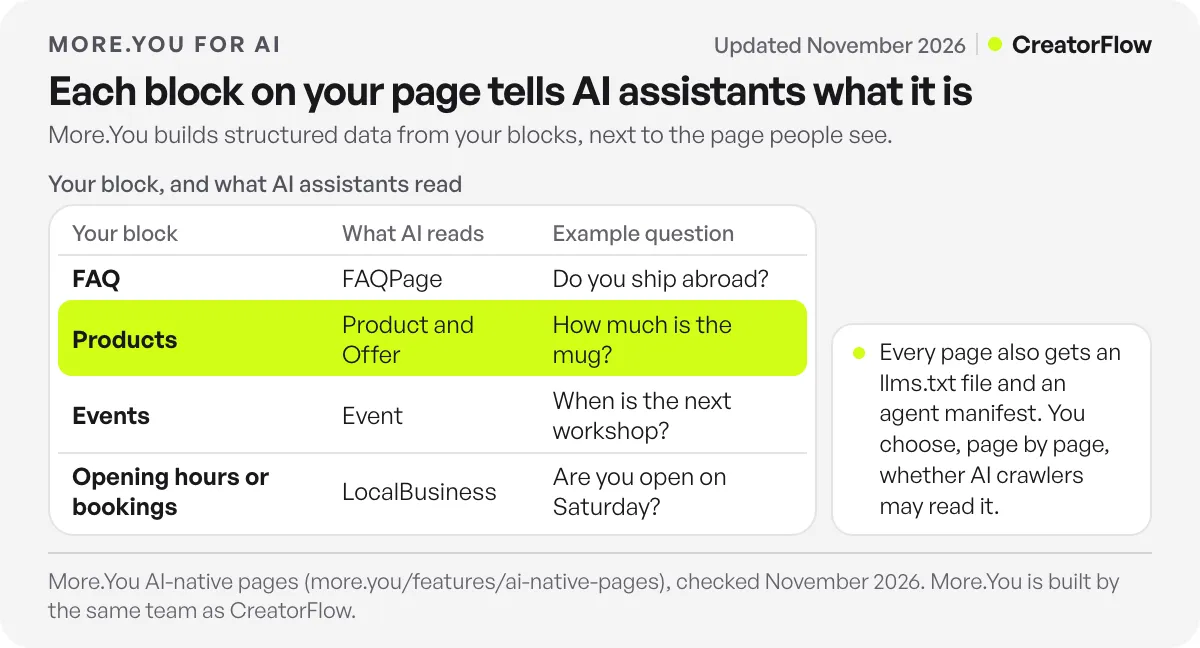
The structured data follows your blocks, per More.You’s AI-native pages page (checked November 2026):
| Your block | What AI assistants and search engines read |
|---|---|
| FAQ | FAQPage |
| Products | Product and Offer |
| Events | Event |
| Opening hours or bookings | LocalBusiness |
You decide, page by page, whether AI crawlers may read it. Allowing them is the default.
Why it matters: people now ask assistants about creators and small businesses. “Does she take commissions?” “When is the next workshop?” A page that only shows untitled buttons gives an assistant little to answer from. A page with clear blocks and structured data gives it a source.
Edit Your Page From ChatGPT, Claude or Gemini
More.You has an MCP server. MCP (Model Context Protocol) is the open standard that lets AI assistants use other tools. You connect it once, and then you can change your page by chat.
- Add the More.You connector URL to ChatGPT, Claude, Gemini or another MCP client.
- Sign in once. The assistant gets a limited token, never your password.
- Ask in plain words: “Add my new video to my page” or “Retitle the booking link”.
The AI control page says this is included free on every plan and that you can remove access at any time (checked November 2026). Any post drafts the assistant writes stay drafts until you publish them.
How More.You and CreatorFlow Work Together
People reach your link in two ways. Some comment on your Reel. Others tap your profile. CreatorFlow takes care of the first group, and More.You takes care of the second.
When people comment. Your Reel says “Comment LINK for the guide”. CreatorFlow sends everyone who comments LINK the link by DM, in seconds, through Meta’s official Instagram API. CreatorFlow is a Meta Tech Provider, and comment-to-DM works on every plan, including Free. Here is how sending links by DM works.
When people tap your profile. They open your bio link and land on your More.You page. Put the thing your newest post promised at the top, so both groups find the same link.
| Who | What they do | What gets them the link |
|---|---|---|
| People who comment | Comment a word like LINK | A DM from CreatorFlow, in seconds |
| People who visit your profile | Tap your bio link | Your More.You page |
| People who ask an AI assistant | Ask about you by name | Your page’s llms.txt and structured data |
For the full comment-to-DM setup, follow our step-by-step comment-to-DM guide.
A Real Page: CreatorFlow on More.You
CreatorFlow’s own bio page runs on More.You at more.you/creatorflowso. It holds a “Start free” link, a “Read reviews” link and our YouTube, Instagram and LinkedIn profiles.
Add /llms.txt to the end of any More.You page address and you can see what AI assistants read. For our page, that file lists our name, a one-line description of CreatorFlow, the two links and the three social profiles, in plain text (checked November 2026).
How to Set Up Your Free More.You Page
Setup takes five steps. You need your current bio link URL, your website, or one sentence about what you do.
- Claim your name. Go to more.you and pick your page address, more.you/yourname.
- Start from what you have. Paste your current link in bio URL, your website, or a one-sentence description, or pick a template.
- Approve the proposal. Keep the blocks you want and remove the rest.
- Put first things first. Drag the newest offer to the top, or pin it.
- Update your bio. Add your More.You address to your Instagram profile. Our guide on how to add a link to your Instagram bio shows the taps on iPhone and Android.
You can share the page offline too. More.You makes a QR code for each page, for a poster, a menu or a market stall.
FAQ
Is More.You free?
Yes. More.You’s Free plan is free forever. It includes one page with every block type, the full theme gallery and templates, QR codes, views and clicks analytics with 30 days of history, import from any other tool and AI control over MCP, per its pricing page (checked November 2026). Page writing is on every plan too.
Who built More.You?
More.You is built by the same team as CreatorFlow, the Instagram DM automation tool. CreatorFlow’s own bio page runs on More.You at more.you/creatorflowso.
Can I move my Linktree page to More.You?
Yes. Paste your Linktree URL into More.You’s import tool. It proposes your header, avatar, socials and links as blocks, and nothing changes on your page until you confirm. The same works for pages on Beacons, Komi, Stan and bio.link. For other tools people switch between, see our guide to Linktree alternatives. Our step-by-step guide to moving off Linktree without losing visitors covers what to export first and how to forward the old URL.
What is llms.txt on a More.You page?
It is a plain-text summary of your page that AI assistants can read. More.You publishes it for every page at your page address followed by /llms.txt. It lists who you are, what you offer and your links.
Can I use More.You and CreatorFlow together?
Yes. CreatorFlow sends your link by DM to everyone who comments a word like LINK. More.You is the page people open when they tap your bio link. Use the same top link in both places.
Which AI assistants can edit my More.You page?
Any assistant that supports MCP, including ChatGPT, Claude and Gemini. You connect it once with a sign-in, and you can remove its access at any time.
Sources and checks
More.You plans and features checked on more.you in November 2026: pricing, page blocks, import, page generation, templates, AI-native pages, AI control and QR codes. CreatorFlow’s page and its llms.txt were read at more.you/creatorflowso on November 9, 2026. More.You is built by the same team as CreatorFlow.





