

To migrate from Linktree, save your data first, then import your page into the new tool by pasting your Linktree URL. Check which links did not copy and add them by hand. Change the link on every profile that still shows linktr.ee. Keep the old page live, or forward it, until visits stop. Delete your Linktree last, because deleting is permanent.
Most people treat the move as a design job. The design part takes minutes. The slow part is everything that still points at your old address: your Instagram bio, your TikTok profile, your YouTube channel, old captions, an email signature, a printed QR code. Delete the Linktree before you find all of them, and those visitors land on a page that no longer works.
This guide walks through the move in the order that keeps your clicks. It uses More.You’s free import tool for the copy step, because it reads any public Linktree page in one paste. The same order works for any tool you move to.
Key Takeaways
- Save before you delete: Linktree’s Insights CSV is on Premium, and its audience CSV sits under Audience, then Integrations. Deleting is permanent, so export first
- Import takes one paste: More.You reads your public Linktree page and proposes your header, photo, social icons and links. Nothing saves until you confirm each item
- Some items need a second pass: forms, links behind a password or age check, and items with no web address stay on Linktree. Add them as blocks yourself
- The move happens in your bios: followers see your new page only when you change the link on each profile. Your Linktree keeps working until then
- Forward the stragglers: Linktree’s Redirect (Starter, Pro and Premium) sends every visitor to one link until a date you set. On Free, cut the page to one link that points to your new page
- Delete last: your linktr.ee URL stops working, and you cannot reuse the username or email for 14 days
The Five Steps to Migrate From Linktree
A Linktree migration has five steps, and the order matters more than the tool. Save your data, copy your page, add what the copy missed, change every bio link, then forward or delete the old page. The import takes a few minutes. Changing bio links takes longest, and step five waits until visits to the old page stop.
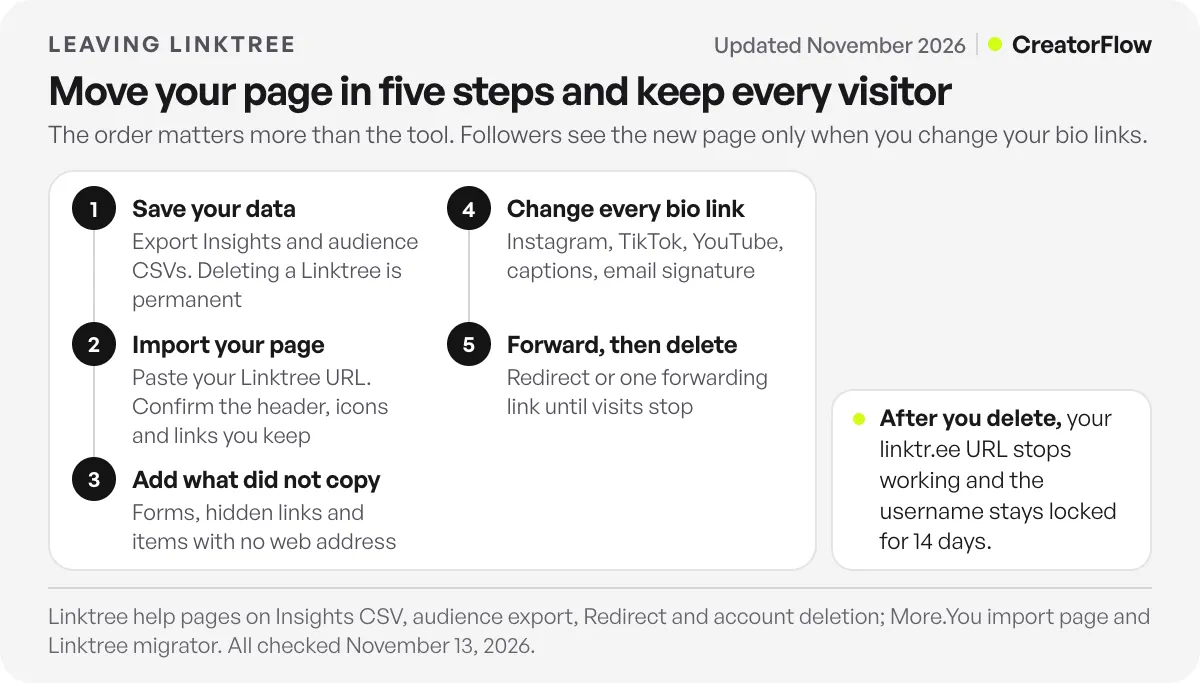
- Save your Linktree data (Insights and audience exports)
- Import your page into the new tool
- Add what the import missed by hand
- Change your link on every profile and in old places
- Forward the old URL, then delete it when visits stop
Each step gets its own section below, with the exact menu names from Linktree’s and More.You’s help pages.
What Moves and What Stays on Linktree
An import copies what a visitor can see on your public page. It cannot reach anything behind your Linktree login. More.You’s Linktree migrator and its guide to importing list what carries over and what does not (checked November 2026).
| Item | Moves with import? | What to do |
|---|---|---|
| Name, bio and profile photo | Yes | Check the proposed header, then accept or edit it |
| Social icons | Yes | Skip accounts you no longer use |
| Links and their titles | Yes, in the same order | Skip dead links during review |
| Link groups | Group titles become small headings | Check the order after import |
| Forms | No | Rebuild in the new tool |
| Links behind a password or age check | No | Add them as link blocks |
| Items with no web address | No | Add them by hand |
| Theme, colours and fonts | No | Pick a theme in the new tool |
| Insights history and audience contacts | No | Export from Linktree before you delete |
If your whole Linktree page is locked, behind a content warning or switched off, the migrator may not read it at all. Turn the page back on for a few minutes while you import.
Step 1: Save Your Linktree Data Before You Switch
Export your click history and your contacts first. Nothing in an import reaches them, and deleting the account removes them for good.
Insights (clicks and views). Linktree’s help page on downloading a CSV of your Insights marks the export as available on Premium (checked November 2026). Open Insights, set the date range in the top-right corner, and select Download CSV below the activity chart. The download holds separate files for activity, cities, countries, devices and referrers.
Audience (emails and sign-ups). If you collected emails or phone numbers on Linktree, go to Audience, then Integrations, and select Export CSV at the bottom of the page. You set a passcode, and Linktree emails you the file, per its audience integrations help page, which is marked for Pro and Premium (checked November 2026).
On a plan without these exports, write down your top five links by clicks from your Insights screen. That list tells you which links go at the top of the new page.
Step 2: Import Your Linktree Page Into More.You
More.You is a free link in bio page built by the same team as CreatorFlow. Import is on its Free plan, per its pricing page (checked November 2026).
Preview first, with no account. Paste your Linktree address into the “Your Linktree address” field on the Linktree migrator and select “Show my More.You page.” It shows your name, bio, social icons and links as a More.You page, and a “Left on Linktree” list of items it could not read, with the reason for each. You can also select “Copy all links” or “Download links (CSV)” to keep a list with each link’s title, address and group.
Then import for real:
- Claim your name on More.You’s Free plan. Your page lives at more.you/yourname.
- In setup, choose Import and paste your Linktree address.
- Review the proposed header (photo, name and bio). Accept it or skip it.
- Review each social icon and link. Keep or skip each one.
- Confirm. Only the items you approved go on your page.
- Pick a theme, check the link order, and publish.
More.You’s import page says the move usually takes a few minutes, and that changing your bio links takes the most time. The import only reads your public page. Your Linktree stays online and unchanged while you work.
Moving from more than one tool? You can import links from several old pages into one More.You page. For other providers, such as Beacons or Stan, use Import inside More.You setup instead of the Linktree migrator.
Step 3: Add the Links the Import Did Not Find
Compare the “Left on Linktree” list with your new page before you change any bio link. Each missing item becomes a block you add by hand.
More.You’s help page on missed links gives the most likely cause: import reads only the page at the address you pasted. If your Linktree shows a long list, the import takes the first batch. Check two things:
- Same address: paste the exact URL your visitors use, not a preview or admin link
- Visible links: links hidden by a rule, a password or an age check are not on the public page, so the import cannot see them
Add each missing link as a link block, then drag the blocks into order. Put the link most people want at the top. Your top five from Step 1 decide that order.
This is also the step to add what Linktree held as forms or embeds. More.You’s blocks cover links, products, events, music pre-saves, podcast episodes, bookings, opening hours and FAQs. A product or booking block links to your store or calendar.
Step 4: Change Your Bio Link on Every Profile
Your followers see the new page only when you change the link in your bios. Until then, they keep landing on your Linktree. Work through every profile in one sitting.
| Platform | Where the link goes | Limit |
|---|---|---|
| Edit profile, then Links, then Add external link (iPhone) or Add link (Android) | Up to 5 links | |
| TikTok | Edit profile, then Add next to Links | Needs 1,000+ followers or a registered business account |
| YouTube | YouTube Studio, Customization, Profile, then Add link under Links | Up to 14 links; the first shows near Subscribe |
Sources: Instagram’s help page on adding a website, TikTok’s page on linking a website, and YouTube’s page on managing your channel profile (all checked November 2026). On Instagram, replace the linktr.ee link in the same slot rather than adding a sixth. Our guide to adding a link to your Instagram bio covers link order and what to do when a link will not save.
Then search for the old address in other places. Bios are the obvious ones. These are the ones people forget:
- Pinned comments and old captions that say “link in bio” with a linktr.ee URL typed out
- Your email signature and newsletter footer
- Printed QR codes on packaging, flyers, business cards or event signs
- Media kits, brand pitch decks and PDF lead magnets
- Your Facebook page, Pinterest profile, Twitch panels and podcast show notes
You cannot change a printed QR code. That is why Step 5 exists.
Step 5: Forward Your Old Linktree URL, Then Delete It
Leave the old address working until it gets almost no visits. Then delete it.
On Starter, Pro or Premium: use Redirect. Linktree’s Redirect help page lists it on Starter, Pro and Premium (checked November 2026). It sends everyone who opens your Linktree straight to one link:
- Add a link to your new page (for example, more.you/yourname) on your Linktree.
- On that link, select Power-ups, then Prioritize, then Redirect.
- Set the date and time next to “Active until” and choose your time zone.
Your Linktree returns on its own at that time. Visits during the redirect still count in Linktree Insights, so you can watch the number fall. If a rule hides the link from some visitors, they see your Linktree page instead.
On Free: cut the page to one link. Delete the other links and leave a single one, titled with your new address, that points to your new page. Visitors who arrive from an old QR code tap once and land in the right place.
When to delete. Check your Linktree Insights once a week. When views fall to a handful, you can delete. Linktree’s deletion help page says:
- Both deleting one Linktree and deleting the account are permanent. Links and data cannot be recovered
- Your Linktree URL stops working
- You cannot reuse the same username or email for a new account for 14 days
- Deleting does not cancel billing on its own. Cancel a paid plan separately
To delete the whole account, go to Settings, then Account management, scroll to Manage account deletion and select Delete account. If you own more than one Linktree, you can delete only one of them from the same screen.
Send the Link Straight to People Who Ask
A new bio page fixes where people land. It does not change how they get there: a viewer still has to leave the Reel, open your profile and tap the link. On Instagram, you can skip that trip for the people who ask.
With comment-to-DM automation, everyone who comments LINK on a Reel gets your page (or the one product link they asked about) in a DM in seconds. CreatorFlow runs it on every plan, including Free, through Meta’s official Instagram API. The two work together: the bio link serves people who visit your profile, and the DM serves people who ask in the comments.
Still choosing where to move? Our guide to Linktree alternatives, sorted by why people leave compares 10 tools, and Linktree vs Beacons compares the two most common picks on price and fees.
FAQ
Can I import my Linktree into another link in bio tool?
Yes. More.You’s import reads your public Linktree page from its URL and proposes your header, photo, social icons and links as blocks. Nothing saves until you confirm each item, and import is on its Free plan. Forms, password or age-gated links and your Linktree theme do not move, so add those by hand.
Will I lose clicks when I migrate from Linktree?
Not if you keep the old page live. Your Linktree keeps working until you delete it, so visitors from old posts and QR codes still land somewhere. Change your bio links first, then use Linktree’s Redirect (Starter, Pro and Premium) or a single forwarding link on Free until visits stop.
Does the import copy my Linktree design?
No. An import copies your content: name, bio, photo, social icons and links. Themes, colours and fonts stay on Linktree. After import, pick a theme in More.You. If you want ideas, our link in bio examples show five page layouts by creator type.
Can I redirect my Linktree URL to my new page?
Yes, for a set time. Linktree’s Redirect, on Starter, Pro and Premium, sends every visitor to one link until the date and time you set next to “Active until”. On the Free plan, leave one link on your Linktree that points to your new page.
Should I delete my Linktree after I switch?
Only after you export your data and visits to the old page have fallen to almost nothing. Deleting is permanent, your linktr.ee URL stops working, and you cannot reuse the username or email for 14 days. Deleting also does not cancel a paid plan, so cancel billing separately.
How long does it take to migrate from Linktree?
The import itself takes a few minutes, per More.You’s import page. Adding missed links, picking a theme and changing your bio links take longer, depending on how many profiles you run. Keep the old page forwarding until visits stop, so people with old QR codes and saved posts still reach you.
Sources and checks
Import steps and what moves checked on More.You’s import page, Linktree migrator, import guide, missed links help page and pricing page on November 13, 2026. Linktree steps and plans checked on its help pages for Insights CSV, audience export, Redirect and deleting an account on November 13, 2026. Profile link limits from Instagram, TikTok and YouTube help pages, checked November 2026. Menu names change from time to time; if a label differs, look for the same step in the same place. More.You is built by the same team as CreatorFlow.





