

In Linktree vs Beacons, pick Linktree if you want a simple link page and will sell enough to pay for Pro at $17 a month, with 0% Linktree fees. Pick Beacons if you want to sell, send emails and share a media kit on a free plan. Its 9% fee makes Creator Plus ($30 a month, 0% fees) the cheaper Beacons plan once sales pass about $334 a month.
Both tools give you one page for the link in your Instagram bio. On a phone, the two pages look alike. The differences are in what each plan lets you sell, what each takes from a sale, and what you pay as your sales grow.
This comparison uses prices and fees checked on Linktree’s and Beacons’ own pages in November 2026, in US dollars. It adds a cost table at six sales levels, so you can see the monthly sales where each paid plan becomes the cheaper choice.
Key Takeaways
- Linktree sells paid products on Pro and Premium only. Free and Starter share free products. Pro is $17 a month and Premium $35, both at 0% Linktree fees
- Beacons sells on every plan, including Free. Free and Creator ($10 a month) take a 9% fee. Creator Plus ($30) and Creator Max ($100) take 0%
- Two sales levels decide the cost. Above about $189 a month in sales, Linktree Pro costs less than Beacons Free. Above about $334, Beacons Creator Plus costs less than Beacons Free
- Email works in two different ways. Beacons sends email itself: 50 sends a month on Free, 500 on Creator, unlimited on Creator Plus. Linktree collects sign-ups and syncs them to tools such as Mailchimp and Kit on Pro
- Both have a media kit and Instagram auto-replies. Linktree publishes a monthly DM allowance per plan, from 1,000 on Free to unlimited on Premium
- Stripe processing is the same on both, at 2.9% + $0.30 per sale, so it does not change which plan is cheaper
- A third option from our team: More.You is a free link in bio page that imports your Linktree or Beacons page in one paste
Linktree vs Beacons at a Glance
Both tools have a free plan with unlimited links. Beacons lets you sell on every plan, with a 9% fee until Creator Plus. Linktree lets you sell paid products on Pro and Premium, with 0% Linktree fees. Beacons sends email from its own tool. Linktree collects sign-ups and syncs them to your email tool on Pro.
| Linktree | Beacons | |
|---|---|---|
| Free plan | Unlimited links, email sign-ups, free products only | Unlimited links, store, media kit, 50 email sends a month |
| Paid plans, billed monthly | Starter $9, Pro $17, Premium $35 | Creator $10, Creator Plus $30, Creator Max $100 |
| Paid plans, billed annually | $7, $14 and $30 a month | $100, $300 and $1,000 a year ($8.33, $25 and $83.33 a month) |
| Selling paid products | Pro and Premium | Every plan, including Free |
| Platform fee on sales | 0% on Pro and Premium | 9% on Free and Creator, 0% on Creator Plus and Creator Max |
| Payment processing | Stripe, 2.9% + $0.30 per sale | Stripe, 2.9% + $0.30, or PayPal, 3.49% + a fixed fee |
| Email tools | Sign-ups on Free. Sync to Mailchimp, Klaviyo, Kit and others on Pro | Sends email itself: 50 a month Free, 500 Creator, unlimited Creator Plus |
| Media kit | Yes, with its own link. PDF download on Pro and Premium | Yes, updated daily, on every plan |
| Instagram auto-replies | 1,000 DMs a month on Free, up to unlimited on Premium | Smart Reply auto-DM listed on Free |
| Remove the logo | From Pro | From Creator Plus |
| Mobile apps | iOS and Android | iOS and Android |
All prices are in US dollars. Linktree’s pricing page shows prices in your local currency, so we read it as shown to US visitors and confirmed the same figures in PricingSaaS’s dated capture of that page (checked November 2026). Beacons’ figures come from its plan guide in the help center and its plans page (checked November 2026).
How Selling Works on Linktree
Linktree sells paid products on its Pro and Premium plans, at 0% Linktree fees. You can share free products on any plan, per its help article on selling (checked November 2026). For you, the first Linktree plan that sells a paid product is Pro.
What Linktree Does Well
Linktree says it has over 70 million users, on the pricing page linked above. Its four plans add features in steps, from a free page to selling, email sync and team tools.
- The lower-priced 0% plan of the two. Pro sells digital products and courses at 0% Linktree fees for $17 a month, or $14 billed annually. Beacons’ first 0% plan, Creator Plus, is $30 a month. Pro and Premium come with a 7-day free trial
- Email sync to the tool you already use. The Free plan collects email sign-ups. Pro and Premium sync contacts to Mailchimp, Klaviyo, Kit, beehiiv, Flodesk or Google Sheets, per Linktree’s guide to paid plan features (checked November 2026)
- Instagram auto-replies on every plan. The monthly allowance is 1,000 DMs on Free, 1,500 on Starter, 2,500 on Pro and unlimited on Premium
- A media kit with its own link. It updates daily from your connected Instagram, TikTok or YouTube accounts. Pro and Premium add a PDF download, per the Media Kit guide
- Longer analytics as you upgrade. Insights history is 28 days on Free, 90 on Starter, 365 on Pro and your whole history on Premium
Before you sell on Linktree, check that you live in a supported country. The list includes the US, Canada, the UK and much of Europe, plus Australia, New Zealand, Japan, Singapore, Hong Kong and the UAE.
What Beacons Does Well
Beacons puts a link page, a store, email and a media kit in one account. It says over 2 million creators use it, in its App Store listing (checked November 2026).
- Selling on the free plan. Free sells unlimited digital products with a 9% seller fee, per the plans page. You can sell your first product before you pay for anything
- Email sending built in. Free includes 50 email sends a month, Creator 500 and Creator Plus unlimited. Creator adds email automations, so you do not need a separate email service to start
- Brand deal tools. A media kit that updates daily is on every plan. Creator adds AI Brand Outreach, which writes emails to brands for you
- More ways to sell. Creator Plus adds 0% fees, Buy Now Pay Later, courses, memberships and order bumps (add-on offers at checkout), and removes the Beacons logo
- More than one page. The free plan includes 5 link-in-bio pages, and the plans page lists Smart Reply, an Instagram auto-DM, on Free
The 9% fee applies on Free and Creator. On Creator it covers all sales except invoices, which are 0%. Creator Plus and Creator Max charge 0%, per Beacons’ help article on transaction fees (checked November 2026). Creator Max ($100 a month) adds Google Workspace, an NFC card that opens your page, and personal onboarding and priority support, at the same 0% fee as Creator Plus.
A media kit is one of several tools creators use to get brand deals, next to a link page, a store and an email tool.
Total Cost at Your Sales Level
If you sell less than about $189 a month, Beacons Free is the lowest-cost way to sell on either platform, because it has no monthly price. Above $189, Linktree Pro at $17 a month costs less than a 9% fee. Inside Beacons, Creator Plus at $30 costs less than Free once sales pass about $334 a month.
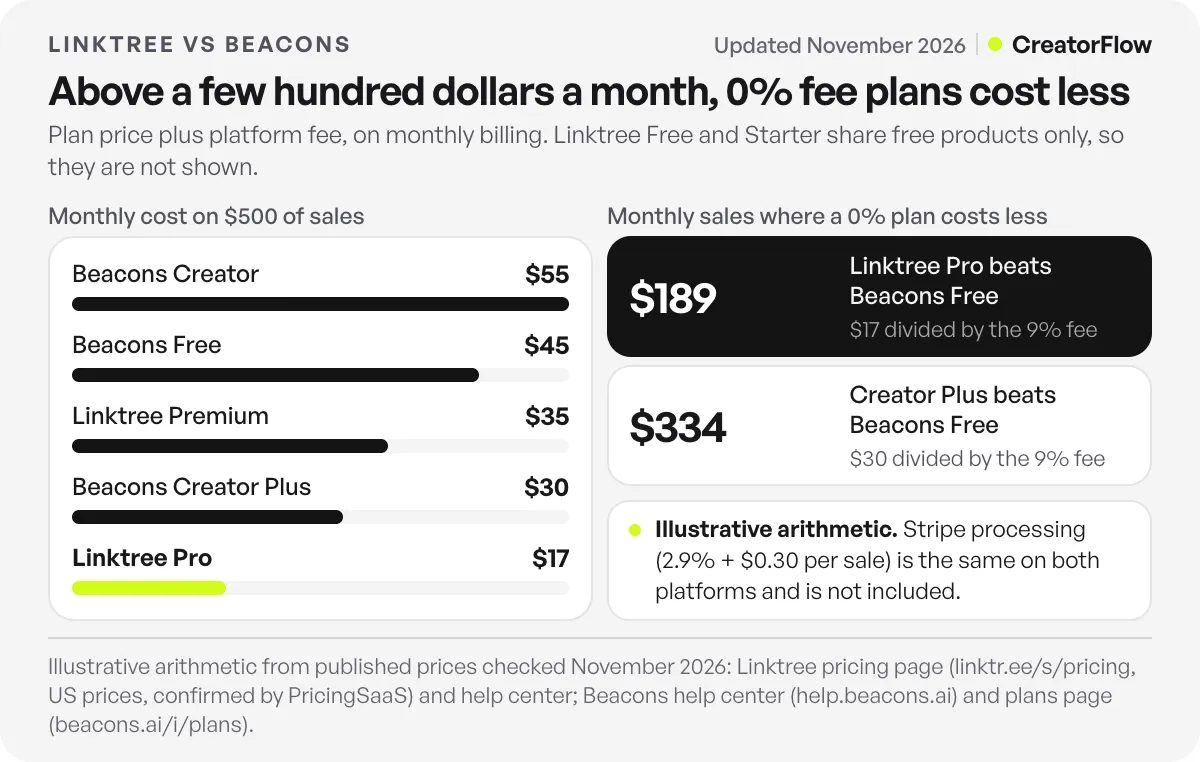
The table below adds each plan’s monthly price to its platform fee. It is illustrative arithmetic from the published prices above, on monthly billing. Stripe processing is not included, because it is the same on both platforms.
| Monthly sales | Beacons Free (9%) | Beacons Creator ($10 + 9%) | Beacons Creator Plus ($30, 0%) | Linktree Pro ($17, 0%) | Linktree Premium ($35, 0%) |
|---|---|---|---|---|---|
| $0 | $0 | $10 | $30 | $17 | $35 |
| $100 | $9 | $19 | $30 | $17 | $35 |
| $250 | $22.50 | $32.50 | $30 | $17 | $35 |
| $500 | $45 | $55 | $30 | $17 | $35 |
| $1,000 | $90 | $100 | $30 | $17 | $35 |
| $2,500 | $225 | $235 | $30 | $17 | $35 |
Linktree Free and Starter are not in the table, because they share free products only. Here is where each paid plan pays for itself, which means the monthly sales where its total cost drops below the plan you compare it with:
- Linktree Pro against Beacons Free: about $189 a month ($17 divided by 9%). Below it, Beacons Free costs less. Above it, Pro costs less
- Beacons Creator Plus against Beacons Free: about $334 a month ($30 divided by 9%)
- Beacons Creator Plus against Beacons Creator: about $223 a month (the $20 price gap divided by 9%)
- Beacons Creator: it never pays for itself on fees, because it charges the same 9% as Free. You pay $10 for a custom domain (free for the first year), email automations and 500 email sends
- Linktree Premium and Beacons Creator Max: they never pay for themselves on fees, because the plan below already charges 0%. You pay for features such as unlimited Instagram auto-replies and full analytics history on Premium, Google Workspace and personal onboarding on Creator Max
On annual billing the points move lower. Linktree Pro is $14 a month and Beacons Creator Plus $25, so Pro costs less than Beacons Free above about $156 a month, and Creator Plus costs less than Free above about $278.
Processing is the same on both. As an illustration, 20 sales of $25 ($500 in total) cost $20.50 in Stripe fees on either platform: 2.9% of $500 is $14.50, plus 20 × $0.30. Linktree’s help article on fees lists the same Stripe rate on every plan (checked November 2026).
Fees are only part of the choice. Beacons Free also sends email and holds 5 pages. Linktree Pro syncs sign-ups to your email tool and removes the Linktree logo. Decide which features you need first, then use the table to check the cost.
Linktree or Beacons for Creators: Which to Pick
Choose by the job your bio link does today. A link page with no store fits either free plan. Selling under about $189 a month fits Beacons Free. Steady sales above that fit Linktree Pro or Beacons Creator Plus. Between those two, email decides it. Beacons sends email itself, and Linktree syncs sign-ups to the email tool you already use.
Pick Linktree If
- You share links and do not sell yet. Free covers unlimited links and email sign-ups
- You sell more than about $189 a month from a supported country. Pro is the lower-priced 0% plan of the two
- You already email your list from Mailchimp, Klaviyo, Kit, beehiiv or Flodesk, and want new sign-ups to arrive there (Pro)
- You want Instagram auto-replies with a published monthly allowance, up to unlimited on Premium
Pick Beacons If
- You want to sell your first product before you pay for a plan
- You want to email your audience from the same tool as your page
- You pitch brands and want a media kit plus AI outreach emails (Creator)
- You plan to sell courses or memberships (Creator Plus)
- You want more than one page, since Free includes 5
If you are still deciding between a link page and a site of your own, our guide to link in bio vs a website compares the cost and the work of each.
Getting Your Link to People Who Comment
Both pages wait for a visit. Someone sees your post, opens your profile and taps the bio link. When people ask for the link in your comments instead, Linktree and Beacons can both reply by DM. If that is your main job, CreatorFlow, our own Instagram DM tool, sends your link by DM to everyone who comments a word like LINK, in seconds, on every plan including Free.
A Third Option From Our Team
There is also a third option. More.You is a link-in-bio page builder built by the same team as CreatorFlow.
Its Free plan is free forever (checked November 2026). It includes one page with every block type, such as links, social icons, events, music pre-saves, podcast episodes, bookings and FAQs. You also get the full theme gallery, templates, QR codes and basic analytics (views and clicks) with 30 days of history.
To move, paste your Linktree or Beacons URL into More.You’s import tool. It proposes your header, avatar, socials and links as blocks, and nothing changes until you confirm. For a side-by-side view, see More.You vs Linktree and how it compares with Beacons. Our Linktree migration checklist lists what to save and change before you delete the old page.
For more free plans, our comparison of free link-in-bio tools lists the limits of each one.
FAQ
Is Beacons better than Linktree?
Neither is better for every creator. Beacons fits creators who want to sell, send email and pitch brands from a free plan. Linktree fits creators who want a simple link page, and its Pro plan is the lower-priced 0% fee plan of the two, at $17 a month billed monthly (checked November 2026).
Which is cheaper, Linktree or Beacons?
Both free plans cost $0. To sell, Beacons Free has no monthly price but takes 9% of each sale, while Linktree Pro costs $17 a month with 0% Linktree fees. Pro costs less once you sell more than about $189 a month. Among 0% plans, Linktree Pro is $17 and Beacons Creator Plus is $30, both billed monthly.
Does Linktree take a percentage of sales?
Pro and Premium sell at 0% Linktree fees, per Linktree’s pricing page (checked November 2026). Stripe still charges 2.9% + $0.30 per purchase on every plan. On affiliate and sponsored-link earnings, which are US only, Linktree takes a percentage of your commission, already counted in the commission it shows you.
Does Beacons take a cut of sales?
Yes, on two plans. Free and Creator take 9% of each sale, and Creator Plus and Creator Max take 0%, per Beacons’ help center (checked November 2026). Stripe or PayPal processing applies on every plan.
Can you sell on Linktree’s free plan?
You can share free digital products on any Linktree plan. Setting a price on a digital product or course needs Pro or Premium, and you must live in a supported country. Linktree made this change in October 2026.
What are the best Beacons alternatives?
Linktree is the closest one. Its Pro plan sells at 0% Linktree fees for $17 a month. Our guide to Linktree alternatives, sorted by why people leave, covers more tools with stores and free plans. More.You, built by the same team as CreatorFlow, can also import your Beacons page on its free plan.
Do Linktree and Beacons have mobile apps?
Yes. Both have apps for iOS and Android, so you can edit your page from your phone. Linktree links to both app stores from its pricing page, and Beacons lists its app as Beacons: Creator Tools on the App Store and Google Play.
Sources and checks
Prices, plans and fees checked on official pages in November 2026: Linktree pricing, read as shown to US visitors and confirmed in PricingSaaS’s October 26 capture, with the October changes from PricingSaaS’s October 5 and October 19 records. Linktree help center: selling requirements and countries, transaction and processing fees, paid plan features and limits, Instagram auto-reply limits, Media Kit. Beacons: plan guide, plans page, transaction fees, and the app listings on the App Store and Google Play. More.You plan facts from more.you, November 2026. The cost table is illustrative arithmetic from these published prices and excludes payment processing. Prices change, so confirm on each vendor’s page before you choose.





